理解项目结构
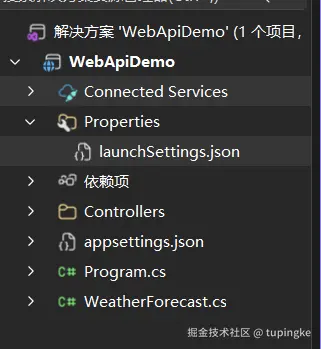
我们创建一个 Web API 项目之后,初始项目结构是这样的,如下图:
-
Program.cs 文件代码分析:只保留几个主要代码所有 app.Usexxxx 的语句都用于添加中间件组件ASP.NET Core 只是一个中间件管道
csharpnamespace WebApiDemo { public class Program { public static void Main(string[] args) { // 使用构建器 var builder = WebApplication.CreateBuilder(args); // 构建应用程序 var app = builder.Build(); // 告诉应用程序 如果收到HTTP请求,重定向到HTTPS app.UseHttpsRedirection(); // 持续运行 app.Run(); } } }
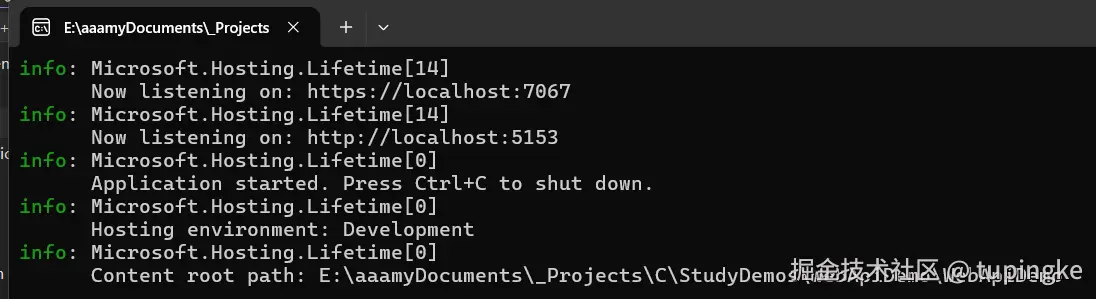
运行之后,控制台打印信息如下图
-
Properties (属性)文件里面的launchSettings.json 配置文件,配置端口
kotlin{ "$schema": "https://json.schemastore.org/launchsettings.json", "profiles": { "http": { "commandName": "Project", "dotnetRunMessages": true, "launchBrowser": false, "applicationUrl": "http://localhost:5153", // HTTP 端口配置 "environmentVariables": { "ASPNETCORE_ENVIRONMENT": "Development" } }, "https": { "commandName": "Project", "dotnetRunMessages": true, "launchBrowser": true, // 运行时是否打开浏览器 "applicationUrl": "https://localhost:7067;http://localhost:5153", // HTTPS 端口配置 "environmentVariables": { "ASPNETCORE_ENVIRONMENT": "Development" } } } }
1、Controller 控制器 创建 Web API
1*、创建最小api
-
举个栗子
typescriptnamespace WebApiDemo { public class Program { public static void Main(string[] args) { // 使用构建器 var builder = WebApplication.CreateBuilder(args); // 构建应用程序 var app = builder.Build(); // 告诉应用程序 如果收到HTTP请求,重定向到HTTPS app.UseHttpsRedirection(); // 最小API // Get请求 app.MapGet("/", () => "Hello World!"); // Get请求 app.MapGet("/hello/{name}", (string name) => $"Hello {name}!"); // Post请求, app.MapPost("/hello/{name}", (string name) => $"POST:Hello {name}!"); // Put请求 app.MapPut("/hello/{name}", (string name) => $"POST:Hello {name}!"); // Delete请求 app.MapDelete("/hello/{name}", (string name) => $"DELETE:Hello {name}!"); // 持续运行 app.Run(); } } }
2、创建一个控制器
1、创建控制器(Controller)
Controller 是 ASP.NET Core Web API 中用于处理 HTTP 请求的组件,一个 Controller 通常负责一类相关业务,例如用户管理、订单管理、人员管理等。
1、创建 Controllers 文件夹
一般在项目根目录下创建一个
Controllers文件夹,用于存放所有控制器类。
2、创建控制器类
- 例如,在
Controllers文件夹中新建一个PersonController类:
3、将普通类变成 Web API 控制器
要让 PersonController 能够处理 HTTP 请求,需要完成以下两步
-
1、继承
ControllerBaseControllerBase是所有 Web API 控制器的基类。Web API 项目一般都继承ControllerBase;如果是 MVC 页面项目,则通常继承Controllerkotlinpublic class PersonController:ControllerBase { } -
2、添加
[ApiController]特性告诉 ASP.NET Core:这是一个 Web API 控制器。
kotlin[ApiController] public class PersonController : ControllerBase { } -
3、配置路由
使用
[Route]指定访问路径。api:接口统一前缀[controller]:表示控制器名称(去掉Controller后缀)下面代码对应的最终访问路径为:
/api/personcsharp[ApiController] [Route("api/[controller]")] public class PersonController : ControllerBase { } -
4、创建操作方法 Action
控制器中的每一个公开方法(Action)通常对应一个接口,用于处理某一种 HTTP 请求。
[HttpGet]:处理 GET 请求csharpusing Microsoft.AspNetCore.Mvc; [ApiController] [Route("api/[controller]")] public class PersonController : ControllerBase { [HttpGet] public string GetPerson() { return "Hello Person"; } }
2、将 HTTP 请求映射到操作方法(Action)
在 ASP.NET Core Web API 中,HTTP 请求需要通过路由匹配,找到对应的 Controller 和 Action 方法
1、注册 Conroller 相关服务
在入口文件
Program.cs中,通过构建器注册 Controller 所需的服务builder.Services.AddControllers();告诉 ASP.NET Core:当前项目需要使用 Controller,请准备好运行 Controller 所需的相关功能注意:AddControllers()只是让 Controller 具备被创建和执行的能力,并不会自动让 Controller 的路由生效
- 作用:注册 Controller 的创建和执行机制 注册模型绑定功能 注册参数校验功能 注册 JSON 序列化和反序列化功能 注册 Action 执行、过滤器等 MVC 相关服务 使 Controller 可以通过依赖注入获取所需对象、
2、注册 Controller 路由
创建应用程序对象之后,通过
app.MapControllers();注册 Controller 路由告诉 ASP.NET Core:读取项目中的 Controller 路由,并将符合条件的 HTTP 请求交给对应的 Action 方法处理
作用
读取 Controller 和 Action 上配置的特性路由将 HTTP 请求方式和请求路径映射到对应的 Action将 Controller 路由添加到 ASP.NET Core 的端点路由系统中使客户端能够通过 URL 访问 Controller 中的接口
-
举个栗子
- PersonController.cs
csharpusing Microsoft.AspNetCore.Mvc; [ApiController] // Controller 基础路由 [Route("api/[controller]")] public class PersonController : ControllerBase { [HttpGet] public string GetPerson() { return "Hello Person"; } // 需要 id 参数 GET /api/user/{id} [HttpGet("{id}")] public string GetPersonById(int id) { return $"Hello Person with ID: {id}"; } }- Program.cs
csharpnamespace WebApiDemo { public class Program { public static void Main(string[] args) { // 使用构建器 var builder = WebApplication.CreateBuilder(args); // 注册控制器服务 builder.Services.AddControllers(); // 构建应用程序 var app = builder.Build(); // 告诉应用程序 如果收到HTTP请求,重定向到HTTPS app.UseHttpsRedirection(); // 注册控制器 app.MapControllers(); // 持续运行 app.Run(); } } }
2、模型绑定
定义:将 HTTP 请求中的数据映射到操作方法参数的过程
过程:读取 HTTP 请求 ---> 找到数据 ---> 转换类型 ---> 赋值给参数可以理解为: HTTP 请求 ---> Model Binder (模型绑定器) ---> Controller (方法参数)
1、HTTP 请求中 数据来源
1、Route(路由)
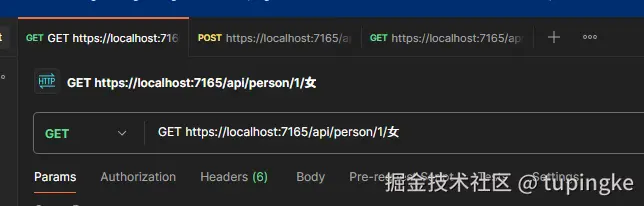
可以写
[FromRoute]来限制参数只能来着路由,如果来自其他地方就报错
- 举个栗子
csharp
```

GET https://localhost:7165/api/person/1/女
```

-   Controller

```

[HttpGet("{id}/{gender}")]
public string GetPerson(string id,[FromRoute] string gender)
{
    return $"Helloe,the person{id}'s gender is {gender}";
}
```
2、Query(查询字符串)
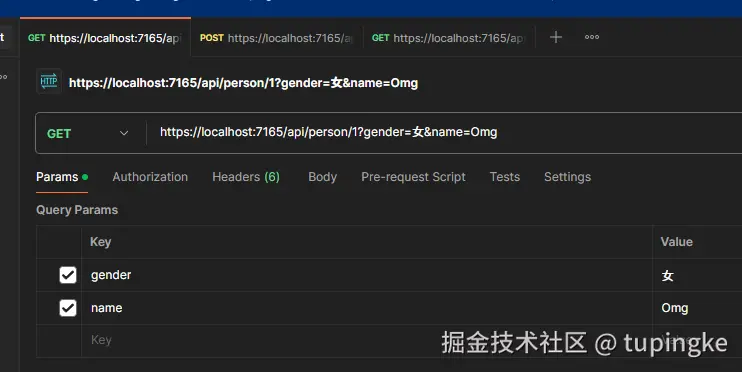
可以写
[FromQuery]来限制参数来源
- 举个栗子
csharp
```

GET https://localhost:7165/api/person/1?gender=女
```

-   Controller

```

[HttpGet("{id}")]
public string GetPerson(string id,[FromQuery] string gender)
{
    return $"Helloe,the person{id}'s gender is {gender}";
}
```-
多个参数 栗子
bashGET https://localhost:7165/api/person/1?gender=女&name=Omg- Contoller
csharp[HttpGet("{id}")] public string GetPerson(string id,[FromQuery] string gender,string name) { return $"Helloe,the person{id}'s gender is {gender} and name is {name}"; }
3、Body(请求体)
请求体 也就是 我们前端平时写的 JSON 格式一般用于 POST 和 PUT 请求可以用
[FromBody]限制参数来源后端首先 需要先创建 类
- 举个栗子
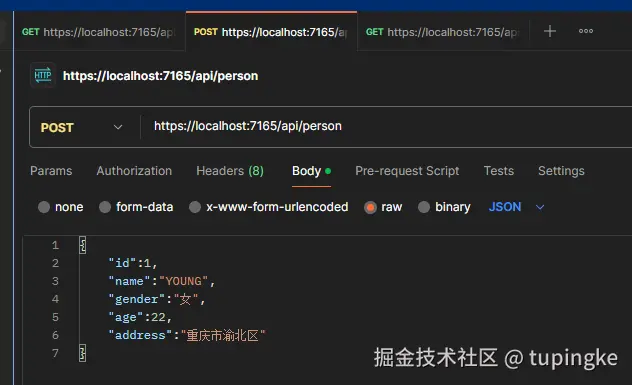
csharp
```
POST https://localhost:7165/api/person
```
- 传参 JSON
```
{
"id":1,
"name":"YOUNG",
"gender":"女",
"age":22,
"address":"重庆市渝北区"
}
```
- Dto 类
```
namespace ControllerDemo1.Models
{
public class PersonDto
{
public int Id { get; set; }
public required string Name { get; set; }
public string? Gender { get; set; }
public int? Age { get; set; }
public string? Address { get; set; }
}
}
```
- Controller
```
[HttpPost]
public string PostPerson([FromBody] PersonDto person)
{
return $"POST信息:Id={person.Id},Name={person.Name},Gender={person.Gender},Age={person.Age}, Address={person.Address}";
// POST信息:Id=1,Name=YOUNG,Gender=女,Age=22,Address=重庆市渝北区
}
```4、Form(表单)
可以通过
[FromForm]限制参数来源
- 举个栗子
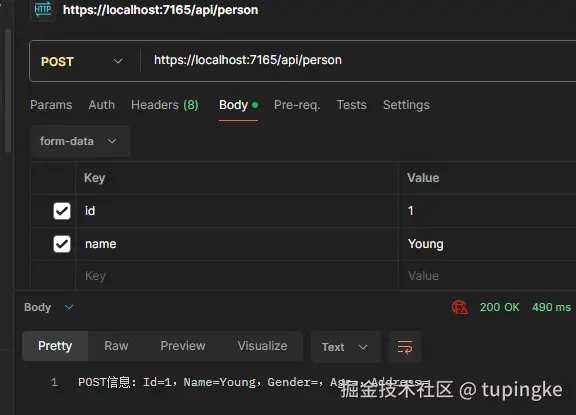
csharp
-   Controller

```

[HttpPost]
public string PostPerson([FromForm] PersonDto person)
{
    return $"POST信息:Id={person.Id},Name={person.Name},Gender={person.Gender},Age={person.Age},                  Address={person.Address}";
    // POST信息:Id=1,Name=YOUNG,Gender=女,Age=22,Address=重庆市渝北区
}
```
5、Header(请求头)
可以通过
[FromHeader]限制参数来源
- 举个栗子
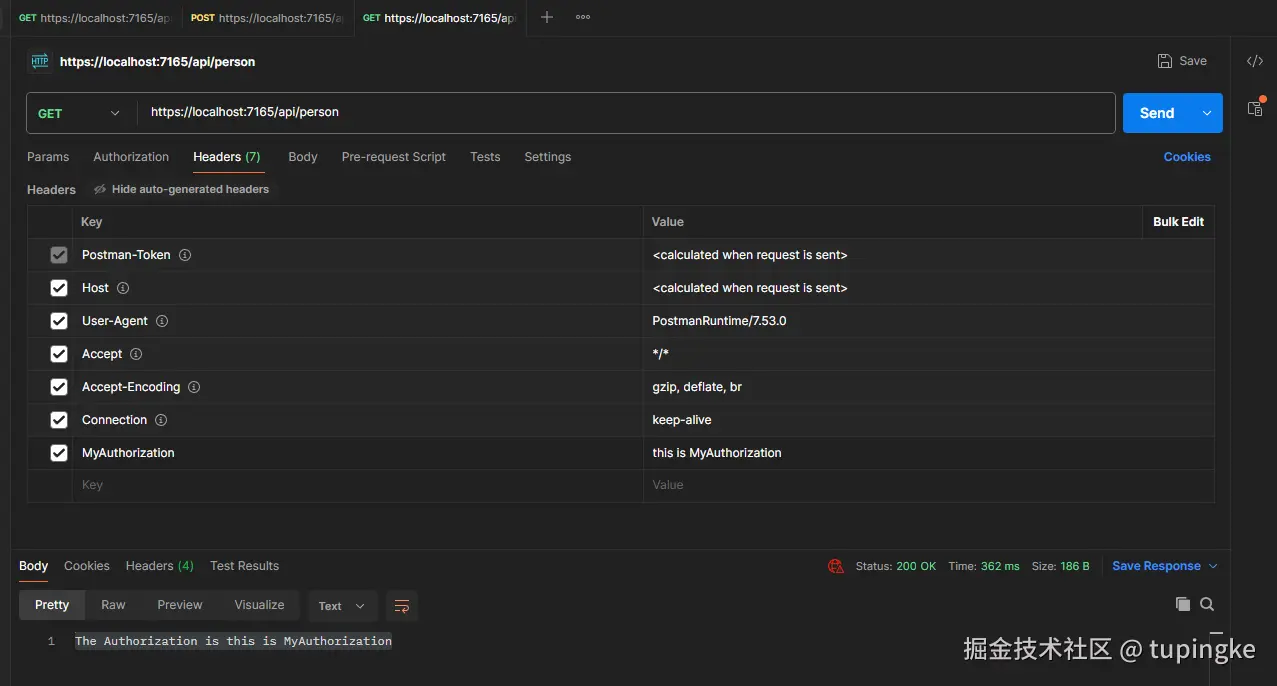
csharp
```

GET https://localhost:7165/api/person
```

-   Controller

```

[HttpGet]
public string GetAuthorization([FromHeader(Name = "MyAuthorization")] string MyAuthorization)
{
    return $"The Authorization is {MyAuthorization}";
    // The Authorization is this is MyAuthorization
}
```
3、数据注解 模型验证
定义:当客户端提交数据到 API 时,后端自动检查这个数据是否符合要求一般发生在 API层
最常见的验证方式 DataAnnotations (.NET自带的一套验证特性)命名空间:
arduinousing System.ComponentModel.DataAnnotations;
-
举个栗子 (使用数据注解 进行 单个 属性验证)
csharpusing System.ComponentModel.DataAnnotations; namespace WebApiDemo1.Dtos; public class PersonDtos { public required int Id { get; set; } [Required(ErrorMessage ="name is required!!!")] // 必须填写 //[StringLength(20)] // 限制字符串长度 [StringLength(20, MinimumLength = 2, ErrorMessage = "长度最小必须为2")] public required string Name { get; set; } [Range(0, 100, ErrorMessage = "年龄范围在0-100")] public int Age { get; set; } [MinLength(5)] // 最短 [MaxLength(50)] // 最长 public string? Description { get; set; } [EmailAddress] // 邮箱验证格式 public string? Email { get; set; } } -
注意
区分
requied和[Required]required是 C# 语言特性,创建对象时必须初始化,否则编译器报警[Required]其实是[RequiredAttribute]缩写
4、ValidationAttribute 模型验证
1、步骤
-
1、创建一个自定义 Attribute 类,并继承 ValidationAttribute
一般自定义验证类都会以
Attribute结尾,实际使用的时候可以不写Attribute- 举个栗子
EducationValidatateAttribute : ValidationAttribute继承ValidationAttribute就说明EducationValidatateAttribute是一个验证属性arduinousing System.ComponentModel.DataAnnotations; namespace WebApiDemo1.Models.Validations; public class EducationValidatateAttribute : ValidationAttribute { } -
2、重写 IsValid 方法
-
ValidationResult是方法的返回类型- 验证成功:
return ValidationResult.Success; - 验证失败:
return new ValidationResult("不能包含空格"); ValidationResult?= 返回一个验证结果,也可能表示没有错误
- 验证成功:
-
object? value是当前正在验证的属性值- 假设将改验证属性写在 DTO 里面的 Name 字段上面,请求{"name":"Lily"}那么 ASP.NET Core 调用
IsValid的时候,value就是 Lily
- 假设将改验证属性写在 DTO 里面的 Name 字段上面,请求{"name":"Lily"}那么 ASP.NET Core 调用
-
ValidationContext validationContext:当前正在验证哪个对象、哪个属性
value
-
validationContext
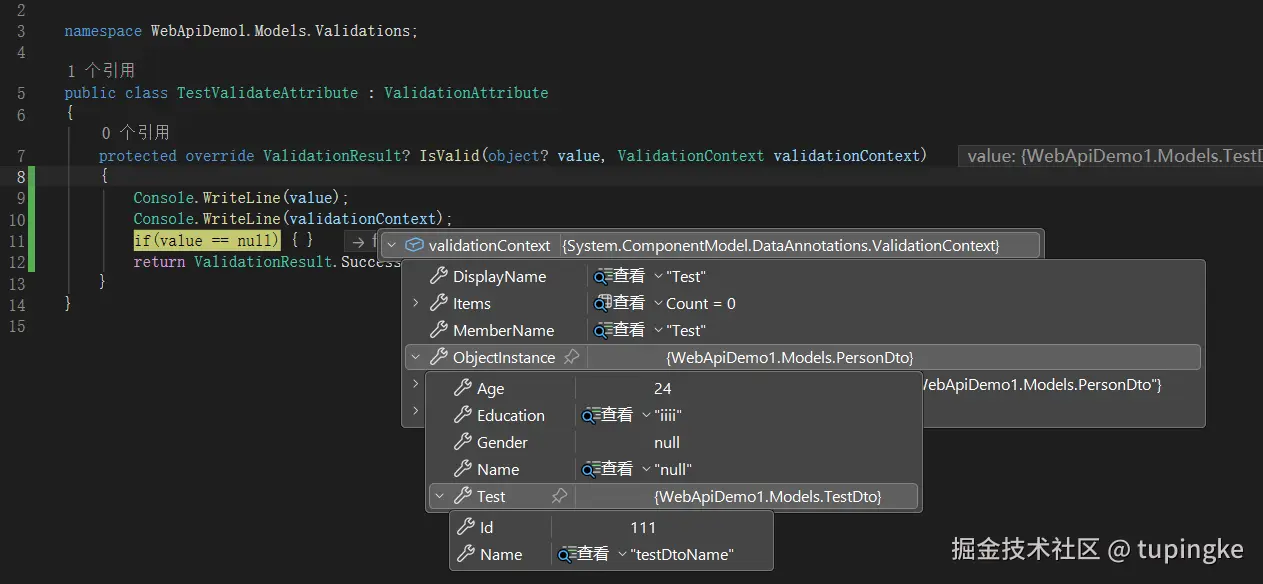
csharp
using System.ComponentModel.DataAnnotations;
namespace WebApiDemo1.Models.Validations;
public class TestValidateAttribute : ValidationAttribute
{
protected override ValidationResult? IsValid(object? value, ValidationContext validationContext)
{
// 验证规则
}
}- 3、加在 DTO 属性上
2、举个栗子
- PersonDto.cs
csharp
using System.ComponentModel.DataAnnotations;
using WebApiDemo1.Models.Validations;
namespace WebApiDemo1.Models;
public class PersonDto
{
[Required(ErrorMessage = "Name is asked!")]
public required string Name { get; set; }
[Required(ErrorMessage = "Age is asked!")]
[Range(0, 120, ErrorMessage = "Age's range is 0-120")]
public int Age { get; set; }
[Required]
[EducationValidatate]
public required string Education { get; set; }
public string? Gender { get; set; }
}- EducationValidatateAttribute.cs
kotlin
using System.ComponentModel.DataAnnotations;
namespace WebApiDemo1.Models.Validations;
public class EducationValidatateAttribute : ValidationAttribute
{
protected override ValidationResult? IsValid(object? value, ValidationContext validationContext)
{
if (value is not (object?)"PRIMARY" and not (object?)"SECONDARY" and not (object?)"UNIVERSITY")
{
return new ValidationResult("Please enter the correct educational background:PRIMARY; SECONDARY; UNIVERSITY");
}
return ValidationResult.Success;
}
}- TestDto.cs
csharp
[TestValidate]
public class TestDto
{
    public int LeftNum { get; set; }
    public int RightNum { get; set; }
    public required string Symbol { get; set; }
}- TestValidateAttribute.cs
kotlin
using System.ComponentModel.DataAnnotations;
namespace WebApiDemo1.Models.Validations;
public class TestValidateAttribute : ValidationAttribute
{
protected override ValidationResult? IsValid(object? value, ValidationContext validationContext)
{
var test = validationContext.ObjectInstance as TestDto;
if (test == null)
{
return new ValidationResult("No Test!!!");
}
if (test.LeftNum > test.RightNum && test.Symbol != ">")
{
return new ValidationResult("LeftNum IS BIGGER THAN RightNum");
}
else if (test.LeftNum < test.RightNum && test.Symbol != "<")
{
return new ValidationResult("LeftNum IS SMALLER THAN RightNum");
}
else if (test.LeftNum == test.RightNum && test.Symbol != "=")
{
return new ValidationResult("LeftNum Equal RightNum");
}
return ValidationResult.Success;
}
}5、WebApi 返回类型
返回类型决定:Controller 方法能返回什么内容;最终HTTP响应长什么样
1、直接返回普通类型
直接返回 字符串、数字、布尔值这些,不需要考虑 HTTP 状态码
- 举个栗子
csharp
[ApiController]
[Route("api/[controller]")]
public class PersonController:ControllerBase
{
    [HttpGet]
    public string GetPerson()
    {
        return "Person" ;
    }
}
2、直接返回 DTO 对象
假设现在有一个 Dto对象 就可以 new 一个返回对象
ASP.NET Core 会自动序列化成 JSON,不需要自己写
JsonConvert.SerializeObject(...)
- 举个栗子
csharp
[ApiController]
[Route("api/[controller]")]
public class PersonController:ControllerBase
{
// 返回单个 PersonDto 对象
[HttpGet("{id}")]
public PersonDto GetPerson(string id)
{
return new PersonDto
{
Name = $"YOUNG + {id}",
Age = 23,
Gender = "Female"
};
}
// 返回 PersonDto 数组
[HttpGet]
public List<PersonDto> GetPersonList()
{
return new List<PersonDto>
{
new()
{
Name = "YOUNG",
Age = 22,
Gender = "Female"
},
new()
{
Name = "GNAY",
Age = 24,
Gender = "Male"
}
};
}
}3、IActionResult
可以灵活返回不同 HTTP 状态
BadRequest()、NotFound()、Ok()这些方法,它们都定义在ControllerBase中。
- 举个栗子
ini
[ApiController]
[Route("api/[controller]")]
public class PersonController: ControllerBase
{
[HttpGet("{id}")]
public IActionResult GetPerson(int id)
{
if (id < 0)
{
return BadRequest();
};
if(id ==0)
{
return Unauthorized();
}
if(id == 100)
{
return NotFound();
}
var person = new PersonDto
{
Name = "YOUNG",
Age = 24,
Gender = "Female"
};
return Ok(person);
}
}4、ActionResult<T>
控制器方法执行后返回的结果类型
ActionResult<T>和IActionResult差不多,实际上就是 具体数据类型 T + IActionResult可以返回一个对象 也可以 Ok(对象)如果需要返回明确的 DTO 可以使用
ActionResult<T>因为一眼就知道需要返回什么对象
- 举个栗子
ini
[ApiController]
[Route("api/[controller]")]
public class PersonController : ControllerBase
{
[HttpGet("{id}")]
public ActionResult<PersonDto> GetPerson(int id)
{
if (id < 0)
{
return BadRequest();
}
if (id == 0)
{
return Unauthorized();
}
if (id == 100)
{
return NotFound();
}
return new PersonDto
{
Name = "YOUNG",
Age = 24,
Gender = "Female"
};
}
}1、异步接口 async Task
异步接口通常用
Task<T>如果直接写Task相当于没有返回内容,就像一般的删除接口一样
async:告诉编译器 这个方法里面可能会用await
Task:告诉调用方 这个方法是异步的,结果以后才完成
swift
public async Task<返回类型> 方法名()
{
var result = await 异步操作();
return result;
}2、常见的 HTTP 返回方法
-
状态码:200 【成功】
kotlinreturn Ok(); -
状态码:201 【创建成功】
kotlinreturn Created(); -
状态码:400 【参数错误】
vbscript400 Bad Request -
状态码:404 【找不到数据】
kotlinreturn NotFound(); -
状态码:401 【未登录】
kotlinreturn Unauthorized(); -
状态码:403 【禁止访问】
kotlinreturn Forbid(); -
状态码:204 【没有返回内容】
kotlinreturn NoContent();
6、内存存储库 Repository
Repository:存储库;专门负责数据访问
不用数据库,把数据暂时放在程序内存里的一个集合中,再通过一个 Repository 类统一增删改查
在模拟的时候,可以不用数据库,将数据写在 内存存储库里面。数据存在程序运行时的 RAM 里。数据只在程序运行期间存在,不会永久保存。
内存存储库的作用就是 不让Controller 自己处理输入如:
Add(...)、Remove(...)等数据处理操作数据处理操作都放在 Repository 文件里面
- 举个栗子(静态类)存储库
csharp
/** PersonRepository.cs */
namespace WebApiDemo1.Models.Repositories;
public static class PersonRepository
{
private static List<PersonDto> _persons = new()
{
new PersonDto{Id = 1, Name = "Young", Age = 20 },
new PersonDto{ Id = 2, Name = "Gnay", Age = 22 },
new PersonDto{ Id = 3, Name = "Lily", Age = 20 },
new PersonDto{ Id = 4, Name = "Harwon", Age = 22 },
};
public static List<PersonDto> GetAll()
{
return _persons;
}
public static PersonDto? GetById(int id)
{
return _persons.FirstOrDefault(x => x.Id == id);
}
public static void Add(PersonDto person)
{
_persons.Add(person);
}
public static void Delete(int id)
{
var person = _persons.FirstOrDefault(x => x.Id == id);
if (person != null)
{
_persons.Remove(person);
}
}
public static bool PersonExits(int id)
{
return _persons.Any(x => x.Id == id);
}
}
scss
/** PersonController.cs */
using Microsoft.AspNetCore.Mvc;
using WebApiDemo1.Models;
using WebApiDemo1.Models.Repositories;
namespace WebApiDemo1.Controllers;
[ApiController]
[Route("api/[controller]")]
public class PersonController : ControllerBase
{
[HttpGet]
public ActionResult<List<PersonDto>> GetPersonList()
{
return Ok(PersonRepository.GetAll());
}
[HttpGet("{id}")]
public ActionResult<PersonDto> GetPerson(int id)
{
var person = PersonRepository.GetById(id);
if (person == null)
{
return NotFound();
}
return Ok(person);
}
[HttpPost]
public ActionResult<PersonDto> PostPerson(PersonDto person)
{
PersonRepository.Add(person);
return Created();
}
[HttpDelete("{id}")]
public ActionResult DeletePerson(int id)
{
var person = PersonRepository.GetById(id);
if (person == null)
{
return NotFound();
}
PersonRepository.Delete(person.Id);
return Ok();
}
}7、操作过滤器 ActionFilter
可以把后端 Filter 类比成前端里的"请求拦截器 / 路由守卫 / axios interceptor"
处理"控制器方法执行前后都要做的公共逻辑";可以理解为:在 Controller 的 Action 方法执行前后,自动插入一段代码
通过使用 ASP.NET Core 中的筛选器,可在请求处理管道中的特定阶段之前或之后运行代码。
一个请求可能会经历:
HTTP 请求
   ↓
路由匹配
   ↓
Controller
   ↓
过滤器
   ↓
Action 方法
   ↓
过滤器
   ↓
HTTP 响应
-
作用
- 日志记录:记录哪个接口被调用
- 参数记录:检查参数是否合法
- 性能统计:计算接口执行耗时
- 修改参数:Action执行前修改参数
- 修改返回值:Action执行后修改结果
- 统一业务处理:做重复的公共逻辑
一个过滤器需要 继承
ActionFilterAttribute
ActionFilterAttribute是 ASP.NET Core 给我们提供的一个基类
- OnActionExecuting:Action 方法执行之前 触发
- OnActionExecuted:Action 方法执行之后 触发
- context:当前 Action 请求的上下文信息,可以通过
context.ActionArguments["参数"]获取指定参数 - context.Result:可以提前终止 Action
- 举个栗子
csharp
/** PersonValidateIdFilterAttribute.cs */
using Microsoft.AspNetCore.Mvc;
using Microsoft.AspNetCore.Mvc.Filters;
using WebApiDemo1.Models.Repositories;
namespace WebApiDemo1.Filters;
/** 验证 id 是否正确 */
// 1、继承 ActionFilterAttribute
public class PersonValidateIdFilterAttribute : ActionFilterAttribute
{
// 2、重写方法 OnActionExecuting(Action执行之前触发)
public override void OnActionExecuting(ActionExecutingContext context)
{
// 调用父类 ActionFilterAttribute 的 OnActionExecuting() 方法
// 可以理解 为先让父类做它原本该做的事情
// 然后再执行我们自己的代码
base.OnActionExecuting(context);
// 3、通过 context.ActionArguments 获取id
var id = context.ActionArguments["id"] as int?;
// 4、判断 id 值是否正确
if (id.HasValue)
{
if (id.Value <= 0)
{
// 5、添加错误 给 id 加一个验证错误"Id is Invalid!"
// AddModelError("字段","发生了什么错误")
context.ModelState.AddModelError("id", "Id Is Invalid!");
// 6、把 ModelState 中的验证错误整理成规范的 HTTP 错误响应。
var problemDetails = new ValidationProblemDetails(context.ModelState)
{
Title = "This Is A 400 Error Title",
Status = StatusCodes.Status400BadRequest
};
// 7、指定当前请求的响应结果
// 注意:一旦在 OnActionExecuting 中给 context.Result 赋值,
// Controller 的 Action 就不会继续执行。
context.Result = new BadRequestObjectResult(problemDetails);
}
else if (!PersonRepository.PersonExits(id.Value))
{
context.ModelState.AddModelError("id", "Person Is Not Found!");
var problemDetalis = new ValidationProblemDetails(context.ModelState)
{
Title = "This Is A 404 Error Title",
Status = StatusCodes.Status404NotFound
};
context.Result = new BadRequestObjectResult(problemDetalis);
}
}
}
}
csharp
/** PersonController.cs */
using Microsoft.AspNetCore.Mvc;
using WebApiDemo1.Filters;
using WebApiDemo1.Models;
using WebApiDemo1.Models.Repositories;
namespace WebApiDemo1.Controllers;
[ApiController]
[Route("api/[controller]")]
public class PersonController : ControllerBase
{
[HttpGet("{id}")]
// 8、将操作过滤添加在接口位置
[PersonValidateIdFilter]
public ActionResult<PersonDto> GetPerson(int id)
{
var person = PersonRepository.GetById(id);
if (person == null)
{
return NotFound();
}
return Ok(person);
}
}1、创建端点
Create()和CreateAtAction()的区别
Created()只告诉客户端"创建成功了,并告诉你资源地址";
CreatedAtAction()是ControllerBase提供的方法,用于返回 201 Created ,并基于某个 Action 生成Location响应头
作用:
- 返回 HTTP 201 Created
- 根据指定的 Action 自动生成新资源 URL
- 可以把新创建的资源放进响应体
使用时 有四个参数,四个参数都可以为空
- actionName(string);指定用于生成 URL 的 Action 名称
- controllerName(string);指定目标 Controller 名称
- routeValues(object);提供生成 URL 所需的路由值
- value(object);放入 HTTP 响应体的数据
CreatedAtAction(actionName)
CreatedAtAction(actionName, value)
CreatedAtAction(actionName, routeValues, value)
CreatedAtAction(actionName, controllerName, routeValues, value)
-
举个栗子
要求:新建 person ,名称不允许重复
csharp
/** Controller */
[HttpPost]
public ActionResult<PersonDto> PostPerson(PersonDto person)
{
    PersonRepository.AddPerson(person);
    // nameOf:用于获取 某个变量、类型、方法、属性、参数等"名称"的字符串
    return CreatedAtAction(
        nameof(GetPerson),
        new { id = person.Id },
        person);
}
csharp
/** Repository */
public static void AddPerson(PersonDto person)
{
int maxId = _persons.Count != 0 ? _persons.Max(x => x.Id) : 1;
person.Id = maxId + 1;
_persons.Add(person);
}
public static bool IsPersonRepeat(PersonDto person)
{
var exitPerson = _persons.Any(x => x.Name == person.Name);
if (exitPerson)
{
return true;
}
return false;
}
ini
/** ActionFilter */
public class PersonValidatePersonExitFilterAttribute : ActionFilterAttribute
{
    public override void OnActionExecuting(ActionExecutingContext context)
    {
        base.OnActionExecuting(context);
        var person = context.ActionArguments["person"] as PersonDto;
        if(person == null)
        {
            context.ModelState.AddModelError("person", "Person Is Be Null");
            var problemDetails = new ValidationProblemDetails(context.ModelState)
            {
                Title = "This Is A 400 Error!",
                Status = StatusCodes.Status400BadRequest
            };
            context.Result = new BadRequestObjectResult(problemDetails);
        }
        else if(PersonRepository.IsPersonRepeat(person))
        {
            context.ModelState.AddModelError("name", "Person Is Exited!");
            var problemDetails = new ValidationProblemDetails(context.ModelState)
            {
                Title = "This Is A 400 Error!",
                Status = StatusCodes.Status400BadRequest
            };
            context.Result = new BadRequestObjectResult(problemDetails);
        }
    }
}
0、杂七杂八
1、静态修饰符 static
static可以修饰类,使类成为静态类。这样在此类中只能定义静态的方法和静态的变量
-
修饰类
静态类不能被实例化,也就是说不能使用new关键字创建静态类类型的变量
-
修饰变量
static可以修饰变量,注意:这个变量只能是成员变量,而不能是局部变量
-
修饰方法
static可以修饰方法,Main方法必须用static修饰, 因为它是与程序共存亡的,是程序的入口和程序的大门
- 静态方法是不属于特定对象的方法
- 静态方法可以直接访问静态成员(包括静态字段、静态方法)
- 静态方法不可以直接访问实例成员,并且静态方法也不能直接调用实例方法
-
修饰构造函数
static可以修饰,使构造函数成为静态构造函数。 并且不能在再使用其他修饰符,并且不能是实例构造函数
- 不能继承
- 静态构造函数没有访问修饰符,没有参数,只有一个static修饰符
- 静态构造函数只执行一次
2、构造函数和方法 区别
构造函数的名称 必须与 类名相同,并且没有返回值 类型等。使用
new 对象()调用用于设置对象的初始状态方法必须有返回类型。使用
类名.方法()调用
-
举个栗子
csharppublic class Person { public string Name { get; set; } // 构造函数 public Person(string name) { Name = name; } // 方法 public void SayHello() { Console.WriteLine($"你好,我是{Name}"); } }scssclass Person ↓ new Person() ↓ 调用构造函数 ↓ Person 对象创建完成 ↓ person.SayHello() ↓ 调用普通方法