第 5 讲 · desktop-app bundle:一个 bundle 如何改造产品
系列 :我在Deepseek harness中增加了桌面版,将逐行代码解析我是怎么增加的,希望你也能创建属于自己的桌面版Agent 本讲目标 :吃透
packages/bundle/desktop-app------387 行的cordis.patch.yml如何定义桌面端插件名册,以及src/index.ts(139 行)如何实现desktopRuntime服务(桌面端"无 HTTP 的 API 网关")。 逐行文件 :cordis.patch.yml(387 行,关键段)+src/index.ts(139 行,全行) 代码仓库 :github.com/tslcarmack/...Desktop App 运行效果图
🎯 本讲地图
scss
desktop-app bundle(packages/bundle/desktop-app/)
   ├─► cordis.patch.yml(387 行)------桌面端插件名册
   │      ├─► host 侧行:desktop-runtime / api-gateway / modules / connection ...
   │      └─► dsh.client 行:浏览器端 ui-* 插件(theme/layout/sidebar/conversation...)
   └─► src/index.ts(139 行)------desktopRuntime 服务实现
          ├─► mux/host 双推送通道(订阅者集合)
          ├─► graph()           → 启动图(clientModules.graph())
          ├─► loadBundleSource()→ 读客户端 bundle 源码
          └─► fetchFromPreload()→ 无 HTTP 的"fetch"(ApiProxy 适配)
📁 0. 定位:bundle = 配置行 + 代码的分发格式
回顾第 4 讲:desktop profile 的 dsh.profile.bundles = [dsh-base, dsh-desktop-app]。bundle 的价值在于------它只是"补丁包":插入/覆写配置行,随包分发代码。desktop-app 就是"把 dsh 变成桌面应用"的那个补丁包。
📁 1. cordis.patch.yml 关键段逐行
文件:packages/bundle/desktop-app/cordis.patch.yml(387 行)
1.1 开头注释(第 1-18 行)
yaml
# The dsh-desktop-app bundle patch: the Electron surface over the dsh-base layer.
# Applied after dsh-base's insert; rows here override base rows by id, with
# the profile's own cordis.patch.yml and any --patch overlays still to come.
#
# A patch replaces the targeted row's whole `config`, so each row below
# restates every key it owns.
#
# The desktop-runtime plugin injects `cmdlineArgs` and provides `desktopRuntime`...关键认知:
- patch 语义是按 id 替换整行 config------所以每行都要完整声明它拥有的所有 key。
- 应用顺序:dsh-base 先插入 → desktop-app 覆写 → 用户 profile patch → --patch。
1.2 host 侧关键行(第 60-130 行附近)
yaml
# Desktop glue: provides `desktopRuntime` for the connection node half and
    # the Electron main process. No HTTP listen.
    - id: desktop-runtime
name: '@deepseek-ai/dsh-desktop-app'desktop-runtime行 :这就是第 3 讲ctx.get('desktopRuntime')的来源。注释点破核心差异:"No HTTP listen"。
yaml
# The API gateway: the transport-agnostic dispatch face every client shape
    # shares. The base layer's agent-default-model service owns the default model.
    - id: api-gateway
name: '@deepseek-ai/dsh-host-apiproxy'api-gateway行 :web/desktop 共用的传输无关 API 网关 ------web 端它挂 HTTP 路由,桌面端它挂desktopRuntime(src/index.ts 的setApiFetch)。
yaml
# Browser Session export: `/export` command plus the shared download dialog.
    - id: session-log-download
      name: '@deepseek-ai/dsh-session-log-export'
yaml
# Pin the native dual-face picker: auto needs webServer to sample bind host,
    # and desktop has no HTTP listen. Overlay -browse to pin the other interaction.
    - id: directory-picker
name: '@deepseek-ai/dsh-host-directory-picker-native'- 桌面无 HTTP 的连锁反应 :
directory-picker用auto模式需要 webServer 探测绑定主机------桌面没有 webServer,所以强制 pin 到 native 双面实现。这是一个"bundle 处理环境差异"的绝佳例子。
1.3 浏览器插件名册(dsh.client 行)
yaml
# ── browser plugin roster (dsh.client rows; node halves are layer-2 hosts) ──

    - id: modules
      name: '@deepseek-ai/dsh-client-modules'
    - id: connection
      name: '@deepseek-ai/dsh-client-connection'
    ...
    - id: ui-theme
      name: '@deepseek-ai/dsh-client-ui-theme'
    - id: ui-layout
      name: '@deepseek-ai/dsh-client-ui-layout'
    - id: ui-sidebar
      name: '@deepseek-ai/dsh-client-ui-sidebar'
    - id: ui-conversation
      name: '@deepseek-ai/dsh-client-ui-conversation'
    - id: ui-tool
      name: '@deepseek-ai/dsh-client-ui-tool'
...关键认知:
dsh.client行 = 浏览器端插件名册 。第 4 讲提到modules插件把它们打包进window.__DSH_BOOT__下发。- 桌面端前端也是插件体系 :theme/layout/sidebar/conversation/tool 等都是独立的
dsh-client-ui-*包------这就是"一切皆插件"延伸到浏览器端的体现。 - 注释:"node halves are layer-2 hosts"------这些插件是**双面(dual-face)**的:Node 半是加载器,浏览器半是真正的 UI。
📁 2. src/index.ts 全行逐行(139 行)
文件:packages/bundle/desktop-app/src/index.ts
ts
1  /**
  2   * @deepseek-ai/dsh-desktop-app --- the Electron-surface bundle's runtime glue.
  3   * Provides `desktopRuntime` so connection can bind ApiProxy without HTTP.
  4   * Window, preload, and ipcMain wiring live in `apps/desktop`.
  5   * @module @deepseek-ai/dsh-desktop-app
  6   */
  7
  8  import { readFile } from 'node:fs/promises'
  9  import type { Context } from '@deepseek-ai/cordis'
 10  import type { DesktopRuntime } from '@deepseek-ai/dsh-client-connection'
 11  import type { WebBootGraph } from '@deepseek-ai/dsh-client-modules'
 12
 13  /** Stable Cordis plugin name. */
 14  export const name = 'desktop-app'
 15
 16  /** No required services: the glue provides `desktopRuntime` for later rows. */
 17  export const inject: string[] = []
 18
 19  /** DesktopRuntime plus the methods Electron main uses after the window exists. */
 20  export interface DesktopRuntimeImpl extends DesktopRuntime {
 21    readonly graph: () => WebBootGraph
 22    loadBundleSource(url: string): Promise
 23    subscribeMux(listener: (json: string) => void): () => void
 24    subscribeHost(listener: (json: string) => void): () => void
 25    fetchFromPreload(request: IpcFetchRequest): Promise
 26  }
 27
 28  /** Unary IPC request the renderer sends through the preload bridge. */
 29  export interface IpcFetchRequest {
 30    url: string
 31    method: string
 32    headers: Record
 33    body: string | null
 34  }
 35
 36  /** Unary IPC response the preload bridge returns to the renderer. */
 37  export interface IpcFetchResponse {
 38    status: number
 39    headers: Record
 40    body: string
 41    bodyEncoding?: 'utf8' | 'base64'
 42  }
 43
 44  function clientIdFromBundleUrl(url: string): string {
 45    const pathname = new URL(url, 'http://dsh.internal').pathname
 46    return decodeURIComponent(pathname.replace(/^\/plugins\//u, '').replace(/\/client\.js$/u, ''))
 47  }
 48
 49  export function apply(ctx: Context): void {
 50    const muxListeners = new Set<(json: string) => void>()
 51    const hostListeners = new Set<(json: string) => void>()
 52    let apiFetch: ((request: Request) => Promise) | undefined
 53    const runtime: DesktopRuntimeImpl = {
 54      setApiFetch(fetch) {
 55        apiFetch = fetch
 56        return () => { if (apiFetch === fetch) apiFetch = undefined }
 57      },
 58      sendFrame(stream, json) {
 59        const listeners = stream === 'mux' ? muxListeners : hostListeners
 60        for (const listener of listeners) listener(json)
 61      },
 62      graph: () => {
 63        const modules = ctx.get('clientModules')
 64        if (modules === undefined) throw new Error('desktop-app: clientModules is not mounted')
 65        return modules.graph()
 66      },
 67      async loadBundleSource(url) {
 68        const id = clientIdFromBundleUrl(url)
 69        const modules = ctx.get('clientModules')
 70        const path = modules?.clientPath(id)
 71        if (path === undefined) throw new Error(`desktop-app: no client bundle for ${id}`)
 72        return readFile(path, 'utf8')
 73      },
 74      subscribeMux(listener) {
 75        muxListeners.add(listener)
 76        return () => { muxListeners.delete(listener) }
 77      },
 78      subscribeHost(listener) {
 79        hostListeners.add(listener)
 80        return () => { hostListeners.delete(listener) }
 81      },
 82      async fetchFromPreload(request) {
 83        if (apiFetch === undefined) {
 84          return { status: 503, headers: { 'content-type': 'text/plain; charset=utf-8' }, body: 'desktop-app: api fetch not installed' }
 85        }
 86        const init: RequestInit = { method: request.method, headers: request.headers }
 87        if (request.body !== null) init.body = request.body
 88        const response = await apiFetch(new Request(request.url, init))
 89        const headers: Record = {}
 90        response.headers.forEach((value, key) => { headers[key] = value })
 91        const encoded = await encodeIpcFetchBody(response)
 92        return { status: response.status, headers, ...encoded }
 93      },
 94    }
 95    ctx.provide('desktopRuntime', runtime)
 96  }
 97
 98  function isTextualIpcContentType(contentType: string): boolean {
 99    const media = contentType.split(';', 1)[0]!.trim().toLowerCase()
100    return media === '' || media.startsWith('text/') || media === 'application/json' || media.endsWith('+json')
101  }
102
103  async function encodeIpcFetchBody(response: Response): Promise<{ body: string; bodyEncoding?: 'base64' }> {
104    const contentType = response.headers.get('content-type') ?? ''
105    if (isTextualIpcContentType(contentType)) return { body: await response.text() }
106    return { body: Buffer.from(await response.arrayBuffer()).toString('base64'), bodyEncoding: 'base64' }
107  }
逐段讲解
第 13-17 行 · 插件元数据
ts
export const name = 'desktop-app'
export const inject: string[] = []name:插件名(desktop-runtime行装载它)。inject: []:无必选服务------注释说"提供者给后续行用",所以它不依赖任何服务(依赖关系由 Loader 的 inject 机制管理,它自己是被依赖方)。
第 20-26 行 · DesktopRuntimeImpl
ts
export interface DesktopRuntimeImpl extends DesktopRuntime {
  readonly graph: () => WebBootGraph
  loadBundleSource(url: string): Promise
  subscribeMux(listener): () => void
  subscribeHost(listener): () => void
  fetchFromPreload(request): Promise
}- 扩展自
@deepseek-ai/dsh-client-connection的DesktopRuntime基接口(含setApiFetch/sendFrame,这是 connection 插件需要的)。 - 新增 5 个方法 :
graph(启动图)、loadBundleSource(读 bundle)、两个订阅、fetchFromPreload(无 HTTP 的 fetch)。
第 44-47 行 · clientIdFromBundleUrl
ts
function clientIdFromBundleUrl(url: string): string {
  const pathname = new URL(url, 'http://dsh.internal').pathname
  return decodeURIComponent(pathname.replace(/^\/plugins\//u, '').replace(/\/client\.js$/u, ''))
}- 把
/plugins//client.js?rev=...格式的 URL 解析出插件 id。http://dsh.internal是虚拟 base ------纯粹为了用URL解析相对路径,没有真实网络。
第 49-96 行 · apply(ctx)(核心)
三个内部状态:
ts
const muxListeners = new Set<(json: string) => void>()
const hostListeners = new Set<(json: string) => void>()
let apiFetch: ((request: Request) => Promise) | undefined- 两个订阅者集合(mux/host 通道)+ 一个可变的
apiFetch处理器。
setApiFetch(第 54-57 行):
ts
setApiFetch(fetch) {
  apiFetch = fetch
  return () => { if (apiFetch === fetch) apiFetch = undefined }
},- 让
connection插件注入真正的 fetch 处理函数(ApiProxy 的 dispatch)。 - 返回幂等 disposer:只有当前值还是自己时才清掉------防止后注册的覆盖者被先注册的卸载误删。
graph(第 62-66 行):
ts
graph: () => {
  const modules = ctx.get('clientModules')
  if (modules === undefined) throw new Error('desktop-app: clientModules is not mounted')
  return modules.graph()
},- 懒读取
ctx.clientModules(patch 里的modules行)------注释说"read lazily",因为 apply 时 modules 可能还没挂载,必须在调用时再取。 - 取不到就 fail-fast。
loadBundleSource(第 67-73 行):
ts
async loadBundleSource(url) {
  const id = clientIdFromBundleUrl(url)
  const modules = ctx.get('clientModules')
  const path = modules?.clientPath(id)
  if (path === undefined) throw new Error(`desktop-app: no client bundle for ${id}`)
  return readFile(path, 'utf8')
},clientPath(id):clientModules 把插件 id 映射到磁盘上的lib/client.js路径。readFile读源码返回字符串------第 3 讲 renderer.ts 把它包装成 Blob URL 加载。
subscribeMux / subscribeHost(第 74-81 行):
ts
subscribeMux(listener) {
  muxListeners.add(listener)
  return () => { muxListeners.delete(listener) }
},- Set 增删 = 可逆注册的又一体现(返回 unsubscriber)。
fetchFromPreload(第 82-93 行):
ts
async fetchFromPreload(request) {
  if (apiFetch === undefined) {
    return { status: 503, ... }
  }
  const init: RequestInit = { method: request.method, headers: request.headers }
  if (request.body !== null) init.body = request.body
  const response = await apiFetch(new Request(request.url, init))
  ...
  return { status: response.status, headers, ...encoded }
},- 无 HTTP 的"fetch" :把渲染进程的 IPC 请求翻译成标准
Request→ 交给apiFetch(ApiProxy)→ 再把Response翻译回 IPC 响应。 503兜底:handler 未安装时明确报错(而不是静默失败)。
ctx.provide('desktopRuntime', runtime)(第 95 行):
- 最终效果 :把 runtime 挂到 ctx 上,第 3 讲的
ctx.get('desktopRuntime')从此可用。
第 98-107 行 · 响应体编码
ts
function isTextualIpcContentType(contentType: string): boolean {
  const media = contentType.split(';', 1)[0]!.trim().toLowerCase()
  return media === '' || media.startsWith('text/') || media === 'application/json' || media.endsWith('+json')
}

async function encodeIpcFetchBody(response: Response): Promise<{ body: string; bodyEncoding?: 'base64' }> {
  const contentType = response.headers.get('content-type') ?? ''
  if (isTextualIpcContentType(contentType)) return { body: await response.text() }
  return { body: Buffer.from(await response.arrayBuffer()).toString('base64'), bodyEncoding: 'base64' }
}- 文本内容(text/*、json)按 utf8 传输;二进制(ZIP 等)转 base64------IPC 通道只能传字符串,所以需要这个编码层。
🖼️ 第 5 讲架构图
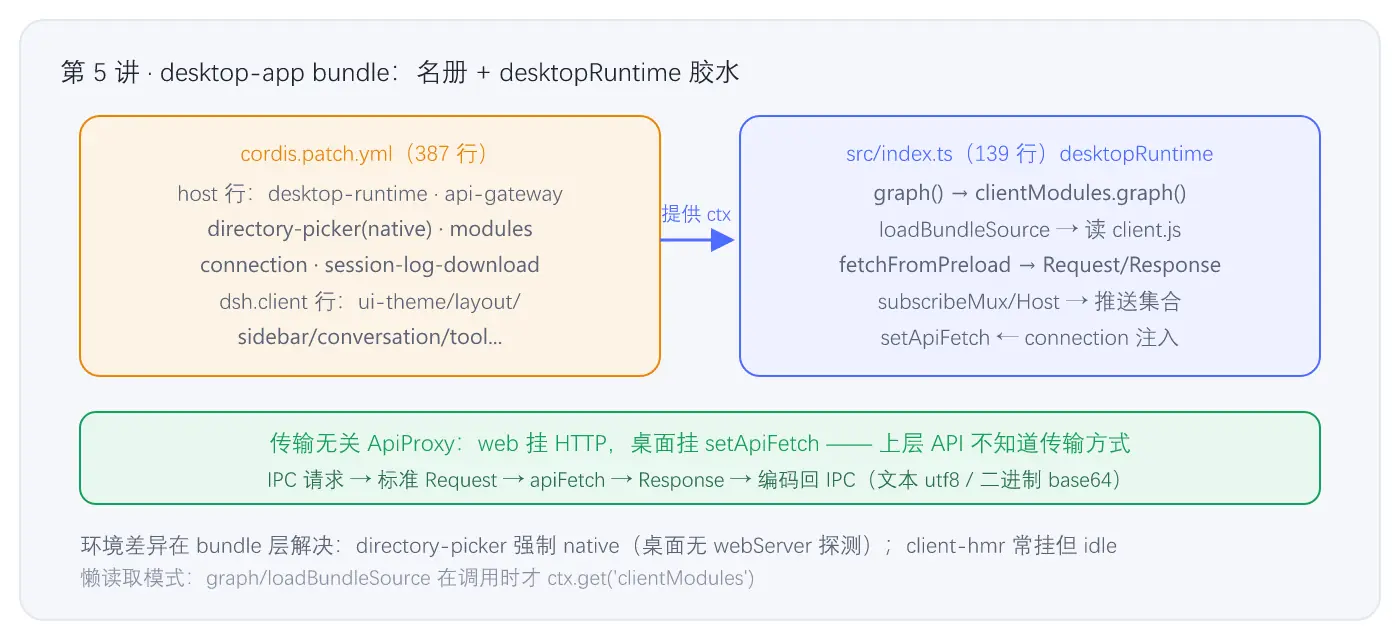
图 5-1 · desktop-app bundle 的职责:配置名册 + desktopRuntime 胶水
⚙️ 机制小结
- bundle = 补丁包 :desktop-app 只做两件事------插配置行(名册)+ 提供
desktopRuntime服务(胶水)。 - 传输无关的 ApiProxy :web 挂 HTTP、桌面挂
setApiFetch------fetchFromPreload把 IPC 请求翻译成标准 Request/Response,上层 API 完全不知道传输方式。 - 懒读取模式 :
graph()/loadBundleSource()都在调用时ctx.get('clientModules'),因为 apply 时依赖可能尚未挂载。 - 双面插件 :
dsh.client行 = 浏览器端插件名册,Node 半加载、浏览器半渲染------前端也是插件体系。 - 环境差异处理在 bundle 层:directory-picker 强制 native、禁用 HMR------bundle 按环境声明差异,核心代码零改动。
🧪 动手验证
sh
# 1) 在组合树里定位 desktop 专属行
cd D:\code\deepseek-harness
node apps/cli/lib/bin.js --profile desktop --dump-config | grep -E "desktop-runtime|api-gateway|directory-picker"

# 2) 看浏览器插件名册(dsh.client 行在 dump 里的形态)
node apps/cli/lib/bin.js --profile desktop --dump-config | grep "ui-"

# 3) 对比 web 与 desktop 的差异行
diff <(node apps/cli/lib/bin.js --profile web --dump-config) <(node apps/cli/lib/bin.js --profile desktop --dump-config) | head -40
📚 深入指引
| 文件 | 作用 |
|---|---|
packages/bundle/desktop-app/cordis.patch.yml |
桌面端插件名册(387 行) |
packages/bundle/desktop-app/src/index.ts |
desktopRuntime 实现(本讲全行) |
packages/bundle/desktop-app/src/client/ |
浏览器侧 connection/IPC 客户端(选读) |
packages/api/ |
ApiProxy(fetchFromPreload 最终调用的实现) |
下一讲预告:从桌面壳进入 harness 核心------core 六包(session / system-prompt / tools / agent / agent-loop / scope)的关键函数与依赖关系,理解"一次回合的骨架"。