第7章:能力 Seam------三段式架构与 Provider 替换
系列:DeepSeek Harness 源码实战
换一个 Provider,整个产品就从本地工具变成了远程沙箱。
前几章我们看了 agent 循环、工具流水线、会话日志。这些都是 dsh 的「骨架」。这一章来看 dsh 的「肌肉」------能力 Seam(接缝)。这是 dsh 最有辨识度的架构模式,也是它和单体 coding agent 的根本区别。
我是怕浪猫,这一章我们拆开 dsh 的五大 Seam,看它们怎么用三段式架构实现「换 Provider 就换产品」。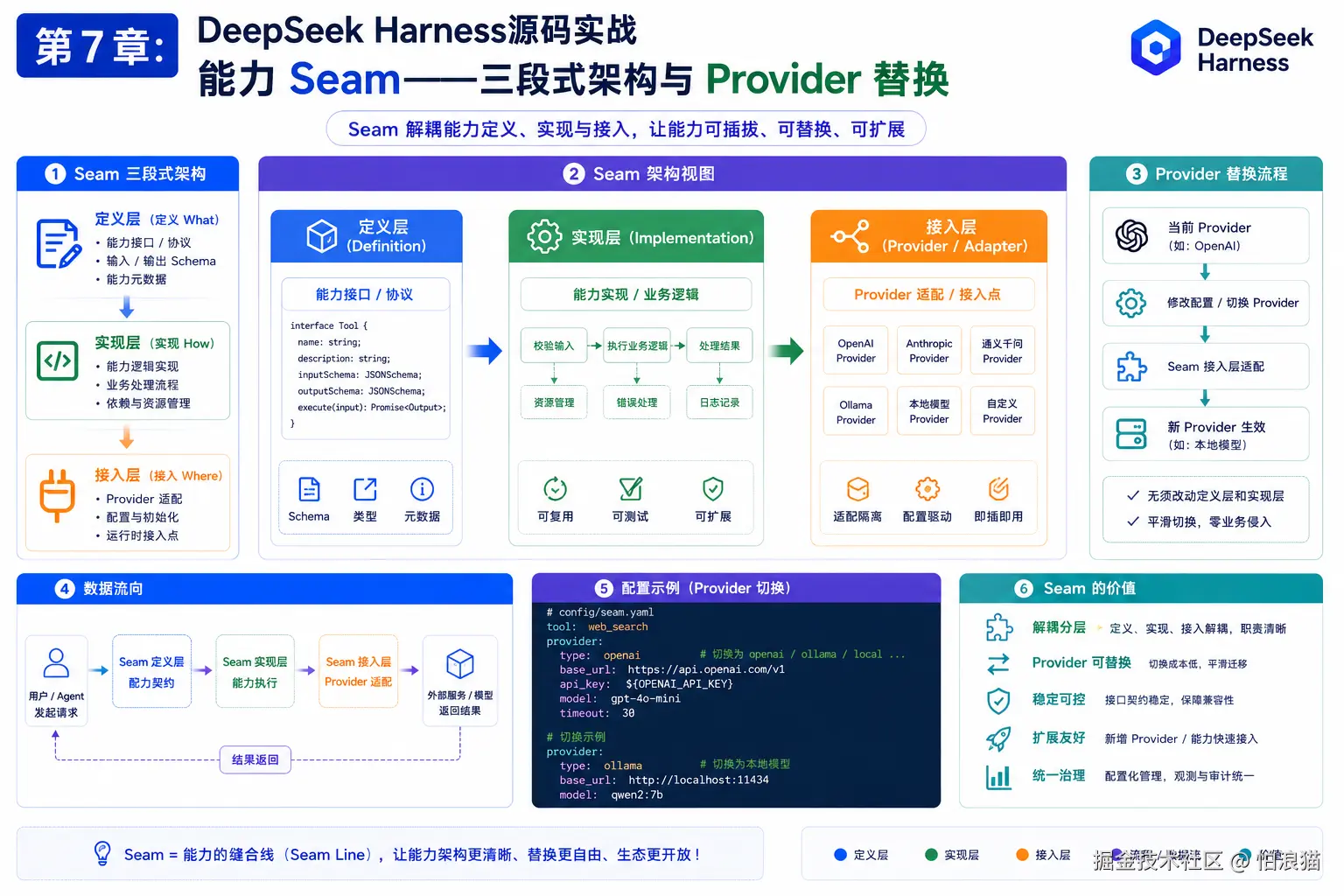
7.1 三段式架构:Service Definition / Provider / Consumer
dsh 的每一个能力(文件系统、shell、搜索等)都遵循三段式:
Service Definition(服务定义):接口契约。声明这个能力有哪些方法、哪些事件。是一个抽象类或接口,不包含实现。
Service Provider(服务提供方):具体实现。继承 Service Definition 的抽象类,实现所有方法。一个 ctx 上只能有一个 Provider。
Consumer(消费方):面向模型的工具。调用 Provider 的方法,把结果格式化后返回给模型。Consumer 不关心 Provider 是谁。
来看三者的关系:
bash
┌──────────────────────────────────────────────────┐
│                 ctx(上下文)                      │
│                                                   │
│  ┌─────────────────┐     ┌──────────────────┐    │
│  │ Service          │     │ Consumer          │    │
│  │ Definition       │◀────│ (tool-fs)       │    │
│  │ (dsh-fs)       │     │                  │    │
│  │                  │     │ 调用 ctx.fs.*    │    │
│  │ abstract class   │     │ 返回结果给模型   │    │
│  │ FileSystem       │     └──────────────────┘    │
│  └────────▲────────┘                              │
│           │ implements                            │
│  ┌────────┴────────┐                              │
│  │ Provider         │                              │
│  │ (fs-local)     │                              │
│  │                  │                              │
│  │ class LocalFs    │                              │
│  │ extends FileSystem│                             │
│  └─────────────────┘                              │
└──────────────────────────────────────────────────┘
关键设计决策:
- Consumer 依赖 Service Definition,不依赖 Provider 。tool-fs 调用的是
ctx.fs.readText(),不知道也不需要知道背后是 LocalFs 还是 E2BFs。 - 一个 ctx 上只能有一个 Provider。如果加载第二个,Cordis 会抛 duplicate service 错误。
- Provider 可以热替换。卸载旧的、加载新的,Consumer 不需要改任何代码。
来看文件系统 Service Definition 的真实代码:
typescript
// packages/fs/fs/src/index.ts(节选)
declare module '@deepseek-ai/cordis' {
  interface Context {
    fs: FileSystem
  }
}

/**
 * Filesystem Service Definition for one execution world. Backends own stable
 * target identity, process paths and file URIs, containment, text reads,
 * decoding, binary rejection, and atomic mutations.
 */
export abstract class FileSystem extends Service {
  // ... 抽象方法
}
注意 declare module '@deepseek-ai/cordis' 这行------这是 TypeScript 的声明合并(declaration merging)。它告诉 Cordis:「ctx 上有一个 fs 键,类型是 FileSystem」。这样其他插件就可以通过 ctx.fs 访问文件系统服务,TypeScript 会提供类型检查。
金句:三段式的本质不是设计模式,是依赖倒置。Consumer 依赖接口,Provider 实现接口,ctx 是它们的天桥。
7.2 五大 Seam 详解
dsh 有五大核心 Seam,每一个都遵循三段式。逐一来拆。
Seam 1:文件系统(ctx.fs)
| 角色 | 包 | 说明 |
|---|---|---|
| Service Definition | dsh-fs | 抽象类 FileSystem,声明 readText/writeText/editText/listDir 等 |
| Provider: 本地 | dsh-fs-local | 直接调用 Node.js fs 模块 |
| Provider: 沙箱 | dsh-fs-sandbox | 在本地 fs 外包一层路径约束和写入策略 |
| Provider: 远程 | dsh-fs-e2b | 所有操作在远程 E2B 沙箱里执行 |
| Consumer | dsh-tool-fs | 面向模型的工具:fs_read, fs_write, fs_edit, fs_list |
Service Definition 还定义了三个事件:
typescript
// packages/fs/fs/src/index.ts(节选)
interface Events {
  /** @mode waterfall */
  'fs/write-intent'(target: FsTarget, actor: object | undefined, next: ...): Promise<FsWriteIntent | undefined>
  /** @mode waterfall */
  'fs/edit-intent'(target: FsTarget, actor: object | undefined, next: ...): Promise<{ version: FsVersion } | undefined>
  /** @mode emit */
  'fs/observed'(target: FsTarget, observation: FsObservation, actor: object | undefined): void
}fs/write-intent:写入前的意图决策(waterfall,第一个返回 intent 的监听器获胜)fs/edit-intent:编辑前的版本守卫决策fs/observed:文件存在/不存在的观察记录(emit,纯通知)
这些事件让策略插件(如 fs-observation-policy)可以在不修改 Provider 的情况下,介入文件操作的决策。
Seam 2:Shell(ctx.shell)
| 角色 | 包 | 说明 |
|---|---|---|
| Service Definition | dsh-shell | 抽象类 ShellExecutor,声明 exec/background/read 等 |
| Provider: 本地 bash | dsh-bash-local | 通过 ctx.subprocess 跑 bash -c |
| Provider: 沙箱 bash | dsh-bash-sandbox | 在沙箱限制下跑 bash |
| Provider: 本地 pwsh | dsh-pwsh-local | Windows PowerShell |
| Consumer | dsh-tool-bash / dsh-tool-pwsh | 面向模型的 bash/pwsh 工具 |
bash-local 的实现有一个值得注意的细节------它设置了模型友好的环境变量:
typescript
// packages/shell/bash-local/src/index.ts(节选)
export const ENV_OVERRIDES = {
  NO_COLOR: '1',
  TERM: 'dumb',
  PAGER: 'cat',
  GIT_PAGER: 'cat',
} as const
注释说这是「model-friendly terminal environment」------禁用颜色、分页器和交互式终端特性,避免工具输出被 ANSI 转义码搞乱。Codex 和 Claude Code 也有类似的设置。
Seam 3:LLM(ctx.llm)
| 角色 | 包 | 说明 |
|---|---|---|
| Service Definition | dsh-llm | 消息词汇表、适配器接口、ContentBlock 定义 |
| Provider: DeepSeek | dsh-llm-deepseek | DeepSeek API 适配器 |
| Provider: Pi-AI | dsh-llm-pi-ai | Pi-AI API 适配器 |
| Consumer | agent-loop | 通过 ctx.llm.stream() 发起流式请求 |
LLM Seam 的特点是 Provider 注册的是适配器(adapter),而不是直接的 LLM 调用。ctx.llm.prepareCall() 会解析 provider 和 model,找到对应的适配器,返回一个 PreparedLlmCall 对象。这个对象绑定了具体的请求配置和 stream 方法。
Seam 4:Subprocess(ctx.subprocess)
| 角色 | 包 | 说明 |
|---|---|---|
| Service Definition | dsh-subprocess | 进程生命周期管理接口 |
| Provider: 本地 | dsh-subprocess-local | node-pty + detached 进程树 |
| Provider: 远程 | dsh-subprocess-e2b | E2B 沙箱内进程 |
| Consumer | bash-local / terminal-bash / code-runtime | shell、终端、代码运行时 |
subprocess Seam 的设计要点:进程生命周期由服务负责管理,消费方定义进程的含义。dsh-subprocess-local 的 dispose(释放)逻辑是先终止再等待退出,确保不留僵尸进程。
Seam 5:Terminal(ctx.terminals)
| 角色 | 包 | 说明 |
|---|---|---|
| Service Definition | dsh-pty | 后端注册表 + Agent 所有权 |
| Provider | dsh-terminal-bash | bash 后端 |
| Consumer | dsh-tool-terminal | 6 个面向模型的终端工具 |
Terminal Seam 和 Subprocess Seam 的区别:Subprocess 是「跑一个命令拿结果」,Terminal 是「维持一个持久会话」。Terminal 有 Agent 所有权------每个 agent 可以有自己的终端实例,agent 销毁时终端一起清理。
速查表:
| Seam | ctx 键 | 典型 Provider | 典型 Consumer |
|---|---|---|---|
| 文件系统 | ctx.fs | fs-local / fs-sandbox / fs-e2b | tool-fs |
| Shell | ctx.shell | bash-local / bash-sandbox / pwsh-local | tool-bash / tool-pwsh |
| LLM | ctx.llm | llm-deepseek / llm-pi-ai | agent-loop |
| Subprocess | ctx.subprocess | subprocess-local / subprocess-e2b | bash-local / terminal-bash |
| Terminal | ctx.terminals | terminal-bash | tool-terminal |
7.3 E2B 远程执行世界:一个 Provider 如何改变一切
dsh 有一个 E2B(一个远程沙箱服务)的 POC(Proof of Concept,概念验证)实现。来看它怎么工作。
E2B 家族有三个包:
| 包 | 角色 | 说明 |
|---|---|---|
| dsh-e2b | 共享基础设施 | E2B SDK 封装、命令执行、文件操作辅助 |
| dsh-fs-e2b | fs Provider | 文件读写都在 E2B 沙箱里 |
| dsh-subprocess-e2b | subprocess Provider | 进程在 E2B 沙箱里跑 |
关键点:当你把 fs Provider 换成 fs-e2b、subprocess Provider 换成 subprocess-e2b 时,以下所有工具会自动指向远程沙箱:
bash
ctx.fs = fs-e2b
  └── tool-fs(文件读写)→ 远程
  └── tool-fs-search(文件搜索)→ 远程
  └── tool-lsp(语言服务器)→ 远程(LSP 需要读文件)

ctx.subprocess = subprocess-e2b
  └── bash-local(shell 执行)→ 远程
  └── terminal-bash(终端)→ 远程
  └── code-runtime(代码执行)→ 远程
这就是「换 Provider 就换产品」的含义。你不需要改任何工具代码,不需要改 agent-loop,不需要改工具流水线。只需要在配置里把 Provider 换了,整个执行世界就从本地搬到了远程沙箱。
来看 fs-e2b 的实现开头:
typescript
// packages/e2b/fs-e2b/src/index.ts(节选)
/**
 * E2B provider for the filesystem capability seam. Paths, contents, and
 * atomic staging files remain inside the shared remote sandbox.
 */
import { FileSystem, FsError, FsTargetKey, FsVersion } from '@deepseek-ai/dsh-fs'

// ... 继承 FileSystem,实现所有抽象方法,所有操作通过 E2B Sandbox 对象执行
fs-e2b 继承了 FileSystem 抽象类,实现了所有方法。方法内部通过 E2B Sandbox 对象执行操作------文件内容在远程沙箱里,本地只接收和发送数据。
E2B 的边界
E2B POC 不迁移的东西:
- Harness 进程本身(Cordis 插件树仍在本地运行)
- 模型调用(LLM 请求仍从本地发出)
- Agent 状态和会话持久化(日志仍在本地)
- Cordis 对象和事件分发(仍在本地)
它只迁移了「执行世界」------文件系统操作和进程执行。这是一个务实的边界:模型推理和会话管理在本地保持低延迟,执行操作在远程沙箱保持隔离。
bash
本地进程                          E2B 远程沙箱
┌─────────────────────┐          ┌─────────────────────┐
│ Cordis 插件树        │          │                     │
│ agent-loop           │          │  文件系统           │
│ 工具流水线            │          │  进程               │
│ 会话日志              │          │  终端               │
│ LLM 适配器            │          │  代码运行时         │
│                      │───RPC───▶│                     │
│ ctx.fs = fs-e2b     │          │                     │
│ ctx.subprocess =     │          │                     │
│   subprocess-e2b    │          │                     │
└─────────────────────┘          └─────────────────────┘
金句:E2B 不是把 dsh 搬到云端,是把 dsh 的手搬到云端,大脑还在本地。
7.4 手写一个 Provider:以自定义文件系统为例
来看实际怎么写一个 Provider。假设我们要写一个只读文件系统------所有写操作都返回错误,读操作代理给本地 fs。
typescript
// 伪代码示意:readonly-fs.ts
import { Context } from '@deepseek-ai/cordis'
import { FileSystem, FsError } from '@deepseek-ai/dsh-fs'
import type { FsTarget, FsVersion, FsWriteOutcome, FsEditOutcome } from '@deepseek-ai/dsh-fs'

class ReadOnlyFileSystem extends FileSystem {
  // 读操作代理给本地实现
  async readText(target: FsTarget, signal?: AbortSignal): Promise<string> {
    return this.inner.readText(target, signal)
  }

  async listDir(target: FsTarget, signal?: AbortSignal): Promise<FsDirEntry[]> {
    return this.inner.listDir(target, signal)
  }

  // 写操作全部拒绝
  async writeText(target: FsTarget, content: string, signal?: AbortSignal): Promise<FsWriteOutcome> {
    throw new FsError('filesystem is read-only', 'FS_PERMISSION_DENIED')
  }

  async editText(request: EditRequest, signal?: AbortSignal): Promise<FsEditOutcome> {
    throw new FsError('filesystem is read-only', 'FS_PERMISSION_DENIED')
  }
}

// Cordis 插件入口
export function apply(ctx: Context) {
  ctx.plugin(ReadOnlyFileSystem)
}
然后在 cordis.patch.yml 里替换 Provider:
yaml
# cordis.patch.yml
- id:
fs-local
  disabled:
true
# 禁用本地 fs Provider
- id:
readonly-fs
  insert:
    name:
'@my-org/dsh-readonly-fs'
这样 ctx.fs 就指向了 ReadOnlyFileSystem。所有工具(tool-fs、tool-fs-search、tool-lsp)自动变成只读。不需要改任何工具代码。
Provider 开发清单
写一个新的 Provider 需要做什么:
| 步骤 | 说明 |
|---|---|
| 1. 确定 Seam | 你要替换哪个能力?fs / shell / subprocess / terminal / llm |
| 2. 继承 Service Definition | 继承对应的抽象类(如 FileSystem) |
| 3. 实现所有抽象方法 | 每个方法都要实现,不能跳过 |
| 4. 处理 signal | 所有异步方法都要响应 AbortSignal |
| 5. 注册为 Cordis 插件 | 在 apply 函数里 ctx.plugin(YourClass) |
| 6. 禁用旧 Provider | 在 cordis.patch.yml 里 disabled: true |
| 7. 插入新 Provider | 在 cordis.patch.yml 里 insert 新条目 |
| 8. dump-config 验证 | dsh --profile xxx --dump-config 确认配置树 |
7.5 其他能力家族速览
除了五大 Seam,dsh 还有这些能力家族,它们的架构模式与 Seam 类似:
| 家族 | Service Definition | Provider | Consumer |
|---|---|---|---|
| Web 搜索 | dsh-web | web-search-exa / perplexity / deepseek | tool-web |
| Web 抓取 | dsh-web | web-fetch-http | tool-web |
| 工作流 | dsh-workflow | workflow-worker-thread | tool-workflow / tool-ralph |
| 代码运行时 | dsh-code-runtime | code-runtime-worker | (Code Mode 内置) |
| LSP | dsh-lsp | lsp-stdio | tool-lsp |
| Skill | dsh-skill | skill-filesystem | tool-skill |
| 子代理 | dsh-subagent | subagent-inprocess / spawn / acp / codex / claude-code / dsh-sdk | tool-subagent |
| 压缩 | dsh-compaction | compaction-basic / compaction-tool-result-pruner | command-compact |
每个家族都遵循「Definition + Provider + Consumer」的模式。替换 Provider 的方法完全一样:禁用旧的、插入新的。
金句:Seam 不是五个,是 N 个。模式只有一个:定义接口、实现接口、消费接口。
本章小结
| 要点 | 说明 |
|---|---|
| 三段式 | Service Definition(接口)+ Provider(实现)+ Consumer(工具) |
| 依赖方向 | Consumer 依赖 Definition,不依赖 Provider |
| 单 Provider | 一个 ctx 上一个能力只能有一个 Provider |
| 热替换 | 卸载旧 Provider、加载新 Provider,Consumer 无感知 |
| 五大 Seam | fs / shell / llm / subprocess / terminal |
| E2B | 远程沙箱 Provider,迁移「执行世界」但不迁移推理和日志 |
| Provider 边界 | 模型调用、会话持久化、Cordis 对象不迁移 |
| fs 事件 | write-intent / edit-intent(waterfall)+ observed(emit) |
| 开发清单 | 继承抽象类 → 实现方法 → 处理 signal → 注册插件 → patch 替换 |
| 其他家族 | web / workflow / code-runtime / lsp / skill / subagent / compaction 同模式 |
下章预告
最后一章,我们把所有东西串起来。dsh 的六种服务方式、扩展点全景、以及这个系列的总收官。
我是怕浪猫,如果你被 Seam 架构的设计说服了,点个收藏。你的项目里能力是硬编码的还是可替换的?评论区聊聊。
系列进度:7/8 | 下一章:多端服务与扩展生态------收官总结