一.pod的两种创建方式
1.命令式
bash
#先下载nginx:latest镜像
#运行nginx:latest
[root@master ~]# kubectl run  webpod --image nginx:latest --port 80

#查看pod情况
[root@master ~]# kubectl get pods
webpod   1/1     Running   0          33s

#查看pod详细信息
[root@master ~]# kubectl describe pods webpod
Name:             webpod
Namespace:        default
Priority:         0
Service Account:  default
Node:             node2/172.25.254.20
Start Time:       Sun, 29 Mar 2026 10:18:15 +0800
Labels:           run=webpod
Annotations:      <none>
Status:           Running
IP:               10.244.2.2
IPs:
  IP:  10.244.2.2
Containers:
  webpod:
    Container ID:   docker://688436b733ca8843f6946814f78bf59f865877081820ca43dda1c33f409ac10d
    Image:          nginx:latest
    Image ID:       docker-pullable://nginx@sha256:127262f8c4c716652d0e7863bba3b8c45bc9214a57d13786c854272102f7c945
    Port:           80/TCP
    Host Port:      0/TCP
    State:          Running
      Started:      Sun, 29 Mar 2026 10:18:30 +0800
    Ready:          True
    Restart Count:  0
    Environment:    <none>
    Mounts:
      /var/run/secrets/kubernetes.io/serviceaccount from kube-api-access-nt87d (ro)
Conditions:
  Type                        Status
  PodReadyToStartContainers   True
  Initialized                 True
  Ready                       True
  ContainersReady             True
  PodScheduled                True
Volumes:
  kube-api-access-nt87d:
    Type:                    Projected (a volume that contains injected data from multiple sources)
    TokenExpirationSeconds:  3607
    ConfigMapName:           kube-root-ca.crt
    Optional:                false
    DownwardAPI:             true
QoS Class:                   BestEffort
Node-Selectors:              <none>
Tolerations:                 node.kubernetes.io/not-ready:NoExecute op=Exists for 300s
                             node.kubernetes.io/unreachable:NoExecute op=Exists for 300s
Events:
  Type    Reason     Age   From               Message
  ----    ------     ----  ----               -------
  Normal  Scheduled  24s   default-scheduler  Successfully assigned default/webpod to node2
  Normal  Pulling    24s   kubelet            spec.containers{webpod}: Pulling image "nginx:latest"
  Normal  Pulled     20s   kubelet            spec.containers{webpod}: Successfully pulled image "nginx:latest" in 3.7s (3.7s including waiting). Image size: 187694648 bytes.
  Normal  Created    9s    kubelet            spec.containers{webpod}: Container created
  Normal  Started    9s    kubelet            spec.containers{webpod}: Container started


[root@master ~]# kubectl get pods  -o wide
NAME     READY   STATUS    RESTARTS   AGE     IP           NODE    NOMINATED NODE   READINESS GATES
webpod   1/1     Running   0          2m46s   10.244.2.2   node2   <none>           <none>

#删除pod
[root@master ~]# kubectl delete pods webpod
pod "webpod" deleted from default namespace
2.yaml文件方式
bash
[root@master ~]# kubectl create deployment test --image nginx --replicas 1  --dry-run=client -o yaml  > test.yml

[root@master ~]# vim test.yml
apiVersion: apps/v1
kind: Deployment
metadata:
  labels:
    app: test
  name: test
spec:
  replicas: 1
  selector:
    matchLabels:
      app: test
  template:
    metadata:
      labels:
        app: test
    spec:
      containers:
      - image: nginx
        name: nginx

#建立式
[root@master ~]# kubectl create  -f test.yml
deployment.apps/test created
[root@master ~]# kubectl get pods
NAME                    READY   STATUS    RESTARTS   AGE
test-56848fd9dc-h2sct   1/1     Running   0          8s

[root@master ~]# kubectl delete -f test.yml
deployment.apps "test" deleted from default namespace
[root@master ~]# kubectl get pods
No resources found in default namespace.


#声明式
[root@master ~]# kubectl apply -f test.yml
deployment.apps/test created
[root@master ~]# kubectl get pods
NAME                    READY   STATUS    RESTARTS   AGE
test-56848fd9dc-cxtnp   1/1     Running   0          1s


#注意建立只能建立不能更新,声明可以
[root@master ~]# vim test.yml
apiVersion: apps/v1
kind: Deployment
metadata:
  labels:
    app: test
  name: test
spec:
  replicas: 2			#只修改pod数量
。。。。。。。。。。。。。。。。。。


[root@master ~]# kubectl create  -f test.yml
Error from server (AlreadyExists): error when creating "test.yml": deployments.apps "test" already exists

[root@master ~]# kubectl apply  -f test.yml
deployment.apps/test configured
[root@master ~]# kubectl get pods
NAME                    READY   STATUS    RESTARTS   AGE
test-56848fd9dc-9sw95   1/1     Running   0          8s
test-56848fd9dc-cxtnp   1/1     Running   0          2m42s
二.K8S 核心资源 & 常用 kubectl 命令实操
环境:K8s v1.35.3 三节点集群(1master+2node)
节点是 K8s 底层宿主机,全部 Ready 代表集群基础正常
bash
# 查看所有节点
[root@k8s-master pod]# kubectl get pods
NAME                          READY   STATUS    RESTARTS   AGE
webcluster-77c87d9946-5qbxt   1/1     Running   0          16s
webcluster-77c87d9946-95b2g   1/1     Running   0          16s


#查看指定命名空间的pods
[root@master pod]# kubectl get namespaces
NAME              STATUS   AGE
default           Active   3d3h
kube-flannel      Active   3d2h
kube-node-lease   Active   3d3h
kube-public       Active   3d3h
kube-system       Active   3d3h
[root@master pod]# kubectl -n kube-flannel get pods
NAME                    READY   STATUS    RESTARTS        AGE
kube-flannel-ds-5xlw5   1/1     Running   3 (4h26m ago)   3d2h
kube-flannel-ds-9q8ps   1/1     Running   2 (4h26m ago)   3d2h
kube-flannel-ds-tkxt5   1/1     Running   3 (4h26m ago)   3d2h
[root@master pod]#


# 自定义命名空间
[root@k8s-master ~]# kubectl create namespace timinglee
NAME              STATUS   AGE
default           Active   4h22m
kube-flannel      Active   3h32m
kube-node-lease   Active   4h22m
kube-public       Active   4h22m
kube-system       Active   4h22m
timinglee         Active   5s

# 指定ns创建nginx pod
[root@k8s-master ~]#  kubectl -n timinglee run testpod --image nginx:latest


# 交互式启动busybox
[root@k8s-master ~]# kubectl run testpod -it --image busybox
# Ctrl+P+Q 后台退出

# 重新附着终端
[root@k8s-master ~]# kubectl attach pods/testpod -it

# 进入容器shell(生产常用)
[root@k8s-master ~]# kubectl exec -it pods/testpod -c testpod -- /bin/sh

# 本地文件拷入pod
[root@k8s-master ~]# kubectl cp testpod.yml testpod:/ -c testpod

# 查看所有deployment控制器
[root@k8s-master ~]# kubectl get deployments

# 查看所有svc
[root@k8s-master ~]# kubectl get svc

#查看资源类型
[root@master ~]# kubectl api-resources | grep dep
deployments                         deploy       apps/v1                           true         Deployment
[root@master ~]# kubectl api-resources

# 编辑修改副本数
[root@master ~]# kubectl edit deploy test

# 补丁修改副本
[root@master ~]# kubectl patch deploy test -p '{"spec":{"replicas":1}}'

# 命令行快速扩缩容
[root@master ~]# kubectl scale deployment test --replicas=6
[root@master ~]# kubectl scale deployment test --replicas=1

# 暴露deployment,内部访问80
[root@master ~]# kubectl expose deployment test --port 80 --target-port 80

# 查看service详情
[root@master ~]# kubectl describe svc test


# 查看pod日志
[root@master ~]# kubectl logs pod/xxx

# 查看pod及标签
[root@master ~]# kubectl get pods --show-labels

# 给pod打标签
[root@master ~]# kubectl label pods testpod name=lee

# 删除指定标签(key后加-)
[root@master ~]# kubectl label pods testpod name-

#管理集群资源发布rollout
[root@k8s-master pod]# kubectl create deployment webcluster --image myapp:v1 --replicas 2 --dry-run=client -o yaml > webcluster.yml
[root@k8s-master pod]# vim webcluster.yml
apiVersion: apps/v1
kind: Deployment
metadata:
  labels:
    app: webcluster
  name: webcluster
spec:
  replicas: 2
  selector:
    matchLabels:
      app: webcluster
  template:
    metadata:
      labels:
        app: webcluster
    spec:
      containers:
      - image: myapp:v1
        name: myapp

[root@k8s-master pod]# kubectl apply -f webcluster.yml
deployment.apps/webcluster created
[root@k8s-master pod]# kubectl get deployments.apps
NAME         READY   UP-TO-DATE   AVAILABLE   AGE
webcluster   2/2     2            2           7s
[root@k8s-master pod]# kubectl get pods
NAME                          READY   STATUS    RESTARTS   AGE
webcluster-77c87d9946-5qbxt   1/1     Running   0          16s
webcluster-77c87d9946-95b2g   1/1     Running   0          16s


[root@k8s-master pod]# kubectl rollout status  deployment webcluster
deployment "webcluster" successfully rolled out

deployment.apps/webcluster resumed
[root@k8s-master pod]# kubectl rollout  restart   deployment webcluster
deployment.apps/webcluster restarted
[root@k8s-master pod]# kubectl get pods
NAME                          READY   STATUS    RESTARTS   AGE
webcluster-7bfd865747-jmhwl   1/1     Running   0          6s
webcluster-7bfd865747-qv2xt   1/1     Running   0          8s
[root@k8s-master pod]# kubectl rollout  restart   deployment webcluster
deployment.apps/webcluster restarted
[root@k8s-master pod]# kubectl get pods
NAME                          READY   STATUS              RESTARTS   AGE
webcluster-7bfd865747-jmhwl   1/1     Running             0          19s
webcluster-7bfd865747-qv2xt   0/1     Completed           0          21s
webcluster-9787d97f6-z7xv5    1/1     Running             0          1s
webcluster-9787d97f6-zl6q2    0/1     ContainerCreating   0          0s
三.Pod的管理
1.自助式管理pod
bash
#先在harbor上推送myapp:v1,myapp:v2
[root@master pod]# kubectl run  myappv2 --image  myapp:v2  --port 80
pod/myappv2 created
[root@master pod]# kubectl get pods
NAME      READY   STATUS              RESTARTS   AGE
myappv2   0/1     ContainerCreating   0          8s				#创建中
[root@master pod]# kubectl get pods
NAME      READY   STATUS         RESTARTS   AGE
myappv2   0/1     ErrImagePull   0          20s					#镜像拉取失败

[root@master pod]# kubectl get pods
NAME      READY   STATUS             RESTARTS   AGE
myappv2   0/1     ImagePullBackOff   0          3m48s			#尝试从新拉去镜像

[root@master pod]# kubectl get pods
NAME      READY   STATUS    RESTARTS   AGE
myappv2   1/1     Running   0          4m20s

[root@master pod]# kubectl delete pods myappv2
pod "myappv2" deleted from default namespace
[root@master pod]# kubectl get pods
No resources found in default namespace.
2.利用控制器管理pod
bash
[root@master pod]# kubectl create deployment webcluster --image myapp:v2 --replicas 1
deployment.apps/webcluster created
[root@master pod]# kubectl get deployments.apps -o wide
NAME         READY   UP-TO-DATE   AVAILABLE   AGE   CONTAINERS   IMAGES     SELECTOR
webcluster   1/1     1            1           14s   myapp        myapp:v2   app=webcluster

#修改pods里的容器数量
[root@master pod]# kubectl scale deployment webcluster --replicas 2
deployment.apps/webcluster scaled
[root@master pod]# kubectl scale deployment webcluster --replicas 1

#把 Pod webcluster-6c8b4bb9d7-jsjws 的 app 标签删掉
[root@master pod]# kubectl label pods webcluster-6c8b4bb9d7-jsjws app-
pod/webcluster-6c8b4bb9d7-jsjws unlabeled
#把 Pod webcluster-6c8b4bb9d7-jsjws 的 app 标签改为app=webcluster
[root@master pod]# kubectl label pods webcluster-6c8b4bb9d7-jsjws app=webcluster
pod/webcluster-6c8b4bb9d7-jsjws labeled


#暴漏控制器(设定访问pod的vip)
[root@master pod]# kubectl expose deployment webcluster --port 80 --target-port 80
[root@master pod]# kubectl describe svc webcluster | tail -n 10
IP Family Policy:         SingleStack
IP Families:              IPv4
IP:                       10.98.36.168
IPs:                      10.98.36.168
Port:                     <unset>  80/TCP
TargetPort:               80/TCP
Endpoints:                10.244.1.12:80
Session Affinity:         None
Internal Traffic Policy:  Cluster
Events:                   <none>


[root@master pod]# curl  10.98.36.168
Hello MyApp | Version: v2 | <a href="hostname.html">Pod Name</a>


#更新版本
[root@master pod]# kubectl set image deployments webcluster myapp=myapp:v1
deployment.apps/webcluster image updated

[root@master pod]# curl 10.98.36.168
Hello MyApp | Version: v1 | <a href="hostname.html">Pod Name</a>

[root@master pod]# kubectl rollout history deployment webcluster
deployment.apps/webcluster
REVISION  CHANGE-CAUSE
1         <none>
2         <none>

[root@master pod]# kubectl rollout undo deployment webcluster --to-revision 1
deployment.apps/webcluster rolled back
[root@master pod]# curl 10.98.36.168
Hello MyApp | Version: v2 | <a href="hostname.html">Pod Name</a>

#删除控制器管理的pod
[root@master ~]# kubectl get pods -o wide --show-labels
NAME                          READY   STATUS    RESTARTS   AGE     IP           NODE    NOMINATED NODE   READINESS GATES   LABELS
webcluster-6c8b4bb9d7-gcb2p   1/1     Running   0          4m54s   10.244.2.7   node1   <none>           <none>            app=webcluster,pod-template-hash=6c8b4bb9d7
webcluster-6c8b4bb9d7-wqj69   1/1     Running   0          4m43s   10.244.1.4   node2   <none>           <none>            app=webcluster,pod-template-hash=6c8b4bb9d7
[root@master ~]# kubectl delete deployment webcluster
deployment.apps "webcluster" deleted from default namespace
[root@master ~]# kubectl get pods
No resources found in default namespace.
四.利用yaml文件部署应用
1.运行单个容器(images)
bash
#运行单个容器
[root@master pod]# kubectl run  lee1 --image myapp:v1  --dry-run=client -o yaml  > 1test.yml
[root@master pod]# vim 1test.yml
apiVersion: v1
kind: Pod
metadata:
  labels:
    name: lee1
  name: lee1
spec:
  containers:
  - image: myapp:v1
    name: myappv1

[root@master pod]# kubectl apply -f 1test.yml
pod/lee1 created
[root@master pod]# kubectl get pods
NAME   READY   STATUS    RESTARTS   AGE
lee1   1/1     Running   0          2s
[root@master pod]# kubectl describe  pods
Name:             lee1
Namespace:        default
Priority:         0
Service Account:  default
Node:             node2/172.25.254.20
Start Time:       Sun, 29 Mar 2026 15:15:50 +0800
Labels:           run=lee1
Annotations:      <none>
Status:           Running
IP:               10.244.2.23
IPs:
  IP:  10.244.2.23
Containers:
  myappv1:
    Container ID:   docker://3b8b569e18a5d8dcfa55fe7fb6b3abecde985e38ea1eaf72e5c5f160e638ca42
    Image:          myapp:v1
    Image ID:       docker-pullable://myapp@sha256:9eeca44ba2d410e54fccc54cbe9c021802aa8b9836a0bcf3d3229354e4c8870e
    Port:           <none>
    Host Port:      <none>
    State:          Running
      Started:      Sun, 29 Mar 2026 15:15:50 +0800
    Ready:          True
    Restart Count:  0
    Environment:    <none>
    Mounts:
      /var/run/secrets/kubernetes.io/serviceaccount from kube-api-access-x26c2 (ro)
Conditions:
  Type                        Status
  PodReadyToStartContainers   True
  Initialized                 True
  Ready                       True
  ContainersReady             True
  PodScheduled                True
Volumes:
  kube-api-access-x26c2:
    Type:                    Projected (a volume that contains injected data from multiple sources)
    TokenExpirationSeconds:  3607
    ConfigMapName:           kube-root-ca.crt
    Optional:                false
    DownwardAPI:             true
QoS Class:                   BestEffort
Node-Selectors:              <none>
Tolerations:                 node.kubernetes.io/not-ready:NoExecute op=Exists for 300s
                             node.kubernetes.io/unreachable:NoExecute op=Exists for 300s
Events:
  Type    Reason     Age   From               Message
  ----    ------     ----  ----               -------
  Normal  Scheduled  16s   default-scheduler  Successfully assigned default/lee1 to node2
  Normal  Pulled     16s   kubelet            spec.containers{myappv1}: Container image "myapp:v1" already present on machine and can be accessed by the pod
  Normal  Created    16s   kubelet            spec.containers{myappv1}: Container created
  Normal  Started    16s   kubelet            spec.containers{myappv1}: Container started


[root@master pod]# kubectl get pods
NAME   READY   STATUS    RESTARTS   AGE
lee1   1/1     Running   0          78s
[root@master pod]# kubectl get pods  -o wide
NAME   READY   STATUS    RESTARTS   AGE   IP            NODE    NOMINATED NODE   READINESS GATES
lee1   1/1     Running   0          82s   10.244.2.23   node2   <none>           <none>


[root@master pod]# kubectl delete -f 1test.yml
pod "lee1" deleted from default namespace
2.运行多个容器(images)
bash
[root@master pod]# cp 1test.yml  2test.yml
[root@master pod]# vim 2test.yml
apiVersion: v1
kind: Pod
metadata:
  labels:
    run: lee1
  name: lee1
spec:
  containers:
  - image: myapp:v1
    name: myappv1
  - image: busybox:latest
    name: busybox
    command:
      - /bin/sh
      - -c
      - sleep 20000

[root@master pod]# kubectl apply -f 2test.yml
pod/lee1 created
[root@master pod]# kubectl get pods
NAME   READY   STATUS    RESTARTS   AGE
lee1   2/2     Running   0          4s
[root@master pod]# kubectl delete -f 2test.yml  --force
3.理解pod里的网络整合
bvash
[root@master pod]# cp 2test.yml 3test.yml
[root@master pod]# vim 3test.yml
apiVersion: v1
kind: Pod
metadata:
  labels:
    run: lee1
  name: lee1
spec:
  containers:
  - image: myapp:v1
    name: myappv1
  - image: busyboxplus:latest
    name: busybox
    command:
      - /bin/sh
      - -c
      - sleep 20000
[root@master pod]# kubectl apply -f 3test.yml
pod/lee1 created
[root@master pod]# kubectl get pods
NAME   READY   STATUS    RESTARTS   AGE
lee1   2/2     Running   0          17s

[root@master pod]# kubectl exec -it pods/lee1 -c busybox -- /bin/sh
[ root@lee1:/ ]$ curl localhost
Hello MyApp | Version: v1 | <a href="hostname.html">Pod Name</a>
4.端口映射(port)
b
[root@master pod]# cp 1test.yml  4test.yml
[root@master pod]# vim 4test.yml
apiVersion: v1
kind: Pod
metadata:
  labels:
    run: lee1
  name: lee1
spec:
  containers:
  - image: myapp:v1
    name: myappv1
    ports:
    - name: webport
      containerPort: 80
      hostPort: 80
      protocol: TCP


[root@master pod]# kubectl apply -f 4test.yml
pod/lee1 created
[root@master pod]# kubectl get pods  -o wide
NAME   READY   STATUS    RESTARTS   AGE   IP            NODE    NOMINATED NODE   READINESS GATES
lee1   1/1     Running   0          7s    10.244.2.31   node2   <none>           <none>


[root@master pod]# curl  172.25.254.20
Hello MyApp | Version: v1 | <a href="hostname.html">Pod Name</a>
5.选择运行节点(nodeSelector)
bash
[root@master pod]# cp 4test.yml 5test.yml
#选择两个node不同的标签来区分
[root@master ~]# kubectl get nodes --show-labels
NAME     STATUS   ROLES           AGE   VERSION   LABELS
master   Ready    control-plane   19h   v1.35.3   beta.kubernetes.io/arch=amd64,beta.kubernetes.io/os=linux,kubernetes.io/arch=amd64,kubernetes.io/hostname=master,kubernetes.io/os=linux,node-role.kubernetes.io/control-plane=,node.kubernetes.io/exclude-from-external-load-balancers=
node1    Ready    <none>          19h   v1.35.3   beta.kubernetes.io/arch=amd64,beta.kubernetes.io/os=linux,kubernetes.io/arch=amd64,kubernetes.io/hostname=node1,kubernetes.io/os=linux      #io/hostname=node1
node2    Ready    <none>          19h   v1.35.3   beta.kubernetes.io/arch=amd64,beta.kubernetes.io/os=linux,kubernetes.io/arch=amd64,kubernetes.io/hostname=node2,kubernetes.io/os=linux      #io/hostname=node2

[root@master pod]# vim 5test.yml
apiVersion: v1
kind: Pod
metadata:
  labels:
    run: lee1
  name: lee1
spec:
  nodeSelector:
    kubernetes.io/hostname: node1
  containers:
  - image: myapp:v1
    name: myappv1
    ports:
    - name: webport
      containerPort: 80
      hostPort: 80
      protocol: TCP
[root@master pod]# kubectl apply -f 5test.yml
pod/lee1 created
[root@master pod]# kubectl get pods  -o wide
NAME   READY   STATUS    RESTARTS   AGE   IP            NODE    NOMINATED NODE   READINESS GATES
lee1   1/1     Running   0          5s    10.244.1.14   node1   <none>           <none>
6.共享宿主机网络(hostNetwork)
bash
root@master pod]# cp  5test.yml  6test.yml
[root@master pod]# vim 6test.yml
apiVersion: v1
kind: Pod
metadata:
  labels:
    run: lee1
  name: lee1
spec:
  hostNetwork: true
  nodeSelector:
    kubernetes.io/hostname: node1
  containers:
  - image: busybox:latest
    name:  busybox
    command:
      - /bin/sh
      - -c
      - sleep 1000

[root@master pod]# kubectl apply -f 6test.yml
pod/lee1 created
[root@master pod]# kubectl exec -it pods/lee1 -c  busybox -- /bin/sh
/ #
/ # ip a
1: lo: <LOOPBACK,UP,LOWER_UP> mtu 65536 qdisc noqueue qlen 1000
    link/loopback 00:00:00:00:00:00 brd 00:00:00:00:00:00
    inet 127.0.0.1/8 scope host lo
       valid_lft forever preferred_lft forever
    inet6 ::1/128 scope host
       valid_lft forever preferred_lft forever
2: eth0: <BROADCAST,MULTICAST,UP,LOWER_UP> mtu 1500 qdisc mq qlen 1000
    link/ether 00:0c:29:67:23:76 brd ff:ff:ff:ff:ff:ff
    inet 172.25.254.10/24 brd 172.25.254.255 scope global noprefixroute eth0
       valid_lft forever preferred_lft forever
    inet6 fe80::7a35:2bf3:8ff4:9419/64 scope link noprefixroute
       valid_lft forever preferred_lft forever
3: docker0: <NO-CARRIER,BROADCAST,MULTICAST,UP> mtu 1500 qdisc noqueue
    link/ether 3a:0c:33:9f:d9:36 brd ff:ff:ff:ff:ff:ff
    inet 172.17.0.1/16 brd 172.17.255.255 scope global docker0
       valid_lft forever preferred_lft forever
4: flannel.1: <BROADCAST,MULTICAST,UP,LOWER_UP> mtu 1450 qdisc noqueue
    link/ether 06:c7:70:fe:6f:e6 brd ff:ff:ff:ff:ff:ff
    inet 10.244.1.0/32 scope global flannel.1
       valid_lft forever preferred_lft forever
    inet6 fe80::4c7:70ff:fefe:6fe6/64 scope link
       valid_lft forever preferred_lft forever
5: cni0: <NO-CARRIER,BROADCAST,MULTICAST,UP> mtu 1500 qdisc noqueue qlen 1000
    link/ether 7a:22:fc:84:3f:e2 brd ff:ff:ff:ff:ff:ff
    inet 10.244.1.1/24 brd 10.244.1.255 scope global cni0
       valid_lft forever preferred_lft forever
    inet6 fe80::7822:fcff:fe84:3fe2/64 scope link
       valid_lft forever preferred_lft forever
/ #
7.在pod中指定变量(env)
bash
[root@k8s-master pod]# vim mysql.yml
apiVersion: v1
kind: Pod
metadata:
  labels:
    run: mysql
  name: mysql
spec:
  containers:
  - image: mysql:8.0
    name: mysql8
    env:
    - name: MYSQL_ROOT_PASSWORD
      value: lee

  - image: phpmyadmin:latest
    name: mysqladmin
    env:
    - name: PMA_ARBITRARY
      value: "1"
    ports:
    - name: phpadminport
      containerPort: 80
      hostPort: 80
      protocol: TCP

[root@k8s-master pod]# kubectl apply -f mysql.yml
[root@k8s-master pod]# kubectl get pods  -o wide
NAME    READY   STATUS    RESTARTS   AGE   IP            NODE        NOMINATED NODE   READINESS GATES
mysql   2/2     Running   0          36s   10.244.1.44   k8s-node1   <none>           <none>


#在浏览器中访问 node下面看到的主机ip
8.资源优先级
1.BestEffort没有做任何资源限制,资源使用优先级最低
bash
[root@k8s-master pod]# vim testpod.yaml
apiVersion: v1
kind: Pod
metadata:
  labels:
    run: testpod
  name: testpod
spec:
  hostNetwork: true
  containers:
  - image: busybox:latest
    name: busybox
    command:
    - /bin/sh
    - -c
    - sleep 10000
apiVersion: v1
kind: Pod
metadata:
  labels:
    run: testpod
  name: testpod
spec:
  hostNetwork: true
  containers:
  - image: busybox:latest
    name: busybox
    command:
    - /bin/sh
    - -c
    - sleep 10000


[root@k8s-master pod]# kubectl describe pods  testpod  | grep "QoS Class:"
QoS Class:                   BestEffort
2.Burstable 设定了资源限制,但是期望值和限制值不同,资源使用优先级次之
bash
[root@k8s-master pod]# vim testpod.yaml
apiVersion: v1
kind: Pod
metadata:
  labels:
    run: testpod
  name: testpod
spec:
  hostNetwork: true
  containers:
  - image: busybox:latest
    name: busybox
    command:
    - /bin/sh
    - -c
    - sleep 10000
apiVersion: v1
kind: Pod
metadata:
  labels:
    run: testpod
  name: testpod
spec:
  hostNetwork: true
  containers:
  - image: busybox:latest
    name: busybox
    command:
    - /bin/sh
    - -c
    - sleep 10000
	resources:
      limits:
        cpu: 700m
        memory: 200M
      requests:
        cpu: 500m
        memory: 100M

[root@k8s-master pod]# kubectl apply -f testpod.yaml
pod/testpod unchanged

[root@k8s-master pod]# kubectl describe pods  testpod  | grep "QoS Class:"
QoS Class:                   Burstable
3.Guaranteed期望值和最大使用限制相同,优先级最高
[root@k8s-master pod]# vim testpod.yaml
apiVersion: v1
kind: Pod
metadata:
  labels:
    run: testpod
  name: testpod
spec:
  hostNetwork: true
  containers:
  - image: busybox:latest
    name: busybox
    command:
    - /bin/sh
    - -c
    - sleep 10000
apiVersion: v1
kind: Pod
metadata:
  labels:
    run: testpod
  name: testpod
spec:
  hostNetwork: true
  containers:
  - image: busybox:latest
    name: busybox
    command:
    - /bin/sh
    - -c
    - sleep 10000
	resources:
      limits:
        cpu: 500m
        memory: 100M
      requests:
        cpu: 500m
        memory: 100M

[root@k8s-master pod]# kubectl apply -f testpod.yaml
pod/testpod created
[root@k8s-master pod]# kubectl describe pods  testpod  | grep "QoS Class:"
QoS Class:                   Guaranteed
9.容器重启规则
1.Always 无论什么原因都会从新运行pod
apiVersion: v1
kind: Pod
metadata:
  labels:
    run: testpod
  name: testpod
spec:
  hostNetwork: true
  restartPolicy: Always
  containers:
  - image: busybox:latest
    name: busybox
    command:
    - /bin/sh
    - -c
    - sleep 60


[root@k8s-master pod]# kubectl get pods -o wide  -w
[root@k8s-node2 ~]# docker rm -f 3051d9de4c36
2.OnFailure 非正常管关闭会从其pod
apiVersion: v1
kind: Pod
metadata:
  labels:
    run: testpod
  name: testpod
spec:
  hostNetwork: true
  restartPolicy: OnFailure
  containers:
  - image: busybox:latest
    name: busybox
    command:
    - /bin/sh
    - -c
    - sleep 30

[root@k8s-master pod]# kubectl get pods -o wide  -w
[root@k8s-node2 ~]# docker rm -f 3051d9de4c36


#等30秒后让容器中的命令运行完成后再次观察
3.Never pod关闭后不重启
apiVersion: v1
kind: Pod
metadata:
  labels:
    run: testpod
  name: testpod
spec:
  hostNetwork: true
  restartPolicy: OnFailure
  containers:
  - image: busybox:latest
    name: busybox
    command:
    - /bin/sh
    - -c
    - sleep 30

[root@k8s-master pod]# kubectl get pods -o wide  -w
[root@k8s-node2 ~]# docker rm -f 3051d9de4c36
5.pod的生命周期
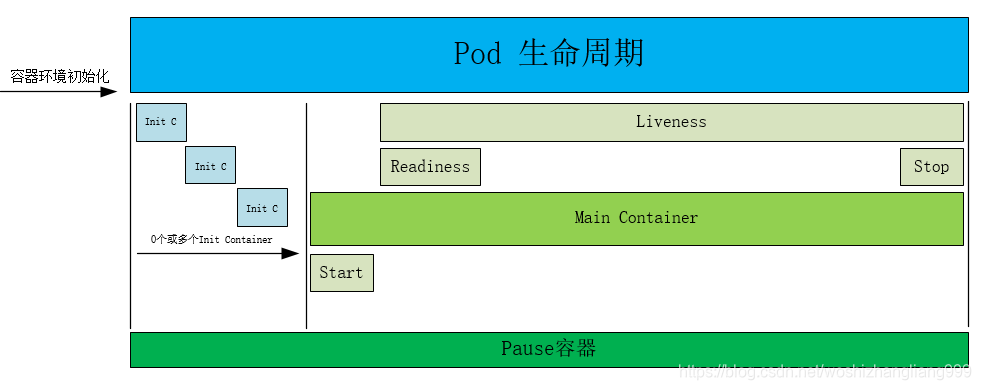
先从仓库拉取镜像------>然后再运行init容器安装一些应用容器中不存在的东西,如实用工具或个性化代码等。------> 之后运行应用容器使用启动探针(StartupProbe)判断容器服务是否准备,并禁用就绪和存活探针,直到启动探针检查完成,并只执行一次后续不在使用,之后使用就绪探针(readinessProbe)判断服务是否准备好,没好直接在所有的server上去除该pod的ip,不会杀死容器。用存活探针(livenessProbe)判断容器是否运行,没运行直接杀死容器重新运行一个新的容器,但pod不会杀死,杀死的是pod里面的容器
1.init 容器
bash
#init 容器的核心是:主容器要等它执行完、成功退出,才能启动!

[root@master pod]# cp 1test.yml  init.yml
[root@master pod]# vim init.yml
apiVersion: v1
kind: Pod
metadata:
  labels:
    run: lee1
  name: lee1
spec:
  initContainers:
  - name: init-myservice
    image: busybox
    command: ["sh","-c","until test -e /testfile;do echo wating for myservice; sleep 2;done"]
  containers:
  - image: myapp:v1
    name: myappv1

[root@master pod]# kubectl apply -f init.yml
pod/lee1 created

[root@master pod]# watch -n 1 kubectl get pods		#监控命令
NAME   READY   STATUS     RESTARTS   AGE
lee1   0/1     Init:0/1   0          3s


[root@master pod]# kubectl exec -it pods/lee1 -c init-myservice -- /bin/sh
/ #
/ #
[root@master pod]# kubectl exec -it pods/lee1 -c init-myservice -- /bin/sh
/ #
/ # touch  /testfile   #执行完指定的命令之后才启动容器
/ # command terminated with exit code 137
[root@master pod]# kubectl get pods
NAME   READY   STATUS    RESTARTS   AGE
lee1   1/1     Running   0          2m32s
2.livenessprobe(存活探针)
bash
#创建一个 Deployment(无状态应用控制器,,用来管理 Pod,pod的标识),名字叫 webcluster
#replicas 1(创建pod数量一个)
#--dry-run=client 只模拟,不执行

[root@master pod]# kubectl create deployment webcluster --image myapp:v1 --replicas 1 --
[root@master pod]# kubectl create deployment webcluster --image myapp:v1 --replicas 1 --dry-run=client -o yaml > liveness.yml  #"帮我生成一个 YAML 文件,不真正创建资源"


[root@master pod]# kubectl expose deployment webcluster --port 80 --target-port 80  --dry-run=client -o yaml >> liveness.yml
[root@master ~]# vim liveness.yml

apiVersion: apps/v1
kind: Deployment
metadata:
  labels:
    app: webcluster
  name: webcluster
spec:
  replicas: 1
  selector:
    matchLabels:
      app: webcluster
  template:
    metadata:
      labels:
        app: webcluster
    spec:
      containers:
      - image: myapp:v1
        name: myapp
        livenessProbe:
          exec:
            command:
            - /bin/bash
            - -c
            - killall -0 nginx
---
apiVersion: v1
kind: Service
metadata:
  labels:
    app: webcluster
  name: webcluster
spec:
  ports:
  - port: 80
    protocol: TCP
    targetPort: 80
  selector:
    app: webcluster


#删除由liveness。yml创建的资源
[root@master pod]# kubectl delete -f  liveness.yml
deployment.apps "webcluster" deleted from default namespace
Error from server (NotFound): error when deleting "liveness.yml": services "webcluster" not found

[root@master pod]# kubectl apply -f liveness.yml
deployment.apps/webcluster created
service/webcluster created

#测试liveness
[root@master pod]# watch -n 1 "kubectl get pods  ;kubectl describe svc webcluster | tail -n 10"
NAME                          READY   STATUS    RESTARTS     AGE
webcluster-584fddd575-4ttz9   1/1     Running   3 (2s ago)   92s
IP Family Policy:         SingleStack
IP Families:              IPv4
IP:                       10.105.47.234
IPs:                      10.105.47.234
Port:                     <unset>  80/TCP
TargetPort:               80/TCP
Endpoints:                10.244.2.36:80
Session Affinity:         Non.e
Internal Traffic Policy:  Cluster
Events:                   <none>

[root@master pod]# kubectl exec -it pods/webcluster-7fd94cc55b-pgdx6  -c myapp -- /bin/sh
/ # nginx -s stop
2026/03/29 08:50:02 [notice] 59#59: signal process started
/ # command terminated with exit code 137
3.ReadinessProbe( 就绪探针)
bash
[root@master pod]# cp liveness.yml ReadinessProbe.yml
[root@master pod]# vim ReadinessProbe.yml
apiVersion: apps/v1
kind: Deployment
metadata:
  labels:
    app: webcluster
  name: webcluster
spec:
  replicas: 1
  selector:
    matchLabels:
      app: webcluster
  template:
    metadata:
      labels:
        app: webcluster
    spec:
      containers:
      - image: myapp:v1
        name: myapp
        readinessProbe:
          httpGet:
            path: /test.html
            port: 80
          initialDelaySeconds: 1
          periodSeconds: 3
          timeoutSeconds: 1


        #initialDelaySeconds: 1		#容器启动后要等待多少秒后就探针开始工作,默认是 0
        #periodSeconds: 1			#执行探测的时间间隔,默认为 10s
        #timeoutSeconds: 1			#探针执行检测请求后,等待响应的超时时间,默认为 1s
        #如果有/test.html这个发布目录,就启动容器,否者就每间隔3秒查看一次,直到出现它然后再启动容器,期间不会删除容器

---
apiVersion: v1
kind: Service
metadata:
  labels:
    app: webcluster
  name: webcluster
spec:
  ports:
  - port: 80
    protocol: TCP
    targetPort: 80
  selector:
    app: webcluster


[root@master pod]# kubectl apply -f ReadinessProbe.yml
deployment.apps/webcluster configured
service/webcluster unchanged

#监控
[root@master pod]# watch -n 1 "kubectl get pods  ;kubectl describe svc webcluster | tail -n 10"
6

NAME                          READY   STATUS    RESTARTS   AGE
webcluster-6bc85dfc84-zk4mn   0/1     Running   0          7s
IP Family Policy:         SingleStack
IP Families:              IPv4
IP:                       10.107.142.60
IPs:                      10.107.142.60
Port:                     <unset>  80/TCP
TargetPort:               80/TCP
Endpoints:
Session Affinity:         None
Internal Traffic Policy:  Cluster
Events:                   <none>


#查看上方监控变化
[root@master pod]# kubectl exec -it pods/webcluster-6bc85dfc84-zk4mn   -c myapp -- /bin/sh
/ # echo timinglee > /usr/share/nginx/html/test.html
/ # rm -fr /usr/share/nginx/html/test.html
/ # echo timinglee > /usr/share/nginx/html/test.html
/ #