在蓝牙技术的应用场景中,从无线耳机传输音频、智能手表同步健康数据,到 IoT 设备控制家居,数据传输的安全性至关重要。蓝牙安全机制主要解决以下问题:
身份验证:确保连接的是可信设备,防止中间人攻击
数据加密:保护传输中的数据不被窃听
访问控制:限制非授权设备的访问
目录
[六、经典蓝牙与 BLE 配对差异](#六、经典蓝牙与 BLE 配对差异)
在深入源码之前,必须明确两个核心概念的区别:
|-----------------|--------------|-----------|-----------|
| 概念 | 定义 | 过程 | 结果 |
| 配对(Pairing) | 设备间建立信任关系的过程 | 交换密钥、验证身份 | 生成短期/长期密钥 |
| 绑定(Bonding) | 将配对信息持久化存储 | 存储密钥到本地 | 下次连接自动认证 |
关键区别:
-
配对是一次性的认证过程
-
绑定是将配对结果保存到持久化存储
-
未绑定的设备断电后需要重新配对
蓝牙安全发展历程:
|---------------|-----------------------|------------|
| 版本 | 核心特性 | 安全等级 |
| Bluetooth 2.0 | PIN 码配对 | 较低(4-16 位) |
| Bluetooth 2.1 | SSP(安全简单配对) | 较高(128 位) |
| Bluetooth 4.0 | LE Secure Connections | BLE 专用 |
| Bluetooth 4.2 | LE Secure Connections | 支持 MITM 保护 |
一、安全机制架构总览
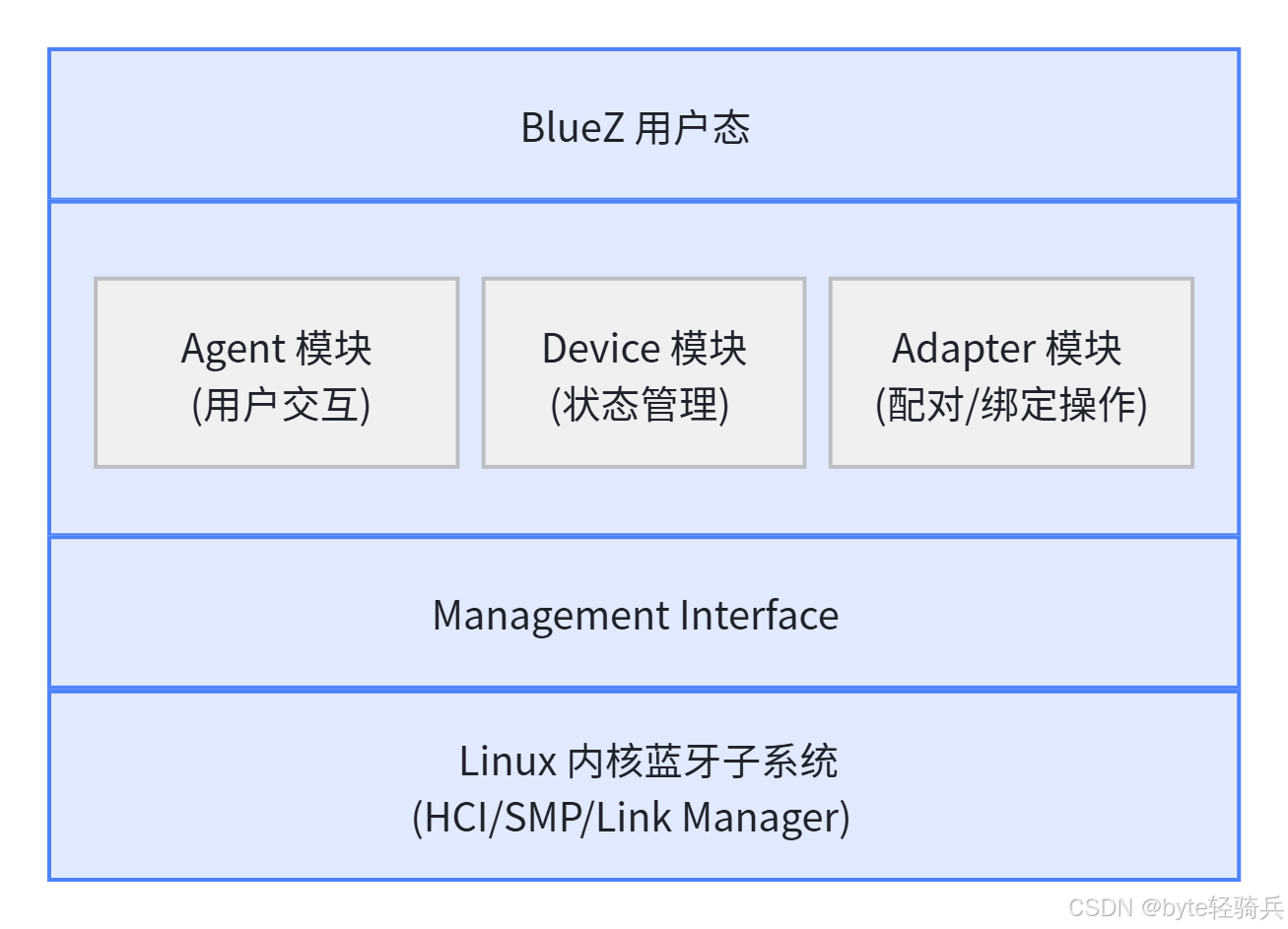
1.1 BlueZ 安全模块架构
BlueZ 的安全机制涉及多个核心模块:
1.2 核心数据结构
1.2.1 绑定请求结构
cpp
// src/device.c - 绑定请求结构
struct bonding_req {
    DBusMessage *msg;              /* DBus 请求消息 */
    guint listener_id;             /* 监听器 ID */
    struct btd_device *device;     /* 目标设备 */
    uint8_t bdaddr_type;          /* 地址类型 */
    struct agent *agent;           /* 认证 Agent */
    struct btd_adapter_pin_cb_iter *cb_iter;  /* 回调迭代器 */
    uint8_t status;                /* 绑定状态 */
    guint retry_timer;            /* 重试定时器 */
    struct timespec attempt_start_time;  /* 开始时间 */
    long last_attempt_duration_ms; /* 上次尝试耗时 */
};
1.2.2 设备安全状态
cpp
// src/device.c - 承载状态结构
struct bearer_state {
    bool connected;     /* 已连接 */
    bool paired;        /* 已配对 */
    bool bonded;        /* 已绑定 */
    bool connecting;    /* 连接中 */
    bool disconnecting; /* 断开中 */
    bool pairing;       /* 配对中 */
    bool svc_resolved;  /* 服务已解析 */
    bool autorized;     /* 已授权 */
};

// 设备结构中的安全状态
struct btd_device {
    // ...
    struct bearer_state bredr_state;  /* BR/EDR 安全状态 */
    struct bearer_state le_state;     /* BLE 安全状态 */
    struct bonding_req *bonding;      /* 当前绑定请求 */
    struct authentication_req *authr; /* 当前认证请求 */
    // ...
};
二、配对流程核心解析
2.1 配对触发入口
2.1.1 DBus 接口触发
cpp
// src/device.c - Pair 方法处理
static DBusMessage *pair_device(DBusConnection *conn,
                                DBusMessage *msg, void *user_data)
{
    struct btd_device *device = user_data;
    struct btd_adapter *adapter = device_get_adapter(device);
    int err;

    // 检查设备状态
    if (device->bonding)
        return btd_error_already_exists(msg);

    // 启动配对流程
    err = btd_adapter_create_bonding(adapter, device, msg);
    if (err < 0)
        return btd_error_failed(msg, err);

    device->pairing = TRUE;

    return NULL;
}
2.1.2 适配器 绑定创建
cpp
// src/adapter.c - 创建绑定请求
int adapter_create_bonding(struct btd_adapter *adapter,
                          const bdaddr_t *bdaddr,
                          uint8_t addr_type, uint8_t io_cap)
{
    // 暂停发现流程
    suspend_discovery(adapter);

    // 开始绑定尝试
    return adapter_bonding_attempt(adapter, bdaddr, addr_type, io_cap);
}
2.2 配对命令下发
2.2.1 发送 Pair Device 命令
cpp
// src/adapter.c - 发送配对命令
int adapter_bonding_attempt(struct btd_adapter *adapter,
                           const bdaddr_t *bdaddr,
                           uint8_t addr_type, uint8_t io_cap)
{
    struct mgmt_cp_pair_device cp;
    struct pair_device_data *data;
    unsigned int id;

    // 准备命令参数
    memset(&cp, 0, sizeof(cp));
    bacpy(&cp.addr.bdaddr, bdaddr);
    cp.addr.type = addr_type;
    cp.io_cap = io_cap;  /* 输入输出能力 */

    // 创建回调数据
    data = g_new0(struct pair_device_data, 1);
    data->adapter = adapter;
    bacpy(&data->bdaddr, bdaddr);
    data->addr_type = addr_type;

    // 通过 Management Interface 发送命令
    id = mgmt_send_timeout(adapter->mgmt, MGMT_OP_PAIR_DEVICE,
                adapter->dev_id, sizeof(cp), &cp,
                pair_device_complete, data,
                free_pair_device_data, BONDING_TIMEOUT);
    if (id == 0) {
        btd_error(adapter->dev_id, "Failed to pair for hci%u",
                            addr, adapter->dev_id);
        free_pair_device_data(data);
        return -EIO;
    }

    return 0;
}
2.2.2 IO 能力参数说明
cpp
// 输入输出能力 (IO Capability)
#define BT_IO_CAP_OUT    0x01  /* 仅输出 (如: 耳机) */
#define BT_IO_CAP_IN    0x02  /* 仅输入 (如: 键盘) */
#define BT_IO_CAP_IO    0x03  /* 输入输出 (如: 手机) */
#define BT_IO_CAP_NONE  0x04  /* 无 (如: 传感器) */
IO 能力决定配对方式:
|-----------------|-----------------|----------|
| 本端能力 | 对端能力 | 配对方式 |
| DisplayYesNo | DisplayYesNo | 数字比较 |
| KeyboardDisplay | DisplayYesNo | 键盘输入 |
| NoInputNoOutput | NoInputNoOutput | 无安全 |
| KeyboardOnly | KeyboardOnly | 密码输入 |
2.3 配对响应处理
2.3.1 配对完成回调
cpp
// src/adapter.c - 配对完成回调
static void pair_device_complete(uint8_t status, uint16_t length,
                    const void *param, void *user_data)
{
    const struct mgmt_rp_pair_device *rp = param;
    struct pair_device_data *data = user_data;
    struct btd_adapter *adapter = data->adapter;

    DBG("%s (0x%02x)", mgmt_errstr(status), status);

    // 处理内核 Bug:命令状态异常
    if (status != MGMT_STATUS_SUCCESS && length < sizeof(*rp)) {
        btd_error(adapter->dev_id, "Pair device failed: %s (0x%02x)",
                        mgmt_errstr(status), status);
        bonding_attempt_complete(adapter, &data->bdaddr,
                            data->addr_type, status);
        return;
    }

    // 正常完成
    bonding_attempt_complete(adapter, &rp->addr.bdaddr,
                            rp->addr.type, status);
}
2.3.2 绑定尝试完成
cpp
// src/adapter.c - 绑定尝试完成
static void bonding_attempt_complete(struct btd_adapter *adapter,
                    const bdaddr_t *bdaddr, uint8_t addr_type,
                    uint8_t status)
{
    struct btd_device *device;

    // 状态为 0 表示成功
    if (status == 0)
        device = btd_adapter_get_device(adapter, bdaddr, addr_type);
    else
        device = btd_adapter_find_device(adapter, bdaddr, addr_type);

    // 检查是否需要重试
    if (status != 0 && device && device_is_retrying(device))
        return;

    // 完成绑定流程
    bonding_complete(adapter, bdaddr, addr_type, status);
}
2.3.3 绑定完成处理
cpp
// src/adapter.c - 绑定完成
static void bonding_complete(struct btd_adapter *adapter,
                    const bdaddr_t *bdaddr, uint8_t addr_type,
                    uint8_t status)
{
    struct btd_device *device;

    if (status == 0)
        device = btd_adapter_get_device(adapter, bdaddr, addr_type);
    else
        device = btd_adapter_find_device(adapter, bdaddr, addr_type);

    if (device != NULL)
        device_bonding_complete(device, addr_type, status);

    // 恢复发现流程
    resume_discovery(adapter);

    // 检查 OOB 绑定完成
    check_oob_bonding_complete(adapter, bdaddr, status);
}
三、认证与密钥交互
3.1 密码请求处理
3.1.1 PIN 码/密码请求
cpp
// src/adapter.c - PIN 码请求事件处理
static void user_passkey_request_callback(uint16_t index, uint16_t length,
                    const void *param, void *user_data)
{
    const struct mgmt_ev_user_passkey_request *ev = param;
    struct btd_adapter *adapter = user_data;
    struct btd_device *device;
    int err;

    // 查找设备
    device = btd_adapter_get_device(adapter, &ev->addr.bdaddr, ev->addr.type);
    if (!device)
        return;

    // 请求用户输入密码
    err = device_request_passkey(device, ev->addr.type);
    if (err < 0) {
        btd_adapter_passkey_reply(adapter, &ev->addr.bdaddr,
                    ev->addr.type, INVALID_PASSKEY);
    }
}
3.1.2 数字比较确认
cpp
// src/adapter.c - 数字比较事件处理
static void user_confirm_request_callback(uint16_t index, uint16_t length,
                    const void *param, void *user_data)
{
    const struct mgmt_ev_user_confirm_request *ev = param;
    struct btd_adapter *adapter = user_data;
    struct btd_device *device;
    int err;

    device = btd_adapter_get_device(adapter, &ev->addr.bdaddr, ev->addr.type);
    if (!device)
        return;

    // 请求用户确认(显示 6 位数字)
    err = device_confirm_passkey(device, ev->addr.type,
                btohl(ev->value), ev->confirm_hint);
    if (err < 0) {
        btd_adapter_confirm_reply(adapter, &ev->addr.bdaddr,
                    ev->addr.type, FALSE);
    }
}
3.2 密钥通知处理
3.2.1 密码输入通知
cpp
// src/adapter.c - 密码输入事件
static void user_passkey_notify_callback(uint16_t index, uint16_t length,
                    const void *param, void *user_data)
{
    const struct mgmt_ev_passkey_notify *ev = param;
    struct btd_adapter *adapter = user_data;
    uint32_t passkey;

    // 获取密码值
    passkey = btohl(ev->passkey);

    DBG("passkey %06u entered %u", passkey, ev->entered);

    // 通知用户密码(用于显示)
    if (!ev->entered)
        device_notify_passkey(device, adapter->bdaddr_type,
                    passkey, FALSE);  /* 显示密码给用户 */
}
四、密钥生成与存储
4.1 经典蓝牙密钥(Link Key)
4.1.1 新链路密钥回调
cpp
// src/adapter.c - 新链路密钥事件
static void new_link_key_callback(uint16_t index, uint16_t length,
                    const void *param, void *user_data)
{
    const struct mgmt_ev_new_link_key *ev = param;
    const struct mgmt_addr_info *addr = &ev->key.addr;
    struct btd_adapter *adapter = user_data;
    struct btd_device *device;

    if (length < sizeof(*ev)) {
        btd_error(adapter->dev_id, "Too small new link key event");
        return;
    }

    // 验证 PIN 长度
    if (ev->key.pin_len > 16) {
        btd_error(adapter->dev_id,
            "Invalid PIN length (%u) in new_key event", ev->key.pin_len);
        return;
    }

    device = btd_adapter_get_device(adapter, &addr->bdaddr, addr->type);
    if (!device)
        return;

    // 存储密钥(仅当 store_hint 为真时)
    if (ev->store_hint) {
        const struct mgmt_link_key_info *key = &ev->key;

        store_link_key(adapter, device, key->val, key->type, key->pin_len);
        device_set_bonded(device, BDADDR_BREDR);
    }

    bonding_complete(adapter, &addr->bdaddr, addr->type, 0);
}
4.1.2 链路密钥存储
cpp
// src/adapter.c - 存储链路密钥
static void store_link_key(struct btd_adapter *adapter,
                struct btd_device *device, const uint8_t *key,
                uint8_t type, uint8_t pin_length)
{
    char device_addr[18];
    char filename[PATH_MAX];
    GKeyFile *key_file;
    char key_str[33];
    int i;

    // 获取设备地址字符串
    ba2str(device_get_address(device), device_addr);

    // 构造存储路径
    snprintf(filename, PATH_MAX, STORAGEDIR "/%s/%s/info",
            btd_adapter_get_storage_dir(adapter), device_addr);

    // 创建文件(权限 0600)
    create_file(filename, 0600);

    // 加载或创建键文件
    key_file = g_key_file_new();
    if (!g_key_file_load_from_file(key_file, filename, 0, &gerr)) {
        g_key_file_free(key_file);
        return;
    }

    // 转换密钥为十六进制字符串
    for (i = 0; i < 16; i++)
        sprintf(key_str + (i * 2), "%2.2X", key[i]);

    // 写入密钥信息
    g_key_file_set_string(key_file, "LinkKey", "Key", key_str);
    g_key_file_set_integer(key_file, "LinkKey", "Type", type);
    g_key_file_set_integer(key_file, "LinkKey", "PINLength", pin_length);

    // 保存到文件
    str = g_key_file_to_data(key_file, &length, NULL);
    g_file_set_contents(filename, str, length, NULL);
    g_free(str);

    g_key_file_free(key_file);
}
4.2 BLE 长期密钥(LTK)
4.2.1 LTK 存储
cpp
// src/adapter.c - 存储 BLE LTK
static void store_longtermkey(struct btd_adapter *adapter,
                const bdaddr_t *peer, uint8_t bdaddr_type,
                const unsigned char *key, uint8_t central,
                uint8_t authenticated, uint8_t enc_size,
                uint16_t ediv, uint64_t rand)
{
    if (central != 0x00 && central != 0x01) {
        error("Unsupported LTK type %u", central);
        return;
    }

    if (central) {
        // Central 角色
        store_ltk_group(adapter, peer, bdaddr_type, key,
                "LongTermKey", authenticated, enc_size, ediv, rand);
    } else {
        // Peripheral 角色
        store_ltk_group(adapter, peer, bdaddr_type, key,
                "PeripheralLongTermKey", authenticated,
                enc_size, ediv, rand);
    }
}
4.2.2 LTK 分组存储
cpp
// src/adapter.c - LTK 分组存储
static void store_ltk_group(struct btd_adapter *adapter,
                const bdaddr_t *peer, uint8_t bdaddr_type,
                const unsigned char *key, const char *group,
                uint8_t authenticated, uint8_t enc_size,
                uint16_t ediv, uint64_t rand)
{
    char device_addr[18];
    char filename[PATH_MAX];
    GKeyFile *key_file;
    char key_str[33];
    int i;

    ba2str(peer, device_addr);

    // 构造存储路径
    snprintf(filename, PATH_MAX, STORAGEDIR "/%s/%s/info",
            btd_adapter_get_storage_dir(adapter), device_addr);

    key_file = g_key_file_new();
    g_key_file_load_from_file(key_file, filename, 0, NULL);

    // 转换密钥
    for (i = 0; i < 16; i++)
        sprintf(key_str + (i * 2), "%2.2X", key[i]);

    // 存储密钥信息
    g_key_file_set_string(key_file, group, "Key", key_str);
    g_key_file_set_integer(key_file, group, "Authenticated", authenticated);
    g_key_file_set_integer(key_file, group, "EncSize", enc_size);
    g_key_file_set_integer(key_file, group, "EDiv", ediv);
    g_key_file_set_uint64(key_file, group, "Rand", rand);

    // 保存
    create_file(filename, 0600);
    str = g_key_file_to_data(key_file, &length, NULL);
    g_file_set_contents(filename, str, length, NULL);
    g_free(str);

    g_key_file_free(key_file);
}
4.3 存储文件结构
4.3.1 经典蓝牙存储示例
cpp
/var/lib/bluetooth/{adapter_addr}/{device_addr}/info
cpp
[LinkKey]
Key=010203040506070809101112131415
Type=4
PINLength=16
4.3.2 BLE 存储示例
cpp
[LongTermKey]
Key=010203040506070809101112131415
Authenticated=1
EncSize=16
EDiv=1234
Rand=1234567890

[IdentityResolvingKey]
Key=AABBCCDDEEFF00112233445566778899

[SignatureResolvingKey]
Key=112233445566778899AABBCCDDEEFF00
Counter=1
五、设备绑定完成处理
5.1 绑定完成回调
cpp
// src/device.c - 设备绑定完成处理
void device_bonding_complete(struct btd_device *device, uint8_t bdaddr_type,
                            uint8_t status)
{
    struct bonding_req *bonding = device->bonding;
    struct authentication_req *auth = device->authr;
    struct bearer_state *state = get_state(device, bdaddr_type);

    DBG("bonding %p status 0x%02x", bonding, status);

    // 取消未完成的认证
    if (auth && auth->agent)
        agent_cancel(auth->agent);

    // 处理失败状态
    if (status) {
        device_cancel_authentication(device, TRUE);

        // 设备回到临时状态
        if (!device_is_paired(device, bdaddr_type) &&
                !device_is_trusted(device))
            btd_device_set_temporary(device, true);

        device_bonding_failed(device, status);
        return;
    }

    // 成功:清理认证请求
    device_auth_req_free(device);

    // 设置配对状态
    if (state->paired)
        return;  // 已配对,无需重复操作

    device_set_paired(device, bdaddr_type);

    // 如果服务已解析,直接回复
    if (state->svc_resolved && bonding) {
        store_gatt_db(device);  // 存储 GATT 数据库
        g_dbus_send_reply(dbus_conn, bonding->msg, DBUS_TYPE_INVALID);
        bonding_request_free(bonding);
        return;
    }

    // 启动服务发现
    if (bonding) {
        DBG("Proceeding with service discovery");

        // 移除发现定时器
        if (device->discov_timer) {
            timeout_remove(device->discov_timer);
            device->discov_timer = 0;
        }

        // 根据地址类型选择服务发现方式
        if (bdaddr_type == BDADDR_BREDR)
            device_browse_sdp(device, bonding->msg);   // SDP
        else
            device_browse_gatt(device, bonding->msg); // GATT

        bonding_request_free(bonding);
    } else if (!state->svc_resolved) {
        // 被动发现模式
        if (!device->browse && !device->discov_timer &&
                btd_opts.reverse_discovery) {
            // 启动延迟服务发现
            device->discov_timer = timeout_add(5000,
                        delayed_discovery_cb, device, NULL);
        }
    }
}
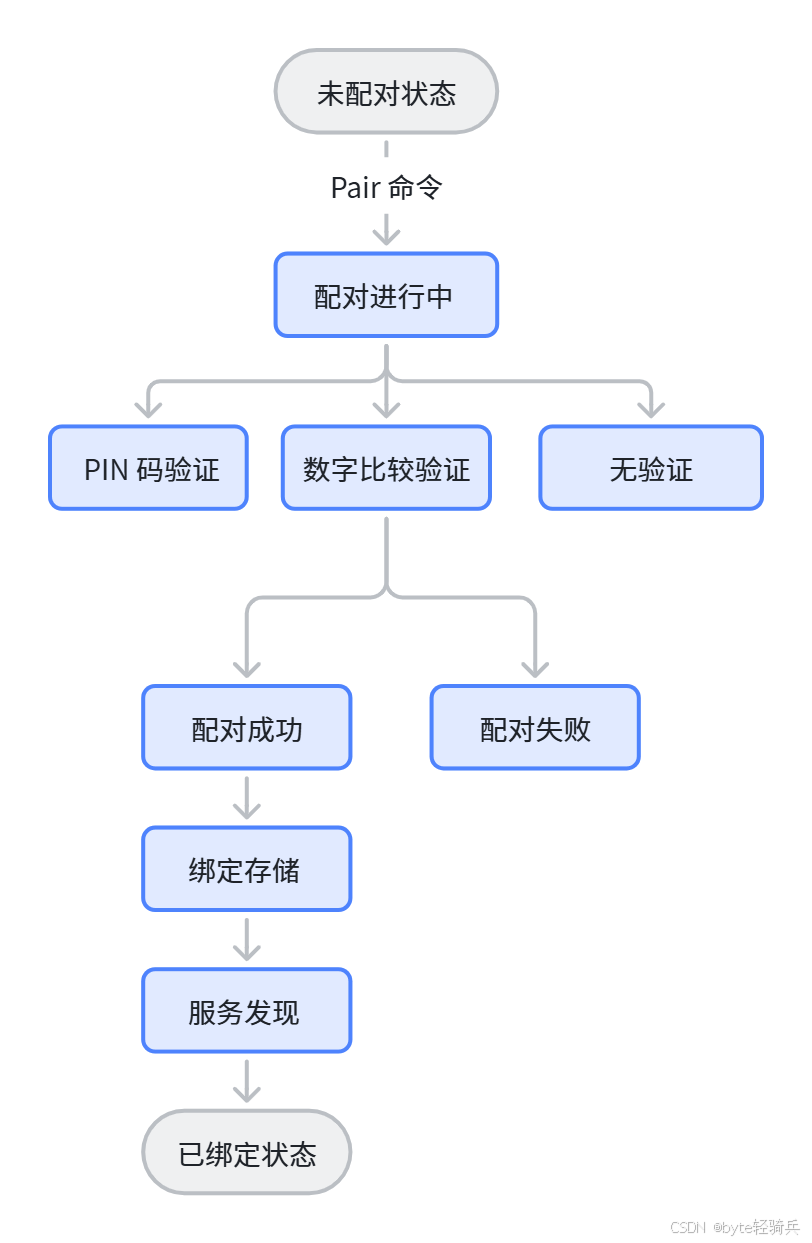
5.2 状态机流转
六、经典蓝牙与 BLE 配对差异
6.1 核心差异对比
|--------|-------------------|-----------------------|
| 维度 | 经典蓝牙 (BR/EDR) | 低功耗蓝牙 (BLE) |
| 协议 | SSP(安全简单配对) | LE Secure Connections |
| 密钥类型 | Link Key | LTK(长期密钥) |
| 存储位置 | [LinkKey] 组 | [LongTermKey] 组 |
| 认证方式 | PIN 码、数字比较 | 数字比较、Just Works |
| 连接模式 | 主从模式 | Central-Peripheral |
6.2 密钥结构差异
6.2.1 BR/EDR Link Key
cpp
// src/adapter.c - Link Key 类型
#define LINK_KEY_TYPE_COMBINATION    0x00  // 组合密钥
#define LINK_KEY_TYPE_LOCAL_UNIT     0x01  // 本地单元密钥
#define LINK_KEY_TYPE_REMOTE_UNIT    0x02  // 远端单元密钥
#define LINK_KEY_TYPE_DEBUG          0x03  // 调试密钥
#define LINK_KEY_TYPE_PAIRATION      0x04  // 配对密钥
6.2.2 BLE LTK 参数
cpp
// src/adapter.c - LTK 存储参数
struct ltk_params {
    uint8_t key[16];        // 密钥值
    uint8_t authenticated;  // 是否认证
    uint8_t enc_size;      // 加密大小
    uint16_t ediv;          // 加密分隔符
    uint64_t rand;          // 随机数
};
6.3 配对流程差异
6.3.1 BR/EDR 配对
cpp
1. 连接建立
2. 发送 Pair Device 命令
3. 协商 IO 能力
4. 验证方式:
   - 键盘输入 PIN 码
   - 显示数字进行比较
5. 生成 Link Key
6. 存储密钥
7. 建立加密链路
6.3.2 BLE 配对
cpp
1. 连接建立
2. 发送 Pair Device 命令
3. 协商 LE 安全级别
4. 验证方式:
   - Just Works(无需验证)
   - 数字比较(6 位数字)
   - 密码输入(从设备输入)
5. 生成 LTK + IRK + CSRK
6. 存储密钥
7. 建立加密链路
七、常见问题与解决方案
7.1 配对失败问题
|---------|-------------|--------------|
| 问题 | 原因 | 解决方案 |
| PIN 码错误 | 用户输入不匹配 | 重新配对,确保输入正确 |
| 超时无响应 | 对端设备未响应 | 检查设备是否在范围内 |
| 不支持 SSP | 设备不支持安全简单配对 | 使用传统 PIN 码方式 |
| 加密失败 | 密钥协商出错 | 重启设备后重试 |
7.2 绑定丢失问题
|-----------|---------|------------|
| 问题 | 原因 | 解决方案 |
| 重启后需要重新配对 | 密钥未持久化 | 检查存储目录权限 |
| 连接时提示未配对 | 密钥损坏 | 删除绑定信息重新配对 |
| 多设备切换问题 | IRK 不匹配 | 清空所有绑定重新配对 |
7.3 调试技巧
cpp
# 查看设备配对状态
bluetoothctl info AA:BB:CC:DD:EE:FF

# 查看已绑定设备列表
bt-device --list

# 启用详细日志
bluetoothd -d --verbose

# 查看存储的密钥文件
ls -la /var/lib/bluetooth/{adapter_addr}/

# 删除设备绑定
bt-device --remove AA:BB:CC:DD:EE:FF
八、核心函数索引
|-----------------------------------|---------------|----------------|
| 函数 | 文件 | 功能 |
| pair_device() | src/device.c | Pair DBus 方法处理 |
| adapter_create_bonding() | src/adapter.c | 创建绑定请求 |
| adapter_bonding_attempt() | src/adapter.c | 发送配对命令 |
| pair_device_complete() | src/adapter.c | 配对完成回调 |
| bonding_complete() | src/adapter.c | 绑定完成处理 |
| device_bonding_complete() | src/device.c | 设备绑定完成 |
| store_link_key() | src/adapter.c | 存储 BR/EDR 链路密钥 |
| store_longtermkey() | src/adapter.c | 存储 BLE LTK |
| store_ltk_group() | src/adapter.c | LTK 分组存储 |
| new_link_key_callback() | src/adapter.c | 新链路密钥事件 |
| user_passkey_request_callback() | src/adapter.c | PIN 码请求处理 |
| user_confirm_request_callback() | src/adapter.c | 数字比较处理 |
九、总结
蓝牙配对与绑定机制是一个涉及多模块协作的复杂过程:
- 协议层:
-
经典蓝牙使用 SSP(安全简单配对)
-
BLE 使用 LE Secure Connections
- 流程层:
-
配对触发:DBus 接口调用
-
命令下发:通过 Management Interface
-
交互验证:Agent 模块处理用户交互
-
密钥存储:持久化到文件系统
- 安全层:
-
密钥类型:Link Key(BR/EDR)、LTK(BLE)
-
存储路径:
/var/lib/bluetooth/{adapter}/{device}/info -
文件权限:0600(仅所有者可读写)
理解蓝牙安全机制不仅有助于解决配对故障,更能为开发安全的蓝牙应用奠定基础。在实际工程中,需根据应用场景选择合适的配对方式和安全等级。