STM32 学习笔记:OLED 调试工具与 Keil 在线调试
对应课程:
[4-1] OLED 调试工具课堂录音:
2026-08-30 18_06 记录 OLED&Keil调试_原文.docx老师 PPT:第 37~40 页
芯片/板卡:STM32F103C8T6 最小系统板
OLED:0.96 寸、128×64、四针 I²C 版本
开发方式:标准外设库、软件模拟 I²C、Keil + ST-Link 在线调试
整理日期:2026-08-30
本节边界:课堂目标是学会调用老师提供的 OLED 模块并认识 Keil 调试工具;OLED 控制器原理、完整驱动和 I²C 协议将在后续课程展开。
1. 老师的整条思路
单片机不像电脑那样天然拥有屏幕和控制台。如果程序中的变量、执行位置和寄存器状态完全不可见,出错后就很难定位。因此老师先介绍三种调试方式,再选择 OLED 作为之后课程常用的现场显示工具,最后演示 Keil 在线调试。
#mermaid-svg-DEPrLt1jYF6tiXH8{font-family:"trebuchet ms",verdana,arial,sans-serif;font-size:16px;fill:#333;}@keyframes edge-animation-frame{from{stroke-dashoffset:0;}}@keyframes dash{to{stroke-dashoffset:0;}}#mermaid-svg-DEPrLt1jYF6tiXH8 .edge-animation-slow{stroke-dasharray:9,5!important;stroke-dashoffset:900;animation:dash 50s linear infinite;stroke-linecap:round;}#mermaid-svg-DEPrLt1jYF6tiXH8 .edge-animation-fast{stroke-dasharray:9,5!important;stroke-dashoffset:900;animation:dash 20s linear infinite;stroke-linecap:round;}#mermaid-svg-DEPrLt1jYF6tiXH8 .error-icon{fill:#552222;}#mermaid-svg-DEPrLt1jYF6tiXH8 .error-text{fill:#552222;stroke:#552222;}#mermaid-svg-DEPrLt1jYF6tiXH8 .edge-thickness-normal{stroke-width:1px;}#mermaid-svg-DEPrLt1jYF6tiXH8 .edge-thickness-thick{stroke-width:3.5px;}#mermaid-svg-DEPrLt1jYF6tiXH8 .edge-pattern-solid{stroke-dasharray:0;}#mermaid-svg-DEPrLt1jYF6tiXH8 .edge-thickness-invisible{stroke-width:0;fill:none;}#mermaid-svg-DEPrLt1jYF6tiXH8 .edge-pattern-dashed{stroke-dasharray:3;}#mermaid-svg-DEPrLt1jYF6tiXH8 .edge-pattern-dotted{stroke-dasharray:2;}#mermaid-svg-DEPrLt1jYF6tiXH8 .marker{fill:#333333;stroke:#333333;}#mermaid-svg-DEPrLt1jYF6tiXH8 .marker.cross{stroke:#333333;}#mermaid-svg-DEPrLt1jYF6tiXH8 svg{font-family:"trebuchet ms",verdana,arial,sans-serif;font-size:16px;}#mermaid-svg-DEPrLt1jYF6tiXH8 p{margin:0;}#mermaid-svg-DEPrLt1jYF6tiXH8 .label{font-family:"trebuchet ms",verdana,arial,sans-serif;color:#333;}#mermaid-svg-DEPrLt1jYF6tiXH8 .cluster-label text{fill:#333;}#mermaid-svg-DEPrLt1jYF6tiXH8 .cluster-label span{color:#333;}#mermaid-svg-DEPrLt1jYF6tiXH8 .cluster-label span p{background-color:transparent;}#mermaid-svg-DEPrLt1jYF6tiXH8 .label text,#mermaid-svg-DEPrLt1jYF6tiXH8 span{fill:#333;color:#333;}#mermaid-svg-DEPrLt1jYF6tiXH8 .node rect,#mermaid-svg-DEPrLt1jYF6tiXH8 .node circle,#mermaid-svg-DEPrLt1jYF6tiXH8 .node ellipse,#mermaid-svg-DEPrLt1jYF6tiXH8 .node polygon,#mermaid-svg-DEPrLt1jYF6tiXH8 .node path{fill:#ECECFF;stroke:#9370DB;stroke-width:1px;}#mermaid-svg-DEPrLt1jYF6tiXH8 .rough-node .label text,#mermaid-svg-DEPrLt1jYF6tiXH8 .node .label text,#mermaid-svg-DEPrLt1jYF6tiXH8 .image-shape .label,#mermaid-svg-DEPrLt1jYF6tiXH8 .icon-shape .label{text-anchor:middle;}#mermaid-svg-DEPrLt1jYF6tiXH8 .node .katex path{fill:#000;stroke:#000;stroke-width:1px;}#mermaid-svg-DEPrLt1jYF6tiXH8 .rough-node .label,#mermaid-svg-DEPrLt1jYF6tiXH8 .node .label,#mermaid-svg-DEPrLt1jYF6tiXH8 .image-shape .label,#mermaid-svg-DEPrLt1jYF6tiXH8 .icon-shape .label{text-align:center;}#mermaid-svg-DEPrLt1jYF6tiXH8 .node.clickable{cursor:pointer;}#mermaid-svg-DEPrLt1jYF6tiXH8 .root .anchor path{fill:#333333!important;stroke-width:0;stroke:#333333;}#mermaid-svg-DEPrLt1jYF6tiXH8 .arrowheadPath{fill:#333333;}#mermaid-svg-DEPrLt1jYF6tiXH8 .edgePath .path{stroke:#333333;stroke-width:2.0px;}#mermaid-svg-DEPrLt1jYF6tiXH8 .flowchart-link{stroke:#333333;fill:none;}#mermaid-svg-DEPrLt1jYF6tiXH8 .edgeLabel{background-color:rgba(232,232,232, 0.8);text-align:center;}#mermaid-svg-DEPrLt1jYF6tiXH8 .edgeLabel p{background-color:rgba(232,232,232, 0.8);}#mermaid-svg-DEPrLt1jYF6tiXH8 .edgeLabel rect{opacity:0.5;background-color:rgba(232,232,232, 0.8);fill:rgba(232,232,232, 0.8);}#mermaid-svg-DEPrLt1jYF6tiXH8 .labelBkg{background-color:rgba(232, 232, 232, 0.5);}#mermaid-svg-DEPrLt1jYF6tiXH8 .cluster rect{fill:#ffffde;stroke:#aaaa33;stroke-width:1px;}#mermaid-svg-DEPrLt1jYF6tiXH8 .cluster text{fill:#333;}#mermaid-svg-DEPrLt1jYF6tiXH8 .cluster span{color:#333;}#mermaid-svg-DEPrLt1jYF6tiXH8 div.mermaidTooltip{position:absolute;text-align:center;max-width:200px;padding:2px;font-family:"trebuchet ms",verdana,arial,sans-serif;font-size:12px;background:hsl(80, 100%, 96.2745098039%);border:1px solid #aaaa33;border-radius:2px;pointer-events:none;z-index:100;}#mermaid-svg-DEPrLt1jYF6tiXH8 .flowchartTitleText{text-anchor:middle;font-size:18px;fill:#333;}#mermaid-svg-DEPrLt1jYF6tiXH8 rect.text{fill:none;stroke-width:0;}#mermaid-svg-DEPrLt1jYF6tiXH8 .icon-shape,#mermaid-svg-DEPrLt1jYF6tiXH8 .image-shape{background-color:rgba(232,232,232, 0.8);text-align:center;}#mermaid-svg-DEPrLt1jYF6tiXH8 .icon-shape p,#mermaid-svg-DEPrLt1jYF6tiXH8 .image-shape p{background-color:rgba(232,232,232, 0.8);padding:2px;}#mermaid-svg-DEPrLt1jYF6tiXH8 .icon-shape .label rect,#mermaid-svg-DEPrLt1jYF6tiXH8 .image-shape .label rect{opacity:0.5;background-color:rgba(232,232,232, 0.8);fill:rgba(232,232,232, 0.8);}#mermaid-svg-DEPrLt1jYF6tiXH8 .label-icon{display:inline-block;height:1em;overflow:visible;vertical-align:-0.125em;}#mermaid-svg-DEPrLt1jYF6tiXH8 .node .label-icon path{fill:currentColor;stroke:revert;stroke-width:revert;}#mermaid-svg-DEPrLt1jYF6tiXH8 :root{--mermaid-font-family:"trebuchet ms",verdana,arial,sans-serif;} 为什么需要调试输出
比较三种调试方式
认识 OLED 和接口
按接线图连接硬件
导入现成 OLED 驱动
调用显示函数
进入 Keil Debug
单步/断点/变量/寄存器
| 录音时间 | 课堂内容 |
|---|---|
00:07--01:25 |
本节目标、演示现象、为什么需要调试工具 |
01:25--03:18 |
串口、显示屏、Keil 三种调试方法 |
03:18--04:45 |
OLED 特点、规格和常见版本 |
04:45--06:46 |
四针/七针接口、坐标和驱动函数 |
06:46--09:58 |
接线、导入驱动、修改 SCL/SDA 引脚 |
09:58--12:16 |
字符、字符串和各种进制数字显示 |
12:16--17:16 |
Keil 在线调试:运行控制、断点、变量和寄存器 |
2. 三种常用调试方式
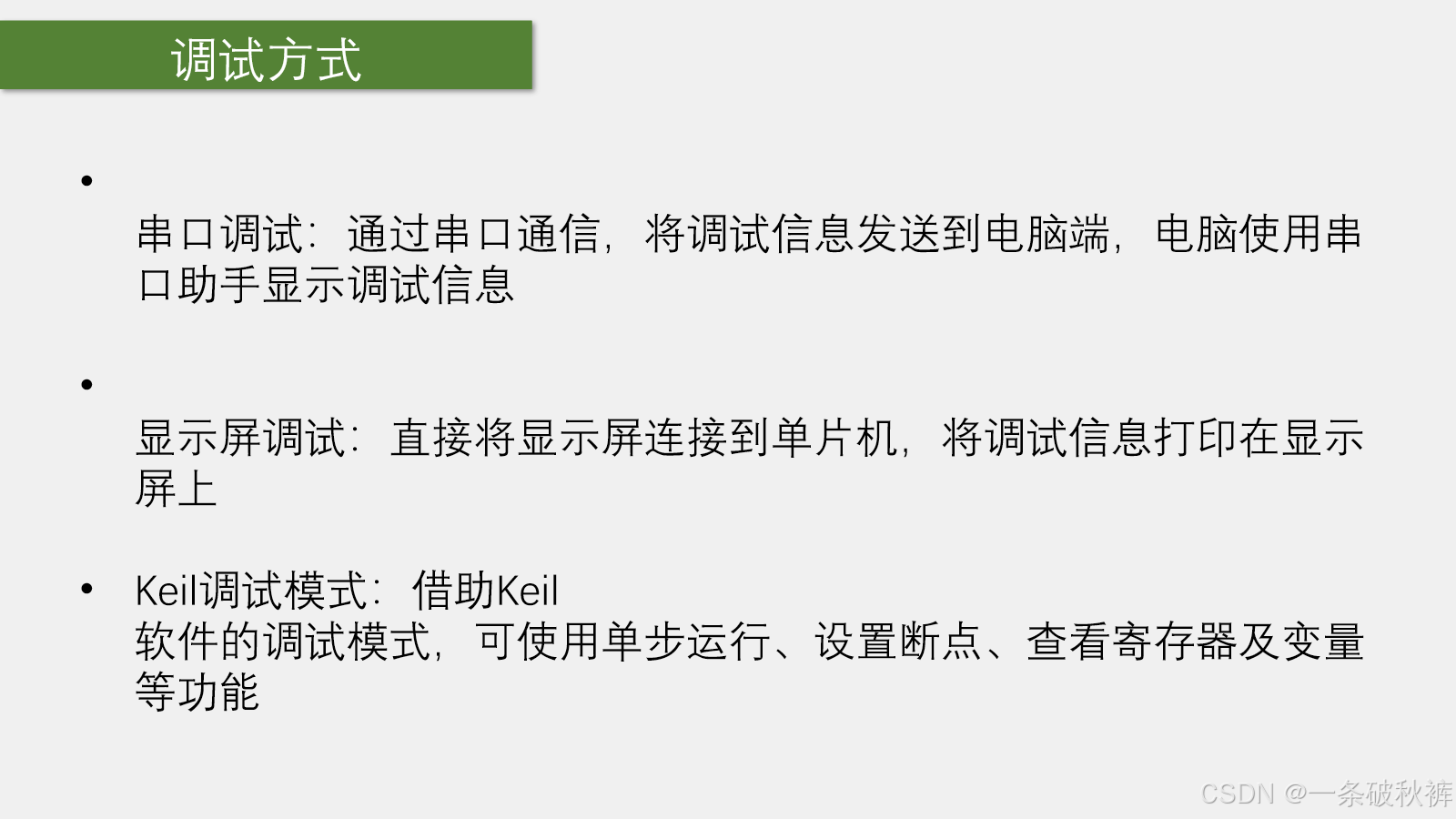
图 1 老师 PPT 第 37 页:串口调试、显示屏调试和 Keil 调试模式。
2.1 为什么"能观察"如此重要
调试的核心不是盯着代码猜,而是获取证据:
- 程序执行到哪里了?
- 某个
if条件是否成立? - 变量当前是什么值?
- GPIO、定时器等寄存器是否按预期配置?
- 程序是没有运行,还是硬件没有产生现象?
三种方法提供的观察窗口不同:
| 方法 | 观察位置 | 优点 | 局限 | 适合场景 |
|---|---|---|---|---|
| 串口调试 | 电脑串口助手 | 信息量大,可记录数据、画曲线 | 需要串口硬件与上位机 | 大量日志、长期采样、曲线分析 |
| OLED 调试 | 设备本机屏幕 | 脱离电脑、直接、可持续刷新 | 屏幕小,占用引脚和程序空间 | 现场显示少量关键变量 |
| Keil 在线调试 | Keil Debug 窗口 | 可单步、断点、看变量和寄存器 | 通常需要调试器;停机会改变实时行为 | 追踪执行路径、查配置错误 |
这三种方式不是互相替代,而是互补。常见组合是:
- OLED 显示运行时最重要的 2~5 个状态;
- 串口连续输出详细数据;
- Keil 在异常位置断住,检查当时的变量和寄存器。
2.2 没有调试工具时怎样缩小问题
老师还提到两种最基础的方法:
- 删减/二分定位:先注释部分程序,确认恢复正常后,再逐步加入代码,缩小故障范围;
- 对照法:找一份已验证的工程,对比接线、配置、执行顺序和现象。
这两种方法的本质也是"控制变量",避免一次面对整个工程。
3. OLED 是什么
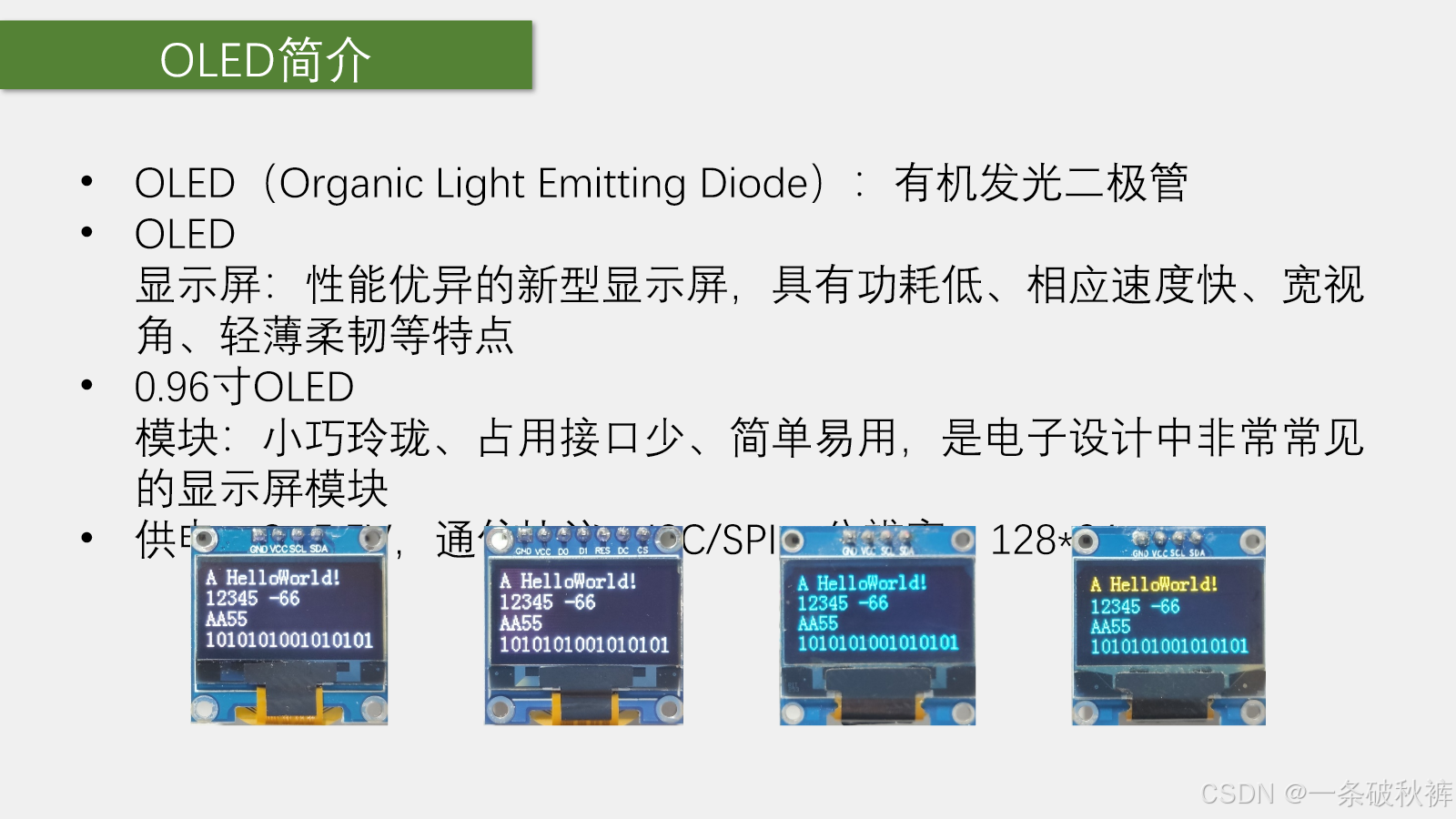
图 2 老师 PPT 第 38 页:0.96 寸 OLED 的特点、规格和不同显示颜色版本。
OLED 是 Organic Light Emitting Diode,中文为有机发光二极管。OLED 像素能够主动发光,不需要传统液晶屏那样的背光层,因此具有功耗低、响应快、视角宽、轻薄等特点。
本课程模块的关键参数:
| 项目 | 参数 |
|---|---|
| 屏幕尺寸 | 0.96 寸 |
| 分辨率 | 128×64 像素 |
| 供电 | 模块标称约 3~5.5 V;本工程使用 3.3 V |
| 通信版本 | 四针 I²C 或七针 SPI |
| 本节使用 | 四针 I²C 版本 |
| 字符坐标 | 4 行 × 16 列,每字符 8×16 像素 |
白色、蓝色和黄蓝双色主要是发光颜色不同。常见黄蓝屏通常是上方固定黄色、下方固定蓝色,并不是任意像素可自由切换颜色。
4. 四针 I²C 与七针 SPI 接口
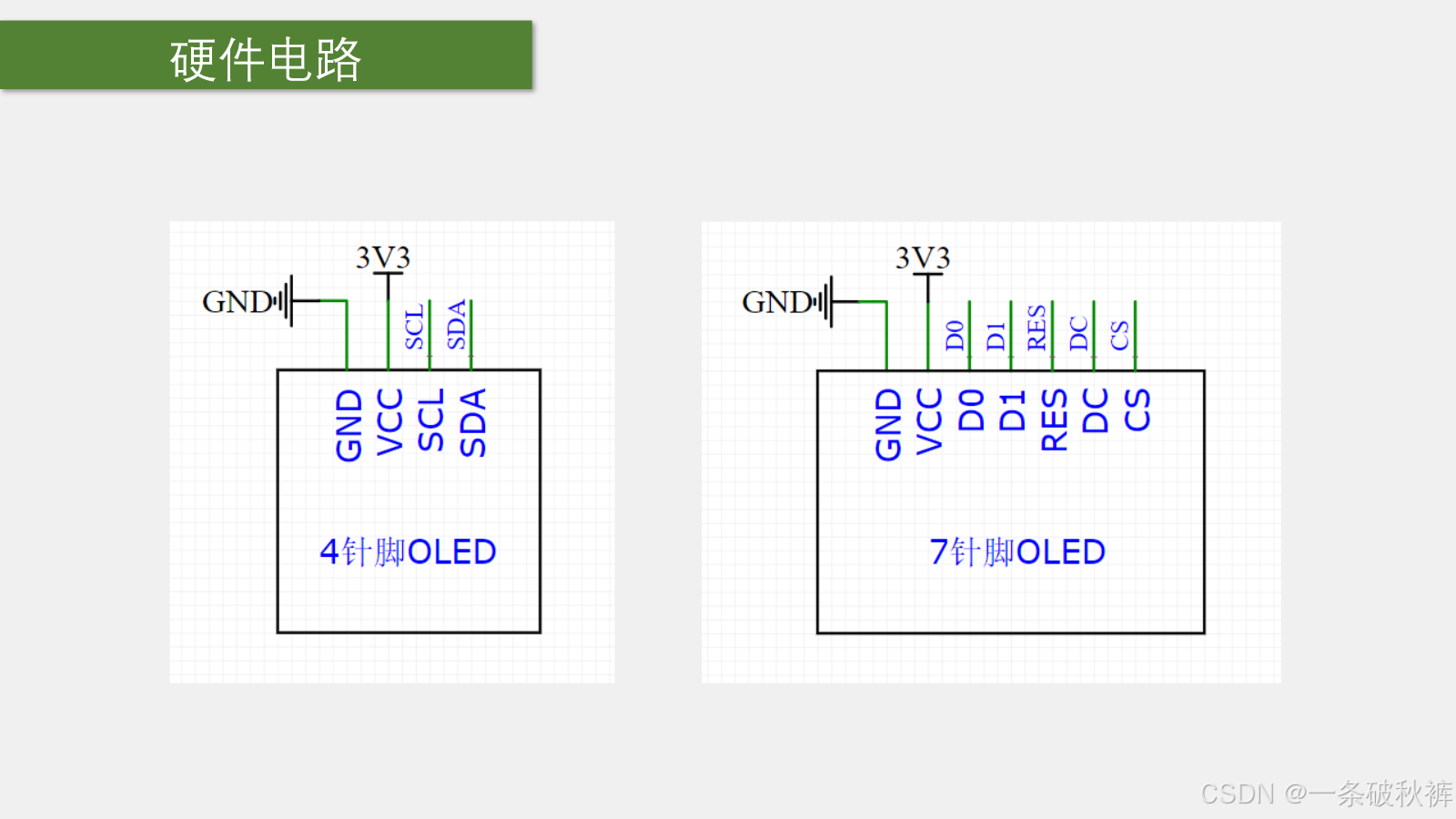
图 3 老师 PPT 第 39 页:四针 I²C OLED 与七针 SPI OLED 的接口。
4.1 四针 I²C 版本
| 引脚 | 含义 | 本工程连接 |
|---|---|---|
GND |
电源地 | GND |
VCC |
模块电源 | 3.3 V |
SCL |
串行时钟 | PB8 |
SDA |
串行数据 | PB9 |
课堂驱动使用 GPIO 软件模拟 I²C,因此 SCL/SDA 可以换到其他普通 GPIO;换引脚时,必须同时修改引脚宏和初始化代码。
4.2 七针 SPI 版本
除了 GND/VCC,通常还具有:
D0:SPI 时钟;D1:SPI 数据;RES:复位;DC:命令/数据选择;CS:片选。
四针驱动不能直接复制给七针模块使用,必须选择源码包中对应的版本。
4.3 软件模拟通信意味着什么
本工程没有调用 STM32 的硬件 I²C 外设,而是由普通 GPIO 按顺序改变 SCL/SDA 电平,模拟通信时序:
#mermaid-svg-ITcJy6ZQqORhKSDW{font-family:"trebuchet ms",verdana,arial,sans-serif;font-size:16px;fill:#333;}@keyframes edge-animation-frame{from{stroke-dashoffset:0;}}@keyframes dash{to{stroke-dashoffset:0;}}#mermaid-svg-ITcJy6ZQqORhKSDW .edge-animation-slow{stroke-dasharray:9,5!important;stroke-dashoffset:900;animation:dash 50s linear infinite;stroke-linecap:round;}#mermaid-svg-ITcJy6ZQqORhKSDW .edge-animation-fast{stroke-dasharray:9,5!important;stroke-dashoffset:900;animation:dash 20s linear infinite;stroke-linecap:round;}#mermaid-svg-ITcJy6ZQqORhKSDW .error-icon{fill:#552222;}#mermaid-svg-ITcJy6ZQqORhKSDW .error-text{fill:#552222;stroke:#552222;}#mermaid-svg-ITcJy6ZQqORhKSDW .edge-thickness-normal{stroke-width:1px;}#mermaid-svg-ITcJy6ZQqORhKSDW .edge-thickness-thick{stroke-width:3.5px;}#mermaid-svg-ITcJy6ZQqORhKSDW .edge-pattern-solid{stroke-dasharray:0;}#mermaid-svg-ITcJy6ZQqORhKSDW .edge-thickness-invisible{stroke-width:0;fill:none;}#mermaid-svg-ITcJy6ZQqORhKSDW .edge-pattern-dashed{stroke-dasharray:3;}#mermaid-svg-ITcJy6ZQqORhKSDW .edge-pattern-dotted{stroke-dasharray:2;}#mermaid-svg-ITcJy6ZQqORhKSDW .marker{fill:#333333;stroke:#333333;}#mermaid-svg-ITcJy6ZQqORhKSDW .marker.cross{stroke:#333333;}#mermaid-svg-ITcJy6ZQqORhKSDW svg{font-family:"trebuchet ms",verdana,arial,sans-serif;font-size:16px;}#mermaid-svg-ITcJy6ZQqORhKSDW p{margin:0;}#mermaid-svg-ITcJy6ZQqORhKSDW .label{font-family:"trebuchet ms",verdana,arial,sans-serif;color:#333;}#mermaid-svg-ITcJy6ZQqORhKSDW .cluster-label text{fill:#333;}#mermaid-svg-ITcJy6ZQqORhKSDW .cluster-label span{color:#333;}#mermaid-svg-ITcJy6ZQqORhKSDW .cluster-label span p{background-color:transparent;}#mermaid-svg-ITcJy6ZQqORhKSDW .label text,#mermaid-svg-ITcJy6ZQqORhKSDW span{fill:#333;color:#333;}#mermaid-svg-ITcJy6ZQqORhKSDW .node rect,#mermaid-svg-ITcJy6ZQqORhKSDW .node circle,#mermaid-svg-ITcJy6ZQqORhKSDW .node ellipse,#mermaid-svg-ITcJy6ZQqORhKSDW .node polygon,#mermaid-svg-ITcJy6ZQqORhKSDW .node path{fill:#ECECFF;stroke:#9370DB;stroke-width:1px;}#mermaid-svg-ITcJy6ZQqORhKSDW .rough-node .label text,#mermaid-svg-ITcJy6ZQqORhKSDW .node .label text,#mermaid-svg-ITcJy6ZQqORhKSDW .image-shape .label,#mermaid-svg-ITcJy6ZQqORhKSDW .icon-shape .label{text-anchor:middle;}#mermaid-svg-ITcJy6ZQqORhKSDW .node .katex path{fill:#000;stroke:#000;stroke-width:1px;}#mermaid-svg-ITcJy6ZQqORhKSDW .rough-node .label,#mermaid-svg-ITcJy6ZQqORhKSDW .node .label,#mermaid-svg-ITcJy6ZQqORhKSDW .image-shape .label,#mermaid-svg-ITcJy6ZQqORhKSDW .icon-shape .label{text-align:center;}#mermaid-svg-ITcJy6ZQqORhKSDW .node.clickable{cursor:pointer;}#mermaid-svg-ITcJy6ZQqORhKSDW .root .anchor path{fill:#333333!important;stroke-width:0;stroke:#333333;}#mermaid-svg-ITcJy6ZQqORhKSDW .arrowheadPath{fill:#333333;}#mermaid-svg-ITcJy6ZQqORhKSDW .edgePath .path{stroke:#333333;stroke-width:2.0px;}#mermaid-svg-ITcJy6ZQqORhKSDW .flowchart-link{stroke:#333333;fill:none;}#mermaid-svg-ITcJy6ZQqORhKSDW .edgeLabel{background-color:rgba(232,232,232, 0.8);text-align:center;}#mermaid-svg-ITcJy6ZQqORhKSDW .edgeLabel p{background-color:rgba(232,232,232, 0.8);}#mermaid-svg-ITcJy6ZQqORhKSDW .edgeLabel rect{opacity:0.5;background-color:rgba(232,232,232, 0.8);fill:rgba(232,232,232, 0.8);}#mermaid-svg-ITcJy6ZQqORhKSDW .labelBkg{background-color:rgba(232, 232, 232, 0.5);}#mermaid-svg-ITcJy6ZQqORhKSDW .cluster rect{fill:#ffffde;stroke:#aaaa33;stroke-width:1px;}#mermaid-svg-ITcJy6ZQqORhKSDW .cluster text{fill:#333;}#mermaid-svg-ITcJy6ZQqORhKSDW .cluster span{color:#333;}#mermaid-svg-ITcJy6ZQqORhKSDW div.mermaidTooltip{position:absolute;text-align:center;max-width:200px;padding:2px;font-family:"trebuchet ms",verdana,arial,sans-serif;font-size:12px;background:hsl(80, 100%, 96.2745098039%);border:1px solid #aaaa33;border-radius:2px;pointer-events:none;z-index:100;}#mermaid-svg-ITcJy6ZQqORhKSDW .flowchartTitleText{text-anchor:middle;font-size:18px;fill:#333;}#mermaid-svg-ITcJy6ZQqORhKSDW rect.text{fill:none;stroke-width:0;}#mermaid-svg-ITcJy6ZQqORhKSDW .icon-shape,#mermaid-svg-ITcJy6ZQqORhKSDW .image-shape{background-color:rgba(232,232,232, 0.8);text-align:center;}#mermaid-svg-ITcJy6ZQqORhKSDW .icon-shape p,#mermaid-svg-ITcJy6ZQqORhKSDW .image-shape p{background-color:rgba(232,232,232, 0.8);padding:2px;}#mermaid-svg-ITcJy6ZQqORhKSDW .icon-shape .label rect,#mermaid-svg-ITcJy6ZQqORhKSDW .image-shape .label rect{opacity:0.5;background-color:rgba(232,232,232, 0.8);fill:rgba(232,232,232, 0.8);}#mermaid-svg-ITcJy6ZQqORhKSDW .label-icon{display:inline-block;height:1em;overflow:visible;vertical-align:-0.125em;}#mermaid-svg-ITcJy6ZQqORhKSDW .node .label-icon path{fill:currentColor;stroke:revert;stroke-width:revert;}#mermaid-svg-ITcJy6ZQqORhKSDW :root{--mermaid-font-family:"trebuchet ms",verdana,arial,sans-serif;} OLED显示函数
写命令/写数据
软件I2C发送字节
GPIO改变PB8/PB9
OLED控制器接收
显存与像素变化
优点是引脚选择灵活、便于入门;代价是占用 CPU,且本课程简化驱动没有检查从机应答。
5. 按接线图连接 OLED
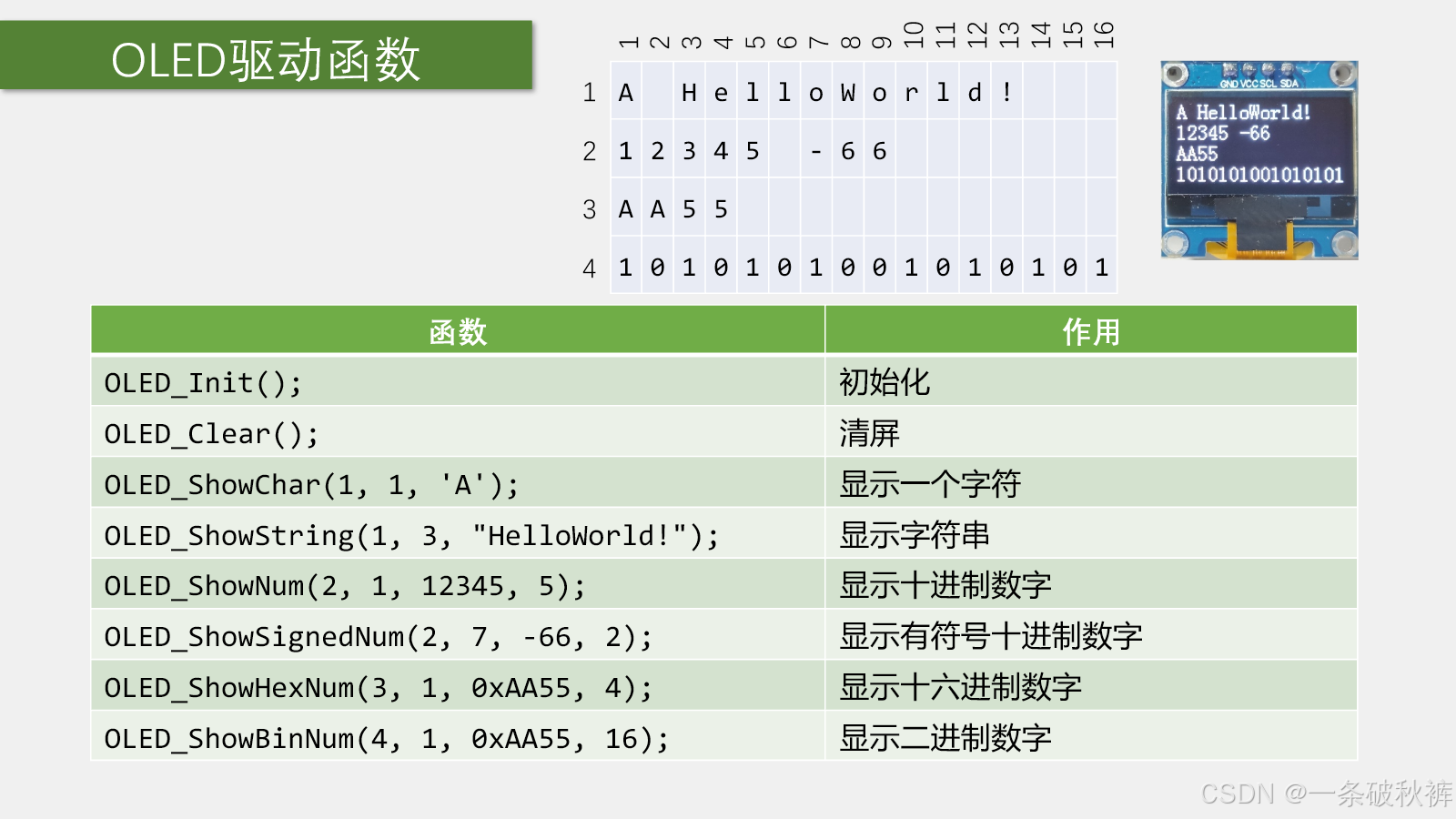
图 4 配套工程 1-1 接线图/4-1 OLED显示屏.jpg:VCC/GND 接电源,SCL 接 PB8,SDA 接 PB9。
接线顺序建议:
- 断电确认模块针脚从左到右的实际标识;
GND → GND;VCC → 3.3 V;SCL → PB8;SDA → PB9;- 检查共地和电源极性后再上电。
5.1 为什么不用 GPIO 给 OLED 供电
课堂提到该小屏功耗较低,临时实验中可以让 GPIO 输出高低电平充当电源,但也明确说明这不规范。
正式设计应使用电源引脚供电,原因包括:
- GPIO 有单脚和端口总电流限制;
- GPIO 上电、复位和调试期间可能处于高阻态;
- 程序错误可能让"电源脚"电平反转;
- 负载启动电流和电源稳定性难以保证。
因此,PB6/PB7 若恰好与面包板供电跳线处于相同孔列,只要不把它们配置为输出,就不会主动与电源争用;但更清晰的接线仍是避开这种容易误解的位置。
5.2 开漏输出为什么需要上拉
源码把 PB8/PB9 配置为 GPIO_Mode_Out_OD:
c
GPIO_InitStructure.GPIO_Mode = GPIO_Mode_Out_OD;
GPIO_InitStructure.GPIO_Speed = GPIO_Speed_50MHz;
开漏输出只能主动拉低;写 1 时是释放总线,必须由上拉电阻形成高电平。常见 OLED 模块板上已经带有 I²C 上拉,但不同模块不一定相同。若 SCL/SDA 始终上不去,应查看模块原理图或实测是否存在上拉。
6. 导入并配置 OLED 驱动模块
老师提供两套驱动:
text
1-4 OLED驱动函数模块/
├─ 4针脚I2C版本/
│  ├─ OLED.c
│  ├─ OLED.h
│  └─ OLED_Font.h
└─ 7针脚SPI版本/
   ├─ OLED.c
   ├─ OLED.h
   └─ OLED_Font.h
本实验选择四针版本,把三个文件复制到工程 Hardware 文件夹并加入 Keil 的 Hardware 分组。
三个文件的职责:
| 文件 | 内容 | 是否通常需要修改 |
|---|---|---|
OLED.c |
GPIO、通信时序、初始化和显示函数 | 换引脚时修改顶部配置及初始化 |
OLED.h |
对外显示函数声明 | 通常不改 |
OLED_Font.h |
ASCII 字符点阵字库 | 通常不改 |
6.1 换引脚要改哪两处
第一处是写引脚的宏:
c
#define OLED_W_SCL(x) GPIO_WriteBit(GPIOB, GPIO_Pin_8, (BitAction)(x))
#define OLED_W_SDA(x) GPIO_WriteBit(GPIOB, GPIO_Pin_9, (BitAction)(x))
第二处是 OLED_I2C_Init() 中的时钟和引脚初始化:
c
RCC_APB2PeriphClockCmd(RCC_APB2Periph_GPIOB, ENABLE);

GPIO_InitTypeDef GPIO_InitStructure;
GPIO_InitStructure.GPIO_Mode = GPIO_Mode_Out_OD;
GPIO_InitStructure.GPIO_Speed = GPIO_Speed_50MHz;
GPIO_InitStructure.GPIO_Pin = GPIO_Pin_8;
GPIO_Init(GPIOB, &GPIO_InitStructure);
GPIO_InitStructure.GPIO_Pin = GPIO_Pin_9;
GPIO_Init(GPIOB, &GPIO_InitStructure);
若 SCL/SDA 换到不同端口,还要分别开启对应端口时钟,不能只改两个宏。
6.2 字库是什么
OLED 不认识字符 'A' 的形状。OLED_Font.h 保存每个可见 ASCII 字符的点阵数据;OLED_ShowChar() 根据字符编码查表,再把 8×16 点阵逐字节写入 OLED。
#mermaid-svg-A4Bk66Iww260LZYW{font-family:"trebuchet ms",verdana,arial,sans-serif;font-size:16px;fill:#333;}@keyframes edge-animation-frame{from{stroke-dashoffset:0;}}@keyframes dash{to{stroke-dashoffset:0;}}#mermaid-svg-A4Bk66Iww260LZYW .edge-animation-slow{stroke-dasharray:9,5!important;stroke-dashoffset:900;animation:dash 50s linear infinite;stroke-linecap:round;}#mermaid-svg-A4Bk66Iww260LZYW .edge-animation-fast{stroke-dasharray:9,5!important;stroke-dashoffset:900;animation:dash 20s linear infinite;stroke-linecap:round;}#mermaid-svg-A4Bk66Iww260LZYW .error-icon{fill:#552222;}#mermaid-svg-A4Bk66Iww260LZYW .error-text{fill:#552222;stroke:#552222;}#mermaid-svg-A4Bk66Iww260LZYW .edge-thickness-normal{stroke-width:1px;}#mermaid-svg-A4Bk66Iww260LZYW .edge-thickness-thick{stroke-width:3.5px;}#mermaid-svg-A4Bk66Iww260LZYW .edge-pattern-solid{stroke-dasharray:0;}#mermaid-svg-A4Bk66Iww260LZYW .edge-thickness-invisible{stroke-width:0;fill:none;}#mermaid-svg-A4Bk66Iww260LZYW .edge-pattern-dashed{stroke-dasharray:3;}#mermaid-svg-A4Bk66Iww260LZYW .edge-pattern-dotted{stroke-dasharray:2;}#mermaid-svg-A4Bk66Iww260LZYW .marker{fill:#333333;stroke:#333333;}#mermaid-svg-A4Bk66Iww260LZYW .marker.cross{stroke:#333333;}#mermaid-svg-A4Bk66Iww260LZYW svg{font-family:"trebuchet ms",verdana,arial,sans-serif;font-size:16px;}#mermaid-svg-A4Bk66Iww260LZYW p{margin:0;}#mermaid-svg-A4Bk66Iww260LZYW .label{font-family:"trebuchet ms",verdana,arial,sans-serif;color:#333;}#mermaid-svg-A4Bk66Iww260LZYW .cluster-label text{fill:#333;}#mermaid-svg-A4Bk66Iww260LZYW .cluster-label span{color:#333;}#mermaid-svg-A4Bk66Iww260LZYW .cluster-label span p{background-color:transparent;}#mermaid-svg-A4Bk66Iww260LZYW .label text,#mermaid-svg-A4Bk66Iww260LZYW span{fill:#333;color:#333;}#mermaid-svg-A4Bk66Iww260LZYW .node rect,#mermaid-svg-A4Bk66Iww260LZYW .node circle,#mermaid-svg-A4Bk66Iww260LZYW .node ellipse,#mermaid-svg-A4Bk66Iww260LZYW .node polygon,#mermaid-svg-A4Bk66Iww260LZYW .node path{fill:#ECECFF;stroke:#9370DB;stroke-width:1px;}#mermaid-svg-A4Bk66Iww260LZYW .rough-node .label text,#mermaid-svg-A4Bk66Iww260LZYW .node .label text,#mermaid-svg-A4Bk66Iww260LZYW .image-shape .label,#mermaid-svg-A4Bk66Iww260LZYW .icon-shape .label{text-anchor:middle;}#mermaid-svg-A4Bk66Iww260LZYW .node .katex path{fill:#000;stroke:#000;stroke-width:1px;}#mermaid-svg-A4Bk66Iww260LZYW .rough-node .label,#mermaid-svg-A4Bk66Iww260LZYW .node .label,#mermaid-svg-A4Bk66Iww260LZYW .image-shape .label,#mermaid-svg-A4Bk66Iww260LZYW .icon-shape .label{text-align:center;}#mermaid-svg-A4Bk66Iww260LZYW .node.clickable{cursor:pointer;}#mermaid-svg-A4Bk66Iww260LZYW .root .anchor path{fill:#333333!important;stroke-width:0;stroke:#333333;}#mermaid-svg-A4Bk66Iww260LZYW .arrowheadPath{fill:#333333;}#mermaid-svg-A4Bk66Iww260LZYW .edgePath .path{stroke:#333333;stroke-width:2.0px;}#mermaid-svg-A4Bk66Iww260LZYW .flowchart-link{stroke:#333333;fill:none;}#mermaid-svg-A4Bk66Iww260LZYW .edgeLabel{background-color:rgba(232,232,232, 0.8);text-align:center;}#mermaid-svg-A4Bk66Iww260LZYW .edgeLabel p{background-color:rgba(232,232,232, 0.8);}#mermaid-svg-A4Bk66Iww260LZYW .edgeLabel rect{opacity:0.5;background-color:rgba(232,232,232, 0.8);fill:rgba(232,232,232, 0.8);}#mermaid-svg-A4Bk66Iww260LZYW .labelBkg{background-color:rgba(232, 232, 232, 0.5);}#mermaid-svg-A4Bk66Iww260LZYW .cluster rect{fill:#ffffde;stroke:#aaaa33;stroke-width:1px;}#mermaid-svg-A4Bk66Iww260LZYW .cluster text{fill:#333;}#mermaid-svg-A4Bk66Iww260LZYW .cluster span{color:#333;}#mermaid-svg-A4Bk66Iww260LZYW div.mermaidTooltip{position:absolute;text-align:center;max-width:200px;padding:2px;font-family:"trebuchet ms",verdana,arial,sans-serif;font-size:12px;background:hsl(80, 100%, 96.2745098039%);border:1px solid #aaaa33;border-radius:2px;pointer-events:none;z-index:100;}#mermaid-svg-A4Bk66Iww260LZYW .flowchartTitleText{text-anchor:middle;font-size:18px;fill:#333;}#mermaid-svg-A4Bk66Iww260LZYW rect.text{fill:none;stroke-width:0;}#mermaid-svg-A4Bk66Iww260LZYW .icon-shape,#mermaid-svg-A4Bk66Iww260LZYW .image-shape{background-color:rgba(232,232,232, 0.8);text-align:center;}#mermaid-svg-A4Bk66Iww260LZYW .icon-shape p,#mermaid-svg-A4Bk66Iww260LZYW .image-shape p{background-color:rgba(232,232,232, 0.8);padding:2px;}#mermaid-svg-A4Bk66Iww260LZYW .icon-shape .label rect,#mermaid-svg-A4Bk66Iww260LZYW .image-shape .label rect{opacity:0.5;background-color:rgba(232,232,232, 0.8);fill:rgba(232,232,232, 0.8);}#mermaid-svg-A4Bk66Iww260LZYW .label-icon{display:inline-block;height:1em;overflow:visible;vertical-align:-0.125em;}#mermaid-svg-A4Bk66Iww260LZYW .node .label-icon path{fill:currentColor;stroke:revert;stroke-width:revert;}#mermaid-svg-A4Bk66Iww260LZYW :root{--mermaid-font-family:"trebuchet ms",verdana,arial,sans-serif;} 字符 'A'
减去空格得到字库索引
取出16字节点阵
上半8字节写一页
下半8字节写下一页
屏幕形成8×16字符
本节只需要会调用,不要求重新编写字库和底层通信。
7. OLED 坐标和显示函数
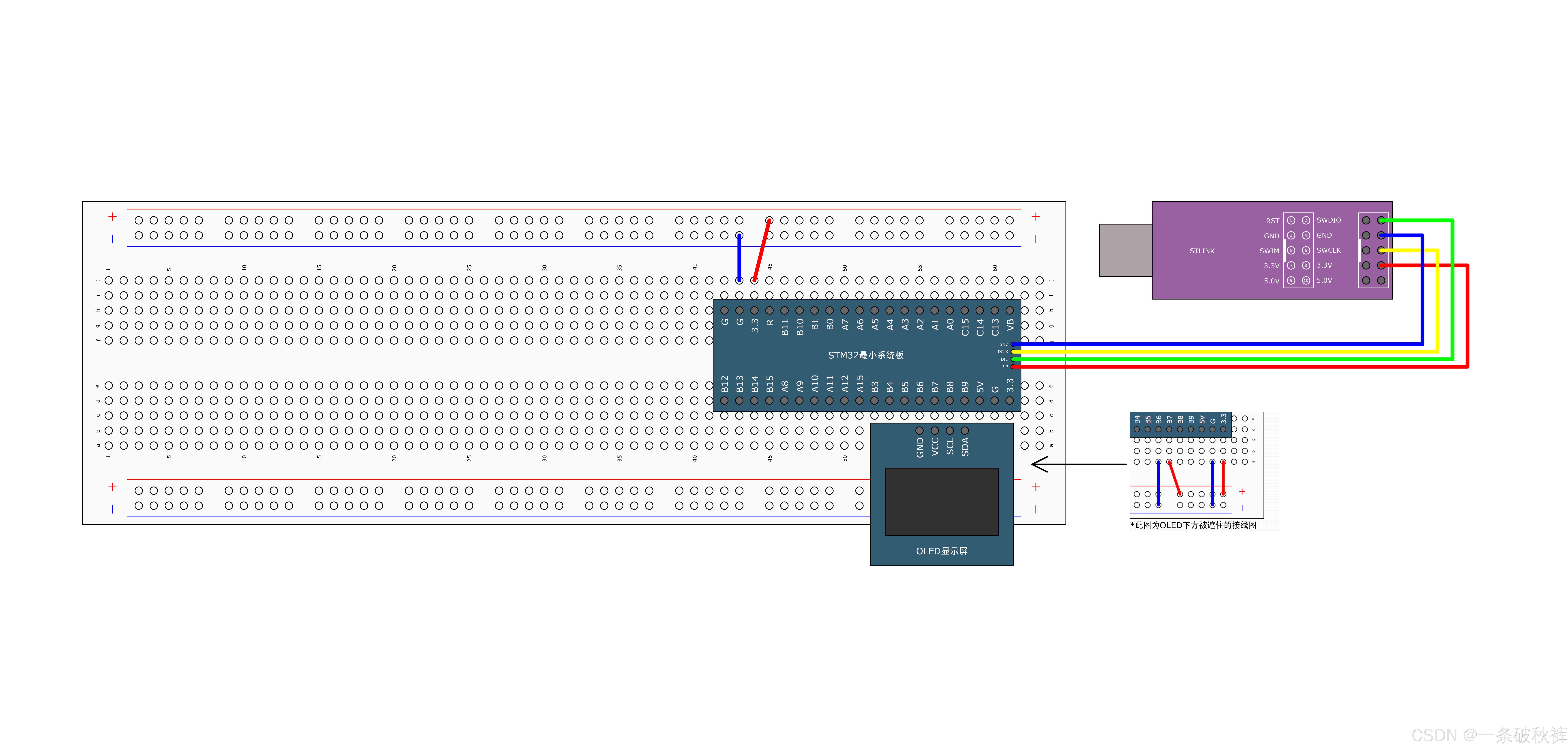
图 5 老师 PPT 第 40 页:4×16 字符坐标及 OLED 驱动函数。
7.1 字符坐标
老师把 128×64 像素屏按照 8×16 字符划分为:
- 行号
1~4,从上到下; - 列号
1~16,从左到右。
这是驱动函数提供的字符坐标,不是 OLED 原生像素坐标。底层换算关系为:
c
Y = (Line - 1) * 2;   // 一个16像素高字符占OLED的两页
X = (Column - 1) * 8; // 一个字符宽8像素
7.2 函数速查
| 函数 | 作用 | 关键参数 |
|---|---|---|
OLED_Init() |
初始化并清屏 | 使用任何显示函数前调用一次 |
OLED_Clear() |
清空全屏 | 无 |
OLED_ShowChar() |
显示一个字符 | 行、列、字符 |
OLED_ShowString() |
显示字符串 | 起始行、列、字符串 |
OLED_ShowNum() |
显示无符号十进制数 | 数值、数字长度 |
OLED_ShowSignedNum() |
显示带正负号十进制数 | 数值、绝对值数字长度 |
OLED_ShowHexNum() |
显示十六进制数 | 数值、十六进制位数 |
OLED_ShowBinNum() |
显示二进制数 | 数值、二进制位数 |
7.3 课堂完整示例
c
#include "stm32f10x.h"
#include "OLED.h"

int main(void)
{
    OLED_Init();

    OLED_ShowChar(1, 1, 'A');
    OLED_ShowString(1, 3, "HelloWorld!");
    OLED_ShowNum(2, 1, 12345, 5);
    OLED_ShowSignedNum(2, 7, -66, 2);
    OLED_ShowHexNum(3, 1, 0xAA55, 4);
    OLED_ShowBinNum(4, 1, 0xAA55, 16);

    while (1)
    {
    }
}
结果对应:
text
第1行:A HelloWorld!
第2行:12345 -66
第3行:AA55
第4行:1010101001010101
源码勘误:
OLED_ShowHexNum(3, 1, 0xAA55, 4)的实参是0xAA55,但其行尾注释写成了0xA5A5;实际显示应以实参为准,即AA55。
7.4 Length 到底表示什么
Length 决定显示多少位,不是自动测量数值长度:
OLED_ShowNum(2, 1, 12345, 5)→12345;OLED_ShowNum(2, 1, 12345, 3)→345,高位被截掉;OLED_ShowNum(2, 1, 66, 4)→0066;OLED_ShowSignedNum(..., -66, 2)中的2只表示绝对值两位,符号另占一列。
显示内容必须满足 Column + 占用列数 - 1 <= 16,否则会超出当前行。
7.5 为什么二进制实参写成十六进制
课程所用的旧版 C 编译环境不支持 0b1010... 二进制整数字面量,所以传给 OLED_ShowBinNum() 的数仍写成十六进制 0xAA55,函数负责把它按二进制逐位显示。
准确性补充:较新的 C23 标准已经加入二进制整数字面量;但本课程的 Keil/ARM C 工程应以当前编译器实际支持为准,使用十六进制最稳妥。
7.6 更新变量时为什么会"覆盖刷新"
固定在同一坐标重复显示相同宽度的数据,新点阵会覆盖旧点阵,适合观察变量:
c
OLED_ShowNum(1, 1, Count, 5);如果新内容比旧内容短,旧字符可能残留。解决方法是固定显示宽度、先显示空格覆盖局部区域,或调用 OLED_Clear() 清整屏。频繁全屏清除可能产生闪烁,调试时通常优先局部覆盖。
8. Keil 在线调试的准备工作
课堂选择 ST-Link 硬件在线调试:
- STM32 正确供电;
- ST-Link 的
SWDIO/SWCLK/GND/3.3V连接正确; - 工程
Options for Target → Debug选择对应 ST-Link 调试器; - 先编译,确保没有错误;
- 点击带
d的放大镜图标进入 Debug; - 调试结束后退出 Debug,才能正常修改并重新编译代码。
Keil 也可能提供软件模拟器,但它无法可靠还原所有具体 STM32 外设和外部 OLED 行为。本节 GPIO/OLED 程序应优先使用真实芯片在线调试。
9. 控制程序怎样运行
进入 Debug 后,黄色箭头指向下一条将要执行的语句。
| 操作 | 含义 | 什么时候用 |
|---|---|---|
| Reset | 复位目标 | 从启动流程重新观察 |
| Run | 全速运行 | 跑到断点或持续运行 |
| Stop | 暂停 | 没有断点或程序一直运行时手动停止 |
| Step Into | 单步进入 | 想看函数内部怎样执行 |
| Step Over | 单步越过 | 把当前函数调用视作一步 |
| Step Out | 跳出当前函数 | 已经进入函数但不想继续逐行看 |
| Run to Cursor | 运行到光标 | 快速到达指定源码行 |
9.1 复位后为什么没有直接到 main()
复位后 CPU 首先从启动文件中的复位处理函数开始:
#mermaid-svg-W1EHs4NkvHgjRglb{font-family:"trebuchet ms",verdana,arial,sans-serif;font-size:16px;fill:#333;}@keyframes edge-animation-frame{from{stroke-dashoffset:0;}}@keyframes dash{to{stroke-dashoffset:0;}}#mermaid-svg-W1EHs4NkvHgjRglb .edge-animation-slow{stroke-dasharray:9,5!important;stroke-dashoffset:900;animation:dash 50s linear infinite;stroke-linecap:round;}#mermaid-svg-W1EHs4NkvHgjRglb .edge-animation-fast{stroke-dasharray:9,5!important;stroke-dashoffset:900;animation:dash 20s linear infinite;stroke-linecap:round;}#mermaid-svg-W1EHs4NkvHgjRglb .error-icon{fill:#552222;}#mermaid-svg-W1EHs4NkvHgjRglb .error-text{fill:#552222;stroke:#552222;}#mermaid-svg-W1EHs4NkvHgjRglb .edge-thickness-normal{stroke-width:1px;}#mermaid-svg-W1EHs4NkvHgjRglb .edge-thickness-thick{stroke-width:3.5px;}#mermaid-svg-W1EHs4NkvHgjRglb .edge-pattern-solid{stroke-dasharray:0;}#mermaid-svg-W1EHs4NkvHgjRglb .edge-thickness-invisible{stroke-width:0;fill:none;}#mermaid-svg-W1EHs4NkvHgjRglb .edge-pattern-dashed{stroke-dasharray:3;}#mermaid-svg-W1EHs4NkvHgjRglb .edge-pattern-dotted{stroke-dasharray:2;}#mermaid-svg-W1EHs4NkvHgjRglb .marker{fill:#333333;stroke:#333333;}#mermaid-svg-W1EHs4NkvHgjRglb .marker.cross{stroke:#333333;}#mermaid-svg-W1EHs4NkvHgjRglb svg{font-family:"trebuchet ms",verdana,arial,sans-serif;font-size:16px;}#mermaid-svg-W1EHs4NkvHgjRglb p{margin:0;}#mermaid-svg-W1EHs4NkvHgjRglb .label{font-family:"trebuchet ms",verdana,arial,sans-serif;color:#333;}#mermaid-svg-W1EHs4NkvHgjRglb .cluster-label text{fill:#333;}#mermaid-svg-W1EHs4NkvHgjRglb .cluster-label span{color:#333;}#mermaid-svg-W1EHs4NkvHgjRglb .cluster-label span p{background-color:transparent;}#mermaid-svg-W1EHs4NkvHgjRglb .label text,#mermaid-svg-W1EHs4NkvHgjRglb span{fill:#333;color:#333;}#mermaid-svg-W1EHs4NkvHgjRglb .node rect,#mermaid-svg-W1EHs4NkvHgjRglb .node circle,#mermaid-svg-W1EHs4NkvHgjRglb .node ellipse,#mermaid-svg-W1EHs4NkvHgjRglb .node polygon,#mermaid-svg-W1EHs4NkvHgjRglb .node path{fill:#ECECFF;stroke:#9370DB;stroke-width:1px;}#mermaid-svg-W1EHs4NkvHgjRglb .rough-node .label text,#mermaid-svg-W1EHs4NkvHgjRglb .node .label text,#mermaid-svg-W1EHs4NkvHgjRglb .image-shape .label,#mermaid-svg-W1EHs4NkvHgjRglb .icon-shape .label{text-anchor:middle;}#mermaid-svg-W1EHs4NkvHgjRglb .node .katex path{fill:#000;stroke:#000;stroke-width:1px;}#mermaid-svg-W1EHs4NkvHgjRglb .rough-node .label,#mermaid-svg-W1EHs4NkvHgjRglb .node .label,#mermaid-svg-W1EHs4NkvHgjRglb .image-shape .label,#mermaid-svg-W1EHs4NkvHgjRglb .icon-shape .label{text-align:center;}#mermaid-svg-W1EHs4NkvHgjRglb .node.clickable{cursor:pointer;}#mermaid-svg-W1EHs4NkvHgjRglb .root .anchor path{fill:#333333!important;stroke-width:0;stroke:#333333;}#mermaid-svg-W1EHs4NkvHgjRglb .arrowheadPath{fill:#333333;}#mermaid-svg-W1EHs4NkvHgjRglb .edgePath .path{stroke:#333333;stroke-width:2.0px;}#mermaid-svg-W1EHs4NkvHgjRglb .flowchart-link{stroke:#333333;fill:none;}#mermaid-svg-W1EHs4NkvHgjRglb .edgeLabel{background-color:rgba(232,232,232, 0.8);text-align:center;}#mermaid-svg-W1EHs4NkvHgjRglb .edgeLabel p{background-color:rgba(232,232,232, 0.8);}#mermaid-svg-W1EHs4NkvHgjRglb .edgeLabel rect{opacity:0.5;background-color:rgba(232,232,232, 0.8);fill:rgba(232,232,232, 0.8);}#mermaid-svg-W1EHs4NkvHgjRglb .labelBkg{background-color:rgba(232, 232, 232, 0.5);}#mermaid-svg-W1EHs4NkvHgjRglb .cluster rect{fill:#ffffde;stroke:#aaaa33;stroke-width:1px;}#mermaid-svg-W1EHs4NkvHgjRglb .cluster text{fill:#333;}#mermaid-svg-W1EHs4NkvHgjRglb .cluster span{color:#333;}#mermaid-svg-W1EHs4NkvHgjRglb div.mermaidTooltip{position:absolute;text-align:center;max-width:200px;padding:2px;font-family:"trebuchet ms",verdana,arial,sans-serif;font-size:12px;background:hsl(80, 100%, 96.2745098039%);border:1px solid #aaaa33;border-radius:2px;pointer-events:none;z-index:100;}#mermaid-svg-W1EHs4NkvHgjRglb .flowchartTitleText{text-anchor:middle;font-size:18px;fill:#333;}#mermaid-svg-W1EHs4NkvHgjRglb rect.text{fill:none;stroke-width:0;}#mermaid-svg-W1EHs4NkvHgjRglb .icon-shape,#mermaid-svg-W1EHs4NkvHgjRglb .image-shape{background-color:rgba(232,232,232, 0.8);text-align:center;}#mermaid-svg-W1EHs4NkvHgjRglb .icon-shape p,#mermaid-svg-W1EHs4NkvHgjRglb .image-shape p{background-color:rgba(232,232,232, 0.8);padding:2px;}#mermaid-svg-W1EHs4NkvHgjRglb .icon-shape .label rect,#mermaid-svg-W1EHs4NkvHgjRglb .image-shape .label rect{opacity:0.5;background-color:rgba(232,232,232, 0.8);fill:rgba(232,232,232, 0.8);}#mermaid-svg-W1EHs4NkvHgjRglb .label-icon{display:inline-block;height:1em;overflow:visible;vertical-align:-0.125em;}#mermaid-svg-W1EHs4NkvHgjRglb .node .label-icon path{fill:currentColor;stroke:revert;stroke-width:revert;}#mermaid-svg-W1EHs4NkvHgjRglb :root{--mermaid-font-family:"trebuchet ms",verdana,arial,sans-serif;} 复位向量
Reset_Handler
SystemInit
C运行库初始化
main
用户初始化
while主循环
因此在底层单步时会先看到启动文件和 SystemInit(),再进入 main()。如果只关心应用程序,可以使用"运行到光标"快速到达 main() 内指定行。
9.2 断点是什么
断点相当于在某行设置"自动停车点":
- 在源码左侧边栏点击设置断点;
- 点击 Run;
- CPU 全速执行;
- 执行到断点时暂停;
- 此时查看变量、调用路径和寄存器。
断点应放在"想验证是否执行到"和"状态刚刚发生变化"的位置,例如 if 分支内部或 GPIO 写操作之后。
10. 查看变量与寄存器
10.1 变量与结构体
Keil 可以在 Locals、Watch、Symbols 等窗口观察变量。若要持续观察某个变量,可把它加入 Watch。
结构体成员可以展开,例如:
text
GPIO_InitStructure
├─ GPIO_Pin
├─ GPIO_Speed
└─ GPIO_Mode
单步执行三条赋值语句时,可以看到成员值逐项变化,这正好验证上一节讲过的"结构体用于打包配置参数"。
如果变量显示为
<not in scope>、无法观察或值看起来跳跃,先确认程序是否停在其作用域内,并考虑编译优化可能把变量放进寄存器、合并或删除。调试学习工程可使用较低优化等级。
10.2 外设寄存器
通过 Peripherals 菜单可以查看 GPIO 等外设寄存器。例如观察 PA0:
GPIOA_ODR的 bit0 表示输出锁存值;- LED 闪烁程序改变 PA0 时,ODR0 会在
0/1之间变化; - Keil 的寄存器窗口与真实 LED 现象共同验证程序是否正确输出。
#mermaid-svg-dnTP8dtvsa7MHgwH{font-family:"trebuchet ms",verdana,arial,sans-serif;font-size:16px;fill:#333;}@keyframes edge-animation-frame{from{stroke-dashoffset:0;}}@keyframes dash{to{stroke-dashoffset:0;}}#mermaid-svg-dnTP8dtvsa7MHgwH .edge-animation-slow{stroke-dasharray:9,5!important;stroke-dashoffset:900;animation:dash 50s linear infinite;stroke-linecap:round;}#mermaid-svg-dnTP8dtvsa7MHgwH .edge-animation-fast{stroke-dasharray:9,5!important;stroke-dashoffset:900;animation:dash 20s linear infinite;stroke-linecap:round;}#mermaid-svg-dnTP8dtvsa7MHgwH .error-icon{fill:#552222;}#mermaid-svg-dnTP8dtvsa7MHgwH .error-text{fill:#552222;stroke:#552222;}#mermaid-svg-dnTP8dtvsa7MHgwH .edge-thickness-normal{stroke-width:1px;}#mermaid-svg-dnTP8dtvsa7MHgwH .edge-thickness-thick{stroke-width:3.5px;}#mermaid-svg-dnTP8dtvsa7MHgwH .edge-pattern-solid{stroke-dasharray:0;}#mermaid-svg-dnTP8dtvsa7MHgwH .edge-thickness-invisible{stroke-width:0;fill:none;}#mermaid-svg-dnTP8dtvsa7MHgwH .edge-pattern-dashed{stroke-dasharray:3;}#mermaid-svg-dnTP8dtvsa7MHgwH .edge-pattern-dotted{stroke-dasharray:2;}#mermaid-svg-dnTP8dtvsa7MHgwH .marker{fill:#333333;stroke:#333333;}#mermaid-svg-dnTP8dtvsa7MHgwH .marker.cross{stroke:#333333;}#mermaid-svg-dnTP8dtvsa7MHgwH svg{font-family:"trebuchet ms",verdana,arial,sans-serif;font-size:16px;}#mermaid-svg-dnTP8dtvsa7MHgwH p{margin:0;}#mermaid-svg-dnTP8dtvsa7MHgwH .label{font-family:"trebuchet ms",verdana,arial,sans-serif;color:#333;}#mermaid-svg-dnTP8dtvsa7MHgwH .cluster-label text{fill:#333;}#mermaid-svg-dnTP8dtvsa7MHgwH .cluster-label span{color:#333;}#mermaid-svg-dnTP8dtvsa7MHgwH .cluster-label span p{background-color:transparent;}#mermaid-svg-dnTP8dtvsa7MHgwH .label text,#mermaid-svg-dnTP8dtvsa7MHgwH span{fill:#333;color:#333;}#mermaid-svg-dnTP8dtvsa7MHgwH .node rect,#mermaid-svg-dnTP8dtvsa7MHgwH .node circle,#mermaid-svg-dnTP8dtvsa7MHgwH .node ellipse,#mermaid-svg-dnTP8dtvsa7MHgwH .node polygon,#mermaid-svg-dnTP8dtvsa7MHgwH .node path{fill:#ECECFF;stroke:#9370DB;stroke-width:1px;}#mermaid-svg-dnTP8dtvsa7MHgwH .rough-node .label text,#mermaid-svg-dnTP8dtvsa7MHgwH .node .label text,#mermaid-svg-dnTP8dtvsa7MHgwH .image-shape .label,#mermaid-svg-dnTP8dtvsa7MHgwH .icon-shape .label{text-anchor:middle;}#mermaid-svg-dnTP8dtvsa7MHgwH .node .katex path{fill:#000;stroke:#000;stroke-width:1px;}#mermaid-svg-dnTP8dtvsa7MHgwH .rough-node .label,#mermaid-svg-dnTP8dtvsa7MHgwH .node .label,#mermaid-svg-dnTP8dtvsa7MHgwH .image-shape .label,#mermaid-svg-dnTP8dtvsa7MHgwH .icon-shape .label{text-align:center;}#mermaid-svg-dnTP8dtvsa7MHgwH .node.clickable{cursor:pointer;}#mermaid-svg-dnTP8dtvsa7MHgwH .root .anchor path{fill:#333333!important;stroke-width:0;stroke:#333333;}#mermaid-svg-dnTP8dtvsa7MHgwH .arrowheadPath{fill:#333333;}#mermaid-svg-dnTP8dtvsa7MHgwH .edgePath .path{stroke:#333333;stroke-width:2.0px;}#mermaid-svg-dnTP8dtvsa7MHgwH .flowchart-link{stroke:#333333;fill:none;}#mermaid-svg-dnTP8dtvsa7MHgwH .edgeLabel{background-color:rgba(232,232,232, 0.8);text-align:center;}#mermaid-svg-dnTP8dtvsa7MHgwH .edgeLabel p{background-color:rgba(232,232,232, 0.8);}#mermaid-svg-dnTP8dtvsa7MHgwH .edgeLabel rect{opacity:0.5;background-color:rgba(232,232,232, 0.8);fill:rgba(232,232,232, 0.8);}#mermaid-svg-dnTP8dtvsa7MHgwH .labelBkg{background-color:rgba(232, 232, 232, 0.5);}#mermaid-svg-dnTP8dtvsa7MHgwH .cluster rect{fill:#ffffde;stroke:#aaaa33;stroke-width:1px;}#mermaid-svg-dnTP8dtvsa7MHgwH .cluster text{fill:#333;}#mermaid-svg-dnTP8dtvsa7MHgwH .cluster span{color:#333;}#mermaid-svg-dnTP8dtvsa7MHgwH div.mermaidTooltip{position:absolute;text-align:center;max-width:200px;padding:2px;font-family:"trebuchet ms",verdana,arial,sans-serif;font-size:12px;background:hsl(80, 100%, 96.2745098039%);border:1px solid #aaaa33;border-radius:2px;pointer-events:none;z-index:100;}#mermaid-svg-dnTP8dtvsa7MHgwH .flowchartTitleText{text-anchor:middle;font-size:18px;fill:#333;}#mermaid-svg-dnTP8dtvsa7MHgwH rect.text{fill:none;stroke-width:0;}#mermaid-svg-dnTP8dtvsa7MHgwH .icon-shape,#mermaid-svg-dnTP8dtvsa7MHgwH .image-shape{background-color:rgba(232,232,232, 0.8);text-align:center;}#mermaid-svg-dnTP8dtvsa7MHgwH .icon-shape p,#mermaid-svg-dnTP8dtvsa7MHgwH .image-shape p{background-color:rgba(232,232,232, 0.8);padding:2px;}#mermaid-svg-dnTP8dtvsa7MHgwH .icon-shape .label rect,#mermaid-svg-dnTP8dtvsa7MHgwH .image-shape .label rect{opacity:0.5;background-color:rgba(232,232,232, 0.8);fill:rgba(232,232,232, 0.8);}#mermaid-svg-dnTP8dtvsa7MHgwH .label-icon{display:inline-block;height:1em;overflow:visible;vertical-align:-0.125em;}#mermaid-svg-dnTP8dtvsa7MHgwH .node .label-icon path{fill:currentColor;stroke:revert;stroke-width:revert;}#mermaid-svg-dnTP8dtvsa7MHgwH :root{--mermaid-font-family:"trebuchet ms",verdana,arial,sans-serif;} 程序执行GPIO写操作
GPIOA ODR位改变
输出驱动器改变PA0电平
LED亮灭
Keil寄存器窗口显示变化
在线更新存在一定延迟;高频翻转时,窗口不一定显示每一次瞬时变化。若点击 Stop,CPU 暂停,外设行为也可能随之停止;重新 Run 后继续执行。
11. 一套实用的调试顺序
遇到"程序没有现象"时,可以按下面顺序排查:
#mermaid-svg-DJlQtia76NmffIxz{font-family:"trebuchet ms",verdana,arial,sans-serif;font-size:16px;fill:#333;}@keyframes edge-animation-frame{from{stroke-dashoffset:0;}}@keyframes dash{to{stroke-dashoffset:0;}}#mermaid-svg-DJlQtia76NmffIxz .edge-animation-slow{stroke-dasharray:9,5!important;stroke-dashoffset:900;animation:dash 50s linear infinite;stroke-linecap:round;}#mermaid-svg-DJlQtia76NmffIxz .edge-animation-fast{stroke-dasharray:9,5!important;stroke-dashoffset:900;animation:dash 20s linear infinite;stroke-linecap:round;}#mermaid-svg-DJlQtia76NmffIxz .error-icon{fill:#552222;}#mermaid-svg-DJlQtia76NmffIxz .error-text{fill:#552222;stroke:#552222;}#mermaid-svg-DJlQtia76NmffIxz .edge-thickness-normal{stroke-width:1px;}#mermaid-svg-DJlQtia76NmffIxz .edge-thickness-thick{stroke-width:3.5px;}#mermaid-svg-DJlQtia76NmffIxz .edge-pattern-solid{stroke-dasharray:0;}#mermaid-svg-DJlQtia76NmffIxz .edge-thickness-invisible{stroke-width:0;fill:none;}#mermaid-svg-DJlQtia76NmffIxz .edge-pattern-dashed{stroke-dasharray:3;}#mermaid-svg-DJlQtia76NmffIxz .edge-pattern-dotted{stroke-dasharray:2;}#mermaid-svg-DJlQtia76NmffIxz .marker{fill:#333333;stroke:#333333;}#mermaid-svg-DJlQtia76NmffIxz .marker.cross{stroke:#333333;}#mermaid-svg-DJlQtia76NmffIxz svg{font-family:"trebuchet ms",verdana,arial,sans-serif;font-size:16px;}#mermaid-svg-DJlQtia76NmffIxz p{margin:0;}#mermaid-svg-DJlQtia76NmffIxz .label{font-family:"trebuchet ms",verdana,arial,sans-serif;color:#333;}#mermaid-svg-DJlQtia76NmffIxz .cluster-label text{fill:#333;}#mermaid-svg-DJlQtia76NmffIxz .cluster-label span{color:#333;}#mermaid-svg-DJlQtia76NmffIxz .cluster-label span p{background-color:transparent;}#mermaid-svg-DJlQtia76NmffIxz .label text,#mermaid-svg-DJlQtia76NmffIxz span{fill:#333;color:#333;}#mermaid-svg-DJlQtia76NmffIxz .node rect,#mermaid-svg-DJlQtia76NmffIxz .node circle,#mermaid-svg-DJlQtia76NmffIxz .node ellipse,#mermaid-svg-DJlQtia76NmffIxz .node polygon,#mermaid-svg-DJlQtia76NmffIxz .node path{fill:#ECECFF;stroke:#9370DB;stroke-width:1px;}#mermaid-svg-DJlQtia76NmffIxz .rough-node .label text,#mermaid-svg-DJlQtia76NmffIxz .node .label text,#mermaid-svg-DJlQtia76NmffIxz .image-shape .label,#mermaid-svg-DJlQtia76NmffIxz .icon-shape .label{text-anchor:middle;}#mermaid-svg-DJlQtia76NmffIxz .node .katex path{fill:#000;stroke:#000;stroke-width:1px;}#mermaid-svg-DJlQtia76NmffIxz .rough-node .label,#mermaid-svg-DJlQtia76NmffIxz .node .label,#mermaid-svg-DJlQtia76NmffIxz .image-shape .label,#mermaid-svg-DJlQtia76NmffIxz .icon-shape .label{text-align:center;}#mermaid-svg-DJlQtia76NmffIxz .node.clickable{cursor:pointer;}#mermaid-svg-DJlQtia76NmffIxz .root .anchor path{fill:#333333!important;stroke-width:0;stroke:#333333;}#mermaid-svg-DJlQtia76NmffIxz .arrowheadPath{fill:#333333;}#mermaid-svg-DJlQtia76NmffIxz .edgePath .path{stroke:#333333;stroke-width:2.0px;}#mermaid-svg-DJlQtia76NmffIxz .flowchart-link{stroke:#333333;fill:none;}#mermaid-svg-DJlQtia76NmffIxz .edgeLabel{background-color:rgba(232,232,232, 0.8);text-align:center;}#mermaid-svg-DJlQtia76NmffIxz .edgeLabel p{background-color:rgba(232,232,232, 0.8);}#mermaid-svg-DJlQtia76NmffIxz .edgeLabel rect{opacity:0.5;background-color:rgba(232,232,232, 0.8);fill:rgba(232,232,232, 0.8);}#mermaid-svg-DJlQtia76NmffIxz .labelBkg{background-color:rgba(232, 232, 232, 0.5);}#mermaid-svg-DJlQtia76NmffIxz .cluster rect{fill:#ffffde;stroke:#aaaa33;stroke-width:1px;}#mermaid-svg-DJlQtia76NmffIxz .cluster text{fill:#333;}#mermaid-svg-DJlQtia76NmffIxz .cluster span{color:#333;}#mermaid-svg-DJlQtia76NmffIxz div.mermaidTooltip{position:absolute;text-align:center;max-width:200px;padding:2px;font-family:"trebuchet ms",verdana,arial,sans-serif;font-size:12px;background:hsl(80, 100%, 96.2745098039%);border:1px solid #aaaa33;border-radius:2px;pointer-events:none;z-index:100;}#mermaid-svg-DJlQtia76NmffIxz .flowchartTitleText{text-anchor:middle;font-size:18px;fill:#333;}#mermaid-svg-DJlQtia76NmffIxz rect.text{fill:none;stroke-width:0;}#mermaid-svg-DJlQtia76NmffIxz .icon-shape,#mermaid-svg-DJlQtia76NmffIxz .image-shape{background-color:rgba(232,232,232, 0.8);text-align:center;}#mermaid-svg-DJlQtia76NmffIxz .icon-shape p,#mermaid-svg-DJlQtia76NmffIxz .image-shape p{background-color:rgba(232,232,232, 0.8);padding:2px;}#mermaid-svg-DJlQtia76NmffIxz .icon-shape .label rect,#mermaid-svg-DJlQtia76NmffIxz .image-shape .label rect{opacity:0.5;background-color:rgba(232,232,232, 0.8);fill:rgba(232,232,232, 0.8);}#mermaid-svg-DJlQtia76NmffIxz .label-icon{display:inline-block;height:1em;overflow:visible;vertical-align:-0.125em;}#mermaid-svg-DJlQtia76NmffIxz .node .label-icon path{fill:currentColor;stroke:revert;stroke-width:revert;}#mermaid-svg-DJlQtia76NmffIxz :root{--mermaid-font-family:"trebuchet ms",verdana,arial,sans-serif;} 否
是
确认供电、共地和接线
确认工程能编译下载
在main入口或初始化后设断点
能到达断点吗
检查启动、下载、复位和死循环
单步检查分支和函数调用
Watch查看关键变量
Peripherals核对RCC/GPIO寄存器
用OLED或串口观察连续运行数据
缩小到具体软件或硬件环节
这套顺序把问题分成三层:
- 程序是否真的运行;
- 软件状态是否符合预期;
- 寄存器和外部硬件是否真正产生了对应结果。
12. 易错点与转写校正
- 转写中的
OLD/OLG/ORD均指OLED。 - 转写中的
KO/Q/kill多数指Keil。 SCL/SDA是四针 I²C 版本的时钟与数据线;七针版本使用 SPI 信号。- 本工程默认
SCL=PB8、SDA=PB9,换端口必须同步修改宏、时钟和初始化引脚。 - 软件 I²C 使用开漏输出,高电平依赖上拉电阻。
OLED_Init()必须先调用,随后才能可靠使用显示函数。- 行列参数是 1 起始的字符坐标,不是 0 起始的像素坐标。
Length是强制显示位数;太短会截高位,太长会补前导零。- 源码十六进制示例实参是
0xAA55,行尾注释误写为0xA5A5。 - OLED 通过 GPIO 临时供电不规范,正式项目应使用稳定电源。
- 黄色箭头表示下一条将执行的语句,而不是已经执行完的语句。
- Debug 模式中不能按正常流程直接修改并重新编译;应先退出调试。
- 寄存器实时窗口有刷新延迟,不适合观察每一次高速翻转。
13. 复习自测
- 串口、OLED、Keil 调试分别适合观察什么?
- 为什么单片机学习需要让变量和执行过程"可见"?
- 四针 OLED 的四根线分别是什么?
- 为什么软件 I²C 的 SCL/SDA 可以换到普通 GPIO?
- PB8/PB9 配置为开漏输出时,高电平由什么产生?
OLED.c、OLED.h、OLED_Font.h分别负责什么?OLED_ShowSignedNum(2, 7, -66, 2)总共占用几列?OLED_ShowNum(..., 12345, 3)为什么只显示345?- 复位后为什么会先看到
Reset_Handler和SystemInit()? - Step Into、Step Over、Step Out 有什么区别?
- 断点、Watch 和 Peripherals 三种工具分别帮助确认什么?
- 为什么高速变化的寄存器不一定能在 Keil 窗口中逐次看到?
14. 资料定位
| 内容 | 资料位置 |
|---|---|
| 三种调试方式 | 老师 PPT 第 37 页;录音 01:25--03:18 |
| OLED 特点与规格 | 老师 PPT 第 38 页;录音 03:18--04:45 |
| 四针/七针硬件接口 | 老师 PPT 第 39 页;录音 04:45--05:18 |
| OLED 坐标和函数 | 老师 PPT 第 40 页;录音 05:18--06:46、09:58--12:16 |
| 面包板接线 | 配套工程 1-1 接线图/4-1 OLED显示屏.jpg;录音 06:46--08:14 |
| 四针与七针驱动包 | 程序源码/STM32Project-有注释版/1-4 OLED驱动函数模块 |
| 本节可运行工程 | 程序源码/STM32Project-有注释版/4-1 OLED显示屏 |
| 软件 I²C、显示函数实现 | 4-1 OLED显示屏/Hardware/OLED.c |
| 对外函数声明 | 4-1 OLED显示屏/Hardware/OLED.h |
| 字库数据 | 4-1 OLED显示屏/Hardware/OLED_Font.h |
| Keil 在线调试操作 | 录音 12:16--17:16 |
| GPIO 输出模式、ODR | STM32F10xxx参考手册(中文).pdf 第 108~110、115 页 |
15. 一句话总结
OLED 让运行数据在设备端可见,Keil Debug 让执行过程、变量和寄存器在开发端可见;把两者结合起来,就能从"程序是否执行"一直追踪到"硬件是否产生预期现象"。