📑 课程信息
- 领域:计算机科学 / 网络自动化(Cisco 网络管理协议进阶)
知识精讲
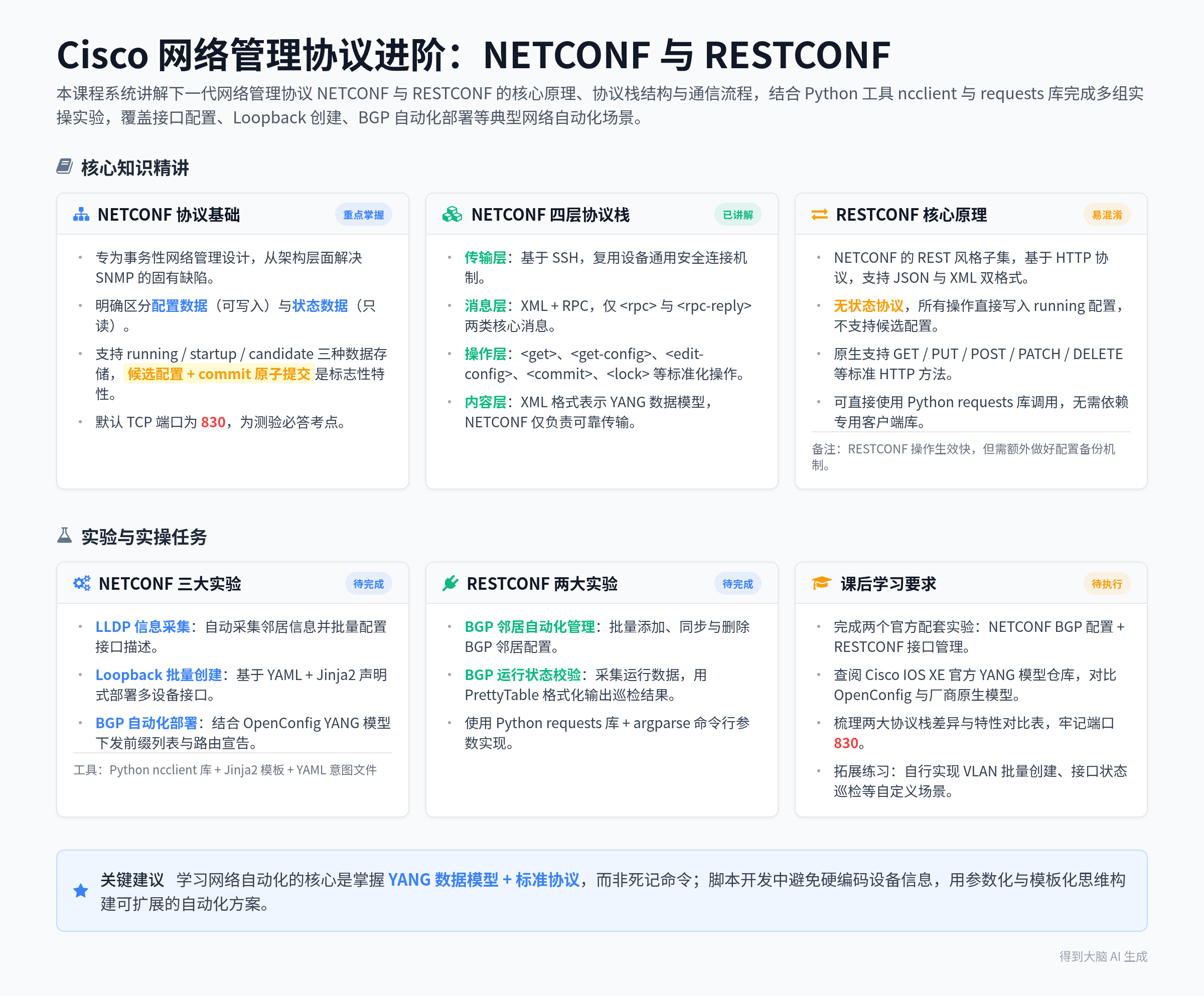
本课程系统讲解下一代网络管理协议 NETCONF 与 RESTCONF 的核心原理、协议栈结构、通信流程,结合 Python 工具 nclient 与 requests 库完成多组实操实验,覆盖接口配置、Loopback 创建、BGP 自动化部署等典型网络自动化场景。
课程整体介绍与学习目标
-
课程定位:本课程由拥有20年行业经验的Cisco认证系统讲师主讲,聚焦解决传统SNMP协议在设备配置场景下的诸多局限性,面向网络工程师提供标准化的可编程网络管理方案。
-
核心学习内容:掌握NETCONF与RESTCONF两大协议的组件、特性与差异,学习Python ncclient库的使用,完成两个官方实验:使用NETCONF管理Cisco路由器BGP配置、使用RESTCONF管理路由器接口配置。
-
🚩重点:两大协议均基于YANG数据模型实现多厂商兼容,是网络自动化落地的核心工业标准。
NETCONF 协议基础定义
-
协议定位:专为事务性网络管理设计的下一代网络管理协议,从架构层面针对性解决SNMP的固有缺陷。
-
核心数据分类:NETCONF首次明确区分配置数据与状态数据:配置数据是可写入的可变数据,用于将设备从初始默认状态切换到当前运行状态;状态数据是系统生成的只读数据,包含设备运行状态、统计信息等不可修改的内容。
-
🚩重点:NETCONF支持多数据存储机制,包含running(当前运行配置)、startup(启动持久化配置)、candidate(暂存候选配置),其中候选配置是NETCONF的标志性特性,所有修改先写入候选区,执行commit操作后才会原子性同步到运行配置,提交失败则运行配置完全不受影响。
NETCONF 四层协议栈详解
-
Transport 传输层:主流实现均采用SSH作为传输协议,复用现有网络设备的通用安全连接机制,满足面向连接、身份认证、数据完整性与保密性的强制要求。
-
Messages 消息层 :基于XML编码与远程过程调用(RPC)通信,仅定义
<rpc>与<rpc-reply>两类核心消息,通过message-id属性实现请求与响应的精准匹配,消息末尾统一使用]]>]]>标记传输结束。 -
Operations 操作层 :定义标准化操作标签,最常用的
<get>操作用于同时获取运行配置与设备状态信息,支持通过subtree过滤器精准筛选返回内容;此外还包含<get-config>、<edit-config>、<commit>、<lock>等丰富操作。 -
Content 内容层:采用XML格式表示设备支持的YANG数据模型,NETCONF本身仅负责XML数据的可靠传输,不强制限定数据模型必须为YANG。
-
🚩重点:NETCONF默认TCP端口为830,该考点在课程配套测验中作为必答题出现。
NETCONF 完整会话通信流程
-
会话步骤:1. 客户端发起连接,接入设备的NETCONF SSH子系统;2. 设备返回hello消息,携带自身支持的所有NETCONF能力集;3. 客户端回复hello消息,声明自身支持的能力集;4. 客户端发送NETCONF RPC请求,执行配置查询或修改操作;5. 设备处理请求后返回对应响应结果。
-
实操演示 :使用Linux命令
ssh -p 830 cisco@csr1kv1 -s netconf可直接建立NETCONF SSH连接,无需额外客户端工具即可完成基础交互。
Python ncclient 库使用指南
-
库特性:ncclient是开源的Python NETCONF客户端库,将NETCONF的XML交互逻辑封装为Python原生对象,大幅降低网络自动化脚本的开发门槛,完整支持RFC 4741定义的所有NETCONF操作。
-
核心代码示例:
导入依赖模块
from ncclient import manager
import lxml.etree as ET建立NETCONF连接
device = manager.connect(
host="csr1kv1",
port=830,
username="cisco",
password="cisco",
timeout=90,
host_key_verify=False
)定义接口配置过滤器
get_filter = """
"""执行get操作获取配置
nc_get_reply = device.get(('subtree', get_filter))
print(ET.tostring(nc_get_reply.data_ele, pretty_print=True)) -
🚩重点:通过自定义subtree过滤器可以精准限定返回内容,避免获取全量冗余配置数据,大幅提升脚本执行效率。
NETCONF 实验一:LLDP信息采集与接口描述自动配置
-
实验目标:通过Python脚本自动采集设备LLDP邻居信息,基于采集结果自动生成对应接口的描述信息,实现接口描述的批量自动化配置。
-
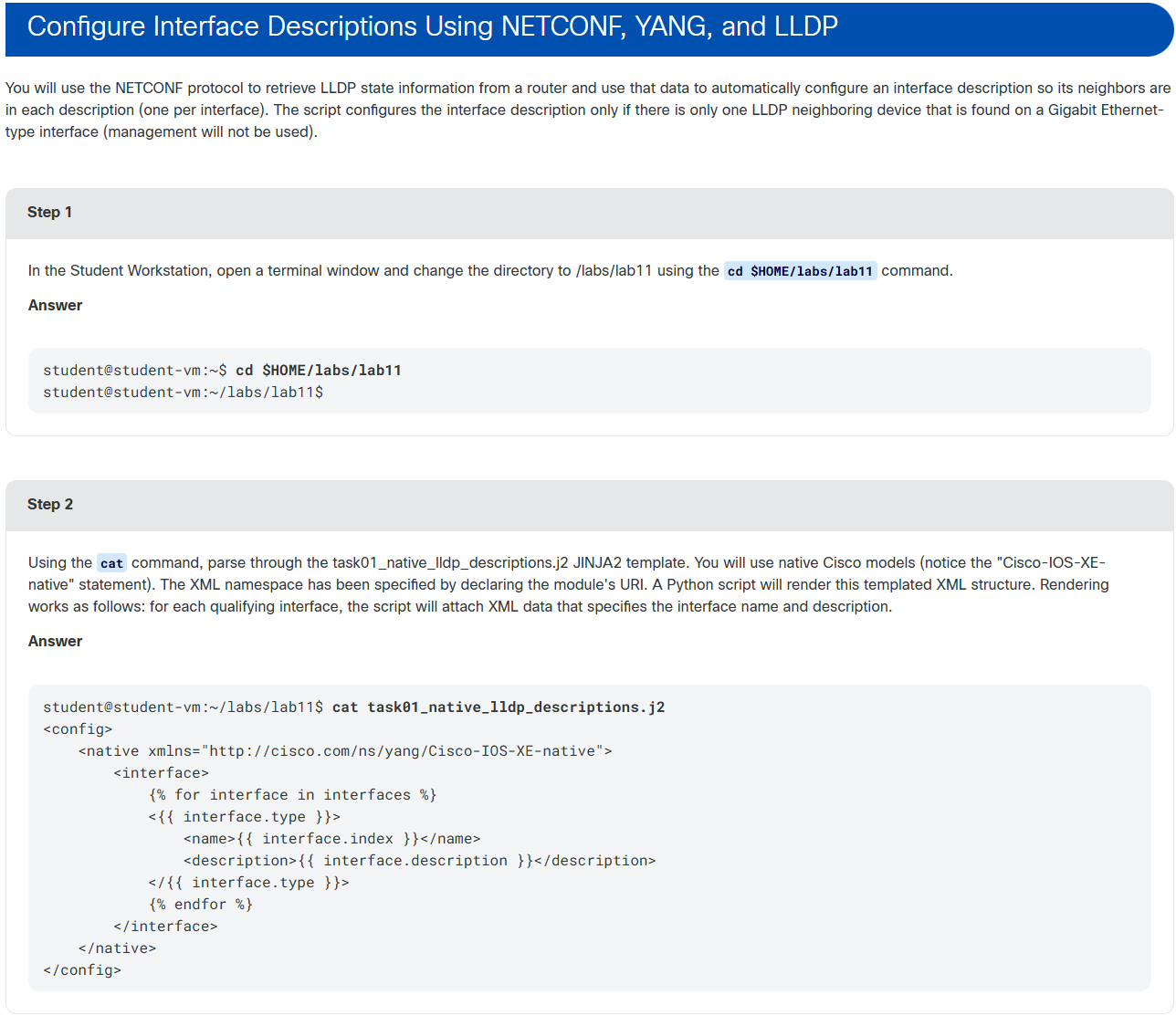
关键技术点:使用Jinja2模板(.j2文件)生成符合YANG模型规范的XML配置片段,结合YANG标准命名空间保证配置的多厂商兼容性。
-
🚩重点:通过修改过滤器的层级结构,可以从返回的全量接口数据中精准筛选出指定接口的信息,大幅简化后续数据处理逻辑。
NETCONF 实验二:Loopback接口批量创建
-
实验目标:基于YAML意图文件批量为多台设备创建Loopback接口,实现配置的声明式自动化部署。
-
核心流程:1. 编写YAML意图文件,定义每台设备Loopback接口的名称、IP地址、前缀长度等参数;2. 通过Jinja2模板将YAML参数动态渲染为NETCONF可识别的XML配置;3. 执行Python脚本批量下发配置。
-
🚩重点:脚本开发中需避免硬编码设备主机名,必须通过命令行参数动态传入目标设备地址,否则会导致批量部署时部分设备配置失败。
NETCONF 实验三:BGP路由协议自动化部署
-
实验目标:通过NETCONF结合OpenConfig YANG模型,自动生成并下发BGP前缀列表,实现BGP路由网络的自动化搭建。
-
核心流程:1. 手动完成BGP基础进程初始化;2. 基于OpenConfig路由策略YANG模型编写Jinja2模板,结合YAML意图文件生成前缀列表配置;3. 通过NETCONF脚本批量下发前缀列表,完成BGP路由邻居的路由宣告配置。
-
🚩重点:IPv4地址的32位前缀对应子网掩码255.255.255.255,用于精准匹配单个主机地址,是Loopback接口路由宣告的标准配置方式。
RESTCONF 协议核心原理
-
协议定位:RESTCONF是NETCONF的REST风格子集,基于HTTP协议实现,复用NETCONF的YANG数据模型,支持JSON与XML两种数据格式,相比NETCONF具备更强的开发灵活性。
-
核心差异对比:NETCONF是面向连接的有状态协议,支持长会话与候选配置;RESTCONF是无状态协议,所有操作直接写入running运行配置,不支持候选配置特性,每次请求仅执行单一操作。
-
🚩重点:RESTCONF原生支持GET、PUT、POST、PATCH、DELETE等标准HTTP方法,开发者可以直接使用Python requests库完成接口调用,无需依赖专用客户端库。
RESTCONF 实验一:BGP邻居自动化管理
-
实验目标:基于RESTCONF实现BGP邻居的批量添加、同步与删除操作,验证RESTCONF在配置管理场景下的易用性。
-
核心流程:1. 手动初始化每台设备的BGP基础进程;2. 编写YAML意图文件定义每台设备的BGP AS号与邻居信息;3. 执行Python脚本通过RESTCONF接口完成BGP邻居的自动化配置与状态同步。
-
🚩重点:RESTCONF配置操作直接写入运行配置,无需执行commit提交,操作生效速度快,但需要额外做好配置备份机制。
RESTCONF 实验二:BGP运行状态自动化校验
-
实验目标:通过RESTCONF接口采集设备BGP运行状态,使用PrettyTable库格式化输出BGP邻居状态、前缀数量等关键信息,实现网络状态的自动化巡检。
-
核心代码要点:脚本通过argparse接收命令行参数,使用requests库发送HTTP GET请求,从指定的YANG模型容器中提取BGP运行数据,最终以结构化表格形式输出巡检结果。
-
🚩重点 :Python脚本中的
if __name__ == "__main__":语句是程序入口标记,是Python模块化开发的标准语法,用于区分脚本直接执行与模块导入两种运行场景。
🖍️ 重点速览
🚩 考点重点
-
NETCONF默认端口:NETCONF协议默认使用TCP 830端口,是课程测验的必答题考点。
-
NETCONF候选配置特性:所有修改先写入候选区,执行commit后原子性同步到运行配置,提交失败则运行配置完全不变,是NETCONF事务性的核心体现。
-
RESTCONF核心限制:RESTCONF是NETCONF的子集,不支持候选配置,所有操作直接写入running运行配置,属于高频易错考点。
-
IPv4前缀含义:IPv4地址总长度为32位,/32前缀代表精准匹配单个主机地址,常用于Loopback接口的路由宣告场景。
-
脚本开发常见坑:Python自动化脚本中禁止硬编码目标设备主机名,必须通过变量或命令行参数动态传入,否则会导致批量部署失败。
💡 核心概念
-
NETCONF:基于XML与SSH的有状态下一代网络管理协议,支持配置与状态数据分离、候选配置事务提交,专为网络自动化设计。
-
RESTCONF:基于HTTP的无状态REST风格网络管理协议,是NETCONF的子集,支持JSON/XML双格式,兼容标准HTTP操作方法。
-
YANG模型:标准化网络数据建模语言,为NETCONF与RESTCONF提供统一的数据结构定义,实现多厂商设备的配置兼容。
-
ncclient:Python生态下的开源NETCONF客户端库,将XML交互封装为Python原生对象,大幅简化NETCONF脚本开发。
-
核心代码片段(ncclient连接):
from ncclient import manager
device = manager.connect(host="csr1kv1", port=830, username="cisco", password="cisco", host_key_verify=False)
✨ 课堂金句
-
"自动化脚本不是读心术,计算机只会严格执行你明确下达的指令,永远不要假设它能自动补全你遗漏的配置参数。"
-
"YANG模型就像网络世界的通用语言,让不同厂商的设备都能听懂自动化脚本的指令。"
-
"前缀长度就像显微镜的变焦值,数字越大,你能精准观察到的网络范围就越小。"
-
"把重复的手工配置交给脚本去做,网络工程师的价值应该聚焦在架构设计而非机械重复劳动上。"
📝 待办事项
-
实验任务:完成两个官方配套实验,分别使用NETCONF实现BGP自动化配置、使用RESTCONF实现接口自动化管理。
-
阅读参考:课后查阅GitHub上的Cisco IOS XE官方YANG模型仓库,熟悉OpenConfig与厂商原生YANG模型的结构差异。
-
复习重点:梳理NETCONF与RESTCONF的协议栈差异、核心特性对比表,牢记NETCONF默认端口830,掌握ncclient与requests库的基础使用方法。
-
拓展练习:基于课程所学脚本,自行扩展实现VLAN批量创建、接口状态巡检等自定义网络自动化场景。
🎯 课程总结
🔍 网络管理协议概述
-
简单网络管理协议(SNMP):传统网络管理协议,支持设备轮询和陷阱通知,但在设备配置方面存在局限性。
-
NETCONF:2006年开发,2011年发布为RFC 6241,旨在解决SNMP的配置缺陷,支持标准化的配置数据读写和设备操作。
-
RESTCONF:基于NETCONF的子集,融合REST功能和HTTP方法,为网络自动化软件提供更高灵活性。
-
共性 :NETCONF与RESTCONF均使用YANG数据模型实现设备配置的标准化编程访问。
📊 数据类型定义
| 数据类型 | 定义 |
|---|---|
| 配置数据 | 将系统从初始默认状态转换为当前状态所需的可写数据 |
| 状态数据 | 系统中非配置数据的额外信息,如只读状态信息和统计数据 |
📋 NETCONF核心特性
-
协议栈结构(从下到上):
-
传输层:基于SSH(默认端口TCP 830),要求面向连接、可靠传输及身份验证
-
消息层 :采用XML编码的
<rpc>(远程过程调用)和<rpc-reply>消息对 -
操作层 :支持配置更新与检索,核心操作包括
<get>、<get-config>、<edit-config>等 -
内容层:基于YANG模型的XML数据表示
-
-
配置数据库:
-
运行配置(running):设备当前生效的配置
-
启动配置(startup):设备启动时加载的配置
-
候选配置(candidate):未提交的配置草稿,支持事务性提交
-
-
关键操作:
-
<get>:获取运行配置和设备状态信息 -
<edit-config>:修改目标配置数据库,支持合并、替换等操作 -
<copy-config>:复制配置数据库内容 -
<commit>:将候选配置提交到运行配置
-
🔄 NETCONF通信流程
-
客户端连接到NETCONF SSH子系统
-
服务器返回包含支持能力的hello消息
-
客户端回应支持能力
-
客户端发送NETCONF请求(包含
<rpc>/操作/内容) -
服务器处理请求并返回响应
💻 ncclient Python库应用
-
功能:简化NETCONF客户端脚本开发,支持设备连接、XML消息发送与响应处理
-
核心操作示例:
# 导入模块
from ncclient import manager
import lxml.etree as ET

# 建立连接
device = manager.connect(
    host="csr1kv1",
    port=830,
    username="cisco",
    password="cisco",
    hostkey_verify=False
)

# 定义过滤条件(获取接口配置)
get_filter = """
<filter xmlns="urn:ietf:params:xml:ns:netconf:base:1.0">
  <interfaces xmlns="urn:ietf:params:xml:ns:yang:ietf-interfaces">
    <interface>
      <name/>
      <description/>
      <type/>
      <enabled/>
    </interface>
  </interfaces>
</filter>
"""

# 获取配置并打印
nc_get_reply = device.get(('subtree', get_filter))
print(ET.tostring(nc_get_reply.data_ele, pretty_print=True))
⚡ 课程收益
-
NETCONF解决并超越SNMP的诸多特性,提供更强大的配置管理能力
-
RESTCONF作为NETCONF的HTTP子集,降低开发门槛,增强自动化灵活性
-
通过实验掌握NETCONF与RESTCONF的实际应用,提升网络自动化技能
PS:由于Cisco远程实验连接美国实验室,跨境加速也加不起来,只能复制粘贴实验课程指导提示,如下:Explore NETCONF with Python
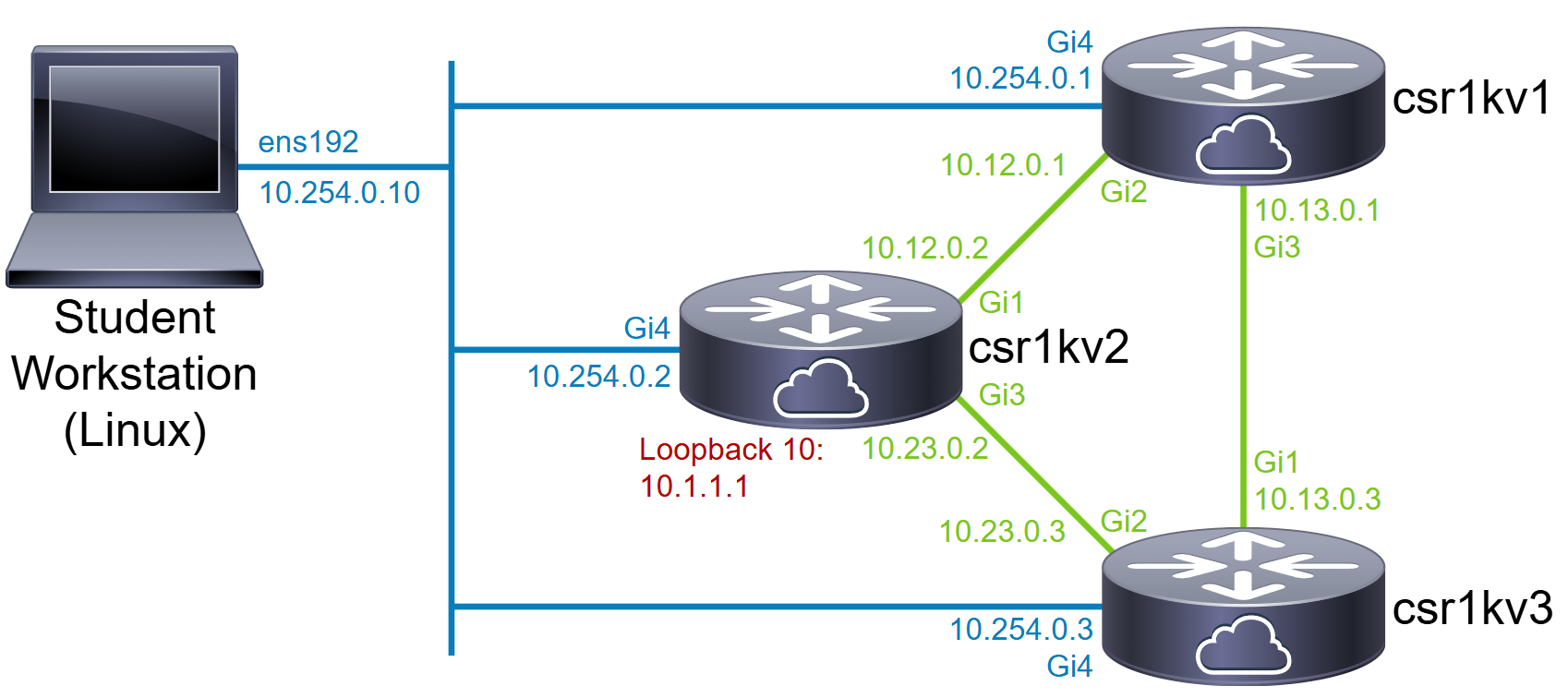
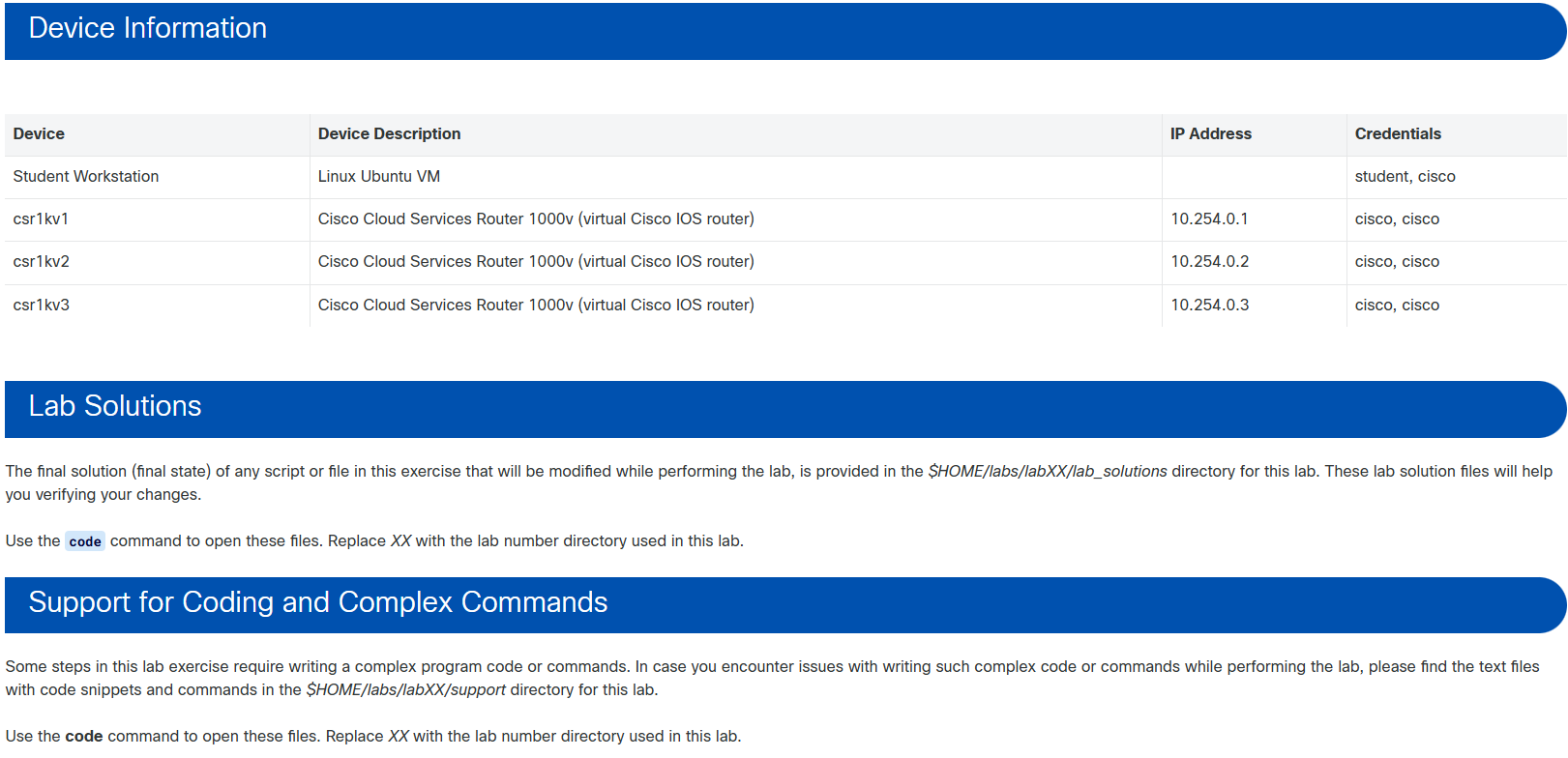
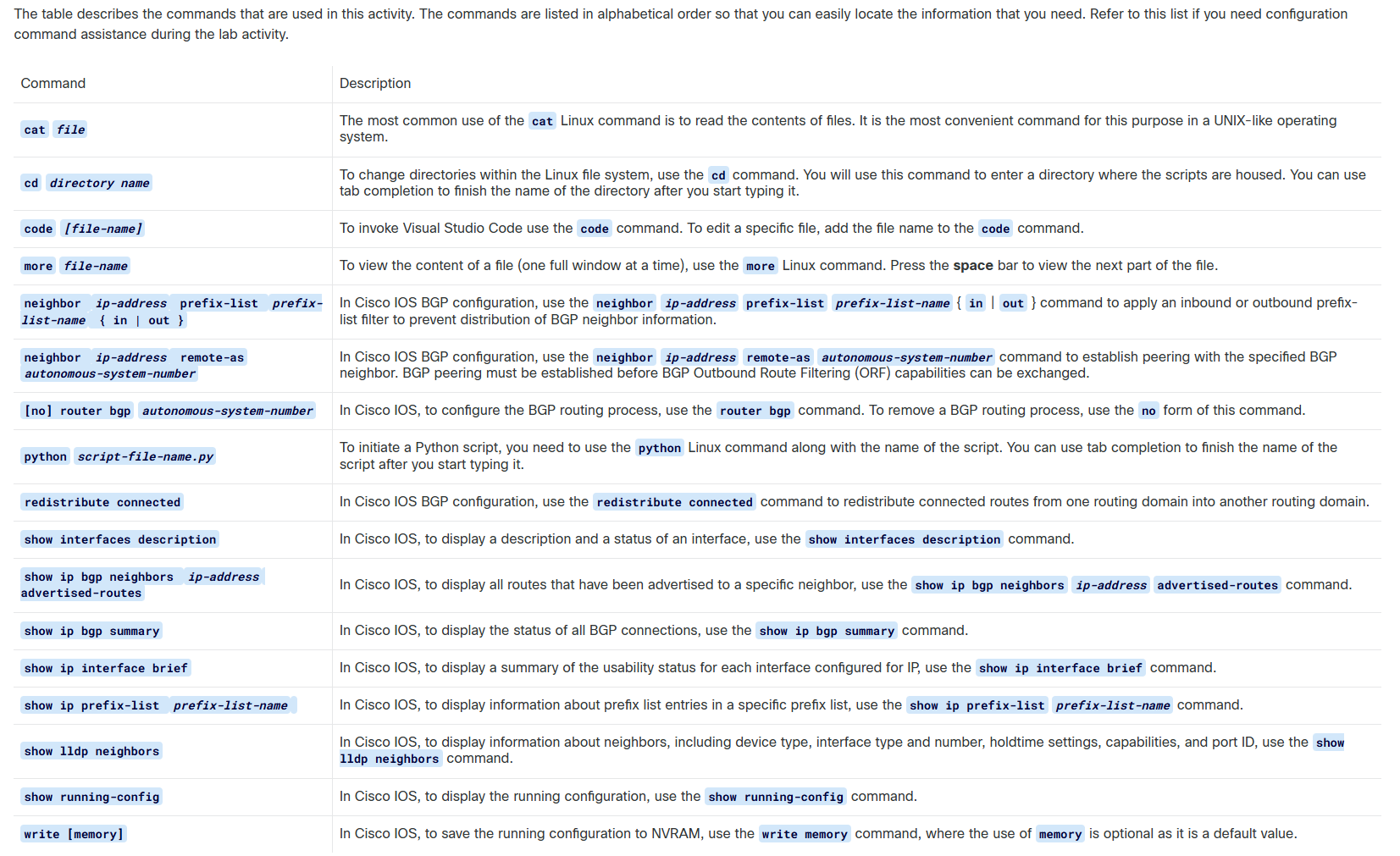
Example for the csr1kv1 router:
bash
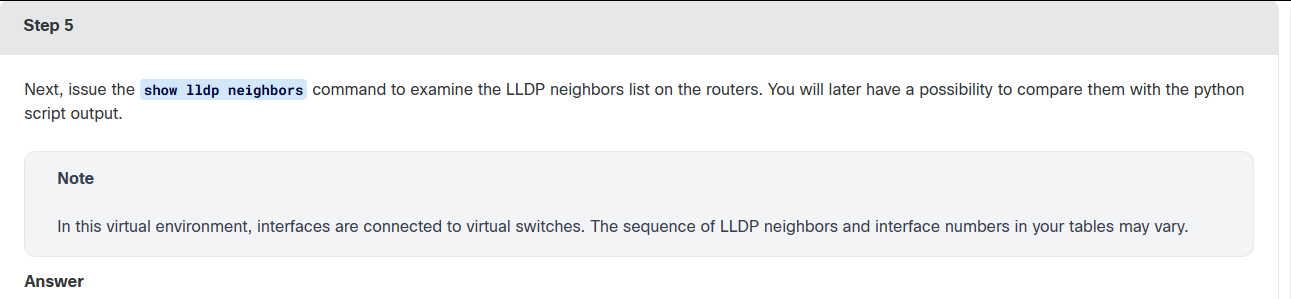
csr1kv1# show lldp neighbors
Capability codes:
    (R) Router, (B) Bridge, (T) Telephone, (C) DOCSIS Cable Device
    (W) WLAN Access Point, (P) Repeater, (S) Station, (O) Other

Device ID           Local Intf     Hold-time  Capability      Port ID
csr1kv3.cisco.com   Gi4            120        R               Gi4
csr1kv3.cisco.com   Gi4            120        R               Gi3
csr1kv3.cisco.com   Gi4            120        R               Gi2
csr1kv3.cisco.com   Gi4            120        R               Gi1
csr1kv1.cisco.com   Gi4            120        R               Gi2
csr1kv1.cisco.com   Gi4            120        R               Gi3
csr1kv1.cisco.com   Gi3            120        R               Gi4
csr1kv2.cisco.com   Gi4            120        R               Gi1
csr1kv2.cisco.com   Gi4            120        R               Gi2
csr1kv2.cisco.com   Gi4            120        R               Gi3
csr1kv2.cisco.com   Gi4            120        R               Gi4

Total entries displayed: 11

csr1kv1#
Example for the csr1kv2 router:
bash
csr1kv2# show lldp neighbors
Capability codes:
    (R) Router, (B) Bridge, (T) Telephone, (C) DOCSIS Cable Device
    (W) WLAN Access Point, (P) Repeater, (S) Station, (O) Other

Device ID           Local Intf     Hold-time  Capability      Port ID
csr1kv3.cisco.com   Gi3            120        R               Gi4
csr1kv3.cisco.com   Gi4            120        R               Gi3
csr1kv3.cisco.com   Gi4            120        R               Gi2
csr1kv3.cisco.com   Gi4            120        R               Gi1
csr1kv1.cisco.com   Gi4            120        R               Gi2
csr1kv1.cisco.com   Gi4            120        R               Gi3
csr1kv1.cisco.com   Gi4            120        R               Gi4
csr1kv2.cisco.com   Gi4            120        R               Gi1
csr1kv2.cisco.com   Gi4            120        R               Gi2
csr1kv2.cisco.com   Gi4            120        R               Gi3
csr1kv2.cisco.com   Gi3            120        R               Gi4

Total entries displayed: 11

csr1kv2#
bash
student@student-vm:~/labs/lab11$ python task01_native_lldp_descriptions.py --host csr1kv1

Getting LLDP neighbors with NETCONF

LLDP Neighbors:
<?xml version="1.0" ?>
<data xmlns="urn:ietf:params:xml:ns:netconf:base:1.0" xmlns:nc="urn:ietf:params:xml:ns:netconf:base:1.0">
 <lldp-entries xmlns="http://cisco.com/ns/yang/Cisco-IOS-XE-lldp-oper">
  <lldp-entry>
   <device-id>csr1kv2.cisco.com</device-id>
   <local-interface>Gi4</local-interface>
   <connecting-interface>Gi4</connecting-interface>
   <ttl>120</ttl>
   <capabilities>
    <router/>
   </capabilities>
  </lldp-entry>
  <lldp-entry>
   <device-id>csr1kv2.cisco.com</device-id>
   <local-interface>Gi4</local-interface>
   <connecting-interface>Gi3</connecting-interface>
   <ttl>120</ttl>
   <capabilities>
    <router/>
   </capabilities>
  </lldp-entry>
  <lldp-entry>
   <device-id>csr1kv2.cisco.com</device-id>
   <local-interface>Gi4</local-interface>
   <connecting-interface>Gi2</connecting-interface>
   <ttl>120</ttl>
   <capabilities>
    <router/>
   </capabilities>
  </lldp-entry>
  <lldp-entry>
   <device-id>csr1kv2.cisco.com</device-id>
   <local-interface>Gi4</local-interface>
   <connecting-interface>Gi1</connecting-interface>
   <ttl>120</ttl>
   <capabilities>
    <router/>
   </capabilities>
  </lldp-entry>
  <lldp-entry>
   <device-id>csr1kv1.cisco.com</device-id>
   <local-interface>Gi3</local-interface>
   <connecting-interface>Gi4</connecting-interface>
   <ttl>120</ttl>
   <capabilities>
    <router/>
   </capabilities>
  </lldp-entry>
  <lldp-entry>
   <device-id>csr1kv1.cisco.com</device-id>
   <local-interface>Gi4</local-interface>
   <connecting-interface>Gi3</connecting-interface>
   <ttl>120</ttl>
   <capabilities>
    <router/>
   </capabilities>
  </lldp-entry>
  <lldp-entry>
   <device-id>csr1kv1.cisco.com</device-id>
   <local-interface>Gi4</local-interface>
   <connecting-interface>Gi2</connecting-interface>
   <ttl>120</ttl>
   <capabilities>
    <router/>
   </capabilities>
  </lldp-entry>
  <lldp-entry>
   <device-id>csr1kv3.cisco.com</device-id>
   <local-interface>Gi4</local-interface>
   <connecting-interface>Gi1</connecting-interface>
   <ttl>120</ttl>
   <capabilities>
    <router/>
   </capabilities>
  </lldp-entry>
  <lldp-entry>
   <device-id>csr1kv3.cisco.com</device-id>
   <local-interface>Gi4</local-interface>
   <connecting-interface>Gi2</connecting-interface>
   <ttl>120</ttl>
   <capabilities>
    <router/>
   </capabilities>
  </lldp-entry>
  <lldp-entry>
   <device-id>csr1kv3.cisco.com</device-id>
   <local-interface>Gi4</local-interface>
   <connecting-interface>Gi3</connecting-interface>
   <ttl>120</ttl>
   <capabilities>
    <router/>
   </capabilities>
  </lldp-entry>
  <lldp-entry>
   <device-id>csr1kv3.cisco.com</device-id>
   <local-interface>Gi4</local-interface>
   <connecting-interface>Gi4</connecting-interface>
   <ttl>120</ttl>
   <capabilities>
    <router/>
   </capabilities>
  </lldp-entry>
 </lldp-entries>
</data>


Filter:

        <lldp-entries xmlns="http://cisco.com/ns/yang/Cisco-IOS-XE-lldp-oper">
        </lldp-entries>


YANG Model URL: https://github.com/YangModels/yang/blob/master/vendor/cisco/xe/1693/Cisco-IOS-XE-lldp-oper.yang


Getting interfaces with NETCONF

Interfaces:
<?xml version="1.0" ?>
<data xmlns="urn:ietf:params:xml:ns:netconf:base:1.0" xmlns:nc="urn:ietf:params:xml:ns:netconf:base:1.0">
 <native xmlns="http://cisco.com/ns/yang/Cisco-IOS-XE-native">
  <interface>
   <GigabitEthernet>
    <name>1</name>
    <shutdown/>
    <mop>
     <enabled>false</enabled>
     <sysid>false</sysid>
    </mop>
    <negotiation xmlns="http://cisco.com/ns/yang/Cisco-IOS-XE-ethernet">
     <auto>true</auto>
    </negotiation>
   </GigabitEthernet>
   <GigabitEthernet>
    <name>2</name>
    <ip>
     <address>
      <primary>
       <address>10.12.0.1</address>
       <mask>255.255.255.0</mask>
      </primary>
     </address>
    </ip>
    <mop>
     <enabled>false</enabled>
     <sysid>false</sysid>
    </mop>
    <negotiation xmlns="http://cisco.com/ns/yang/Cisco-IOS-XE-ethernet">
     <auto>true</auto>
    </negotiation>
   </GigabitEthernet>
   <GigabitEthernet>
    <name>3</name>
    <ip>
     <address>
      <primary>
       <address>10.13.0.1</address>
       <mask>255.255.255.0</mask>
      </primary>
     </address>
    </ip>
    <mop>
     <enabled>false</enabled>
     <sysid>false</sysid>
    </mop>
    <negotiation xmlns="http://cisco.com/ns/yang/Cisco-IOS-XE-ethernet">
     <auto>true</auto>
    </negotiation>
   </GigabitEthernet>
   <GigabitEthernet>
    <name>4</name>
    <ip>
     <address>
      <primary>
       <address>10.254.0.1</address>
       <mask>255.255.255.0</mask>
      </primary>
     </address>
    </ip>
    <mop>
     <enabled>false</enabled>
     <sysid>false</sysid>
    </mop>
    <negotiation xmlns="http://cisco.com/ns/yang/Cisco-IOS-XE-ethernet">
     <auto>true</auto>
    </negotiation>
   </GigabitEthernet>
   <Loopback>
    <name>10</name>
      </Loopback>
   <Loopback>
    <name>100</name>
   </Loopback>
  </interface>
 </native>
</data>


Filter:

        <native xmlns="http://cisco.com/ns/yang/Cisco-IOS-XE-native">
        <interface></interface>
        </native>


YANG Model URL: https://github.com/YangModels/yang/blob/master/vendor/cisco/xe/1693/Cisco-IOS-XE-interfaces.yang


Interfaces Payload:
<config>
    <native xmlns="http://cisco.com/ns/yang/Cisco-IOS-XE-native">
        <interface>

            <GigabitEthernet>
                <name>3</name>
                <description>Connects to csr1kv1.cisco.com on Gi4 (auto-configured by NETCONF)</description>
            </GigabitEthernet>

        </interface>
    </native>
</config>


YANG Model URL: https://github.com/YangModels/yang/blob/master/vendor/cisco/xe/1693/Cisco-IOS-XE-interfaces.yang


Sending interface descriptions with NETCONF

YANG Model URL: https://github.com/YangModels/yang/blob/master/vendor/cisco/xe/1693/Cisco-IOS-XE-interfaces.yang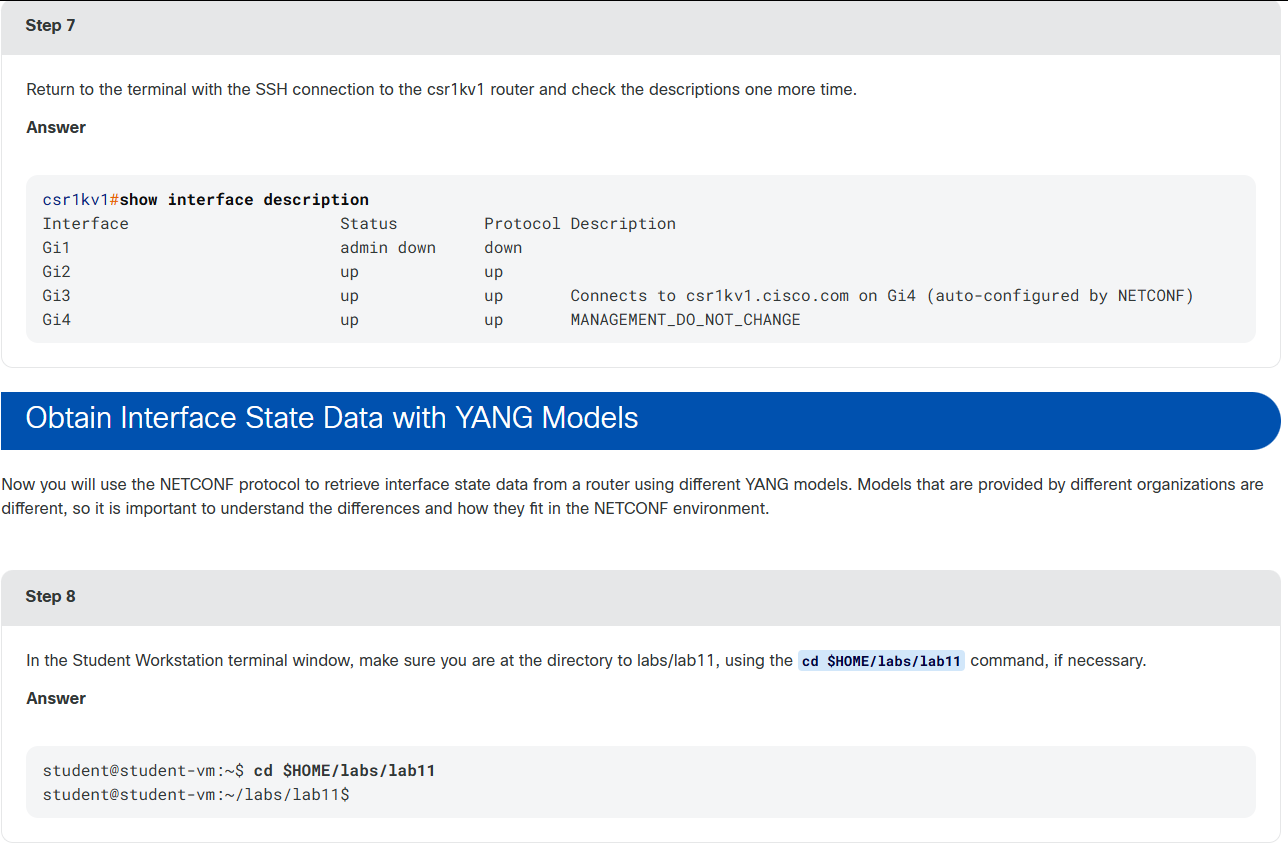
bash
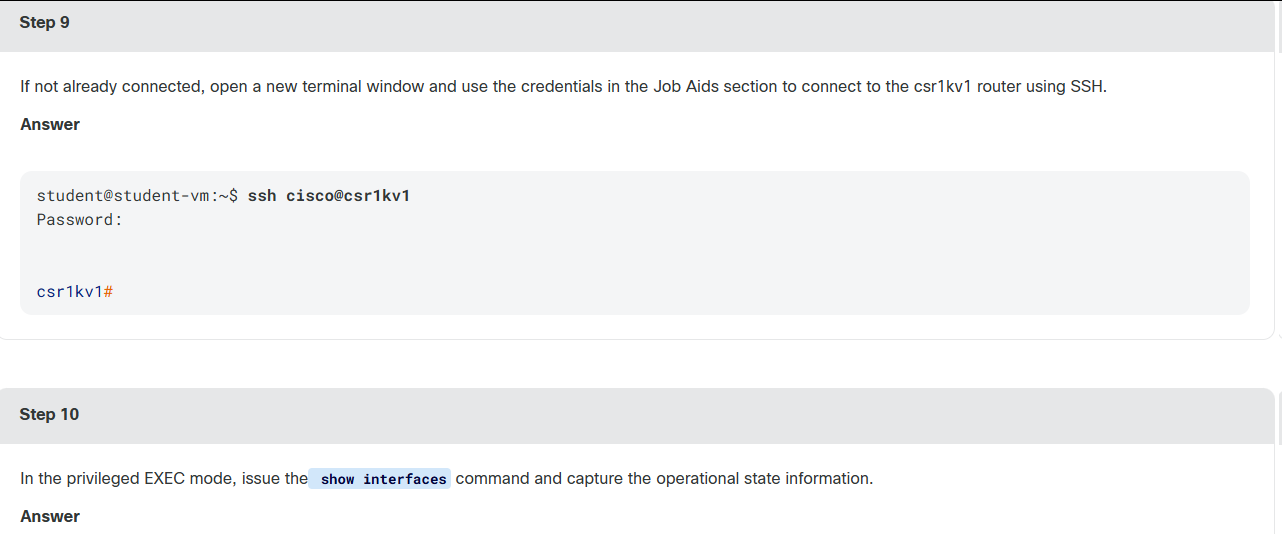
csr1kv1#show interfaces
GigabitEthernet1 is administratively down, line protocol is down
  Hardware is CSR vNIC, address is 0050.56a5.9465 (bia 0050.56a5.9465)
  MTU 1500 bytes, BW 1000000 Kbit/sec, DLY 10 usec,
     reliability 255/255, txload 1/255, rxload 1/255
  Encapsulation ARPA, loopback not set
  Keepalive set (10 sec)
  Full Duplex, 1000Mbps, link type is auto, media type is Virtual
  output flow-control is unsupported, input flow-control is unsupported
  ARP type: ARPA, ARP Timeout 04:00:00
  Last input 2w0d, output 2w0d, output hang never
  Last clearing of "show interface" counters never
  Input queue: 0/375/0/0 (size/max/drops/flushes); Total output drops: 0
  Queueing strategy: fifo
  Output queue: 0/40 (size/max)
  5 minute input rate 0 bits/sec, 0 packets/sec
  5 minute output rate 0 bits/sec, 0 packets/sec
     2431 packets input, 608226 bytes, 0 no buffer
     Received 0 broadcasts (0 IP multicasts)
     0 runts, 0 giants, 0 throttles
     0 input errors, 0 CRC, 0 frame, 0 overrun, 0 ignored
     0 watchdog, 0 multicast, 0 pause input
     67 packets output, 22882 bytes, 0 underruns
     0 output errors, 0 collisions, 1 interface resets
     0 unknown protocol drops
     0 babbles, 0 late collision, 0 deferred
     1 lost carrier, 0 no carrier, 0 pause output
     0 output buffer failures, 0 output buffers swapped out
GigabitEthernet2 is up, line protocol is up
  Hardware is CSR vNIC, address is 0050.56a5.e191 (bia 0050.56a5.e191)
  Description: Connects to csr1kv1.cisco.com on Gi3 (auto-configured by NETCONF)
  Internet address is 10.12.0.1/24
  MTU 1500 bytes, BW 1000000 Kbit/sec, DLY 10 usec,
     reliability 255/255, txload 1/255, rxload 1/255
  Encapsulation ARPA, loopback not set
  Keepalive set (10 sec)
  Full Duplex, 1000Mbps, link type is auto, media type is Virtual
  output flow-control is unsupported, input flow-control is unsupported
  ARP type: ARPA, ARP Timeout 04:00:00
  Last input 00:00:00, output 00:00:01, output hang never
  Last clearing of "show interface" counters never
  Input queue: 0/375/0/0 (size/max/drops/flushes); Total output drops: 0
  Queueing strategy: fifo
  Output queue: 0/40 (size/max)
  5 minute input rate 0 bits/sec, 0 packets/sec
  5 minute output rate 0 bits/sec, 0 packets/sec
     3341248 packets input, 765819740 bytes, 0 no buffer
     Received 0 broadcasts (0 IP multicasts)
     0 runts, 0 giants, 0 throttles
     0 input errors, 0 CRC, 0 frame, 0 overrun, 0 ignored
     0 watchdog, 0 multicast, 0 pause input
     401185 packets output, 70304356 bytes, 0 underruns
     0 output errors, 0 collisions, 0 interface resets
     114 unknown protocol drops
     0 babbles, 0 late collision, 0 deferred
     0 lost carrier, 0 no carrier, 0 pause output
     0 output buffer failures, 0 output buffers swapped out
GigabitEthernet3 is up, line protocol is up
  Hardware is CSR vNIC, address is 0050.56a5.10bd (bia 0050.56a5.10bd)
  Description: Connects to csr1kv1.cisco.com on Gi4 (auto-configured by NETCONF)
  Internet address is 10.13.0.1/24
  MTU 1500 bytes, BW 1000000 Kbit/sec, DLY 10 usec,
     reliability 255/255, txload 1/255, rxload 1/255
  Encapsulation ARPA, loopback not set
  Keepalive set (10 sec)
  Full Duplex, 1000Mbps, link type is auto, media type is Virtual
  output flow-control is unsupported, input flow-control is unsupported
  ARP type: ARPA, ARP Timeout 04:00:00
  Last input 00:00:00, output 00:00:02, output hang never
  Last clearing of "show interface" counters never
  Input queue: 0/375/0/0 (size/max/drops/flushes); Total output drops: 0
  Queueing strategy: fifo
  Output queue: 0/40 (size/max)
  5 minute input rate 0 bits/sec, 0 packets/sec
  5 minute output rate 0 bits/sec, 0 packets/sec
     3306155 packets input, 761821714 bytes, 0 no buffer
     Received 0 broadcasts (0 IP multicasts)
     0 runts, 0 giants, 0 throttles
     0 input errors, 0 CRC, 0 frame, 0 overrun, 0 ignored
     0 watchdog, 0 multicast, 0 pause input
     413425 packets output, 70806672 bytes, 0 underruns
     0 output errors, 0 collisions, 1 interface resets
     147 unknown protocol drops
     0 babbles, 0 late collision, 0 deferred
     1 lost carrier, 0 no carrier, 0 pause output
     0 output buffer failures, 0 output buffers swapped out
GigabitEthernet4 is up, line protocol is up
  Hardware is CSR vNIC, address is 0050.56a5.2851 (bia 0050.56a5.2851)
  Internet address is 10.254.0.1/24
  MTU 1500 bytes, BW 1000000 Kbit/sec, DLY 10 usec,
     reliability 255/255, txload 1/255, rxload 1/255
  Encapsulation ARPA, loopback not set
  Keepalive set (10 sec)
  Full Duplex, 1000Mbps, link type is auto, media type is Virtual
  output flow-control is unsupported, input flow-control is unsupported
  ARP type: ARPA, ARP Timeout 04:00:00
  Last input 00:00:00, output 00:00:00, output hang never
  Last clearing of "show interface" counters never
  Input queue: 0/375/0/0 (size/max/drops/flushes); Total output drops: 0
  Queueing strategy: fifo
  Output queue: 0/40 (size/max)
  5 minute input rate 0 bits/sec, 0 packets/sec
  5 minute output rate 0 bits/sec, 0 packets/sec
     3419532 packets input, 729648453 bytes, 0 no buffer
     Received 0 broadcasts (0 IP multicasts)
     0 runts, 0 giants, 0 throttles
     0 input errors, 0 CRC, 0 frame, 0 overrun, 0 ignored
     0 watchdog, 0 multicast, 0 pause input
     322887 packets output, 107504215 bytes, 0 underruns
     0 output errors, 0 collisions, 0 interface resets
     147 unknown protocol drops
     0 babbles, 0 late collision, 0 deferred
     0 lost carrier, 0 no carrier, 0 pause output
     0 output buffer failures, 0 output buffers swapped out
bash
student@student-vm:~/labs/lab11$ python task02_interfaces_state.py --host csr1kv1 --model native

Getting interfaces oper state with NETCONF (using Native Model)

Interfaces:
<?xml version="1.0" ?>
<data xmlns="urn:ietf:params:xml:ns:netconf:base:1.0" xmlns:nc="urn:ietf:params:xml:ns:netconf:base:1.0">
 <interfaces xmlns="http://cisco.com/ns/yang/Cisco-IOS-XE-interfaces-oper">
  <interface>
   <name>GigabitEthernet1</name>
   <interface-type>iana-iftype-ethernet-csmacd</interface-type>
   <admin-status>if-state-down</admin-status>
   <oper-status>if-oper-state-no-pass</oper-status>
   <last-change>2019-09-13T11:10:25.00079+00:00</last-change>
   <if-index>1</if-index>
   <phys-address>00:50:56:a5:94:65</phys-address>
   <speed>1024000000</speed>
   <statistics>
    <discontinuity-time>2019-06-26T16:11:18.000587+00:00</discontinuity-time>
    <in-octets>608226</in-octets>
    <in-unicast-pkts>2431</in-unicast-pkts>
    <in-broadcast-pkts>0</in-broadcast-pkts>
    <in-multicast-pkts>0</in-multicast-pkts>
    <in-discards>0</in-discards>
    <in-errors>0</in-errors>
    <in-unknown-protos>0</in-unknown-protos>
    <out-octets>22882</out-octets>
    <out-unicast-pkts>67</out-unicast-pkts>
    <out-broadcast-pkts>0</out-broadcast-pkts>
    <out-multicast-pkts>0</out-multicast-pkts>
    <out-discards>0</out-discards>
    <out-errors>0</out-errors>
    <rx-pps>0</rx-pps>
    <rx-kbps>0</rx-kbps>
    <tx-pps>0</tx-pps>
    <tx-kbps>0</tx-kbps>
    <num-flaps>0</num-flaps>
    <in-crc-errors>0</in-crc-errors>
   </statistics>
   <vrf/>
   <description/>
   <mtu>1500</mtu>
   <input-security-acl/>
   <output-security-acl/>
   <v4-protocol-stats>
    <in-pkts>0</in-pkts>
    <in-octets>0</in-octets>
    <in-error-pkts>0</in-error-pkts>
    <in-forwarded-pkts>0</in-forwarded-pkts>
    <in-forwarded-octets>0</in-forwarded-octets>
    <in-discarded-pkts>0</in-discarded-pkts>
    <out-pkts>0</out-pkts>
    <out-octets>0</out-octets>
    <out-error-pkts>0</out-error-pkts>
    <out-forwarded-pkts>0</out-forwarded-pkts>
    <out-forwarded-octets>0</out-forwarded-octets>
    <out-discarded-pkts>0</out-discarded-pkts>
   </v4-protocol-stats>
   <v6-protocol-stats>
    <in-pkts>0</in-pkts>
    <in-octets>0</in-octets>
    <in-error-pkts>0</in-error-pkts>
    <in-forwarded-pkts>0</in-forwarded-pkts>
    <in-forwarded-octets>0</in-forwarded-octets>
    <in-discarded-pkts>0</in-discarded-pkts>
    <out-pkts>0</out-pkts>
    <out-octets>0</out-octets>
    <out-error-pkts>0</out-error-pkts>
    <out-forwarded-pkts>0</out-forwarded-pkts>
    <out-forwarded-octets>0</out-forwarded-octets>
    <out-discarded-pkts>0</out-discarded-pkts>
   </v6-protocol-stats>
   <bia-address>00:50:56:a5:94:65</bia-address>
   <ipv4-tcp-adjust-mss>0</ipv4-tcp-adjust-mss>
   <ipv6-tcp-adjust-mss>0</ipv6-tcp-adjust-mss>
   <ether-state>
    <negotiated-duplex-mode>unknown-duplex</negotiated-duplex-mode>
    <negotiated-port-speed>speed-unknown</negotiated-port-speed>
    <auto-negotiate>true</auto-negotiate>
    <enable-flow-control>false</enable-flow-control>
   </ether-state>
   <ether-stats>
    <in-mac-control-frames>0</in-mac-control-frames>
    <in-mac-pause-frames>0</in-mac-pause-frames>
    <in-oversize-frames>0</in-oversize-frames>
    <in-jabber-frames>0</in-jabber-frames>
    <in-fragment-frames>0</in-fragment-frames>
    <in-8021q-frames>0</in-8021q-frames>
    <out-mac-control-frames>0</out-mac-control-frames>
    <out-mac-pause-frames>0</out-mac-pause-frames>
    <out-8021q-frames>0</out-8021q-frames>
   </ether-stats>
  </interface>
  <interface>
   <name>GigabitEthernet2</name>
   <interface-type>iana-iftype-ethernet-csmacd</interface-type>
   <admin-status>if-state-up</admin-status>
   <oper-status>if-oper-state-ready</oper-status>
   <last-change>2019-06-26T16:13:26.0006+00:00</last-change>
   <if-index>2</if-index>
   <phys-address>00:50:56:a5:e1:91</phys-address>
   <speed>1024000000</speed>
   <statistics>
    <discontinuity-time>2019-06-26T16:11:18.000586+00:00</discontinuity-time>
    <in-octets>765858783</in-octets>
    <in-unicast-pkts>3341437</in-unicast-pkts>
    <in-broadcast-pkts>0</in-broadcast-pkts>
    <in-multicast-pkts>0</in-multicast-pkts>
    <in-discards>0</in-discards>
    <in-errors>0</in-errors>
    <in-unknown-protos>0</in-unknown-protos>
    <out-octets>70308816</out-octets>
    <out-unicast-pkts>401215</out-unicast-pkts>
    <out-broadcast-pkts>0</out-broadcast-pkts>
    <out-multicast-pkts>0</out-multicast-pkts>
    <out-discards>0</out-discards>
    <out-errors>0</out-errors>
    <rx-pps>1</rx-pps>
    <rx-kbps>1</rx-kbps>
    <tx-pps>0</tx-pps>
    <tx-kbps>0</tx-kbps>
    <num-flaps>0</num-flaps>
    <in-crc-errors>0</in-crc-errors>
   </statistics>
   <vrf/>
   <ipv4>10.12.0.1</ipv4>
   <ipv4-subnet-mask>255.255.255.0</ipv4-subnet-mask>
   <description>Connects to csr1kv1.cisco.com on Gi3 (auto-configured by NETCONF)</description>
   <mtu>1500</mtu>
   <input-security-acl/>
   <output-security-acl/>
   <v4-protocol-stats>
    <in-pkts>248112</in-pkts>
    <in-octets>15965031</in-octets>
    <in-error-pkts>0</in-error-pkts>
    <in-forwarded-pkts>0</in-forwarded-pkts>
    <in-forwarded-octets>0</in-forwarded-octets>
    <in-discarded-pkts>0</in-discarded-pkts>
    <out-pkts>246043</out-pkts>
    <out-octets>14712459</out-octets>
    <out-error-pkts>0</out-error-pkts>
    <out-forwarded-pkts>246043</out-forwarded-pkts>
    <out-forwarded-octets>0</out-forwarded-octets>
    <out-discarded-pkts>0</out-discarded-pkts>
   </v4-protocol-stats>
   <v6-protocol-stats>
    <in-pkts>0</in-pkts>
    <in-octets>0</in-octets>
    <in-error-pkts>0</in-error-pkts>
    <in-forwarded-pkts>0</in-forwarded-pkts>
    <in-forwarded-octets>0</in-forwarded-octets>
    <in-discarded-pkts>0</in-discarded-pkts>
    <out-pkts>0</out-pkts>
    <out-octets>0</out-octets>
    <out-error-pkts>0</out-error-pkts>
    <out-forwarded-pkts>0</out-forwarded-pkts>
    <out-forwarded-octets>0</out-forwarded-octets>
    <out-discarded-pkts>0</out-discarded-pkts>
   </v6-protocol-stats>
   <bia-address>00:50:56:a5:e1:91</bia-address>
   <ipv4-tcp-adjust-mss>0</ipv4-tcp-adjust-mss>
   <ipv6-tcp-adjust-mss>0</ipv6-tcp-adjust-mss>
   <ether-state>
    <negotiated-duplex-mode>unknown-duplex</negotiated-duplex-mode>
    <negotiated-port-speed>speed-unknown</negotiated-port-speed>
    <auto-negotiate>true</auto-negotiate>
    <enable-flow-control>false</enable-flow-control>
   </ether-state>
   <ether-stats>
    <in-mac-control-frames>0</in-mac-control-frames>
    <in-mac-pause-frames>0</in-mac-pause-frames>
    <in-oversize-frames>0</in-oversize-frames>
    <in-jabber-frames>0</in-jabber-frames>
    <in-fragment-frames>0</in-fragment-frames>
    <in-8021q-frames>0</in-8021q-frames>
    <out-mac-control-frames>0</out-mac-control-frames>
    <out-mac-pause-frames>0</out-mac-pause-frames>
    <out-8021q-frames>0</out-8021q-frames>
   </ether-stats>
  </interface>
  <interface>
   <name>GigabitEthernet3</name>
   <interface-type>iana-iftype-ethernet-csmacd</interface-type>
   <admin-status>if-state-up</admin-status>
   <oper-status>if-oper-state-ready</oper-status>
   <last-change>2019-08-08T20:29:20.000977+00:00</last-change>
   <if-index>3</if-index>
   <phys-address>00:50:56:a5:10:bd</phys-address>
   <speed>1024000000</speed>

< . . . output omitted . . .>

</interfaces>
</data>


Filter:

        <interfaces xmlns="http://cisco.com/ns/yang/Cisco-IOS-XE-interfaces-oper">
        </interfaces>


YANG Model URL: https://github.com/YangModels/yang/blob/master/vendor/cisco/xe/1693/Cisco-IOS-XE-interfaces-oper.yang
bash
student@student-vm:~/labs/lab11$ python task02_interfaces_state.py --host csr1kv1 --model openconfig

Getting interfaces oper state with NETCONF (using Openconfig Model)

Interfaces:
<?xml version="1.0" ?>
<data xmlns="urn:ietf:params:xml:ns:netconf:base:1.0" xmlns:nc="urn:ietf:params:xml:ns:netconf:base:1.0">
 <interfaces xmlns="http://openconfig.net/yang/interfaces">
  <interface>
   <name>GigabitEthernet1</name>
   <config>
    <name>GigabitEthernet1</name>
    <type xmlns:ianaift="urn:ietf:params:xml:ns:yang:iana-if-type">ianaift:ethernetCsmacd</type>
    <enabled>false</enabled>
   </config>
   <state>
    <name>GigabitEthernet1</name>
    <type xmlns:ianaift="urn:ietf:params:xml:ns:yang:iana-if-type">ianaift:ethernetCsmacd</type>
    <enabled>false</enabled>
    <ifindex>1</ifindex>
    <admin-status>DOWN</admin-status>
    <oper-status>DOWN</oper-status>
    <last-change>1568373025000862000</last-change>
    <counters>
     <in-octets>608226</in-octets>
     <in-unicast-pkts>2431</in-unicast-pkts>
     <in-broadcast-pkts>0</in-broadcast-pkts>
     <in-multicast-pkts>0</in-multicast-pkts>
     <in-discards>0</in-discards>
     <in-errors>0</in-errors>
     <in-unknown-protos>0</in-unknown-protos>
     <in-fcs-errors>0</in-fcs-errors>
     <out-octets>22882</out-octets>
     <out-unicast-pkts>67</out-unicast-pkts>
     <out-broadcast-pkts>0</out-broadcast-pkts>
     <out-multicast-pkts>0</out-multicast-pkts>
     <out-discards>0</out-discards>
     <out-errors>0</out-errors>
     <last-clear>1561565478000659000</last-clear>
    </counters>
    <hardware-port xmlns="http://openconfig.net/yang/platform">GigabitEthernet1</hardware-port>
   </state>
   <subinterfaces>
    <subinterface>
     <index>0</index>
     <config>
      <index>0</index>
      <enabled>false</enabled>
     </config>
     <state>
      <enabled>false</enabled>
      <name>GigabitEthernet1</name>
      <ifindex>1</ifindex>
      <admin-status>DOWN</admin-status>
      <oper-status>DOWN</oper-status>
      <last-change>1568373025000862000</last-change>
      <counters>
       <in-octets>608226</in-octets>
       <in-unicast-pkts>2431</in-unicast-pkts>
       <in-broadcast-pkts>0</in-broadcast-pkts>
       <in-multicast-pkts>0</in-multicast-pkts>
       <in-discards>0</in-discards>
       <in-errors>0</in-errors>
       <in-unknown-protos>0</in-unknown-protos>
       <in-fcs-errors>0</in-fcs-errors>
       <out-octets>22882</out-octets>
       <out-unicast-pkts>67</out-unicast-pkts>
       <out-broadcast-pkts>0</out-broadcast-pkts>
       <out-multicast-pkts>0</out-multicast-pkts>
       <out-discards>0</out-discards>
       <out-errors>0</out-errors>
       <last-clear>1561565478000659000</last-clear>
      </counters>
     </state>
     <ipv4 xmlns="http://openconfig.net/yang/interfaces/ip">
      <state>
       <counters>
        <in-pkts>0</in-pkts>
        <in-octets>0</in-octets>
        <in-error-pkts>0</in-error-pkts>
        <in-forwarded-pkts>0</in-forwarded-pkts>
        <in-forwarded-octets>0</in-forwarded-octets>
        <in-discarded-pkts>0</in-discarded-pkts>
        <out-pkts>0</out-pkts>
        <out-octets>0</out-octets>
        <out-error-pkts>0</out-error-pkts>
        <out-forwarded-pkts>0</out-forwarded-pkts>
        <out-forwarded-octets>0</out-forwarded-octets>
        <out-discarded-pkts>0</out-discarded-pkts>
       </counters>
      </state>
     </ipv4>

< . . . output omitted . . .>

</data>


Filter:

        <interfaces xmlns="http://openconfig.net/yang/interfaces">
        </interfaces>


YANG Model URL: https://github.com/YangModels/yang/blob/master/vendor/cisco/xe/1693/openconfig-interfaces.yang
bash
student@student-vm:~/labs/lab11$ cat task02_interfaces_state.py
#!/usr/bin/env python

#######################
# Global Vars
#
# Those values are for hard coding the environment.
#
# If needed, they can be overwritten by CLI parameters.
# If no CLI parameters are given, below values will be used.
#
DEFAULT_TARGET_HOST = ""
DEFAULT_USERNAME = "cisco"
DEFAULT_PASSWORD = "cisco"

#######################

import argparse
from lxml import etree

from ncclient import manager


def submain(args):
    ###
    #   Headers & URLs definitions
    ###

    def print_native_ifoper():
        filter = """
        <interfaces xmlns="http://cisco.com/ns/yang/Cisco-IOS-XE-interfaces-oper">
        </interfaces>
        """

        with manager.connect(
            host=args.host,
            port=830,
            username=args.username,
            password=args.password,
            hostkey_verify=False,
            device_params={"name": "csr"},
            look_for_keys=False,
            allow_agent=False,
        ) as m:
            netconf_response = m.get(
                filter=("subtree", filter)
            )

        print(
            "\nGetting interfaces oper state with NETCONF (using Native Model)"
        )
        print("\nInterfaces: \n")
        print(ET.tostring(netconf_response.data_ele, pretty_print=True))
        print("\nFilter: \n{}".format(filter))
        print(
            "\nYANG Model URL: {}\n".format(
                "https://github.com/YangModels/yang/blob/master/vendor/cisco/xe/1693/Cisco-IOS-XE-interfaces-oper.yang"
            )
        )

        # from lxml import etree
        # pretty_xml = etree.tostring(netconf_response.data_ele, pretty_print=True)

    def print_openconfig_ifoper():
        filter = """
        <interfaces xmlns="http://openconfig.net/yang/interfaces">
        </interfaces>
        """

        with manager.connect(
            host=args.host,
            port=830,
            username=args.username,
            password=args.password,
            hostkey_verify=False,
            device_params={"name": "csr"},
            look_for_keys=False,
            allow_agent=False,
        ) as m:
            netconf_response = m.get(
                filter=("subtree", filter)
            )

        print(
            "\nGetting interfaces oper state with NETCONF (using Openconfig Model)"
        )
        print("\nInterfaces: \n"
        print(ET.tostring(netconf_response.data_ele, pretty_print=True))
        print("\nFilter: \n{}".format(filter))
        print(
            "\nYANG Model URL: {}\n".format(
                "https://github.com/YangModels/yang/blob/master/vendor/cisco/xe/1693/openconfig-interfaces.yang"
            )
        )

        # from lxml import etree
        # pretty_xml = etree.tostring(netconf_response.data_ele, pretty_print=True)

    if args.model == "native":
        print_native_ifoper()
    elif args.model == "openconfig":
        print_openconfig_ifoper()


def main():
    parser = argparse.ArgumentParser()
    required_named = parser.add_argument_group(
        "Required named arguments"
    )
    required_named.add_argument(
        "--host",
        help="Target Host",
        required=True if not DEFAULT_TARGET_HOST else False,
        default=DEFAULT_TARGET_HOST,
    )
    required_named.add_argument(
        "-u",
        "--username",
        help="Username",
        required=False,
        default=DEFAULT_USERNAME,
    )
    required_named.add_argument(
        "-p",
        "--password",
        help="Password",
        required=False,
        default=DEFAULT_PASSWORD,
    )
    required_named.add_argument(
        "-m", "--model", help="Yang Model", required=True
    )

    args = parser.parse_args()

    submain(args)


if __name__ == "__main__":
    main()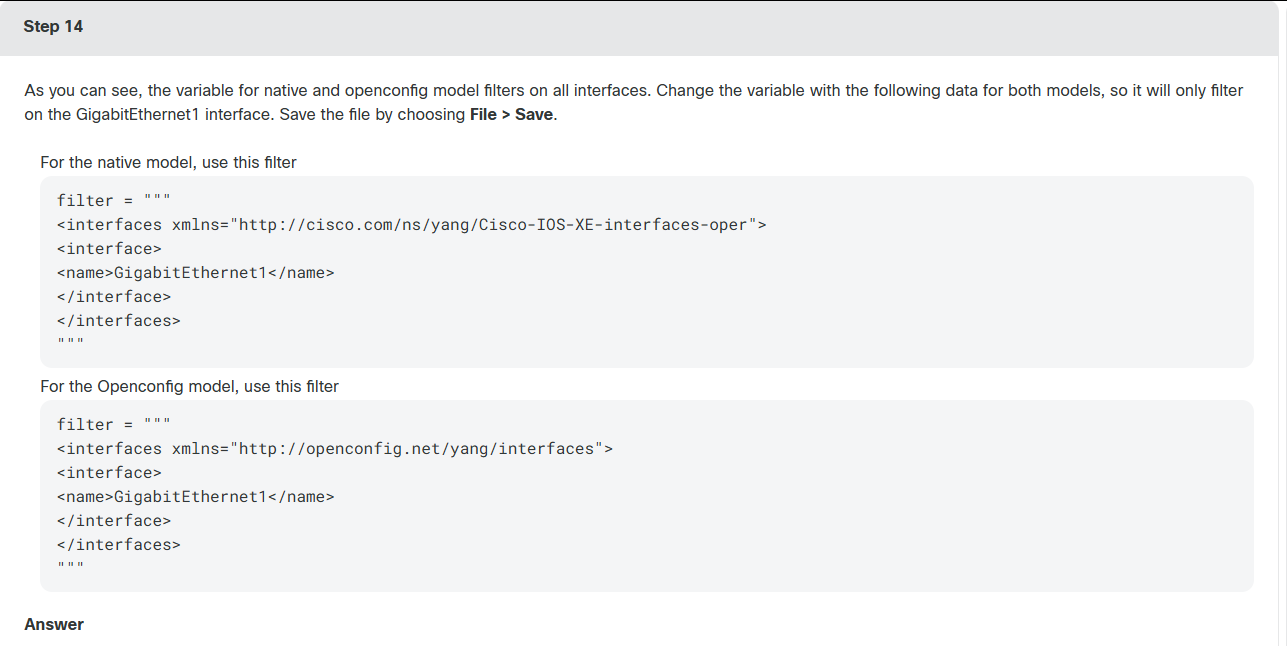
bash
student@student-vm:~/labs/lab11$ cat task02_interfaces_state.py
#!/usr/bin/env python

#######################
# Global Vars
#
# Those values are for hard coding the environment.
#
# If needed, they can be overwritten by CLI parameters.
# If no CLI parameters are given, below values will be used.
#
DEFAULT_TARGET_HOST = ""
DEFAULT_USERNAME = "cisco"
DEFAULT_PASSWORD = "cisco"

#######################

import argparse
from lxml import etree

from ncclient import manager


def submain(args):
    ###
    #   Headers & URLs definitions
    ###

    def print_native_ifoper():
        filter = """
        <interfaces xmlns="http://cisco.com/ns/yang/Cisco-IOS-XE-interfaces-oper">
        <interface>
        <name>GigabitEthernet1</name>
        </interface>
        </interfaces>
        """

        with manager.connect(
            host=args.host,
            port=830,
            username=args.username,
            password=args.password,
            hostkey_verify=False,
            device_params={"name": "csr"},
            look_for_keys=False,
            allow_agent=False,
        ) as m:
            netconf_response = m.get(
                filter=("subtree", filter)
            )

        print(
            "\nGetting interfaces oper state with NETCONF (using Native Model)"
        )
        print("\nInterfaces: \n")
        print(etree.tostring(netconf_response.data_ele, pretty_print=True))
        print("\nFilter: \n{}".format(filter))
        print(
            "\nYANG Model URL: {}\n".format(
                "https://github.com/YangModels/yang/blob/master/vendor/cisco/xe/1693/Cisco-IOS-XE-interfaces-oper.yang"
            )
        )

        # from lxml import etree
        # pretty_xml = etree.tostring(netconf_response.data_ele, pretty_print=True)

    def print_openconfig_ifoper():
        filter = """
        <interfaces xmlns="http://openconfig.net/yang/interfaces">
        <interface>
        <name>GigabitEthernet1</name>
        </interface>
        </interfaces>
        """

        with manager.connect(
            host=args.host,
            port=830,
            username=args.username,
            password=args.password,
            hostkey_verify=False,
            device_params={"name": "csr"},
            look_for_keys=False,
            allow_agent=False,
        ) as m:
            netconf_response = m.get(
                filter=("subtree", filter)
            )

        print(
            "\nGetting interfaces oper state with NETCONF (using Openconfig Model)"
        )
        print("\nInterfaces: \n")
        print(ET.tostring(netconf_response.data_ele, pretty_print=True))
        print("\nFilter: \n{}".format(filter))
        print(
            "\nYANG Model URL: {}\n".format(
                "https://github.com/YangModels/yang/blob/master/vendor/cisco/xe/1693/openconfig-interfaces.yang"
            )
        )

        # from lxml import etree
        # pretty_xml = etree.tostring(netconf_response.data_ele, pretty_print=True)

    if args.model == "native":
        print_native_ifoper()
    elif args.model == "openconfig":
        print_openconfig_ifoper()


def main():
    parser = argparse.ArgumentParser()
    required_named = parser.add_argument_group(
        "Required named arguments"
    )
    required_named.add_argument(
        "--host",
        help="Target Host",
        required=True if not DEFAULT_TARGET_HOST else False,
        default=DEFAULT_TARGET_HOST,
    )
    required_named.add_argument(
        "-u",
        "--username",
        help="Username",
        required=False,
        default=DEFAULT_USERNAME,
    )
    required_named.add_argument(
        "-p",
        "--password",
        help="Password",
        required=False,
        default=DEFAULT_PASSWORD,
    )
    required_named.add_argument(
        "-m", "--model", help="Yang Model", required=True
    )

    args = parser.parse_args()

    submain(args)


if __name__ == "__main__":
    main()
bash
student@student-vm:~/labs/lab11$ python task02_interfaces_state.py --host csr1kv1 --model native

Getting interfaces oper state with NETCONF (using Native Model)

Interfaces:
<?xml version="1.0" ?>
<data xmlns="urn:ietf:params:xml:ns:netconf:base:1.0" xmlns:nc="urn:ietf:params:xml:ns:netconf:base:1.0">
 <interfaces xmlns="http://cisco.com/ns/yang/Cisco-IOS-XE-interfaces-oper">
  <interface>
   <name xmlns:nc="urn:ietf:params:xml:ns:netconf:base:1.0">GigabitEthernet1</name>
   <interface-type>iana-iftype-ethernet-csmacd</interface-type>
   <admin-status>if-state-down</admin-status>
   <oper-status>if-oper-state-no-pass</oper-status>
   <last-change>2019-09-13T11:10:25.000761+00:00</last-change>
   <if-index>1</if-index>
   <phys-address>00:50:56:a5:94:65</phys-address>
   <speed>1024000000</speed>
   <statistics>
    <discontinuity-time>2019-06-26T16:11:18.000558+00:00</discontinuity-time>
    <in-octets>608226</in-octets>
    <in-unicast-pkts>2431</in-unicast-pkts>
    <in-broadcast-pkts>0</in-broadcast-pkts>
    <in-multicast-pkts>0</in-multicast-pkts>
    <in-discards>0</in-discards>
    <in-errors>0</in-errors>
    <in-unknown-protos>0</in-unknown-protos>
    <out-octets>22882</out-octets>
    <out-unicast-pkts>67</out-unicast-pkts>
    <out-broadcast-pkts>0</out-broadcast-pkts>
    <out-multicast-pkts>0</out-multicast-pkts>
    <out-discards>0</out-discards>
    <out-errors>0</out-errors>
    <rx-pps>0</rx-pps>
    <rx-kbps>0</rx-kbps>
    <tx-pps>0</tx-pps>
    <tx-kbps>0</tx-kbps>
    <num-flaps>0</num-flaps>
    <in-crc-errors>0</in-crc-errors>
   </statistics>
   <vrf/>
   <ipv4>10.0.10.1</ipv4>
   <ipv4-subnet-mask>255.255.255.0</ipv4-subnet-mask>
   <description/>
   <mtu>1500</mtu>
   <input-security-acl/>
   <output-security-acl/>
   <v4-protocol-stats>
    <in-pkts>0</in-pkts>
    <in-octets>0</in-octets>
    <in-error-pkts>0</in-error-pkts>
    <in-forwarded-pkts>0</in-forwarded-pkts>
    <in-forwarded-octets>0</in-forwarded-octets>
    <in-discarded-pkts>0</in-discarded-pkts>
    <out-pkts>0</out-pkts>
    <out-octets>0</out-octets>
    <out-error-pkts>0</out-error-pkts>
    <out-forwarded-pkts>0</out-forwarded-pkts>
    <out-forwarded-octets>0</out-forwarded-octets>
    <out-discarded-pkts>0</out-discarded-pkts>
   </v4-protocol-stats>
   <v6-protocol-stats>
    <in-pkts>0</in-pkts>
    <in-octets>0</in-octets>
    <in-error-pkts>0</in-error-pkts>
    <in-forwarded-pkts>0</in-forwarded-pkts>
    <in-forwarded-octets>0</in-forwarded-octets>
    <in-discarded-pkts>0</in-discarded-pkts>
    <out-pkts>0</out-pkts>
    <out-octets>0</out-octets>
    <out-error-pkts>0</out-error-pkts>
    <out-forwarded-pkts>0</out-forwarded-pkts>
    <out-forwarded-octets>0</out-forwarded-octets>
    <out-discarded-pkts>0</out-discarded-pkts>
   </v6-protocol-stats>
   <bia-address>00:50:56:a5:94:65</bia-address>
   <ipv4-tcp-adjust-mss>0</ipv4-tcp-adjust-mss>
   <ipv6-tcp-adjust-mss>0</ipv6-tcp-adjust-mss>
   <ether-state>
    <negotiated-duplex-mode>unknown-duplex</negotiated-duplex-mode>
    <negotiated-port-speed>speed-unknown</negotiated-port-speed>
    <auto-negotiate>true</auto-negotiate>
    <enable-flow-control>false</enable-flow-control>
   </ether-state>
   <ether-stats>
    <in-mac-control-frames>0</in-mac-control-frames>
    <in-mac-pause-frames>0</in-mac-pause-frames>
    <in-oversize-frames>0</in-oversize-frames>
    <in-jabber-frames>0</in-jabber-frames>
    <in-fragment-frames>0</in-fragment-frames>
    <in-8021q-frames>0</in-8021q-frames>
    <out-mac-control-frames>0</out-mac-control-frames>
    <out-mac-pause-frames>0</out-mac-pause-frames>
    <out-8021q-frames>0</out-8021q-frames>
   </ether-stats>
  </interface>
 </interfaces>
</data>


Filter:

        <interfaces xmlns="http://cisco.com/ns/yang/Cisco-IOS-XE-interfaces-oper">
        <interface>
        <name>GigabitEthernet1</name>
        </interface>
        </interfaces>


YANG Model URL: https://github.com/YangModels/yang/blob/master/vendor/cisco/xe/1693/Cisco-IOS-XE-interfaces-oper.yang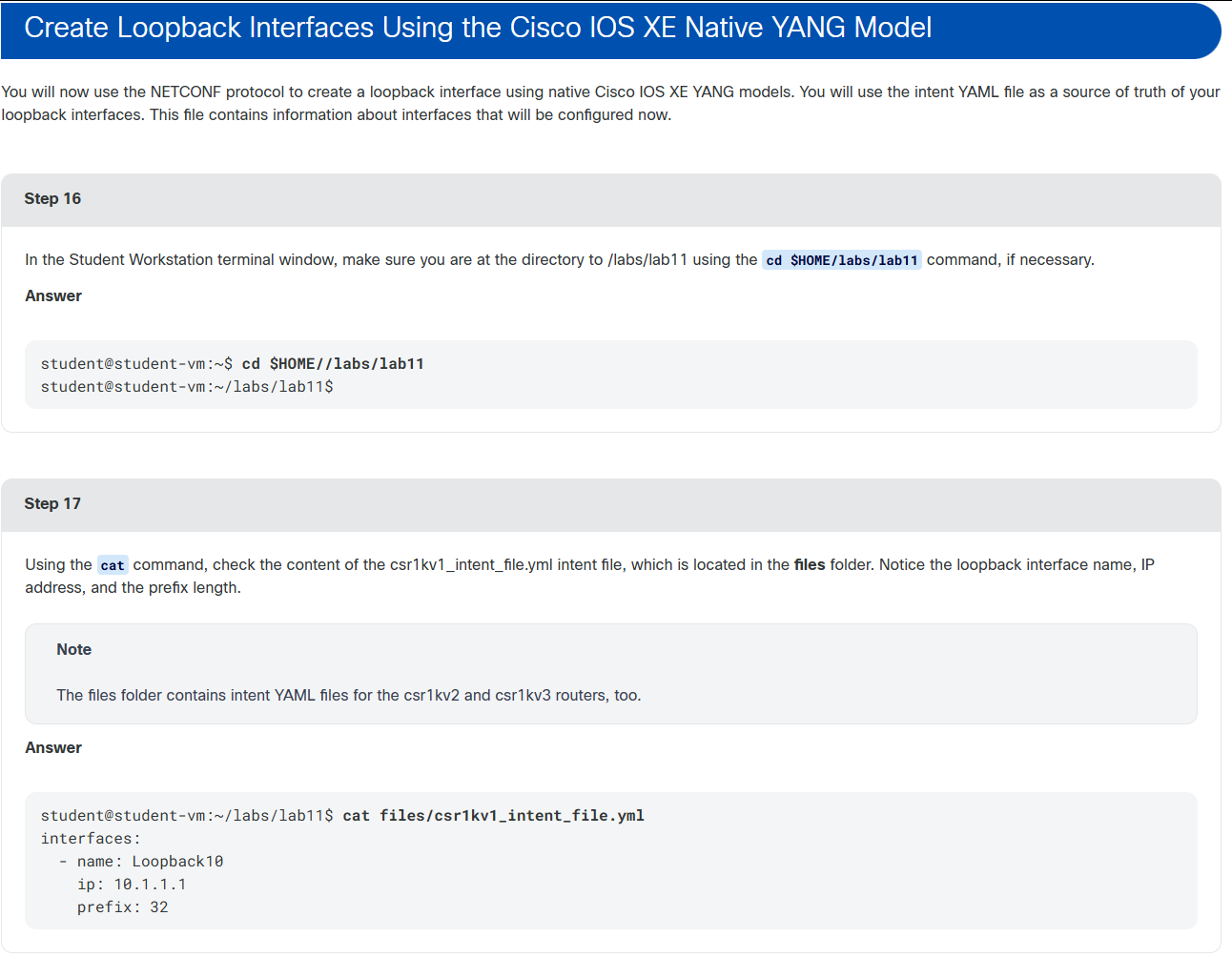
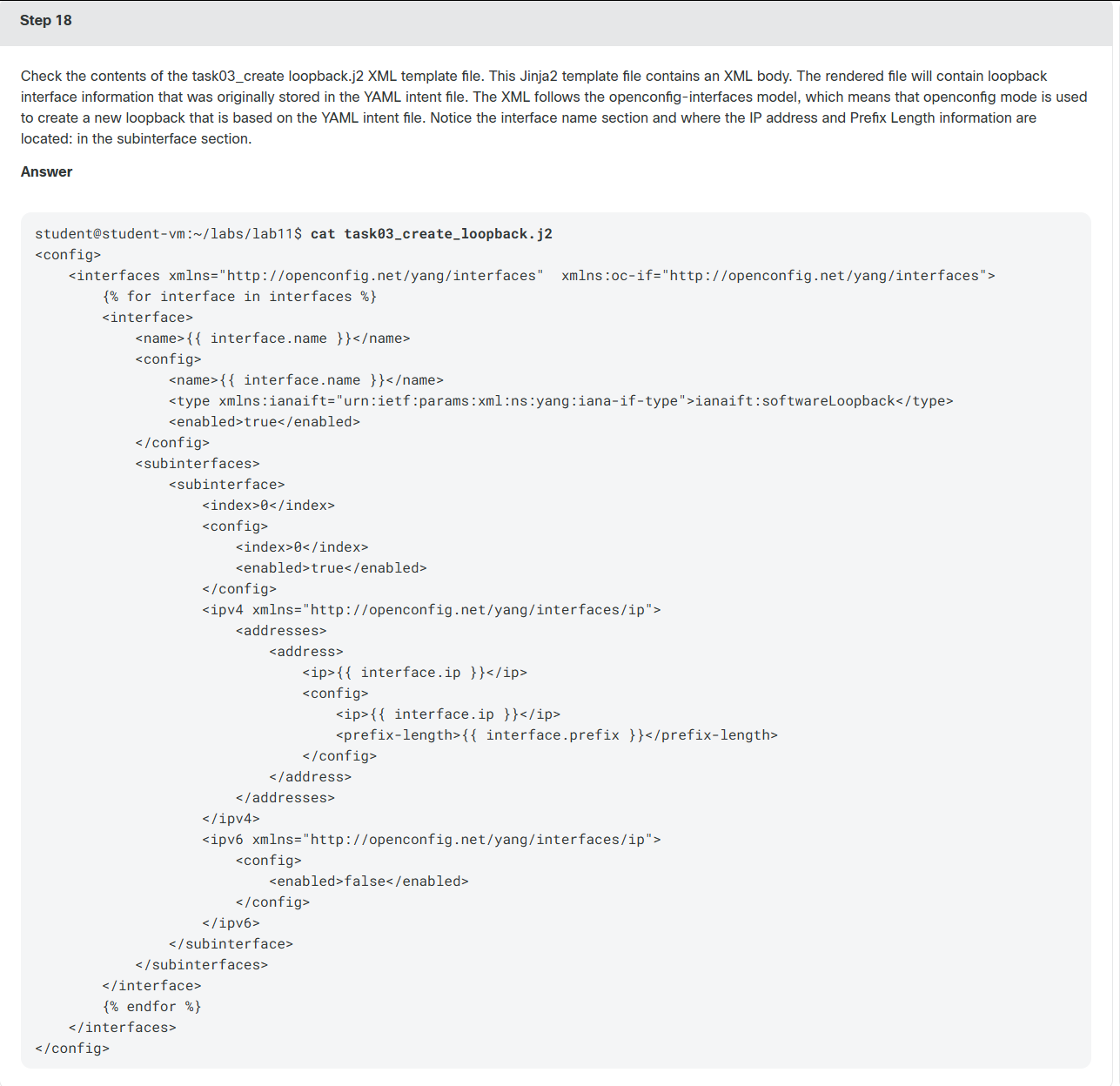
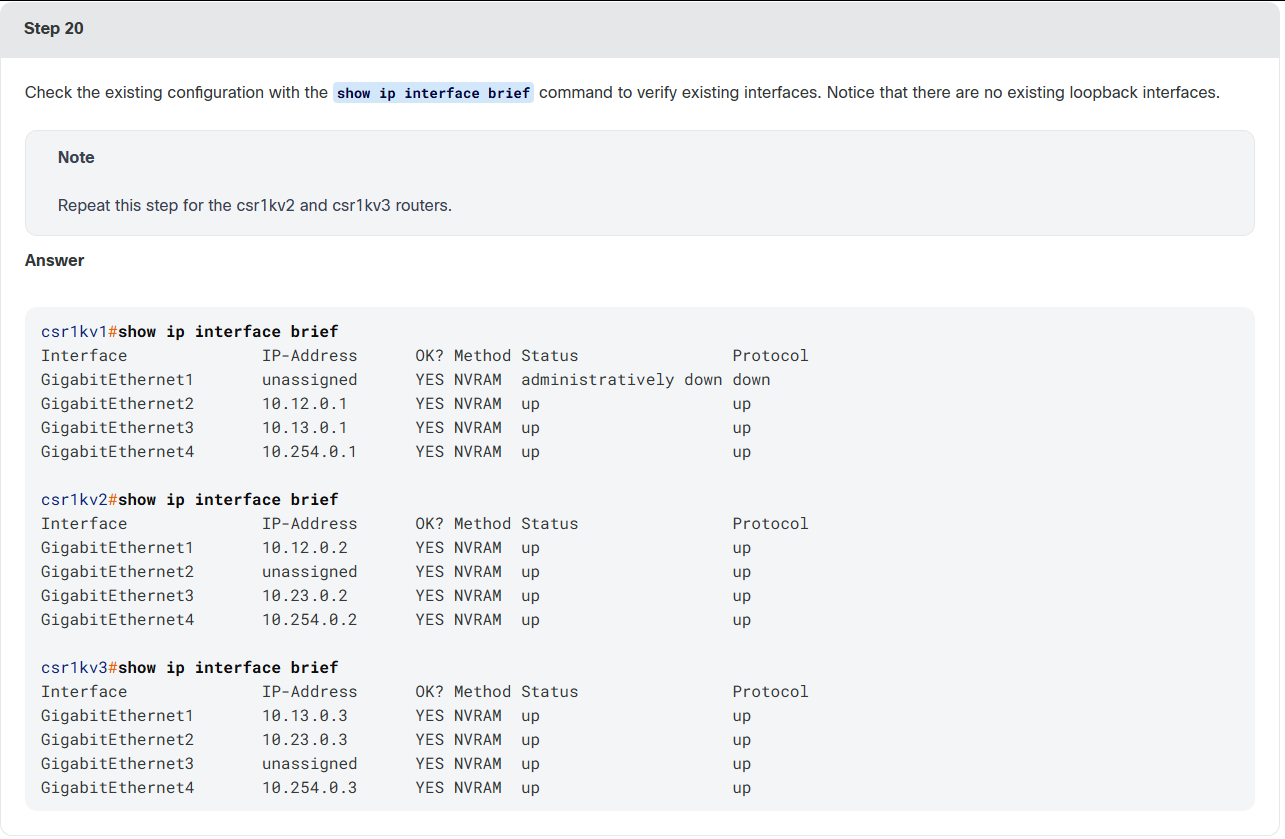

bash
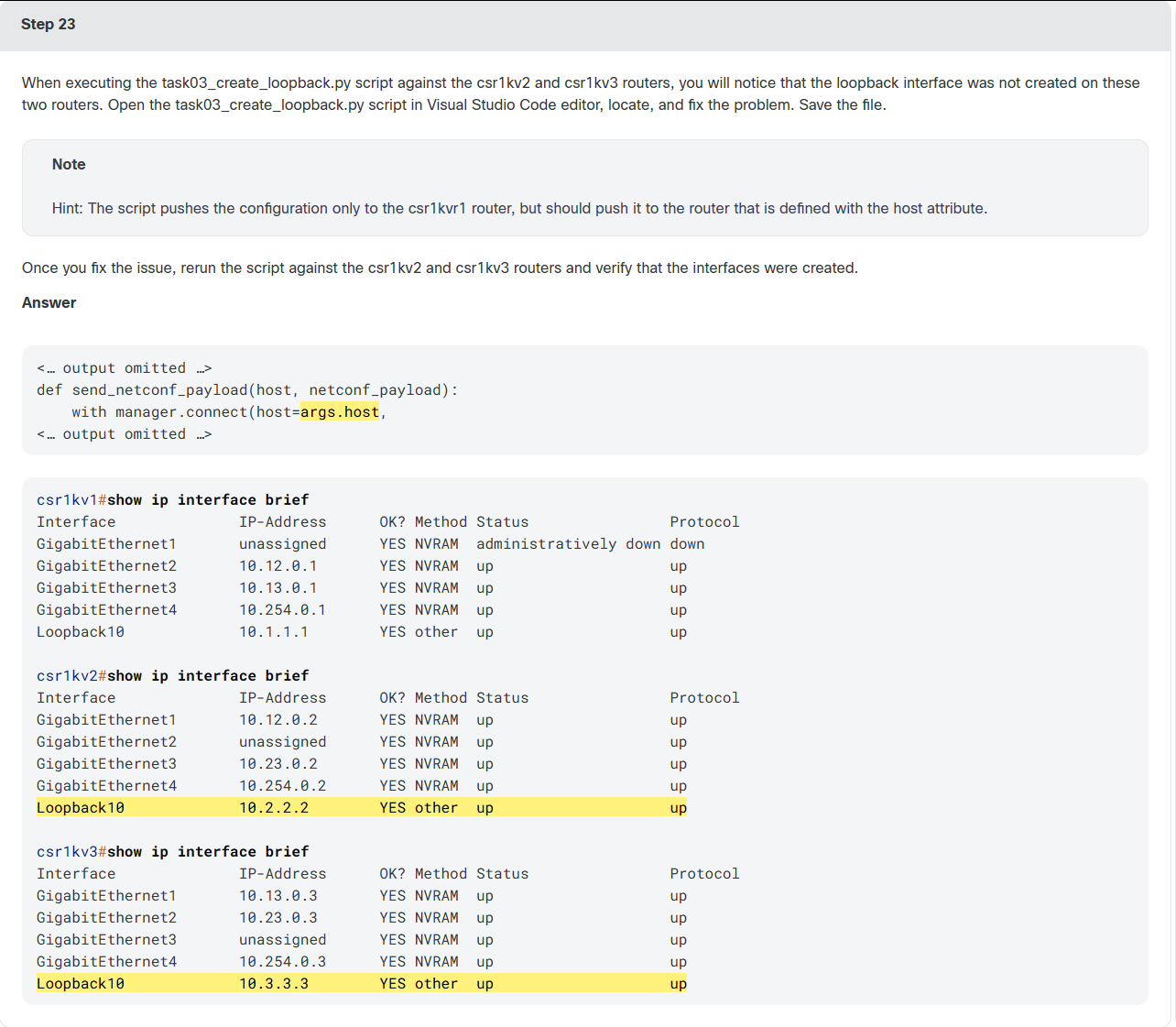
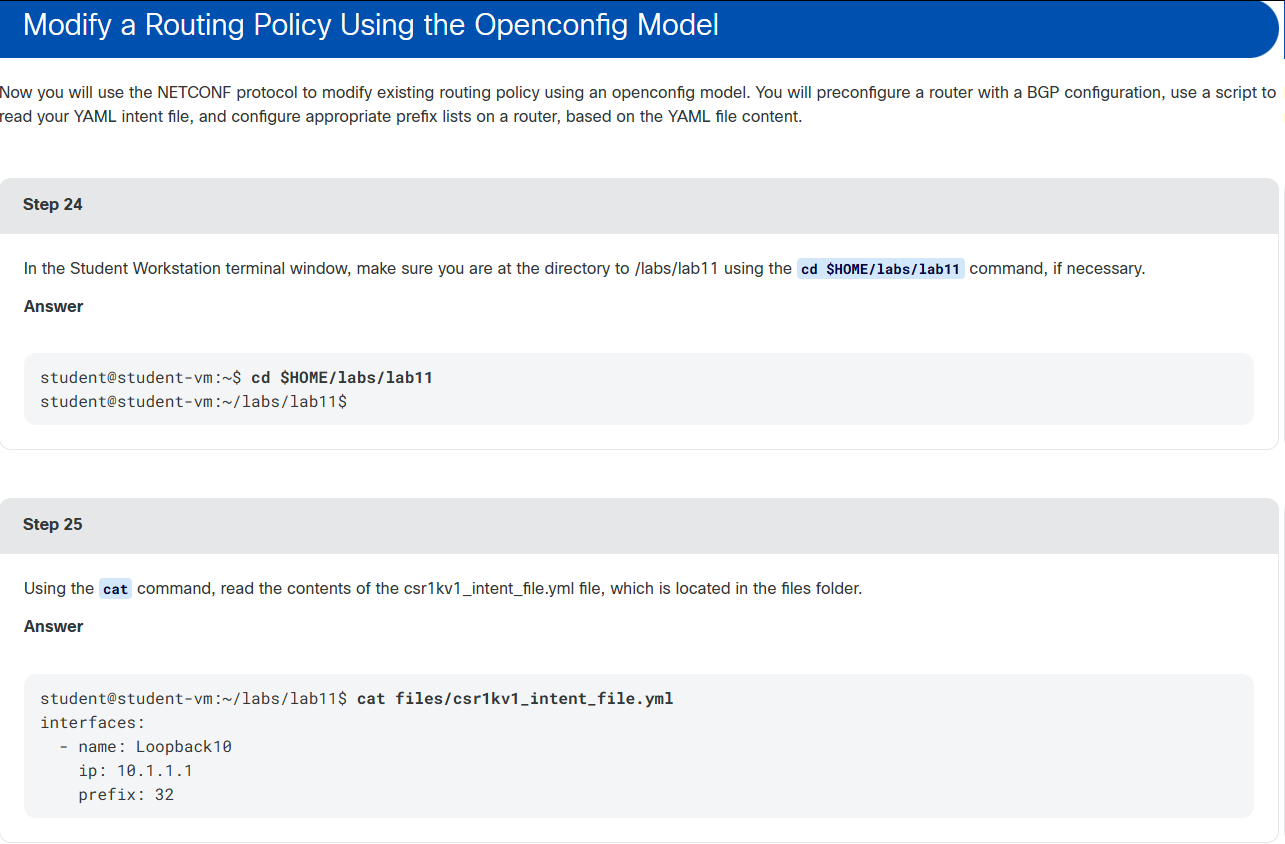
student@student-vm:~/labs/lab11$ python task03_create_loopback.py --host csr1kv1 --intent files/csr1kv1_intent_file.yml

Interfaces Payload:
<config>
    <interfaces xmlns="http://openconfig.net/yang/interfaces"  xmlns:oc-if="http://openconfig.net/yang/interfaces">

        <interface>
            <name>Loopback10</name>
            <config>
                <name>Loopback10</name>
                <type xmlns:ianaift="urn:ietf:params:xml:ns:yang:iana-if-type">ianaift:softwareLoopback</type>
                <enabled>true</enabled>
            </config>
            <subinterfaces>
                <subinterface>
                    <index>0</index>
                    <config>
                        <index>0</index>
                        <enabled>true</enabled>
                    </config>
                    <ipv4 xmlns="http://openconfig.net/yang/interfaces/ip">
                        <addresses>
                            <address>
                                <ip>10.1.1.1</ip>
                                <config>
                                    <ip>10.1.1.1</ip>
                                    <prefix-length>32</prefix-length>
                                </config>
                            </address>
                        </addresses>
                    </ipv4>
                    <ipv6 xmlns="http://openconfig.net/yang/interfaces/ip">
                        <config>
                            <enabled>false</enabled>
                        </config>
                    </ipv6>
                </subinterface>
            </subinterfaces>
        </interface>

    </interfaces>
</config>


YANG Model URL: https://github.com/YangModels/yang/blob/master/vendor/cisco/xe/1693/openconfig-interfaces.yang


Sending interface configuration with NETCONF

YANG Model URL: https://github.com/YangModels/yang/blob/master/vendor/cisco/xe/1693/openconfig-interfaces.yang

student@student-vm:~/labs/lab11$ python task03_create_loopback.py --host csr1kv2 --intent files/csr1kv2_intent_file.yml

Interfaces Payload:
<config>
    <interfaces xmlns="http://openconfig.net/yang/interfaces"  xmlns:oc-if="http://openconfig.net/yang/interfaces">

        <interface>
            <name>Loopback10</name>
            <config>
                <name>Loopback10</name>
                <type xmlns:ianaift="urn:ietf:params:xml:ns:yang:iana-if-type">ianaift:softwareLoopback</type>
                <enabled>true</enabled>
            </config>
            <subinterfaces>
                <subinterface>
                    <index>0</index>
                    <config>
                        <index>0</index>
                        <enabled>true</enabled>
                    </config>
                    <ipv4 xmlns="http://openconfig.net/yang/interfaces/ip">
                        <addresses>
                            <address>
                                <ip>10.2.2.2</ip>
                                <config>
                                    <ip>10.2.2.2</ip>
                                    <prefix-length>32</prefix-length>
                                </config>
                            </address>
                        </addresses>
                    </ipv4>
                    <ipv6 xmlns="http://openconfig.net/yang/interfaces/ip">
                        <config>
                            <enabled>false</enabled>
                        </config>
                    </ipv6>
                </subinterface>
            </subinterfaces>
        </interface>

    </interfaces>
</config>


YANG Model URL: https://github.com/YangModels/yang/blob/master/vendor/cisco/xe/1693/openconfig-interfaces.yang


Sending interface configuration with NETCONF

YANG Model URL: https://github.com/YangModels/yang/blob/master/vendor/cisco/xe/1693/openconfig-interfaces.yang

student@student-vm:~/labs/lab11$ python task03_create_loopback.py --host csr1kv3 --intent files/csr1kv3_intent_file.yml

Interfaces Payload:
<config>
    <interfaces xmlns="http://openconfig.net/yang/interfaces"  xmlns:oc-if="http://openconfig.net/yang/interfaces">

        <interface>
            <name>Loopback10</name>
            <config>
                <name>Loopback10</name>
                <type xmlns:ianaift="urn:ietf:params:xml:ns:yang:iana-if-type">ianaift:softwareLoopback</type>
                <enabled>true</enabled>
            </config>
            <subinterfaces>
                <subinterface>
                    <index>0</index>
                    <config>
                        <index>0</index>
                        <enabled>true</enabled>
                    </config>
                    <ipv4 xmlns="http://openconfig.net/yang/interfaces/ip">
                        <addresses>
                            <address>
                                <ip>10.3.3.3</ip>
                                <config>
                                    <ip>10.3.3.3</ip>
                                    <prefix-length>32</prefix-length>
                                </config>
                            </address>
                        </addresses>
                    </ipv4>
                    <ipv6 xmlns="http://openconfig.net/yang/interfaces/ip">
                        <config>
                            <enabled>false</enabled>
                        </config>
                    </ipv6>
                </subinterface>
            </subinterfaces>
        </interface>

    </interfaces>
</config>


YANG Model URL: https://github.com/YangModels/yang/blob/master/vendor/cisco/xe/1693/openconfig-interfaces.yang


Sending interface configuration with NETCONF

YANG Model URL: https://github.com/YangModels/yang/blob/master/vendor/cisco/xe/1693/openconfig-interfaces.yang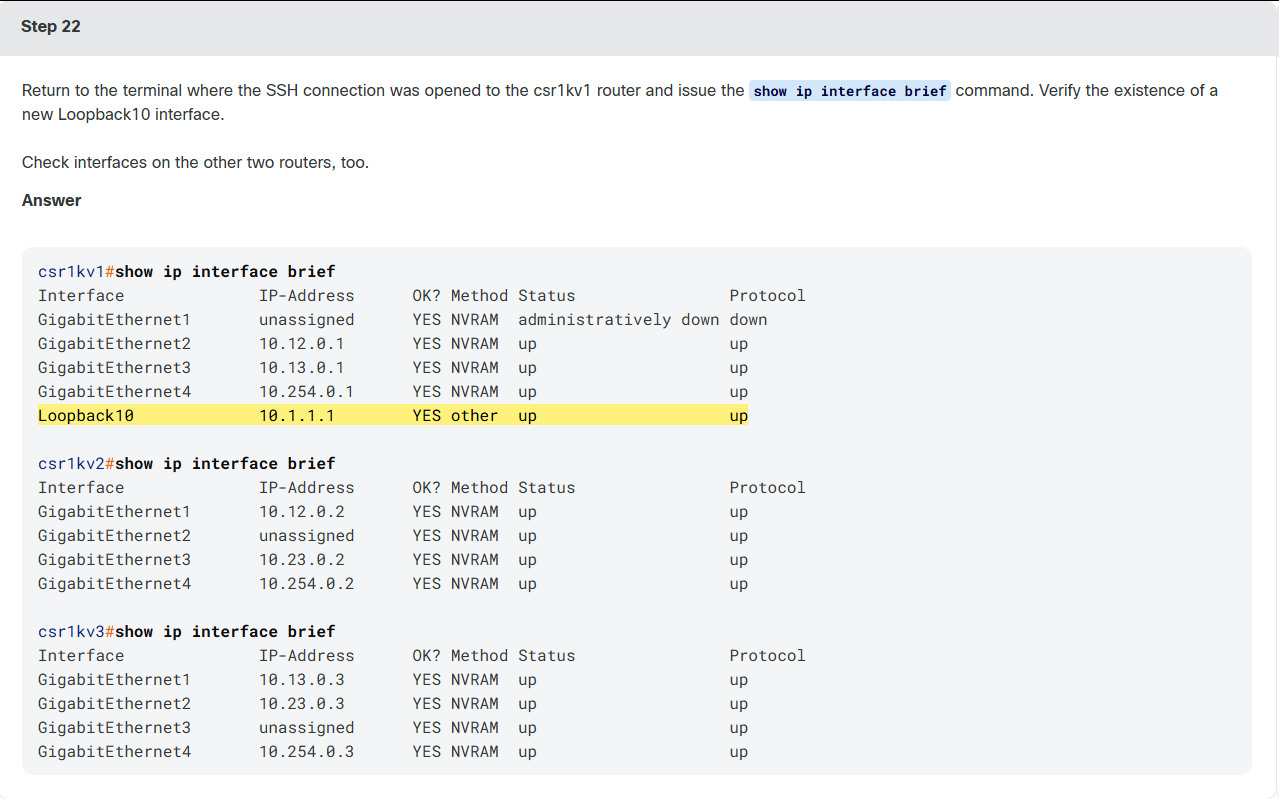
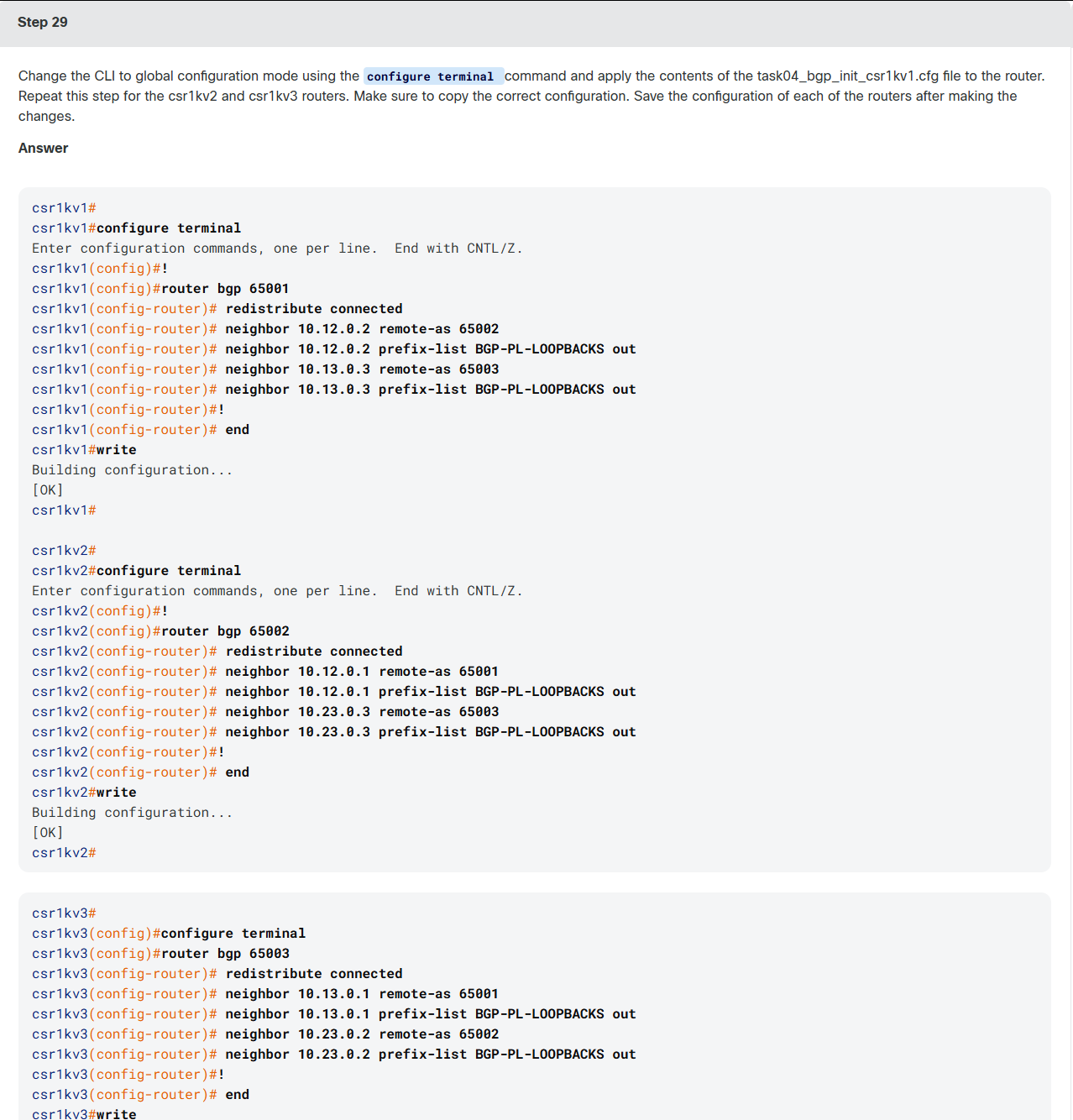
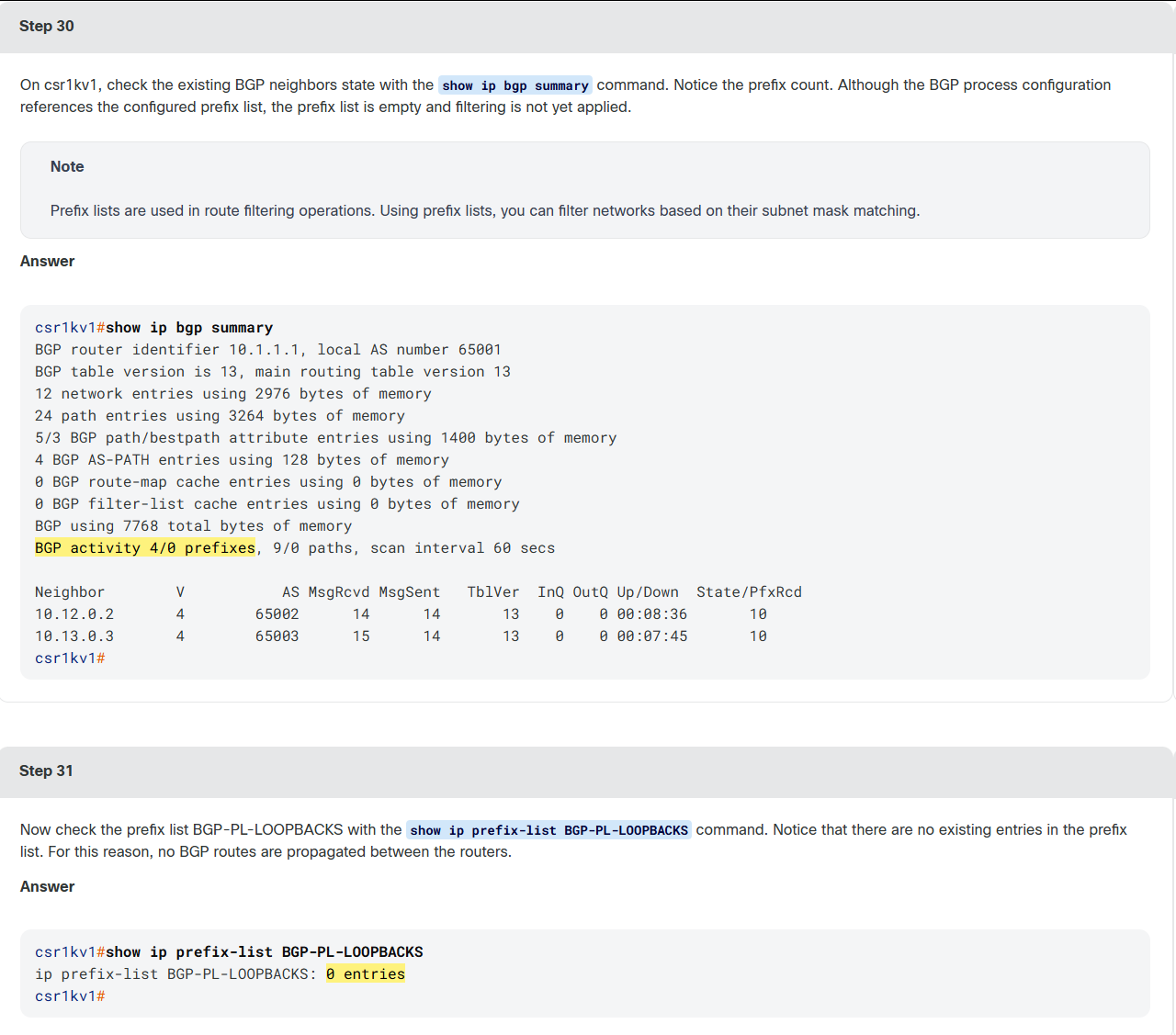

bash
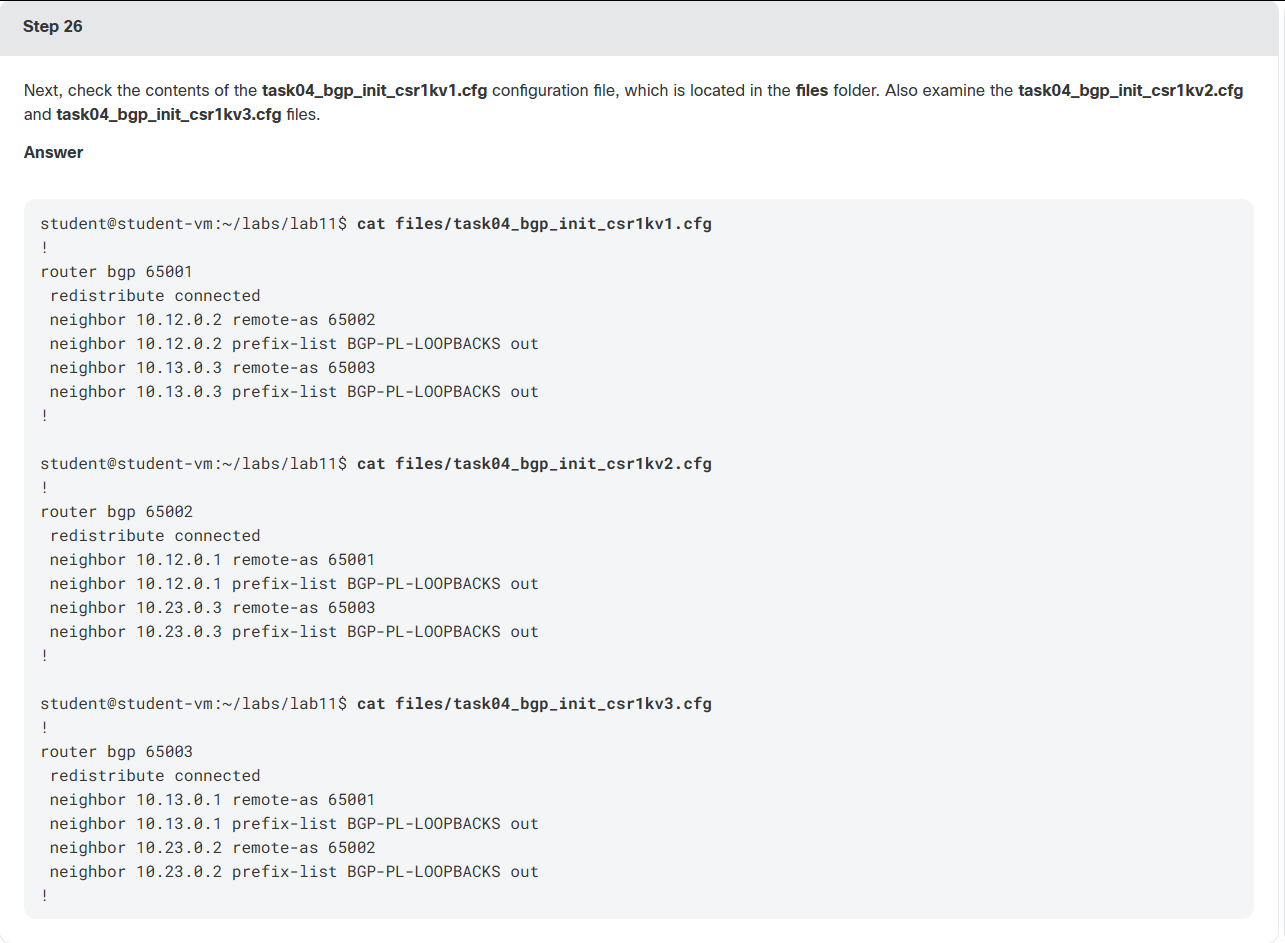
student@student-vm:~/labs/lab11$ cat task04_routing_policy.j2
<config>
    <routing-policy xmlns="http://openconfig.net/yang/routing-policy"  xmlns:oc-rpol="http://openconfig.net/yang/routing-policy">
        <defined-sets>
            <prefix-sets>
                <prefix-set>
                    <prefix-set-name>BGP-PL-LOOPBACKS</prefix-set-name>
                    <config>
                        <prefix-set-name>BGP-PL-LOOPBACKS</prefix-set-name>
                    </config>
                    <prefixes>
                        {% for interface in interfaces %}
                        <prefix>
                            <ip-prefix>{{ interface.ip }}/{{ interface.prefix }}</ip-prefix>
                            <masklength-range>exact</masklength-range>
                            <config>
                                <ip-prefix>{{ interface.ip }}/{{ interface.prefix }}</ip-prefix>
                                <masklength-range>exact</masklength-range>
                            </config>
                        </prefix>
                        {% endfor %}
                    </prefixes>
                </prefix-set>
            </prefix-sets>
        </defined-sets>
    </routing-policy>
</config>
python
student@student-vm:~/labs/lab11$ python task04_routing_policy.py --host csr1kv1 --intent files/csr1kv1_intent_file.yml

Routing Policy Payload:
<config>
    <routing-policy xmlns="http://openconfig.net/yang/routing-policy"  xmlns:oc-rpol="http://openconfig.net/yang/routing-policy">
        <defined-sets>
            <prefix-sets>
                <prefix-set>
                    <prefix-set-name>BGP-PL-LOOPBACKS</prefix-set-name>
                    <config>
                        <prefix-set-name>BGP-PL-LOOPBACKS</prefix-set-name>
                    </config>
                    <prefixes>

                        <prefix>
                            <ip-prefix>10.1.1.1/32</ip-prefix>
                            <masklength-range>exact</masklength-range>
                            <config>
                                <ip-prefix>10.1.1.1/32</ip-prefix>
                                <masklength-range>exact</masklength-range>
                            </config>
                        </prefix>

                    </prefixes>
                </prefix-set>
            </prefix-sets>
        </defined-sets>
    </routing-policy>
</config>


YANG Model URL: https://github.com/YangModels/yang/blob/master/vendor/cisco/xe/1693/openconfig-routing-policy.yang


Sending routing policy configuration with NETCONF

YANG Model URL: https://github.com/YangModels/yang/blob/master/vendor/cisco/xe/1693/openconfig-routing-policy.yang

student@student-vm:~/labs/lab11$ python task04_routing_policy.py --host csr1kv2 --intent files/csr1kv2_intent_file.yml

Routing Policy Payload:
<config>
    <routing-policy xmlns="http://openconfig.net/yang/routing-policy"  xmlns:oc-rpol="http://openconfig.net/yang/routing-policy">
        <defined-sets>
            <prefix-sets>
                <prefix-set>
                    <prefix-set-name>BGP-PL-LOOPBACKS</prefix-set-name>
                    <config>
                        <prefix-set-name>BGP-PL-LOOPBACKS</prefix-set-name>
                    </config>
                    <prefixes>

                        <prefix>
                            <ip-prefix>10.2.2.2/32</ip-prefix>
                            <masklength-range>exact</masklength-range>
                            <config>
                                <ip-prefix>10.2.2.2/32</ip-prefix>
                                <masklength-range>exact</masklength-range>
                            </config>
                        </prefix>

                    </prefixes>
                </prefix-set>
            </prefix-sets>
        </defined-sets>
    </routing-policy>
</config>


YANG Model URL: https://github.com/YangModels/yang/blob/master/vendor/cisco/xe/1693/openconfig-routing-policy.yang


Sending routing policy configuration with NETCONF

YANG Model URL: https://github.com/YangModels/yang/blob/master/vendor/cisco/xe/1693/openconfig-routing-policy.yang

student@student-vm:~/labs/lab11$ python task04_routing_policy.py --host csr1kv3 --intent files/csr1kv3_intent_file.yml

Routing Policy Payload:
<config>
    <routing-policy xmlns="http://openconfig.net/yang/routing-policy"  xmlns:oc-rpol="http://openconfig.net/yang/routing-policy">
        <defined-sets>
            <prefix-sets>
                <prefix-set>
                    <prefix-set-name>BGP-PL-LOOPBACKS</prefix-set-name>
                    <config>
                        <prefix-set-name>BGP-PL-LOOPBACKS</prefix-set-name>
                    </config>
                    <prefixes>

                        <prefix>
                            <ip-prefix>10.3.3.3/32</ip-prefix>
                            <masklength-range>exact</masklength-range>
                            <config>
                                <ip-prefix>10.3.3.3/32</ip-prefix>
                                <masklength-range>exact</masklength-range>
                            </config>
                        </prefix>

                    </prefixes>
                </prefix-set>
            </prefix-sets>
        </defined-sets>
    </routing-policy>
</config>


YANG Model URL: https://github.com/YangModels/yang/blob/master/vendor/cisco/xe/1693/openconfig-routing-policy.yang


Sending routing policy configuration with NETCONF

YANG Model URL: https://github.com/YangModels/yang/blob/master/vendor/cisco/xe/1693/openconfig-routing-policy.yang

student@student-vm:~/labs/lab11$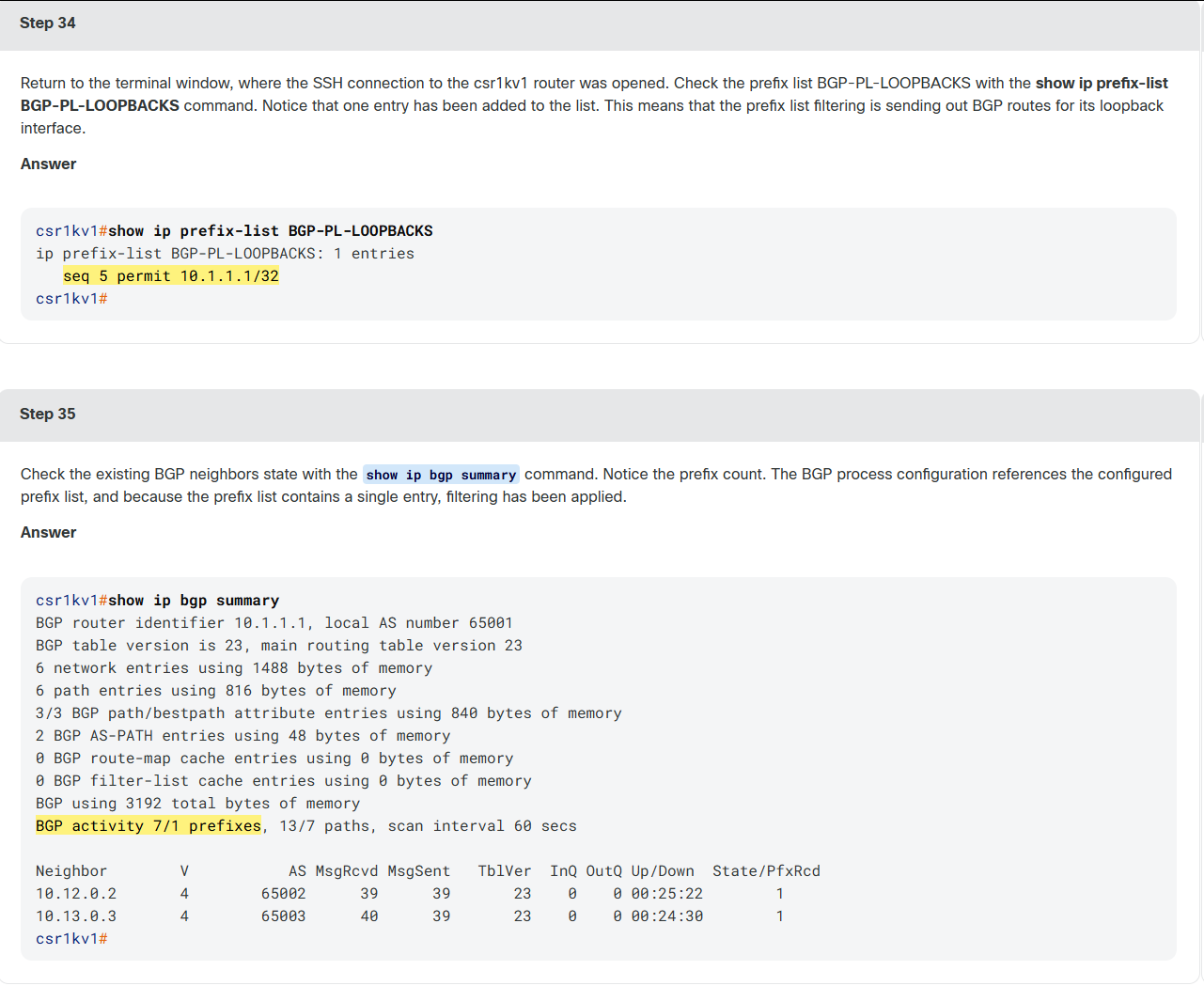
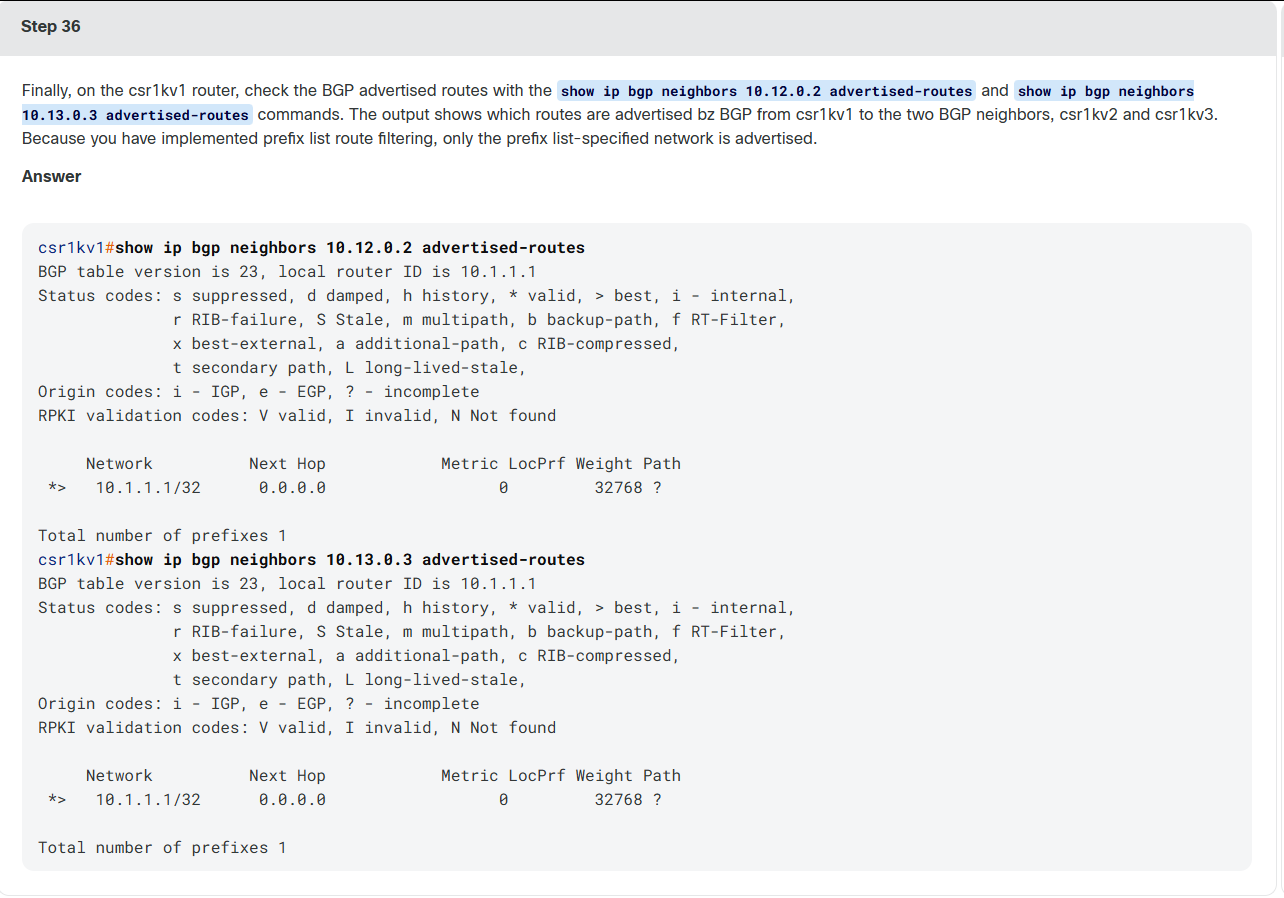
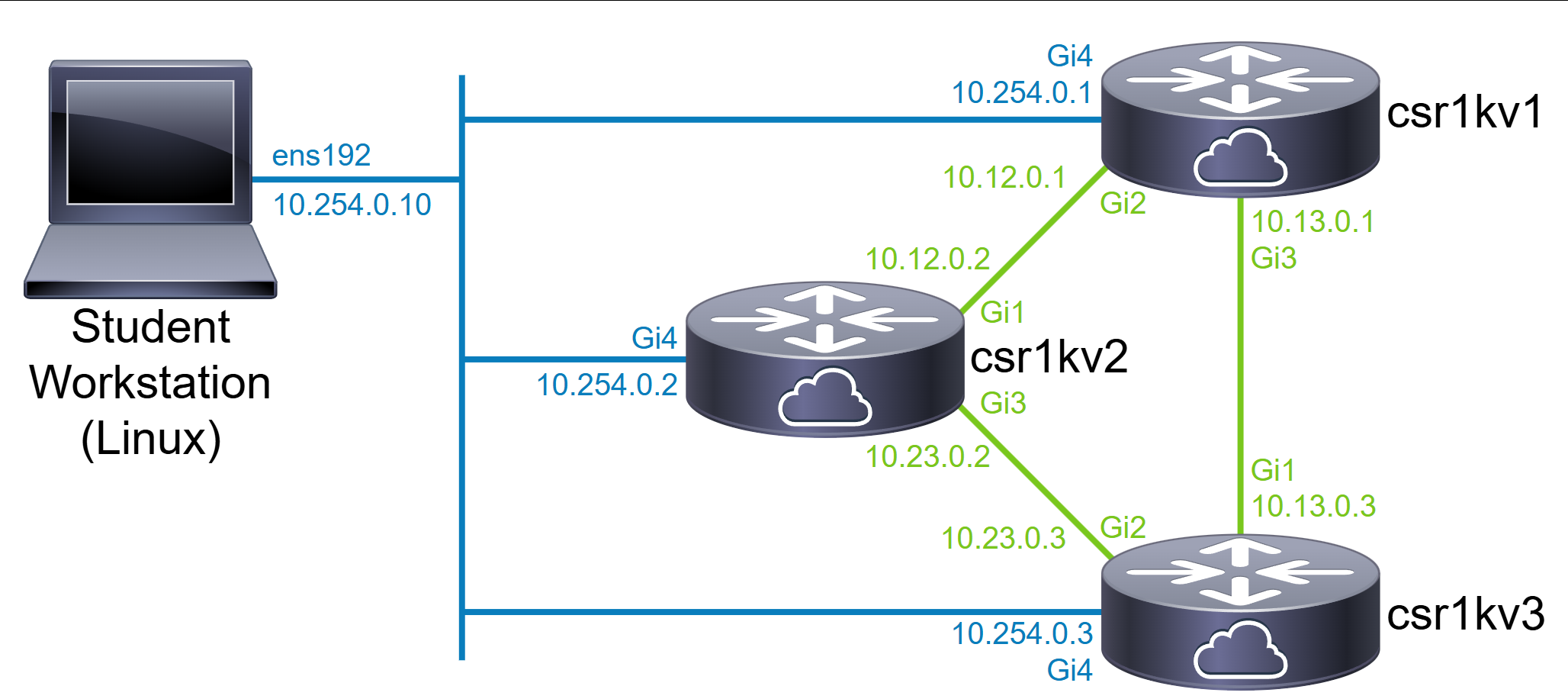
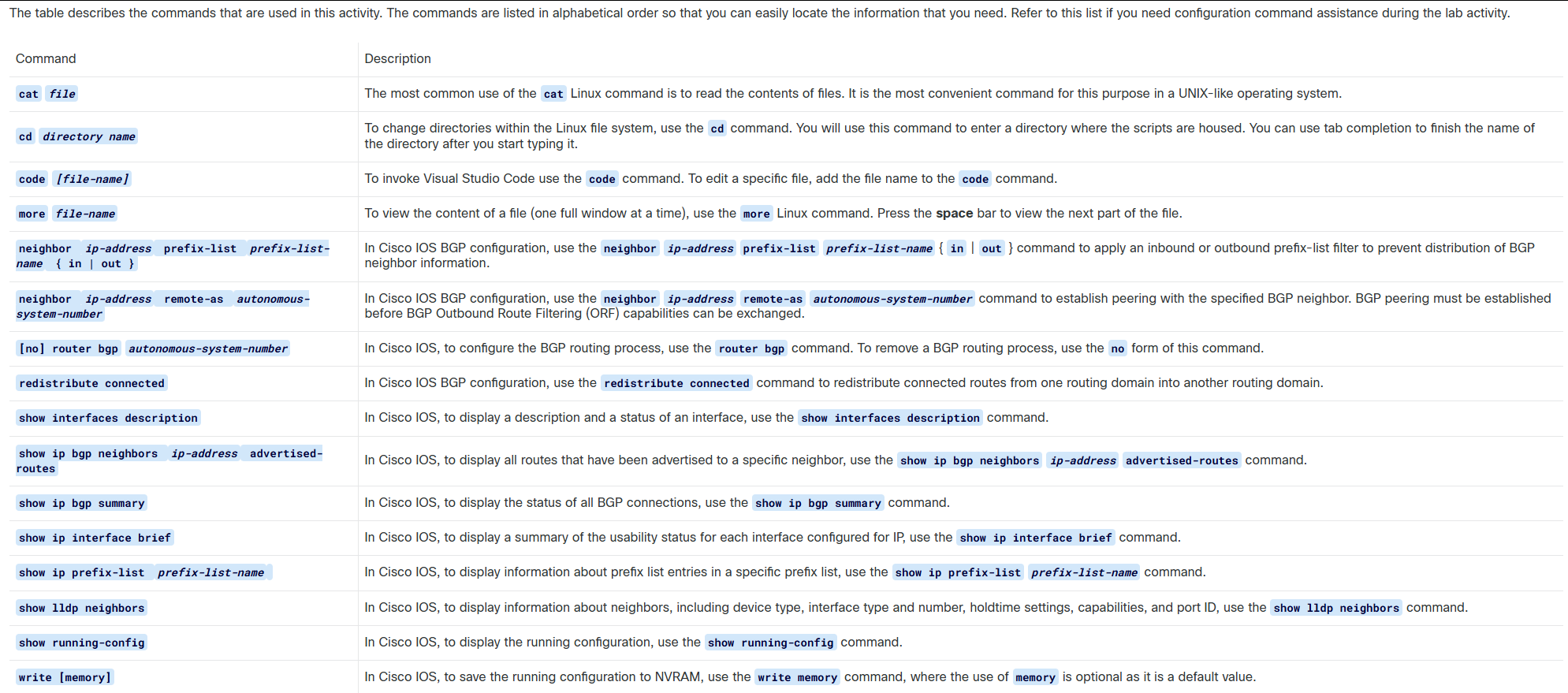
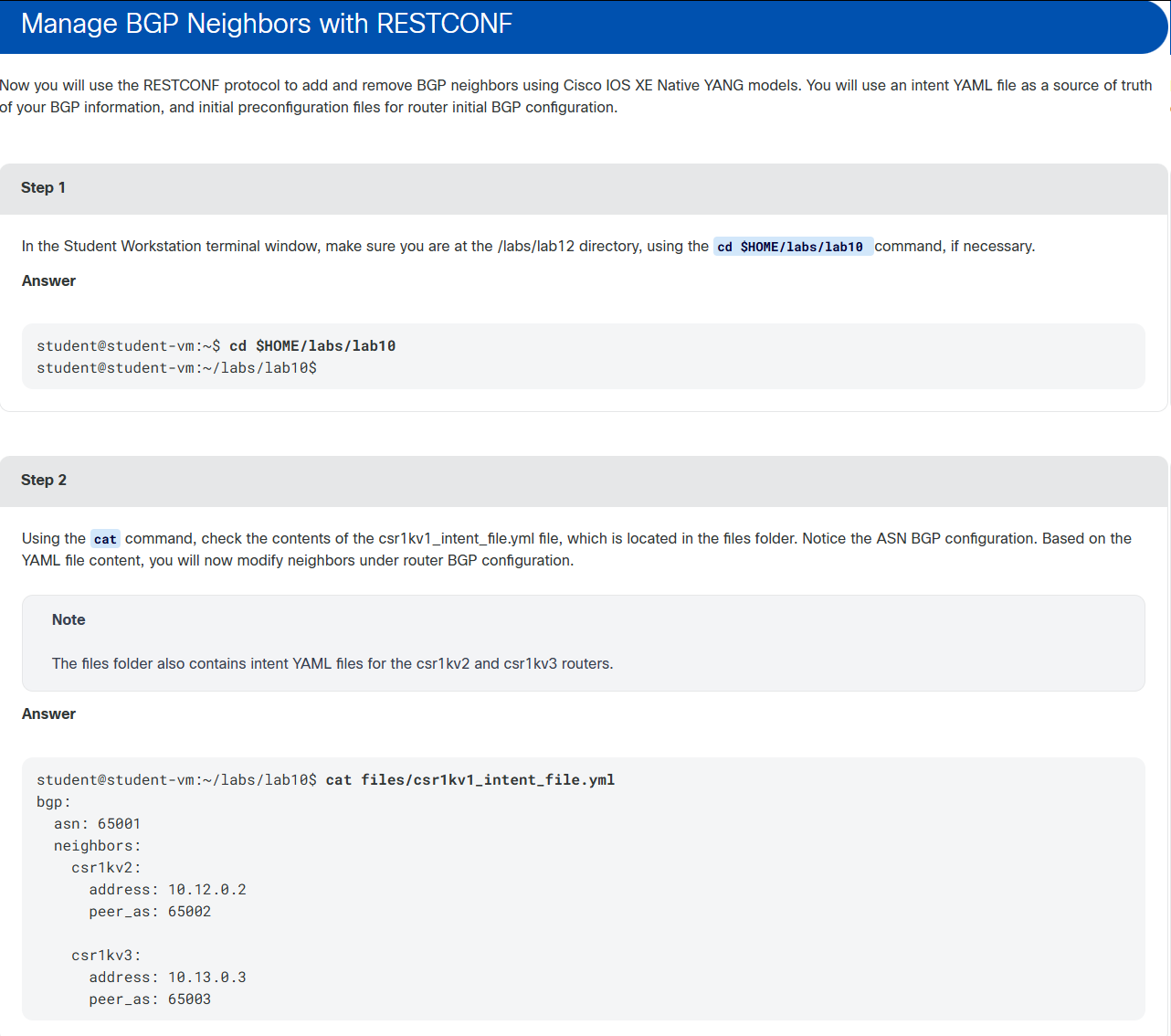
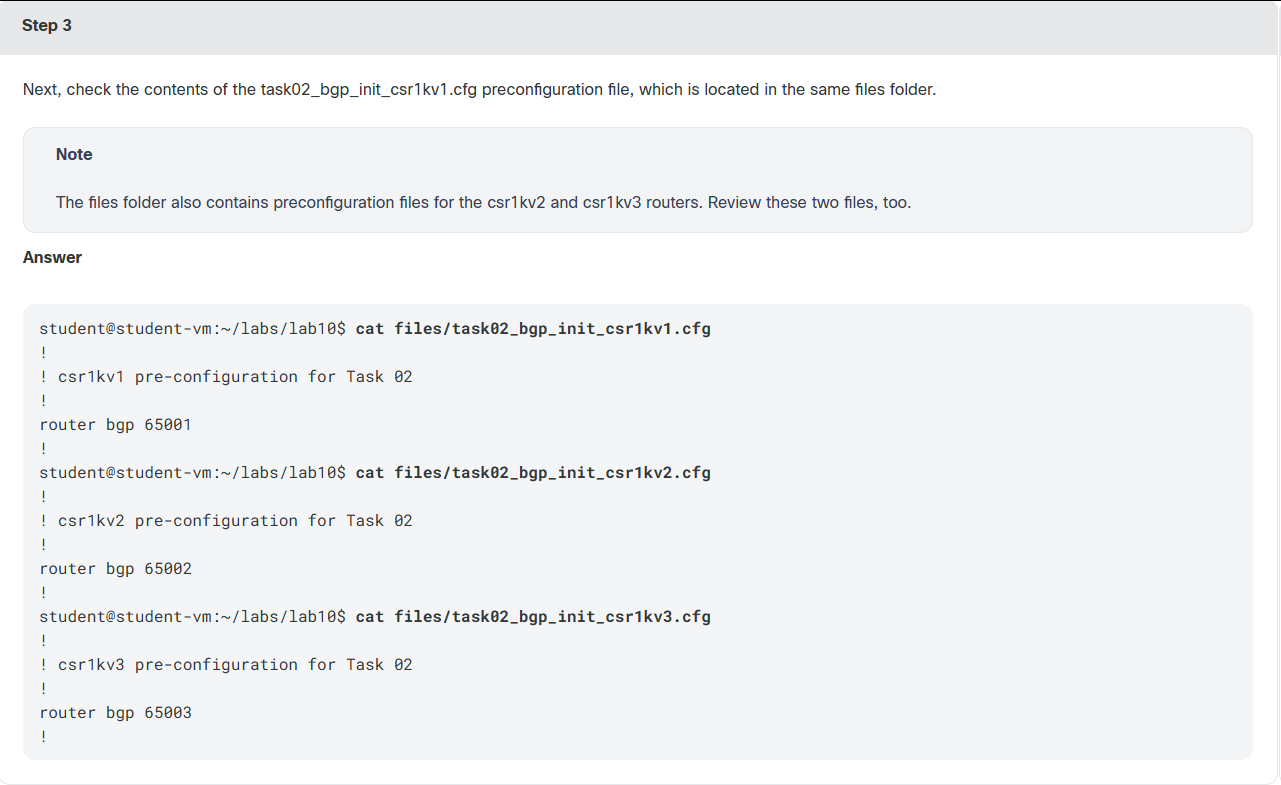
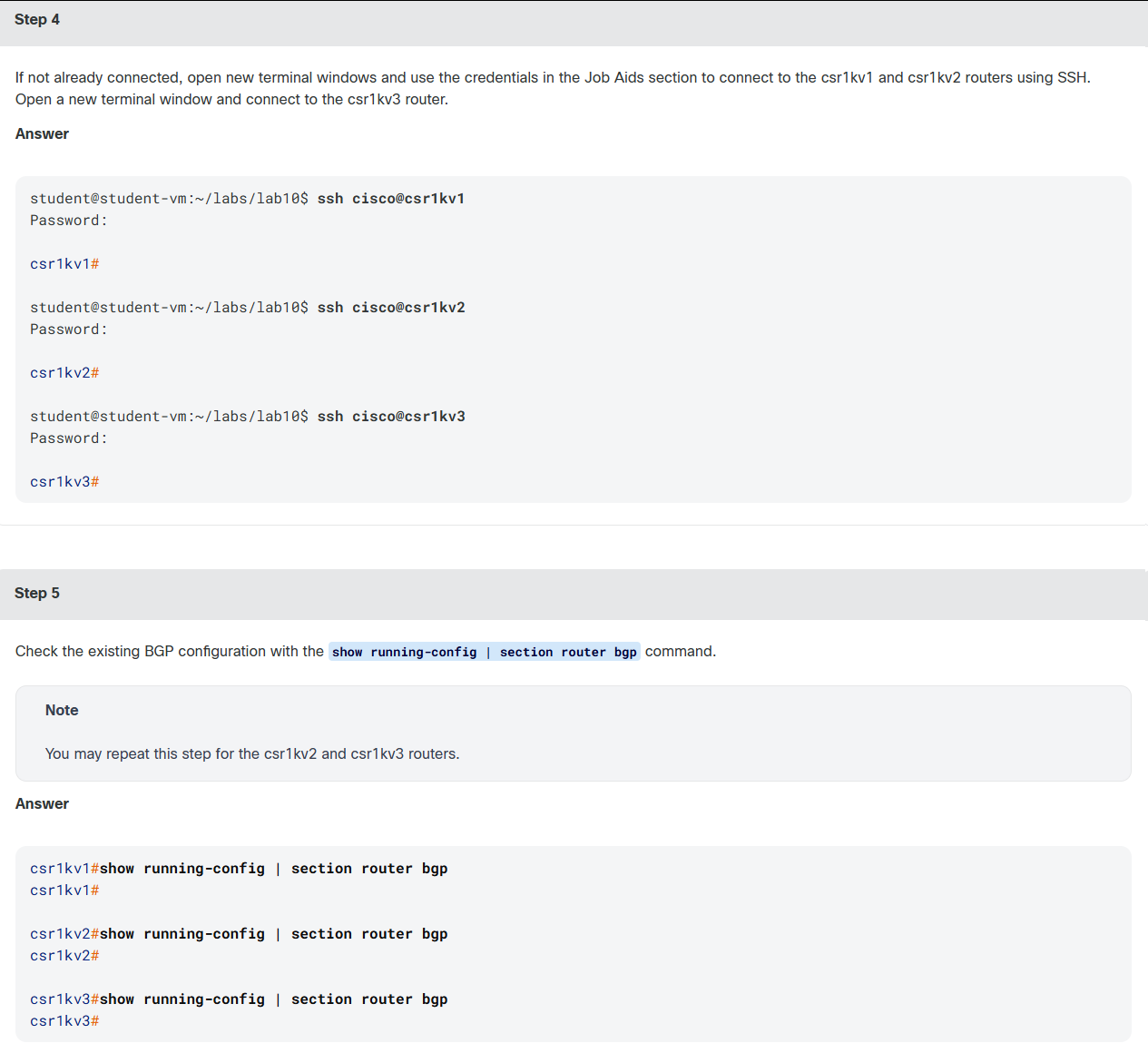
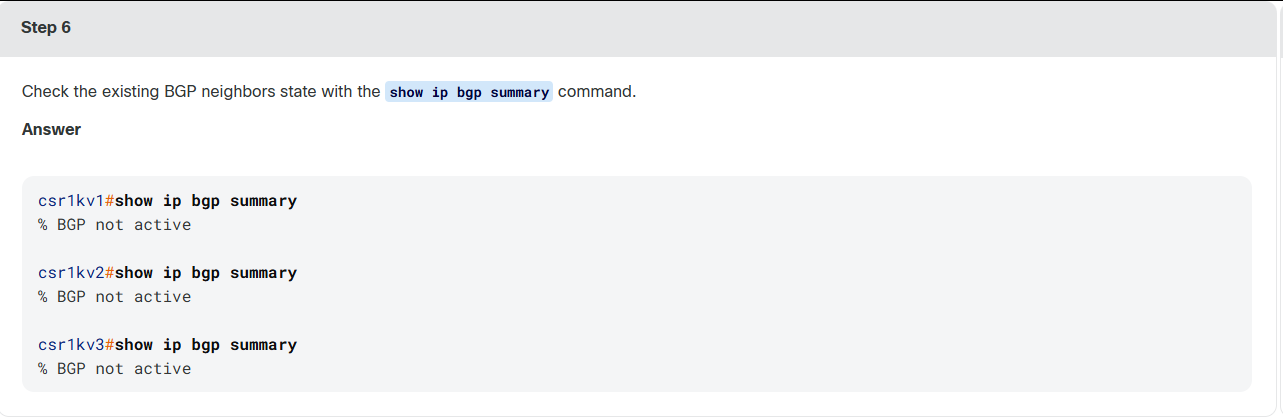
实验课程指导提示,如下:Explore RESTCONF with Python

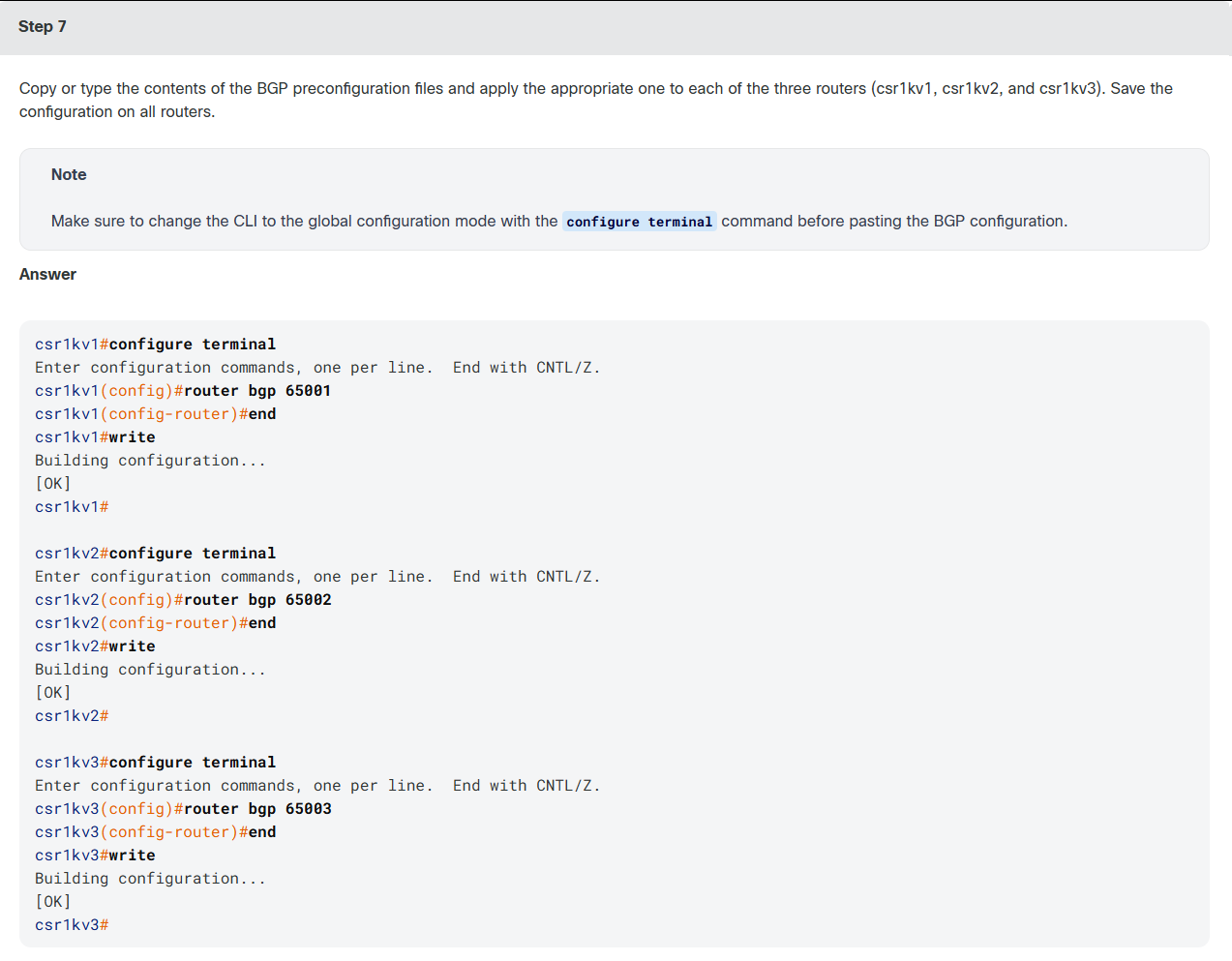
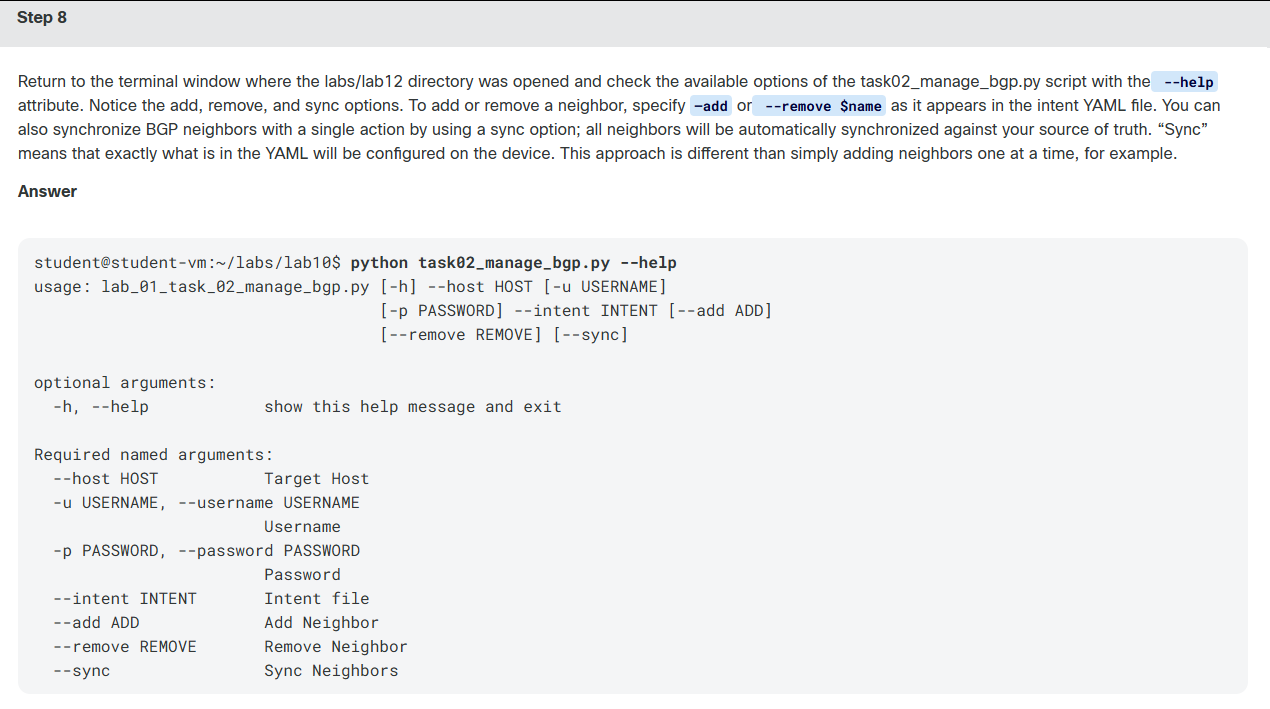

python
student@student-vm:~/labs/lab10$ python task02_manage_bgp.py --host csr1kv1 --intent files/csr1kv1_intent_file.yml --add csr1kv2

Adding BGP neighbor with RESTCONF

BGP Payload:
{
    "Cisco-IOS-XE-bgp:neighbor": [
        {
            "id": "10.12.0.2",
            "remote-as": 65002
        }
    ]
}

URL: https://csr1kv1/restconf/data/Cisco-IOS-XE-native:native/Cisco-IOS-XE-native:router=bgp/65001/neighbor

Headers:
{
    "Accept": "application/yang-data+json",
    "Content-Type": "application/yang-data+json"
}

YANG Model URL: https://github.com/YangModels/yang/blob/master/vendor/cisco/xe/1693/Cisco-IOS-XE-bgp.yang
student@student-vm:~/labs/lab10$ python task02_manage_bgp.py --host csr1kv1 --intent files/csr1kv1_intent_file.yml --add csr1kv3

Adding BGP neighbor with RESTCONF

BGP Payload:
{
    "Cisco-IOS-XE-bgp:neighbor": [
        {
            "id": "10.13.0.3",
            "remote-as": 65003
        }
    ]
}

URL: https://csr1kv1/restconf/data/Cisco-IOS-XE-native:native/Cisco-IOS-XE-native:router=bgp/65001/neighbor

Headers:
{
    "Accept": "application/yang-data+json",
    "Content-Type": "application/yang-data+json"
}

YANG Model URL: https://github.com/YangModels/yang/blob/master/vendor/cisco/xe/1693/Cisco-IOS-XE-bgp.yang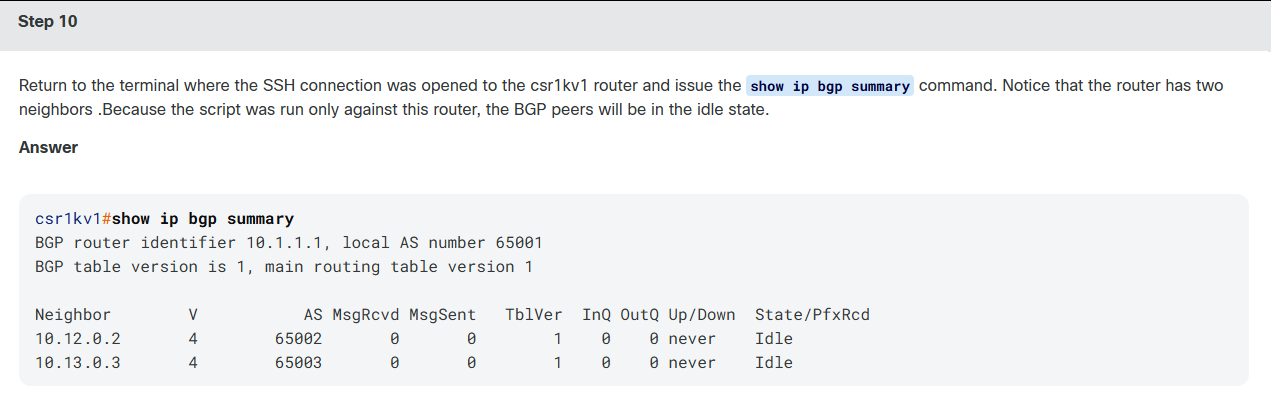

bash
student@student-vm:~/labs/lab10$ cat files/csr1kv2_intent_file.yml
bgp:
  asn: 65002
  neighbors:
    csr1kv1:
      address: 10.12.0.1
      peer_as: 65001

    csr1kv3:
      address: 10.23.0.3
      peer_as: 65003


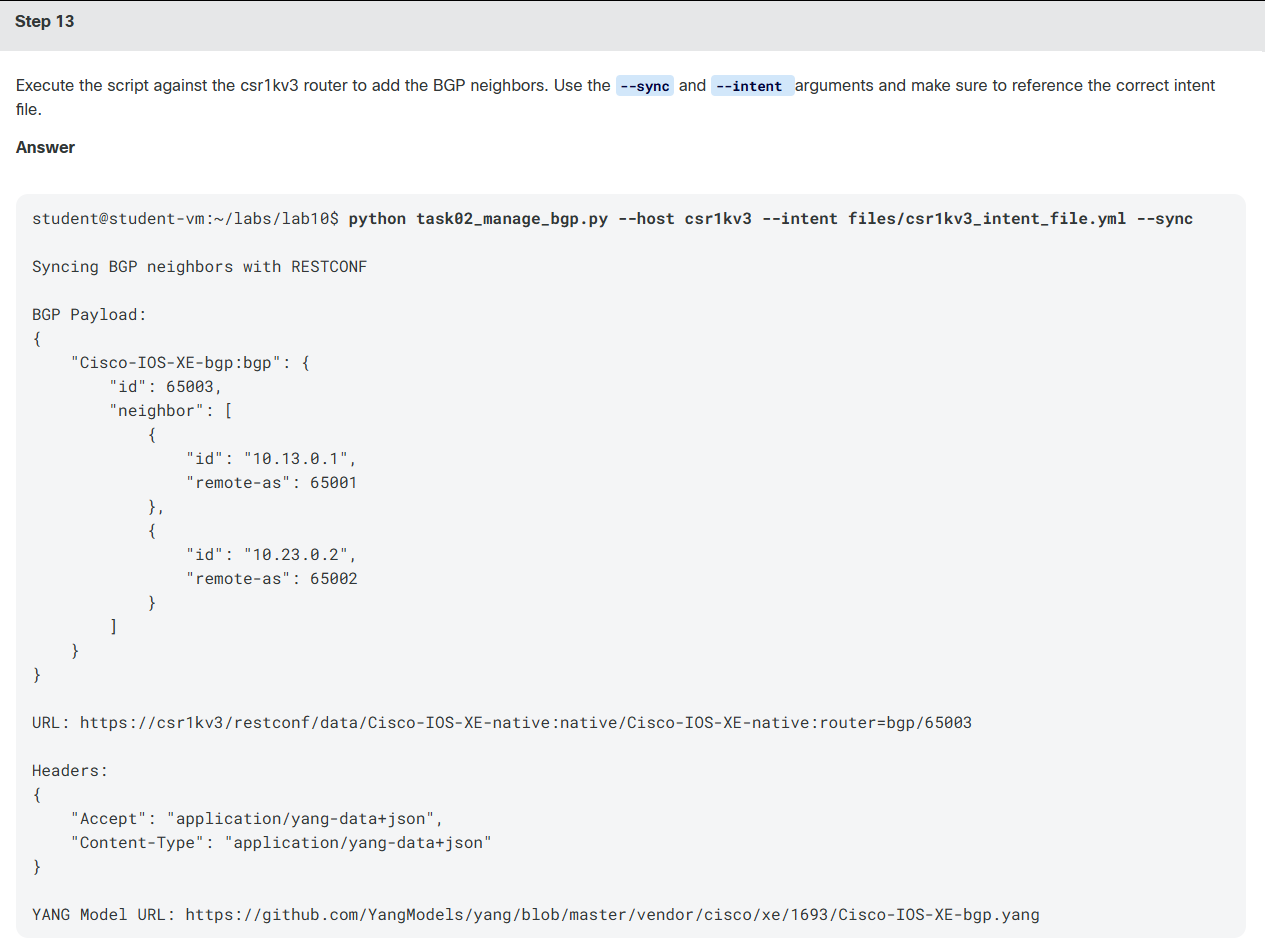
student@student-vm:~/labs/lab10$ python task02_manage_bgp.py --host csr1kv2 --intent files/csr1kv2_intent_file.yml --sync

Syncing BGP neighbors with RESTCONF

BGP Payload:
{
    "Cisco-IOS-XE-bgp:bgp": {
        "id": 65002,
        "neighbor": [
            {
                "id": "10.12.0.1",
                "remote-as": 65001
            },
            {
                "id": "10.23.0.3",
                "remote-as": 65003
            }
        ]
    }
}

URL: https://csr1kv2/restconf/data/Cisco-IOS-XE-native:native/Cisco-IOS-XE-native:router=bgp/65002

Headers:
{
    "Accept": "application/yang-data+json",
    "Content-Type": "application/yang-data+json"
}

YANG Model URL: https://github.com/YangModels/yang/blob/master/vendor/cisco/xe/1693/Cisco-IOS-XE-bgp.yang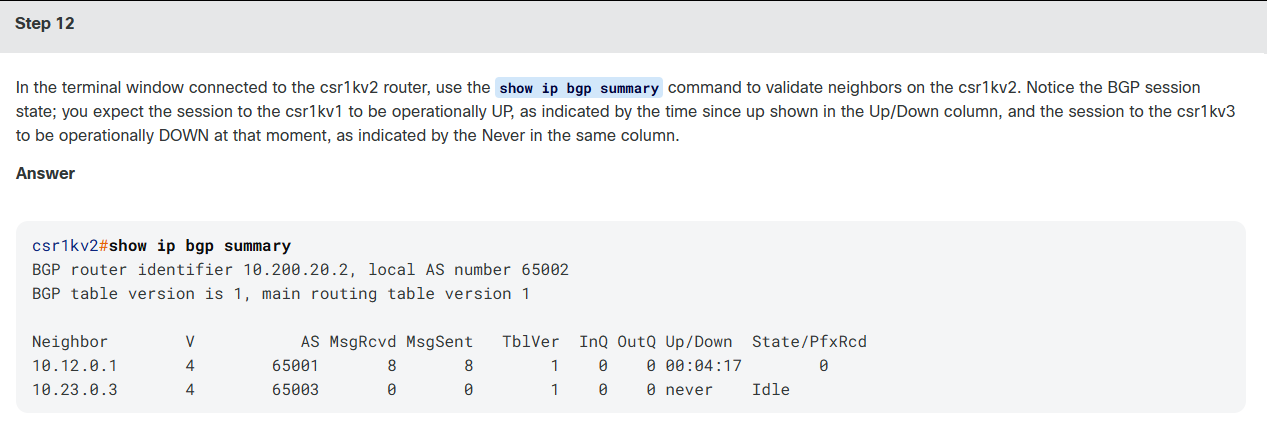
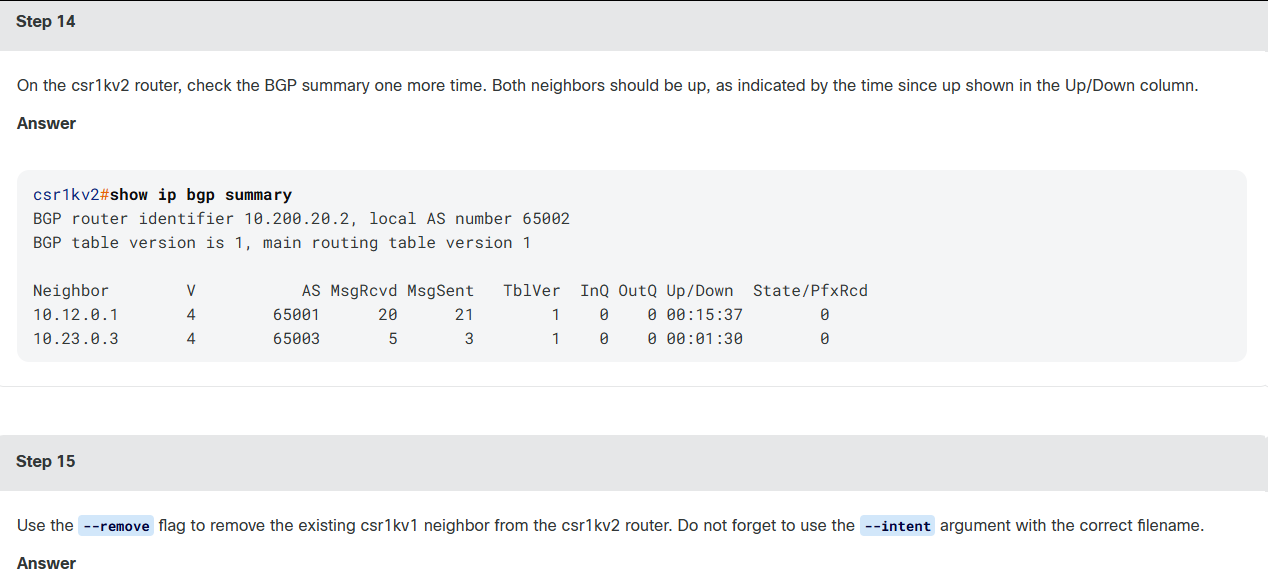
python
student@student-vm:~/labs/lab10$ python task02_manage_bgp.py --host csr1kv2 --intent files/csr1kv2_intent_file.yml --remove csr1kv1

Removing BGP neighbor with RESTCONF

BGP Payload: None for DELETE operation

URL: https://csr1kv2/restconf/data/Cisco-IOS-XE-native:native/Cisco-IOS-XE-native:router=bgp/65002/neighbor=10.12.0.1

Headers:
{
    "Accept": "application/yang-data+json",
    "Content-Type": "application/yang-data+json"
}

YANG Model URL: https://github.com/YangModels/yang/blob/master/vendor/cisco/xe/1693/Cisco-IOS-XE-bgp.yang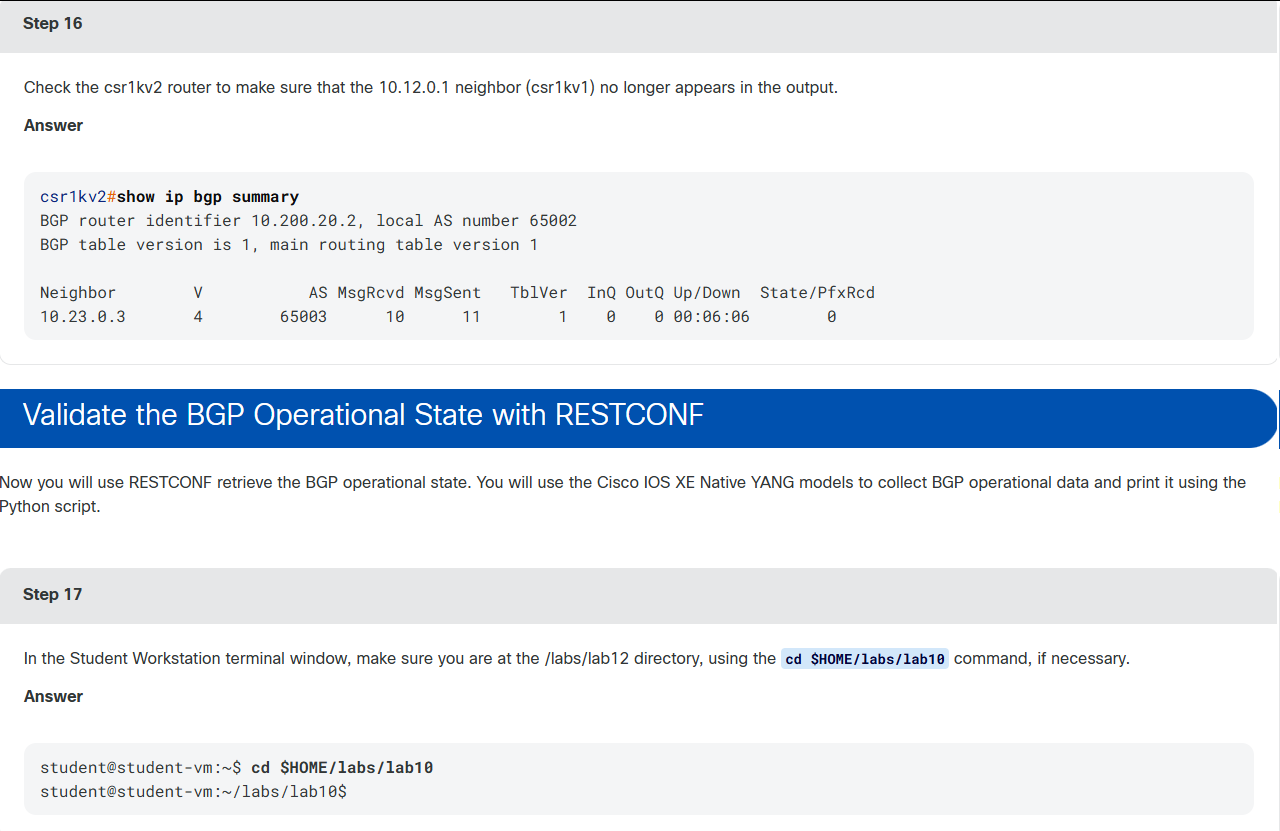

bash
student@student-vm:~/labs/lab10$ cat task03_validate_bgp.py
#!/usr/bin/env python

#######################
# Global Vars
#
# Those values are for hard coding the environment.
#
# If needed, they can be overwritten by CLI parameters.
# If no CLI parameters are given, below values will be used.
#
DEFAULT_TARGET_HOST = ""
DEFAULT_USERNAME = "cisco"
DEFAULT_PASSWORD = "cisco"

#######################
import argparse
import json

import requests
import urllib3
from prettytable import PrettyTable

requests.packages.urllib3.disable_warnings()


def submain(args):
    ###
    #   Headers & URLs definitions
    ###
    restconf_headers = {
        "Accept": "application/yang-data+json",
        "Content-Type": "application/yang-data+json",
    }

    def get_bgp_state():
        bgp_url = "https://{host}/restconf/data/{endpoint}".format(
            host=args.host,
            endpoint="{endpoint}:{container}".fomat(
                endpoint=args.endpoint,
                container=args.container,
            ),
        )

        get_response = requests.get(
            bgp_url,
            auth=(args.username, args.password),
            headers=restconf_headers,
            verify=False,
        )

        if get_response.status_code == 200:
            bgp_state = get_response.json()
        else:
            bgp_state = []

        print("\nGetting BGP oper state with RESTCONF")
        print(
            "\nBGP Oper State: \n{}".format(
                json.dumps(
                    bgp_state, indent=4, sort_keys=True
                )
            )
        )
        print("\nBGP Payload: None for GET operation")
        print("\nURL: {}".format(bgp_url))
        print(
            "\nHeaders: \n{}".format(
                json.dumps(
                    restconf_headers,
                    indent=4,
                    sort_keys=True,
                )
            )
        )
        print(
            "\nYANG Model URL: {}\n".format(
                "https://github.com/YangModels/yang/blob/master/vendor/cisco/xe/1693/Cisco-IOS-XE-bgp-oper.yang"
            )
        )

        return bgp_state

    def parse_and_report(bgp_state):
        bgp_state = bgp_state.get(
            "{endpoint}:{container}".fomat(
                endpoint=args.endpoint,
                container=args.container,
            ),
            {},
        )
        bgp_state_table = PrettyTable(
            [
                "Neighbor-id",
                "Up-time",
                "Prefixes",
                "Session state",
                "Connection State",
            ]
        )

        for n in bgp_state["neighbors"]["neighbor"]:
            bgp_state_table.add_row(
                [
                    n["neighbor-id"],
                    n["up-time"],
                    n["installed-prefixes"],
                    n["session-state"],
                    n["connection"]["state"],
                ]
            )

        print(bgp_state_table)

    bgp_state = get_bgp_state()
    parse_and_report(bgp_state=bgp_state)


def main():
    parser = argparse.ArgumentParser()
    required_named = parser.add_argument_group(
        "Required named arguments"
    )
    required_named.add_argument(
        "--host",
        help="Target Host",
        required=True if not DEFAULT_TARGET_HOST else False,
        default=DEFAULT_TARGET_HOST,
    )
    required_named.add_argument(
        "-u",
        "--username",
        help="Username",
        required=False,
        default=DEFAULT_USERNAME,
    )
    required_named.add_argument(
        "-p",
        "--password",
        help="Password",
        required=False,
        default=DEFAULT_PASSWORD,
    )
    required_named.add_argument(
        "-e",
        "--endpoint",
        help="YANG module name: Cisco-IOS-XE-native",
        required=True,
    )
    required_named.add_argument(
        "-c",
        "--container",
        help="YANG container name: native",
        required=True,
    )
    args = parser.parse_args()

    submain(args)


if __name__ == "__main__":
    main()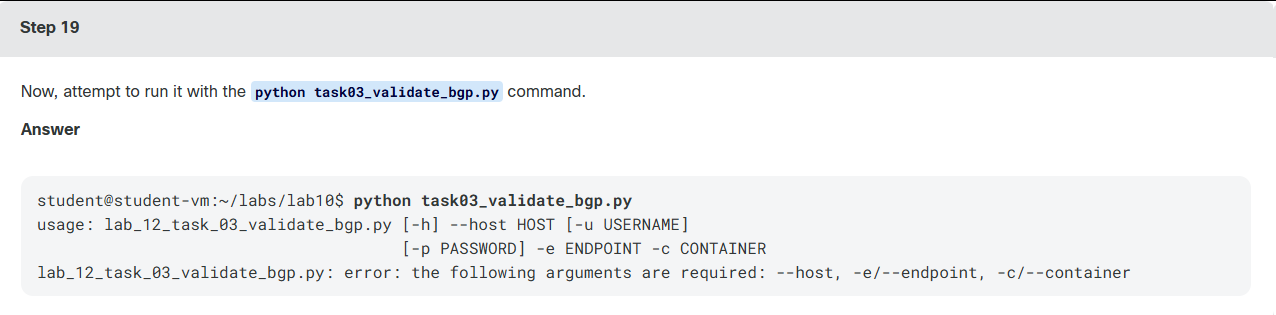
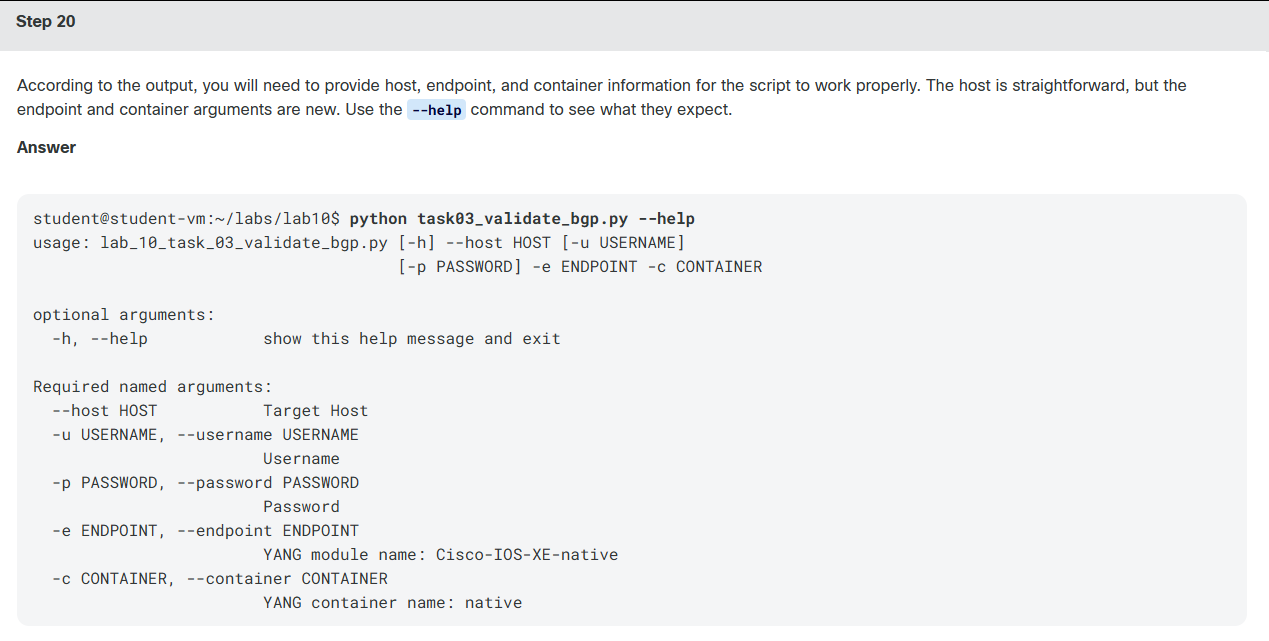
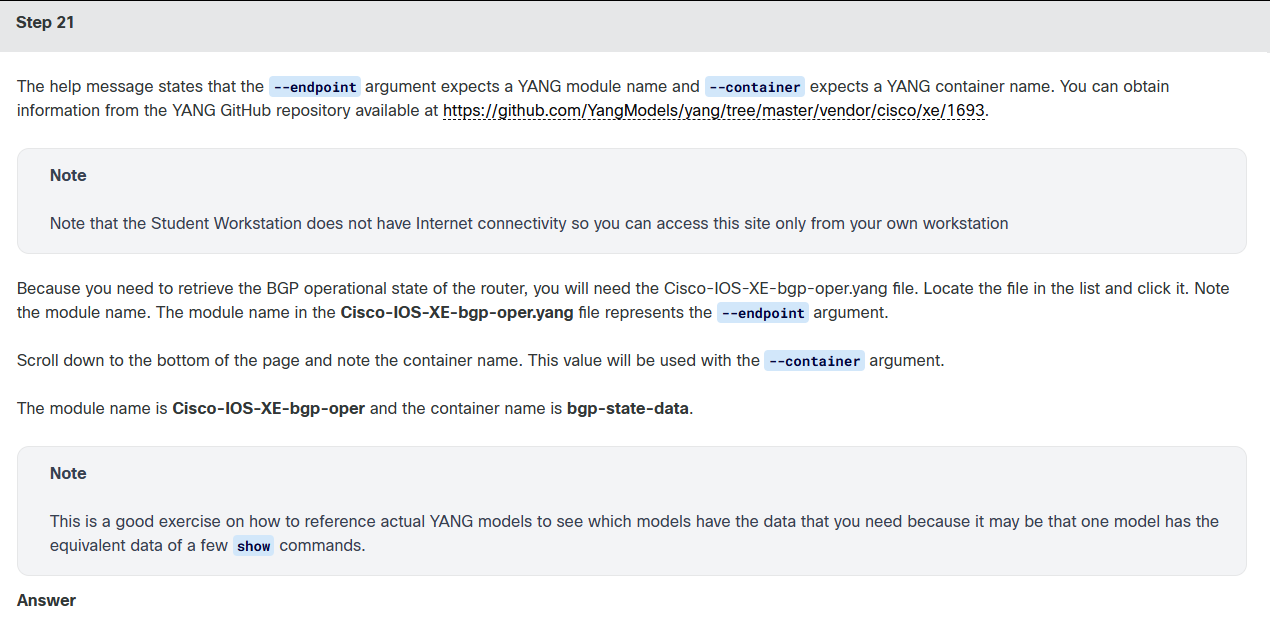
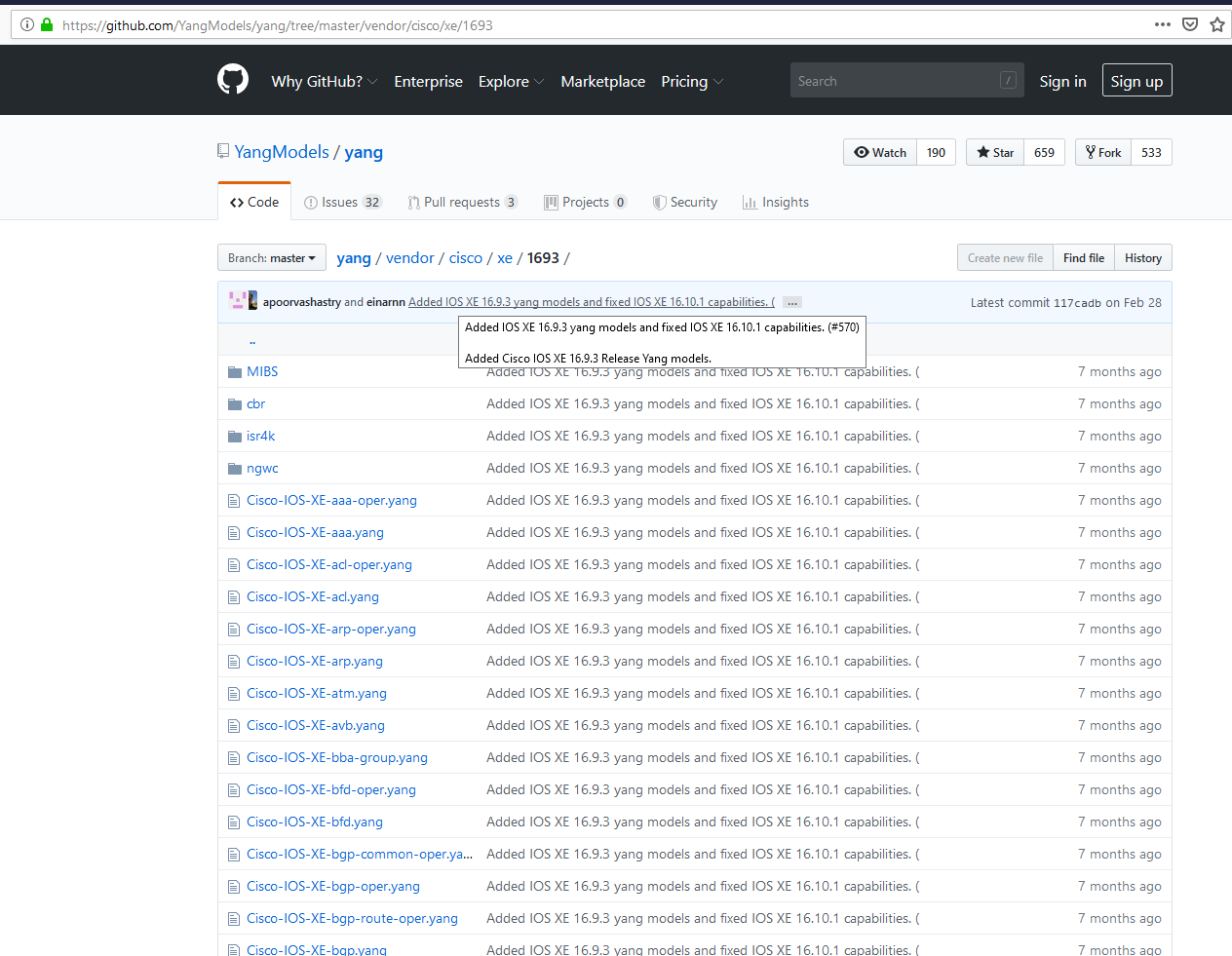
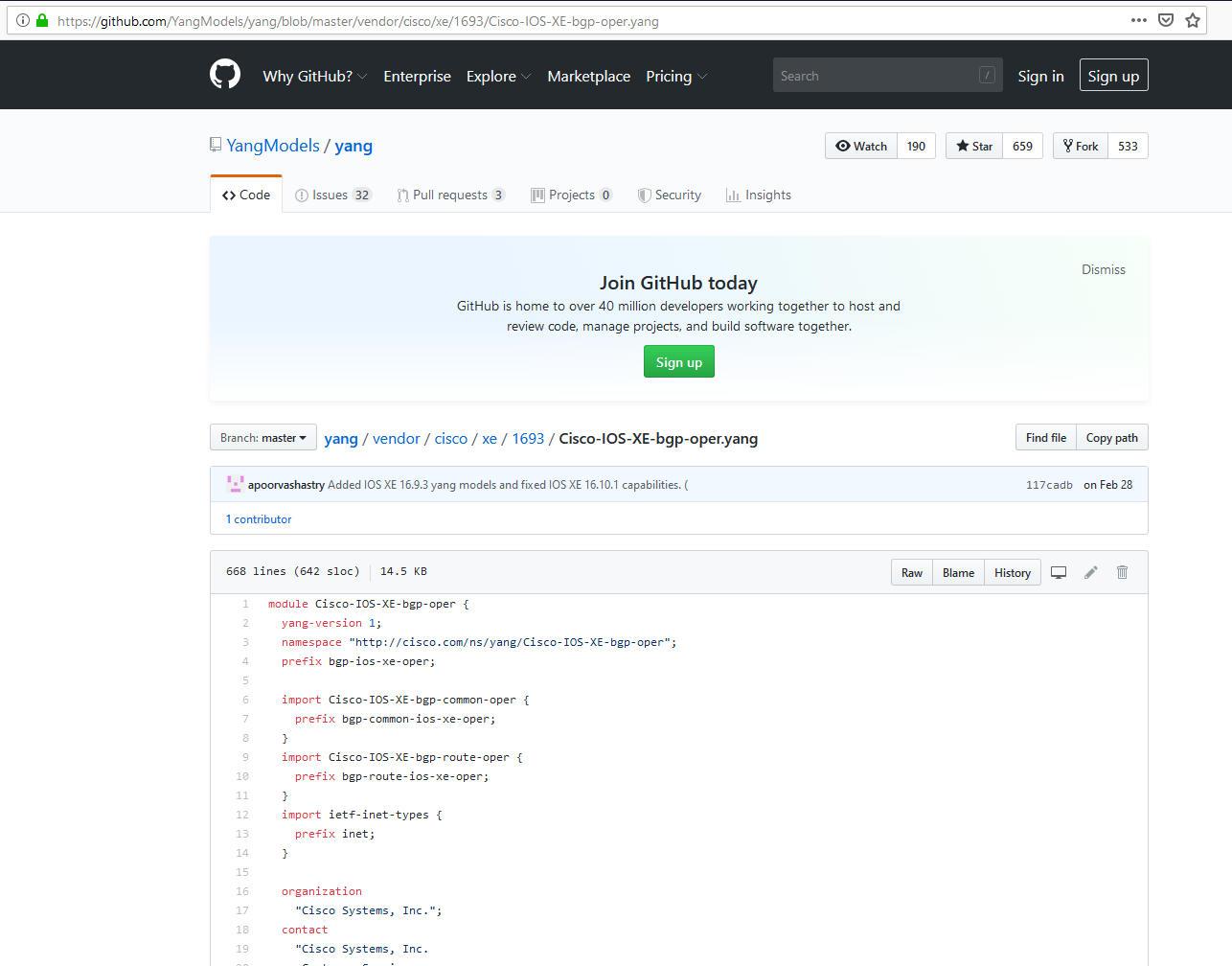
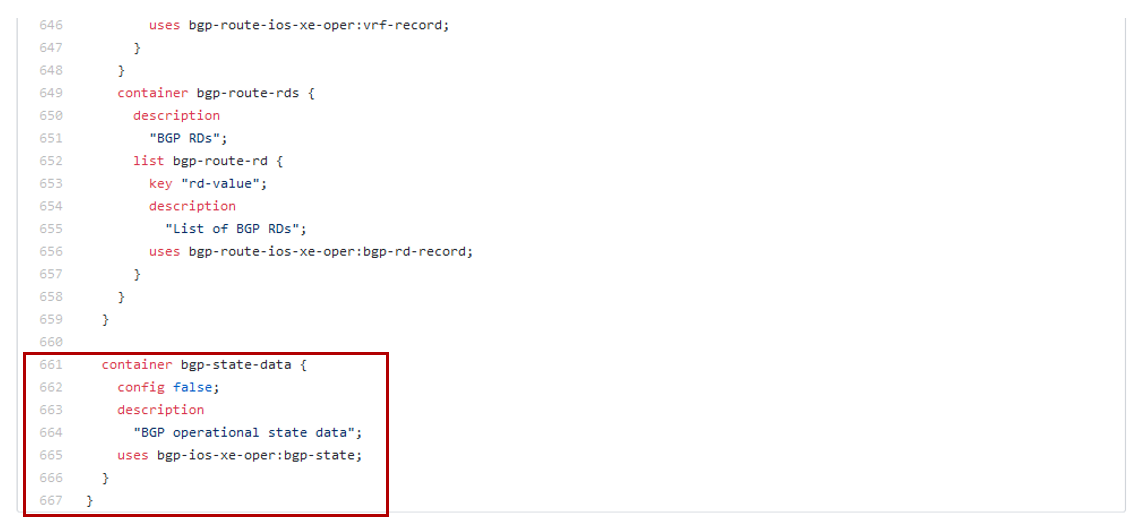

python
student@student-vm:~/labs/lab10$ python task03_validate_bgp.py --host csr1kv1 --endpoint Cisco-IOS-XE-bgp-oper --container bgp-state-data
Getting BGP oper state with RESTCONF
BGP Oper State:
{
"Cisco-IOS-XE-bgp-oper:bgp-state-data": {
"address-families": {
"address-family": [
{
"activities": {
"paths": "0",
"prefixes": "0",
"scan-interval": ""
},
"afi-safi": "ipv4-unicast",
"as-path": {
"memory-usage": "0",
"total-entries": "0"
},
"bgp-neighbor-summaries": {
"bgp-neighbor-summary": [
{
"as": 65002,
"bgp-version": 4,
"dynamically-configured": false,
"id": "10.12.0.2",
"input-queue": "0",
"messages-received": "0",
"messages-sent": "0",
"output-queue": "0",
"prefixes-received": "0",
"state": "fsm-idle",
"table-version": "1",
"up-time": "00:38:34"
},
{
"as": 65003,
"bgp-version": 4,
"dynamically-configured": false,
"id": "10.13.0.3",
"input-queue": "0",
"messages-received": "50",
"messages-sent": "53",
"output-queue": "0",
"prefixes-received": "0",
"state": "fsm-established",
"table-version": "1",
"up-time": "00:44:26"
}
]
},
"bgp-table-version": "1",
"filter-list": {
"memory-usage": "0",
"total-entries": "0"
},
"local-as": 65001,
"path": {
"memory-usage": "0",
"total-entries": "0"
},
"prefixes": {
"memory-usage": "0",
"total-entries": "0"
},
"route-map": {
"memory-usage": "0",
"total-entries": "0"
},
"router-id": "10.1.1.1",
"routing-table-version": "1",
"total-memory": "0",
"vrf-name": "default"
}
]
},
"bgp-route-rds": {
"bgp-route-rd": [
{
"rd-value": "0:0"
}
]
},
"bgp-route-vrfs": {
"bgp-route-vrf": [
{
"bgp-route-afs": {
"bgp-route-af": [
{
"afi-safi": "ipv4-mdt",
"bgp-route-filters": {
"bgp-route-filter": [
{
"route-filter": "bgp-rf-all"
}
]
},
"bgp-route-neighbors": {
"bgp-route-neighbor": [
{
"nbr-id": ""
}
]
}
},
{
"afi-safi": "ipv4-multicast",
"bgp-route-filters": {
"bgp-route-filter": [
{
"route-filter": "bgp-rf-all"
}
]
},
"bgp-route-neighbors": {
"bgp-route-neighbor": [
{
"nbr-id": ""
}
]
}
},
{
"afi-safi": "ipv4-unicast",
"bgp-route-filters": {
"bgp-route-filter": [
{
"route-filter": "bgp-rf-all"
}
]
},
"bgp-route-neighbors": {
"bgp-route-neighbor": [
{
"bgp-neighbor-route-filters": {
"bgp-neighbor-route-filter": [
{
"nbr-fltr": "bgp-nrf-post-received"
}
]
},
"nbr-id": "10.12.0.2"
},
{
"bgp-neighbor-route-filters": {
"bgp-neighbor-route-filter": [
{
"nbr-fltr": "bgp-nrf-post-received"
}
]
},
"nbr-id": "10.13.0.3"
}
]
}
},
{
"afi-safi": "ipv4-mvpn",
"bgp-route-filters": {
"bgp-route-filter": [
{
"route-filter": "bgp-rf-all"
}
]
},
"bgp-route-neighbors": {
"bgp-route-neighbor": [
{
"nbr-id": ""
}
]
}
},
{
"afi-safi": "ipv4-flowspec",
"bgp-route-filters": {
"bgp-route-filter": [
{
"route-filter": "bgp-rf-all"
}
]
},
"bgp-route-neighbors": {
"bgp-route-neighbor": [
{
"nbr-id": ""
}
]
}
},
{
"afi-safi": "ipv6-multicast",
"bgp-route-filters": {
"bgp-route-filter": [
{
"route-filter": "bgp-rf-all"
}
]
},
"bgp-route-neighbors": {
"bgp-route-neighbor": [
{
"nbr-id": ""
}
]
}
},
{
"afi-safi": "ipv6-unicast",
"bgp-route-filters": {
"bgp-route-filter": [
{
"route-filter": "bgp-rf-all"
}
]
},
"bgp-route-neighbors": {
"bgp-route-neighbor": [
{
"nbr-id": ""
}
]
}
},
{
"afi-safi": "ipv6-mvpn",
"bgp-route-filters": {
"bgp-route-filter": [
{
"route-filter": "bgp-rf-all"
}
]
},
"bgp-route-neighbors": {
"bgp-route-neighbor": [
{
"nbr-id": ""
}
]
}
},
{
"afi-safi": "ipv6-flowspec",
"bgp-route-filters": {
"bgp-route-filter": [
{
"route-filter": "bgp-rf-all"
}
]
},
"bgp-route-neighbors": {
"bgp-route-neighbor": [
{
"nbr-id": ""
}
]
}
},
{
"afi-safi": "l2vpn-vpls",
"bgp-route-filters": {
"bgp-route-filter": [
{
"route-filter": "bgp-rf-all"
}
]
},
"bgp-route-neighbors": {
"bgp-route-neighbor": [
{
"nbr-id": ""
}
]
}
},
{
"afi-safi": "l2vpn-e-vpn",
"bgp-route-filters": {
"bgp-route-filter": [
{
"route-filter": "bgp-rf-all"
}
]
},
"bgp-route-neighbors": {
"bgp-route-neighbor": [
{
"nbr-id": ""
}
]
}
},
{
"afi-safi": "nsap-unicast",
"bgp-route-filters": {
"bgp-route-filter": [
{
"route-filter": "bgp- rf-all"
}
]
},
"bgp-route-neighbors": {
"bgp-route-neighbor": [
{
"nbr-id": ""
}
]
}
},
{
"afi-safi": "rtfilter-unicast",
"bgp-route-filters": {
"bgp-route-filter": [
{
"route-filter": "bgp-rf-all"
}
]
},
"bgp-route-neighbors": {
"bgp-route-neighbor": [
{
"nbr-id": ""
}
]
}
},
{
"afi-safi": "vpnv4-multicast",
"bgp-route-filters": {
"bgp-route-filter": [
{
"route-filter": "bgp-rf-all"
}
]
},
"bgp-route-neighbors": {
"bgp-route-neighbor": [
{
"nbr-id": ""
}
]
}
},
{
"afi-safi": "vpnv4-unicast",
"bgp-route-filters": {
"bgp-route-filter": [
{
"route-filter": "bgp-rf-all"
}
]
},
"bgp-route-neighbors": {
"bgp-route-neighbor": [
{
"nbr-id": ""
}
]
}
},
{
"afi-safi": "vpnv6-unicast",
"bgp-route-filters": {
"bgp-route-filter": [
{
"route-filter": "bgp-rf-all"
}
]
},
"bgp-route-neighbors": {
"bgp-route-neighbor": [
{
"nbr-id": ""
}
]
}
},
{
"afi-safi": "vpnv6-multicast",
"bgp-route-filters": {
"bgp-route-filter": [
{
"route-filter": "bgp-rf-all"
}
]
},
"bgp-route-neighbors": {
"bgp-route-neighbor": [
{
"nbr-id": ""
}
]
}
},
{
"afi-safi": "vpnv4-flowspec",
"bgp-route-filters": {
"bgp-route-filter": [
{
"route-filter": "bgp-rf-all"
}
]
},
"bgp-route-neighbors": {
"bgp-route-neighbor": [
{
"nbr-id": ""
}
]
}
},
{
"afi-safi": "vpnv6-flowspec",
"bgp-route-filters": {
"bgp-route-filter": [
{
"route-filter": "bgp-rf-all"
}
]
},
"bgp-route-neighbors": {
"bgp-route-neighbor": [
{
"nbr-id": ""
}
]
}
}
]
},
"vrf": "default"
}
]
},
"neighbors": {
"neighbor": [
{
"afi-safi": "ipv4-unicast",
"as": 65002,
"bgp-neighbor-counters": {
"inq-depth": 0,
"outq-depth": 0,
"received": {
"keepalives": 0,
"notifications": 0,
"opens": 0,
"route-refreshes": 0,
"updates": 0
},
"sent": {
"keepalives": 0,
"notifications": 0,
"opens": 0,
"route-refreshes": 0,
"updates": 0
}
},
"bgp-version": 4,
"connection": {
"last-reset": "00:38:34",
"mode": "mode-active",
"reset-reason": "Active open failed",
"state": "closed",
"total-dropped": 1,
"total-established": 1
},
"description": "",
"installed-prefixes": 0,
"last-read": "",
"last-write": "",
"link": "external",
"negotiated-keepalive-timers": {
"hold-time": 0,
"keepalive-interval": 0
},
"neighbor-id": "10.12.0.2",
"prefix-activity": {
"received": {
"bestpaths": "0",
"current-prefixes": "0",
"explicit-withdraw": "0",
"implicit-withdraw": "0",
"multipaths": "0",
"total-prefixes": "0"
},
"sent": {
"bestpaths": "0",
"current-prefixes": "0",
"explicit-withdraw": "0",
"implicit-withdraw": "0",
"multipaths": "0",
"total-prefixes": "0"
}
},
"session-state": "fsm-idle",
"transport": {
"foreign-port": 0,
"local-port": 0,
"mss": 0,
"path-mtu-discovery": true
},
"up-time": "",
"vrf-name": "default"
},
{
"afi-safi": "ipv4-unicast",
"as": 65003,
"bgp-neighbor-counters": {
"inq-depth": 0,
"outq-depth": 0,
"received": {
"keepalives": 49,
"notifications": 0,
"opens": 1,
"route-refreshes": 0,
"updates": 0
},
"sent": {
"keepalives": 49,
"notifications": 0,
"opens": 1,
"route-refreshes": 0,
"updates": 1
}
},
"bgp-version": 4,
"connection": {
"last-reset": "never",
"mode": "mode-active",
"reset-reason": "",
"state": "established",
"total-dropped": 0,
"total-established": 1
},
"description": "",
"installed-prefixes": 0,
"last-read": "00:00:08",
"last-write": "00:00:40",
"link": "external",
"negotiated-cap": [
"Route refresh: advertised and received(new)",
"Four-octets ASN Capability: advertised and received",
"Address family IPv4 Unicast: advertised and received",
"Enhanced Refresh Capability: advertised and received",
"Multisession Capability: ",
"Stateful switchover support enabled: NO for session 1"
],
"negotiated-keepalive-timers": {
"hold-time": 180,
"keepalive-interval": 60
},
"neighbor-id": "10.13.0.3",
"prefix-activity": {
"received": {
"bestpaths": "0",
"current-prefixes": "0",
"explicit-withdraw": "0",
"implicit-withdraw": "0",
"multipaths": "0",
"total-prefixes": "0"
},
"sent": {
"bestpaths": "0",
"current-prefixes": "0",
"explicit-withdraw": "0",
"implicit-withdraw": "0",
"multipaths": "0",
"total-prefixes": "0"
}
},
"session-state": "fsm-established",
"transport": {
"foreign-host": "10.13.0.3",
"foreign-port": 179,
"local-host": "10.13.0.1",
"local-port": 54948,
"mss": 1460,
"path-mtu-discovery": true
},
"up-time": "00:44:26",
"vrf-name": "default"
}
]
}
}
}
BGP Payload: None for GET operation
URL: https://csr1kv1/restconf/data/Cisco-IOS-XE-bgp-oper:bgp-state-data
Headers:
{
"Accept": "application/yang-data+json",
"Content-Type": "application/yang-data+json"
}
YANG Model URL: https://github.com/YangModels/yang/blob/master/vendor/cisco/xe/1693/Cisco-IOS-XE-bgp-oper.yang
+-------------+----------+----------+-----------------+------------------+
| Neighbor-id | Up-time | Prefixes | Session state | Connection State |
+-------------+----------+----------+-----------------+------------------+
| 10.12.0.2 | | 0 | fsm-idle | closed |
| 10.13.0.3 | 00:44:26 | 0 | fsm-established | established |
+-------------+----------+----------+-----------------+------------------+