目录
[一、什么是 IO](#一、什么是 IO)
[二、阻塞 IO](#二、阻塞 IO)
[阻塞 IO 的优点](#阻塞 IO 的优点)
[阻塞 IO 的缺点](#阻塞 IO 的缺点)
[三、非阻塞 IO](#三、非阻塞 IO)
[如何将 套接字/文件 的属性设置为非阻塞 IO](#如何将 套接字/文件 的属性设置为非阻塞 IO)
[(1)通过 recv/recvfrom 的 MSG_DONTWAIT](#(1)通过 recv/recvfrom 的 MSG_DONTWAIT)
[(2)通过 open 的 O_NONBLOCK](#(2)通过 open 的 O_NONBLOCK)
[(3)通过 fcntl 设置非阻塞属性](#(3)通过 fcntl 设置非阻塞属性)
[实现 SetNoBlock 函数](#实现 SetNoBlock 函数)
[非阻塞 IO 的基本使用](#非阻塞 IO 的基本使用)
[非阻塞 IO 的问题](#非阻塞 IO 的问题)
[四、信号驱动 IO](#四、信号驱动 IO)
前言
在 Linux 网络编程中,IO 是一个非常基础但又十分重要的概念。无论是我们编写一个简单的 Socket 服务器,还是实现一个能够处理大量并发连接的网络服务器,都离不开 IO。
在之前学习网络编程的过程中,我们经常会接触到 read/recv/recvfrom 等系统调用。当程序调用这些接口读取数据时,如果数据还没有准备好,程序究竟会发生什么?为什么有些情况下进程会阻塞,而有些情况下却可以立即返回?非阻塞 IO 又为什么需要不断轮询?这些问题的本质,都与 IO 模型有关。
Linux 中常见的 I/O 模型主要包括阻塞 IO、非阻塞 IO、IO 多路复用、信号驱动 IO 和异步 IO。不同的 I/O 模型,本质上是在解决同一个问题**:当 I/O 数据还没有准备好时,应用程序应该如何等待,以及数据准备好之后由谁完成 I/O 操作。**
本文将从最基础的阻塞 IO 开始,逐步介绍非阻塞 IO、信号驱动 IO 等模型,并通过实际代码理解文件描述符的阻塞属性以及 fcntl 的使用,为后续学习 select、poll、epoll 和 Reactor 模型打下基础。
一、什么是 IO
IO(input,output)即输入输出,在 Linux 中,IO 可以简单理解为应用程序与外部设备之间进行数据传输的过程。
对于后端开发来说,我们接触最多的 IO 就是网络 IO。例如,一个 TCP 服务器通过 Socket 接收客户端发送的数据,本质上就是一次网络 IO。
从服务器进程的角度来看,得到网络数据的过程为:
客户端发送的数据经过网卡抵达网络,经过路由器不断地转发抵达目标主机的网卡。服务器的 Linux 内核进行网络协议栈处理数据包,最终将客户端发送的数据拷贝到对于 Socket 的接收缓冲区中。此时应用程序通过 read/recv/recvfrom 等系统调用将内核缓冲区的数据拷贝到用户定义的用户缓冲区。
因此,一次网络中 IO 可以大致分为两个阶段:
(1)等待数据准备就绪
(2)将数据从内核空间拷贝到用户空间
而 Linux 中常说的五种 IO 模型,本质上针对这两个阶段采用了不同的处理方式。
二、阻塞 IO
阻塞 IO 是 Linux 中最简单、最常见的一种 IO 模型。对于套接字以及文件,它们的默认属性都是阻塞方式。
阻塞 IO:当数据没有准备好时,进程会一直等待,直到数据准备完成。
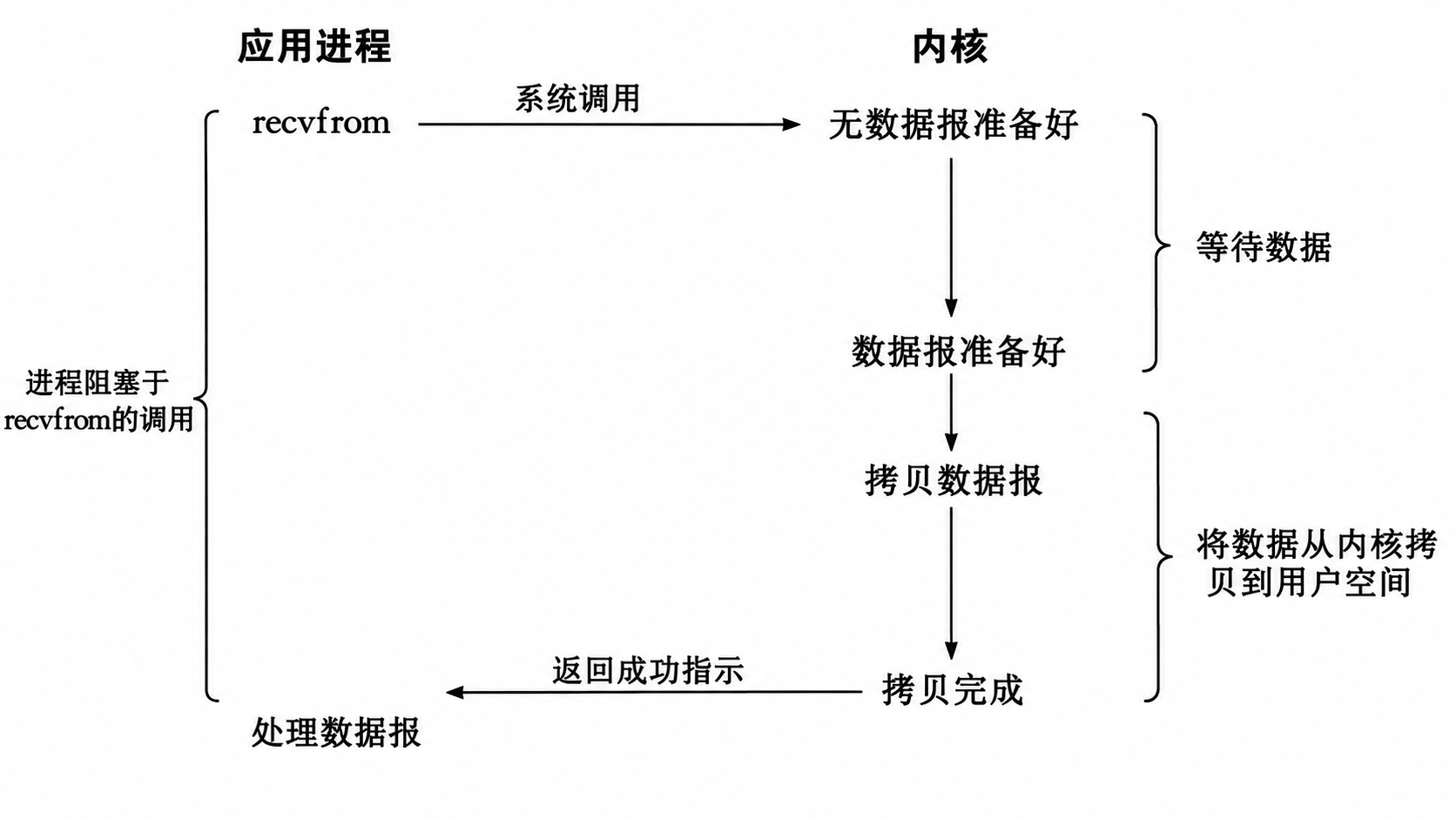
例如,在学习网络的过程中,客户端发送一个请求,服务器调用
cpp
recvfrom(fd, buf, sizeof(buf), 0, &addr, &len);如果此时 Socket 接收缓冲区中没有对应的数据,那么 recv() 就不会立即返回,而是让进程进入等待状态。
补充:当网卡接收到网络数据后,会通过硬件中断等机制通知 CPU。网卡通常会通过 DMA 将接收到的数据拷贝到内存中的接收缓冲区,随后 CPU 执行对应的中断处理流程,由内核继续处理网络数据,并将数据放入对应 Socket 的接收缓冲区中。如果此时有进程因为等待该 Socket 数据而处于阻塞状态,内核会将其唤醒,使其继续执行后续的数据读取操作。
阻塞 IO 的优点
阻塞 IO 的代码非常简单,程序员不需要主动判断数据是否准备好
阻塞 IO 的缺点
如果一个服务器只使用一个线程来处理客户端,那么这个线程在等待某一个客户端数据的时候,就无法处理其他客户端的请求,此时效率就十分低下。
此时,服务器需要结合:多进程、多线程、线程池等方式解决并发问题,来提高效率。
三、非阻塞 IO
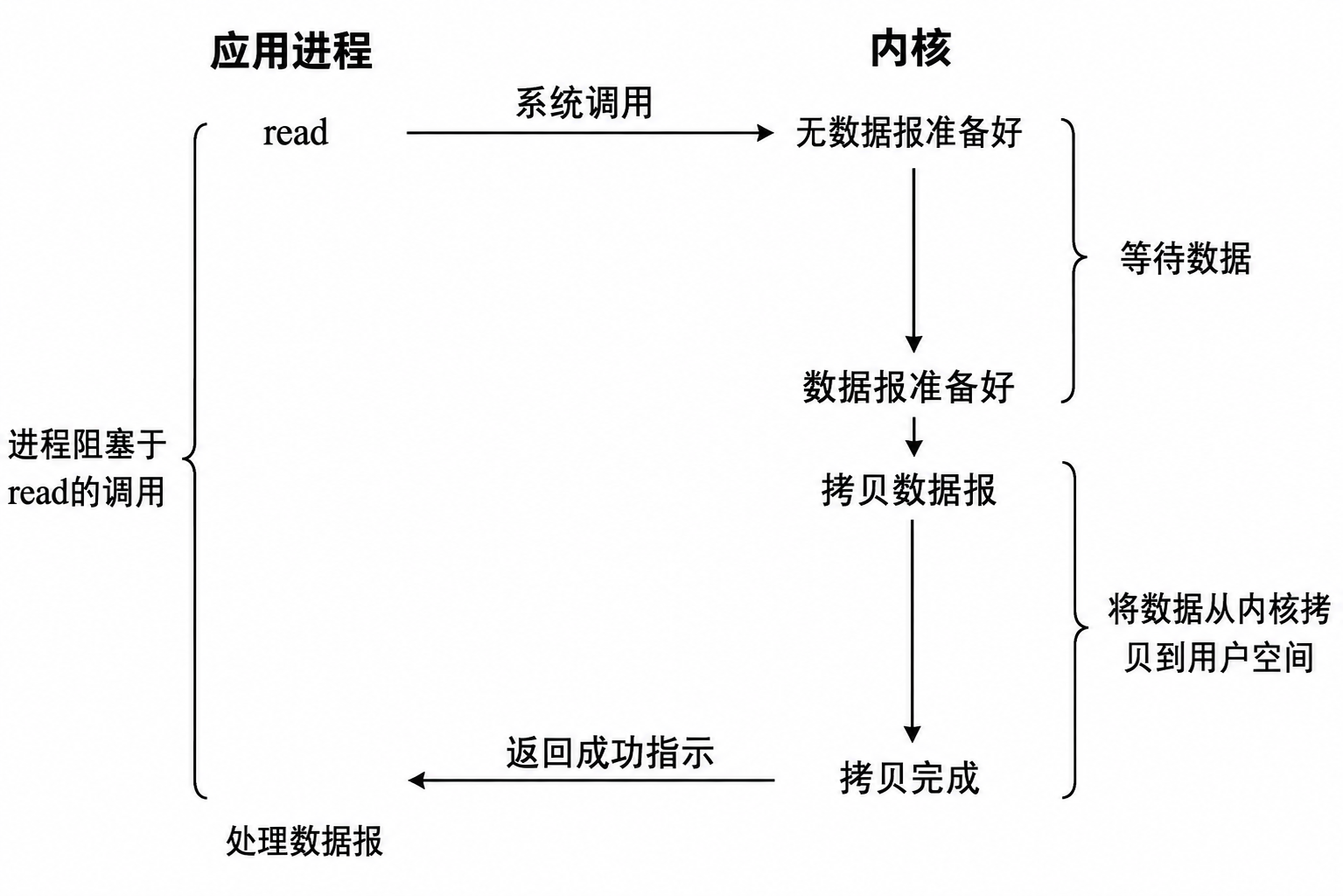
与阻塞 IO 的等待方式不同,非阻塞 IO 的特点是:
当数据没有准备好时,相关的系统调用就立即返回,而不是让进程一直等待。
如何将 套接字/文件 的属性设置为非阻塞 IO
Linux 中可以通过多种方式实现非阻塞 IO。对于 Socket 和普通文件描述符,常见的方式主要有以下几种。
(1)通过 recv/recvfrom 的 MSG_DONTWAIT
cpp
       ssize_t recv(int sockfd, void *buf, size_t len, int flags);

       ssize_t recvfrom(int sockfd, void *buf, size_t len, int flags,
                        struct sockaddr *src_addr, socklen_t *addrlen);
       MSG_DONTWAIT (since Linux 2.2)
              Enables  nonblocking operation; if the operation would block, the call fails
              with the error EAGAIN or EWOULDBLOCK (this can also  be  enabled  using  the
              O_NONBLOCK flag with the F_SETFL fcntl(2)).
对于 Socket,recv/recvfrom 都提供了 flags 参数,当 flags 设置为 MSG_DONTWAIT 时,表示本次 IO 操作采用非阻塞方式。当 flags 设置为 0 时,表示本次 IO 操作采用阻塞方式。
(2)通过 open 的 O_NONBLOCK
cpp
       int open(const char *pathname, int flags);

       ssize_t read(int fd, void *buf, size_t count);
       O_NONBLOCK or O_NDELAY
              When  possible,  the file is opened in nonblocking mode.  Neither the open()
              nor any subsequent operations on the file descriptor which is returned  will
              cause the calling process to wait.  For the handling of FIFOs (named pipes),
              see also fifo(7).  For a discussion of the effect of O_NONBLOCK in  conjunc‐
              tion with mandatory file locks and with file leases, see fcntl(2).
此时打开得到的文件描述符会带有非阻塞属性。之后对该文件描述符进行 I/O 操作时,就会按照非阻塞方式进行。
(3)通过 fcntl 设置非阻塞属性
对于上述两种针对不同类型文件的不同方式,Linux 还提供了更加通用的方式:fcntl
cpp
NAME
       fcntl - manipulate file descriptor

SYNOPSIS
       #include <unistd.h>
       #include <fcntl.h>

       int fcntl(int fd, int cmd, ... /* arg */ );
fcntl 根据传入的 cmd 不同,后面追加的参数也不相同。
fcntl() 是 Linux 中用于操作文件描述符的一个重要系统调用,它具有多种功能:
- F_DUPED:复制一个现有的文件描述符。
- F_GETFD / F_SETFD:获取/设置文件描述符标志。
- F_GETFL / F_SETFL:获取/设置文件状态标志。
- F_GETOWN / F_SETOWN:获取/设置异步 I/O 的所有权。
- F_GETLK / F_SETLK / F_SETLKW:获取/设置文件记录锁。
我们在设置非阻塞 IO 时,使用的是第三种功能:获取/设置文件状态标志。
具体来说,就是通过 F_GETFL 获取当前文件描述符的状态标志,然后通过 F_SETFL 添加 O_NONBLOCK 标志。
实现 SetNoBlock 函数
基于 fcntl,我们自主实现一个 SetNoBlock 函数,将文件描述符设置为非阻塞。
cpp
void SetNoBlock(int fd)
{
    int fl = fcntl(fd, F_GETFL);
    if(fl < 0)
    {
        std::cerr << "fcntl error" << std::endl;
        return;
    }
    fcntl(fd, F_SETFL, O_NONBLOCK | fl);
}
非阻塞 IO 的基本使用
cpp
#include <iostream>
#include <fcntl.h>
#include <unistd.h>

void SetNoBlock(int fd)
{
    int fl = fcntl(fd, F_GETFL);
    if(fl < 0)
    {
        std::cerr << "fcntl error" << std::endl;
        return;
    }
    fcntl(fd, F_SETFL, O_NONBLOCK | fl);
}

int main()
{
    SetNoBlock(0);
    char buffer[1024];
    while(true)
    {
        ssize_t n = read(0, buffer, sizeof(buffer) - 1);
        if(n > 0) // 读取成功
        {
            buffer[n] = 0;
            std::cout << buffer << std::endl;
        }
        else if(n < 0) // 读取失败
        {
            // 对于读取失败的情况 常见的有三种:
            // 1. 读取的过程中,进程收到信号而终止读取
            if(errno == EINTR)
            {
                continue;
            }
            // 2. 非阻塞 IO 情况下,数据没有准备就绪
            else if(errno == EAGAIN || errno == EWOULDBLOCK)
            {
                // 执行其他任务
                // ...
                continue;
            }
            // 3. 读取数据真的出现错误
            else
            {
                std::cerr << "read error" << std::endl;
                break;
            }
        }
        else // 读取到末尾 n == 0
        {
            break;
        }
        sleep(1);
    }
    return 0;
}
对于读取非阻塞的文件描述符时,如果它对应的文件接收缓冲区没有数据,read/recv/recvfrom 等系统调用会直接返回 -1,并设置对应的错误码。因此,我们需要进一步对错误码进行判断,通过错误码知道对应的错误原因。由于非阻塞 IO 读取不到数据而产生的错误码是 EAGAIN or EWOULDBLOCK 。由于信号终止而读取数据失败产生的错误码是 EINTR 。
cpp
RETURN VALUE
       On  success, the number of bytes read is returned (zero indicates end of file), and
       the file position is advanced by this number.  It is not an error if this number is
       smaller  than  the  number  of bytes requested; this may happen for example because
       fewer bytes are actually available right now (maybe because we were close  to  end-
       of-file,  or  because  we  are reading from a pipe, or from a terminal), or because
       read() was interrupted by a signal.  On error, -1 is returned,  and  errno  is  set
       appropriately.   In  this case it is left unspecified whether the file position (if
       any) changes.

ERRORS
       EAGAIN The file descriptor fd refers to a file other than a  socket  and  has  been
              marked nonblocking (O_NONBLOCK), and the read would block.

       EAGAIN or EWOULDBLOCK
              The  file  descriptor  fd refers to a socket and has been marked nonblocking
              (O_NONBLOCK), and the read would block.  POSIX.1-2001 allows either error to
              be  returned for this case, and does not require these constants to have the
              same value, so a portable application should check for both possibilities.

       EBADF  fd is not a valid file descriptor or is not open for reading.

       EFAULT buf is outside your accessible address space.

       EINTR  The call was interrupted by a signal before any  data  was  read;  see  sig‐
              nal(7).

       EINVAL fd is attached to an object which is unsuitable for reading; or the file was
              opened with the O_DIRECT flag, and either the address specified in buf,  the
              value  specified  in  count,  or  the  current  file  offset is not suitably
              aligned.

       EINVAL fd was created via a call to timerfd_create(2) and the wrong size buffer was
              given to read(); see timerfd_create(2) for further information.

       EIO    I/O error.  This will happen for example when the process is in a background
              process group, tries to read from its controlling terminal, and either it is
              ignoring  or blocking SIGTTIN or its process group is orphaned.  It may also
              occur when there is a low-level I/O error while reading from a disk or tape.
       EISDIR fd refers to a directory.

       Other errors may occur, depending on the object connected to fd.   POSIX  allows  a
       read()  that is interrupted after reading some data to return -1 (with errno set to
       EINTR) or to return the number of bytes already read.
非阻塞 IO 的问题
虽然非阻塞 IO 不会阻塞进程,且能利用等待时间处理其他任务,但如果我们想及时发现数据是否到达,就需要不断地调用 read/recv/recvfrom 等系统调用,这将要不断地占用 CPU 资源。
因此,单纯使用非阻塞 IO 并不能很好地解决高并发网络服务器的问题。
四、信号驱动 IO
信号驱动 IO 是一种通过信号通知机制来通知进程 IO 事件已经发生的 IO 模型。
与非阻塞 IO 不同,进程不需要不断调用 read/recv/recvfrom 等系统调用轮询数据是否准备好,而是可以提前告诉内核:当数据准备好时,通过信号通知我
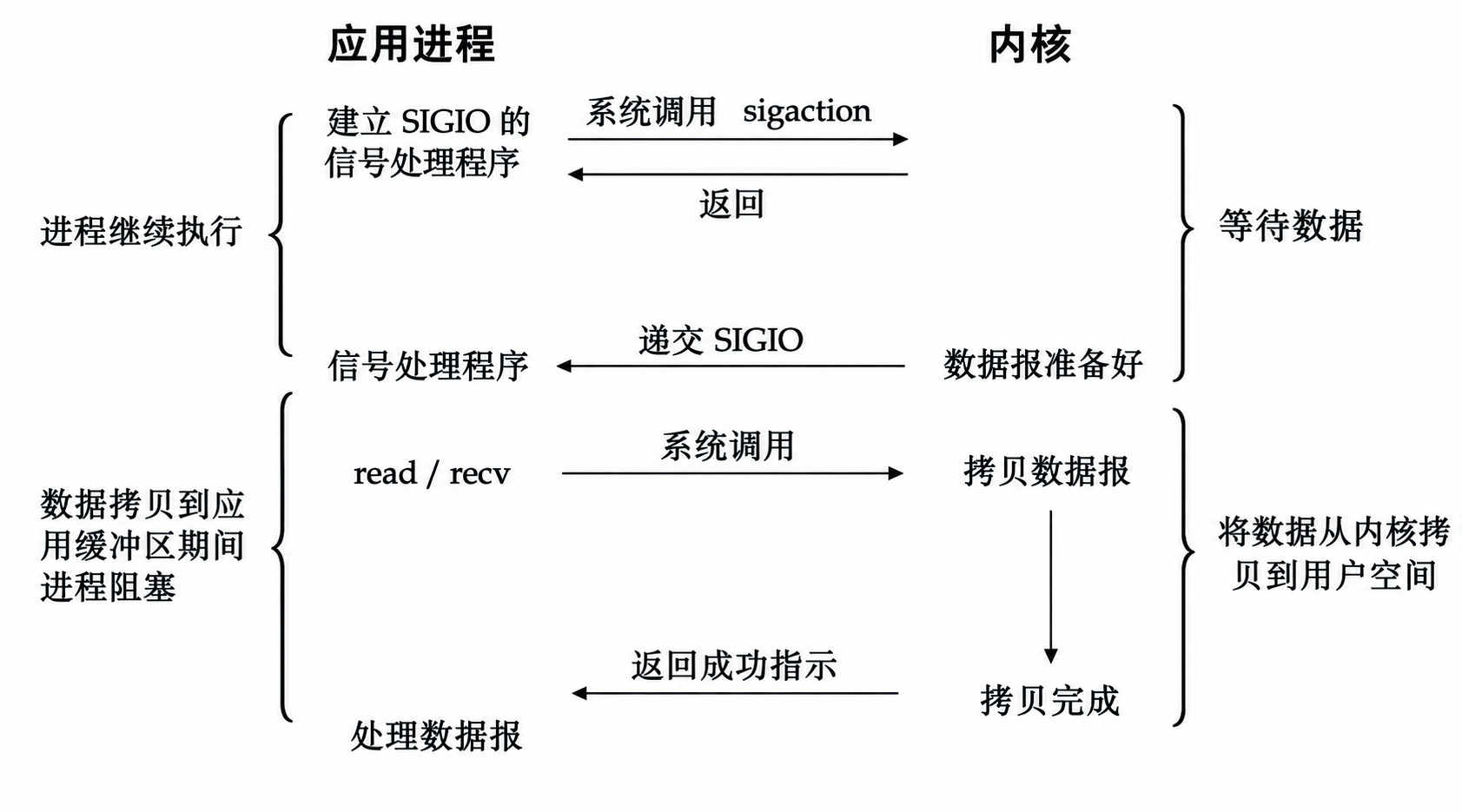
虽然信号驱动 IO 避免了不断轮询的问题,只需要收到信号通知就直接获取数据进行处理,看似非常完美,但是信号驱动 IO 实际使用很少。因为在网络服务器中,大量 Socket 对应的 IO 事件,使用信号来处理事件会带来较高的复杂度。
例如:服务器同时管理着大量的 Socket,大量信号的产生、处理以及信号之间的管理都会增加程序的复杂度。在我们学习 Linux 信号的时候,对于这种普通信号,pending 表中是用比特位来标志对应的信号是否产生,如果产生大量的信号,pending 表也只会记录一次,这也就需要在信号处理的过程中进行处理。
因此,在 Linux 高并发网络编程中,更常见的是使用:
cpp
select
poll
epoll
这也就是下一章节要介绍的重点:IO 多路复用(IO 多路转接)。