【FastAPI筑基-Day19】APScheduler定时任务全实战|自动执行、动态启停、后台常驻
专栏:FastAPI零基础后端实战系列
标签:FastAPI、APScheduler、定时任务、后端自动化、定时清理、常驻任务
前置学习:Day18 Redis缓存、Day11 FastAPI项目工程结构
一、前言
真实后端项目中,除了接口响应能力,还需要大量自动化定时任务:
- 定时清理过期文件、过期缓存
- 每日凌晨统计报表、数据汇总
- 定时心跳检测、服务巡检
- 定时推送消息、订单超时关闭
- 定时备份数据库、清理日志
FastAPI 本身不自带定时任务,行业标配方案是 APScheduler------Python 最强的定时任务框架,支持秒级、分钟级、小时级、每日、每周、Cron 表达式,完全覆盖企业所有定时场景。
本篇从零完成 FastAPI + APScheduler 完整集成,最终产出一套可直接进生产的定时任务方案:三种调度模式实战、项目启动自动常驻、生命周期优雅关闭、接口动态暂停/恢复/查看任务、结合 Redis 定时清理缓存。所有代码本地实跑验证,输出真实回填。
Day19 内容清单:
- ✅ Interval / Cron / Date 三大调度模式
- ✅ 项目启动自动注册任务、后台常驻
- ✅ lifespan 优雅启动与关闭,杜绝线程残留
- ✅ 接口动态暂停、恢复、查看定时任务
- ✅ 结合 Day18 Redis 实现定时清理缓存
- ✅ 生产常见坑:时区、多实例重复执行、任务阻塞
二、APScheduler 三种调度模式(必背)
| 模式 | 触发方式 | 典型场景 |
|---|---|---|
| Interval 间隔执行 | 每隔几秒/几分钟执行一次 | 心跳巡检、轮询同步、定时清理 |
| Cron 定时执行 | Linux Crontab 表达式,精准时间触发 | 每日凌晨统计、每周一报表、定时备份 |
| Date 一次性执行 | 指定时间执行一次 | 延时执行、一次性预热、临时任务 |
后面所有实战都围绕这三种模式展开。
三、安装依赖
bash
pip install apscheduler四、基础集成:最简可运行示例
先实现最基础的定时任务,项目启动自动常驻后台运行:
python
from fastapi import FastAPI
from apscheduler.schedulers.background import BackgroundScheduler
import time

app = FastAPI(title="Day19 定时任务实战")

# 初始化后台调度器
scheduler = BackgroundScheduler(timezone="Asia/Shanghai")

# 定义定时任务函数
def task_heartbeat():
    print(f"【心跳任务】服务正常运行 {time.strftime('%Y-%m-%d %H:%M:%S')}")

# 添加间隔任务:每3秒执行一次
scheduler.add_job(task_heartbeat, "interval", seconds=3)

# 启动调度器
scheduler.start()

@app.get("/")
def index():
    return {"msg": "定时任务服务已启动"}

if __name__ == "__main__":
    import uvicorn
    uvicorn.run(app, host="0.0.0.0", port=8000)
运行项目可以看到:控制台每 3 秒自动打印日志,接口正常使用,互不影响。BackgroundScheduler 在后台线程跑任务,不会阻塞 FastAPI 主进程。
五、三大任务模式完整实战
1. Interval 间隔任务(高频轮询)
适合:心跳检测、定时清理缓存、轮询同步数据。
python
def task_interval():
    print("【间隔任务】每5秒执行一次")

scheduler.add_job(task_interval, "interval", seconds=5)
2. Cron 定时任务(精准定时)
适合:每日凌晨统计数据、定时备份、每日报表。
python
def task_cron():
    print("【Cron任务】每日 00:00 执行数据统计")

# 每日凌晨0点执行
scheduler.add_job(task_cron, "cron", hour=0, minute=0)
3. Date 一次性任务
适合:延时执行、一次性预热、临时任务。
python
from datetime import datetime, timedelta

def task_once():
    print("【一次性任务】执行完成")

# 当前时间+10秒后执行一次
run_time = datetime.now() + timedelta(seconds=10)
scheduler.add_job(task_once, "date", run_date=run_time)
六、项目优雅启动与关闭(生产必备)
第四节那种模块级直接 scheduler.start() 的写法有个致命问题:项目关闭时定时任务线程未销毁 ,造成线程残留、端口占用,重启服务先报 Address already in use。
企业标准写法是用 FastAPI 自带的 lifespan 生命周期:启动时注册并启动调度器,关闭时销毁,一个不漏:
python
from fastapi import FastAPI
from apscheduler.schedulers.background import BackgroundScheduler
from contextlib import asynccontextmanager

# 全局调度器
scheduler = BackgroundScheduler(timezone="Asia/Shanghai")

# 任务列表统一管理
def task_clear_log():
    print("【定时任务】定时清理日志")

def task_refresh_cache():
    print("【定时任务】定时刷新热点缓存")

@asynccontextmanager
async def lifespan(app: FastAPI):
    # 项目启动时执行
    print("项目启动,初始化定时任务...")
    scheduler.add_job(task_clear_log, "interval", seconds=10)
    scheduler.add_job(task_refresh_cache, "cron", hour=12, minute=0)
    scheduler.start()
    yield
    # 项目关闭时执行
    print("项目关闭,销毁定时任务")
    scheduler.shutdown()

app = FastAPI(title="定时任务优雅集成", lifespan=lifespan)
整个生命周期一张图:
#mermaid-svg-nMCAx8ryFfiYKexs{font-family:"trebuchet ms",verdana,arial,sans-serif;font-size:16px;fill:#333;}@keyframes edge-animation-frame{from{stroke-dashoffset:0;}}@keyframes dash{to{stroke-dashoffset:0;}}#mermaid-svg-nMCAx8ryFfiYKexs .edge-animation-slow{stroke-dasharray:9,5!important;stroke-dashoffset:900;animation:dash 50s linear infinite;stroke-linecap:round;}#mermaid-svg-nMCAx8ryFfiYKexs .edge-animation-fast{stroke-dasharray:9,5!important;stroke-dashoffset:900;animation:dash 20s linear infinite;stroke-linecap:round;}#mermaid-svg-nMCAx8ryFfiYKexs .error-icon{fill:#552222;}#mermaid-svg-nMCAx8ryFfiYKexs .error-text{fill:#552222;stroke:#552222;}#mermaid-svg-nMCAx8ryFfiYKexs .edge-thickness-normal{stroke-width:1px;}#mermaid-svg-nMCAx8ryFfiYKexs .edge-thickness-thick{stroke-width:3.5px;}#mermaid-svg-nMCAx8ryFfiYKexs .edge-pattern-solid{stroke-dasharray:0;}#mermaid-svg-nMCAx8ryFfiYKexs .edge-thickness-invisible{stroke-width:0;fill:none;}#mermaid-svg-nMCAx8ryFfiYKexs .edge-pattern-dashed{stroke-dasharray:3;}#mermaid-svg-nMCAx8ryFfiYKexs .edge-pattern-dotted{stroke-dasharray:2;}#mermaid-svg-nMCAx8ryFfiYKexs .marker{fill:#333333;stroke:#333333;}#mermaid-svg-nMCAx8ryFfiYKexs .marker.cross{stroke:#333333;}#mermaid-svg-nMCAx8ryFfiYKexs svg{font-family:"trebuchet ms",verdana,arial,sans-serif;font-size:16px;}#mermaid-svg-nMCAx8ryFfiYKexs p{margin:0;}#mermaid-svg-nMCAx8ryFfiYKexs .label{font-family:"trebuchet ms",verdana,arial,sans-serif;color:#333;}#mermaid-svg-nMCAx8ryFfiYKexs .cluster-label text{fill:#333;}#mermaid-svg-nMCAx8ryFfiYKexs .cluster-label span{color:#333;}#mermaid-svg-nMCAx8ryFfiYKexs .cluster-label span p{background-color:transparent;}#mermaid-svg-nMCAx8ryFfiYKexs .label text,#mermaid-svg-nMCAx8ryFfiYKexs span{fill:#333;color:#333;}#mermaid-svg-nMCAx8ryFfiYKexs .node rect,#mermaid-svg-nMCAx8ryFfiYKexs .node circle,#mermaid-svg-nMCAx8ryFfiYKexs .node ellipse,#mermaid-svg-nMCAx8ryFfiYKexs .node polygon,#mermaid-svg-nMCAx8ryFfiYKexs .node path{fill:#ECECFF;stroke:#9370DB;stroke-width:1px;}#mermaid-svg-nMCAx8ryFfiYKexs .rough-node .label text,#mermaid-svg-nMCAx8ryFfiYKexs .node .label text,#mermaid-svg-nMCAx8ryFfiYKexs .image-shape .label,#mermaid-svg-nMCAx8ryFfiYKexs .icon-shape .label{text-anchor:middle;}#mermaid-svg-nMCAx8ryFfiYKexs .node .katex path{fill:#000;stroke:#000;stroke-width:1px;}#mermaid-svg-nMCAx8ryFfiYKexs .rough-node .label,#mermaid-svg-nMCAx8ryFfiYKexs .node .label,#mermaid-svg-nMCAx8ryFfiYKexs .image-shape .label,#mermaid-svg-nMCAx8ryFfiYKexs .icon-shape .label{text-align:center;}#mermaid-svg-nMCAx8ryFfiYKexs .node.clickable{cursor:pointer;}#mermaid-svg-nMCAx8ryFfiYKexs .root .anchor path{fill:#333333!important;stroke-width:0;stroke:#333333;}#mermaid-svg-nMCAx8ryFfiYKexs .arrowheadPath{fill:#333333;}#mermaid-svg-nMCAx8ryFfiYKexs .edgePath .path{stroke:#333333;stroke-width:2.0px;}#mermaid-svg-nMCAx8ryFfiYKexs .flowchart-link{stroke:#333333;fill:none;}#mermaid-svg-nMCAx8ryFfiYKexs .edgeLabel{background-color:rgba(232,232,232, 0.8);text-align:center;}#mermaid-svg-nMCAx8ryFfiYKexs .edgeLabel p{background-color:rgba(232,232,232, 0.8);}#mermaid-svg-nMCAx8ryFfiYKexs .edgeLabel rect{opacity:0.5;background-color:rgba(232,232,232, 0.8);fill:rgba(232,232,232, 0.8);}#mermaid-svg-nMCAx8ryFfiYKexs .labelBkg{background-color:rgba(232, 232, 232, 0.5);}#mermaid-svg-nMCAx8ryFfiYKexs .cluster rect{fill:#ffffde;stroke:#aaaa33;stroke-width:1px;}#mermaid-svg-nMCAx8ryFfiYKexs .cluster text{fill:#333;}#mermaid-svg-nMCAx8ryFfiYKexs .cluster span{color:#333;}#mermaid-svg-nMCAx8ryFfiYKexs div.mermaidTooltip{position:absolute;text-align:center;max-width:200px;padding:2px;font-family:"trebuchet ms",verdana,arial,sans-serif;font-size:12px;background:hsl(80, 100%, 96.2745098039%);border:1px solid #aaaa33;border-radius:2px;pointer-events:none;z-index:100;}#mermaid-svg-nMCAx8ryFfiYKexs .flowchartTitleText{text-anchor:middle;font-size:18px;fill:#333;}#mermaid-svg-nMCAx8ryFfiYKexs rect.text{fill:none;stroke-width:0;}#mermaid-svg-nMCAx8ryFfiYKexs .icon-shape,#mermaid-svg-nMCAx8ryFfiYKexs .image-shape{background-color:rgba(232,232,232, 0.8);text-align:center;}#mermaid-svg-nMCAx8ryFfiYKexs .icon-shape p,#mermaid-svg-nMCAx8ryFfiYKexs .image-shape p{background-color:rgba(232,232,232, 0.8);padding:2px;}#mermaid-svg-nMCAx8ryFfiYKexs .icon-shape .label rect,#mermaid-svg-nMCAx8ryFfiYKexs .image-shape .label rect{opacity:0.5;background-color:rgba(232,232,232, 0.8);fill:rgba(232,232,232, 0.8);}#mermaid-svg-nMCAx8ryFfiYKexs .label-icon{display:inline-block;height:1em;overflow:visible;vertical-align:-0.125em;}#mermaid-svg-nMCAx8ryFfiYKexs .node .label-icon path{fill:currentColor;stroke:revert;stroke-width:revert;}#mermaid-svg-nMCAx8ryFfiYKexs :root{--mermaid-font-family:"trebuchet ms",verdana,arial,sans-serif;} FastAPI 项目启动
lifespan 注册全部定时任务
scheduler.start 启动调度器
接口正常服务, 任务后台常驻
项目收到关闭信号
scheduler.shutdown 销毁调度器, 无线程残留
yield 之前是启动逻辑,yield 之后是关闭逻辑,彻底解决线程残留问题。
七、动态管理定时任务(接口启停)
很多场景需要后台动态开启/关闭定时任务,不用重启服务:比如大促期间临时暂停清理任务、运维巡检时临时停掉推送。
python
@app.get("/scheduler/pause", summary="暂停所有定时任务")
def pause_scheduler():
    scheduler.pause()
    return {"code": 200, "msg": "定时任务已暂停"}

@app.get("/scheduler/resume", summary="恢复所有定时任务")
def resume_scheduler():
    scheduler.resume()
    return {"code": 200, "msg": "定时任务已恢复"}

@app.get("/scheduler/list", summary="查看所有任务")
def list_task():
    jobs = scheduler.get_jobs()
    task_list = []
    for job in jobs:
        task_list.append({
            "id": job.id,
            "name": job.name,
            "next_run_time": str(job.next_run_time)
        })
    return {"code": 200, "data": task_list}
三个接口:暂停、恢复、查看任务清单与下次执行时间,运维直接 curl 就能管任务。
八、结合业务实战:定时清理过期缓存
结合 Day18 的 Redis 缓存,实现定时清理无效缓存、垃圾数据:
python
import redis

redis_client = redis.Redis(host="127.0.0.1", port=6379, db=0,
                           decode_responses=True, socket_timeout=5)

def clean_invalid_cache():
    """定时清理无效缓存"""
    try:
        keys = redis_client.keys("user:list:*")
    except redis.exceptions.ConnectionError:
        print("【缓存清理】Redis 未连接,跳过本次清理")
        return
    if keys:
        redis_client.delete(*keys)
    print(f"【缓存清理】清理 {len(keys)} 条列表缓存")

# 每1分钟执行一次缓存清理
scheduler.add_job(clean_invalid_cache, "interval", minutes=1)
注意那个 try/except:定时任务绝不能因为依赖服务抖动而崩溃 。Redis 短暂断开时跳过本轮、等下一轮自动重试,调度器稳稳常驻。工程里直接复用 Day18 封装好的 redis_client 即可。
生产提示:
keys命令在数据量大时会阻塞 Redis,线上请改用scan_iter("user:list:*")游标遍历删除(Day18 也强调过这一点)。
九、APScheduler 核心踩坑总结(生产必看)
1. 时区问题
不指定时区会导致定时时间错乱(服务器默认 UTC,你的"凌晨0点"变成早上8点),必须指定:BackgroundScheduler(timezone="Asia/Shanghai")。
2. 服务多实例部署重复执行
多节点部署时,每台机器都会执行定时任务,导致重复执行(报表统计两遍、消息推送两次)。
解决方案:借助 Redis 分布式锁,同一时间只允许一台机器抢到任务执行权。
3. 项目重启任务丢失
默认内存存储任务(MemoryJobStore),重启服务所有定时任务重置。代码里用 lifespan 每次启动重新注册可以解决;进阶可配置 RedisJobStore,任务持久化。
4. 任务阻塞问题
如果任务执行时间过长,会阻塞下一次调度。耗时任务建议拆到独立线程/进程异步执行,调度器只负责"触发",不负责"干重活"。
十、Day19 完整整合代码
把以上所有能力整合成一份可直接运行的完整代码(本地验证时 8000 端口被其他服务占用,临时用 8013 跑,文章统一写 8000):
python
import time
from contextlib import asynccontextmanager
from datetime import datetime, timedelta

import redis
from apscheduler.schedulers.background import BackgroundScheduler
from fastapi import FastAPI

# ====================== Redis 全局连接(与 Day18 一致) ======================
redis_client = redis.Redis(
    host="127.0.0.1",
    port=6379,
    db=0,
    decode_responses=True,
    socket_timeout=5,
)

# ====================== 初始化后台调度器 ======================
# 必须指定时区,否则 cron 定时会错乱
scheduler = BackgroundScheduler(timezone="Asia/Shanghai")


# ====================== 定时任务 ======================
def heartbeat_task():
    """间隔任务:每 5 秒心跳巡检"""
    print(f"【心跳巡检】服务运行正常 {time.strftime('%H:%M:%S')}")


def cache_clean_task():
    """间隔任务:每 1 分钟清理无效列表缓存"""
    try:
        keys = redis_client.keys("user:list:*")
    except redis.exceptions.ConnectionError:
        print("【缓存清理】Redis 未连接,跳过本次清理")
        return
    if keys:
        redis_client.delete(*keys)
    print(f"【缓存清理】清理 {len(keys)} 条列表缓存")


def daily_stat_task():
    """Cron 任务:每日凌晨 0 点数据汇总"""
    print(f"【每日统计】执行凌晨数据汇总 {time.strftime('%Y-%m-%d %H:%M:%S')}")


def warmup_task():
    """Date 一次性任务:启动 10 秒后预热一次"""
    print("【一次性任务】缓存预热完成")


# ====================== 生命周期:优雅启动与关闭 ======================
@asynccontextmanager
async def lifespan(app: FastAPI):
    # 项目启动时执行:注册所有任务并启动调度器
    print("项目启动,初始化定时任务...")
    scheduler.add_job(heartbeat_task, "interval", seconds=5)
    scheduler.add_job(cache_clean_task, "interval", minutes=1)
    scheduler.add_job(daily_stat_task, "cron", hour=0, minute=0)
    scheduler.add_job(warmup_task, "date", run_date=datetime.now() + timedelta(seconds=10))
    scheduler.start()
    print("✅ 所有定时任务启动成功")
    yield
    # 项目关闭时执行:销毁调度器,防止线程残留
    print("项目关闭,销毁定时任务")
    scheduler.shutdown()
    print("✅ 定时任务已安全关闭")


app = FastAPI(title="Day19 APScheduler定时任务实战", lifespan=lifespan)


# ====================== 任务管理接口 ======================
@app.get("/scheduler/list", summary="查看所有定时任务")
def get_task_list():
    jobs = scheduler.get_jobs()
    res = []
    for job in jobs:
        res.append({
            "id": job.id,
            "name": job.name,
            "next_run_time": str(job.next_run_time),
        })
    return {"code": 200, "data": res}


@app.get("/scheduler/pause", summary="暂停所有定时任务")
def pause_task():
    scheduler.pause()
    return {"code": 200, "msg": "定时任务已暂停"}


@app.get("/scheduler/resume", summary="恢复所有定时任务")
def resume_task():
    scheduler.resume()
    return {"code": 200, "msg": "定时任务已恢复"}


@app.get("/")
def root():
    return {"msg": "Day19 定时任务服务已启动"}


if __name__ == "__main__":
    import uvicorn
    uvicorn.run(app, host="0.0.0.0", port=8000)
实际运行结果
启动项目,lifespan 自动注册并拉起全部任务,三种模式全部真实触发:
text
项目启动,初始化定时任务...
✅ 所有定时任务启动成功
【心跳巡检】服务运行正常 10:35:23
【心跳巡检】服务运行正常 10:35:28
【一次性任务】缓存预热完成
【心跳巡检】服务运行正常 10:35:33
...
【缓存清理】Redis 未连接,跳过本次清理
心跳每 5 秒一次(Interval),预热任务启动 10 秒后只执行了一次(Date),缓存清理每 1 分钟一次且 Redis 未连接时优雅跳过(Interval + 容错)。
查看任务清单,注意 daily_stat_task 的下次执行时间精准落在次日 00:00,Cron 模式生效:
text
$ curl http://localhost:8000/scheduler/list
{
  "code": 200,
  "data": [
    {"id": "d47b...", "name": "heartbeat_task",  "next_run_time": "2026-08-31 10:36:53.614119+08:00"},
    {"id": "c6b1...", "name": "cache_clean_task", "next_run_time": "2026-08-31 10:37:18.614494+08:00"},
    {"id": "9e56...", "name": "daily_stat_task",  "next_run_time": "2026-09-01 00:00:00+08:00"}
  ]
}
动态暂停/恢复实测:调用 /scheduler/pause 后,暂停窗口内一次心跳都没有打印 ;调用 /scheduler/resume 后 5 秒内心跳立刻恢复:
text
【心跳巡检】服务运行正常 10:37:33      <- 暂停前最后一次心跳
{"code":200,"msg":"定时任务已暂停"}
(暂停窗口 15 秒,无任何心跳输出)
{"code":200,"msg":"定时任务已恢复"}
【心跳巡检】服务运行正常 10:37:53      <- 恢复后心跳继续
【心跳巡检】服务运行正常 10:37:58
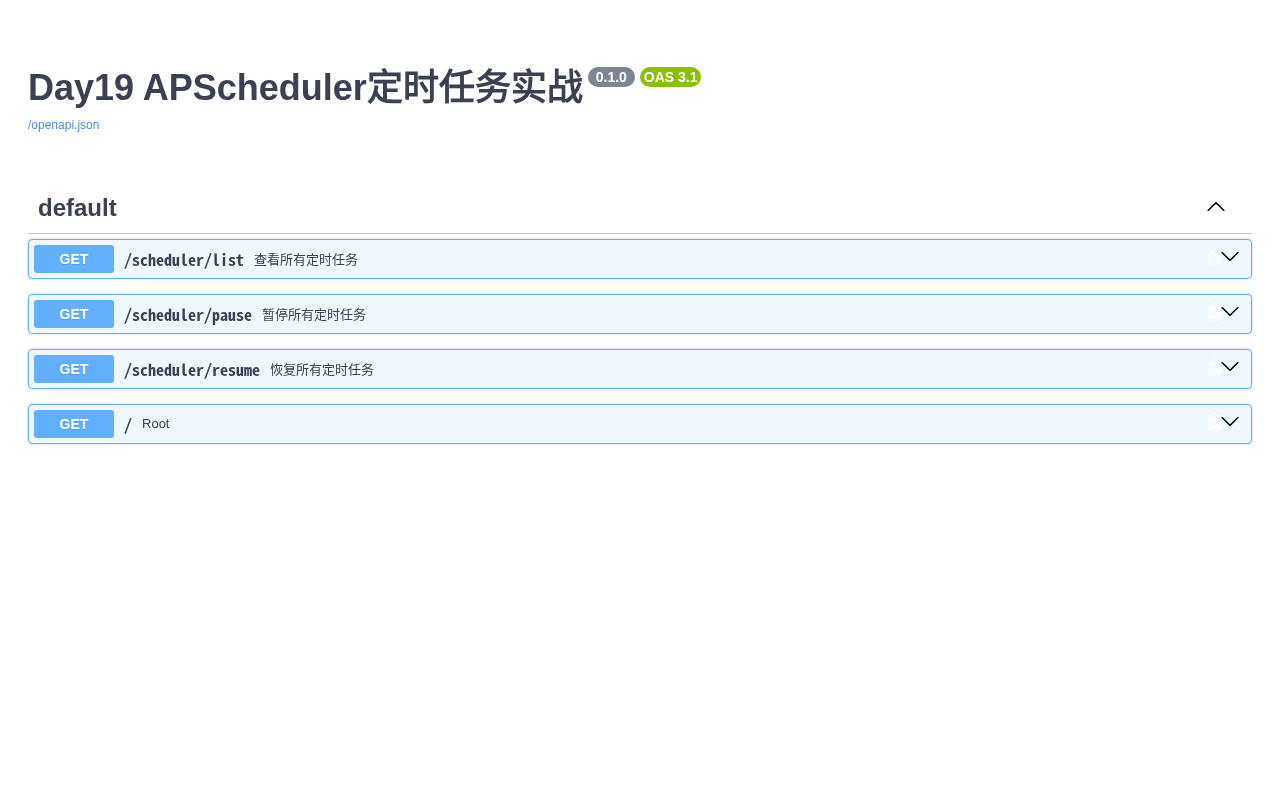
接口文档页面,三个任务管理接口一目了然:
十一、本章核心总结
- 掌握 APScheduler 三种核心任务模式:Interval、Cron、Date
- 掌握 FastAPI lifespan 生命周期,实现任务优雅启停、杜绝线程残留
- 实现动态暂停、恢复、查看定时任务接口
- 结合 Redis 缓存实现自动化业务任务,任务依赖异常时优雅降级
- 熟悉生产环境常见坑:时区必须指定、多实例重复执行用分布式锁、耗时任务防阻塞
十二、下期预告
Day20 完结篇:【FastAPI筑基-Day20·完结篇】本地能跑≠上线!Docker+Nginx把项目送上生产服务器
带你把整套 FastAPI 项目 Docker 容器化打包、Nginx 反向代理、开机自启、服务器正式上线,完成从开发到上线的全流程!