Embeddings 和向量存储
简介
在 RAG(Retrieval‑Augmented Generation)的混合检索中,密集嵌入(Dense Embeddings) 和 稀疏嵌入(Sparse Embeddings) 是两种互补的向量表示方法,分别用于捕捉语义信息和关键词匹配。
混合搜索结合了不同搜索范式的优势,以提高检索的准确性和鲁棒性。它充分利用了密集向量搜索和稀疏向量搜索的能力,以及多种密集向量搜索策略的组合,确保对各种查询进行全面而精确的检索。
在这种情况下,使用语义向量相似性和精确关键词匹配两种方法检索候选内容。来自这些方法的结果会被合并、重新排序,并传递给 LLM 以生成最终答案。这种方法兼顾了精确性和语义理解,对各种查询场景都非常有效。
算法
密集嵌入(Dense Embeddings): bge‑large,(BAAI General Embedding)是由北京智源人工智能研究院(BAAI)推出的开源文本嵌入模型,属于密集嵌入(Dense Embedding)的代表性模型,专为语义检索、问答、聚类等任务优化。主要针对中文优化,但也支持多语言。
稀疏嵌入(Sparse Embeddings): BM25,(Best Matching 25)是一种基于统计的稀疏检索算法,是信息检索(Information Retrieval, IR)领域最经典的排序函数之一。它是对传统 TF‑IDF(词频‑逆文档频率)的改进,能够更合理地衡量文档与查询的相关性,广泛应用于搜索引擎(如 Elasticsearch、Lucene)和问答系统。
根据用户的问题分别使用语义和关键词两种方式获取关联的文档,然后再重排序获取指定个数文档,最后再交给大模型。
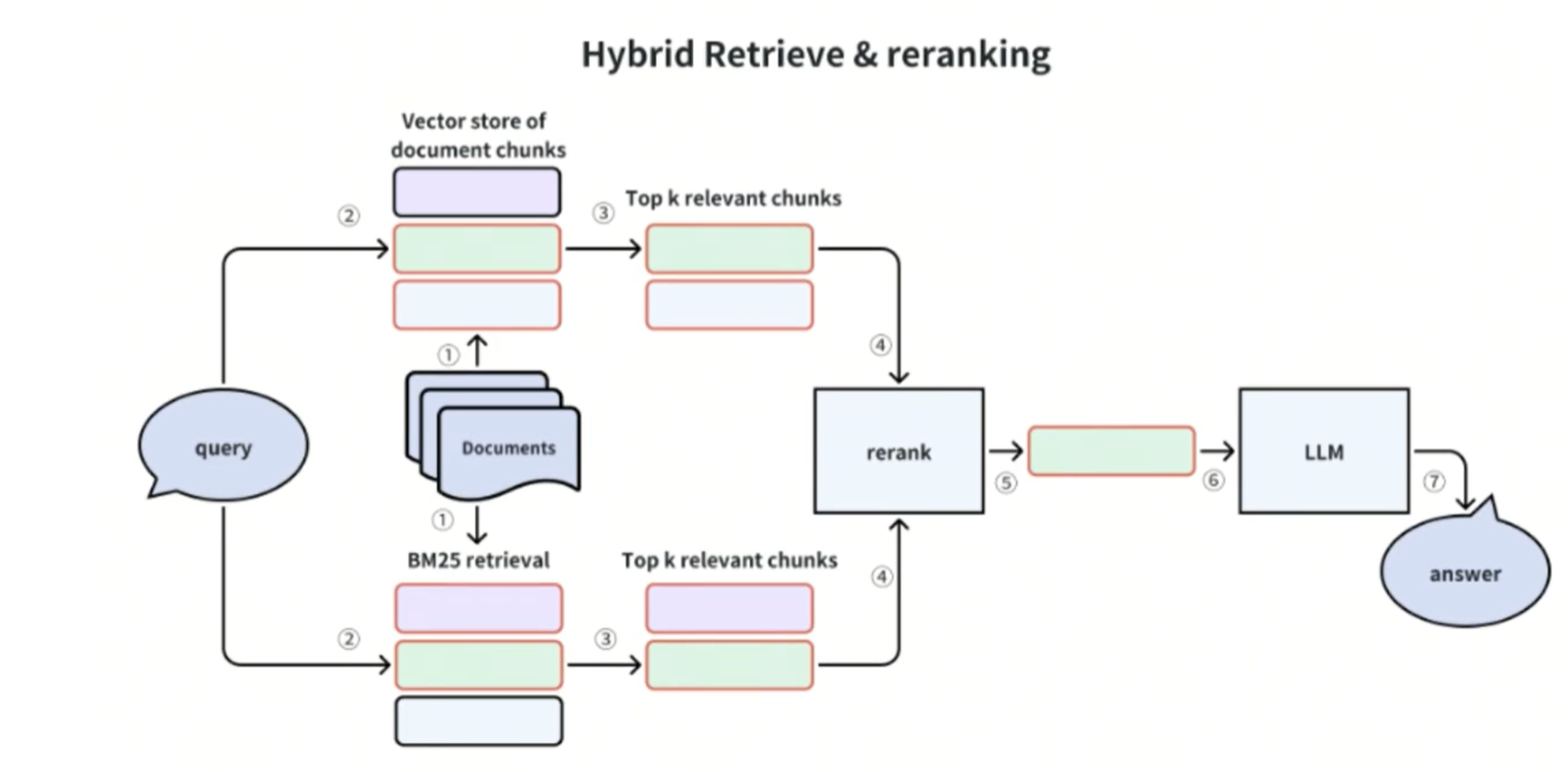
密集嵌入(Dense Embeddings): bge‑large
使用本地模型进行向量,第一次访问会下载模型,需要配置模型镜像地址。
shell
pip install -U huggingface_hub
pip install -U langchain-huggingface

# 配置环境变量(配置完后需要重启pycharm)
HF_ENDPOINT= "https://hf-mirror.com"
python
from langchain_huggingface import HuggingFaceEmbeddings

# 轻量中文嵌入模型
model_name = "BAAI/bge-small-zh-v1.5"
# `device="cpu"` 指定运行设备;GPU 环境改为`"cuda"`
model_kwargs = {"device": "cpu"}
# normalize_embeddings=True 向量归一化,Milvus 余弦相似度检索必须开启
encode_kwargs = {"normalize_embeddings": True}
bge_embedding = HuggingFaceEmbeddings(
    model_name=model_name, model_kwargs=model_kwargs, encode_kwargs=encode_kwargs
)

vec = bge_embedding.embed_query("测试文本")
print(f"向量维度:{len(vec)}, {vec}")
Hybrid 混合检索(稀疏+密集)
shell
pip install langchain-milvus
python
from pathlib import Path

from langchain_unstructured import UnstructuredLoader
from langchain_core.documents import Document
from langchain_milvus import Milvus, BM25BuiltInFunction
from pymilvus import Function, FunctionType, IndexType, MilvusClient
from pymilvus.client.types import MetricType
from langchain_huggingface import HuggingFaceEmbeddings

collection_name = 'hybrid_rag3'

def get_bge_embedding():
    model_name = "BAAI/bge-small-zh-v1.5"
    model_kwargs = {"device": "cpu"}
    encode_kwargs = {"normalize_embeddings": True}
    bge_embedding = HuggingFaceEmbeddings(
        model_name=model_name, model_kwargs=model_kwargs, encode_kwargs=encode_kwargs
    )
    return bge_embedding

def init_milvus():
    # 若 collection 已存在则先删除,保证脚本可重复运行
    client = MilvusClient(uri="http://127.0.0.1:19530")
    if client.has_collection(collection_name):
        client.drop_collection(collection_name)

    # 注意:不要写 "field_name" 键,langchain_milvus 内部会按 vector_field 顺序
    # 自行传 field_name,重复传入会导致 add_index 冲突报错
    index_params = [
        {
            "index_name": "dense_vector_index",
            "index_type": IndexType.HNSW,
            "metric_type": MetricType.IP,
            "params": {
                "M": 16,
                "efConstruction": 64
            }
        },
        {
            "index_name": "sparse_inverted_index",
            "index_type": "SPARSE_INVERTED_INDEX",
            "metric_type": "BM25",
            "params": {
                "inverted_index_algo": "DAAT_MAXSCORE",
                "bm25_k1": 1.2,
                "bm25_b": 0.75
            }
        }
    ]

    # 初始化 Milvus, 会自动创建 collection
    milvus = Milvus(
        embedding_function = get_bge_embedding(),
        collection_name=collection_name,
        builtin_function=BM25BuiltInFunction(),
        vector_field=['dense', 'sparse'],
        index_params=index_params,
        consistency_level="Strong",
        auto_id=True,
        # elements 模式下各文档 metadata 的 key 不一致(如 parent_id、category_depth
        # 仅部分文档有),不开动态字段时插入会因缺字段报 DataNotMatchException
        enable_dynamic_field=True,
        connection_args={
            "uri": "http://127.0.0.1:19530",
            "user": "",
            "password": ""
        }
    )

    return milvus


def get_docs() -> list[Document]:
    md_path = Path(__file__).parent / "docs" / "company_profile.md"
    loader = UnstructuredLoader(
        file_path=str(md_path),
        mode="elements",
    )
    docs = loader.load()
    # languages 字段是 list 类型,langchain_milvus 建 schema 时会把它推断为 ARRAY,
    # 在未提供 metadata_schema 时走到其内部崩溃分支(None 不可下标),故移除
    for doc in docs:
        doc.metadata.pop("languages", None)
    return docs


def add_documents(milvus: Milvus, docs: list[Document]):
    # 添加文档
    milvus.add_documents(docs)
    # 表结构
    desc_collection = milvus.client.describe_collection(collection_name=collection_name)
    print(desc_collection)
    # 索引描述(describe_index 的 index_name 是必需参数,先列出所有索引名)
    for index_name in milvus.client.list_indexes(collection_name=collection_name):
        desc_index = milvus.client.describe_index(
            collection_name=collection_name, index_name=index_name
        )
        print(desc_index)

def show(title: str, hits: list[dict]):
    """打印 search 结果(list[list[hit]] 取第一路)"""
    print(f'\n=== {title} ===')
    for hit in hits[0]:
        entity = hit['entity']
        text = entity.get('text', '')
        print(f"  score={hit['distance']:.4f} [{entity.get('category')}] {text[:40]}")
初始化添加文档。
python
docs = get_docs()
milvus = init_milvus()
add_documents(milvus, docs)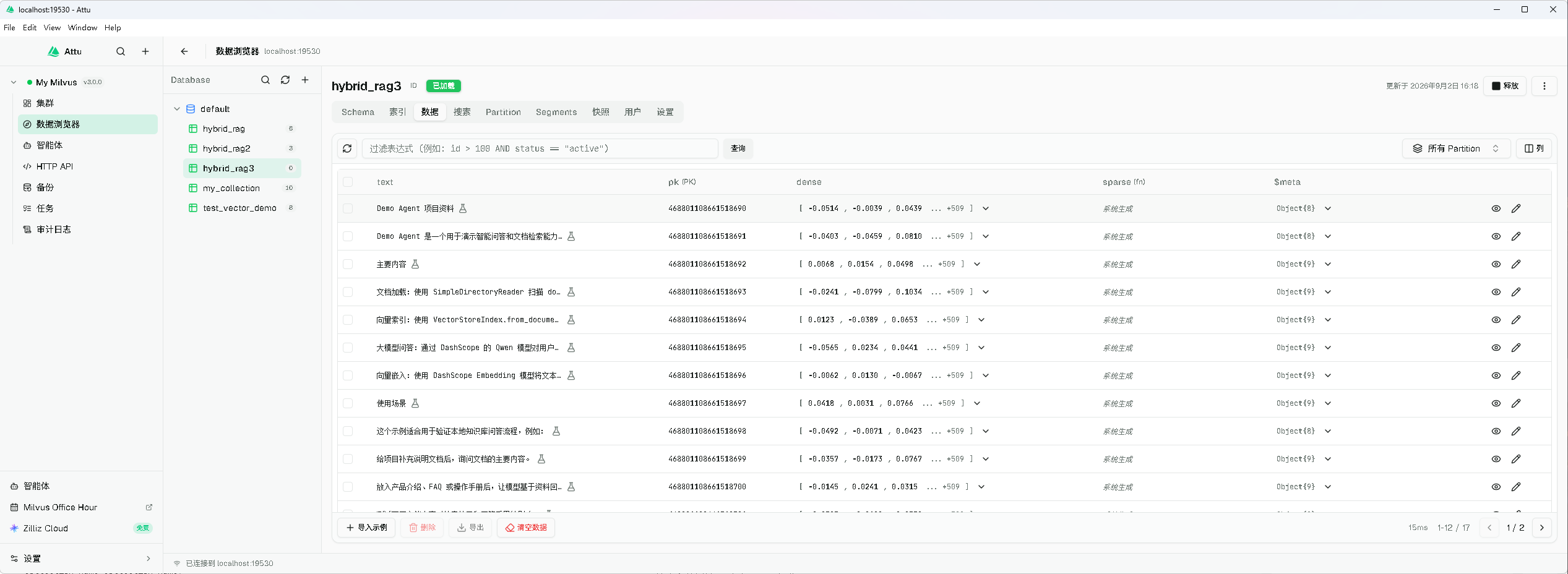
1.标量过滤查询(client.query)
只按字段值过滤,不走向量、不打分
python
result = milvus.client.query(
    collection_name=collection_name,
    filter='category in ["Title"]',
    output_fields=['text', 'category', 'filename'],
)
print('\n=== 标量过滤 query ===')
print(result)

'''
=== 标量过滤 query ===
data: ["{'text': 'Demo Agent 项目资料', 'pk': 468801108661518724, 'filename': 'company_profile.md', 'category': 'Title'}", "{'text': '主要内容', 'pk': 468801108661518726, 'filename': 'company_profile.md', 'category': 'Title'}", "{'text': '使用场景', 'pk': 468801108661518731, 'filename': 'company_profile.md', 'category': 'Title'}", "{'text': '示例问题', 'pk': 468801108661518736, 'filename': 'company_profile.md', 'category': 'Title'}"], extra_info: {}

'''
2.纯 sparse BM25 关键字匹配
直接传查询文本。
python
query = '这个项目的主要功能是什么?'

# 由集合上的 BM25 内置函数在线转成稀疏向量后检索 sparse 字段
sparse_hits = milvus.client.search(
   collection_name=collection_name,
   data=[query],
   anns_field='sparse',
   limit=3,
   consistency_level='Strong',
   output_fields=['text', 'category', 'filename'],
)
show('sparse BM25 关键字匹配(全文检索)', sparse_hits)
3.纯 dense 语义相似度
查询文本 → bge 向量 → 检索 dense 字段。
python
#    哪怕字面不重叠,语义相近的段落也能召回
query_vec = milvus.embeddings.embed_query(query)
dense_hits = milvus.client.search(
    collection_name=collection_name,
    data=[query_vec],
    anns_field='dense',
    limit=3,
    consistency_level='Strong',
    output_fields=['text', 'category', 'filename'],
)
show('dense 语义相似度(向量检索)', dense_hits)

'''
=== dense 语义相似度(向量检索) ===
  score=0.7934 [ListItem] 这个项目主要演示什么能力?
  score=0.6487 [Title] 主要内容
  score=0.6336 [ListItem] 给项目补充说明文档后,询问文档的主要内容。
'''
4. 混合检索:dense + sparse 两路同时搜,WeightedRanker 加权融合
python
weighted_reranker = Function(
    name='weighted_reranker',
    input_field_names=[],
    function_type=FunctionType.RERANK,
    params={
        'reranker': 'weighted',
        # weights 必须是数组(按两路搜索请求的顺序 [dense, sparse]),
        # dict 按字段名传权重是 Milvus 2.6+ 才支持的写法
        'weights': [0.7, 0.3],
    },
)
hybrid_res = milvus.similarity_search_with_score(
    query, k=3, reranker=weighted_reranker
)
print('\n=== 混合检索(dense+sparse, WeightedRanker 0.7/0.3) ===')
for doc, score in hybrid_res:
    print(f"  score={score:.4f} [{doc.metadata.get('category')}] {doc.page_content[:40]}")
'''
=== 混合检索(dense+sparse, WeightedRanker 0.7/0.3) ===
  score=0.5554 [ListItem] 这个项目主要演示什么能力?
  score=0.4541 [Title] 主要内容
  score=0.4435 [ListItem] 给项目补充说明文档后,询问文档的主要内容。
'''
5. 混合检索 + 标量过滤:expr 在两路 ANN 检索时同时生效
python
filtered_res = milvus.similarity_search_with_score(
    query, k=3, expr='category == "Title"', reranker=weighted_reranker
)
print('\n=== 混合检索 + 过滤(category == "Title") ===')
for doc, score in filtered_res:
    print(f"  score={score:.4f} [{doc.metadata.get('category')}] {doc.page_content[:40]}")
'''
=== 混合检索 + 过滤(category == "Title") ===
  score=0.4541 [Title] 主要内容
  score=0.3417 [Title] 使用场景
  score=0.3389 [Title] Demo Agent 项目资料
'''