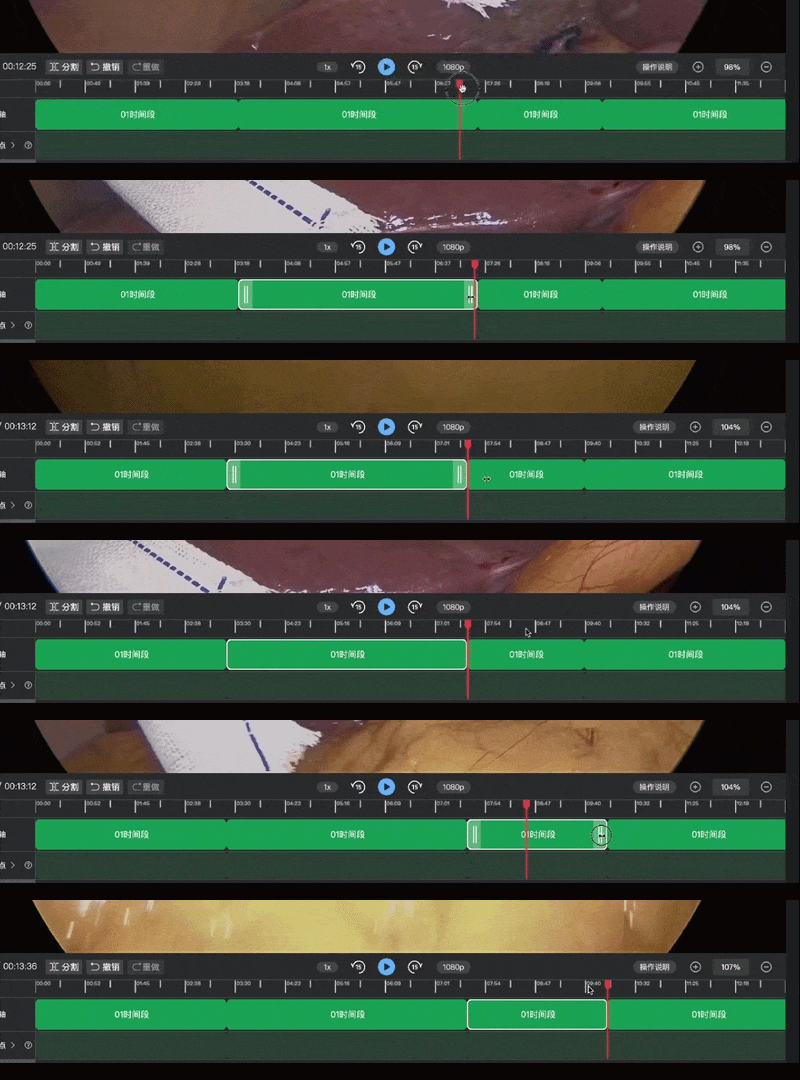
剪辑视频功能
需求
功能点:拖拽阶段时间点、分割、撤销、重做、删除、播放/暂停、前进/后退1秒、前进/后退15秒、多选、缩放时间轴等基础功能;这是一个功能完整的视频剪辑时间轴组件,核心围绕片段管理和播放联动两大主线,通过 Store 驱动数据、Canvas 绘制刻度、DOM 渲染片段,实现了流畅的剪辑体验。
主要时间轴整体框架
┌─────────────────────────────────────────────────────────────┐
│ 时间轴编辑器 │
├─────────────┬───────────────────────────────────────────────┤
│ 控制栏 │ 播放控制、分割、撤销/重做、倍速、分辨率 │
├─────────────┼───────────────────────────────────────────────┤
│ 时间轴 │ Canvas 绘制刻度 + 片段拖拽 + 指示器 │
├─────────────┼───────────────────────────────────────────────┤
│ 滚动条 │ 自定义滚动条(支持拖拽和触摸板) │
└─────────────┴───────────────────────────────────────────────┘
核心功能模块
-
数据管理(Store 驱动)
editVideoStore:管理剪辑片段列表、当前时间、撤销/重做栈
reviewVideoStore:管理播放状态、当前时间、视频分辨率
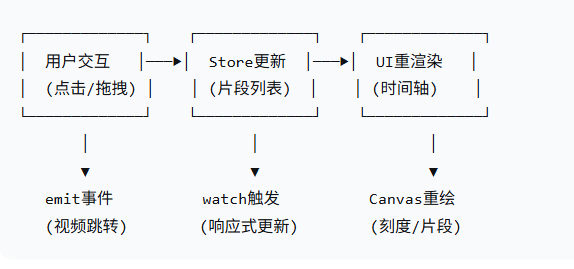
数据流向:Store → computed → 组件渲染
-
时间轴渲染(Canvas)
duration → 计算刻度数/每格时间/每格宽度 → 绘制刻度线 → 显示时间文本
自适应缩放:支持从 50% 到 2000%+ 的缩放
缩放策略:gridToTime 最小到 1秒/格
-
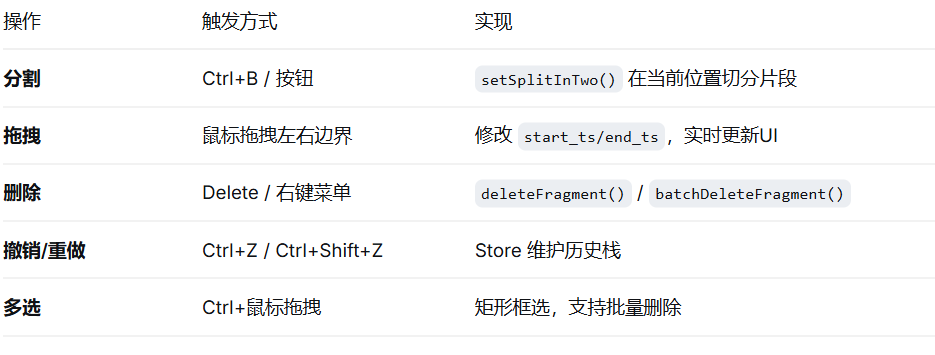
片段操作(核心交互)
Mac: ⌘+B(分割) ⌘+Z(撤销) ⌘+⇧+Z(重做) ⌫(删除)
Win: Ctrl+B Ctrl+Z Ctrl+Shift+Z Delete
-
播放联动
原视频播放 → 监听 currentTime → 计算时间轴位置 → 更新指示器
时间轴拖拽 → 计算对应视频时间 → emit('sendCurrentTime') → 跳转视频
-
缩放系统
滚轮缩放:Ctrl+滚轮,逐级放大/缩小
按钮缩放:固定比例(50%→60%→...→100%→200%→400%...)
缩放影响:pxPerGrid、gridToTime、gridNum 联动变化
关键技术实现
-
时间转换
// 视频时间 ↔ 时间轴时间 互转
timelinetsToVideoTs(timelineTs, ranges) // 时间轴→视频
videoTimeChangeTimeLine(time) // 视频→时间轴(播放时)
-
滚动控制
自定义滚动条,与 scrollLeft 双向绑定
触摸板双指滑动:监听 @scroll 事件同步
拖拽指示器到边缘时自动滚动(setInterval 控制)
-
拖拽防抖
限制最小更新间隔(16ms)
限制最大单次拖动距离(防异常跳跃)
拖拽结束后统一提交变更(addClip)
数据流向图
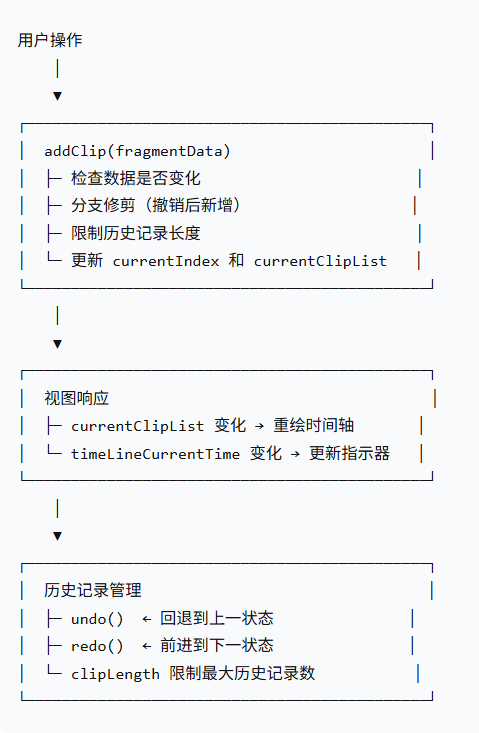
状态流转图
核心代码举例
typescript
// 从 Store 获取片段列表,映射为时间轴数据
const timelineData = ref<Phase[]>([])

// 片段数据结构
interface Phase {
  start_ts: number          // 原视频起始时间
  end_ts: number            // 原视频结束时间
  timeLineStart_ts?: number // 时间轴起始位置
  timeLineEnd_ts?: number   // 时间轴结束位置
  from_ai?: boolean         // 是否来自AI识别
  color?: string            // 片段颜色
  name?: string             // 片段名称
}
Canvas 刻度绘制
typescript
// 核心渲染参数
const gridNum = ref<number>(0)        // 绘制的格数
const pxPerGrid = ref<number>(0)      // 每格宽度(px)
const gridToTime = ref<number>(0)     // 每格代表时间(秒)
const zoomPX = ref<number>(0)         // 当前像素/每秒
const moveLeft = ref<number>(0)       // 左右滚动偏移

// 初始化刻度计算:找到最合适的一屏展示全部时间
const initCalculateGrid = (totalDuration: number, minScaleWidth: number) => {
  const totalWidth = canvasContentWidth.value
  const maxScales = Math.round(totalWidth / minScaleWidth)

  function recursiveCalculate(grid) {
    let gridTime = totalDuration / grid
    let gridWidth = totalWidth / grid

    if (gridTime >= 1 && gridWidth > gridMinWidth) {
      return { grid, gridTime, gridWidth }
    }
    return recursiveCalculate(grid - 1)
  }

  return recursiveCalculate(maxScales)
}

// 绘制刻度线和时间文本
const generatingScale = () => {
  for (let i = 0; i <= gridNum.value + 1; i++) {
    const timeText = graduationTimeText(i)
    const x = i * pxPerGrid.value - moveLeft.value

    ctx.fillText(timeText, x + 2, 10)
    drawLine(x, 1, 24, '#E9E9E9', 2)      // 主刻度
    drawLine(x + 0.5 * pxPerGrid.value, 1, 14, '#E9E9E9', 2) // 小刻度
  }
}
片段拖拽(核心交互)
typescript
// 拖拽状态
const isPhaseDrag = ref<boolean>(false)
const currentDirection = ref<string>('') // 'start' | 'end' | 'content'
const dragX = ref<number>(0)

// 拖拽开始
const handleDragStart = (event, index, direction) => {
  timeLineIndex.value = index
  currentDirection.value = direction
  startX.value = event.clientX
  isPhaseDrag.value = true
  dragInProgress.value = true

  window.addEventListener('mousemove', handleDrag)
  window.addEventListener('mouseup', handleDragEnd)
}

// 拖拽过程中
const handleDrag = async (event) => {
  const delta = (event.clientX - startX.value) / zoomPX.value

  if (direction === 'start') {
    // 修改片段起始时间
    phases[index].start_ts += delta
    phases[index].timeLineStart_ts += delta
    // 边界限制:不能小于0,不能大于结束时间
    if (phases[index].start_ts >= endTime) {
      phases[index].start_ts = endTime
    }
  } else if (direction === 'end') {
    // 修改片段结束时间
    phases[index].end_ts += delta
    phases[index].timeLineEnd_ts += delta
    // 边界限制:不能小于起始时间,不能大于总时长
  }

  startX.value = event.clientX
  operationalData.value = phases
}

// 拖拽结束 - 提交变更
const handleDragEnd = async (event) => {
  if (whetherOrNotDrag.value && operationalData.value) {
    await editVideoStore().addClip(operationalData.value)
    await dragChangeRatio(lastDuration)  // 更新缩放比例
  }
}
多选与批量操作
typescript
// Ctrl + 鼠标拖拽框选
const handleMousedown = async (event) => {
  if (isCtrlKeyDown.value) {
    isDragging.value = true
    startX.value = event.clientX
    startY.value = event.clientY - videoH

    // 显示选择框
    selectionBox.value.style.display = 'block'
    selectionBox.value.style.left = `${startX.value}px`
    selectionBox.value.style.top = `${startY.value}px`

    // 绑定鼠标移动/抬起事件
    rightMenu.addEventListener('mousemove', handleMouseMove)
    rightMenu.addEventListener('mouseup', handleMouseUp)
  }
}

// 检测哪些片段被框选
const handleMouseMove = (event) => {
  const items = document.querySelectorAll('.phase_box')
  const selectedRect = selectionBox.value.getBoundingClientRect()

  items.forEach((item, index) => {
    const rect = item.getBoundingClientRect()
    const isInSelectionBox =
      rect.left < selectedRect.right &&
      rect.right > selectedRect.left &&
      rect.top < selectedRect.bottom &&
      rect.bottom > selectedRect.top

    if (isInSelectionBox) {
      selectedItems.value.push({ ...item, domIndex: index })
    }
  })
}

// 批量删除
const deleteFragment = () => {
  if (selectedItems.value.length > 0) {
    const indexArray = selectedItems.value.map(item => item.domIndex)
    editVideoStore().batchDeleteFragment(indexArray)
  } else {
    editVideoStore().deleteFragment(timeLineIndex.value)
  }
}
分割操作
typescript
const handleSegmentation = () => {
  const timeline = timelineData.value
  const { index } = getIndex() // 获取当前时间点所在的片段索引

  if (index >= 0) {
    // 检查分割点是否在片段边界上
    if (timeline[index].timeLineStart_ts === canvasCurrentTime.value ||
        timeline[index].timeLineEnd_ts === canvasCurrentTime.value) {
      message.warning('当前位置无法分割')
      return
    }

    // 调用 Store 方法分割片段
    editVideoStore().setSplitInTwo(index, currentTime.value, canvasCurrentTime.value)
  }
}
指示器位置更新
typescript
// 初始化指示器位置
const initGrabbing = (offsetX: number = 0) => {
  const canvasBox = videoCanvas.value
  let left = offsetX ? offsetX : Math.round(canvasCurrentTime.value * zoomPX.value - moveLeft.value)

  // 边界处理
  if (left < -8 || left > canvasBox?.clientWidth) {
    grabbingStatus.value = false
  } else {
    grabbingStatus.value = true
  }

  // 吸附到最后一个片段
  if (canvasCurrentTime.value > duration.value) {
    left = duration.value * zoomPX.value - moveLeft.value
    const index = timelineData.value.length - 1
    sendCurrentTime(timelineData.value[index].end_ts)
  }

  grabbingLeft.value = left + 160  // 偏移左侧标题栏宽度
}
timelinetsToVideoTs 将时间轴时间转换为原视频时间
typescript
const timelinetsToVideoTs = (timelineTs: number, ranges: Array<ClipFragment>) => {
  // 遍历所有片段,找到当前时间点所在片段
  for (let i = 0; i < ranges.length; i++) {
    // 如果当前时间轴时间大于当前片段的持续时间
    // 说明当前时间点在后边的片段中,需要减去当前片段的时长继续查找
    if (timelineTs > ranges[i].timeLineEnd_ts - ranges[i].timeLineStart_ts) {
      timelineTs -= ranges[i].timeLineEnd_ts - ranges[i].timeLineStart_ts
    } else {
      // 找到了所在片段,计算对应的原视频时间
      return ranges[i].start_ts + timelineTs
    }
  }
}
数据关系:
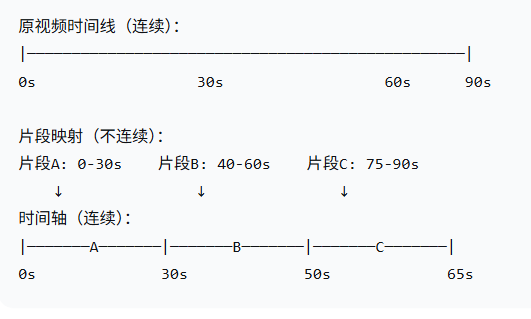
转换示例:
typescript
const ranges = [
  { start_ts: 0, end_ts: 30, timeLineStart_ts: 0, timeLineEnd_ts: 30 },    // 片段A
  { start_ts: 40, end_ts: 60, timeLineStart_ts: 30, timeLineEnd_ts: 50 },   // 片段B
  { start_ts: 75, end_ts: 90, timeLineStart_ts: 50, timeLineEnd_ts: 65 }    // 片段C
]
typescript
// 例1: 时间轴时间 10s → 在原视频中对应 10s
timelinetsToVideoTs(10, ranges)
// 循环:
// i=0: 10 > 30? false → 返回 0 + 10 = 10 ✅

// 例2: 时间轴时间 35s → 在原视频中对应 45s
timelinetsToVideoTs(35, ranges)
// 循环:
// i=0: 35 > 30? true → timelineTs = 35 - 30 = 5
// i=1: 5 > 20? false → 返回 40 + 5 = 45 ✅

// 例3: 时间轴时间 55s → 在原视频中对应 80s
timelinetsToVideoTs(55, ranges)
// 循环:
// i=0: 55 > 30? true → timelineTs = 55 - 30 = 25
// i=1: 25 > 20? true → timelineTs = 25 - 20 = 5
// i=2: 5 > 15? false → 返回 75 + 5 = 80 ✅
重点!!!!!!数据管理 Store 实现代码(editVideoStore)
独立ts文件
数据结构说明:
typescript
// 单个片段数据结构
interface ClipFragment {
  start_ts: number          // 原视频起始时间(秒)
  end_ts: number            // 原视频结束时间(秒)
  timeLineStart_ts?: number // 时间轴起始位置(计算属性)
  timeLineEnd_ts?: number   // 时间轴结束位置(计算属性)
  from_ai?: boolean         // 是否来自AI识别
  color?: string            // 片段颜色
  name?: string             // 片段名称
  id?: string | null        // 片段ID
}

// 历史记录结构
clipList = [
  [片段1, 片段2, 片段3],  // 初始状态
  [片段1, 片段2],         // 撤销/重做状态1
  [片段1, 片段2, 片段4],  // 撤销/重做状态2
  // ...
]
typescript
import { defineStore } from 'pinia'
import { ref } from 'vue'

const editVideoStore = defineStore('editVideoFragment', () => {
  const clipList = ref<Array<any>>([]) // 剪辑片段数组
  const currentIndex = ref<number>(0) // 当前数据的下标
  const clipLength = ref<number>(10) // 数据最大长度
  const currentClipList = ref<Array<any>>([]) // 当前数据
  const timeLineCurrentTime = ref<number>(0) // 当前时间轴时间点
  const recentlySubmittedData = ref<any>([]) // 上次提交保存的数据
  const selectIndex = ref<number>(-1)
  /**
   * Set
   */
  // 撤销
  const undo = () => {
    if (currentIndex.value > 0) {
      currentIndex.value -= 1
      currentClipList.value = getCurrentIndexClipList(currentIndex.value)
      return true
    } else {
      return false
    }
  }
  // 重做
  const redo = () => {
    if (currentIndex.value < clipList.value.length - 1) {
      currentIndex.value += 1
      currentClipList.value = getCurrentIndexClipList(currentIndex.value)
      return true
    } else {
      return false
    }
  }
  // 重命名
  const renameFragment = (index: number, name: string) => {
    if (index >= 0 && index <= currentClipList.value.length - 1) {
      const newClipList = JSON.parse(JSON.stringify(currentClipList.value))
      newClipList[index].name = name
      newClipList[index].from_ai = false // 更改了该ai阶段则变更为false
      addClip(newClipList)
    }
  }
  // 删除
  const deleteFragment = (index: number) => {
    if (index >= 0 && index <= currentClipList.value.length - 1) {
      const newClipList = JSON.parse(JSON.stringify(currentClipList.value))
      // 更新原数组
      newClipList.splice(index, 1)
      addClip(newClipList)
      return true
    } else {
      return false
    }
  }
  // 批量删除
  const batchDeleteFragment = (indexArr: Array<0>) => {
    if (indexArr && indexArr.length > 0) {
      const clipList = JSON.parse(JSON.stringify(currentClipList.value))
      // 更新原数组
      const newClipList = clipList.filter((_, index) => !indexArr.includes(index))
      addClip(newClipList)
      return true
    } else {
      return false
    }
  }

  // 分割 index:分割对象下标,time:分割时间,threshold:临近边缘的阈值
  const setSplitInTwo = (index: number, time: number, threshold: number = 1) => {
    if (index < 0 || index >= currentClipList.value.length || time === 0) {
      return false
    }
    const item = currentClipList.value[index]
    const newClipList = JSON.parse(JSON.stringify(currentClipList.value))
    // 检查时间点是否临近边缘
    // if (Math.abs(time - item.start_ts) < threshold || Math.abs(item.end_ts - time) < threshold) {
    //   return false
    // }
    if (item.start_ts === time || item.end_ts === time) {
      return false
    }
    // 创建两个新的对象
    const firstPart = {
      ...item,
      from_ai: false, // 更改了该ai阶段则变更为false
      end_ts: time // 更新 end_ts 为分割时间
    }
    const secondPart = {
      ...item,
      from_ai: false,
      start_ts: time, // 更新 start_ts 为分割时间
      id: null
    }
    // 更新原数组
    newClipList.splice(index, 1, firstPart, secondPart)
    addClip(newClipList)
    return true
  }
  // 添加片段
  const addClip = (fragmentData: Array<object>) => {
    // 如果数据没有变化则不变化
    if (JSON.stringify(fragmentData) != JSON.stringify(currentClipList.value)) {
      // 如果当前索引不是最后一个,移除后面的数据-更新撤销后不重做直接新增的情况
      if (currentIndex.value < clipList.value.length - 1) {
        clipList.value = clipList.value.slice(0, currentIndex.value + 1)
      }
      // 如果当前数据长度已达到最大长度则把数组前一项移除
      if (clipList.value.length === clipLength.value) {
        clipList.value.shift()
      }
      // 添加新的全量剪辑数据
      clipList.value.push(fragmentData)
      // 更新当前索引
      currentIndex.value = clipList.value.length - 1
      currentClipList.value = getCurrentIndexClipList(currentIndex.value)
      return true
    } else {
      return false
    }
  }
  // 更改最大长度
  const setClipLength = (size: number) => {
    clipLength.value = size
  }
  // 重置/修改全部剪辑数组
  const setAllClipList = (list: Array<any> = []) => {
    clipList.value = list
  }
  // 重置数据状态
  const resetAllDataStatus = () => {
    clipList.value = []
    currentIndex.value = 0
    currentClipList.value = []
    timeLineCurrentTime.value = 0
  }
  // 修改当前下标
  const setCurrentIndex = (index: number) => {
    currentIndex.value = index
  }
  // 当前时间轴时间点
  const setTimeLineCurrentTime = (time: number) => {
    timeLineCurrentTime.value = time
  }
  // 修改当前片段数据
  const setCurrentClipList = (data: Array<object>) => {
    currentClipList.value = data
  }
  // 上次保存的数据
  const setRecentlySubmittedData = (data: Array<object>) => {
    recentlySubmittedData.value = data
  }
  // 当前时间数组的选中下标
  const setTimeLineSelectIndex = (index: number) => {
    selectIndex.value = index
  }
  /**
   * Get
   */
  // 获取当前片段列表
  const getCurrentIndexClipList = (index: number) => {
    return clipList.value[index]
  }
  // 获取当前片段数组
  const getCurrentClipList = () => {
    return currentClipList.value ?? []
  }
  // 获取当前下标
  const getCurrentIndex = () => {
    return currentIndex.value
  }
  // 获取完整数据长度
  const getClipLength = () => {
    return clipList.value.length
  }
  // 获取完整数据
  const getAllClipList = () => {
    return clipList.value
  }
  // 获取原始数据所有片段的总时长
  const getClipTotalTime = (index: number = -1) => {
    const list = index >= 0 ? getCurrentIndexClipList(index) : currentClipList.value
    const totalDuration = list.reduce((total, { start_ts, end_ts }) => {
      return total + (end_ts - start_ts)
    }, 0)
    return totalDuration
  }
  // 获取当前时间轴时间点
  const getTimeLineCurrentTime = () => {
    return timeLineCurrentTime.value
  }
  // 计算剪辑轴的连续时间段
  const getClippingAxisTimePeriod = (data: Array<object> = currentClipList.value) => {
    const clipList = data
    if (clipList) {
      let timeLineStart_ts = 0
      let timeLineEnd_ts = 0
      return clipList.map((i, index) => {
        const totalTime = i.end_ts - i.start_ts
        timeLineStart_ts = index === 0 ? 0 : timeLineEnd_ts
        timeLineEnd_ts = timeLineStart_ts + totalTime
        return {
          ...i,
          timeLineStart_ts,
          timeLineEnd_ts
        }
      })
    }
  }
  // 上次保存的数据
  const getRecentlySubmittedData = () => {
    return recentlySubmittedData.value
  }
  const getTimeLineSelectIndex = () => {
    return selectIndex.value
  }
  return {
    undo,
    redo,
    renameFragment,
    deleteFragment,
    batchDeleteFragment,
    setSplitInTwo,
    setAllClipList,
    resetAllDataStatus,
    addClip,
    setCurrentClipList,
    setTimeLineCurrentTime,
    setRecentlySubmittedData,
    setTimeLineSelectIndex,
    getCurrentIndexClipList,
    getCurrentClipList,
    getCurrentIndex,
    setCurrentIndex,
    setClipLength,
    getClipLength,
    getAllClipList,
    getClipTotalTime,
    getTimeLineCurrentTime,
    getClippingAxisTimePeriod,
    getRecentlySubmittedData,
    getTimeLineSelectIndex
  }
})
export default editVideoStore
使用示例
typescript
import editVideoStore from '@/store/module/editVideoFragment'

// 初始化数据
const store = editVideoStore()
store.setAllClipList([])

// 添加片段
store.addClip([
  { start_ts: 0, end_ts: 10, name: '片段1', color: '#FF6B6B' },
  { start_ts: 15, end_ts: 25, name: '片段2', color: '#4ECDC4' }
])

// 分割片段
store.setSplitInTwo(0, 5)  // 在5秒处分割第一个片段

// 删除片段
store.deleteFragment(1)    // 删除第二个片段

// 撤销/重做
store.undo()  // 回到分割前
store.redo()  // 恢复分割
示例图片