在信创系统,如麒麟和统信中,使用QT工具编程操作NFC读写器YW-607HC.
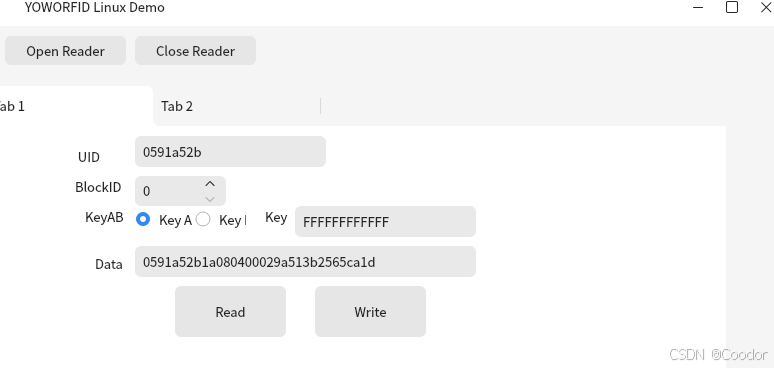
首先编排界面ui
cpp
<?xml version="1.0" encoding="UTF-8"?>
<ui version="4.0">
 <class>MainWindow</class>
 <widget class="QMainWindow" name="MainWindow">
  <property name="geometry">
   <rect>
    <x>0</x>
    <y>0</y>
    <width>800</width>
    <height>600</height>
   </rect>
  </property>
  <property name="windowTitle">
   <string>YOWORFID Linux Demo</string>
  </property>
  <widget class="QWidget" name="centralwidget">
   <widget class="QTabWidget" name="tabWidget">
    <property name="geometry">
     <rect>
      <x>0</x>
      <y>60</y>
      <width>741</width>
      <height>291</height>
     </rect>
    </property>
    <property name="currentIndex">
     <number>0</number>
    </property>
    <widget class="QWidget" name="tab">
     <property name="enabled">
      <bool>true</bool>
     </property>
     <attribute name="title">
      <string>Tab 1</string>
     </attribute>
     <widget class="QLineEdit" name="edtUID">
      <property name="geometry">
       <rect>
        <x>150</x>
        <y>10</y>
        <width>191</width>
        <height>31</height>
       </rect>
      </property>
     </widget>
     <widget class="QLabel" name="label">
      <property name="geometry">
       <rect>
        <x>90</x>
        <y>20</y>
        <width>55</width>
        <height>21</height>
       </rect>
      </property>
      <property name="text">
       <string> UID</string>
      </property>
     </widget>
     <widget class="QLabel" name="label_2">
      <property name="geometry">
       <rect>
        <x>100</x>
        <y>80</y>
        <width>55</width>
        <height>21</height>
       </rect>
      </property>
      <property name="text">
       <string>KeyAB</string>
      </property>
     </widget>
     <widget class="QRadioButton" name="rbKeyA">
      <property name="geometry">
       <rect>
        <x>150</x>
        <y>80</y>
        <width>61</width>
        <height>27</height>
       </rect>
      </property>
      <property name="text">
       <string>Key A</string>
      </property>
      <property name="checked">
       <bool>true</bool>
      </property>
     </widget>
     <widget class="QRadioButton" name="rbKeyB">
      <property name="geometry">
       <rect>
        <x>210</x>
        <y>80</y>
        <width>51</width>
        <height>27</height>
       </rect>
      </property>
      <property name="text">
       <string>Key B</string>
      </property>
     </widget>
     <widget class="QLabel" name="label_3">
      <property name="geometry">
       <rect>
        <x>280</x>
        <y>80</y>
        <width>31</width>
        <height>21</height>
       </rect>
      </property>
      <property name="text">
       <string>Key</string>
      </property>
     </widget>
     <widget class="QLineEdit" name="edtKey">
      <property name="geometry">
       <rect>
        <x>310</x>
        <y>80</y>
        <width>181</width>
        <height>31</height>
       </rect>
      </property>
      <property name="inputMask">
       <string/>
      </property>
      <property name="text">
       <string>FFFFFFFFFFFF</string>
      </property>
      <property name="maxLength">
       <number>12</number>
      </property>
     </widget>
     <widget class="QLabel" name="label_4">
      <property name="geometry">
       <rect>
        <x>110</x>
        <y>127</y>
        <width>31</width>
        <height>21</height>
       </rect>
      </property>
      <property name="text">
       <string>Data</string>
      </property>
     </widget>
     <widget class="QLineEdit" name="edtData">
      <property name="geometry">
       <rect>
        <x>150</x>
        <y>120</y>
        <width>341</width>
        <height>31</height>
       </rect>
      </property>
     </widget>
     <widget class="QPushButton" name="btnRead">
      <property name="geometry">
       <rect>
        <x>190</x>
        <y>160</y>
        <width>111</width>
        <height>51</height>
       </rect>
      </property>
      <property name="text">
       <string>Read</string>
      </property>
     </widget>
     <widget class="QPushButton" name="btnWrite">
      <property name="geometry">
       <rect>
        <x>330</x>
        <y>160</y>
        <width>111</width>
        <height>51</height>
       </rect>
      </property>
      <property name="text">
       <string>Write</string>
      </property>
     </widget>
     <widget class="QLabel" name="label_5">
      <property name="geometry">
       <rect>
        <x>90</x>
        <y>50</y>
        <width>55</width>
        <height>21</height>
       </rect>
      </property>
      <property name="text">
       <string>BlockID</string>
      </property>
     </widget>
     <widget class="QSpinBox" name="edtBlockID">
      <property name="geometry">
       <rect>
        <x>150</x>
        <y>50</y>
        <width>91</width>
        <height>30</height>
       </rect>
      </property>
     </widget>
    </widget>
    <widget class="QWidget" name="tab_2">
     <attribute name="title">
      <string>Tab 2</string>
     </attribute>
    </widget>
   </widget>
   <widget class="QWidget" name="widget" native="true">
    <property name="geometry">
     <rect>
      <x>0</x>
      <y>0</y>
      <width>721</width>
      <height>51</height>
     </rect>
    </property>
    <widget class="QPushButton" name="btnCloseReader">
     <property name="geometry">
      <rect>
       <x>150</x>
       <y>10</y>
       <width>121</width>
       <height>29</height>
      </rect>
     </property>
     <property name="text">
      <string>Close Reader</string>
     </property>
    </widget>
    <widget class="QPushButton" name="btnOpenReader">
     <property name="geometry">
      <rect>
       <x>20</x>
       <y>10</y>
       <width>121</width>
       <height>29</height>
      </rect>
     </property>
     <property name="text">
      <string>Open Reader</string>
     </property>
    </widget>
   </widget>
  </widget>
  <widget class="QStatusBar" name="statusbar"/>
 </widget>
 <resources/>
 <connections/>
</ui>
界面如图所示:
编写C++代码:
cpp
#include "mainwindow.h"
#include "ui_mainwindow.h"
#include <QtWidgets/QMessageBox>

MainWindow::MainWindow(QWidget *parent)
    : QMainWindow(parent)
    , ui(new Ui::MainWindow)
{
    ui->setupUi(this);
    connect(ui->btnOpenReader,&QPushButton::clicked,this, &MainWindow::Click_OpenReader);
    connect(ui->btnCloseReader,&QPushButton::clicked,this, &MainWindow::Click_CloseReader);
    connect(ui->btnRead,&QPushButton::clicked,this, &MainWindow::Click_Read);
    connect(ui->btnWrite,&QPushButton::clicked,this, &MainWindow::Click_Write);
}

MainWindow::~MainWindow()
{
    delete ui;
}

void MainWindow::BeepOk()
{
    yoworfid.YW_Buzzer(1,5,5,1);
}

void MainWindow::BeepFail()
{
    yoworfid.YW_Buzzer(1,1,1,3);
}

void MainWindow::Click_OpenReader()
{

    int rt =yoworfid.YW_USBHIDInitial();
    if(rt>0)
    {
        MsgBox("Connect OK");

    }
    else
    {
        MsgBox("Connect Fail");
    }

}

void MainWindow::Click_CloseReader()
{
    yoworfid.YW_USBHIDFree();

}

void MainWindow::MsgBox(const QString &Content)
{
    QMessageBox::information(NULL,"YOWORFID",Content);
}

QString MainWindow::HexToStr(unsigned char *Hex, unsigned char Len)
{
    QString ret;
    for(int i=0;i<Len;i++)
    {
        QString a = "0" + QString::number(*Hex,16);
        ret = ret + a.right(2);

        Hex++;
    }
    return ret;
}

int  MainWindow::StrToHexArray(const QString &Str, unsigned char *hex)
{
    int len = Str.length()/2;
    int arraylen=0;
    for(int i=0;i<len;i++)
    {
        char H = Str.at(i*2).toLatin1();
        char L = Str.at(i*2+1).toLatin1();

        *hex = ConvertHexChar(H)*16+ConvertHexChar(L);
        hex++;
        arraylen++;
    }
    return arraylen;

}

int MainWindow::ConvertHexChar(char ch)
    {
        if((ch >= '0') && (ch <= '9'))
         return ch-'0';
        else if((ch >= 'A') && (ch <= 'F'))
         return ch-'A'+10;
        else if((ch >= 'a') && (ch <= 'f'))
         return ch-'a'+10;
        else return (-1);
    }

bool MainWindow::RequestCard(unsigned char *uidlen,unsigned char *UID)
{

    unsigned short ATQA=0;
    unsigned char SAK=0;
    return yoworfid.YW_RequestAntiandSelect(1,0x52,0,&ATQA,&SAK,uidlen, UID)>0;

}
void MainWindow::Click_Read()
{
    unsigned char UID[10];
    unsigned char uidlen=0;

    unsigned char Key[6];
    unsigned char BlockData[16];
    if(!RequestCard(&uidlen, UID))
    {
        ui->edtUID->clear();
        MsgBox("Request Card Fail");
        return;
    }
    QString strUID = HexToStr(&UID[0],uidlen);

    ui->edtUID->setText(strUID);

    int BlockID = ui->edtBlockID->value();
    unsigned char KeyMode = PASSWORD_A;
    if(ui->rbKeyB->isChecked())KeyMode = PASSWORD_B;

    StrToHexArray(ui->edtKey->text(),&Key[0]);

    if(yoworfid.YW_KeyAuthorization(1,KeyMode, BlockID, &Key[0])<0)
    {
        MsgBox("Key Error");
        return;

    }

    if(yoworfid.YW_ReadaBlock(1,BlockID,16,BlockData)<0)
    {
        ui->edtData->clear();
        MsgBox("Read Error");
        return;
    }
    else
    {
        QString strData = HexToStr(&BlockData[0],16);

        ui->edtData->setText(strData);
         BeepOk();
    }


}

void MainWindow::Click_Write()
{
    unsigned char UID[10];
    unsigned char uidlen=0;

    unsigned char Key[6];
    unsigned char BlockData[16];
    if(!RequestCard(&uidlen, UID))
    {
        ui->edtUID->clear();
        MsgBox("Request Card Fail");
        return;
    }
    QString strUID = HexToStr(&UID[0],uidlen);

    ui->edtUID->setText(strUID);

    int BlockID = ui->edtBlockID->value();
    unsigned char KeyMode = PASSWORD_A;
    if(ui->rbKeyB->isChecked())KeyMode = PASSWORD_B;

    StrToHexArray(ui->edtKey->text(),&Key[0]);

    if(yoworfid.YW_KeyAuthorization(1,KeyMode, BlockID, &Key[0])<0)
    {
        MsgBox("Key Error");
        return;

    }

    StrToHexArray(ui->edtData->text(),&BlockData[0]);
    if(yoworfid.YW_WriteaBlock(1,BlockID,16,BlockData)<0)
    {

        MsgBox("Write Error");
        return;
    }
    else
    {
         BeepOk();
         MsgBox("Write OK");
    }


}
这样一个具有智能卡基本读写功能的程序就完成了,编译试试看吧。