方案 :Copy as fetch,到 Console 改(推荐)
参考截图
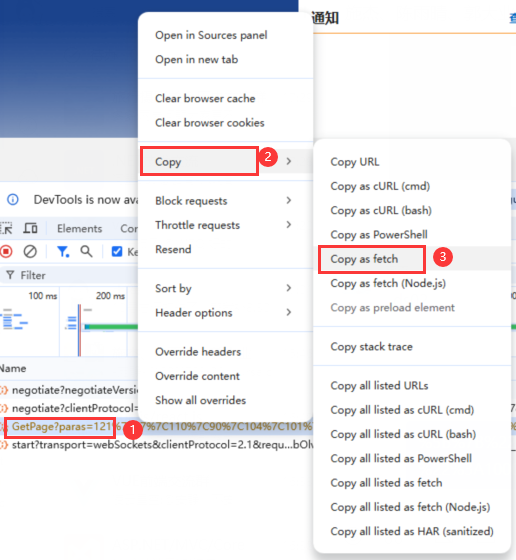
- 右键请求 → Copy → Copy as fetch
- DevTools 切到 Console
- 粘贴,若提示粘贴保护,输入
allow pasting回车后再粘贴 - 修改请求参数,并回车
javascript
fetch("你的URL", {
  "method": "GET", // 或 POST
  "headers": {
    "accept": "application/json"
    // 需要就加/改 cookie、authorization、content-type
  },
  "credentials": "include"
}).then(r => r.text()).then(console.log)
如果响应的结果是json格式,显示的是unicode转码的格式,需要使用 JSON.parse 转成 Json 格式查看,例如:
javascript
fetch("你的URL", {
  "method": "GET", // 或 POST
  "headers": {
    "accept": "application/json"
    // 需要就加/改 cookie、authorization、content-type
  },
  "credentials": "include"
})
.then(r => r.text())
.then(text => {
  const outer = JSON.parse(text);
  const realArray = JSON.parse(outer.jsonStr);
  console.log(realArray);
});
切回Network,可以看到已经重发成功
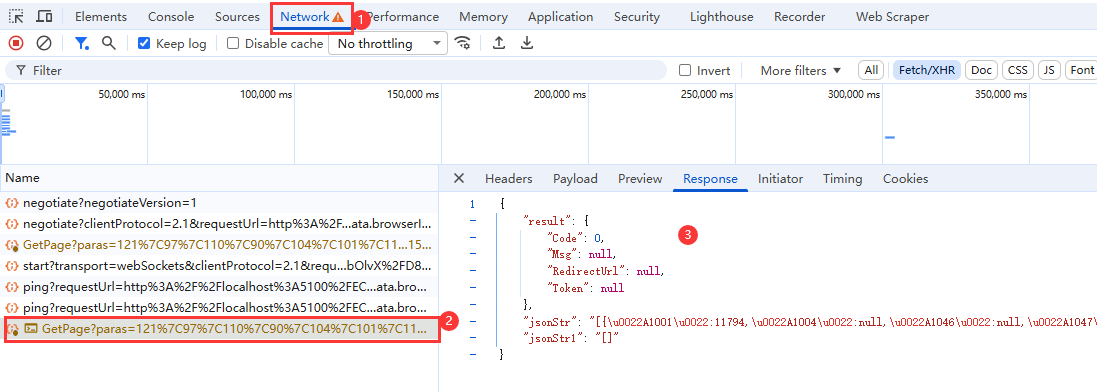
最后,火狐可以直接在Network上右键:编辑并重发,更好用!