此案例调用大模型来完成应用系统,
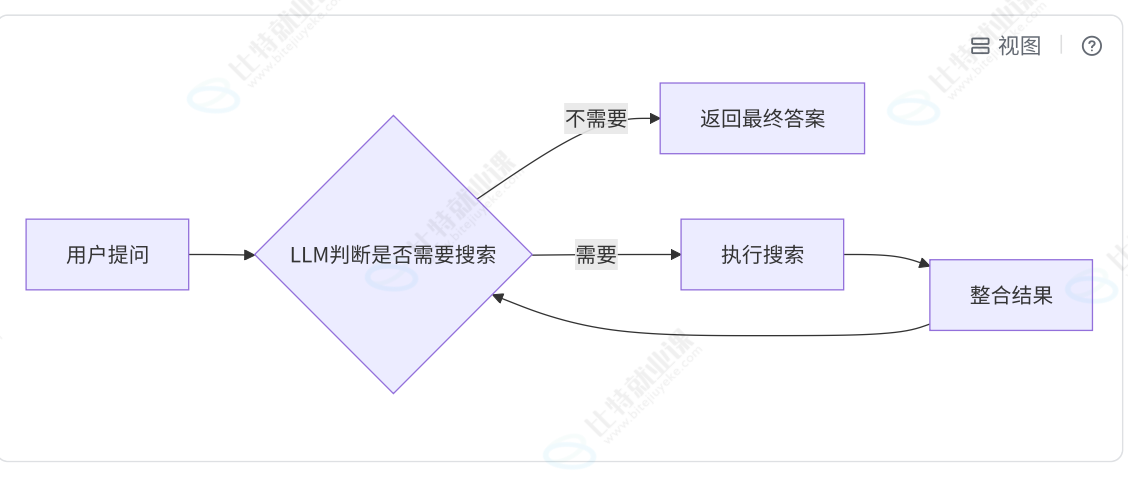
基于聊天模型, 能够理解用户的问题并解决是否需要调用搜索工具
快速上手 :
1. 准备工作 定义 LLM 并 绑定工具
# 准备工作
# 定义大语言模型
model = init_chat_model("gpt-4o-mini",temperature = 0) # 温度为 0

# 绑定工具
search = TavilySearch(max_results = 4)
tools = [search]
model_with_tools = model.bind_tools(tools)
2. 设置状态 State
message : 类型listAnyMessage , 是追加更新, 作用: 存放任意消息对象的列表
llm_calls : 类型int, 是覆盖更新, 作用: 跟踪 LLM 的调用次数
# 1. 状态定义
class MessageState(TypedDict):
    # 消息列表 (记忆功能, 维护上下文)
    message:Annotated[list[AnyMessage],operator.add]  # 追加更新

    # 调用llm次数
    llm_calls:int
3. 设置 Nodes :
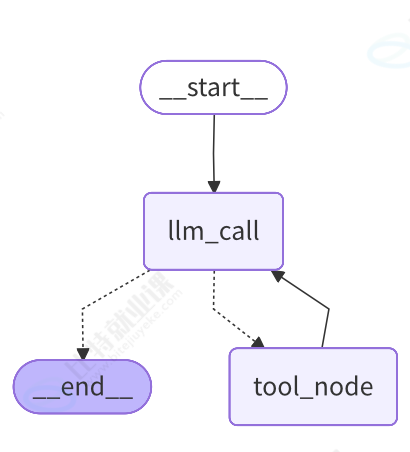
节点 1 llm_call
专门负责搜索, 获取搜索结果
来到 llm_call 有两种情况 :
① 用户输入问题->llm_call (messagesHumanMessage): 此时 llm 先判断是否需要进行搜索工具搜索, 需要, 则调用工具节点; 不需要, 则直接输出 AIMessage
② 调用完工具节点->llm_call (messagesHumanMessage,AIMessage,ToolMessage) : 此时 llm 根据 完整 messages 整合后生成新的 AIMessage 并输出
节点 2 tool_node
专门负责调用 LLM, 获取最终结果
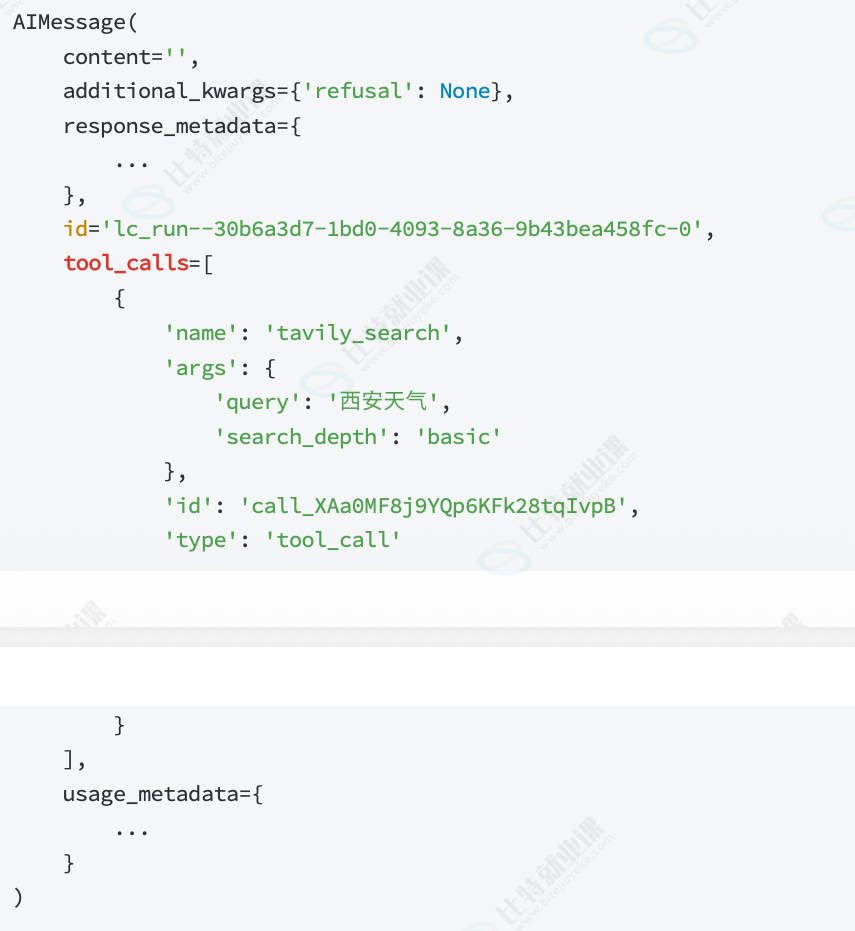
根据 llm 调用工具的输出结构, 在 tool_calls中 包含执行工具所需要的属性, 并构建 ToolMessage
# 2. 节点定义
def llm_call(state:MessageState):
    """LLM 决定是否调用工具"""
    # 由于当前节点可能是START 过来的, 也有可能是工具节点过来的
    # 因此state["message"]获取的是[H] 或[H,A,T]
    messages = state["message"]         # 拿到HumanMessage
    # result 可能 1 : 带有tool_calls的 AIMessage
    # result 可能 2 : 不带tool_calls的 AIMessage(最终结果)
    result = model_with_tools.invoke(
        [
            SystemMessage(content = "你是一个乐于助人的助手, 支持调用工具进行搜索")
        ]+
        messages
    )
    return {
        "message": [result],                #追加更新
        "llm_calls": state.get("llm_calls",0) + 1
    }
# {键表达式: 值表达式 for 变量 in 可迭代对象}
tools_by_name = {tool.name: tool for tool in tools}

def tool_node(state:MessageState):
    """执行工具调用"""
    result = []

    # 拿到当前最新的消息 AIMessage
    for tool_call in state["message"][-1].tool_calls :
        # 就可以获取到tool_call 的 name,args,id...
        tool = tools_by_name[tool_call["name"]]
        obs = tool.invoke(tool_call["args"])
        result.append(ToolMessage(content = obs,tool_call_id = tool_call["id"]))

    return {
        "message": result,                #追加更新
    }
4. 定义图, 设置节点和边
此处只讲解 条件边的构建, 其余方法参考图结构和案例 1
路由条件 : should_continue
判断最新消息是AIMessage 是否带有tool_calls : 携带则执行tool_node 节点, 不携带则执行 END
# 3. 定义图, 添加节点和边
agent_builder = StateGraph(MessageState)

agent_builder.add_node(llm_call)
agent_builder.add_node(tool_node)

agent_builder.add_edge(START,"llm_call")

# 路由条件
def should_continue(state:MessageState):
    # 判断最新消息是AIMessage 是否带有tool_calls
    # 带tool_calls 走tool_node
    # 不带 END
    last_message = state["message"][-1]
    if last_message.tool_calls:
        return "tool_node"
    return END

agent_builder.add_conditional_edges(
    "llm_call",
    should_continue,
    ["tool_node",END]
)
agent_builder.add_edge("tool_node","llm_call")

# 4. 编译图
agent_search = agent_builder.compile()
5.生成图样式
借助工具库 在终端中执行pip install matplotlib****, 或 使用在线绘图工具Mermaid 在线绘图工具 | 菜鸟工具
# 5. 生成图样式
import matplotlib.pyplot as plt
import matplotlib.image as mpimg

try:
    # 生成 Mermaid 图表并保存为图片
    mermaid_code = agent_search.get_graph(xray=True).draw_mermaid_png()
    # 保存文件
    with open("../jpg/graph1.jpg", "wb") as f:
        f.write(mermaid_code)

    #使用 matplotlib 显示图像
    img = mpimg.imread("../jpg/graph1.jpg")
    plt.imshow(img)  # 显示图片
    plt.axis('off')  # 关闭坐标轴
    plt.show()       # 弹出窗口显示图片

except Exception as e:
    print(f"An error occurred: {e}")
6.执行图
# 6.执行图
result = agent_search.invoke({
    "message":[HumanMessage(content="今天西安的天气如何?")]
})
# result 是最终的结果状态
print(f"一共调用了{result['llm_calls']}次大模型")
for msg in result["message"]:
    msg.pretty_print()
完整代码 :
import operator
from typing import TypedDict, Annotated

from langchain.chat_models import init_chat_model
from langchain_core.messages import AnyMessage, SystemMessage, HumanMessage
from langchain_tavily import TavilySearch
from langchain_core.messages import ToolMessage
from langgraph.graph import StateGraph, START,END


# 准本工作
# 定义大语言模型
model = init_chat_model("gpt-4o-mini",temperature = 0) # 温度为 0

# 绑定工具
search = TavilySearch(max_results = 4)
tools = [search]
model_with_tools = model.bind_tools(tools)

# 1. 状态定义
class MessageState(TypedDict):
    # 消息列表 (记忆功能, 维护上下文)
    message:Annotated[list[AnyMessage],operator.add]  # 追加更新

    # 调用llm次数
    llm_calls:int

# 2. 节点定义
def llm_call(state:MessageState):
    """LLM 决定是否调用工具"""
    # 由于当前节点可能是START 过来的, 也有可能是工具节点过来的
    # 因此state["message"]获取的是[H] 或[H,A,T]
    messages = state["message"]         # 拿到HumanMessage
    # result 可能 1 : 带有tool_calls的 AIMessage
    # result 可能 2 : 不带tool_calls的 AIMessage(最终结果)
    result = model_with_tools.invoke(
        [
            SystemMessage(content = "你是一个乐于助人的助手, 支持调用工具进行搜索")
        ]+
        messages
    )
    return {
        "message": [result],                #追加更新
        "llm_calls": state.get("llm_calls",0) + 1
    }
# (这是字典 Dict,建立了 名称 -> 工具对象 的映射)
tools_by_name = {tool.name: tool for tool in tools}

def tool_node(state:MessageState):
    """执行工具调用"""
    result = []

    # 拿到当前最新的消息 AIMessage
    for tool_call in state["message"][-1].tool_calls :
        # 就可以获取到tool_call 的 name,args,id...
        tool = tools_by_name[tool_call["name"]]
        obs = tool.invoke(tool_call["args"])
        result.append(ToolMessage(content = obs,tool_call_id = tool_call["id"]))

    return {
        "message": result,                #追加更新
    }

# 3. 定义图, 添加节点和边
agent_builder = StateGraph(MessageState)
agent_builder.add_node(llm_call)
agent_builder.add_node(tool_node)

agent_builder.add_edge(START,"llm_call")

# 路由条件
def should_continue(state:MessageState):
    # 最新消息是AIMessage 判断是否带有tool_calls
    # 带tool_calls 走tool_node
    # 不带 END
    last_message = state["message"][-1]
    if last_message.tool_calls:
        return "tool_node"
    return END

agent_builder.add_conditional_edges(
    "llm_call",
    should_continue,
    ["tool_node",END]
)
agent_builder.add_edge("tool_node","llm_call")


# 4. 编译图
agent_search = agent_builder.compile()

# # 5. 生成图样式
# import matplotlib.pyplot as plt
# import matplotlib.image as mpimg
#
# try:
#     # 生成 Mermaid 图表并保存为图片
#     mermaid_code = agent_search.get_graph(xray=True).draw_mermaid_png()
#     # 保存文件
#     with open("../jpg/graph1.jpg", "wb") as f:
#         f.write(mermaid_code)
#
#     #使用 matplotlib 显示图像
#     img = mpimg.imread("../jpg/graph1.jpg")
#     plt.imshow(img)  # 显示图片
#     plt.axis('off')  # 关闭坐标轴
#     plt.show()       # 弹出窗口显示图片
#
# except Exception as e:
#     print(f"An error occurred: {e}")

# 6.执行图
result = agent_search.invoke({
    "message":[HumanMessage(content="今天西安的天气如何?")]
})
# result 是最终的结果状态
print(f"一共调用了{result['llm_calls']}次大模型")
for msg in result["message"]:
    msg.pretty_print()