TCP通讯助手(TcpAssistant)
基于 C# WinForms + .NET 8 + SQLite + TCP Socket 的多连接通讯调试工具。
支持多服务端 / 多客户端、独立会话窗口、主界面内嵌登录(默认普通用户)、SQLite 连接管理、消息与操作日志持久化、用户权限划分。
目录
1. 项目简介
本程序面向本地 / 局域网 TCP 联调,并统一管理程序使用的 SQLite 数据连接。
主要能力
| 能力 | 说明 |
|---|---|
| 多 TCP 服务端 | 多端口监听、广播 / 定点发送、踢出客户端 |
| 多 TCP 客户端 | 多目标连接、断开 / 重连、收发 |
| 独立会话窗 | 每个连接独立窗口,防重复打开 |
| 内嵌登录 | 登录镶嵌在主窗口;启动默认普通用户登录 |
| SQLite 连接 | 模式含 Server / Client / SQLite;展示默认库信息 |
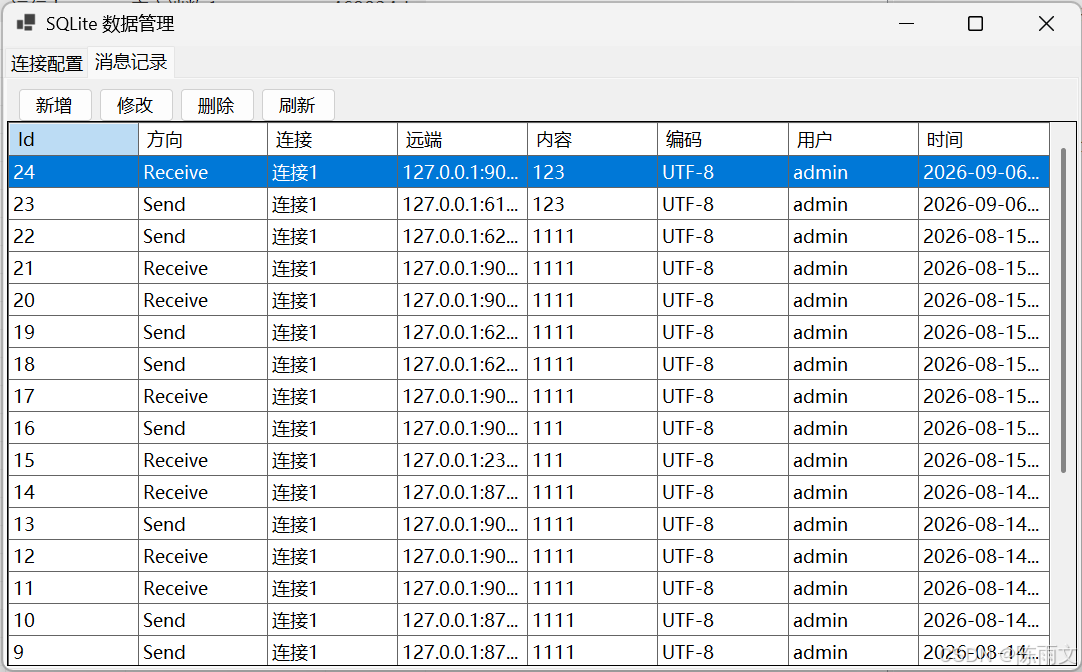
| 数据管理 | 连接、消息的增删改查 |
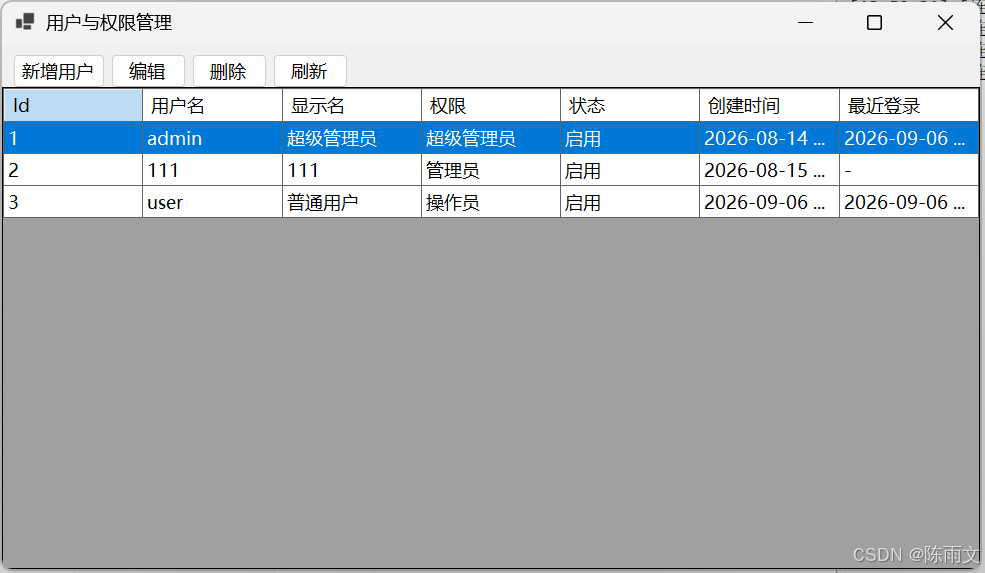
| 用户权限 | 操作员 / 管理员 / 超管 |
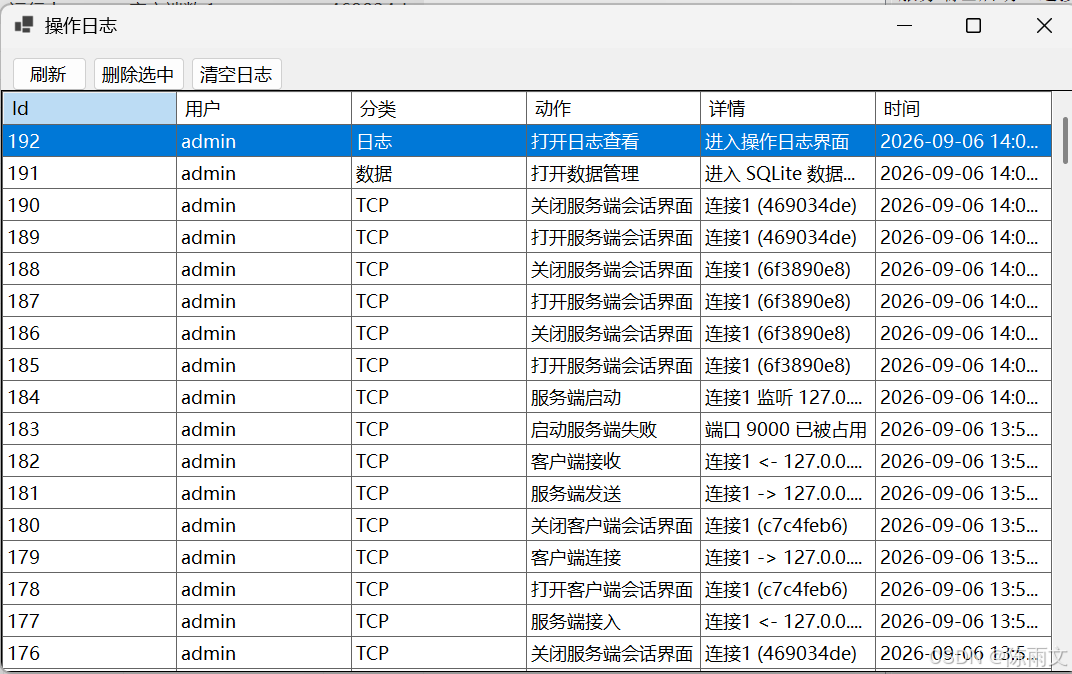
| 全量日志 | 登录、TCP、用户、数据等操作均落库 |
默认账号
| 账号 | 密码 | 角色 |
|---|---|---|
user |
user123 |
普通用户(操作员,默认自动登录) |
admin |
admin123 |
超级管理员 |
2. 技术栈说明
| 技术 | 用途 |
|---|---|
| C# / .NET 8 | 主语言与运行时(net8.0-windows) |
| Windows Forms | 桌面 UI(主窗内嵌登录、会话窗、数据管理等) |
| System.Net.Sockets | TCP:TcpListener / TcpClient / NetworkStream |
| Microsoft.Data.Sqlite | 嵌入式 SQLite;SqliteConnectionStringBuilder 生成连接串 |
| System.Security.Cryptography | 密码 SHA256 哈希 |
| async / await + Task | 异步连接、收发、接收循环 |
| ConcurrentDictionary | 多会话线程安全管理 |
| 事件 event | 状态 / 收发通知 UI |
[Flags] 枚举 |
权限位掩码 |
| BeginInvoke | UI 线程安全刷新 |
3. 快速开始
3.1 环境
-
Windows 10 / 11
3.2 运行
cd TcpAssistant
dotnet restore
dotnet run
3.3 编译
dotnet build TcpAssistant.csproj输出示例:
bin\Debug\net8.0-windows\TcpAssistant.exe
bin\Debug\net8.0-windows\tcp_assistant.db
bin\Debug\net8.0-windows\Help\帮助手册.md
4. 功能一览
| 模块 | 功能 |
|---|---|
| 登录 | 主窗内嵌登录区;启动自动以 user 登录;可退出后换账号 |
| TCP 服务端 / 客户端 | 启停、列表、独立会话窗 |
| 指令收发 | 模板、文本、Hex、追加 \r\n、广播 |
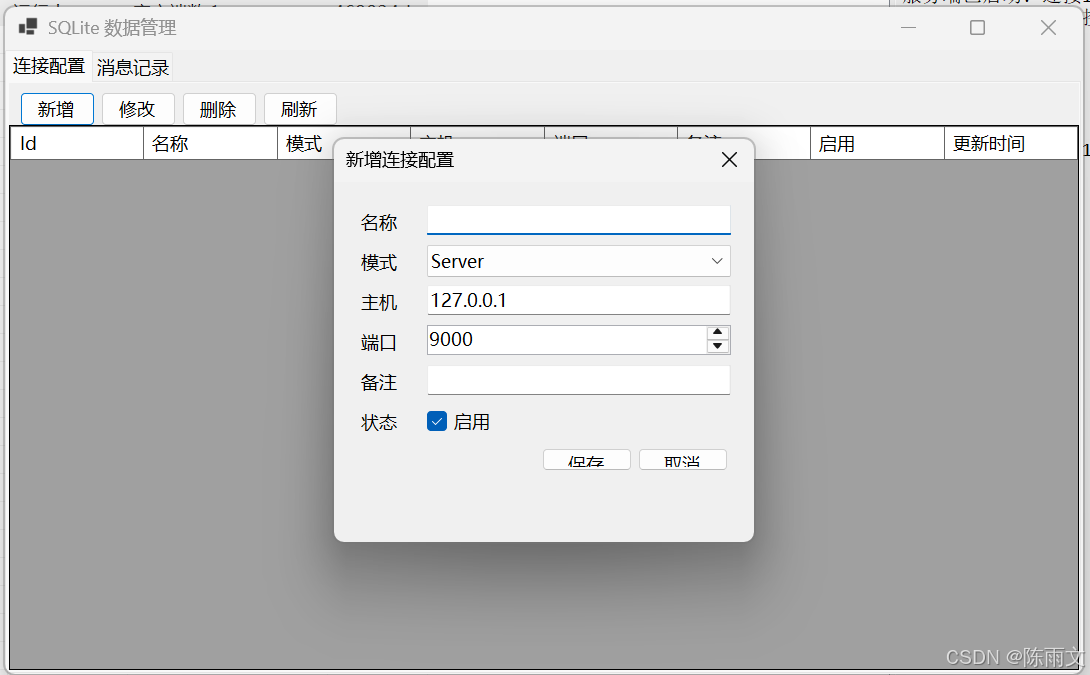
| 连接配置 | Server / Client / SQLite 三种模式 |
| SQLite 连接页 | 默认库路径、连接串、文件状态、测试 / 复制 / 打开目录 |
| 消息 / 日志 | 持久化查看与维护 |
| 用户管理 | 仅超管:增删改用户与权限 |
5. 使用方法详解
5.1 启动与登录
-
运行程序后直接进入主窗口
-
默认自动以普通用户
user登录并显示工作区 -
菜单「退出登录」回到内嵌登录页(预填
user/user123) -
需要管理用户时,退出后用
admin/admin123登录
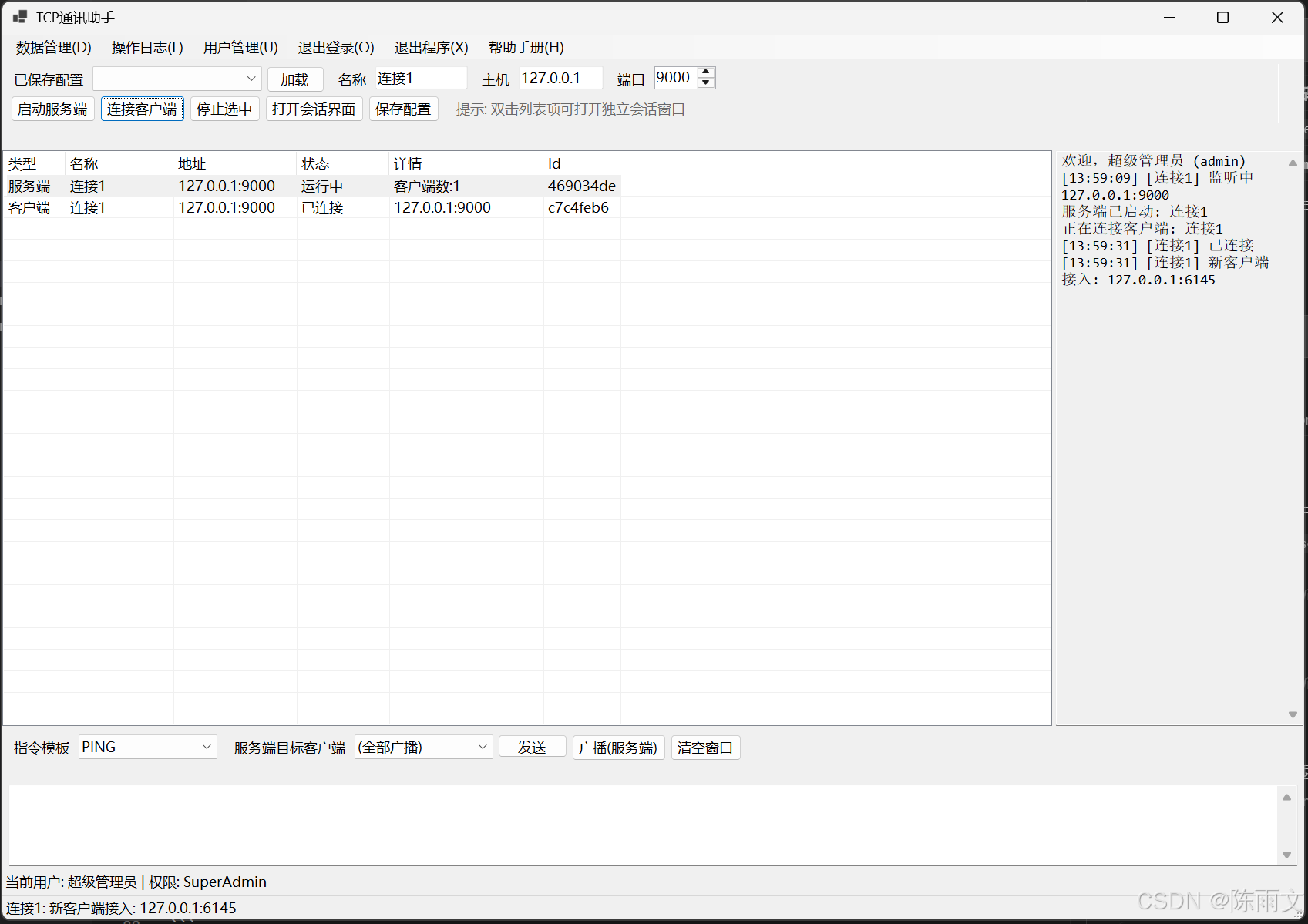
5.2 本机 TCP 联调
-
名称
本地服务,主机0.0.0.0,端口9000→ 启动服务端(自动打开服务端会话窗) -
名称
本地客户端,主机127.0.0.1,端口9000→ 连接客户端 -
在客户端会话窗发送
PING,服务端会话窗应能收到 -
服务端可定点发送或广播;可踢出客户端
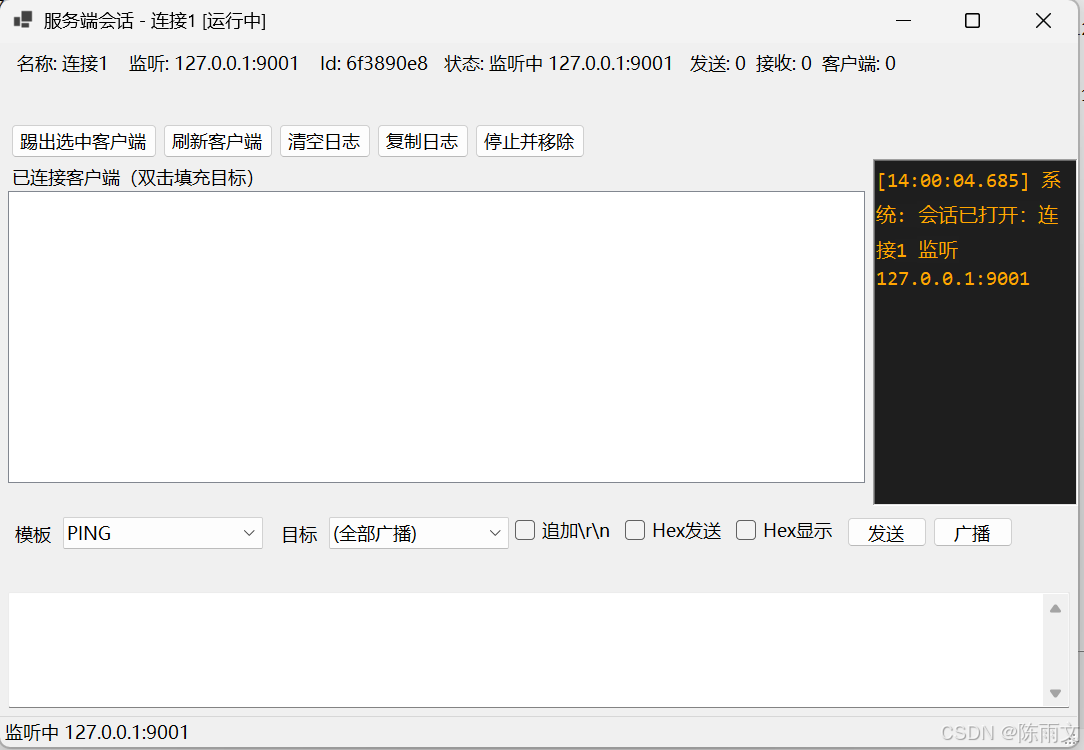
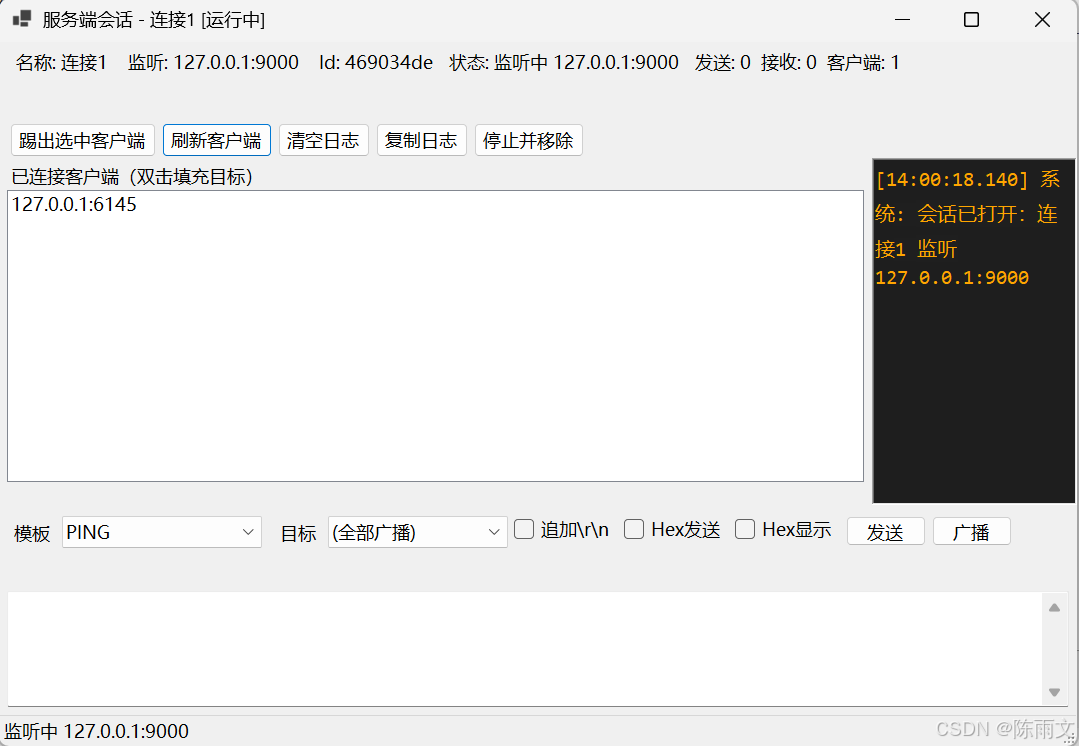
5.3 打开会话窗
-
启动时自动打开
-
双击运行列表 / 「打开会话界面」 / Enter
-
同一连接不会重复开窗,只会激活已有窗口
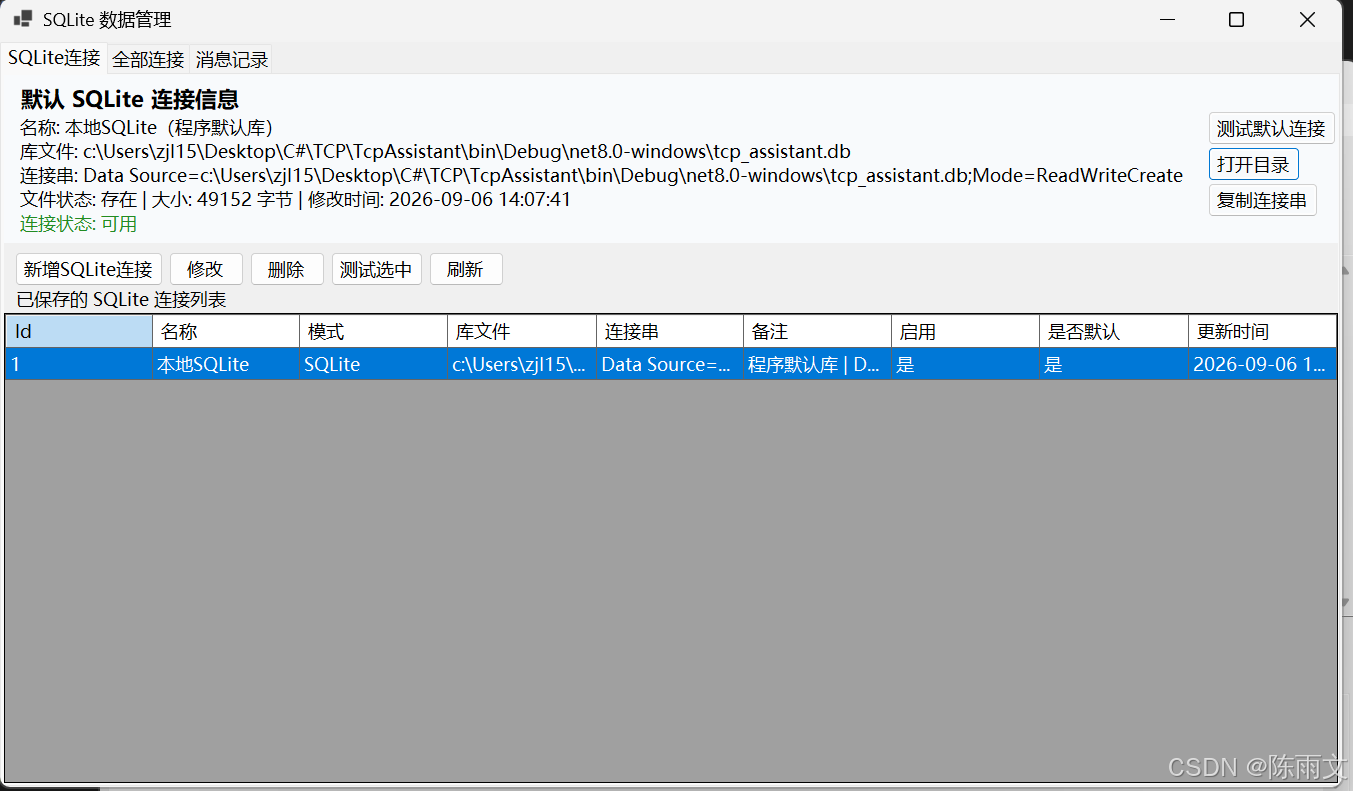
5.4 SQLite 连接管理
-
菜单 数据管理 → SQLite连接
-
顶部查看默认连接信息:
-
名称、库文件路径、连接串
-
文件大小 / 修改时间 / 连接状态
-
-
可 测试默认连接 、打开目录 、复制连接串
-
下方列表为已保存的 SQLite 连接(含是否默认库标记)
-
可新增 / 修改 / 删除 / 测试 SQLite 连接
5.5 保存 TCP / SQLite 配置
-
主界面「保存配置」可选 Server / Client / SQLite
-
「已保存配置」下拉仅加载 TCP,用于快速启停联调
5.6 菜单一览
| 菜单 | 说明 | 权限 |
|---|---|---|
| 数据管理 | SQLite连接 / 全部连接 / 消息 | ViewData / ManageData |
| 操作日志 | 查日志 | ViewLogs |
| 用户管理 | 管用户 | ManageUsers |
| 退出登录 | 回内嵌登录页 | --- |
| 退出程序 | 结束进程 | --- |
| 帮助手册 | 打开 Markdown 帮助 | --- |
6. 项目结构
TcpAssistant/
├── Program.cs                 # 入口:初始化库 → 主窗体
├── TcpAssistant.csproj
├── README.md                  # 本文件
├── Help/帮助手册.md
├── Models/
│   ├── User.cs
│   ├── PermissionFlags.cs
│   ├── ConnectionRecord.cs    # 含 Server/Client/SQLite
│   ├── MessageRecord.cs
│   ├── LogRecord.cs
│   └── AppSession.cs
├── Data/
│   └── Database.cs            # SQLite 初始化、连接串、测试
├── Services/
│   ├── AuthService.cs
│   ├── UserService.cs
│   ├── ConnectionService.cs
│   ├── MessageService.cs
│   ├── LogService.cs
│   └── TcpManager.cs
└── Forms/
    ├── MainForm.cs            # 内嵌登录 + 工作区
    ├── LoginForm.cs           # 独立登录窗(备用)
    ├── ClientSessionForm.cs
    ├── ServerSessionForm.cs
    ├── SessionWindowManager.cs
    ├── SessionUiHelper.cs
    ├── DataManageForm.cs      # SQLite连接页 + 全部连接 + 消息
    ├── ConnectionEditForm.cs
    ├── MessageEditForm.cs
    ├── UserManageForm.cs
    ├── UserEditForm.cs
    └── LogViewForm.cs
7. 代码书写全过程与步骤
按真实开发顺序说明:每步目的 + 关键代码。完整源码以仓库 .cs 文件为准。
步骤 1:创建项目并引入 SQLite
dotnet new winforms -n TcpAssistant -f net8.0
cd TcpAssistant
dotnet add package Microsoft.Data.Sqlite
mkdir Models, Data, Services, Forms, HelpTcpAssistant.csproj:
<Project Sdk="Microsoft.NET.Sdk">
  <PropertyGroup>
    <OutputType>WinExe</OutputType>
    <TargetFramework>net8.0-windows</TargetFramework>
    <Nullable>enable</Nullable>
    <UseWindowsForms>true</UseWindowsForms>
    <ImplicitUsings>enable</ImplicitUsings>
  </PropertyGroup>
  <ItemGroup>
    <PackageReference Include="Microsoft.Data.Sqlite" Version="10.0.11" />
  </ItemGroup>
  <ItemGroup>
    <None Update="Help\帮助手册.md">
      <CopyToOutputDirectory>PreserveNewest</CopyToOutputDirectory>
    </None>
  </ItemGroup>
</Project>
步骤 2:定义模型与权限
2.1 权限(Models/PermissionFlags.cs)
namespace TcpAssistant.Models;
[Flags]
public enum PermissionFlags
{
None = 0,
ViewData = 1 << 0,
ManageData = 1 << 1,
SendReceive = 1 << 2,
ManageServer = 1 << 3,
ManageClient = 1 << 4,
ViewLogs = 1 << 5,
ManageUsers = 1 << 6,
Operator = ViewData | SendReceive | ManageServer | ManageClient | ViewLogs,
Admin = Operator | ManageData,
SuperAdmin = Admin | ManageUsers
}2.2 连接模型(支持 SQLite)
namespace TcpAssistant.Models;
public class ConnectionRecord
{
public int Id { get; set; }
public string Name { get; set; } = string.Empty;
/// <summary>Server / Client / SQLite</summary>
public string Mode { get; set; } = "Client";
/// <summary>TCP 主机,或 SQLite 库文件路径</summary>
public string Host { get; set; } = "127.0.0.1";
public int Port { get; set; } = 9000;
public string Remark { get; set; } = string.Empty;
public bool IsEnabled { get; set; } = true;
public DateTime CreatedAt { get; set; } = DateTime.Now;
public DateTime UpdatedAt { get; set; } = DateTime.Now;
public bool IsSqlite => string.Equals(Mode, "SQLite", StringComparison.OrdinalIgnoreCase);
public bool IsTcp => Mode is "Server" or "Client";
public string SqliteConnectionString =>
IsSqlite ? $"Data Source={Host}" : string.Empty;
public string DisplayEndpoint => IsSqlite ? Host : $"{Host}:{Port}";
}2.3 用户 / 消息 / 日志 / 会话
public class User
{
    public int Id { get; set; }
    public string Username { get; set; } = string.Empty;
    public string PasswordHash { get; set; } = string.Empty;
    public string DisplayName { get; set; } = string.Empty;
    public PermissionFlags Permissions { get; set; }
    public bool IsActive { get; set; } = true;
    public DateTime CreatedAt { get; set; } = DateTime.Now;
    public DateTime? LastLoginAt { get; set; }
}

public static class AppSession
{
    public static User? CurrentUser { get; set; }
    public static bool IsLoggedIn => CurrentUser != null;
    public static bool HasPermission(PermissionFlags flag)
        => CurrentUser != null && CurrentUser.Permissions.HasFlag(flag);
    public static string Username => CurrentUser?.Username ?? "系统";
}消息表字段:Direction / ConnectionName / RemoteEndpoint / Content / Encoding / Username / CreatedAt 日志表字段:Username / Category / Action / Detail / CreatedAt
步骤 3:SQLite 初始化与连接 API
完整见 Data/Database.cs。核心代码:
using System.Security.Cryptography;
using System.Text;
using Microsoft.Data.Sqlite;
using TcpAssistant.Models;

namespace TcpAssistant.Data;

public static class Database
{
    private static readonly string DbPath =
        Path.Combine(AppDomain.CurrentDomain.BaseDirectory, "tcp_assistant.db");

    public static string DefaultDbPath => DbPath;
    public static string ConnectionString => BuildSqliteConnectionString(DbPath);

    public static string BuildSqliteConnectionString(string dbFilePath)
    {
        return new SqliteConnectionStringBuilder
        {
            DataSource = dbFilePath,
            Mode = SqliteOpenMode.ReadWriteCreate
        }.ToString();
    }

    public static void Initialize()
    {
        using var conn = Open();
        using var cmd = conn.CreateCommand();
        cmd.CommandText = """
            CREATE TABLE IF NOT EXISTS Users ( ... );
            CREATE TABLE IF NOT EXISTS Connections ( ... );
            CREATE TABLE IF NOT EXISTS Messages ( ... );
            CREATE TABLE IF NOT EXISTS Logs ( ... );
            """;
        cmd.ExecuteNonQuery();
        EnsureDefaultUser(conn, "admin", "admin123", "超级管理员", PermissionFlags.SuperAdmin);
        EnsureDefaultUser(conn, "user", "user123", "普通用户", PermissionFlags.Operator);
        EnsureDefaultSqliteConnection(conn); // 写入「本地SQLite」连接记录
    }

    public static SqliteConnection Open() => Open(ConnectionString);

    public static SqliteConnection Open(string connectionString)
    {
        var conn = new SqliteConnection(connectionString);
        conn.Open();
        return conn;
    }

    public static SqliteConnection OpenFile(string dbFilePath)
        => Open(BuildSqliteConnectionString(dbFilePath));

    public static bool TestSqliteConnection(string dbFilePath, out string message)
    {
        try
        {
            using var conn = OpenFile(dbFilePath);
            using var cmd = conn.CreateCommand();
            cmd.CommandText = "SELECT 1";
            var ok = Convert.ToInt32(cmd.ExecuteScalar()) == 1;
            message = ok
                ? $"SQLite 连接成功\n文件: {dbFilePath}\n连接串: {BuildSqliteConnectionString(dbFilePath)}"
                : "SQLite 连接异常";
            return ok;
        }
        catch (Exception ex)
        {
            message = $"SQLite 连接失败: {ex.Message}";
            return false;
        }
    }

    public static string HashPassword(string password)
    {
        var bytes = SHA256.HashData(Encoding.UTF8.GetBytes(password));
        return Convert.ToHexString(bytes);
    }
}
默认 SQLite 连接种子:
private static void EnsureDefaultSqliteConnection(SqliteConnection conn)
{
    // 若不存在 Name=本地SQLite 且 Mode=SQLite 的记录,则 INSERT
    // Host = DbPath,Remark 含连接串说明
}
步骤 4:业务服务层
| 服务 | 职责 |
|---|---|
LogService |
Write / GetAll / Delete / Clear |
AuthService |
Login / Logout,校验哈希与启用状态 |
UserService |
用户 CRUD;禁止删除 admin |
ConnectionService |
连接 CRUD;GetTcpConnections / GetSqliteConnections / Test |
MessageService |
消息写入与 CRUD |
认证核心:
public static bool Login(string username, string password)
{
    // 查 Users → 校验 IsActive → 比较 SHA256(password)
    // 成功:AppSession.CurrentUser = user;更新 LastLoginAt;写日志
    // 失败:写失败日志并 return false
}
连接测试:
public static bool Test(ConnectionRecord item, out string message)
{
    if (item.IsSqlite)
        return Database.TestSqliteConnection(item.Host, out message);
    // TCP:校验 Host/Port 合法性
}
步骤 5:TCP 核心(Services/TcpManager.cs)
客户端会话
public sealed class TcpClientSession : IDisposable
{
    public string Id { get; } = Guid.NewGuid().ToString("N")[..8];
    public event Action<string, string>? MessageReceived;
    public event Action<string, string>? StatusChanged;

    public async Task ConnectAsync()
    {
        // new TcpClient → ConnectAsync → GetStream
        // 后台 ReceiveLoopAsync;收发写入 MessageService + LogService
    }

    public async Task SendAsync(string content)
        => await SendBytesAsync(Encoding.UTF8.GetBytes(content), content);

    public async Task SendBytesAsync(byte[] data, string? displayContent = null) { /* Write + Flush */ }
    public void Disconnect() { /* Cancel + Close */ }
}
服务端会话
public sealed class TcpServerSession : IDisposable
{
    public event Action<string, string, string>? MessageReceived; // name, endpoint, content
    public void Start() { /* TcpListener + AcceptLoopAsync */ }
    public Task BroadcastAsync(string content) { /* ... */ }
    public Task SendToEndpointAsync(string endpoint, string content) { /* ... */ }
    public bool KickClient(string endpoint) { /* ... */ }
    public IReadOnlyList<string> GetClientEndpoints() { /* ... */ }
}
管理器单例
public sealed class TcpManager
{
    public static TcpManager Instance { get; } = new();
    public TcpServerSession StartServer(string name, string host, int port) { /* ... */ }
    public TcpClientSession StartClient(string name, string host, int port) { /* ... */ }
    public bool StopServer(string id) { /* ... */ }
    public bool StopClient(string id) { /* ... */ }
    public void StopAll() { /* ... */ }
}
步骤 6:主窗体内嵌登录 + 工作区
MainForm 使用两个 Panel 切换:
private readonly Panel _loginPanel = new() { Dock = DockStyle.Fill };
private readonly Panel _workPanel = new() { Dock = DockStyle.Fill };

private const string DefaultUser = "user";
private const string DefaultPassword = "user123";

public MainForm()
{
    BuildLoginPanel();
    BuildWorkPanel();
    Controls.Add(_workPanel);
    Controls.Add(_loginPanel);
    WireTcpEvents();
    Shown += (_, _) => AutoLoginAsNormalUser();
}

private void AutoLoginAsNormalUser()
{
    if (AuthService.Login(DefaultUser, DefaultPassword))
        EnterWorkMode($"已默认以普通用户 [{DefaultUser}] 登录");
    else
        ShowLoginPanel();
}

private void SwitchToLogin()
{
    SessionWindowManager.CloseAll();
    TcpManager.Instance.StopAll();
    if (AppSession.IsLoggedIn) AuthService.Logout();
    MainMenuStrip = null;
    _workPanel.Visible = false;
    ShowLoginPanel();
}
工作区包含:菜单、连接工具条、运行列表、日志、发送区。 启动服务端 / 客户端后调用 SessionWindowManager.OpenServer/OpenClient。
步骤 7:独立会话窗
public static class SessionWindowManager
{
    private static readonly Dictionary<string, Form> Windows = new();

    public static void OpenServer(TcpServerSession server, IWin32Window? owner = null)
    {
        if (TryActivate(server.Id)) return;
        Register(server.Id, new ServerSessionForm(server), owner);
    }

    public static void OpenClient(TcpClientSession client, IWin32Window? owner = null)
    {
        if (TryActivate(client.Id)) return;
        Register(client.Id, new ClientSessionForm(client), owner);
    }
}-
ClientSessionForm:发送 / 接收、Hex、断开 / 重连 -
ServerSessionForm:客户端列表、定点 / 广播、踢出 -
SessionUiHelper:Hex 编解码、彩色日志
步骤 8:数据管理(含 SQLite 连接页)
DataManageForm 三个 Tab:
-
SQLite连接
-
顶部默认库信息面板(路径、连接串、文件状态、测试 / 复制 / 打开目录)
-
下方 SQLite 连接列表(标记是否默认库)
-
-
全部连接 --- Server / Client / SQLite
-
消息记录
连接编辑:
public static ConnectionEditForm CreateForSqlite(string defaultDbPath)
    => new ConnectionEditForm(null, preferSqlite: true, sqlitePath: defaultDbPath);
模式为 SQLite 时:显示「库文件」+ 浏览按钮,端口禁用,预览连接串,支持测试连接。
步骤 9:用户管理与日志窗
-
UserManageForm/UserEditForm:权限勾选 + 操作员 / 管理员 / 超管模板 -
LogViewForm:查询、删除;清空仅超管
步骤 10:程序入口
using TcpAssistant.Data;
using TcpAssistant.Forms;
using TcpAssistant.Services;

namespace TcpAssistant;

internal static class Program
{
    [STAThread]
    static void Main()
    {
        ApplicationConfiguration.Initialize();
        Database.Initialize();
        LogService.Write("系统", "程序启动", "TCP通讯助手启动", "系统");
        Application.Run(new MainForm());
        LogService.Write("系统", "程序退出", "主窗口关闭", "系统");
    }
}
启动流程:
ApplicationConfiguration.Initialize()
    → Database.Initialize()(建表 + admin/user + 默认SQLite连接)
    → MainForm(自动普通用户登录 → 工作区)
步骤 11:帮助文档
-
编写
Help/帮助手册.md -
csproj 中
CopyToOutputDirectory -
主菜单「帮助手册」打开该文件
开发步骤总览
| 序号 | 步骤 | 产出 |
|---|---|---|
| 1 | 建项目 + SQLite 包 | TcpAssistant.csproj |
| 2 | 模型与权限 | Models/* |
| 3 | 数据库与 SQLite API | Data/Database.cs |
| 4 | 业务服务 | Services/*Service.cs |
| 5 | TCP 核心 | Services/TcpManager.cs |
| 6 | 主窗内嵌登录 | Forms/MainForm.cs |
| 7 | 会话窗 | Client/ServerSessionForm 等 |
| 8 | 数据管理 + SQLite 页 | DataManageForm / ConnectionEditForm |
| 9 | 用户 / 日志 | User* / LogViewForm |
| 10 | 入口 | Program.cs |
| 11 | 文档 | README.md / Help/* |
8. 数据库设计
文件:运行目录 tcp_assistant.db
| 表 | 用途 |
|---|---|
| Users | 用户与权限 |
| Connections | TCP / SQLite 连接配置 |
| Messages | 收发消息 |
| Logs | 操作日志 |
默认连接记录示例:
| 字段 | 值 |
|---|---|
| Name | 本地SQLite |
| Mode | SQLite |
| Host | <运行目录>\tcp_assistant.db |
| Port | 0 |
密码:SHA256 哈希存储。
9. 权限设计
| 标志 | 含义 |
|---|---|
| ViewData | 查看数据 |
| ManageData | 增删改数据 |
| SendReceive | 收发消息 |
| ManageServer | 管理服务端 |
| ManageClient | 管理客户端 |
| ViewLogs | 查看日志 |
| ManageUsers | 用户管理 |
模板:Operator(默认 user) / Admin / SuperAdmin(admin)。
10. 常见问题
Q:如何切换管理员? 退出登录 → 输入 admin / admin123。
Q:端口被占用? 更换端口或结束占用进程。
Q:在哪里看默认 SQLite 信息? 数据管理 → SQLite连接 顶部面板。
Q:忘记密码? 删除运行目录 tcp_assistant.db 后重启(清空数据并重建默认账号与连接)。
Q:帮助手册打不开? 执行 dotnet build,确认输出目录有 Help\帮助手册.md。
相关文档
- 软件内操作说明:
Help/帮助手册.md
说明
本项目适用于学习与联调。若用于生产,建议升级密码哈希(加盐)、完善异常处理,并对网络通讯考虑 TLS。
 https://github.com/zhangsansh/C-WinForms-.NET-8-SQLite-TCP-Socket.git