javascript
<div ref="modelContainer" style="width:100%; height:600px;">

<script>
import * as THREE from 'three'
import { FBXLoader } from 'three/examples/jsm/loaders/FBXLoader'
import { OrbitControls } from 'three/examples/jsm/controls/OrbitControls'

export default {
  name: 'FbxModelPreview',
  data() {
    return {
      //fbx url
      modelUrl: '',

      // three实例
      scene: null,
      camera: null,
      renderer: null,
      controls: null,
      fbxModel: null,
      animateId: null
    }
  },
  created() {
        //初始化
        this.$nextTick(() => {
          this.initThree()
          this.loadFbxModel()
        })
   }

    methods: {
        // 3D模型
        initThree() {
            const container = this.$refs.modelContainer
            if (!container) return

            console.log('容器宽高', container.clientWidth, container.clientHeight)

            // 场景
            this.scene = new THREE.Scene()
            this.scene.background = new THREE.Color(0xffffff)

            // 相机
            this.camera = new THREE.PerspectiveCamera(60, container.clientWidth / container.clientHeight, 0.1, 2000)
            this.camera.position.set(10, 10, 15)

            // 渲染器
            this.renderer = new THREE.WebGLRenderer({ antialias: true })
            this.renderer.setSize(container.clientWidth, container.clientHeight)
            this.renderer.setPixelRatio(window.devicePixelRatio)
            container.appendChild(this.renderer.domElement)

            // 灯光
            const ambientLight = new THREE.AmbientLight(0xffffff, 0.6)
            this.scene.add(ambientLight)
            const dirLight = new THREE.DirectionalLight(0xffffff, 0.8)
            dirLight.position.set(20, 30, 20)
            this.scene.add(dirLight)

            // 轨道控制器 鼠标拖拽旋转缩放平移
            this.controls = new OrbitControls(this.camera, this.renderer.domElement)
            this.controls.enableDamping = true

            // 窗口自适应
            window.addEventListener('resize', this.onWindowResize)

            this.animate()
        },

        loadFbxModel() {
            const loader = new FBXLoader()
            loader.load(
                this.modelUrl,
                (object) => {
                    console.log('fbx加载成功', object)
                    this.fbxModel = object

                    // true:计算scale/旋转/位移后的真实包围盒
                    const box = new THREE.Box3().setFromObject(object, true)
                    const size = box.getSize(new THREE.Vector3())
                    console.log('模型原始size', size)

                    // 基于底座XZ缩放,忽略巨大Y
                    const maxXZ = Math.max(size.x, size.z)
                    const targetXZ = 8
                    const scale = targetXZ / maxXZ
                    object.scale.set(scale, scale, scale)

                    // ✅缩放后重新获取真实边界,必须带true
                    box.setFromObject(object, true)
                    const center = box.getCenter(new THREE.Vector3())

                    // 模型底部对齐y=0
                    object.position.x = -center.x
                    object.position.z = -center.z
                    object.position.y = -box.min.y

                    this.scene.add(object)

                    box.setFromObject(object, true)
                    box.getCenter(center)
                    this.controls.target.copy(center)

                    // ==========核心:相机自动适配模型,模型刚好完整显示在画布(图2效果)==========
                    const sphere = new THREE.Sphere()
                    box.getBoundingSphere(sphere)
                    const fov = this.camera.fov * (Math.PI / 180)
                    const cameraDistance = sphere.radius / Math.sin(fov / 2) * 1.3 //1.3留一点边距

                    // 相机斜45°观察高塔,初始视角就是正面斜视角,出来直接看到整根塔
                    this.camera.position.set(
                        center.x + cameraDistance * 0.7,
                        center.y + cameraDistance * 0.45,
                        center.z + cameraDistance * 0.7
                    )
                    this.camera.lookAt(center)

                    this.controls.minDistance = sphere.radius * 0.4
                    this.controls.maxDistance = cameraDistance * 3
                    this.controls.update()
                },
                (progress) => {
                    const percent = (progress.loaded / progress.total * 100).toFixed(1)
                    console.log('加载进度:' + percent + '%')
                },
                (err) => {
                    console.error('FBX加载失败', err)
                    this.$message.error('3D模型加载失败')
                }
            )
        },
        animate() {
            this.animateId = requestAnimationFrame(this.animate)
            if (!this.renderer || !this.scene || !this.camera || !this.controls) return
            this.controls.update()
            this.renderer.render(this.scene, this.camera)
        },

        onWindowResize() {
            const container = this.$refs.modelContainer
            if (!container || !this.camera || !this.renderer) return
            this.camera.aspect = container.clientWidth / container.clientHeight
            this.camera.updateProjectionMatrix()
            this.renderer.setSize(container.clientWidth, container.clientHeight)
        },

        // 关闭弹窗
        handleClose() {
            this.modelUrl= ''

            window.removeEventListener('resize', this.onWindowResize)
            if (this.animateId) cancelAnimationFrame(this.animateId)
            if (this.renderer) {
                this.renderer.dispose()
                this.$refs.modelContainer && (this.$refs.modelContainer.innerHTML = '')
            }
            this.scene = null
            this.camera = null
            this.renderer = null
            this.controls = null
            this.fbxModel = null
        },
    },
}
</script>
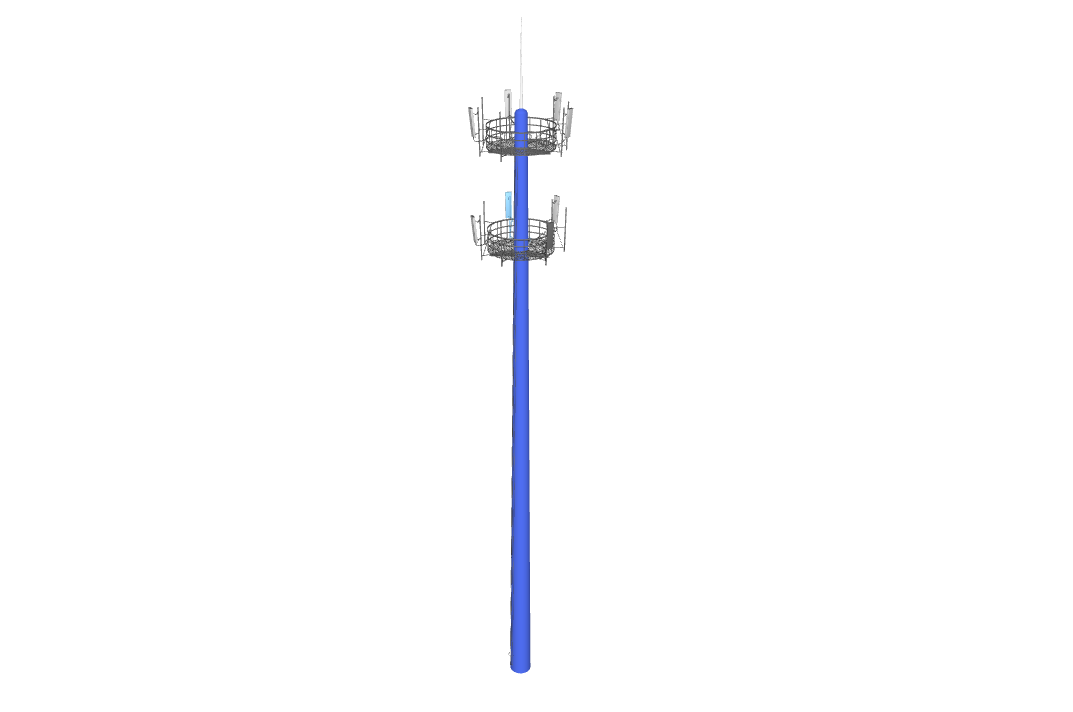
效果图(案例):