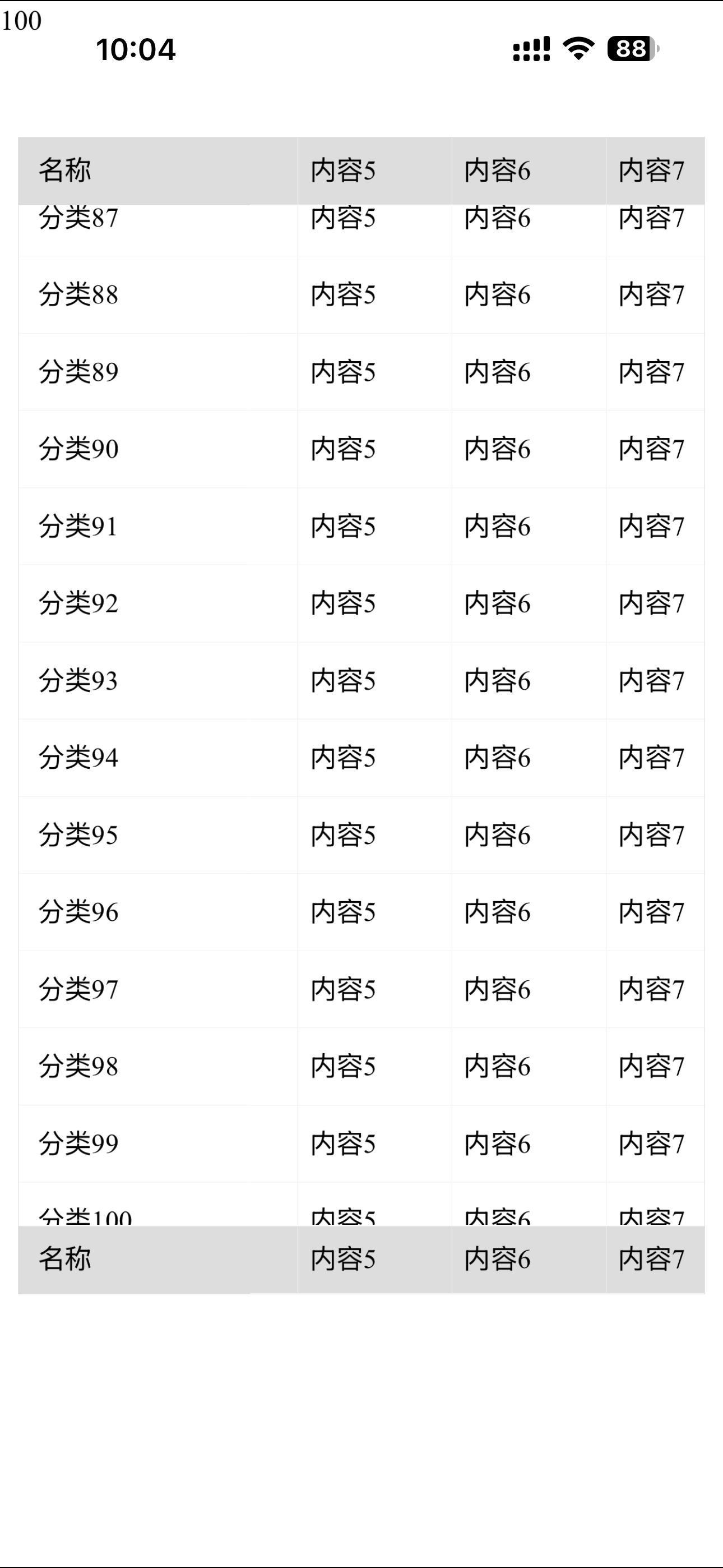
vue实现scroll-view上下滑动右侧左右滑动 右侧左右滑动时不会抖动基本操作没什么影响
javascript
<template>
	<view class="page-container">
		<input type="text" v-model="rowCount" style="margin-top: 100rpx !important;"/>
		<view class="main-scroll-box">

			<!-- ============ 顶部固定表头:view + transform(与主体同一驱动源) ============ -->
			<view class="fixed-row fixed-row--top">
				<view class="row-left">名称</view>
				<view class="row-right">
					<view :class="['track', { 'track--bounce': bouncing }]" :style="trackStyle">
						<view class="row">
							<view class="cell" v-for="(item, i) in contentList" :key="'th' + i">{{ item }}</view>
						</view>
					</view>
				</view>
			</view>

			<!-- ============ 中间主体:外层纵向 scroll-view + 内层横向手势区 ============ -->
			<scroll-view class="main-scroll" scroll-y :show-scrollbar="false">
				<view class="content-wrap">
					<!-- 左侧固定列:跟随外层纵向滚动 -->
					<view class="col-left">
						<view class="menu-item" v-for="(item, i) in menuList" :key="'m' + i">{{ item }}</view>
					</view>

					<!--
						横向区域:普通 view,不是 scroll-view
						手势由 onTouchStart/Move/End 接管,位移走 transform
						三个区域共用同一个 offsetX → 同一帧渲染 → 不可能错位
					-->
					<view class="col-right" @touchstart="onTouchStart" @touchmove="onTouchMove" @touchend="onTouchEnd"
						@touchcancel="onTouchEnd">
						<view class="track track--body" :class="{ 'track--bounce': bouncing }" :style="trackStyle">
							<view class="row" v-for="(r, ri) in rowList" :key="'r' + ri">
								<view class="cell" v-for="(c, ci) in contentList" :key="ri + '-' + ci">{{ c }}</view>
							</view>
						</view>
					</view>
				</view>
			</scroll-view>

			<!-- ============ 底部固定表尾:view + transform ============ -->
			<view class="fixed-row fixed-row--bottom">
				<view class="row-left">名称</view>
				<view class="row-right">
					<view :class="['track', { 'track--bounce': bouncing }]" :style="trackStyle">
						<view class="row">
							<view class="cell" v-for="(item, i) in contentList" :key="'tf' + i">{{ item }}</view>
						</view>
					</view>
				</view>
			</view>

		</view>

		<!-- 调试用:打印 maxScroll(上线可删) -->
		<!-- <view class="debug" v-if="debugInfo">{{ debugInfo }}</view> -->
	</view>
</template>

<script>
	/**
	 * 终极方案:三区域全 view + transform,手势与惯性自绘
	 *
	 * 为什么这样彻底不抖:
	 *   三个区域不再各自持有滚动状态,而是渲染同一个变量 offsetX。
	 *   没有 scroll 事件、没有受控属性回写、没有跨线程事件回传延迟,
	 *   同一次 Vue 更新里三处 transform 一起变 → 帧级别一致,不存在错位的可能。
	 *
	 * 为什么放弃 scroll-view 做横向:
	 *   App 端 scroll-view 滚动发生在原生层,scroll 事件跨线程回传天然滞后,
	 *   跟随端永远慢一拍,"追赶"的过程就是肉眼看到的抖动。自绘则无此延迟。
	 *
	 * 纵向仍用外层 scroll-view:纵向是原生滚动,性能好、惯性自然,没必要自己造。
	 */

	const FRICTION = 0.97 // 惯性衰减:每 16ms 速度乘以该值,越小停得越快
	const MIN_VELOCITY = 0.02 // px/ms,低于此值停止惯性
	const OVER_DRAG = 0.35 // 越界拖拽阻尼,手指越界时位移打折
	const BOUNCE_MS = 260 // 越界回弹时长,需与样式中的 transition 保持一致
	const AXIS_THRESHOLD = 4 // px,判定滑动方向所需的最小位移

	/* rAF 安全封装:部分 App WebView 不存在该 API */
	const HAS_RAF = typeof requestAnimationFrame === 'function'
	const HAS_CAF = typeof cancelAnimationFrame === 'function'
	const HOST = typeof window !== 'undefined' ? window : typeof global !== 'undefined' ? global : null
	const raf = HAS_RAF ? requestAnimationFrame.bind(HOST) : cb => setTimeout(cb, 16)
	const caf = HAS_CAF ? cancelAnimationFrame.bind(HOST) : id => clearTimeout(id)

	/* touch 坐标兼容:优先 clientX,老基础库退化为 pageX */
	function pointX(e) {
		const t = e.touches && e.touches[0]
		if (!t) return null
		return t.clientX != null ? t.clientX : t.pageX
	}

	function pointY(e) {
		const t = e.touches && e.touches[0]
		if (!t) return null
		return t.clientY != null ? t.clientY : t.pageY
	}

	export default {
		data() {
			return {
				rowCount: 100, // 主体行数
				contentList: Array.from({
					length: 10
				}, (_, i) => `内容${i + 1}`),

				offsetX: 0, // 唯一驱动源:三条轨道共用
				bouncing: false, // 回弹中 → 开启 transition
				debugInfo: ''
			}
		},

		computed: {
			menuList() {
				return Array.from({
					length: this.rowCount
				}, (_, i) => `分类${i + 1}`)
			},
			rowList() {
				return Array.from({
					length: this.rowCount
				}, (_, i) => i)
			},
			trackStyle() {
				const t = `translate3d(${-this.offsetX}px, 0, 0)`
				return {
					transform: t,
					'-webkit-transform': t
				}
			}
		},

		created() {
			// 非响应式字段:高频更新不让 Vue 追踪
			this._raw = 0 // 真实位移量(含小数)
			this._maxScroll = 0 // 可滚动最大距离
			this._axis = '' // 本次手势方向:'' | 'x' | 'y'
			this._startX = 0
			this._startY = 0
			this._startRaw = 0
			this._lastX = 0
			this._lastT = 0
			this._velocity = 0 // px/ms
			this._raf = 0
			this._bounceTimer = null
			this._tickFn = null
		},

		mounted() {
			this.measure()
		},

		onReady() {
			this.$nextTick(() => this.measure())
		},

		beforeDestroy() {
			this.stopInertia()
			if (this._bounceTimer) clearTimeout(this._bounceTimer)
		},

		methods: {
			/* ---------------- 手势接管 ---------------- */

			onTouchStart(e) {
				this.stopInertia()
				this.clearBounce()

				const x = pointX(e)
				const y = pointY(e)
				if (x == null) return

				this._axis = ''
				this._startX = x
				this._startY = y
				this._lastX = x
				this._lastT = Date.now()
				this._velocity = 0
				this._startRaw = this._raw
			},

			onTouchMove(e) {
				const x = pointX(e)
				const y = pointY(e)
				if (x == null) return

				// 方向锁:首次移动判定方向,锁定后本次手势不再改变
				if (!this._axis) {
					const dx = Math.abs(x - this._startX)
					const dy = Math.abs(y - this._startY)
					if (dx < AXIS_THRESHOLD && dy < AXIS_THRESHOLD) return
					this._axis = dx > dy ? 'x' : 'y'
				}
				// 判定为纵向 → 完全放手,交给外层 scroll-view
				if (this._axis !== 'x') return

				const now = Date.now()
				const dt = Math.max(now - this._lastT, 1)
				// 手指左移 → 内容左移 → offset 增大
				let delta = this._lastX - x

				// 越界阻尼:超出可滚动范围时位移打折,手感更自然
				const next = this._startRaw + (this._startX - x)
				if (next < 0 || next > this._maxScroll) {
					delta *= OVER_DRAG
				}

				this._raw += delta
				this._raw = Math.max(-60, Math.min(this._maxScroll + 60, this._raw)) // 允许少量越界

				// 速度平滑:避免单点抖动导致松手时惯性突兀
				const v = (this._lastX - x) / dt
				this._velocity = this._velocity * 0.3 + v * 0.7

				this._lastX = x
				this._lastT = now
				this.offsetX = Math.round(this._raw)
			},

			onTouchEnd() {
				if (this._axis !== 'x') {
					this._axis = ''
					return
				}
				this._axis = ''

				// 越界 → 回弹
				if (this._raw < 0 || this._raw > this._maxScroll) {
					this.bounceTo(this._raw < 0 ? 0 : this._maxScroll)
					return
				}

				// 速度太小 → 不启动惯性
				if (Math.abs(this._velocity) < MIN_VELOCITY) return

				this.startInertia()
			},

			/* ---------------- 惯性动画 ---------------- */

			startInertia() {
				this.stopInertia()
				if (!this._tickFn) this._tickFn = this.tick.bind(this)
				this._lastT = Date.now()
				this._raf = raf(this._tickFn)
			},

			tick() {
				this._raf = 0
				const now = Date.now()
				const dt = Math.min(Math.max(now - this._lastT, 1), 32)
				this._lastT = now

				this._velocity *= Math.pow(FRICTION, dt / 16)
				this._raw += this._velocity * dt

				// 撞边界 → 回弹并结束
				if (this._raw < 0 || this._raw > this._maxScroll) {
					this.stopInertia()
					this.bounceTo(this._raw < 0 ? 0 : this._maxScroll)
					return
				}

				if (Math.abs(this._velocity) < MIN_VELOCITY) {
					this.stopInertia()
					return
				}

				this.offsetX = Math.round(this._raw)
				this._raf = raf(this._tickFn)
			},

			stopInertia() {
				if (this._raf) {
					caf(this._raf)
					this._raf = 0
				}
				this._velocity = 0
			},

			/* ---------------- 越界回弹 ---------------- */

			bounceTo(target) {
				this.clearBounce()
				this._raw = target
				this.bouncing = true // 开启 transition,由 CSS 完成缓动
				this.offsetX = Math.round(target)
				this._bounceTimer = setTimeout(() => {
					this.bouncing = false
				}, BOUNCE_MS)
			},

			clearBounce() {
				if (this._bounceTimer) {
					clearTimeout(this._bounceTimer)
					this._bounceTimer = null
				}
				this.bouncing = false
			},

			/* ---------------- 测量与工具 ---------------- */

			/**
			 * 测量可滚动最大距离:maxScroll = 内容宽 - 容器宽
			 * 内容或列宽变化后需重新调用
			 */
			measure() {
				const query = uni.createSelectorQuery().in(this)
				let containerW = 0
				let contentW = 0

				query.select('.col-right').boundingClientRect(res => {
					containerW = res ? res.width : 0
				})
				query.select('.track--body').boundingClientRect(res => {
					contentW = res ? res.width : 0
				})
				query.exec(() => {
					this._maxScroll = Math.max(0, Math.round(contentW - containerW))
					this.debugInfo = `max=${this._maxScroll} content=${contentW} box=${containerW}`
					console.log('[scroll-sync]', this.debugInfo)
				})
			},

			// 程序化回到最左
			resetScroll() {
				this.stopInertia()
				this.bounceTo(0)
			}
		}
	}
</script>

<style scoped lang="scss">
	/* ========== 布局基线:列宽必须三处完全一致,否则"同步但错位" ========== */
	$cell-w: 160rpx; // 单元格宽度,改这里即可
	$body-row-h: 80rpx; // 主体行高
	$fixed-row-h: 70rpx; // 表头/表尾行高
	$left-w: 240rpx; // 左侧固定列宽度

	.page-container {
		width: 100%;
		height: 100vh;
		overflow: hidden;
	}

	.main-scroll-box {
		position: relative;
		width: 95%;
		height: 1200rpx;
		margin: 50rpx auto 0;
		padding: $fixed-row-h 0; // 给上下固定行留出位置
		overflow: hidden;
		border: 1rpx solid #ddd;
		box-sizing: border-box;
		// margin-top: 100rpx !important;
	}

	/* ---------- 上下固定行(表头 / 表尾) ---------- */
	.fixed-row {
		position: absolute;
		left: 0;
		width: 100%;
		height: $fixed-row-h;
		display: flex;
		align-items: flex-start;
		background-color: #ddd;
		z-index: 2;
		overflow: hidden;

		&--top {
			top: 0;
		}

		&--bottom {
			bottom: 0;
		}

		.row-left {
			flex: 0 0 $left-w;
			width: $left-w;
			height: $fixed-row-h;
			line-height: $fixed-row-h;
			font-size: 28rpx;
			padding-left: 20rpx;
			box-sizing: border-box;
		}

		.row-right {
			position: relative;
			flex: 1;
			height: $fixed-row-h;
			overflow: hidden;
		}
	}

	/* ---------- 中间主体 ---------- */
	.main-scroll {
		width: 100%;
		height: 100%;
		overflow: hidden;
	}

	.content-wrap {
		display: flex;
		align-items: flex-start; // 两列按内容高度撑开
		width: 100%;
	}

	.col-left {
		flex: 0 0 $left-w;
		width: $left-w;

		.menu-item {
			height: $body-row-h;
			line-height: $body-row-h;
			font-size: 28rpx;
			padding-left: 20rpx;
			box-sizing: border-box;
			border-bottom: 1rpx solid #f2f2f2;
		}
	}

	.col-right {
		flex: 1;
		height: auto;
		overflow: hidden;
		/* 避免长按选中干扰手势 */
		-webkit-user-select: none;
		user-select: none;
	}

	/* ---------- 横向内容轨道 ---------- */
	.track {
		display: inline-flex;
		flex-direction: column;
		align-items: stretch;
		will-change: transform;
		backface-visibility: hidden;
	}

	/* 仅回弹时开启过渡,拖拽与惯性期间必须关闭,否则会滞后 */
	.track--bounce {
		transition: transform 260ms cubic-bezier(0.25, 0.8, 0.25, 1);
		-webkit-transition: -webkit-transform 260ms cubic-bezier(0.25, 0.8, 0.25, 1);
	}

	.row {
		display: flex;
		flex-direction: row;
		flex-wrap: nowrap; // 绝不允许换行,否则内容宽度计算错误
		height: $body-row-h;
		line-height: $body-row-h;
	}

	.fixed-row .row {
		height: $fixed-row-h;
		line-height: $fixed-row-h;
	}

	.cell {
		flex: 0 0 $cell-w; // 不压缩、不放大,保证内容宽 = 列数 × 列宽
		width: $cell-w;
		height: 100%;
		line-height: inherit;
		font-size: 28rpx;
		padding-left: 12rpx;
		box-sizing: border-box;
		white-space: nowrap;
		overflow: hidden;
		text-overflow: ellipsis;
		border-bottom: 1rpx solid #f2f2f2;
		border-left: 1rpx solid #eee;
	}

	::-webkit-scrollbar {
		width: 0;
		height: 0;
		display: none;
	}

	.debug {
		padding: 10rpx;
		font-size: 22rpx;
		color: #999;
	}
</style>