开发工具: 华为云码道
本文配套仓库(预定地址): oh-flutter/flutter_ble_peripheral
flutter_ble_peripheral 将 BLE 外设广播与 GATT 服务封装为 Flutter 插件,应用可以广播服务、接收 Central 写入,并向已订阅的特征发送数据。本文以 flutter_ble_peripheral 3.1.0 为例,介绍源码准备、OHOS 工程配置、ArkTS 实现和 example 真机运行。
插件声明 Android、iOS、macOS、Windows 和 OHOS 实现,权限与平台专用广播设置并不完全相同。配套仓库地址统一规划为 oh-flutter/flutter_ble_peripheral;尚未创建或同步时,先使用本地源码。本文依据本地 3.1.0 适配工作区,当前 HEAD 为 0472cebec7dfb9dad695c089b1cbc6b66d782f44,OHOS 相关实现还包含未提交内容,该 HEAD 不能单独还原本文代码。
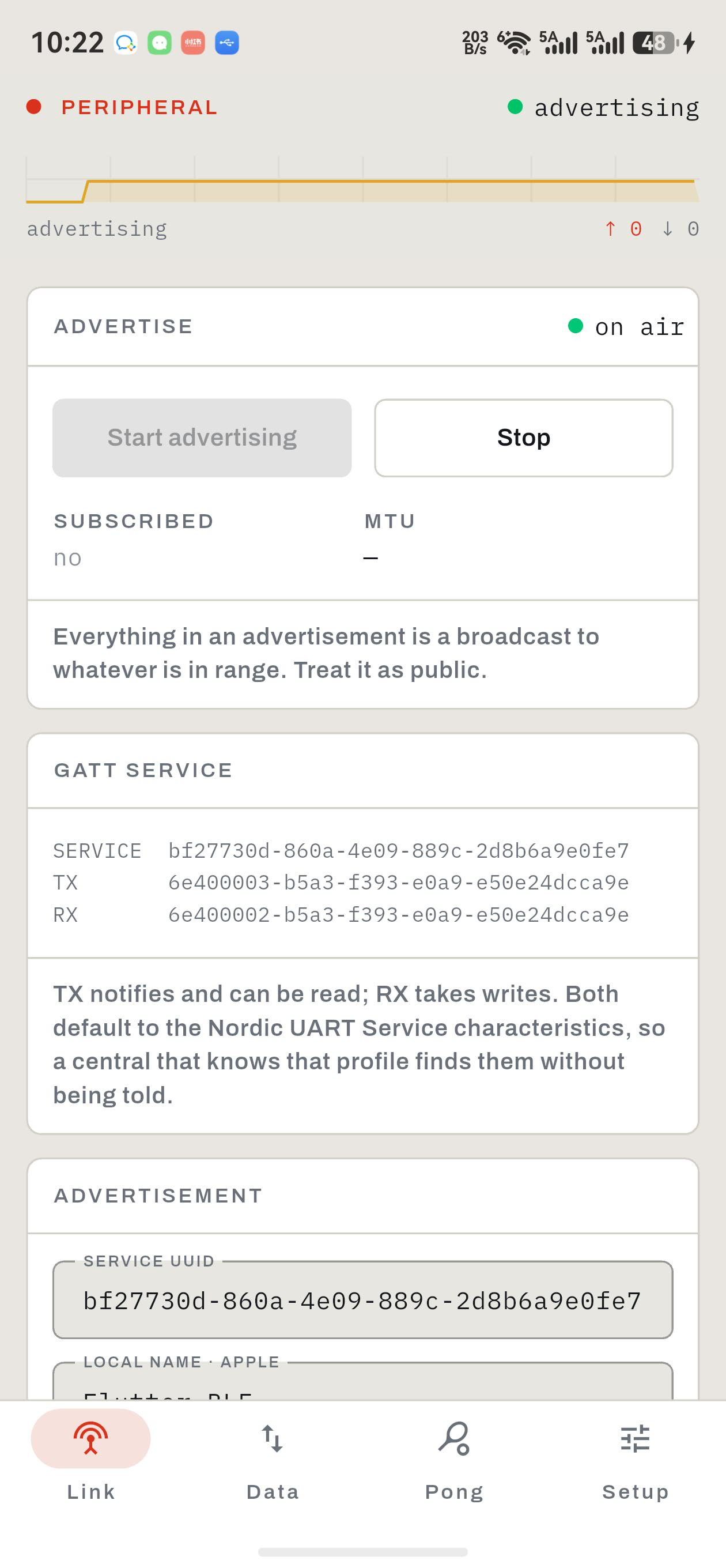
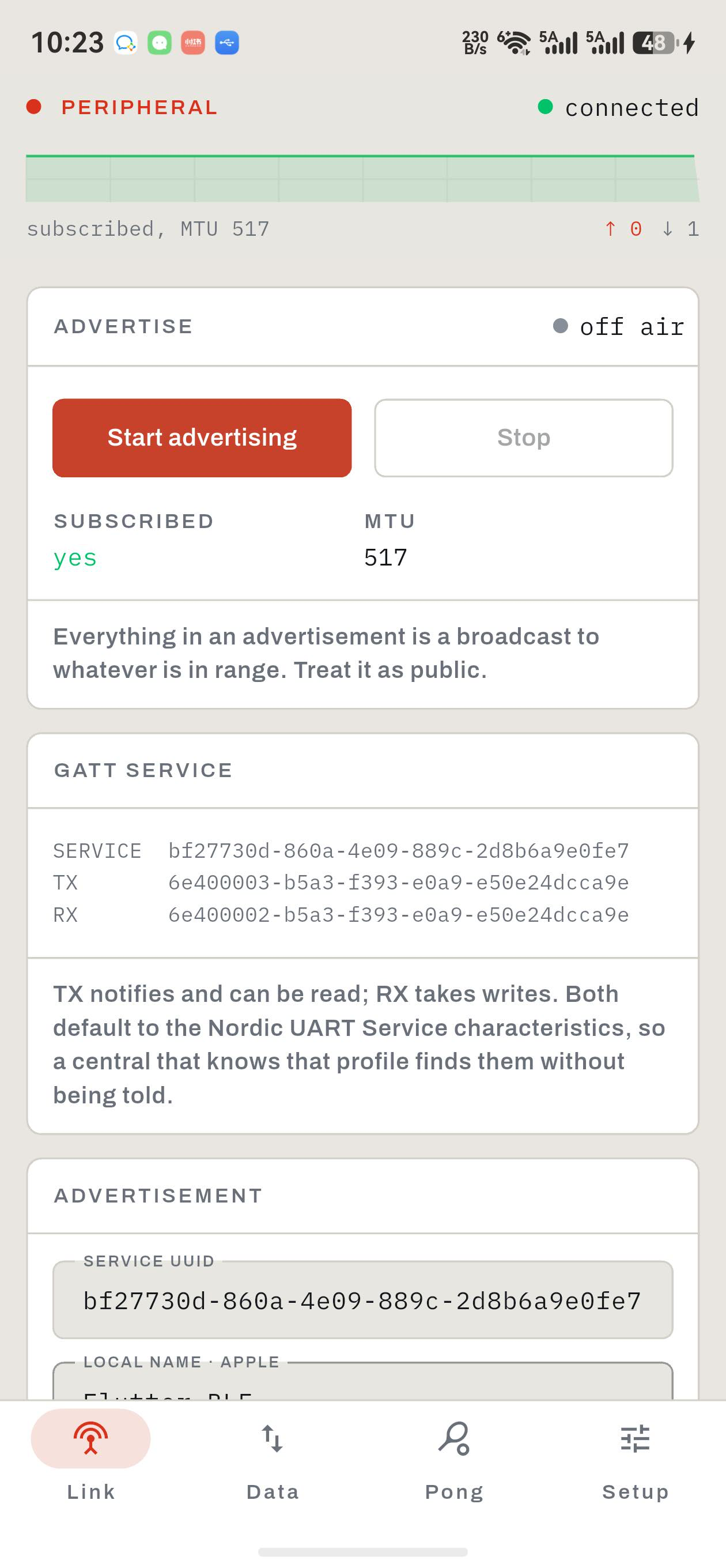
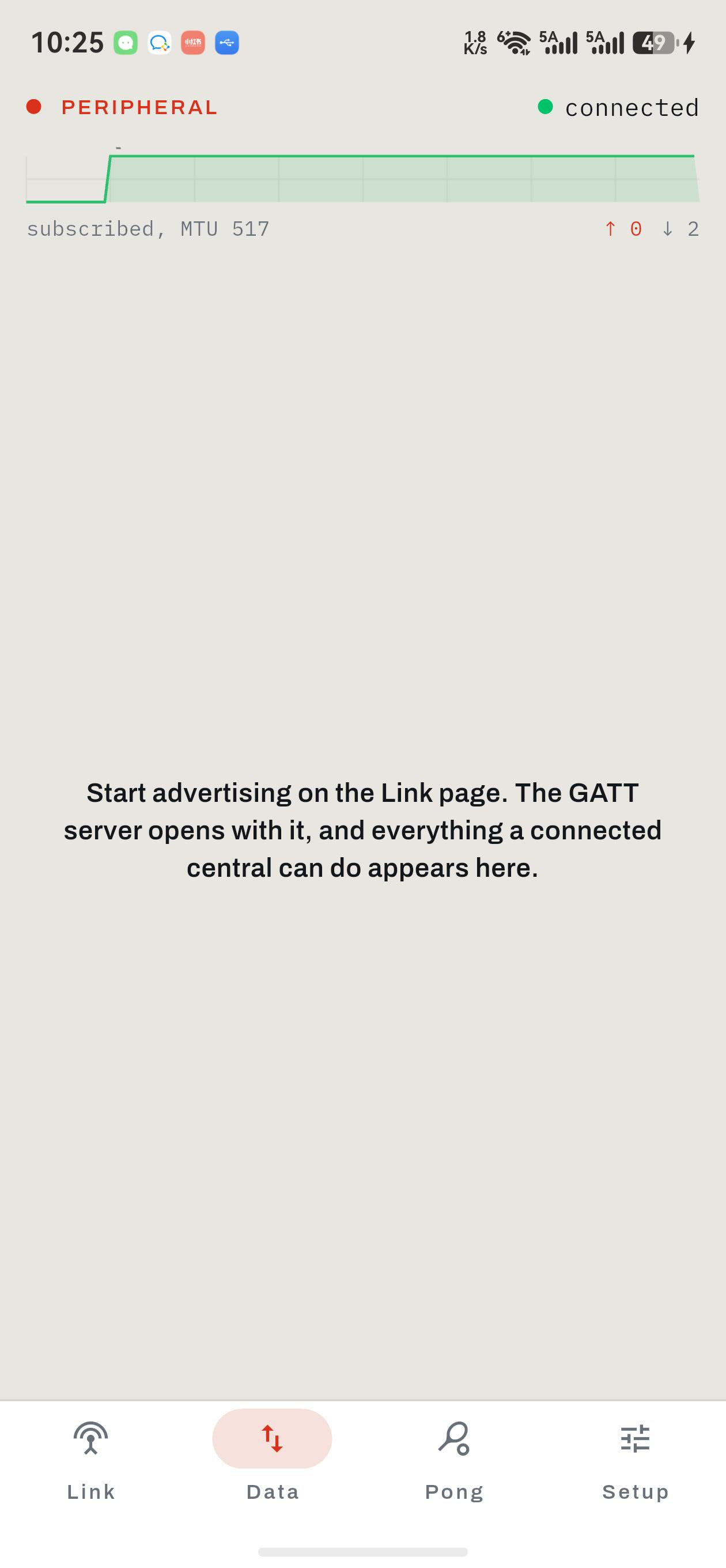
真机运行图(从左到右):广播中/连接与订阅/已连接时的数据页实际表现。采集于 2026-09-09,设备 ALN-AL00 / HUAWEI Mate 60 Pro,系统 OpenHarmony 6.1.1.120(API 24);使用本地当前源码构建的签名 Release HAP。
广播、连接、订阅与 RX 写入已观察到;第三图保留 Demo 在 connected 状态下隐藏操作区的问题,未展示双向收发成功。
截图标注:操作步骤与截图命令
执行目录:本文 Markdown 所在目录。先用 hdc list targets 获取设备 ID,将下列 <device-id> 替换为实际值。截图使用仓库完整 Demo;snapshot_display 在本机要求 .jpeg 后缀,图片保持原始真机画面。
bash
mkdir -p blog-assets/flutter_ble_peripheral广播中: 在 Link 点击 Start advertising,等待 on air 和 advertising 状态稳定。
bash
hdc -t <device-id> shell snapshot_display -f /data/local/tmp/flutter_ble_peripheral-advertising.jpeg
hdc -t <device-id> file recv /data/local/tmp/flutter_ble_peripheral-advertising.jpeg ./blog-assets/flutter_ble_peripheral/advertising.jpeg
连接与订阅: 在 Mac 运行配套 CoreBluetooth Central,连接服务并订阅 TX;手机显示 SUBSCRIBED yes、MTU 517 和收到数据的计数。
bash
hdc -t <device-id> shell snapshot_display -f /data/local/tmp/flutter_ble_peripheral-subscribed.jpeg
hdc -t <device-id> file recv /data/local/tmp/flutter_ble_peripheral-subscribed.jpeg ./blog-assets/flutter_ble_peripheral/subscribed.jpeg
已连接时的数据页实际表现: 保持 Central 连接并向 RX 写入演示字节 09 08 07,切到 Data。顶部接收计数增加,但当前 Demo 错误隐藏数据操作区,图中保留这一实际表现。
bash
hdc -t <device-id> shell snapshot_display -f /data/local/tmp/flutter_ble_peripheral-data-connected.jpeg
hdc -t <device-id> file recv /data/local/tmp/flutter_ble_peripheral-data-connected.jpeg ./blog-assets/flutter_ble_peripheral/data-connected.jpeg
在 macOS 终端运行 swift blog-assets/flutter_ble_peripheral/blog_ble_central.swift,脚本只连接本 Demo 的服务 UUID、订阅 TX 并写入 09 08 07,结束时按 Ctrl-C。该脚本与图片一同提供。
一、插件简介与适配目标
BLE 外设负责广播自身服务,Central 扫描并连接后通过 GATT 特征交换数据。OHOS 端使用 Connectivity Kit 的蓝牙访问、广播和 GATT Server API 实现这些能力。
例如,手机可以作为传感器数据源、演示外设或双设备交互的服务端。仅广播不需要创建 GATT 服务;需要连接读写时,再提供服务与特征配置。
命令通过 MethodChannel 发送,状态、MTU、写入与订阅变化通过事件通道返回。广播中、已连接和已订阅是不同状态:已连接不意味着可以发送通知。
二、环境准备
环境搭建参考社区文档:Flutter OH 开发环境搭建,完成 Flutter OH SDK 安装、环境变量和 DevEco Studio 配置。
完成后,在宿主机终端执行以下命令,确认当前选中的是支持 OHOS 的 Flutter 工具链,并能发现目标设备:
bash
flutter --version
flutter doctor -v
hdc list targets
本文使用的工具链和复现时补全的 SDK 配置如下:
| 项目 | 版本或配置 | 用途 |
|---|---|---|
| Flutter OHOS SDK | 3.44.9+ohos-0.0.1-canary1 |
Flutter 编译与 OHOS 平台工具链 |
| Flutter 分支 | oh-3.44.9-dev |
CPF-Flutter 对应开发分支 |
| Dart SDK | 3.12.2 |
Dart 语言与包管理环境 |
| HarmonyOS 开发套件 | 7.0.0(API 26) |
开发套件版本及对应的 API 级别 |
compileSdkVersion |
26.0.0(本文补全) |
编译时使用的 SDK API |
targetSdkVersion |
26.0.0(本文补全) |
应用面向的行为版本 |
compatibleSdkVersion |
5.1.0(18) |
当前工程声明的最低兼容版本 |
| 插件版本 | 3.1.0 |
pubspec.yaml 中的包版本 |
| 原生语言 | ArkTS | HarmonyOS 插件实现 |
| 插件产物 | HAR | 被应用 entry 模块依赖 |
2.1 开发套件版本与工程中的 SDK 版本配置
7.0.0(API 26) 和 26.0.0 涉及 HarmonyOS 开发套件版本(API 版本)及其底座 OpenHarmony 的版本号体系。在本文工程中,相关版本的含义与配置方式如下:
7.0.0(API 26)表示 HarmonyOS 开发套件版本为7.0.0,对应 API 26。26.0.0是本文 HarmonyOS 应用工程中compileSdkVersion和targetSdkVersion的属性值。5.1.0(18)是本文工程中compatibleSdkVersion的属性值,声明最低兼容 API 18。
本地示例未显式填写 compileSdkVersion、targetSdkVersion。下面为沿用 API 26 工具链时需合并的 product 片段,补全值不代表原文件已包含这些字段:
json5
{
  "name": "default",
  "compatibleSdkVersion": "5.1.0(18)",
  "compileSdkVersion": "26.0.0",
  "targetSdkVersion": "26.0.0",
  "runtimeOS": "HarmonyOS"
}
这组配置使用 API 26 SDK 编译,并以 API 26 为目标版本,最低兼容 API 18。实际能力取决于蓝牙硬件、系统权限和 Central。localName 在 OHOS 被忽略,isSupported 只是协议栈可用性的近似判断;当前不支持 prepared write,也不承诺进程终止后保持广播。
三、从源码仓库开始准备适配工程
3.1 将上游源码同步到 AtomGit
适配已有第三方插件时,先从 Pub 包信息或项目 README 确认上游地址、包名、版本和许可证。同步仓库时保留源码、许可证和提交历史,方便后续跟踪上游更新。
在 AtomGit 网页的新建仓库流程中,找到从已有仓库导入的入口,填写上游 Git 地址,选择自己有写权限的组织或个人空间,设置目标仓库名称后执行导入。完成后检查目标分支、pubspec.yaml、LICENSE 和提交历史是否完整,并记录适配起点的提交号。如果上游本身托管在 AtomGit,也可以通过 Fork 获得自己的工作仓库。
上游源码为 https://github.com/juliansteenbakker/flutter_ble_peripheral,本文基于 3.1.0。配套仓库预定为 flutter_ble_peripheral。仓库创建并同步适配代码后,再执行下面的拉取命令;尚未同步时使用本地副本。需要提交修改时,使用自己有写权限的仓库或 Fork。
3.2 将代码拉取到宿主机
在安装了 Flutter OH 和 DevEco Studio 的开发电脑上打开终端,进入准备存放项目的目录,执行:
bash
git clone https://atomgit.com/oh-flutter/flutter_ble_peripheral.git
cd flutter_ble_peripheral
pwd
ls
git remote -v
git status --short --branch
git rev-parse HEAD
git clone 会创建 flutter_ble_peripheral/ 目录;cd 后的位置就是下文所说的插件仓库根目录 ,这里应能看到 pubspec.yaml、lib/ 和 example/。Git 仓库名和 Dart 包名均为 flutter_ble_peripheral。
需要使用与本文相同的代码版本时,先将适配工作区整理、提交并同步到配套仓库,再将下方占位符替换为实际适配提交号。在没有未提交修改的仓库中执行:
bash
git switch --detach <适配提交号>适配其他插件时,使用该插件对应版本的 tag 或 commit 作为分支起点。
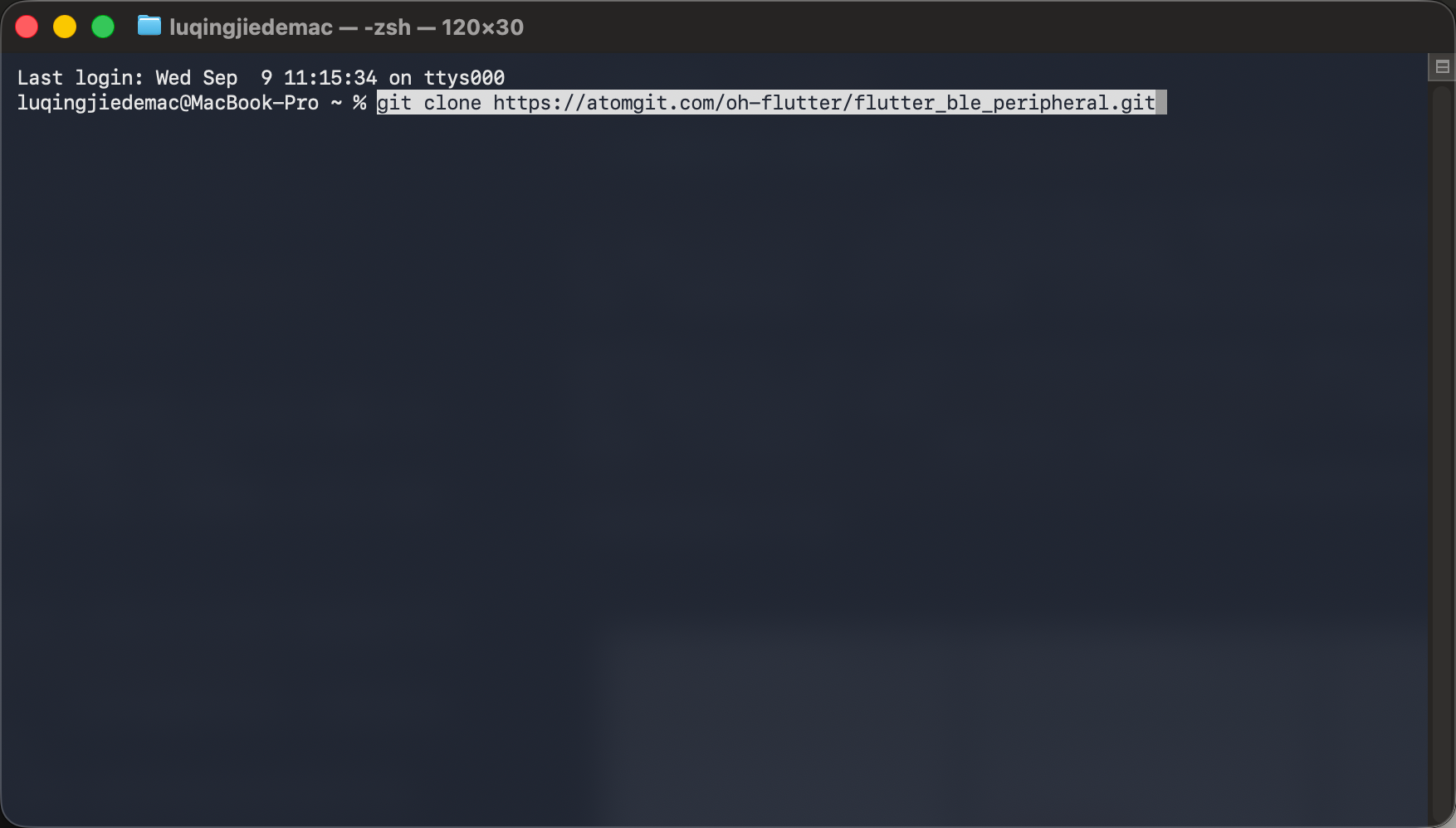
图 1:在宿主机终端输入 AtomGit 仓库拉取命令。
3.3 在仓库根目录创建适配分支
接着在 flutter_ble_peripheral/ 根目录创建分支。分支名统一使用 feat/ohos_库名称_版本号,库名称取 pubspec.yaml 的 name,版本号取此次适配的基线版本。本例为:
bash
git switch -c feat/ohos_flutter_ble_peripheral_3.1.0
git branch --show-current
如果该分支已存在,使用 git switch feat/ohos_flutter_ble_peripheral_3.1.0 切换即可。
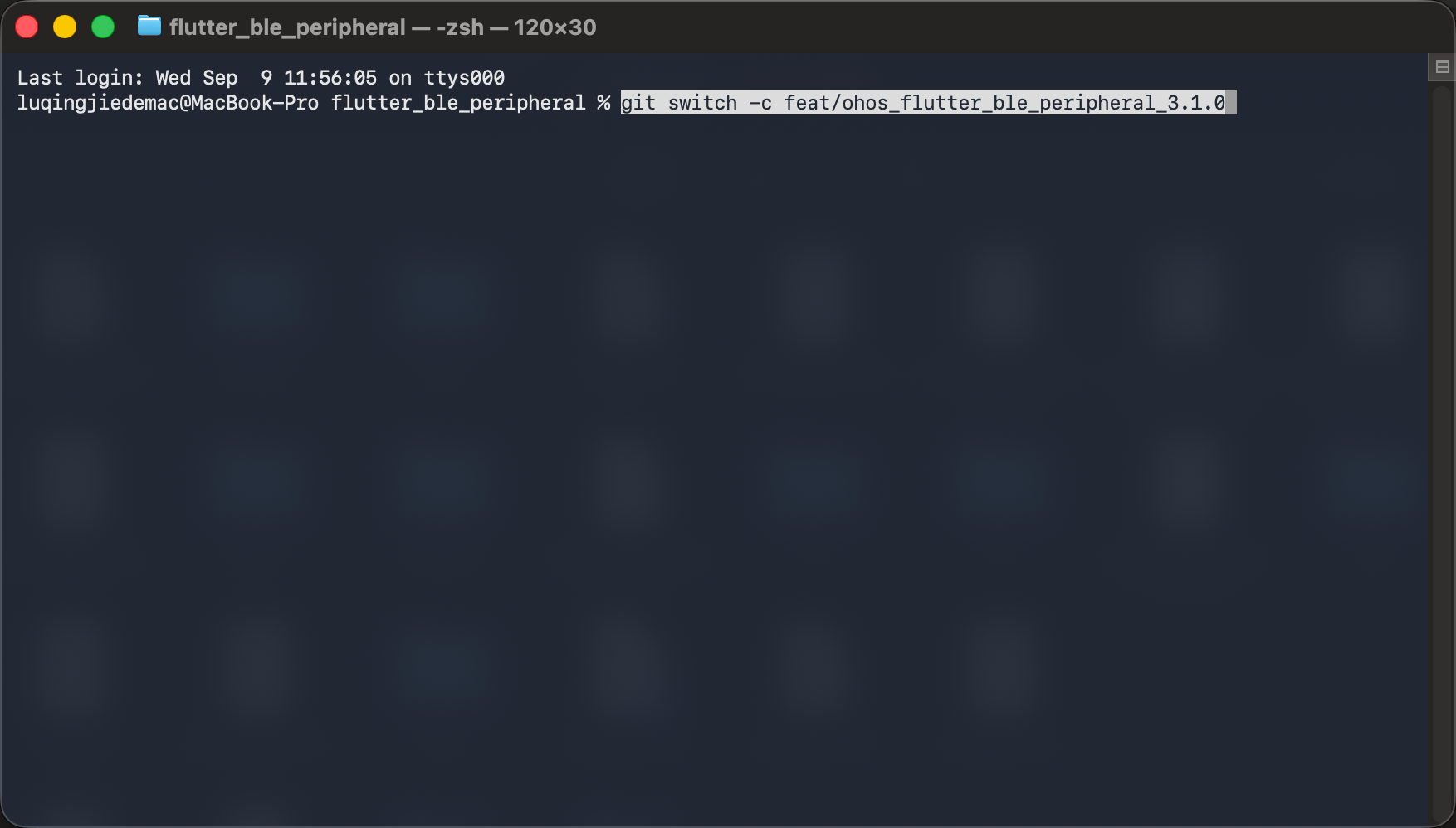
图 2:在 flutter_ble_peripheral 仓库根目录输入适配分支创建命令。
3.4 自动补全 OHOS 适配结构
分支创建后,仍在同一个插件根目录执行结构补全。以下命令适用于尚无 ohos/ 目录的既有 Flutter 平台插件:
bash
flutter create --template=plugin --platforms=ohos --project-name flutter_ble_peripheral .
git status --short
git diff -- pubspec.yaml lib example--template=plugin指定插件模板。--platforms=ohos指定需要补全的平台。--project-name flutter_ble_peripheral使用 Dart 包名,避免当前目录重命名后生成错误的包名。- 最后的
.表示在当前插件目录补全工程,不是另建一层flutter_ble_peripheral/。
该命令生成 OHOS 平台脚手架,业务逻辑需要在 ArkTS 中实现。生成后通过 diff 检查 pubspec.yaml、lib/ 和 example/ 的变化,保留已有 API、其他平台注册项及依赖配置。不同 Flutter OH 版本生成的模板可能略有差异。
如果生成后 example/ohos/ 仍不存在,进入已有示例应用补全平台:
bash
cd example
flutter create --platforms=ohos .
cd ..
本地适配工作区已经包含 ohos/ 和 example/ohos/,直接运行示例时可以跳过结构补全。新建插件则使用 flutter create --org com.nutpi --template=plugin --platforms=ohos flutter_ble_peripheral;已有插件使用上面的 . 在当前目录补全。
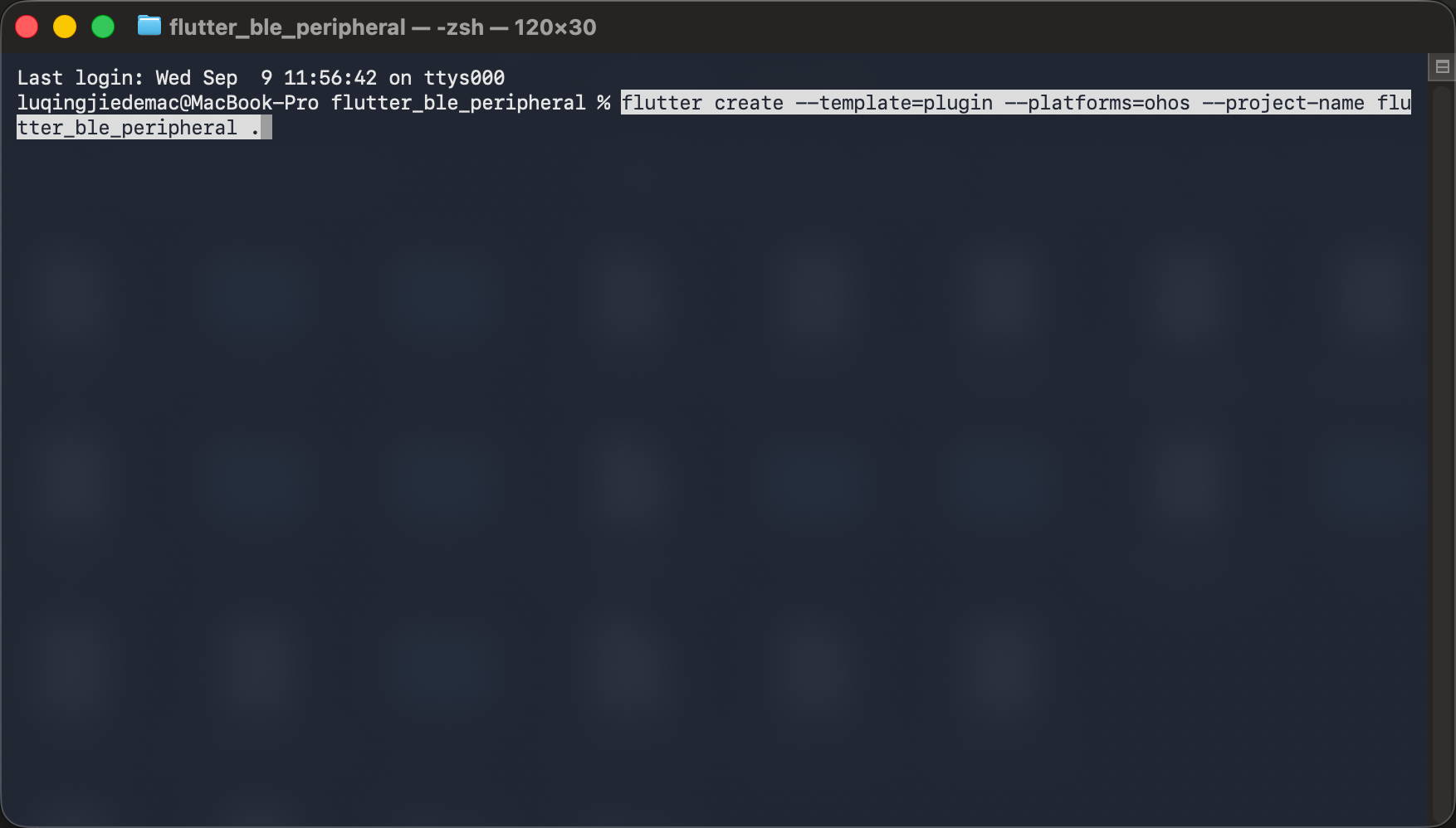
图 3:在插件根目录输入 OHOS 结构补全命令。
3.5 适配后的项目目录
适配后的关键目录如下:
text
flutter_ble_peripheral/
├── lib/
│   ├── flutter_ble_peripheral.dart
│   └── src/
│       ├── flutter_ble_peripheral.dart
│       └── core/
│           └── models/
│               ├── advertise_data_core.dart
│               └── gatt_server_settings.dart
├── ohos/
│   ├── src/
│   │   └── main/
│   │       ├── ets/
│   │       │   └── components/
│   │       │       └── plugin/
│   │       │           ├── FlutterBlePeripheralPlugin.ets
│   │       │           └── BlePeripheralManager.ets
│   │       └── module.json5
│   ├── index.ets
│   └── oh-package.json5
├── example/
│   ├── lib/
│   │   └── main.dart
│   └── ohos/
│       ├── entry/
│       │   └── src/
│       │       └── main/
│       │           └── module.json5
│       └── build-profile.json5
├── pubspec.yaml
├── README.OpenHarmony_CN.md
├── README.OpenHarmony.md
├── CHANGELOG.OpenHarmony.md
└── test/
项目根目录如下,其中包含 ohos/、example/ 及实际保留的说明文件;交付文档清单见第六节:
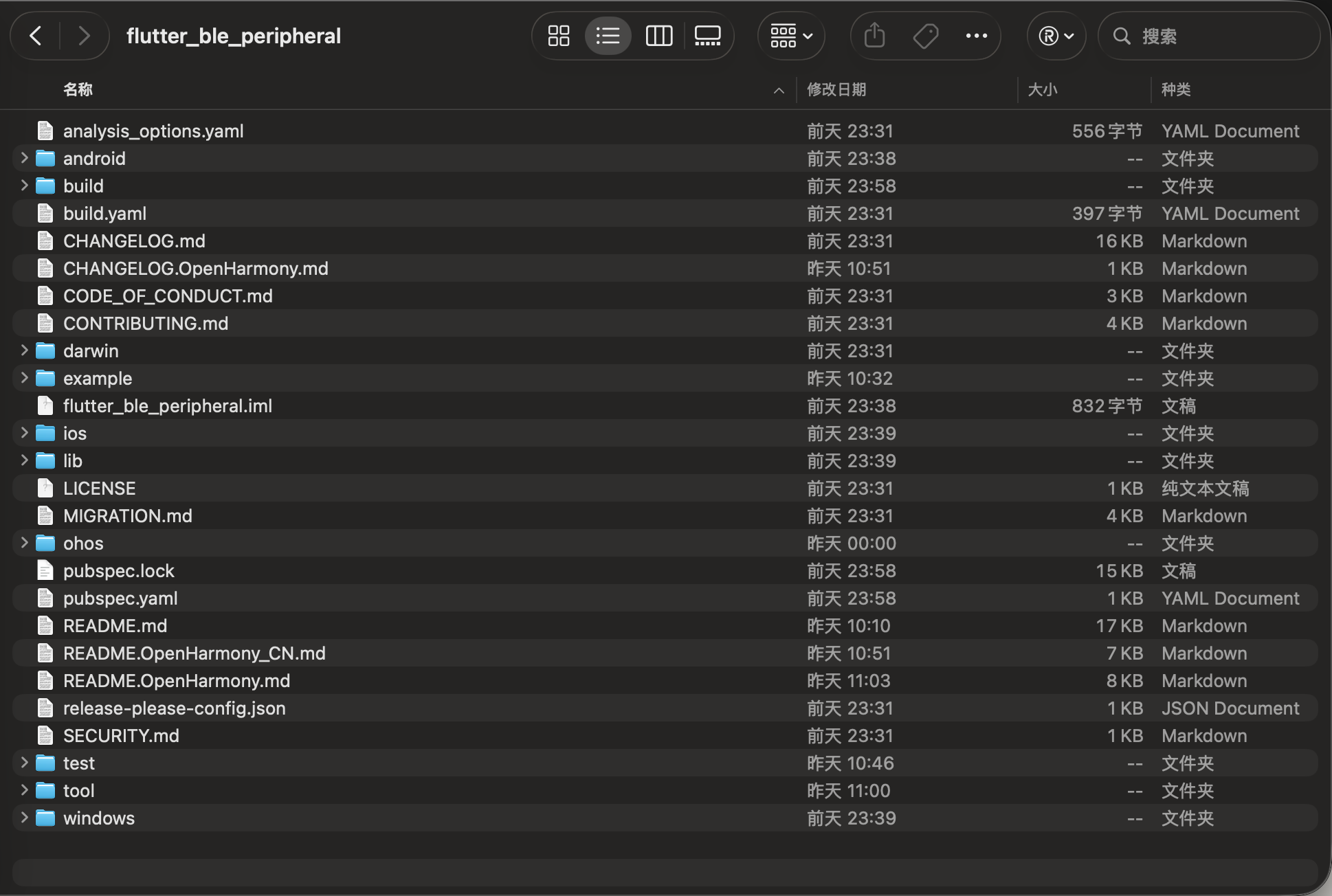
图 4:适配后的 flutter_ble_peripheral 项目根目录。
| 文件 | 主要职责 |
|---|---|
lib/flutter_ble_peripheral.dart |
提供业务公开 API |
lib/src/flutter_ble_peripheral.dart |
实现平台协议或数据模型 |
lib/src/core/models/advertise_data_core.dart |
实现平台协议或数据模型 |
lib/src/core/models/gatt_server_settings.dart |
实现平台协议或数据模型 |
ohos/src/main/ets/components/plugin/FlutterBlePeripheralPlugin.ets |
注册通道并实现 OHOS 原生能力 |
ohos/src/main/module.json5 |
声明 HAR 模块和权限 |
example/lib/main.dart |
演示接口调用与结果显示 |
四、Dart 接口与通道分析
OHOS 实现需要遵循 Dart 层已有的方法、参数和回调约定。先阅读 lib/flutter_ble_peripheral.dart、lib/src/flutter_ble_peripheral.dart、lib/src/core/models/advertise_data_core.dart、lib/src/core/models/gatt_server_settings.dart,再在 ohos/src/main/ets/components/plugin/FlutterBlePeripheralPlugin.ets 中实现对应的原生调用。适配其他已有平台的插件时,也应保留其公开接口和其他平台实现。
本例的对应关系如下:
| Dart 入口或模型 | 通道协议 | OHOS 实现 | 应保持的行为 |
|---|---|---|---|
start(...) / stop() |
start / stop |
BLE 广播与可选 GATT 服务 | 返回 PeripheralBluetoothState |
sendData(...) |
sendData |
按 Central 排队 notify/indicate | 需指定或唯一可通知特征且已订阅 |
requestPermission() |
requestPermission |
ACCESS_BLUETOOTH 运行时授权 | 权限结果不同于蓝牙开关 |
| 状态/MTU/写入/订阅流 | 四条 EventChannel | 原生 GATT 与蓝牙回调 | 保持状态索引和字节类型 |
原生端需要保持方法名、参数键和返回类型一致,不能只保留方法名称而改变业务语义。
4.1 跨端架构与调用时序
MethodChannel 的名称为 dev.steenbakker.flutter_ble_peripheral/ble_state。四条 EventChannel 分别以 ble_mtu_changed、ble_state_changed、ble_data_received 和 ble_subscription_changed 结尾。原始写入流由详细写入流映射,整体与逐特征订阅也共享底层流,避免各自覆盖原生监听。
#mermaid-svg-9mxETpC9OQnckFSg{font-family:"trebuchet ms",verdana,arial,sans-serif;font-size:16px;fill:#333;}@keyframes edge-animation-frame{from{stroke-dashoffset:0;}}@keyframes dash{to{stroke-dashoffset:0;}}#mermaid-svg-9mxETpC9OQnckFSg .edge-animation-slow{stroke-dasharray:9,5!important;stroke-dashoffset:900;animation:dash 50s linear infinite;stroke-linecap:round;}#mermaid-svg-9mxETpC9OQnckFSg .edge-animation-fast{stroke-dasharray:9,5!important;stroke-dashoffset:900;animation:dash 20s linear infinite;stroke-linecap:round;}#mermaid-svg-9mxETpC9OQnckFSg .error-icon{fill:#552222;}#mermaid-svg-9mxETpC9OQnckFSg .error-text{fill:#552222;stroke:#552222;}#mermaid-svg-9mxETpC9OQnckFSg .edge-thickness-normal{stroke-width:1px;}#mermaid-svg-9mxETpC9OQnckFSg .edge-thickness-thick{stroke-width:3.5px;}#mermaid-svg-9mxETpC9OQnckFSg .edge-pattern-solid{stroke-dasharray:0;}#mermaid-svg-9mxETpC9OQnckFSg .edge-thickness-invisible{stroke-width:0;fill:none;}#mermaid-svg-9mxETpC9OQnckFSg .edge-pattern-dashed{stroke-dasharray:3;}#mermaid-svg-9mxETpC9OQnckFSg .edge-pattern-dotted{stroke-dasharray:2;}#mermaid-svg-9mxETpC9OQnckFSg .marker{fill:#333333;stroke:#333333;}#mermaid-svg-9mxETpC9OQnckFSg .marker.cross{stroke:#333333;}#mermaid-svg-9mxETpC9OQnckFSg svg{font-family:"trebuchet ms",verdana,arial,sans-serif;font-size:16px;}#mermaid-svg-9mxETpC9OQnckFSg p{margin:0;}#mermaid-svg-9mxETpC9OQnckFSg .label{font-family:"trebuchet ms",verdana,arial,sans-serif;color:#333;}#mermaid-svg-9mxETpC9OQnckFSg .cluster-label text{fill:#333;}#mermaid-svg-9mxETpC9OQnckFSg .cluster-label span{color:#333;}#mermaid-svg-9mxETpC9OQnckFSg .cluster-label span p{background-color:transparent;}#mermaid-svg-9mxETpC9OQnckFSg .label text,#mermaid-svg-9mxETpC9OQnckFSg span{fill:#333;color:#333;}#mermaid-svg-9mxETpC9OQnckFSg .node rect,#mermaid-svg-9mxETpC9OQnckFSg .node circle,#mermaid-svg-9mxETpC9OQnckFSg .node ellipse,#mermaid-svg-9mxETpC9OQnckFSg .node polygon,#mermaid-svg-9mxETpC9OQnckFSg .node path{fill:#ECECFF;stroke:#9370DB;stroke-width:1px;}#mermaid-svg-9mxETpC9OQnckFSg .rough-node .label text,#mermaid-svg-9mxETpC9OQnckFSg .node .label text,#mermaid-svg-9mxETpC9OQnckFSg .image-shape .label,#mermaid-svg-9mxETpC9OQnckFSg .icon-shape .label{text-anchor:middle;}#mermaid-svg-9mxETpC9OQnckFSg .node .katex path{fill:#000;stroke:#000;stroke-width:1px;}#mermaid-svg-9mxETpC9OQnckFSg .rough-node .label,#mermaid-svg-9mxETpC9OQnckFSg .node .label,#mermaid-svg-9mxETpC9OQnckFSg .image-shape .label,#mermaid-svg-9mxETpC9OQnckFSg .icon-shape .label{text-align:center;}#mermaid-svg-9mxETpC9OQnckFSg .node.clickable{cursor:pointer;}#mermaid-svg-9mxETpC9OQnckFSg .root .anchor path{fill:#333333!important;stroke-width:0;stroke:#333333;}#mermaid-svg-9mxETpC9OQnckFSg .arrowheadPath{fill:#333333;}#mermaid-svg-9mxETpC9OQnckFSg .edgePath .path{stroke:#333333;stroke-width:2.0px;}#mermaid-svg-9mxETpC9OQnckFSg .flowchart-link{stroke:#333333;fill:none;}#mermaid-svg-9mxETpC9OQnckFSg .edgeLabel{background-color:rgba(232,232,232, 0.8);text-align:center;}#mermaid-svg-9mxETpC9OQnckFSg .edgeLabel p{background-color:rgba(232,232,232, 0.8);}#mermaid-svg-9mxETpC9OQnckFSg .edgeLabel rect{opacity:0.5;background-color:rgba(232,232,232, 0.8);fill:rgba(232,232,232, 0.8);}#mermaid-svg-9mxETpC9OQnckFSg .labelBkg{background-color:rgba(232, 232, 232, 0.5);}#mermaid-svg-9mxETpC9OQnckFSg .cluster rect{fill:#ffffde;stroke:#aaaa33;stroke-width:1px;}#mermaid-svg-9mxETpC9OQnckFSg .cluster text{fill:#333;}#mermaid-svg-9mxETpC9OQnckFSg .cluster span{color:#333;}#mermaid-svg-9mxETpC9OQnckFSg div.mermaidTooltip{position:absolute;text-align:center;max-width:200px;padding:2px;font-family:"trebuchet ms",verdana,arial,sans-serif;font-size:12px;background:hsl(80, 100%, 96.2745098039%);border:1px solid #aaaa33;border-radius:2px;pointer-events:none;z-index:100;}#mermaid-svg-9mxETpC9OQnckFSg .flowchartTitleText{text-anchor:middle;font-size:18px;fill:#333;}#mermaid-svg-9mxETpC9OQnckFSg rect.text{fill:none;stroke-width:0;}#mermaid-svg-9mxETpC9OQnckFSg .icon-shape,#mermaid-svg-9mxETpC9OQnckFSg .image-shape{background-color:rgba(232,232,232, 0.8);text-align:center;}#mermaid-svg-9mxETpC9OQnckFSg .icon-shape p,#mermaid-svg-9mxETpC9OQnckFSg .image-shape p{background-color:rgba(232,232,232, 0.8);padding:2px;}#mermaid-svg-9mxETpC9OQnckFSg .icon-shape .label rect,#mermaid-svg-9mxETpC9OQnckFSg .image-shape .label rect{opacity:0.5;background-color:rgba(232,232,232, 0.8);fill:rgba(232,232,232, 0.8);}#mermaid-svg-9mxETpC9OQnckFSg .label-icon{display:inline-block;height:1em;overflow:visible;vertical-align:-0.125em;}#mermaid-svg-9mxETpC9OQnckFSg .node .label-icon path{fill:currentColor;stroke:revert;stroke-width:revert;}#mermaid-svg-9mxETpC9OQnckFSg :root{--mermaid-font-family:"trebuchet ms",verdana,arial,sans-serif;} Flutter 页面
Dart 对外 API
MethodChannel dev.steenbakker.flutter_ble_peripheral/ble_state
ArkTS FlutterBlePeripheralPlugin
ConnectivityKit ble 与 access
EventChannel 与方法结果
4.1.1 一次完整启动广播的时序
独立 Central BLE 协议栈 OHOS 插件与 Manager FlutterBlePeripheral Flutter 页面 独立 Central BLE 协议栈 OHOS 插件与 Manager FlutterBlePeripheral Flutter 页面 #mermaid-svg-H7WDti39y7modtfV{font-family:"trebuchet ms",verdana,arial,sans-serif;font-size:16px;fill:#333;}@keyframes edge-animation-frame{from{stroke-dashoffset:0;}}@keyframes dash{to{stroke-dashoffset:0;}}#mermaid-svg-H7WDti39y7modtfV .edge-animation-slow{stroke-dasharray:9,5!important;stroke-dashoffset:900;animation:dash 50s linear infinite;stroke-linecap:round;}#mermaid-svg-H7WDti39y7modtfV .edge-animation-fast{stroke-dasharray:9,5!important;stroke-dashoffset:900;animation:dash 20s linear infinite;stroke-linecap:round;}#mermaid-svg-H7WDti39y7modtfV .error-icon{fill:#552222;}#mermaid-svg-H7WDti39y7modtfV .error-text{fill:#552222;stroke:#552222;}#mermaid-svg-H7WDti39y7modtfV .edge-thickness-normal{stroke-width:1px;}#mermaid-svg-H7WDti39y7modtfV .edge-thickness-thick{stroke-width:3.5px;}#mermaid-svg-H7WDti39y7modtfV .edge-pattern-solid{stroke-dasharray:0;}#mermaid-svg-H7WDti39y7modtfV .edge-thickness-invisible{stroke-width:0;fill:none;}#mermaid-svg-H7WDti39y7modtfV .edge-pattern-dashed{stroke-dasharray:3;}#mermaid-svg-H7WDti39y7modtfV .edge-pattern-dotted{stroke-dasharray:2;}#mermaid-svg-H7WDti39y7modtfV .marker{fill:#333333;stroke:#333333;}#mermaid-svg-H7WDti39y7modtfV .marker.cross{stroke:#333333;}#mermaid-svg-H7WDti39y7modtfV svg{font-family:"trebuchet ms",verdana,arial,sans-serif;font-size:16px;}#mermaid-svg-H7WDti39y7modtfV p{margin:0;}#mermaid-svg-H7WDti39y7modtfV .actor{stroke:hsl(259.6261682243, 59.7765363128%, 87.9019607843%);fill:#ECECFF;}#mermaid-svg-H7WDti39y7modtfV text.actor>tspan{fill:black;stroke:none;}#mermaid-svg-H7WDti39y7modtfV .actor-line{stroke:hsl(259.6261682243, 59.7765363128%, 87.9019607843%);}#mermaid-svg-H7WDti39y7modtfV .innerArc{stroke-width:1.5;stroke-dasharray:none;}#mermaid-svg-H7WDti39y7modtfV .messageLine0{stroke-width:1.5;stroke-dasharray:none;stroke:#333;}#mermaid-svg-H7WDti39y7modtfV .messageLine1{stroke-width:1.5;stroke-dasharray:2,2;stroke:#333;}#mermaid-svg-H7WDti39y7modtfV #arrowhead path{fill:#333;stroke:#333;}#mermaid-svg-H7WDti39y7modtfV .sequenceNumber{fill:white;}#mermaid-svg-H7WDti39y7modtfV #sequencenumber{fill:#333;}#mermaid-svg-H7WDti39y7modtfV #crosshead path{fill:#333;stroke:#333;}#mermaid-svg-H7WDti39y7modtfV .messageText{fill:#333;stroke:none;}#mermaid-svg-H7WDti39y7modtfV .labelBox{stroke:hsl(259.6261682243, 59.7765363128%, 87.9019607843%);fill:#ECECFF;}#mermaid-svg-H7WDti39y7modtfV .labelText,#mermaid-svg-H7WDti39y7modtfV .labelText>tspan{fill:black;stroke:none;}#mermaid-svg-H7WDti39y7modtfV .loopText,#mermaid-svg-H7WDti39y7modtfV .loopText>tspan{fill:black;stroke:none;}#mermaid-svg-H7WDti39y7modtfV .loopLine{stroke-width:2px;stroke-dasharray:2,2;stroke:hsl(259.6261682243, 59.7765363128%, 87.9019607843%);fill:hsl(259.6261682243, 59.7765363128%, 87.9019607843%);}#mermaid-svg-H7WDti39y7modtfV .note{stroke:#aaaa33;fill:#fff5ad;}#mermaid-svg-H7WDti39y7modtfV .noteText,#mermaid-svg-H7WDti39y7modtfV .noteText>tspan{fill:black;stroke:none;}#mermaid-svg-H7WDti39y7modtfV .activation0{fill:#f4f4f4;stroke:#666;}#mermaid-svg-H7WDti39y7modtfV .activation1{fill:#f4f4f4;stroke:#666;}#mermaid-svg-H7WDti39y7modtfV .activation2{fill:#f4f4f4;stroke:#666;}#mermaid-svg-H7WDti39y7modtfV .actorPopupMenu{position:absolute;}#mermaid-svg-H7WDti39y7modtfV .actorPopupMenuPanel{position:absolute;fill:#ECECFF;box-shadow:0px 8px 16px 0px rgba(0,0,0,0.2);filter:drop-shadow(3px 5px 2px rgb(0 0 0 / 0.4));}#mermaid-svg-H7WDti39y7modtfV .actor-man line{stroke:hsl(259.6261682243, 59.7765363128%, 87.9019607843%);fill:#ECECFF;}#mermaid-svg-H7WDti39y7modtfV .actor-man circle,#mermaid-svg-H7WDti39y7modtfV line{stroke:hsl(259.6261682243, 59.7765363128%, 87.9019607843%);fill:#ECECFF;stroke-width:2px;}#mermaid-svg-H7WDti39y7modtfV :root{--mermaid-font-family:"trebuchet ms",verdana,arial,sans-serif;} requestPermission 与状态检查 请求权限、检查蓝牙 权限与开关结果 监听数据和状态流 EventChannel onListen start(advertiseData, gattServer) start 建立 GATT 服务并广播 ready 连接、订阅、写入 GATT 回调 连接、订阅与写入事件 Stream 回调 sendData(bytes) sendData 按 Central 排队 notify 或 indicate 特征数据 stop() stop 停止广播并关闭 GATT
4.2 状态模型与 GATT 数据
| PeripheralBluetoothState | 协议值 | 含义 |
|---|---|---|
| granted / denied / permanentlyDenied | 0 / 1 / 2 | 权限状态 |
| restricted / limited | 3 / 4 | 保留其他平台索引 |
| turnedOff / unsupported / unknown / ready | 5 / 6 / 7 / 8 | 蓝牙与调用结果 |
另一组 PeripheralState 索引为 unknown 0、unsupported 1、unauthorized 2、poweredOff 3、locationServicesDisabled 4、idle 5、advertising 6、connected 7、shouldShowRequestPermissionRationale 8。两组枚举不可混用。Dart 使用 valuesindex 解码,越界整数不会自动兜底。
dart
const AdvertiseDataCore({
    this.serviceUuid,
    this.serviceUuids,
    this.localName,
    this.manufacturerId,
    this.manufacturerData,
    this.includeTxPowerLevel = false,
  });
广播模型含服务 UUID、厂商数据和 TX Power 标记。GattServerSettings 一次配置一个服务,默认提供 Nordic UART TX/RX 特征;自定义 characteristics 会替换默认特征对。
4.3 公开 API 与平台接口
FlutterBlePeripheral 是单例。start 参数要求 advertiseData,可选 gattServer;服务 UUID 可以由 GATT 配置提供,也可沿用单个广播 UUID。Dart 会检查特征属性非空、UUID 不重复。sendData、权限检查与状态查询保持现有接口:
dart
Future<void> sendData(Uint8List data, {String? characteristicUuid}) async {
  await _methodChannel.invokeMethod('sendData', <String, dynamic>{
    'data': data,
    'characteristicUuid': characteristicUuid,
  });
}

Future<PeripheralBluetoothState> stop() async {
  final response = await _methodChannel.invokeMethod<int>('stop');
  return response == null
      ? PeripheralBluetoothState.unknown
      : PeripheralBluetoothState.values[response];
}
4.4 Dart 通道协议分析
4.4.1 通道名称必须两端完全一致
dart
const methodChannel = MethodChannel('dev.steenbakker.flutter_ble_peripheral/ble_state');
const mtuChannel = EventChannel('dev.steenbakker.flutter_ble_peripheral/ble_mtu_changed');
const stateChannel = EventChannel('dev.steenbakker.flutter_ble_peripheral/ble_state_changed');
const dataChannel = EventChannel('dev.steenbakker.flutter_ble_peripheral/ble_data_received');
const subscriptionChannel = EventChannel('dev.steenbakker.flutter_ble_peripheral/ble_subscription_changed');
通道名称属于跨语言协议。Dart 和 ArkTS 任何一端拼写不一致,都会出现"方法未实现"或"调用找不到插件"等问题。
4.4.2 启动广播并解析写入事件
dart
Stream<GattWrite> get onGattWrite {
  _gattWrites ??= _dataReceivedEventChannel.receiveBroadcastStream().map(
        (dynamic event) => GattWrite(
          characteristicUuid:
              (event as Map)['characteristicUuid'] as String? ?? '',
          data: event['data'] as Uint8List,
        ),
      );
  return _gattWrites!;
}

Stream<Uint8List> get onDataReceived {
  _dataReceived ??= onGattWrite.map((write) => write.data);
  return _dataReceived!;
}
onGattWrite 返回 characteristicUuid 和 Uint8List;onDataReceived 只取字节,两者共享同一底层数据流。start 序列化 AdvertiseDataCore 后附带 manufacturerDataBytes,并将有效 GATT 特征转换为 gattCharacteristics。Android/Darwin/Windows 专属设置不在 OHOS 应用。
4.4.3 共享订阅事件与停止广播
dart
Stream<bool> get onSubscriptionChanged {
  _subscriptionChanged ??= _nativeSubscriptions
      .map((dynamic event) => (event as Map)['anySubscribed'] as bool)
      .distinct();
  return _subscriptionChanged!;
}

Stream<GattSubscription> get onCharacteristicSubscriptionChanged {
  _characteristicSubscriptions ??= _nativeSubscriptions.map(
    (dynamic event) => GattSubscription(
      characteristicUuid:
          (event as Map)['characteristicUuid'] as String? ?? '',
      subscribed: event['subscribed'] as bool? ?? false,
    ),
  );
  return _characteristicSubscriptions!;
}
两种订阅流共用 _nativeSubscriptions。取消 Dart 事件监听只移除对应观察者,不会自动停止广播;业务结束外设服务时还需调用 stop()。
五、补全 OHOS 原生实现与工程配置
5.1 在 FlutterBlePeripheralPlugin.ets 中实现原生能力
业务层沿用已有 API,原生侧在 FlutterBlePeripheralPlugin 中接入 ConnectivityKit ble 与 access,通过 Flutter 通道回传结果。
下面列出类中的主要成员和方法,完整文件还包含 getUniqueClassName() 等插件接口;各段均为核心摘录,需要结合完整类使用。
原生插件位于:
text
ohos/src/main/ets/components/plugin/FlutterBlePeripheralPlugin.ets5.1.1 引入 Flutter 和 HarmonyOS 能力
typescript
import {
  AbilityAware,
  AbilityPluginBinding,
  EventChannel,
  EventSink,
  FlutterPlugin,
  FlutterPluginBinding,
  MethodCall,
  MethodCallHandler,
  MethodChannel,
  MethodResult,
} from '@ohos/flutter_ohos';
import {
  abilityAccessCtrl,
  common,
  PermissionRequestResult,
  Permissions,
  Want,
} from '@kit.AbilityKit';
import { access } from '@kit.ConnectivityKit';
import { BusinessError } from '@kit.BasicServicesKit';
import BlePeripheralManager, {
  BlePeripheralError,
  PeripheralBluetoothState,
} from './BlePeripheralManager';
FlutterPlugin 负责接入 Flutter Engine 生命周期,MethodChannel 接收 Dart 命令;系统能力由 ConnectivityKit ble 与 access 提供。错误和事件处理以对应方法实现为准。
5.1.2 连接 Flutter Engine 和宿主 Ability
typescript
private methodChannel: MethodChannel | null = null;
private mtuChannel: EventChannel | null = null;
private stateChannel: EventChannel | null = null;
private dataChannel: EventChannel | null = null;
private subscriptionChannel: EventChannel | null = null;
private applicationContext: common.Context | null = null;
private abilityBinding: AbilityPluginBinding | null = null;
private manager: BlePeripheralManager | null = null;


onAttachedToEngine(binding: FlutterPluginBinding): void {
  this.applicationContext = binding.getApplicationContext();
  this.manager = new BlePeripheralManager((): boolean => this.hasBluetoothPermission());
  const messenger = binding.getBinaryMessenger();

  this.methodChannel = new MethodChannel(messenger, METHOD_CHANNEL);
  this.methodChannel.setMethodCallHandler(this);

  this.mtuChannel = new EventChannel(messenger, MTU_CHANNEL);
  this.mtuChannel.setStreamHandler({
    onListen: (_arguments: Object, sink: EventSink): void =>
      this.manager?.setMtuSink(sink),
    onCancel: (_arguments: Object): void => this.manager?.setMtuSink(null),
  });

  this.stateChannel = new EventChannel(messenger, STATE_CHANNEL);
  this.stateChannel.setStreamHandler({
    onListen: (_arguments: Object, sink: EventSink): void =>
      this.manager?.setStateSink(sink),
    onCancel: (_arguments: Object): void => this.manager?.setStateSink(null),
  });

  this.dataChannel = new EventChannel(messenger, DATA_CHANNEL);
  this.dataChannel.setStreamHandler({
    onListen: (_arguments: Object, sink: EventSink): void =>
      this.manager?.setDataSink(sink),
    onCancel: (_arguments: Object): void => this.manager?.setDataSink(null),
  });

  this.subscriptionChannel = new EventChannel(messenger, SUBSCRIPTION_CHANNEL);
  this.subscriptionChannel.setStreamHandler({
    onListen: (_arguments: Object, sink: EventSink): void =>
      this.manager?.setSubscriptionSink(sink),
    onCancel: (_arguments: Object): void =>
      this.manager?.setSubscriptionSink(null),
  });
}

onAttachedToAbility(binding: AbilityPluginBinding): void {
  this.abilityBinding = binding;
  this.manager?.publishState();
}

onDetachedFromAbility(): void {
  this.abilityBinding = null;
}
Engine 创建 BlePeripheralManager,注册一个方法通道与四个事件通道。各事件 onCancel 只将对应 sink 置空,广播生命周期由 start/stop 管理;Ability 用于授权和设置跳转。
5.1.3 开始广播并配置 GATT
实际广播和 GATT 状态由 BlePeripheralManager.ets 管理:
typescript
start(call: MethodCall, hasPermission: boolean): PeripheralBluetoothState {
  if (!hasPermission) {
    return PeripheralBluetoothState.DENIED;
  }
  if (!this.isSupported()) {
    return PeripheralBluetoothState.UNSUPPORTED;
  }
  if (!this.isBluetoothOn()) {
    return PeripheralBluetoothState.TURNED_OFF;
  }

  this.stopNativeResources();
  try {
    const gattServiceUuid = this.readOptionalString(call.argument('gattServiceUuid'));
    if (gattServiceUuid !== null) {
      this.createGattServer(call, this.normalizeUuid(gattServiceUuid));
    }
    const settings: ble.AdvertiseSetting = {
      connectable: this.gattServer !== null,
    };
    const data = this.createAdvertiseData(call);
    ble.startAdvertising(settings, data);
    this.advertising = true;
    this.publishState();
    return PeripheralBluetoothState.READY;
  } catch (error) {
    this.closeGattServer();
    this.publishState();
    throw this.platformError('START_FAILED', 'Failed to start BLE advertising.', error);
  }
}

private createAdvertiseData(call: MethodCall): ble.AdvertiseData {
  const serviceUuids = this.readStringArray(call.argument('serviceUuids'));
  if (serviceUuids.length === 0) {
    const serviceUuid = this.readOptionalString(call.argument('serviceUuid'));
    if (serviceUuid !== null) {
      serviceUuids.push(this.normalizeUuid(serviceUuid));
    }
  } else {
    for (let index = 0; index < serviceUuids.length; index += 1) {
      serviceUuids[index] = this.normalizeUuid(serviceUuids[index]);
    }
  }

  const manufactureData: Array<ble.ManufactureData> = [];
  const manufacturerBytes = this.readOptionalBytes(
    call.argument('manufacturerDataBytes'));
  if (manufacturerBytes !== null) {
    const manufacturerId = this.readOptionalNumber(call.argument('manufacturerId'));
    if (manufacturerId === null || !Number.isInteger(manufacturerId) ||
      manufacturerId < 0 || manufacturerId > 0xffff) {
      throw new BlePeripheralError(
        'INVALID_ARGUMENT', 'manufacturerData needs a manufacturerId from 0 to 65535.');
    }
    manufactureData.push({
      manufactureId: Math.trunc(manufacturerId),
      manufactureValue: manufacturerBytes.buffer as ArrayBuffer,
    });
  }

  return {
    serviceUuids: serviceUuids,
    manufactureData: manufactureData,
    serviceData: [],
    includeTxPower: Boolean(call.argument('includeTxPowerLevel') ?? false),
  };
}
未授权、蓝牙关闭等前置条件返回状态码;只有广播调用成功后设置 advertising。createGattServer 建立服务、特征和 CCCD,并注册读写、连接与 MTU 回调。一个服务支持多个特征,prepared write 明确返回 request not supported。
5.1.4 按订阅发送并停止原生资源
typescript
sendData(data: Uint8Array, characteristicUuid: string | null): Promise<void> {
  const server = this.gattServer;
  const serviceUuid = this.serviceUuid;
  if (server === null || serviceUuid === null) {
    return Promise.reject(new BlePeripheralError(
      'NOT_INITIALIZED', 'No GATT server is running.'));
  }

  let config: CharacteristicConfig | undefined;
  if (characteristicUuid !== null) {
    const uuid = this.normalizeUuidOrNull(characteristicUuid);
    config = uuid === null ? undefined : this.characteristics.get(uuid);
    if (config === undefined ||
      (config.properties & (PROPERTY_NOTIFY | PROPERTY_INDICATE)) === 0) {
      return Promise.reject(new BlePeripheralError(
        'SEND_FAILED', 'The GATT service does not notify on that characteristic.'));
    }
  } else {
    const notifying = Array.from(this.characteristics.values()).filter(
      (item: CharacteristicConfig) =>
        (item.properties & (PROPERTY_NOTIFY | PROPERTY_INDICATE)) !== 0);
    if (notifying.length === 0) {
      return Promise.reject(new BlePeripheralError(
        'SEND_FAILED', 'The GATT service has no notifying characteristic.'));
    }
    if (notifying.length > 1) {
      return Promise.reject(new BlePeripheralError(
        'SEND_FAILED',
        'The GATT service has several notifying characteristics; name one.'));
    }
    config = notifying[0];
  }

  const devices = Array.from(this.subscribers.get(config.uuid)?.keys() ?? []);
  if (devices.length === 0) {
    return Promise.reject(new BlePeripheralError(
      'SEND_FAILED', 'No central is subscribed to that characteristic.'));
  }

  const payload = new Uint8Array(data.length);
  payload.set(data);
  config.value = payload;
  const uuid = config.uuid;
  const operations = devices.map((deviceId: string): Promise<void> => {
    const epoch = this.connectionEpochs.get(deviceId) ?? 0;
    const previous = this.sendQueues.get(deviceId) ?? Promise.resolve();
    const operation = previous.catch((): void => {}).then(async (): Promise<void> => {
      const mode = this.subscribers.get(uuid)?.get(deviceId) ?? 0;
      if (this.gattServer !== server || mode === 0 ||
        (this.connectionEpochs.get(deviceId) ?? 0) !== epoch) {
        throw new BlePeripheralError('SEND_FAILED', 'The central disconnected or unsubscribed.');
      }
      const notify: ble.NotifyCharacteristic = {
        serviceUuid: serviceUuid,
        characteristicUuid: uuid,
        characteristicValue: payload.buffer as ArrayBuffer,
        confirm: (mode & 1) === 0 && (mode & 2) !== 0,
      };
      try {
        await server.notifyCharacteristicChanged(deviceId, notify);
      } catch (error) {
        throw this.platformError('SEND_FAILED', 'Failed to send GATT data.', error);
      }
    });
    this.sendQueues.set(deviceId, operation);
    const cleanup = (): void => {
      if (this.sendQueues.get(deviceId) === operation) {
        this.sendQueues.delete(deviceId);
      }
    };
    operation.then(cleanup, cleanup);
    return operation;
  });
  return Promise.all(operations).then((): void => undefined);
}

private stopNativeResources(): void {
  if (this.advertising) {
    try {
      ble.stopAdvertising();
    } catch (error) {
      this.logError('Failed to stop BLE advertising', error);
    }
  }
  this.advertising = false;
  this.closeGattServer();
}
发送队列按 Central 串行化,并检查连接代次与订阅状态。CCCD 值决定 notify 或 indicate;多个可通知特征时必须传 characteristicUuid。停止服务会清理特征、连接、订阅和队列,并上报订阅取消。
5.1.5 处理 MethodChannel 命令
typescript
onMethodCall(call: MethodCall, result: MethodResult): void {
  const manager = this.manager;
  if (manager === null) {
    result.error('NOT_INITIALIZED', 'The plugin is not attached to a Flutter engine.', null);
    return;
  }

  try {
    switch (call.method) {
      case 'start':
        result.success(manager.start(call, this.hasBluetoothPermission()));
        break;
      case 'stop':
        result.success(manager.stop());
        break;
      case 'isSupported':
        result.success(manager.isSupported());
        break;
      case 'isAdvertising':
        result.success(manager.isAdvertising());
        break;
      case 'isConnected':
        result.success(manager.isConnected());
        break;
      case 'isSubscribed':
        result.success(manager.isSubscribed(
          typeof call.args === 'string' ? call.args : null));
        break;
      case 'isBluetoothOn':
        result.success(manager.isBluetoothOn());
        break;
      case 'sendData':
        this.sendData(call, result);
        break;
      case 'enableBluetooth':
        this.enableBluetooth(result);
        break;
      case 'requestPermission':
        this.requestPermission(result);
        break;
      case 'hasPermission':
        result.success(this.hasBluetoothPermission()
          ? PeripheralBluetoothState.GRANTED
          : PeripheralBluetoothState.DENIED);
        break;
      case 'openBluetoothSettings':
        this.openSettings('bluetooth_entry', 'ohos.settings.wireless', false, result);
        break;
      case 'openAppSettings':
        this.openSettings('application_info_entry',
          'ohos.settings.application.details', true, result);
        break;
      default:
        result.notImplemented();
        break;
    }
  } catch (error) {
    this.reportError(result, error);
  }
}
插件未初始化时返回 NOT_INITIALIZED,字节参数必须为 Uint8List。BlePeripheralError 保留稳定错误码,包括 START_FAILED、GATT_FAILED、SEND_FAILED、INVALID_ARGUMENT;系统异常保留原生码。权限拒绝、蓝牙关闭等可返回枚举,不能只检查 Future 是否抛错。
5.1.6 Engine 解绑时释放资源
typescript
onDetachedFromEngine(_binding: FlutterPluginBinding): void {
  this.methodChannel?.setMethodCallHandler(null);
  this.methodChannel = null;
  this.mtuChannel?.setStreamHandler(null);
  this.mtuChannel = null;
  this.stateChannel?.setStreamHandler(null);
  this.stateChannel = null;
  this.dataChannel?.setStreamHandler(null);
  this.dataChannel = null;
  this.subscriptionChannel?.setStreamHandler(null);
  this.subscriptionChannel = null;
  this.manager?.dispose();
  this.manager = null;
  this.applicationContext = null;
  this.abilityBinding = null;
}
Engine 解绑调用 manager.dispose(),停止广播、关闭 GATT 服务、解除蓝牙状态回调,并清空所有 sink。Ability 解绑只移除引用,不等同于立即停止全部蓝牙资源。
5.2 声明插件和宿主权限
HAR 已声明 ACCESS_BLUETOOTH,业务在广播前调用 requestPermission()。普通应用不能通过增加声明获得修改广播名称所需的系统级权限,因此 localName 被忽略。
5.2.1 插件 HAR 的权限
插件 ohos/src/main/module.json5 的模块配置如下:
json5
{
  "module": {
    "name": "flutter_ble_peripheral",
    "type": "har",
    "deviceTypes": [
      "default",
      "tablet"
    ],
    "requestPermissions": [
      {
        "name": "ohos.permission.ACCESS_BLUETOOTH",
        "reason": "$string:access_bluetooth_reason"
      }
    ]
  }
}
5.2.2 应用 entry 的权限
最终安装的是宿主应用。以下片段来自 example/ohos/entry/src/main/module.json5,合并时保留原有 Ability 等配置:
json5
{
  "module": {
    "requestPermissions": [
      {
        "name": "ohos.permission.INTERNET"
      }
    ]
  }
}
示例 entry 保留 INTERNET,蓝牙声明来自依赖的 HAR,构建后应核对最终合并清单。requestPermission 通过前台 Ability 请求 ACCESS_BLUETOOTH,返回 granted、denied 或 permanentlyDenied;获得权限后还要确认 isBluetoothOn。
5.3 注册并导出插件
pubspec.yaml 通过以下配置声明 OHOS 插件类:
yaml
flutter:
  plugin:
    platforms:
      ohos:
        pluginClass: FlutterBlePeripheralPlugin
插件的 ohos/index.ets 需要导出实现:
typescript
import FlutterBlePeripheralPlugin from './src/main/ets/components/plugin/FlutterBlePeripheralPlugin';
export default FlutterBlePeripheralPlugin;
执行 flutter pub get 和构建后,Flutter 工具会为应用生成插件注册代码。通常不应手工编辑 GeneratedPluginRegistrant.ets,因为下次构建可能覆盖它。
注册异常的排查步骤见第九节 MissingPluginException。
5.4 检查 example 的 OHOS 应用结构
本例的 example/ohos/build-profile.json5 应在 products 中设置版本。下面按第二节补全 compileSdkVersion、targetSdkVersion,请合并到现有工程;其中 signingConfig: "default" 需要与本机配置的签名名称一致,签名材料保留在本地。
json5
{
  "app": {
    "products": [
      {
        "name": "default",
        "signingConfig": "default",
        "compatibleSdkVersion": "5.1.0(18)",
        "runtimeOS": "HarmonyOS",
        "compileSdkVersion": "26.0.0",
        "targetSdkVersion": "26.0.0"
      }
    ]
  },
  "modules": [
    {
      "name": "entry",
      "srcPath": "./entry",
      "targets": [
        {
          "name": "default",
          "applyToProducts": [
            "default"
          ]
        }
      ]
    }
  ]
}
配置后,在 DevEco Studio 中执行一次 Sync Project 。如果 entry 模块正常识别,Project 视图中会出现 entry,并能打开 entry 模块的签名配置。
六、补全交付文件并提交适配分支
6.1 除代码外还要补全哪些文件
代码适配完成后,还需要整理安装说明、接口文档、版本记录和开源信息。接收仓库有专用模板时,按其格式填写:
| 文件 | 应写清楚的内容 |
|---|---|
README.OpenSource |
上游名称、源码地址、适配版本或提交、版权及许可证信息;按仓库模板列出第三方依赖 |
README.md |
原项目说明、OHOS 支持入口、配套 Demo 和文档链接;保留上游信息 |
README.OpenHarmony_CN.md |
简介、AtomGit 安装方式、版本对应关系、环境约束、权限、接口表、示例、已验证范围和遗留问题 |
README.OpenHarmony.md |
与中文说明对应的英文文档 |
CHANGELOG.OpenHarmony.md |
OHOS 新增能力、适配版本、兼容限制与测试范围 |
LICENSE / NOTICE |
保留上游许可证;NOTICE 按许可证和原项目要求保留或补充 |
example/README.md |
依赖方式、运行目录、签名、操作步骤与效果图;覆盖权限、广播发现、GATT 读写、订阅、通知、停止和重连 |
pubspec.yaml、ohos/oh-package.json5 |
核对包名、版本、插件注册、仓库地址、许可证和依赖 |
.gitignore |
忽略构建缓存及本机签名材料,不漏提交必要源码和配置 |
README.OpenSource 记录库本身的来源与版本。本例的包名为 flutter_ble_peripheral,版本为 3.1.0,采用 BSD-3-Clause 许可证;Flutter 和 HarmonyOS SDK 版本写入环境说明。
现有说明文件以目录树为准。README.OpenSource 等缺失交付文件按接收仓库要求补全;安装与反馈链接统一替换为本文预定的 AtomGit 地址,并在仓库创建、适配代码同步后核对。
6.2 提交前检查
提交前先完成第八节的插件、example 和真机测试,再从根目录检查改动:
bash
git branch --show-current
git diff --check
git status --short
git diff --stat
git diff
检查 diff 中的接口、平台注册和依赖变化,移除本机路径及签名信息,并使文档中的版本和分支与提交内容一致。
6.3 提交并推送到 AtomGit
文档和代码整理完成后,在 Git 仓库根目录暂存并提交。以下命令以第 6.1 节文档已经补全为前提,文件名按项目实际情况调整:
bash
git add lib ohos pubspec.yaml example test
git add README.md README.OpenSource README.OpenHarmony_CN.md
git add README.OpenHarmony.md CHANGELOG.OpenHarmony.md
git diff --cached --check
git diff --cached --stat
git diff --cached
git commit -m "feat: add OHOS support for flutter_ble_peripheral 3.1.0"
git remote -v
git branch --show-current
git push -u origin feat/ohos_flutter_ble_peripheral_3.1.0
DevEco 可能向 example/ohos/build-profile.json5 写入本机签名配置,需要在提交前从暂存内容中移除。推送时,origin 应指向自己的 AtomGit 仓库,当前分支为 feat/ohos_flutter_ble_peripheral_3.1.0。
推送后在 AtomGit 发起合并请求,说明上游来源和版本、OHOS 实现范围、依赖及权限、测试环境、操作结果、已知限制,并附 Demo 运行图。目标分支和评审流程以接收仓库要求为准。
七、使用根目录 example 演示接入
插件包自带 example/,可以直接用来调试插件和体验 BLE 广播与 GATT 通信。
7.1 本地适配时使用路径依赖
当前 example/pubspec.yaml 的依赖是:
yaml
dependencies:
  flutter:
    sdk: flutter
  flutter_ble_peripheral:
    path: ../
../ 相对于 example/pubspec.yaml 指向插件根目录,修改根目录插件后可直接联调。
7.2 通过 AtomGit 引入插件
业务应用通过 AtomGit 引入时,将 flutter_ble_peripheral 的 path 配置替换为下面的 Git 依赖。仓库同步后,将 ref 替换为实际适配提交号:
yaml
dependencies:
  flutter:
    sdk: flutter
  flutter_ble_peripheral:
    git:
      url: https://atomgit.com/oh-flutter/flutter_ble_peripheral.git
      ref: <适配提交号>
使用自己的适配版本时,先推送分支,再将 url 改为对应仓库,ref 改为 feat/ohos_flutter_ble_peripheral_3.1.0。正式发布后可固定到 tag 或 commit。
从插件根目录执行:
bash
cd example
flutter pub get
flutter pub deps
检查 example/pubspec.lock 中 flutter_ble_peripheral 的来源为 git,并核对 url、ref 和 resolved-ref。同时检查没有 dependency_overrides 或 pubspec_overrides.yaml 将其覆盖回本地依赖,确认应用使用的是 Git 依赖。
7.3 调用接口实现 BLE 广播与 GATT 通信
下面的页面可用于插件包内的 example/lib/main.dart,是便于讲解的最小页面;仓库完整 Demo 的入口和布局可能不同,第八节截图与验收步骤以仓库完整 Demo 为准。
最小页面独占外设单例,默认建立 Nordic UART 服务。发送前需要独立 Central 订阅 TX;接收结果需由该 Central 实际确认。
dart
import 'dart:async';
import 'package:flutter/material.dart';
import 'package:flutter_ble_peripheral/flutter_ble_peripheral.dart';
import 'dart:typed_data';

void main() {
  runApp(const MaterialApp(home: DemoPage()));
}

class DemoPage extends StatefulWidget {
  const DemoPage({super.key});
  @override
  State<DemoPage> createState() => _DemoPageState();
}

class _DemoPageState extends State<DemoPage> {
  String _status = '尚未操作';
  bool _busy = false;
  final _ble = FlutterBlePeripheral();
  StreamSubscription<GattWrite>? _writes;

  @override
  void initState() {
    super.initState();
    _writes = _ble.onGattWrite.listen(
      (write) => _show('${write.characteristicUuid}: ${write.data}'),
      onError: (Object error) => _show('接收失败:$error'),
    );
  }

  void _show(String value) {
    if (mounted) setState(() => _status = value);
  }

  Future<void> _run(Future<String> Function() action) async {
    if (_busy) return;
    setState(() => _busy = true);
    try {
      _show(await action());
    } catch (error) {
      _show('调用失败:$error');
    } finally {
      if (mounted) setState(() => _busy = false);
    }
  }

  @override
  void dispose() {
    unawaited(_writes?.cancel());
    unawaited(_ble.stop().then<void>((_) {}, onError: (Object error) {
      debugPrint('停止外设失败:$error');
    }));
    super.dispose();
  }

  @override
  Widget build(BuildContext context) {
    return Scaffold(
      appBar: AppBar(title: const Text('BLE 外设')),
      body: ListView(
        padding: const EdgeInsets.all(16),
        children: [
          Text(_status),
          const SizedBox(height: 16),
            FilledButton(onPressed: _busy ? null : () => _run(() async {
              final permission = await _ble.requestPermission();
              if (permission != PeripheralBluetoothState.granted && permission != PeripheralBluetoothState.ready) {
                return '权限:$permission';
              }
              if (!await _ble.isBluetoothOn) return '请先在系统设置开启蓝牙';
              final state = await _ble.start(
                advertiseData: const AdvertiseDataCore(serviceUuid: '6e400001-b5a3-f393-e0a9-e50e24dcca9e'),
                gattServer: const GattServerSettings(),
              );
              return '启动结果:$state';
            }), child: const Text('开始广播')),
            FilledButton(onPressed: _busy ? null : () => _run(() async {
              await _ble.sendData(Uint8List.fromList([1, 2, 3]));
              return '发送调用完成';
            }), child: const Text('发送演示数据')),
            FilledButton(onPressed: _busy ? null : () => _run(() async {
              return '停止结果:${await _ble.stop()}';
            }), child: const Text('停止广播')),

        ],
      ),
    );
  }
}
7.4 页面退出时停止外设并取消监听
异步回调先检查 mounted。页面独占外设时,退出前取消自己的 StreamSubscription 并调用 stop;如果多个页面共享单例,应由应用级服务决定何时停止,不能由任意一个页面退出就中断其他页面的广播。仅取消数据流不会自动关闭 GATT。
八、验证、构建与鸿蒙设备运行效果
8.1 分别验证插件与 example
从插件仓库根目录执行:
bash
flutter pub get
flutter analyze
flutter test
cd example
flutter pub get
flutter analyze
flutter test
已有测试覆盖模型与字节转换、通道参数、状态索引,以及原始/详细写入流和整体/逐特征订阅流共存。example 的 pong_test 验证协议与游戏逻辑,并非广播真机测试。tool/README.OpenHarmony.md 另列原生源码回归与独立 Central 验证命令。Widget 测试应匹配实际保留的 Demo 页面;如果替换成第七节最小页面,也要相应调整原来的 UI 断言。
Dart 测试覆盖接口和页面逻辑,权限、广播发现、GATT 读写、订阅、通知、停止和重连还需要在鸿蒙设备上验证。以上为 Dart 测试复现命令,本次未重新执行这些测试;本次已重新构建、安装并运行签名 Release HAP,具体真机采集范围见 8.5。
8.2 确认设备连接
bash
hdc list targets
flutter devices
设备首次连接电脑时,需要在手机端确认调试授权。列表为空时,检查 USB 连接、调试模式和电脑授权。
8.3 配置签名
真机安装的 HAP 通常需要有效签名。推荐使用 DevEco Studio 为 entry 模块配置自动签名:
- 用 DevEco Studio 打开
example/ohos,不是仓库根目录; - 等待工程 Sync 成功,确认 Project 视图中存在
entry模块; - 打开 File > Project Structure > Signing Configs;
- 为
defaultproduct 选择或生成签名; - 确认设备、应用包名、证书和 Profile 匹配;
- 再回到终端执行 Flutter 构建或运行。
签名材料保存在本机,公开仓库中只保留构建所需的通用配置。
8.4 运行示例
以下命令在 example/ 目录执行,将 <device-id> 替换为设备列表中的实际 ID:
bash
flutter run -d <device-id>也可以先构建 HAP:
bash
flutter build hap --debug典型产物位于:
text
example/ohos/entry/build/default/outputs/default/目录中通常包含已签名和未签名 HAP。真机安装应选择与当前设备匹配的已签名产物。
本次真机截图使用签名 Release HAP。在插件包的 example/ 目录完成签名配置后执行:
bash
flutter build hap --release
hdc -t <device-id> install -r build/ohos/hap/entry-default-signed.hap
hdc -t <device-id> shell aa start -a EntryAbility -b dev.steenbakker.flutter_ble_peripheral_example
8.5 在设备上测试 BLE 广播与 GATT 通信
- 运行完整 Demo,在 Setup 检查并请求权限,开启蓝牙。
- 在 Link 点击 Start advertising,确认 on air,并用独立 Central 扫描服务 UUID。
- 连接后发现 GATT 服务与特征,订阅 TX,在 Data 页面核对连接和订阅状态。
- 由 Central 写入 RX,核对字节;点击 Notify on TX,核对 Central 接收的数据。
- 取消订阅、断开并重连,确认订阅与连接状态分别更新,未订阅发送不会误报成功。
- 点击 Stop,再次扫描及连接检查服务已经停止;重复启停和切换蓝牙。
tool/README.OpenHarmony.md 的 2026-09-08 验证记录描述了 ALN-AL00、OpenHarmony 6.1.1.120/API 24 与 macOS Central 的广播发现、读写、indicate、20 条排队通知及重连检查。它是已有项目记录,不是本稿新执行的测试,也不代表所有设备兼容。
8.6 鸿蒙设备运行效果
OHOS 实现提供BLE 广播与 GATT 通信。以下为仓库完整 Demo 的三张真机运行截图,按实际状态记录。
真机运行图(从左到右):广播中/连接与订阅/已连接时的数据页实际表现。采集于 2026-09-09,设备 ALN-AL00 / HUAWEI Mate 60 Pro,系统 OpenHarmony 6.1.1.120(API 24);使用本地当前源码构建的签名 Release HAP。
广播、连接、订阅与 RX 写入已观察到;第三图保留 Demo 在 connected 状态下隐藏操作区的问题,未展示双向收发成功。
截图标注:操作步骤与截图命令
执行目录:本文 Markdown 所在目录。先用 hdc list targets 获取设备 ID,将下列 <device-id> 替换为实际值。截图使用仓库完整 Demo;snapshot_display 在本机要求 .jpeg 后缀,图片保持原始真机画面。
bash
mkdir -p blog-assets/flutter_ble_peripheral广播中: 在 Link 点击 Start advertising,等待 on air 和 advertising 状态稳定。
bash
hdc -t <device-id> shell snapshot_display -f /data/local/tmp/flutter_ble_peripheral-advertising.jpeg
hdc -t <device-id> file recv /data/local/tmp/flutter_ble_peripheral-advertising.jpeg ./blog-assets/flutter_ble_peripheral/advertising.jpeg
连接与订阅: 在 Mac 运行配套 CoreBluetooth Central,连接服务并订阅 TX;手机显示 SUBSCRIBED yes、MTU 517 和收到数据的计数。
bash
hdc -t <device-id> shell snapshot_display -f /data/local/tmp/flutter_ble_peripheral-subscribed.jpeg
hdc -t <device-id> file recv /data/local/tmp/flutter_ble_peripheral-subscribed.jpeg ./blog-assets/flutter_ble_peripheral/subscribed.jpeg
已连接时的数据页实际表现: 保持 Central 连接并向 RX 写入演示字节 09 08 07,切到 Data。顶部接收计数增加,但当前 Demo 错误隐藏数据操作区,图中保留这一实际表现。
bash
hdc -t <device-id> shell snapshot_display -f /data/local/tmp/flutter_ble_peripheral-data-connected.jpeg
hdc -t <device-id> file recv /data/local/tmp/flutter_ble_peripheral-data-connected.jpeg ./blog-assets/flutter_ble_peripheral/data-connected.jpeg
在 macOS 终端运行 swift blog-assets/flutter_ble_peripheral/blog_ble_central.swift,脚本只连接本 Demo 的服务 UUID、订阅 TX 并写入 09 08 07,结束时按 Ctrl-C。该脚本与图片一同提供。
| 广播中 | 连接与订阅 | 数据交换 |
|---|---|---|
| 广播状态 | Central 已订阅 | 实际收发数据 |
实际能力取决于蓝牙硬件、系统权限和 Central。localName 在 OHOS 被忽略,isSupported 只是协议栈可用性的近似判断;当前不支持 prepared write,也不承诺进程终止后保持广播。
九、FAQ:适配过程与使用问题
9.1 Missing SDK components
典型错误如下:
text
Missing SDK components. SDK path: ...,
missing components: toolchains,ets,js,native,previewer.
这个错误发生在 Hvigor 同步阶段。通常需要检查构建工具使用的 SDK 路径、组件是否完整,以及 Hvigor 与 SDK 的版本是否匹配。
处理顺序:
- 在 DevEco Studio SDK Manager 中确认 API 26 组件已经下载完整;
- 检查 Flutter 和 DevEco Studio 使用的 SDK 路径是否一致;
- 避免误用
/Applications/DevEco-Studio.app/Contents/sdk之类的不完整目录; - 确认 SDK 根目录下存在
toolchains、ets、js、native、previewer; - 执行
flutter config --ohos-sdk <正确路径>; - 重新执行
flutter doctor -v和 DevEco Studio Sync。
为什么连接 API 24 手机仍然会报这个错误?
因为 Sync 和 Compile 首先读取 Mac 本地 SDK。手机 API 版本只在部署、安装和运行时参与兼容判断。即使完全不连接手机,本地 SDK 不完整时也会得到相同错误。
当前工程的 compatibleSdkVersion 是 API 18,因此 API 24 在安装版本门槛上是满足的;但功能是否可用还取决于目标系统能力、权限和运行环境,不能仅凭最低版本判断。
9.2 DevEco Studio 中看不到 entry 模块
插件的 ohos/ 目录是 HAR 模块,可安装应用的 entry 模块位于 example/ohos/entry。
请直接使用 DevEco Studio 打开:
text
flutter_ble_peripheral/example/ohos如果仍看不到 entry,先解决 SDK Sync 错误,再检查 example/ohos/build-profile.json5 的 modules 是否包含 ./entry。同步失败时,Project Structure 无法正确解析模块,签名界面也可能不显示 entry。
9.3 无法手动签名
签名配置依附于可构建的应用模块和 product。只有 HAR 插件模块、工程 Sync 失败,或者打开了错误目录时,DevEco Studio 都可能无法提供 entry 签名入口。
建议先确认:
- 打开的是
example/ohos; - SDK 组件完整并且 Sync 成功;
entry的模块类型为entry;defaultproduct 和 target 已正确关联;- 当前账号、证书和调试设备状态有效。
9.4 显示广播成功但 Central 扫不到
检查权限、蓝牙开关和 Central 扫描过滤条件,按服务 UUID 搜索而非 localName。isSupported 仅近似判断协议栈能力,广播载荷大小、厂商数据和硬件能力需看 start 结果及日志。
9.5 MissingPluginException
这通常表示 Dart 通道找不到已注册的原生插件。新增原生插件后需要重新构建应用。从仓库根目录执行:
bash
cd example
flutter clean
flutter pub get
flutter run -d <device-id>
如果仍然出现,检查自动生成的插件注册文件中是否包含 FlutterBlePeripheralPlugin,同时核对 pubspec.yaml、ohos/index.ets 和 oh-package.json5。
9.6 同时监听原始数据和详细数据时有冲突
当前 onDataReceived 从 onGattWrite 映射,订阅事件也共用 _nativeSubscriptions。保持这层共享关系;不要为每个公开流另开同名 receiveBroadcastStream 并互相取消。业务自己的 StreamSubscription 仍需分别释放。
9.7 编译成功但安装失败
常见原因包括:
- HAP 未签名或使用了错误的 Profile;
- 设备未加入调试设备列表;
- 包名与签名 Profile 不匹配;
- 安装包的
compatibleSdkVersion高于设备 API; - 手机上已经安装了使用不同证书签名的同包名应用。
根据安装错误码区分签名、版本和包名冲突,再处理对应配置。
9.8 flutter create 不认识 ohos,或包名不合法
先执行 flutter --version,确认使用的是 OHOS 版工具链,环境配置回到第二节的社区链接核对。包名报错时,确认当前目录包含目标插件的 pubspec.yaml,并显式传入 --project-name flutter_ble_peripheral;本例仓库名和 Dart 包名均为 flutter_ble_peripheral。生成后检查 diff,再补充 ArkTS 业务实现。
9.9 AtomGit 依赖提示找不到分支或无权限
先检查 URL 是否指向已同步的目标仓库,再确认 feat/ohos_flutter_ble_peripheral_3.1.0 已推送。仓库未创建、适配分支未推送或提交未同步时,应先完成同步;不能直接使用仅存在本地的提交号。私有仓库还需在本机配置 Git 认证。
9.10 改了本地 ArkTS,Demo 为什么没变化
先检查 example/pubspec.yaml:Git 依赖读取远程提交,不会自动读取本地插件改动。本地联调切回 path: ../;测试远程版本则先提交推送,再更新依赖并核对 pubspec.lock 的 resolved-ref。原生代码变动后停止应用并重新构建运行,不能只做 Dart 热重载。
9.11 已经连接,sendData 为什么仍然失败
连接与订阅不同。Central 必须为目标特征写入有效 CCCD,且特征具备 notify 或 indicate。多个可通知特征时传 characteristicUuid;断开、退订或服务停止会让排队发送失败。