1. 项目简介
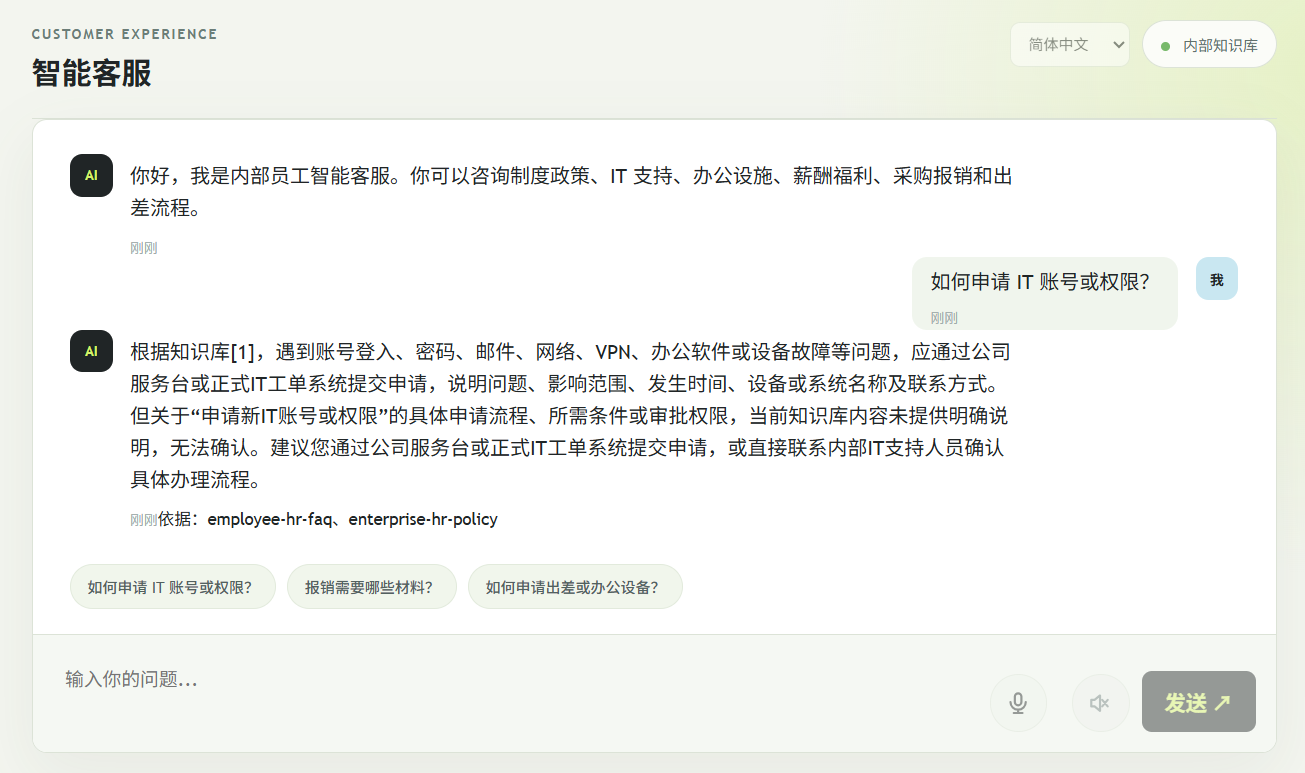
EmployeeAssistant 是一个面向企业员工的智能问答服务,采用原生 HTML/CSS/JavaScript 前端与 ASP.NET Core .NET 10 后端,结合 EF Core、PostgreSQL/pgvector 以及本地或组织批准的 LLM 服务,实现基于知识库的语义检索问答。系统根据员工提出的问题生成 embedding,从 PostgreSQL/pgvector 中检索最相关的知识库切块,并将检索内容、问题与引用来源一并发送给 chat 模型,通过 SSE 流式返回回答。服务同时支持健康检查、文档添加以及为未索引切块生成向量,并提供多语言界面与回答语言识别能力。
需要特别说明的是,本服务提供的回答仅作为信息参考,不能替代 HR 审批、合规调查或法律意见。
2. 技术架构
系统整体采用前后端分离架构,前端为原生 HTML/CSS/JavaScript 单页应用,后端为 ASP.NET Core .NET 10 的 Controller 层,数据访问基于 EF Core,向量存储与相似度检索由 PostgreSQL/pgvector 提供,LLM 推理使用本地或组织批准的模型服务。
- 前端:原生 HTML/CSS/JavaScript,提供多语言界面与 SSE 流式对话体验。
- 后端:ASP.NET Core .NET 10 Controller,负责请求路由、业务编排与 SSE 响应。
- 数据访问:EF Core 管理关系数据与实体映射。
- 向量检索:PostgreSQL/pgvector 存储文档切块向量,执行余弦相似度检索。
- LLM 服务:本地或组织批准的模型服务,负责生成 embedding 与回答文本。
3. 核心功能
3.1 智能问答
员工输入问题后,系统先生成问题 embedding,再从 pgvector 中检索最相关的知识库切块,最后将检索内容、原始问题和引用来源一起发送给 chat 模型,以 SSE 流式返回回答。
3.2 健康检查
服务提供健康检查接口,用于确认后端服务、数据库连接以及 LLM 服务是否可用,便于运维监控与故障排查。
3.3 文档添加与向量生成
支持向知识库添加文档,并为尚未索引的切块自动生成向量,确保新文档能够被后续检索命中。
3.4 多语言支持
界面支持多语言切换,同时系统能够识别用户提问所使用的语言,并尽量以相同语言返回回答,提升员工使用体验。
4. 数据模型与存储
系统核心数据模型围绕文档、切块与向量展开,主要实体包括文档、文档切块以及切块向量。文档实体保存原始文档元数据,切块实体保存切分后的文本内容,向量通过 pgvector 类型存储在切块对应记录中。
csharp
using Microsoft.EntityFrameworkCore;

namespace EmployeeAssistant.Api.Data;

[Comment("企业 HR 制度知识文档及向量索引表")]
public sealed class HrDocument
{
    [Comment("文档唯一标识")]
    public long Id { get; set; }

    [Comment("制度文档标题")]
    public string Title { get; set; } = string.Empty;

    [Comment("制度文档原始内容,用于知识库检索")]
    public string Content { get; set; } = string.Empty;

    [Comment("文档创建时间")]
    public DateTime CreatedAt { get; set; }

    public ICollection<HrDocumentChunk> Chunks { get; set; } = new List<HrDocumentChunk>();
}

using Microsoft.EntityFrameworkCore;
using Pgvector;

namespace EmployeeAssistant.Api.Data;

[Comment("企业制度文档的检索切片及向量表")]
public sealed class HrDocumentChunk
{
    [Comment("切片唯一标识")]
    public long Id { get; set; }

    [Comment("所属制度文档标识")]
    public long HrDocumentId { get; set; }

    [Comment("切片在文档中的顺序")]
    public int ChunkIndex { get; set; }

    [Comment("切片文本内容")]
    public string Content { get; set; } = string.Empty;

    [Comment("由 embedding 模型生成的切片向量")]
    public Vector? Embedding { get; set; }

    [Comment("切片创建时间")]
    public DateTime CreatedAt { get; set; }

    public HrDocument Document { get; set; } = null!;
}
5. 检索与问答流程
一次完整的问答请求包含以下步骤:
- 接收员工问题文本。
- 调用 embedding 模型生成问题向量。
- 在 pgvector 中执行相似度检索,获取最相关的知识库切块。
- 将检索切块、原始问题与引用来源组装为提示词。
- 调用 chat 模型生成回答,并通过 SSE 流式返回给前端。
6. 关键代码示例
6.1 向量检索
csharp
// 只检索已有向量的切片,并按余弦距离取最相关的四项作为回答上下文。
var embedding = await embeddingLlm.CreateEmbeddingAsync(request.Question, language, cancellationToken);
var queryVector = new Vector(embedding);
var chunks = await db.HrDocumentChunks
            .Include(chunk => chunk.Document)
            .Where(chunk => chunk.Embedding != null)
            .OrderBy(chunk => chunk.Embedding!.CosineDistance(queryVector))
            .Take(4)
            .AsNoTracking()
            .ToListAsync(cancellationToken);
6.2 SSE 流式返回
csharp
// 先发送引用,再逐段发送模型输出,前端可以在回答生成期间持续渲染内容。
var sources = chunks
            .Select(chunk => new Citation(chunk.Document.Id, chunk.Document.Title))
            .DistinctBy(source => source.Id)
            .ToList();
await Response.WriteAsync($"event: sources\ndata: {JsonSerializer.Serialize(sources, SseJsonOptions)}\n\n", cancellationToken);
await Response.Body.FlushAsync(cancellationToken);

await foreach (var chunk in chatLlm.StreamChatAsync(request.Question, context, cancellationToken))
        {
            await Response.WriteAsync($"event: delta\ndata: {JsonSerializer.Serialize(new { content = chunk }, SseJsonOptions)}\n\n", cancellationToken);
            await Response.Body.FlushAsync(cancellationToken);
        }

await Response.WriteAsync("event: done\ndata: {}\n\n", cancellationToken);
await Response.Body.FlushAsync(cancellationToken);
return new EmptyResult();
7. 部署与配置
服务部署时需配置数据库连接字符串、pgvector 扩展以及 LLM 服务地址。建议在应用启动时自动执行数据库迁移并启用 pgvector 扩展。
csharp
protected override void OnModelCreating(ModelBuilder modelBuilder)
{
    modelBuilder.HasPostgresExtension("vector");
}
8. 使用限制与免责声明
EmployeeAssistant 的回答基于企业知识库中的已有内容生成,仅供员工日常查询参考。系统不提供 HR 审批、合规调查或法律意见,涉及上述事项时请务必咨询对应专业部门或授权人员。
9. 详细实现
9.1 技术结构
EmployeeAssistant.Api/
 Controllers/ API Controller、请求合约和 SSE 问答
 Data/ EF Core 模型、数据库初始化、文档切块
 Knowledge/ Markdown 知识库源文件
 Services/ embedding、chat 和本地化服务
 Resources/ 后端本地化资源
 wwwroot/ 原生前端和前端本地化资源
9.2 appsettings.json
cs
{
  "ConnectionStrings": {
    "HrDb": "Host=localhost;Port=5432;Database=***;Username=***;Password=***;Ssl Mode=Require;Trust Server Certificate=true;Timeout=10;Command Timeout=120"
  },
  "Llm": {
    "EmbeddingBaseUrl": "http://localhost:4000",
    "EmbeddingModel": "embed.nomic:latest",
    "EmbeddingDimensions": 768,
    "ChatBaseUrl": "http://localhost:4000",
    "ChatApiPath": "/v1/chat/completions",
    "ChatModel": "qwen3.5:latest",
    "ChatApiKey": "***"
  },
  "AllowedHosts": "*"
}
9.3 Program.cs
cs
using EmployeeAssistant.Api.Data;
using EmployeeAssistant.Api.Services;
using Microsoft.EntityFrameworkCore;
using Pgvector.EntityFrameworkCore;
using System.Net.Http.Headers;

var builder = WebApplication.CreateBuilder(args);
builder.Services.AddControllers();
builder.Services.AddEndpointsApiExplorer();
builder.Services.AddSwaggerGen();
builder.Services.AddDbContext<HrDbContext>(options =>
    options.UseNpgsql(
        builder.Configuration.GetConnectionString("HrDb")
            ?? throw new InvalidOperationException("ConnectionStrings:HrDb must be configured."),
        npgsql => npgsql.UseVector()));
builder.Services.AddHttpClient("embedding-llm", client =>
{
    client.BaseAddress = new Uri(builder.Configuration["Llm:EmbeddingBaseUrl"] ?? "http://localhost:11434");
    client.Timeout = TimeSpan.FromMinutes(3);
});
builder.Services.AddHttpClient("chat-llm", client =>
{
    client.BaseAddress = new Uri(builder.Configuration["Llm:ChatBaseUrl"] ?? "http://localhost:11434");
    var apiKey = builder.Configuration["Llm:ChatApiKey"];
    if (!string.IsNullOrWhiteSpace(apiKey))
        client.DefaultRequestHeaders.Authorization = new AuthenticationHeaderValue("Bearer", apiKey);
    client.Timeout = TimeSpan.FromMinutes(3);
});
builder.Services.AddSingleton<EmbeddingLlmClient>();
builder.Services.AddSingleton<ChatLlmClient>();
builder.Services.AddCors(options => options.AddDefaultPolicy(policy =>
    policy.AllowAnyOrigin().AllowAnyHeader().AllowAnyMethod()));

var app = builder.Build();
await DatabaseInitializer.InitializeAsync(app.Services);
app.UseSwagger();
app.UseSwaggerUI();
app.UseCors();
app.UseDefaultFiles();
app.UseStaticFiles();
app.MapControllers();
app.Run();
9.4 Controllers
9.4.1 ApiContracts.cs
cs
namespace EmployeeAssistant.Api.Controllers;

public sealed record AskRequest(string Question, string? Language);
public sealed record DocumentRequest(string Title, string Content);
public sealed record AskResponse(string Answer, IReadOnlyList<Citation> Sources);
public sealed record Citation(long Id, string Title);
9.4.2 ChatController.cs
cs
using EmployeeAssistant.Api.Data;
using EmployeeAssistant.Api.Services;
using Microsoft.AspNetCore.Mvc;
using Microsoft.EntityFrameworkCore;
using Pgvector;
using Pgvector.EntityFrameworkCore;
using System.Text.Json;

namespace EmployeeAssistant.Api.Controllers;

[ApiController]
[Route("api")]
public sealed class ChatController(HrDbContext db, EmbeddingLlmClient embeddingLlm, ChatLlmClient chatLlm) : ControllerBase
{
    private static readonly JsonSerializerOptions SseJsonOptions = new(JsonSerializerDefaults.Web);

    [HttpPost("ask")]
    public async Task<IActionResult> Ask([FromBody] AskRequest request, CancellationToken cancellationToken)
    {
        var language = HrLocalization.Normalize(request.Language);
        if (string.IsNullOrWhiteSpace(request.Question))
            return BadRequest(new { message = HrLocalization.EmptyQuestion(language) });

        // 只检索已有向量的切片,并按余弦距离取最相关的四项作为回答上下文。
        var embedding = await embeddingLlm.CreateEmbeddingAsync(request.Question, language, cancellationToken);
        var queryVector = new Vector(embedding);
        var chunks = await db.HrDocumentChunks
            .Include(chunk => chunk.Document)
            .Where(chunk => chunk.Embedding != null)
            .OrderBy(chunk => chunk.Embedding!.CosineDistance(queryVector))
            .Take(4)
            .AsNoTracking()
            .ToListAsync(cancellationToken);
        var context = chunks.Count == 0
            ? HrLocalization.NoKnowledge(language)
            : string.Join("\n\n", chunks.Select((chunk, index) => $"[{index + 1}] {chunk.Document.Title}\n{chunk.Content}"));

        Response.ContentType = "text/event-stream; charset=utf-8";
        Response.Headers.CacheControl = "no-cache";
        Response.Headers.Connection = "keep-alive";

        // 先发送引用,再逐段发送模型输出,前端可以在回答生成期间持续渲染内容。
        var sources = chunks
            .Select(chunk => new Citation(chunk.Document.Id, chunk.Document.Title))
            .DistinctBy(source => source.Id)
            .ToList();
        await Response.WriteAsync($"event: sources\ndata: {JsonSerializer.Serialize(sources, SseJsonOptions)}\n\n", cancellationToken);
        await Response.Body.FlushAsync(cancellationToken);

        await foreach (var chunk in chatLlm.StreamChatAsync(request.Question, context, cancellationToken))
        {
            await Response.WriteAsync($"event: delta\ndata: {JsonSerializer.Serialize(new { content = chunk }, SseJsonOptions)}\n\n", cancellationToken);
            await Response.Body.FlushAsync(cancellationToken);
        }

        await Response.WriteAsync("event: done\ndata: {}\n\n", cancellationToken);
        await Response.Body.FlushAsync(cancellationToken);
        return new EmptyResult();
    }
}
9.4.3 DocumentsController.cs
cs
using EmployeeAssistant.Api.Data;
using EmployeeAssistant.Api.Services;
using Microsoft.AspNetCore.Mvc;
using Microsoft.EntityFrameworkCore;
using Pgvector;

namespace EmployeeAssistant.Api.Controllers;

[ApiController]
[Route("api")]
public sealed class DocumentsController(HrDbContext db, EmbeddingLlmClient embeddingLlm) : ControllerBase
{
    [HttpPost("documents")]
    public async Task<IActionResult> AddDocument([FromBody] DocumentRequest request, CancellationToken cancellationToken)
    {
        if (string.IsNullOrWhiteSpace(request.Title) || string.IsNullOrWhiteSpace(request.Content))
            return BadRequest(new { message = "Title and content are required" });

        var document = new HrDocument { Title = request.Title.Trim(), Content = request.Content.Trim() };
        db.HrDocuments.Add(document);
        await db.SaveChangesAsync(cancellationToken);
        var chunks = DocumentChunker.Split(document.Content)
            .Select((content, index) => new HrDocumentChunk
            {
                HrDocumentId = document.Id,
                ChunkIndex = index,
                Content = content,
                CreatedAt = DateTime.UtcNow
            });
        db.HrDocumentChunks.AddRange(chunks);
        await db.SaveChangesAsync(cancellationToken);
        return Ok(new { id = document.Id, message = HrLocalization.DocumentSaved("en") });
    }

    [HttpPost("reindex")]
    public async Task<IActionResult> Reindex(CancellationToken cancellationToken)
    {
        var chunks = await db.HrDocumentChunks
            .Where(chunk => chunk.Embedding == null)
            .ToListAsync(cancellationToken);
        foreach (var chunk in chunks)
        {
            var embedding = await embeddingLlm.CreateEmbeddingAsync(chunk.Content, "en", cancellationToken);
            chunk.Embedding = new Vector(embedding);
        }
        await db.SaveChangesAsync(cancellationToken);
        return Ok(new { indexed = chunks.Count });
    }
}
9.4.4 HealthController.cs
cs
using EmployeeAssistant.Api.Data;
using EmployeeAssistant.Api.Services;
using Microsoft.AspNetCore.Mvc;
using Microsoft.EntityFrameworkCore;

namespace EmployeeAssistant.Api.Controllers;

[ApiController]
[Route("api/health")]
public sealed class HealthController(HrDbContext db) : ControllerBase
{
    [HttpGet]
    public async Task<IActionResult> Get(CancellationToken cancellationToken)
    {
        var connected = await db.Database.CanConnectAsync(cancellationToken);
        return connected
            ? Ok(new { status = "ok", database = "connected" })
            : Problem(
                HrLocalization.DatabaseUnavailable(HrLocalization.Normalize(Request.Headers.AcceptLanguage.ToString().Split(',').FirstOrDefault())),
                statusCode: StatusCodes.Status503ServiceUnavailable);
    }
}
9.5 Data
9.5.1 DatabaseInitializer.cs
cs
using Microsoft.EntityFrameworkCore;

namespace EmployeeAssistant.Api.Data;

public static class DatabaseInitializer
{
    public static async Task InitializeAsync(IServiceProvider services)
    {
        await using var scope = services.CreateAsyncScope();
        var db = scope.ServiceProvider.GetRequiredService<HrDbContext>();
        var environment = scope.ServiceProvider.GetRequiredService<IWebHostEnvironment>();
        await db.Database.EnsureCreatedAsync();
        await db.Database.MigrateAsync();

        var changed = false;

        var knowledgeDirectory = Path.Combine(environment.ContentRootPath, "Knowledge");
        // 启动时同步知识库文件;内容变化会删除旧切片,随后由下方逻辑重新切块。
        foreach (var knowledgePath in Directory.EnumerateFiles(knowledgeDirectory, "*.md"))
        {
            var documentTitle = Path.GetFileNameWithoutExtension(knowledgePath);
            var documentContent = await File.ReadAllTextAsync(knowledgePath);
            var existingDocument = await db.HrDocuments
                .SingleOrDefaultAsync(document => document.Title == documentTitle);

            if (existingDocument is null)
            {
                db.HrDocuments.Add(new HrDocument
                {
                    Title = documentTitle,
                    Content = documentContent,
                    CreatedAt = DateTime.UtcNow
                });
                changed = true;
            }
            else if (!string.Equals(existingDocument.Content, documentContent, StringComparison.Ordinal))
            {
                existingDocument.Content = documentContent;
                var oldChunks = await db.HrDocumentChunks
                    .Where(chunk => chunk.HrDocumentId == existingDocument.Id)
                    .ToListAsync();
                db.HrDocumentChunks.RemoveRange(oldChunks);
                changed = true;
            }
        }

        if (changed)
            await db.SaveChangesAsync();

        var documentsWithoutChunks = await db.HrDocuments
            .Where(document => !db.HrDocumentChunks.Any(chunk => chunk.HrDocumentId == document.Id))
            .ToListAsync();
        foreach (var document in documentsWithoutChunks)
        {
            var chunks = DocumentChunker.Split(document.Content);
            db.HrDocumentChunks.AddRange(chunks.Select((content, index) => new HrDocumentChunk
            {
                HrDocumentId = document.Id,
                ChunkIndex = index,
                Content = content,
                CreatedAt = DateTime.UtcNow
            }));
        }

        if (documentsWithoutChunks.Count > 0)
            await db.SaveChangesAsync();
    }
}
9.5.2 DocumentChunker.cs
cs
namespace EmployeeAssistant.Api.Data;

public static class DocumentChunker
{
    private const int MaxChunkLength = 1200;
    private const int OverlapLength = 120;

    public static IReadOnlyList<string> Split(string content)
    {
        var paragraphs = content
            .Replace("\r\n", "\n")
            .Split("\n\n", StringSplitOptions.RemoveEmptyEntries | StringSplitOptions.TrimEntries);
        var chunks = new List<string>();
        var current = string.Empty;

        foreach (var paragraph in paragraphs)
        {
            if (paragraph.Length <= MaxChunkLength)
            {
                if (current.Length + paragraph.Length + 2 <= MaxChunkLength)
                {
                    current = string.IsNullOrEmpty(current) ? paragraph : $"{current}\n\n{paragraph}";
                    continue;
                }

                AddChunk(chunks, current);
                current = paragraph;
                continue;
            }

            AddChunk(chunks, current);
            current = string.Empty;
            // 长段落无法按段落合并时使用固定窗口,并保留少量重叠以避免语义被边界截断。
            for (var offset = 0; offset < paragraph.Length; offset += MaxChunkLength - OverlapLength)
            {
                var length = Math.Min(MaxChunkLength, paragraph.Length - offset);
                chunks.Add(paragraph.Substring(offset, length));
            }
        }

        AddChunk(chunks, current);
        return chunks;
    }

    private static void AddChunk(ICollection<string> chunks, string content)
    {
        if (!string.IsNullOrWhiteSpace(content))
            chunks.Add(content.Trim());
    }
}
9.5.3 HrDbContext.cs
cs
using Microsoft.EntityFrameworkCore;
using Pgvector.EntityFrameworkCore;

namespace EmployeeAssistant.Api.Data;

public sealed class HrDbContext(DbContextOptions<HrDbContext> options) : DbContext(options)
{
    public DbSet<HrDocument> HrDocuments => Set<HrDocument>();
    public DbSet<HrDocumentChunk> HrDocumentChunks => Set<HrDocumentChunk>();

    protected override void OnModelCreating(ModelBuilder modelBuilder)
    {
        modelBuilder.HasPostgresExtension("vector");
        var document = modelBuilder.Entity<HrDocument>();
        document.ToTable("hr_documents");
        document.HasKey(item => item.Id);
        document.Property(item => item.Id)
            .HasColumnName("id")
            .ValueGeneratedOnAdd();
        document.Property(item => item.Title)
            .HasColumnName("title")
            .HasMaxLength(200)
            .IsRequired();
        document.Property(item => item.Content)
            .HasColumnName("content")
            .IsRequired();
        document.Property(item => item.CreatedAt)
            .HasColumnName("created_at");

        var chunk = modelBuilder.Entity<HrDocumentChunk>();
        chunk.ToTable("hr_document_chunks");
        chunk.HasKey(item => item.Id);
        chunk.Property(item => item.Id).HasColumnName("id").ValueGeneratedOnAdd();
        chunk.Property(item => item.HrDocumentId).HasColumnName("hr_document_id").IsRequired();
        chunk.Property(item => item.ChunkIndex).HasColumnName("chunk_index").IsRequired();
        chunk.Property(item => item.Content).HasColumnName("content").IsRequired();
        chunk.Property(item => item.Embedding).HasColumnName("embedding").HasColumnType("vector(768)");
        chunk.Property(item => item.CreatedAt).HasColumnName("created_at");
        chunk.HasOne(item => item.Document)
            .WithMany(item => item.Chunks)
            .HasForeignKey(item => item.HrDocumentId)
            .OnDelete(DeleteBehavior.Cascade);
        chunk.HasIndex(item => item.Embedding)
            .HasMethod("hnsw")
            .HasOperators("vector_cosine_ops");
    }
}
9.5.4 HrDocument.cs
cs
using Microsoft.EntityFrameworkCore;

namespace EmployeeAssistant.Api.Data;

[Comment("企业 HR 制度知识文档及向量索引表")]
public sealed class HrDocument
{
    [Comment("文档唯一标识")]
    public long Id { get; set; }

    [Comment("制度文档标题")]
    public string Title { get; set; } = string.Empty;

    [Comment("制度文档原始内容,用于知识库检索")]
    public string Content { get; set; } = string.Empty;

    [Comment("文档创建时间")]
    public DateTime CreatedAt { get; set; }

    public ICollection<HrDocumentChunk> Chunks { get; set; } = new List<HrDocumentChunk>();
}
9.5.5 HrDocumentChunk.cs
cs
using Microsoft.EntityFrameworkCore;
using Pgvector;

namespace EmployeeAssistant.Api.Data;

[Comment("企业制度文档的检索切片及向量表")]
public sealed class HrDocumentChunk
{
    [Comment("切片唯一标识")]
    public long Id { get; set; }

    [Comment("所属制度文档标识")]
    public long HrDocumentId { get; set; }

    [Comment("切片在文档中的顺序")]
    public int ChunkIndex { get; set; }

    [Comment("切片文本内容")]
    public string Content { get; set; } = string.Empty;

    [Comment("由 embedding 模型生成的切片向量")]
    public Vector? Embedding { get; set; }

    [Comment("切片创建时间")]
    public DateTime CreatedAt { get; set; }

    public HrDocument Document { get; set; } = null!;
}
9.6 Knowledge
...
9.7 Resources
9.7.1 localization.en.json
cs
{"LanguageName":"English","EmptyQuestion":"The question cannot be empty","NoKnowledge":"No relevant knowledge base content is available. Clearly tell the employee that the answer cannot be confirmed and recommend contacting internal support.","DocumentSaved":"Document saved; rebuild the index","DatabaseUnavailable":"Database connection failed","EmbeddingUnavailable":"The local embedding service did not return a vector","EmbeddingEmpty":"The local embedding service returned an empty vector","EmbeddingDimensionMismatch":"The embedding has {0} dimensions, but the PG vector column requires {1}"}9.7.2 localization.zh-CN.json
cs
{"LanguageName":"简体中文","EmptyQuestion":"问题不能为空","NoKnowledge":"暂无可用的知识库内容,请明确告知员工无法确认,并建议联系内部支持人员。","DocumentSaved":"文档已保存,请执行重建索引","DatabaseUnavailable":"数据库连接失败","EmbeddingUnavailable":"本地 embedding 服务没有返回向量","EmbeddingEmpty":"本地 embedding 服务返回了空向量","EmbeddingDimensionMismatch":"embedding 维度为 {0},但 PG 向量列要求 {1} 维"}9.7.3 ...
9.8 Services
9.8.1 ChatLlmClient.cs
cs
using System.Net.Http.Json;
using System.Runtime.CompilerServices;
using System.Text.Json;

namespace EmployeeAssistant.Api.Services;

public sealed class ChatLlmClient(IHttpClientFactory httpClientFactory, IConfiguration configuration)
{
    private readonly HttpClient _client = httpClientFactory.CreateClient("chat-llm");
    private readonly string _model = configuration["Llm:ChatModel"] ?? "dolphin-plus";
    private readonly string _apiPath = configuration["Llm:ChatApiPath"] ?? "/v1/chat/completions";

    public async IAsyncEnumerable<string> StreamChatAsync(
        string question,
        string context,
        [EnumeratorCancellation] CancellationToken cancellationToken)
    {
        var prompt = $"你是内部员工智能客服。只能依据提供的知识库内容回答问题。如果知识库内容不足,请明确说明无法确认,并建议联系内部支持人员。请识别知识库内容的主要语言,并使用该语言回答;只有知识库内容没有可识别语言时,才使用用户问题的语言。回答应简洁、准确。\n\n知识库内容:\n{context}\n\n员工问题:\n{question}";
        using var request = new HttpRequestMessage(HttpMethod.Post, _apiPath)
        {
            Content = JsonContent.Create(new
            {
                model = _model,
                stream = true,
                messages = new[] { new { role = "user", content = prompt } }
            })
        };
        using var response = await _client.SendAsync(request, HttpCompletionOption.ResponseHeadersRead, cancellationToken);
        response.EnsureSuccessStatusCode();

        // 按行解析 SSE,仅转发模型的增量文本,忽略心跳和其他事件数据。
        await using var stream = await response.Content.ReadAsStreamAsync(cancellationToken);
        using var reader = new StreamReader(stream);
        while (await reader.ReadLineAsync(cancellationToken) is { } line)
        {
            if (!line.StartsWith("data:", StringComparison.OrdinalIgnoreCase))
                continue;

            var payload = line[5..].Trim();
            if (payload == "[DONE]")
                yield break;

            using var json = JsonDocument.Parse(payload);
            if (json.RootElement.TryGetProperty("choices", out var choices) && choices.GetArrayLength() > 0)
            {
                var delta = choices[0].GetProperty("delta");
                if (delta.TryGetProperty("content", out var content) && content.ValueKind == JsonValueKind.String)
                    yield return content.GetString() ?? string.Empty;
            }
        }
    }
}
9.8.2 EmbeddingLlmClient.cs
cs
using System.Net.Http.Json;

namespace EmployeeAssistant.Api.Services;

public sealed class EmbeddingLlmClient(IHttpClientFactory httpClientFactory, IConfiguration configuration)
{
    private readonly HttpClient _client = httpClientFactory.CreateClient("embedding-llm");
    private readonly string _model = configuration["Llm:EmbeddingModel"] ?? "nomic-embed-text";
    private readonly int _dimensions = configuration.GetValue("Llm:EmbeddingDimensions", 768);

    public async Task<float[]> CreateEmbeddingAsync(string input, string language, CancellationToken cancellationToken)
    {
        var response = await _client.PostAsJsonAsync("/api/embed", new { model = _model, input }, cancellationToken);
        response.EnsureSuccessStatusCode();
        var payload = await response.Content.ReadFromJsonAsync<EmbeddingResponse>(cancellationToken: cancellationToken)
            ?? throw new InvalidOperationException(HrLocalization.EmbeddingUnavailable(language));
        var embedding = payload.Embeddings.FirstOrDefault()
            ?? throw new InvalidOperationException(HrLocalization.EmbeddingEmpty(language));
        if (embedding.Length != _dimensions)
            throw new InvalidOperationException(HrLocalization.EmbeddingDimensionMismatch(language, embedding.Length, _dimensions));
        return embedding;
    }

    private sealed record EmbeddingResponse(float[][] Embeddings);
}
9.8.3 Localization.cs
cs
using System.Reflection;
using System.Text.Json;

namespace EmployeeAssistant.Api.Services;

public static class HrLocalization
{
    private static readonly Lazy<IReadOnlyDictionary<string, IReadOnlyDictionary<string, string>>> Resources = new(LoadResources);

    public static string Normalize(string? language)
    {
        var value = language?.Trim().ToLowerInvariant() ?? string.Empty;
        return value switch
        {
            "zh-cn" or "zh-sg" or "zh" => "zh-CN",
            "zh-tw" or "zh-hk" => "zh-TW",
            "en" or "en-us" or "en-gb" => "en",
            "vi" or "vi-vn" => "vi",
            "cs" or "cs-cz" => "cs",
            "es" or "es-es" or "es-mx" => "es",
            _ => "en"
        };
    }

    public static string LanguageName(string language) => Get("LanguageName", language);
    public static string EmptyQuestion(string language) => Get("EmptyQuestion", language);
    public static string NoKnowledge(string language) => Get("NoKnowledge", language);
    public static string DocumentSaved(string language) => Get("DocumentSaved", language);
    public static string DatabaseUnavailable(string language) => Get("DatabaseUnavailable", language);
    public static string EmbeddingUnavailable(string language) => Get("EmbeddingUnavailable", language);
    public static string EmbeddingEmpty(string language) => Get("EmbeddingEmpty", language);

    public static string EmbeddingDimensionMismatch(string language, int actual, int expected) =>
        string.Format(Get("EmbeddingDimensionMismatch", language), actual, expected);

    private static string Get(string key, string language)
    {
        var normalized = Normalize(language);
        return Resources.Value.TryGetValue(key, out var translations)
            && (translations.TryGetValue(normalized, out var value) || translations.TryGetValue("en", out value))
            ? value
            : key;
    }

    private static IReadOnlyDictionary<string, IReadOnlyDictionary<string, string>> LoadResources()
    {
        var resources = new Dictionary<string, IReadOnlyDictionary<string, string>>();
        foreach (var language in new[] { "zh-CN", "zh-TW", "en", "vi", "cs", "es" })
        {
            var resourceName = $"EmployeeAssistant.Api.Resources.localization.{language}.json";
            using var stream = typeof(HrLocalization).Assembly.GetManifestResourceStream(resourceName)
                ?? throw new InvalidOperationException($"Embedded localization resource not found: {resourceName}");
            using var document = JsonDocument.Parse(stream);
            foreach (var item in document.RootElement.EnumerateObject())
            {
                if (!resources.TryGetValue(item.Name, out var translations))
                    translations = new Dictionary<string, string>();
                var values = translations.ToDictionary(pair => pair.Key, pair => pair.Value);
                values[language] = item.Value.GetString() ?? string.Empty;
                resources[item.Name] = values;
            }
        }
        return resources;
    }
}
9.9 wwwroot
9.9.1 locales
9.9.1.1 localization.en.json
{"LanguageName":"English","EmptyQuestion":"The question cannot be empty","NoKnowledge":"No relevant knowledge base content is available. Clearly tell the employee that the answer cannot be confirmed and recommend contacting internal support.","DocumentSaved":"Document saved; rebuild the index","DatabaseUnavailable":"Database connection failed","EmbeddingUnavailable":"The local embedding service did not return a vector","EmbeddingEmpty":"The local embedding service returned an empty vector","EmbeddingDimensionMismatch":"The embedding has {0} dimensions, but the PG vector column requires {1}"}9.9.1.2 localization.zh-CN.json
{"LanguageName":"简体中文","EmptyQuestion":"问题不能为空","NoKnowledge":"暂无可用的知识库内容,请明确告知员工无法确认,并建议联系内部支持人员。","DocumentSaved":"文档已保存,请执行重建索引","DatabaseUnavailable":"数据库连接失败","EmbeddingUnavailable":"本地 embedding 服务没有返回向量","EmbeddingEmpty":"本地 embedding 服务返回了空向量","EmbeddingDimensionMismatch":"embedding 维度为 {0},但 PG 向量列要求 {1} 维"}9.9.2 app.js
javascript
const form = document.querySelector('#ask-form');
const question = document.querySelector('#question');
const messages = document.querySelector('#messages');
const voiceInput = document.querySelector('#voice-input');
const voiceStatus = document.querySelector('#voice-status');
const voiceToggle = document.querySelector('#voice-toggle');
const sendButton = document.querySelector('#send-button');
const languageSelect = document.querySelector('#language-select');
const languageLocales = { 'zh-CN': 'zh-CN', 'zh-TW': 'zh-TW', en: 'en-US', vi: 'vi-VN', cs: 'cs-CZ', es: 'es-ES' };
function getBrowserLanguage() {
const browserLanguages = navigator.languages?.length ? navigator.languages : [navigator.language];
const language = browserLanguages.find(value => Object.keys(languageLocales).some(key => value?.toLowerCase().startsWith(key.toLowerCase())))?.toLowerCase() || 'en';
if (language.startsWith('zh-tw') || language.startsWith('zh-hk')) return 'zh-TW';
if (language.startsWith('zh')) return 'zh-CN';
if (language.startsWith('vi')) return 'vi';
if (language.startsWith('cs')) return 'cs';
if (language.startsWith('es')) return 'es';
return 'en';
}
let uiLanguage = getBrowserLanguage();
let ui = { locale: languageLocales[uiLanguage] };
let voiceEnabled = false;
let requestRunning = false;
const microphoneIcon = '<svg viewBox="0 0 24 24" aria-hidden="true"><path d="M12 14a3 3 0 0 0 3-3V6a3 3 0 0 0-6 0v5a3 3 0 0 0 3 3Z"></path><path d="M19 11a7 7 0 0 1-14 0M12 18v3M8 21h8"></path></svg>';
const speakerIcon = '<svg viewBox="0 0 24 24" aria-hidden="true"><path d="M11 5 6 9H3v6h3l5 4V5Z"></path><path d="M15.5 8.5a5 5 0 0 1 0 7M18.5 5.5a9 9 0 0 1 0 13"></path></svg>';
const speakerMutedIcon = '<svg viewBox="0 0 24 24" aria-hidden="true"><path d="M11 5 6 9H3v6h3l5 4V5Z"></path><path d="m18 9-5 6M13 9l5 6"></path></svg>';
const stopIcon = '<svg viewBox="0 0 24 24" aria-hidden="true"><rect x="7" y="7" width="10" height="10" rx="1"></rect></svg>';
function applyTranslations() {
document.documentElement.lang = ui.locale;
document.title = ui.title;
document.querySelector('#app-title').textContent = ui.title;
document.querySelector('#knowledge-status').textContent = ui.status;
document.querySelector('#welcome-message').textContent = ui.welcome;
question.placeholder = ui.placeholder;
sendButton.querySelector('#send-label').textContent = ui.send;
voiceInput.setAttribute('aria-label', ui.startVoice);
voiceInput.title = ui.startVoice;
voiceToggle.setAttribute('aria-label', ui.voiceOn);
voiceToggle.title = ui.voiceOff;
voiceToggle.innerHTML = voiceEnabled ? speakerIcon : speakerMutedIcon;
languageSelect.value = uiLanguage;
languageSelect.setAttribute('aria-label', ui.title);
if (!recognition) {
voiceInput.title = ui.speechUnsupported;
setVoiceStatus(ui.speechUnsupported);
}
document.querySelectorAll('.suggestion').forEach((button, index) => {
button.textContent = ui.questions[index];
button.dataset.question = ui.questions[index];
});
}
async function loadLanguageResource() {
try {
const response = await fetch(`./locales/${uiLanguage}.json`, { cache: 'no-cache' });
if (!response.ok) return;
const resources = await response.json();
const profile = resources[uiLanguage] || resources;
if (profile.locale) {
ui = profile;
applyTranslations();
}
} catch {
// Keep the embedded fallback profile when the resource file is unavailable.
}
}
loadLanguageResource();
languageSelect.addEventListener('change', async () => {
if (requestRunning) return;
uiLanguage = languageSelect.value;
ui = { locale: languageLocales[uiLanguage] };
try {
const response = await fetch(`./locales/${uiLanguage}.json`, { cache: 'no-cache' });
if (response.ok) {
const resources = await response.json();
ui = resources[uiLanguage] || resources;
}
} catch {
// Keep the embedded fallback profile when the resource file is unavailable.
}
applyTranslations();
if (recognition && !voiceInputActive) recognition.lang = ui.locale;
});
function formatRelativeTime(timestamp) {
const seconds = Math.max(0, Math.floor((Date.now() - timestamp) / 1000));
if (uiLanguage !== 'zh-CN' && uiLanguage !== 'zh-TW') {
const formatter = new Intl.RelativeTimeFormat(ui.locale, { numeric: 'auto' });
if (seconds < 60) return formatter.format(0, 'second');
const minutes = Math.floor(seconds / 60);
if (minutes < 60) return formatter.format(-minutes, 'minute');
const hours = Math.floor(minutes / 60);
if (hours < 24) return formatter.format(-hours, 'hour');
return formatter.format(-Math.floor(hours / 24), 'day');
}
if (seconds < 60) return ui.relativeTime.justNow;
const minutes = Math.floor(seconds / 60);
if (minutes < 60) return ui.relativeTime.minutes.replace('{count}', minutes);
const hours = Math.floor(minutes / 60);
if (hours < 24) return ui.relativeTime.hours.replace('{count}', hours);
return ui.relativeTime.days.replace('{count}', Math.floor(hours / 24));
}
function refreshRelativeTimes() {
document.querySelectorAll('time[data-timestamp]').forEach(time => {
time.textContent = formatRelativeTime(Number(time.dataset.timestamp));
});
}
document.querySelectorAll('time[data-timestamp]').forEach(time => {
time.dataset.timestamp = Date.now();
});
setInterval(refreshRelativeTimes, 30000);
const SpeechRecognition = window.SpeechRecognition || window.webkitSpeechRecognition;
let recognition;
let voiceInputActive = false;
let voiceStarting = false;
let voiceStartCancelled = false;
let voiceStopRequested = false;
let voiceErrorTitle = '';
function setVoiceStatus(message) {
voiceStatus.textContent = message;
}
function voiceErrorMessage(code) {
return ui.voiceErrors[code] || ui.voiceErrors.network;
}
async function requestMicrophone() {
if (!window.isSecureContext && location.hostname !== 'localhost' && location.hostname !== '127.0.0.1')
throw new Error(ui.microphoneSecureContext);
if (!navigator.mediaDevices?.getUserMedia)
throw new Error(ui.microphoneUnsupported);
const stream = await navigator.mediaDevices.getUserMedia({ audio: true });
stream.getTracks().forEach(track => track.stop());
}
if (SpeechRecognition) {
recognition = new SpeechRecognition();
recognition.continuous = true;
recognition.interimResults = true;
recognition.lang = ui.locale;
recognition.onstart = () => {
voiceErrorTitle = '';
voiceInputActive = true;
voiceInput.setAttribute('aria-pressed', 'true');
voiceInput.classList.add('recording');
voiceInput.innerHTML = stopIcon;
voiceInput.title = ui.stopVoice;
};
recognition.onresult = event => {
const transcript = Array.from(event.results).map(result => result[0].transcript).join('');
question.value = transcript;
question.dispatchEvent(new Event('input', { bubbles: true }));
};
recognition.onend = () => {
if (voiceInputActive && !voiceStopRequested && !requestRunning) {
setTimeout(() => {
if (voiceInputActive && !voiceStopRequested && !requestRunning) {
try {
recognition.start();
} catch {
voiceStopRequested = true;
}
}
}, 150);
return;
}
voiceInputActive = false;
voiceInput.setAttribute('aria-pressed', 'false');
voiceInput.classList.remove('recording');
voiceInput.innerHTML = microphoneIcon;
voiceInput.setAttribute('aria-label', ui.startVoice);
voiceInput.title = voiceErrorTitle || ui.startVoice;
if (!voiceErrorTitle) setVoiceStatus('');
voiceErrorTitle = '';
voiceStopRequested = false;
};
recognition.onerror = event => {
if (event.error === 'no-speech' && voiceInputActive && !voiceStopRequested) return;
voiceStopRequested = true;
voiceErrorTitle = voiceErrorMessage(event.error);
voiceInput.title = voiceErrorTitle;
voiceInput.setAttribute('aria-label', voiceInput.title);
voiceInput.classList.remove('recording');
voiceInput.innerHTML = microphoneIcon;
voiceInputActive = false;
voiceInput.setAttribute('aria-pressed', 'false');
setVoiceStatus(voiceErrorTitle);
};
} else {
voiceInput.disabled = true;
voiceInput.title = ui.speechUnsupported;
setVoiceStatus(ui.speechUnsupported);
}
function detectLanguage(text) {
if (/\p{Script=Han}/u.test(text)) return ui.locale;
if (/\p{Script=Hiragana}|\p{Script=Katakana}/u.test(text)) return 'ja-JP';
if (/\p{Script=Hangul}/u.test(text)) return 'ko-KR';
if (/\p{Script=Arabic}/u.test(text)) return 'ar-SA';
if (/\p{Script=Cyrillic}/u.test(text)) return 'ru-RU';
return ui.locale;
}
function speak(text, language) {
if (!voiceEnabled) return;
window.speechSynthesis.cancel();
const utterance = new SpeechSynthesisUtterance(text);
utterance.lang = language;
const voice = window.speechSynthesis.getVoices().find(item => item.lang.toLowerCase().startsWith(language.slice(0, 2).toLowerCase()));
if (voice) utterance.voice = voice;
window.speechSynthesis.speak(utterance);
}
function addMessage(text, role, sources = []) {
const item = document.createElement('div');
item.className = `message ${role}`;
const sourceText = sources.length ? `<small>${ui.source}${sources.map(source => source.title).join(ui.sourceSeparator)}</small>` : '';
item.innerHTML = `<span class="avatar">${role === 'user' ? ui.userAvatar : ui.assistantAvatar}</span><div><p>${text.replaceAll('<', '<')}</p>${sourceText}<time data-timestamp="${Date.now()}">${ui.relativeTime.justNow}</time></div>`;
messages.appendChild(item);
item.scrollIntoView({ behavior: 'smooth', block: 'nearest' });
}
function addStreamingMessage() {
const item = document.createElement('div');
item.className = 'message assistant';
item.innerHTML = `<span class="avatar">${ui.assistantAvatar}</span><div><p></p><time data-timestamp="${Date.now()}">${ui.relativeTime.justNow}</time></div>`;
messages.appendChild(item);
item.scrollIntoView({ behavior: 'smooth', block: 'nearest' });
return { item, content: item.querySelector('p'), metadata: item.querySelector('time') };
}
function setRequestRunning(running) {
requestRunning = running;
question.disabled = running;
languageSelect.disabled = running;
voiceInput.disabled = running || !recognition;
sendButton.disabled = running;
sendButton.setAttribute('aria-disabled', String(running));
form.setAttribute('aria-busy', String(running));
form.querySelectorAll('button').forEach(button => { button.disabled = running; });
document.querySelectorAll('[data-question]').forEach(button => { button.disabled = running; });
if (running && voiceInputActive && recognition) {
voiceStopRequested = true;
recognition.stop();
}
}
async function ask(text) {
addMessage(text, 'user');
question.value = '';
setRequestRunning(true);
const assistant = addStreamingMessage();
let answer = '';
try {
const response = await fetch('./api/ask', { method: 'POST', headers: { 'Content-Type': 'application/json' }, body: JSON.stringify({ question: text, language: uiLanguage }) });
if (!response.ok) throw new Error(ui.requestFailed.replace('{status}', response.status));
if (!response.body) throw new Error(ui.streamingUnsupported);
const reader = response.body.getReader();
const decoder = new TextDecoder();
let buffer = '';
let sources = [];
const processEvent = block => {
let eventName = 'message';
const data = [];
block.split(/\r?\n/).forEach(line => {
if (line.startsWith('event:')) eventName = line.slice(6).trim();
if (line.startsWith('data:')) data.push(line.slice(5).trim());
});
if (!data.length) return;
const payload = JSON.parse(data.join('\n'));
if (eventName === 'sources') {
sources = payload;
const sourceText = document.createElement('small');
sourceText.textContent = sources.length ? `${ui.source}${sources.map(source => source.title).join(ui.sourceSeparator)}` : '';
if (sourceText.textContent) assistant.item.querySelector('div').appendChild(sourceText);
} else if (eventName === 'delta') {
answer += payload.content || '';
assistant.content.textContent = answer;
assistant.item.scrollIntoView({ behavior: 'smooth', block: 'nearest' });
}
};
while (true) {
const { value, done } = await reader.read();
buffer += decoder.decode(value || new Uint8Array(), { stream: !done });
const events = buffer.split(/\r?\n\r?\n/);
buffer = events.pop() || '';
events.forEach(processEvent);
if (done) break;
}
if (buffer.trim()) processEvent(buffer);
refreshRelativeTimes();
speak(answer, detectLanguage(text));
} catch (error) {
assistant.content.textContent = ui.requestError.replace('{error}', error.message);
} finally {
setRequestRunning(false);
}
}
form.addEventListener('submit', event => { event.preventDefault(); if (!requestRunning && question.value.trim()) ask(question.value.trim()); });
question.addEventListener('keydown', event => {
if (event.key !== 'Enter' || event.shiftKey || event.isComposing) return;
event.preventDefault();
if (!requestRunning && question.value.trim()) form.requestSubmit(sendButton);
});
document.querySelectorAll('[data-question]').forEach(button => button.addEventListener('click', () => { if (!requestRunning) ask(button.dataset.question); }));
voiceToggle.addEventListener('click', () => {
voiceEnabled = !voiceEnabled;
if (!voiceEnabled) window.speechSynthesis.cancel();
voiceToggle.classList.toggle('active', voiceEnabled);
voiceToggle.innerHTML = voiceEnabled ? speakerIcon : speakerMutedIcon;
voiceToggle.title = voiceEnabled ? ui.voiceOn : ui.voiceOff;
voiceToggle.setAttribute('aria-label', voiceEnabled ? ui.voiceOff : ui.voiceOn);
});
voiceInput.addEventListener('click', async () => {
if (!recognition) return;
if (voiceInputActive) {
voiceStopRequested = true;
recognition.stop();
return;
}
if (voiceStarting) {
voiceStartCancelled = true;
voiceStopRequested = true;
voiceStarting = false;
voiceInputActive = false;
voiceInput.setAttribute('aria-pressed', 'false');
voiceInput.classList.remove('recording');
voiceInput.innerHTML = microphoneIcon;
voiceInput.setAttribute('aria-label', ui.startVoice);
voiceInput.title = ui.startVoice;
setVoiceStatus('');
return;
}
recognition.lang = ui.locale;
voiceStarting = true;
voiceStartCancelled = false;
voiceStopRequested = false;
voiceInputActive = true;
voiceInput.setAttribute('aria-pressed', 'true');
voiceInput.classList.add('recording');
voiceInput.innerHTML = stopIcon;
voiceInput.setAttribute('aria-label', ui.stopVoice);
voiceInput.title = ui.voiceStarting;
try {
await requestMicrophone();
if (voiceStartCancelled) return;
recognition.start();
} catch (error) {
if (voiceStartCancelled) return;
voiceErrorTitle = error.message || ui.voiceStartFailed;
voiceInput.title = voiceErrorTitle;
voiceInput.setAttribute('aria-label', voiceInput.title);
voiceInputActive = false;
voiceInput.setAttribute('aria-pressed', 'false');
setVoiceStatus(voiceErrorTitle);
} finally {
voiceStarting = false;
}
});9.9.3 index.html
html
<!doctype html>
<html lang="zh-CN">

<head>
    <meta charset="utf-8">
    <meta name="viewport" content="width=device-width, initial-scale=1">
    <title>智能客服</title>
    <link rel="stylesheet" href="./styles.css">
</head>

<body>
    <main class="app-shell">
        <header class="topbar">
            <div><span class="eyebrow">CUSTOMER EXPERIENCE</span>
                <h1 id="app-title">智能客服</h1>
            </div>
            <div class="topbar-actions"><select id="language-select" class="language-select" aria-label="选择语言" title="选择语言"><option value="zh-CN">简体中文</option><option value="zh-TW">繁體中文</option><option value="en">English</option><option value="vi">Tiếng Việt</option><option value="cs">Čeština</option><option value="es">Español</option></select><span class="status"><i></i> <span id="knowledge-status">本地知识库</span></span></div>
        </header>
        <section class="chat-panel">
            <div id="messages" class="messages">
                <div class="message assistant"><span class="avatar">AI</span>
                    <div>
                        <p id="welcome-message">你好,我是内部员工智能客服。你可以咨询制度政策、IT 支持、办公设施、薪酬福利、采购报销和出差流程。</p><time data-timestamp>刚刚</time>
                    </div>
                </div>
            </div>
                <div class="suggestions"><button class="suggestion" data-key="annualLeave" data-question="如何申请 IT 账号或权限?">如何申请 IT 账号或权限?</button><button
                    class="suggestion" data-key="sickLeave" data-question="报销需要哪些材料?">报销需要哪些材料?</button><button class="suggestion" data-key="probation" data-question="如何申请出差或办公设备?">如何申请出差或办公设备?</button>
            </div>
            <form id="ask-form" class="composer"><textarea id="question" rows="2" placeholder="输入你的问题..."
                    required></textarea><button id="voice-input" class="icon-button" type="button" aria-pressed="false"
                    aria-label="开始语音输入" title="开始语音输入"><svg viewBox="0 0 24 24" aria-hidden="true"><path d="M12 14a3 3 0 0 0 3-3V6a3 3 0 0 0-6 0v5a3 3 0 0 0 3 3Z"></path><path d="M19 11a7 7 0 0 1-14 0M12 18v3M8 21h8"></path></svg></button><span id="voice-status" class="voice-status" aria-live="polite"></span><button id="voice-toggle"
                    class="icon-button voice-toggle" type="button" aria-label="开启自动朗读"
                    title="自动朗读已关闭"><svg viewBox="0 0 24 24" aria-hidden="true"><path d="M11 5 6 9H3v6h3l5 4V5Z"></path><path d="m18 9-5 6M13 9l5 6"></path></svg></button><button aria-label="发送问题" id="send-button" type="submit"><span id="send-label">发送</span> <span>↗</span></button></form>
        </section>
    </main>
    <script src="./app.js"></script>
</body>

</html>
9.9.4 styles.css
css
:root {
    --ink: #202526;
    --muted: #718080;
    --paper: #f3f5ef;
    --white: #fff;
    --lime: #d6f36a;
    --line: #dce3d7;
    --blue: #c9e7f1
}

* {
    box-sizing: border-box
}

body {
    margin: 0;
    color: var(--ink);
    font-family: 'Trebuchet MS', 'Segoe UI', sans-serif;
    background: radial-gradient(circle at 85% 10%, #e6f1c6 0, transparent 28%), var(--paper)
}

.app-shell {
    max-width: 1080px;
    margin: auto;
    padding: 28px 42px 70px
}

.topbar {
    display: flex;
    align-items: flex-start;
    justify-content: space-between;
    border-bottom: 1px solid var(--line);
    padding-bottom: 20px
}

.eyebrow,
.kicker {
    font-size: 11px;
    letter-spacing: .14em;
    font-weight: 600;
    color: #6b7d78
}

.topbar h1 {
    font: 700 24px 'Trebuchet MS', 'Segoe UI', sans-serif;
    margin: 5px 0 0
}

.topbar-actions {
    display: flex;
    align-items: center;
    gap: 10px
}

.language-select {
    min-height: 36px;
    border: 1px solid var(--line);
    border-radius: 8px;
    background: var(--white);
    color: var(--ink);
    padding: 0 10px;
    font: 12px 'Trebuchet MS', 'Segoe UI', sans-serif
}

.language-select:disabled {
    opacity: .5;
    cursor: not-allowed
}

.status {
    font-size: 12px;
    color: #61706d;
    padding: 10px 14px;
    border: 1px solid var(--line);
    border-radius: 99px;
    background: #fbfcf8
}

.status i {
    display: inline-block;
    width: 7px;
    height: 7px;
    background: #78b96b;
    border-radius: 50%;
    margin-right: 7px
}

.intro {
    padding: 68px 0 44px;
    max-width: 650px
}

.kicker {
    margin: 0 0 18px;
    color: #7a965a
}

.intro h2 {
    font: 600 clamp(38px, 6vw, 72px)/1.02 'Trebuchet MS', 'Segoe UI', sans-serif;
    letter-spacing: -.02em;
    margin: 0
}

.intro em {
    font-style: normal;
    color: #8aa43f
}

.subcopy {
    margin: 24px 0 0;
    color: var(--muted);
    font-size: 15px
}

.chat-panel {
    background: var(--white);
    border: 1px solid var(--line);
    box-shadow: 0 18px 50px #4b5c4211;
    border-radius: 12px;
    overflow: hidden
}

.messages {
    min-height: 180px;
    padding: 27px 30px
}

.message {
    display: flex;
    gap: 14px;
    max-width: 760px
}

.avatar {
    flex: none;
    width: 34px;
    height: 34px;
    border-radius: 10px;
    background: var(--ink);
    color: var(--lime);
    display: grid;
    place-items: center;
    font: 600 11px 'Trebuchet MS', 'Segoe UI', sans-serif
}

.message p {
    margin: 5px 0 8px;
    line-height: 1.6
}

.message time {
    font-size: 11px;
    color: #a0acab
}

.suggestions {
    display: flex;
    gap: 9px;
    flex-wrap: wrap;
    padding: 0 30px 20px
}

.suggestions button {
    font: 500 12px 'Trebuchet MS', 'Segoe UI', sans-serif;
    color: #53615f;
    background: #f1f6ec;
    border: 1px solid #e2eadc;
    border-radius: 99px;
    padding: 9px 13px;
    cursor: pointer
}

.suggestions button:hover {
    background: var(--lime);
    border-color: var(--lime)
}

.composer {
    display: flex;
    gap: 10px;
    background: #f5f8f3;
    border-top: 1px solid var(--line);
    padding: 16px
}

.composer textarea {
    flex: 1;
    resize: none;
    border: 0;
    background: transparent;
    outline: 0;
    color: var(--ink);
    font: 15px/1.5 'Trebuchet MS', 'Segoe UI', sans-serif;
    padding: 8px 10px
}

.composer button {
    align-self: flex-end;
    border: 0;
    border-radius: 8px;
    background: var(--ink);
    color: #fff;
    padding: 12px 18px;
    cursor: pointer;
    font-weight: 600
}

.composer button span {
    color: var(--lime);
    font-size: 17px
}

.composer .icon-button {
    flex: 0 0 46px;
    width: 46px;
    height: 46px;
    padding: 0;
    display: grid;
    place-items: center;
    border: 1px solid var(--line);
    border-radius: 50%;
    background: #edf5ed;
    color: var(--ink);
    font-size: 19px;
    line-height: 1;
    transition: background .2s, transform .2s
}

.composer .icon-button svg {
    width: 21px;
    height: 21px;
    fill: none;
    stroke: currentColor;
    stroke-width: 2;
    stroke-linecap: round;
    stroke-linejoin: round
}

.voice-status {
    align-self: center;
    max-width: 190px;
    color: var(--muted);
    font-size: 11px;
    line-height: 1.3
}

.composer #voice-input:hover {
    background: #d8eee1;
    transform: translateY(-1px)
}

.composer #voice-input.recording {
    background: #f4caca;
    border-color: #d88787;
    color: #9e3030;
    animation: recording-pulse 1.4s ease-in-out infinite
}

.composer #voice-toggle {
    background: #e7f0d1;
    color: #4d6b27
}

.composer #voice-toggle:hover {
    background: var(--lime);
    transform: translateY(-1px)
}

.composer #voice-toggle:not(.active) {
    background: #edf0ed;
    color: var(--muted)
}

.composer .icon-button:disabled,
.composer button:disabled {
    opacity: .45;
    cursor: not-allowed;
    pointer-events: none
}

@keyframes recording-pulse {

    0%,
    100% {
        box-shadow: 0 0 0 0 #d8878766
    }

    50% {
        box-shadow: 0 0 0 7px #d8878700
    }
}

.user {
    margin-left: auto;
    justify-content: flex-end
}

.user .avatar {
    background: var(--blue);
    color: var(--ink);
    order: 2
}

.user div {
    background: #f0f5ed;
    border-radius: 12px;
    padding: 2px 15px
}

.user p {
    margin-bottom: 5px
}

@media(max-width:620px) {
    .app-shell {
        padding: 20px 18px 40px
    }

    .intro {
        padding: 50px 0 32px
    }

    .topbar h1 {
        font-size: 20px
    }

    .status {
        padding: 8px 10px
    }

    .messages {
        padding: 22px 18px
    }

    .suggestions {
        padding: 0 18px 18px
    }

    .composer {
        padding: 12px
    }

    .composer button {
        padding: 11px 13px
    }
}
10. Demo