OpenStack镜像管理-glance
公有云(华为云)镜像概念
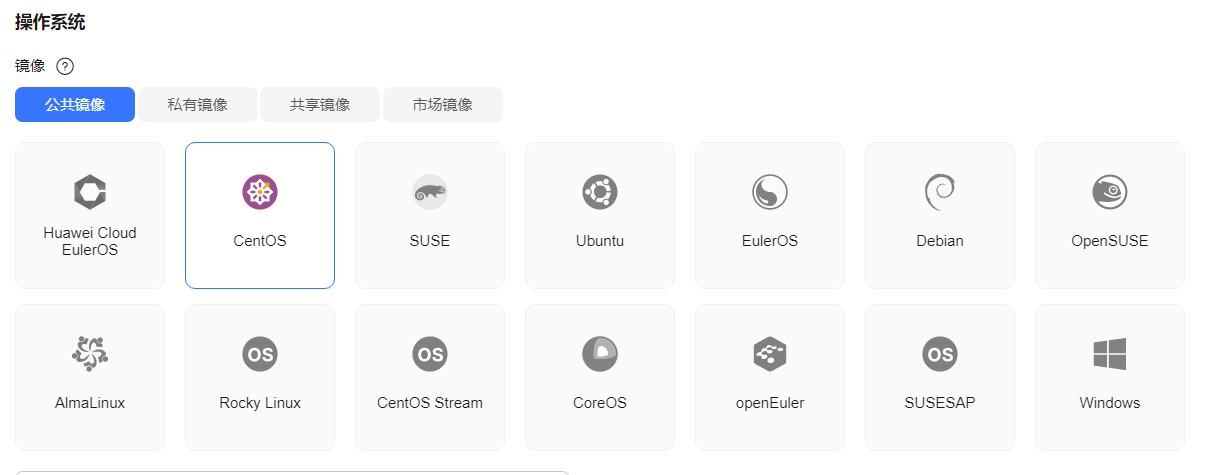
解释说明 镜像 是一个包含了操作系统及必要配置的弹性云服务器模板,使用镜像可以创建弹性云服务器。 公共镜像 公共镜像是云平台提供的常见的标准操作系统镜像,所有用户可见,包括操作系统以及预装的公共 应用。公共镜像具有高度稳定性,皆为正版授权,您也可以根据实际需求自助配置应用环境或相关 软件。 私有镜像 基于云服务器或外部镜像文件等方式创建的个人镜像,仅用户自己可见。包含操作系统、预装的公 共应用以及用户的私有应用。选择私有镜像创建云服务器,可以节省您重复配置云服务器的时间。 更多信息,请参见怎样制作私有镜像? 共享镜像 您可以接受云平台其他用户共享的私有镜像,作为自己的镜像进行使用。 更多信息,请参见怎样共享镜像? 市场镜像 提供预装操作系统、应用环境和各类软件的优质第三方镜像。无需配置,可一键部署,满足建站、 应用开发、可视化管理等个性化需求。 最主要的作用:节约时间
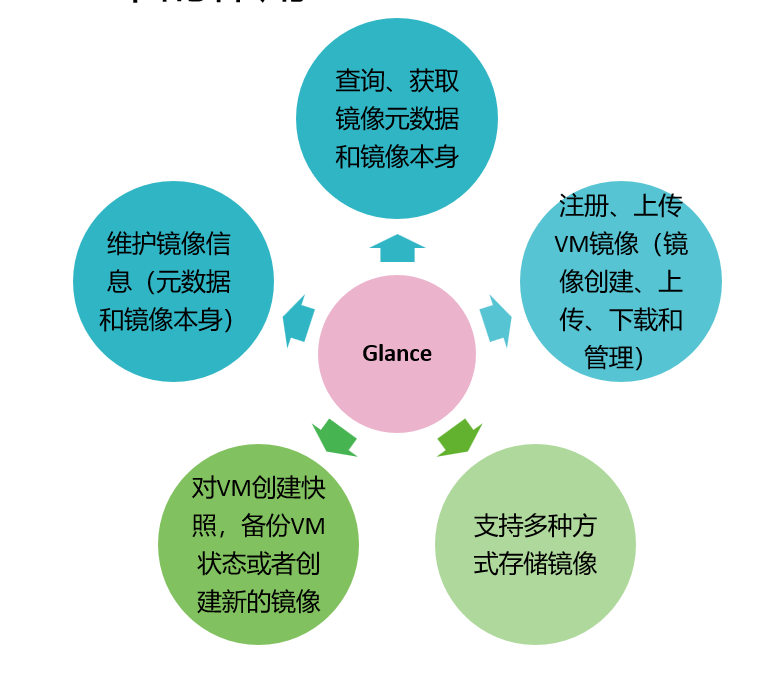
Glance在OpenStack中的作用
Glance架构
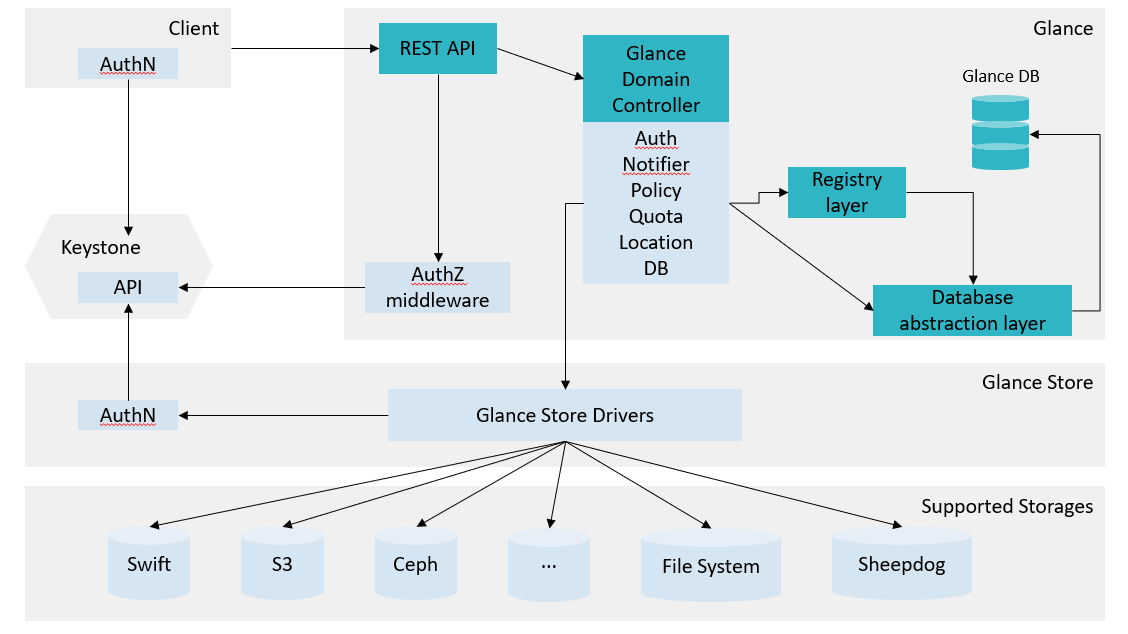
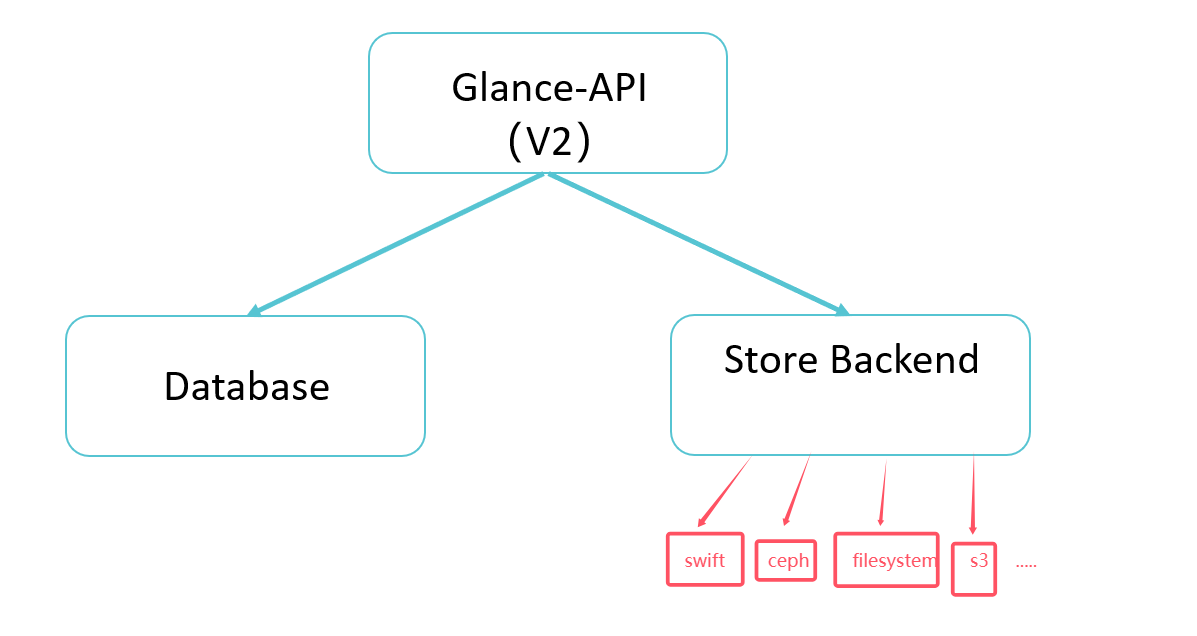
Glance架构
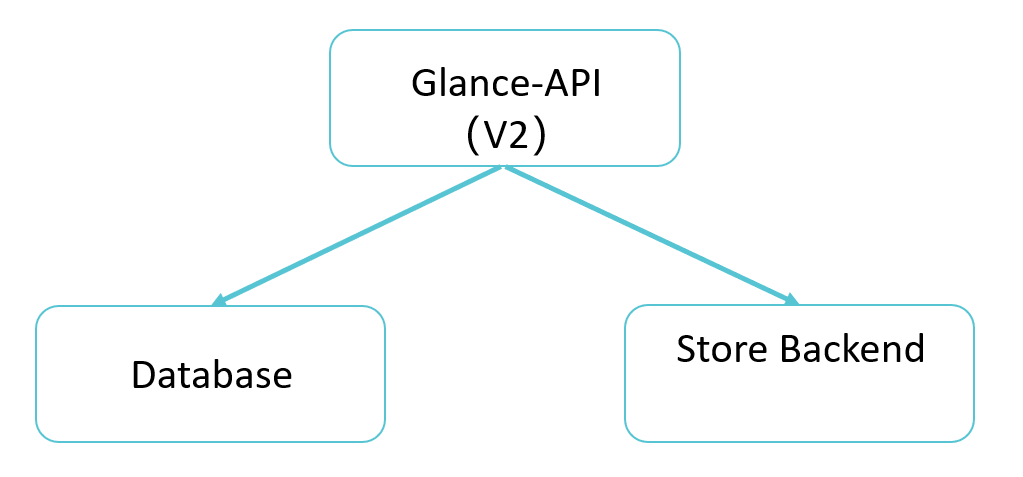
- 在Newton版本及之前版本中,Glance支持REST API V1和V2。 •在V2 API版本中,Glance-Registry的内容被整合进了Glance-API。如果Glance-API接收到与镜像元数据 有关的请求,则会直接操作数据库,不需要再通过Glance-Registry。 •在V1 API版本中,Glance-Registry与Glance-API一样,也是一个WSGI Server,但是Glance-Registry处 理的是与镜像元数据相关的RESTful请求。Glance-API在接收到用户的RESTful请求后,如果该请求与元 数据相关,则将其转发给Glance-Registry。需要注意的是,Glance-Registry提供的REST API是给 Glance-API使用的 ,不对OpenStack外部用户暴露。 •在Newton版本中V1已经过时,并从Stein版本开始,Glance-Registry被废弃,由Glance-API代替,然后 通过Store模块的接口实现对各种不同后台存储系统的支持,包括Glance架构图中的Amazon S3、 Cinder/Swift、Ceph、Sheepdog等存储后端。 查看glalnce-api配置文件,观察与database通信的部分:
bash
glance的配置文件在/etc/glance 目录下:
#查看配置文件,不做修改
[root@controller glance]# vim /etc/glance/glance-api.conf
1619 connection=mysql+pymysql://glance:cb89fe4fee034ad6@192.168.108.10/glance
连接数据库查看现象:
bash
# 执行命令:mysql           #连接数据库
[root@controller ~]# mysql           #连接数据库
Welcome to the MariaDB monitor.  Commands end with ; or \g.
Your MariaDB connection id is 841
Server version: 10.3.28-MariaDB MariaDB Server
Copyright (c) 2000, 2018, Oracle, MariaDB Corporation Ab and others.
Type 'help;' or '\h' for help. Type '\c' to clear the current input statement.
MariaDB [(none)]> show databases;           #查看所有数据库
+--------------------+
| Database           |
+--------------------+
| aodh               |
| cinder             |
| glance             |
| gnocchi            |
| heat               |
| information_schema |
| keystone           |
| mysql              |
| neutron            |
| nova               |
| nova_api           |
| nova_cell0         |
| performance_schema |
| placement          |
| test               |
+--------------------+
15 rows in set (0.014 sec)
MariaDB [(none)]> use glance;                       #切换到指定的glance数据库
Reading table information for completion of table and column names
You can turn off this feature to get a quicker startup with -A
Database changed
MariaDB [glance]> show tables;                    #查看所有当前数据库中的所有表
+----------------------------------+
| Tables_in_glance                 |
+----------------------------------+
| alembic_version                  |
| image_locations                  |
| image_members                    |
| image_properties                 |
| image_tags                       |
| images                           |
| metadef_namespace_resource_types |
| metadef_namespaces               |
| metadef_objects                  |
| metadef_properties               |
| metadef_resource_types           |
| metadef_tags                     |
| migrate_version                  |
| task_info                        |
| tasks                            |
+----------------------------------+
15 rows in set (0.000 sec)
镜像image、实例instance、规格flavor三者区别
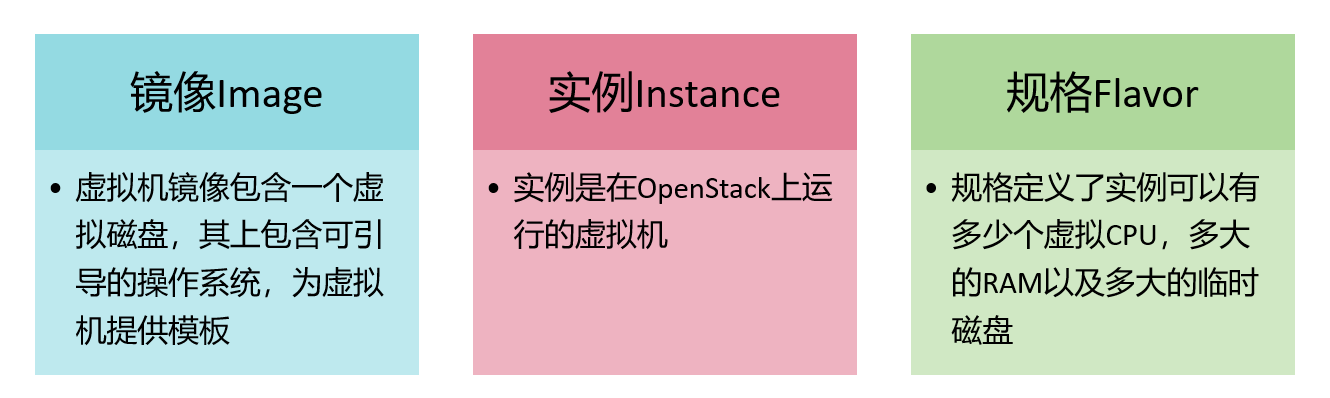
镜像、实例和规格的关系: 用户可以从同一个镜像启动任意数量的实例 每个启动的实例都是基于镜像的一个副本,实例上的任何修改都不会影响到镜像 启动实例时,必须指定一个规格,实例按照规格使用资源 Glance磁盘格式 磁盘格式 描述 vhd Xen,Microsoft,VirtualBox等使用的常见磁盘格式 vhdx vhd格式的增强版本,支持更大的磁盘容量和其他功能 vmdk VMware常见的磁盘格式 vdi VirtualBox和QEMU支持的磁盘格式 iso 光盘(例如CDROM)的存档格式 ploog Virtuozzo支持和使用的磁盘格式,用于运行OS Containers qcow2 QEMU支持的磁盘格式,支持动态扩展和写时复制 aki Amazon Kernel Image ari Amazon Ramdisk Image ami Amazon Machine Image raw 一种非结构化的磁盘镜像格式 将镜像添加到Glance时,必须指定虚拟机镜像的磁盘格式和容器格式 Glance状态机 Glance中有两种状态机:镜像状态和任务状态 镜像状态 描述 已在glance-registry中保留镜像标识符,但镜像数据未上传,镜像大小未初始 queued 化 saving 镜像的原始数据正在上传到Glance中
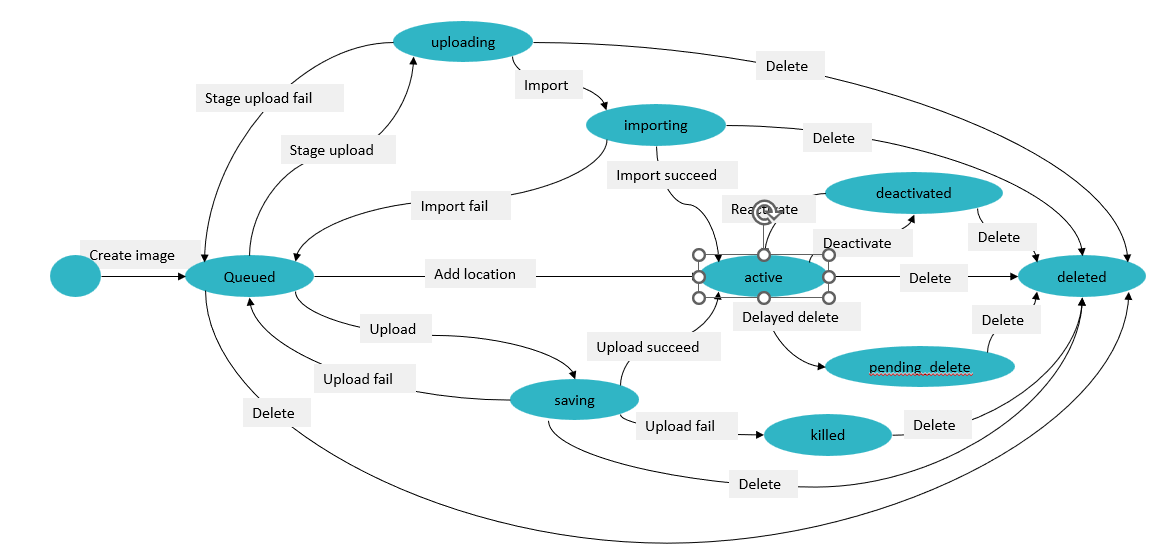
镜像状态 描述 uploading 对镜像调用了import data-put请求 importing 导入镜像中,但镜像尚未就绪 active 镜像创建完成,可以使用 deactivated 禁止任何非管理员用户访问镜像 killed 镜像上传时出错,镜像不可用 deleted Glance保留了镜像信息,但不能继续使用,镜像在一定时间后会被自动清理掉 pending_delete 类似deleted,Glance尚未删除镜像数据,处于该状态的镜像可恢复 任务状态 描述 pending 任务挂起 processing 任务正在处理中 success 任务执行成功 failure 任务执行失败 Glance状态机转换图
-
queued:没有上传image数据,只有db中的元数据。 •saving:正在上传image data,当注册一个镜像使用POST /images并且当前携带了一个x-image-meta- location头,这个镜像将不会进入saving状态(镜像的数据已经是可以获得的,不能重传)。 •active:当镜像数据上传完毕,镜像就可以被使用了(可获得的),此时处于active状态。 •deactivated:表示任何非管理员用户都无权访问镜像数据,禁止下载镜像,也禁止像镜像导出和镜像克 隆之类的操作(请求镜像数据的操作)。 •killed:表示上传过程中发生错误,并且镜像是不可读的。 •deleted:glance已经保存了该镜像的数据,但是该镜像不再可用,处于该状态的镜像将在不久后被自动 删除。
-
pending_delete: 与deleted相似,glance还没有清除镜像数据,只是处于该状态的镜像不可恢复。 上传镜像实验 此次实验上传两个镜像: cirros-0.5.2-x86_64-disk.img TinyCore-12.0.iso 直接先将这2个文件,拖放到controller节点的/root目录。观察两个文件磁盘格式
bash
# 列出当前目录内容
[root@controller ~]# ls
anaconda-ks.cfg  answers.txt  cirros-0.5.2-x86_64-disk.img  keystonerc_admin
TinyCore-12.0.iso
[root@controller ~]#

# 执行命令:qemu-img info cirros-0.5.2-x86_64-disk.i
[root@controller ~]# qemu-img info cirros-0.5.2-x86_64-disk.img
image: cirros-0.5.2-x86_64-disk.img
file format: qcow2                      #磁盘格式qcow2
virtual size: 112 MiB (117440512 bytes)
disk size: 15.5 MiB
cluster_size: 65536
Format specific information:
    compat: 1.1
    compression type: zlib
    lazy refcounts: false
    refcount bits: 16
    corrupt: false
    extended l2: false
[root@controller ~]#

# 执行命令:qemu-img info TinyCore-12.0.iso
[root@controller ~]# qemu-img info TinyCore-12.0.iso
image: TinyCore-12.0.iso
file format: raw
virtual size: 20 MiB (20971520 bytes)
disk size: 20 MiB
[root@controller ~]#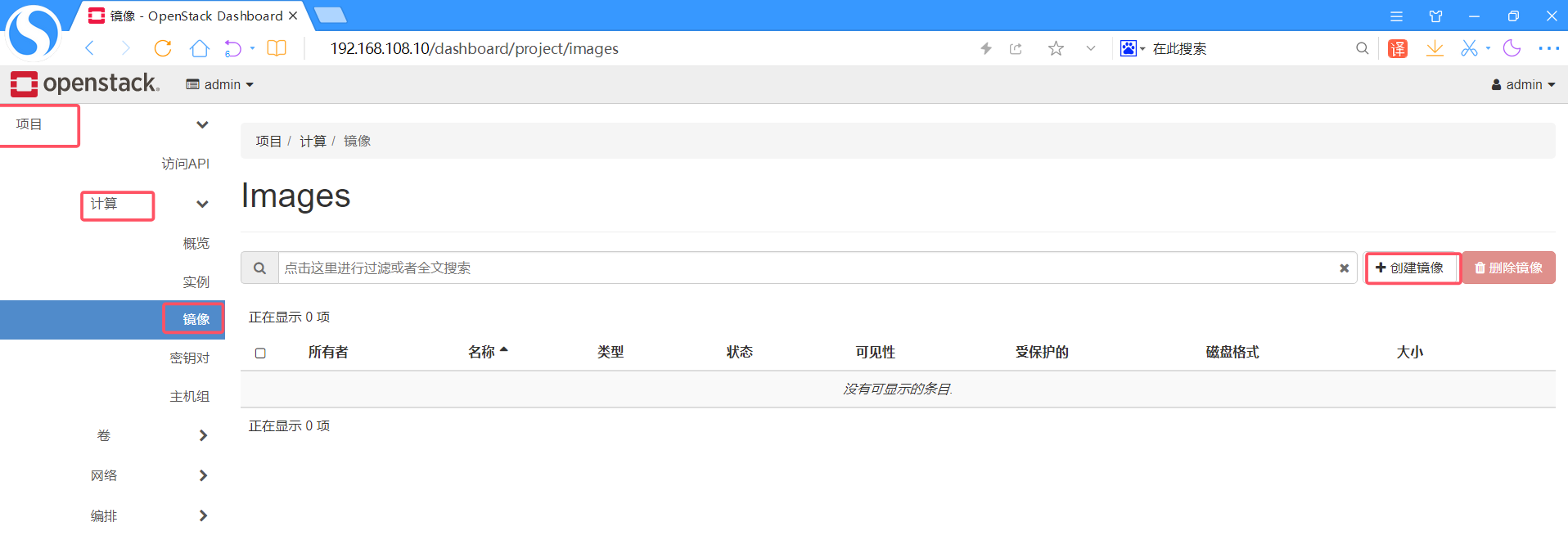
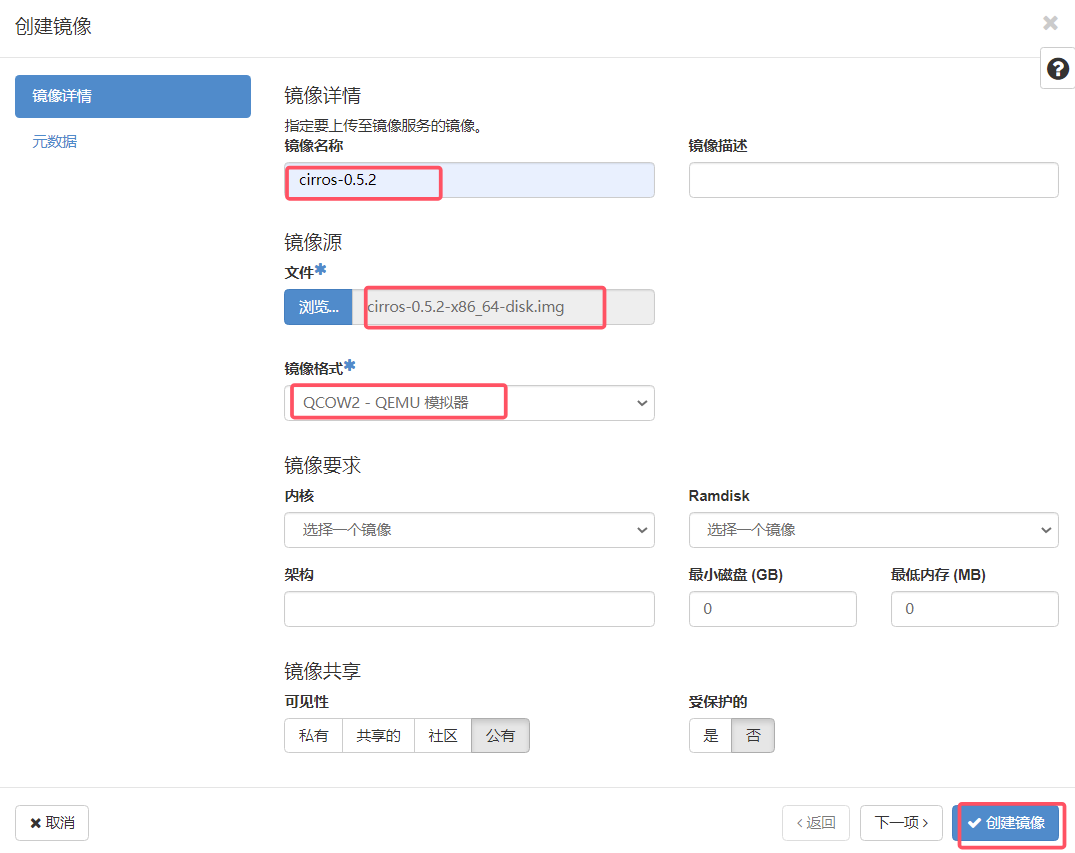
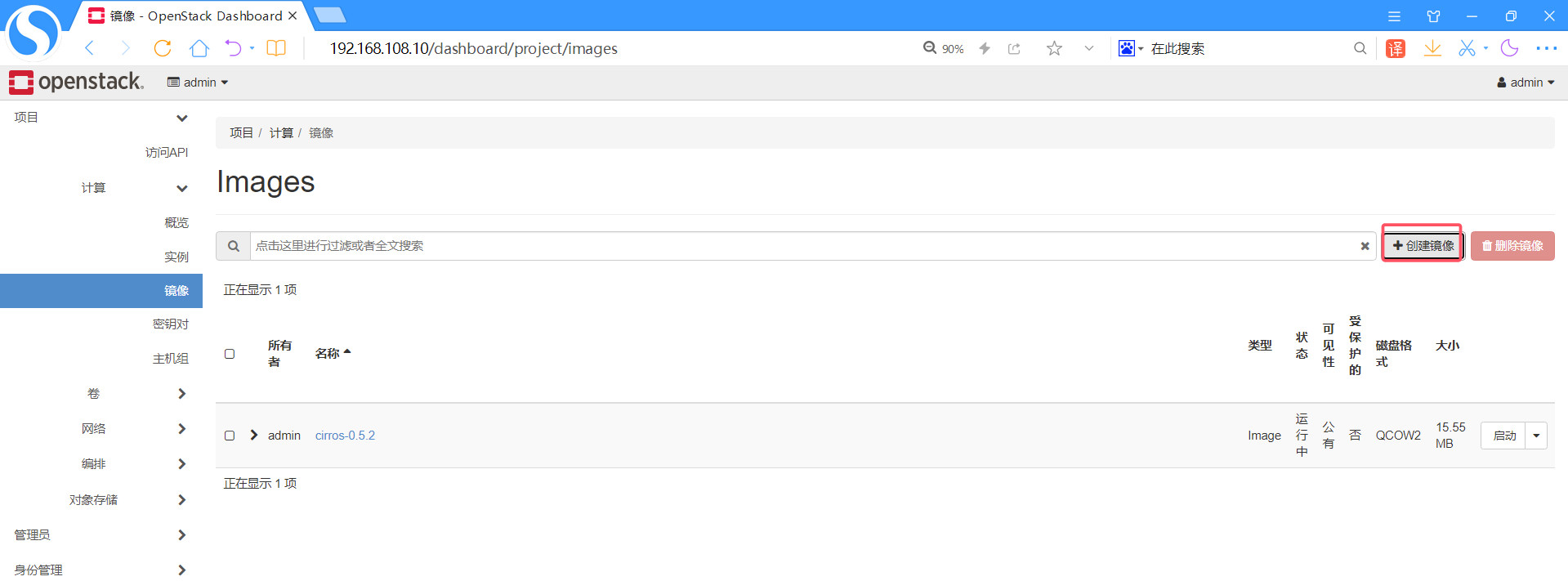
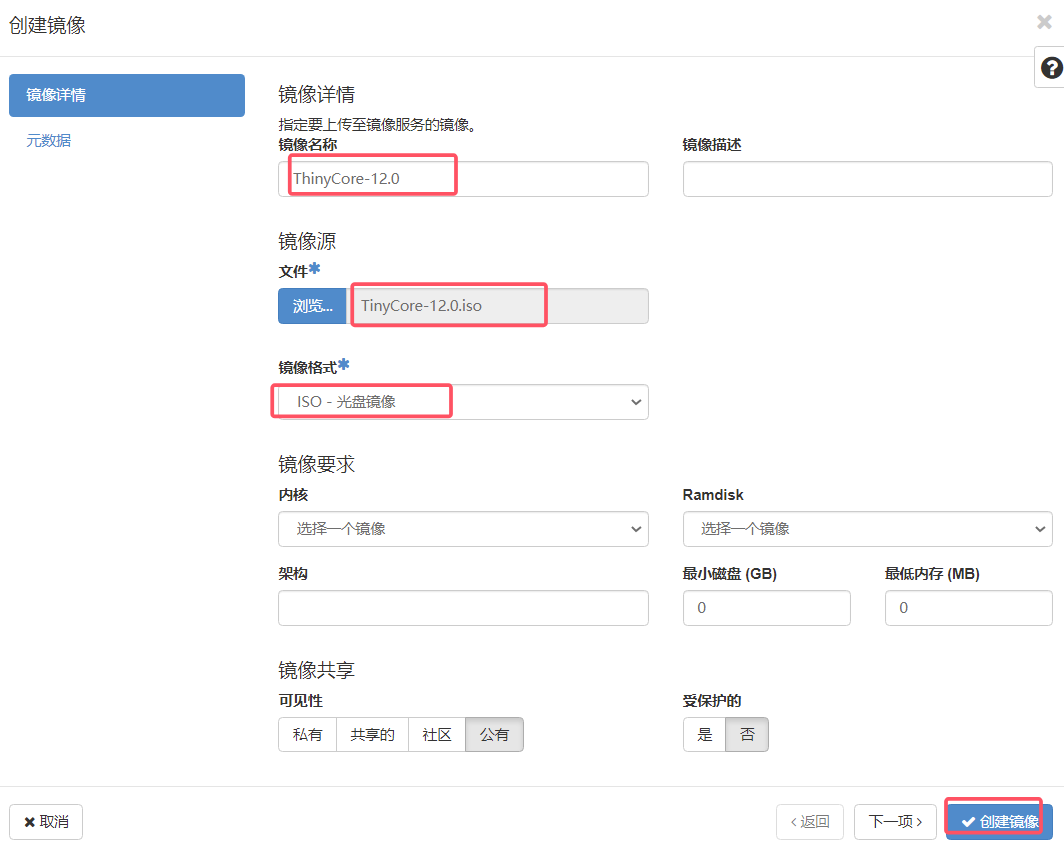
点击上图右上角问号可以看到帮助
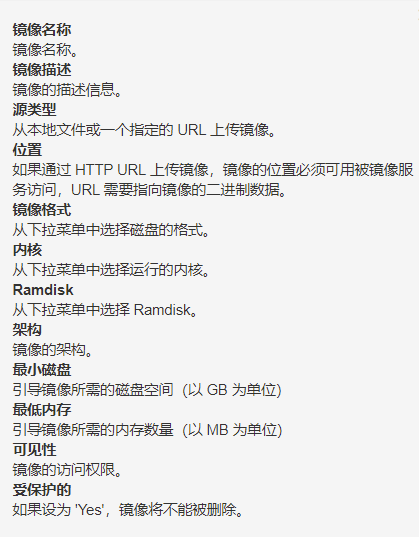
上传成功:
点击镜像
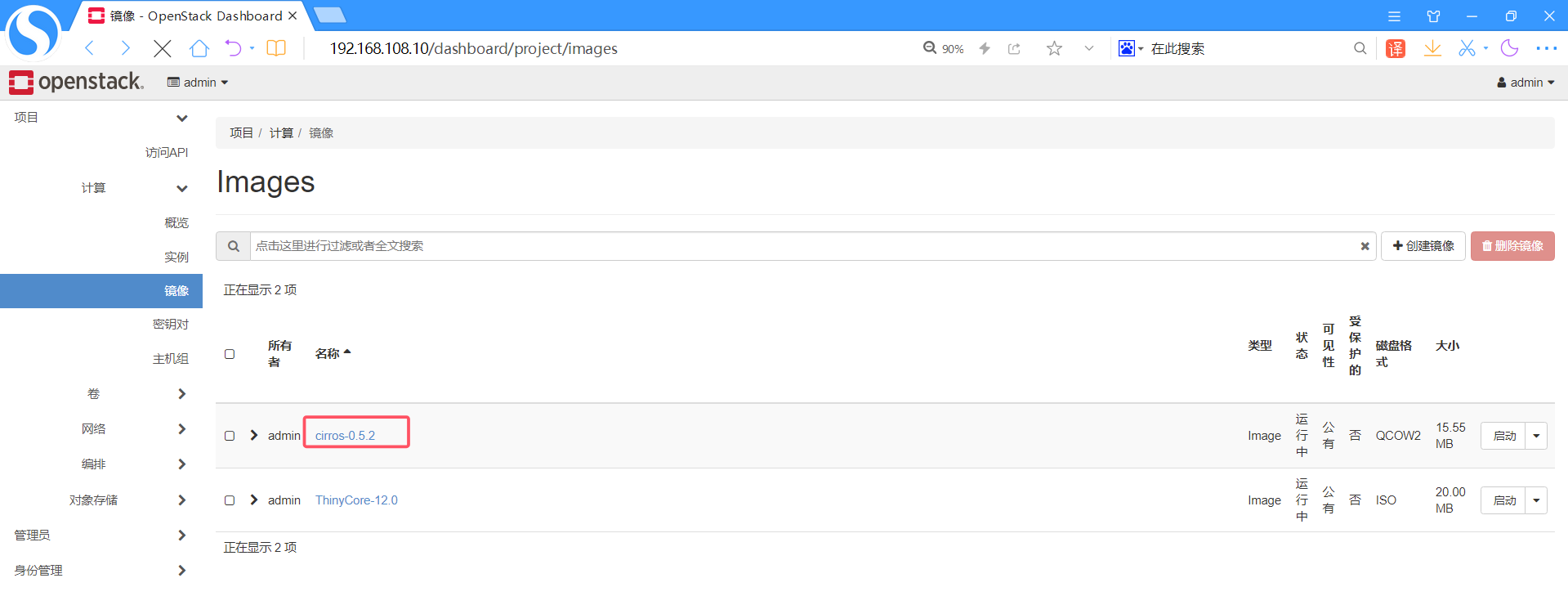
cirros-0.5.2上传后ID为e846b42b-5024-479b-9f79-1ae181bfa14e
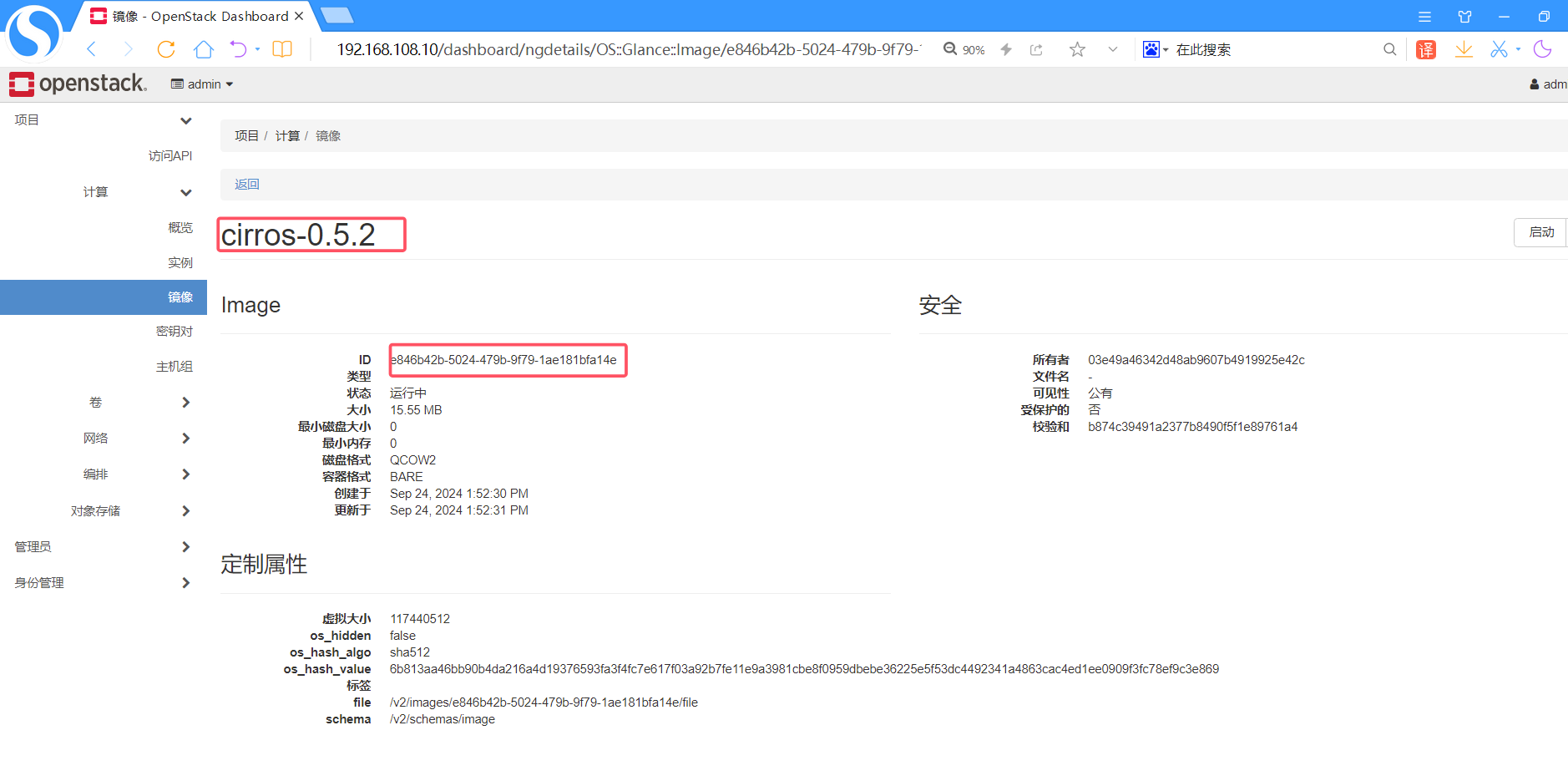
镜像上传到哪里去了?
bash
# 执行命令:find / -name e846b42b-5024-479b-9f79-1ae
[root@controller ~]# find / -name e846b42b-5024-479b-9f79-1ae181bfa14e
/var/lib/glance/images/e846b42b-5024-479b-9f79-1ae181bfa14e
去数据库中查看现象:
bash
# 执行命令:mysql
[root@controller ~]# mysql
Welcome to the MariaDB monitor.  Commands end with ; or \g.
Your MariaDB connection id is 7012
Server version: 10.3.28-MariaDB MariaDB Server
Copyright (c) 2000, 2018, Oracle, MariaDB Corporation Ab and others.
Type 'help;' or '\h' for help. Type '\c' to clear the current input statement.
MariaDB [(none)]> show databases;
+--------------------+
| Database           |
+--------------------+
| aodh               |
| cinder             |
| glance             |
| gnocchi            |
| heat               |
| information_schema |
| keystone           |
| mysql              |
| neutron            |
| nova               |
| nova_api           |
| nova_cell0         |
| performance_schema |
| placement          |
| test               |
+--------------------+
15 rows in set (0.000 sec)
MariaDB [(none)]> use glance;
Reading table information for completion of table and column names
You can turn off this feature to get a quicker startup with -A
Database changed
MariaDB [glance]> show tables;
+----------------------------------+
| Tables_in_glance                 |
+----------------------------------+
| alembic_version                  |
| image_locations                  |
| image_members                    |
| image_properties                 |
| image_tags                       |
| images                           |
| metadef_namespace_resource_types |
| metadef_namespaces               |
| metadef_objects                  |
| metadef_properties               |
| metadef_resource_types           |
| metadef_tags                     |
| migrate_version                  |
| task_info                        |
| tasks                            |
+----------------------------------+
15 rows in set (0.000 sec)
MariaDB [glance]> select id,value from image_locations;
+----+--------------------------------------------------------------------+
| id | value                                                              |
+----+--------------------------------------------------------------------+
|  1 | file:///var/lib/glance/images/e846b42b-5024-479b-9f79-1ae181bfa14e |
|  2 | file:///var/lib/glance/images/bb8a4940-3bde-428c-83b4-9c98eb430721 |
+----+--------------------------------------------------------------------+
2 rows in set (0.000 sec)
Glance镜像制作 最简单的Glance镜像制作方法是下载系统供应商官方发布的OpenStack镜像文件。大多数镜像预安装了 cloud-init包,支持SSH密钥对登录和用户数据注入功能。
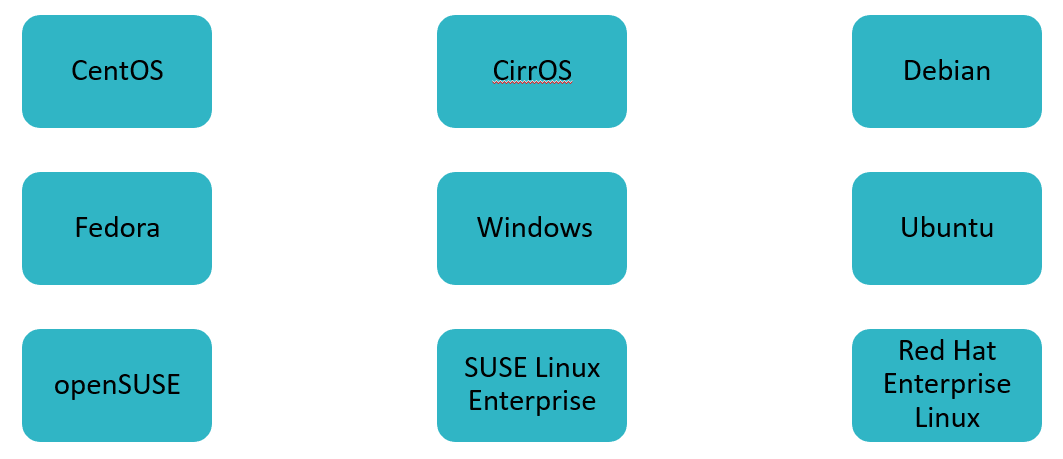
- 镜像的具体下载链接,请参考OpenStack社区网站: ▫https://docs.openstack.org/image-guide/obtain-images.html。
使用swift作为Glance后端存储
bash
#将/etc/glance/glance-api.conf中的#号开头的行(注释行),和空行过滤掉,显示出配置行
[root@controller ~]# grep -Ev '^#' /etc/glance/glance-api.conf | grep -Ev '^$'
[DEFAULT]
bind_host=0.0.0.0
bind_port=9292
workers=4
image_cache_dir=/var/lib/glance/image-cache
debug=False
log_file=/var/log/glance/api.log
log_dir=/var/log/glance
transport_url=rabbit://guest:guest@192.168.108.10:5672/
[cinder]
[cors]
[database]
connection=mysql+pymysql://glance:cb89fe4fee034ad6@192.168.108.10/glance
[file]
[glance.store.http.store]
[glance.store.rbd.store]
[glance.store.s3.store]
[glance.store.swift.store]
[glance.store.vmware_datastore.store]
[glance_store]
stores=file,http,swift
default_store=file
filesystem_store_datadir=/var/lib/glance/images/
[image_format]
[keystone_authtoken]
www_authenticate_uri=http://192.168.108.10:5000/v3
auth_type=password
auth_url=http://192.168.108.10:5000
username=glance
password=huawei
user_domain_name=Default
project_name=services
project_domain_name=Default
[oslo_concurrency]
[oslo_messaging_amqp]
[oslo_messaging_kafka]
[oslo_messaging_notifications]
driver=messagingv2
topics=notifications
[oslo_messaging_rabbit]
ssl=False
default_notification_exchange=glance
[oslo_middleware]
[oslo_policy]
policy_file=/etc/glance/policy.json
[paste_deploy]
flavor=keystone
[profiler]
[store_type_location_strategy]
[task]
[taskflow_executor]
[wsgi]
#下面为查看swift密码方式
[root@controller ~]# vim answers.txt
1137 CONFIG_SWIFT_HASH=f8715a7c2bf640b9       #这个密码配置到上面的配置文件

# 编辑/etc/glance/glance-api.conf配置文件
[root@controller ~]# vim /etc/glance/glance-api.conf
3111 default_store=swift
3982 swift_store_region = RegionOne
4090 swift_store_container = gqdglance
4118 swift_store_large_object_size = 5120
4160 swift_store_create_container_on_put = true
4182 swift_store_multi_tenant = true
4230 swift_store_admin_tenants = services
4391 swift_store_auth_address = http://192.168.108.10:5000/v3
4399 swift_store_user = swift
4408 swift_store_key = f8715a7c2bf640b9           #这里的swift密码是安装的时候决定的,
随机产生的,查看answers.txt

# 重启openstack-glance*  #重启服务
[root@controller ~(keystone_admin)]# systemctl restart openstack-glance*  #重启
glance进程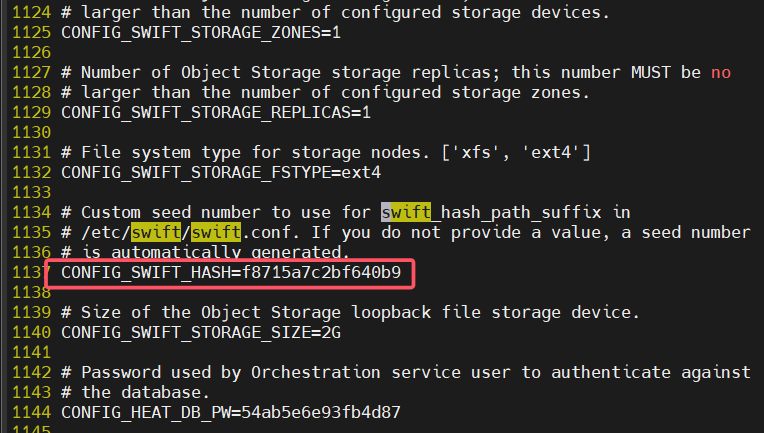
上传镜像,测试效果:
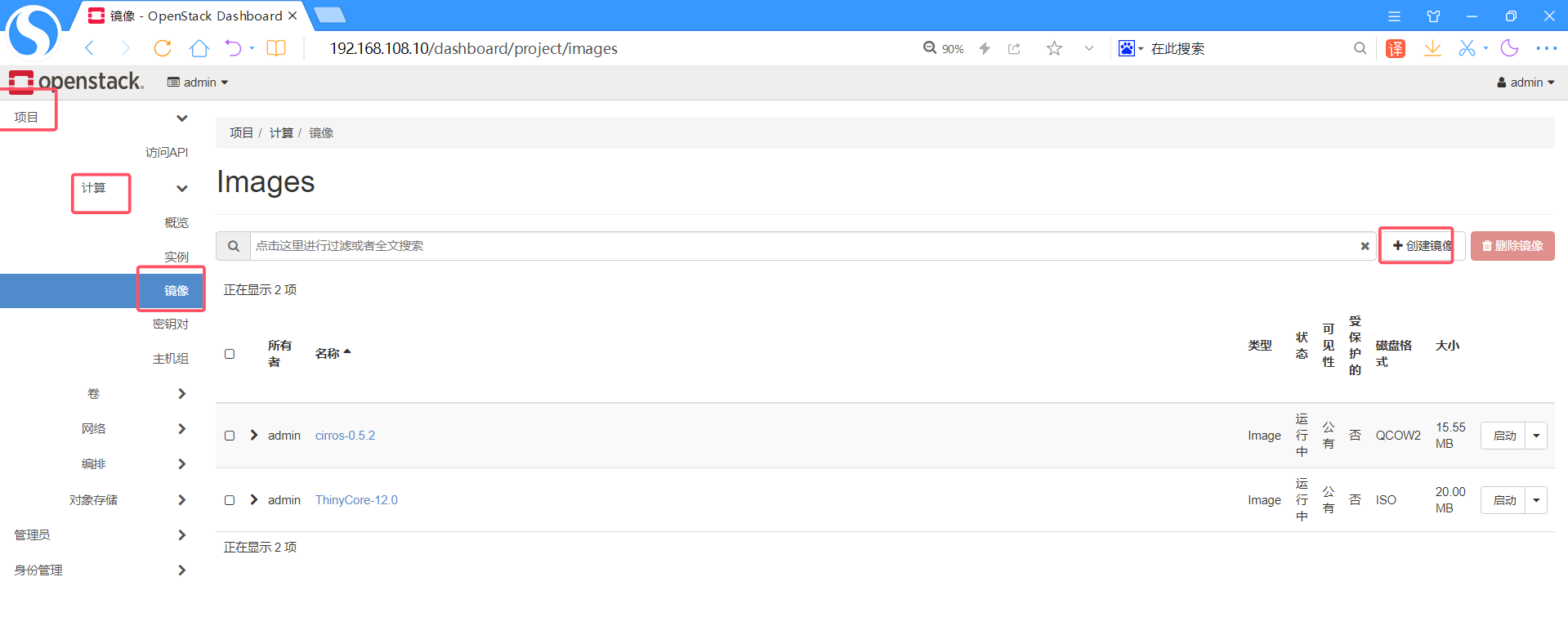
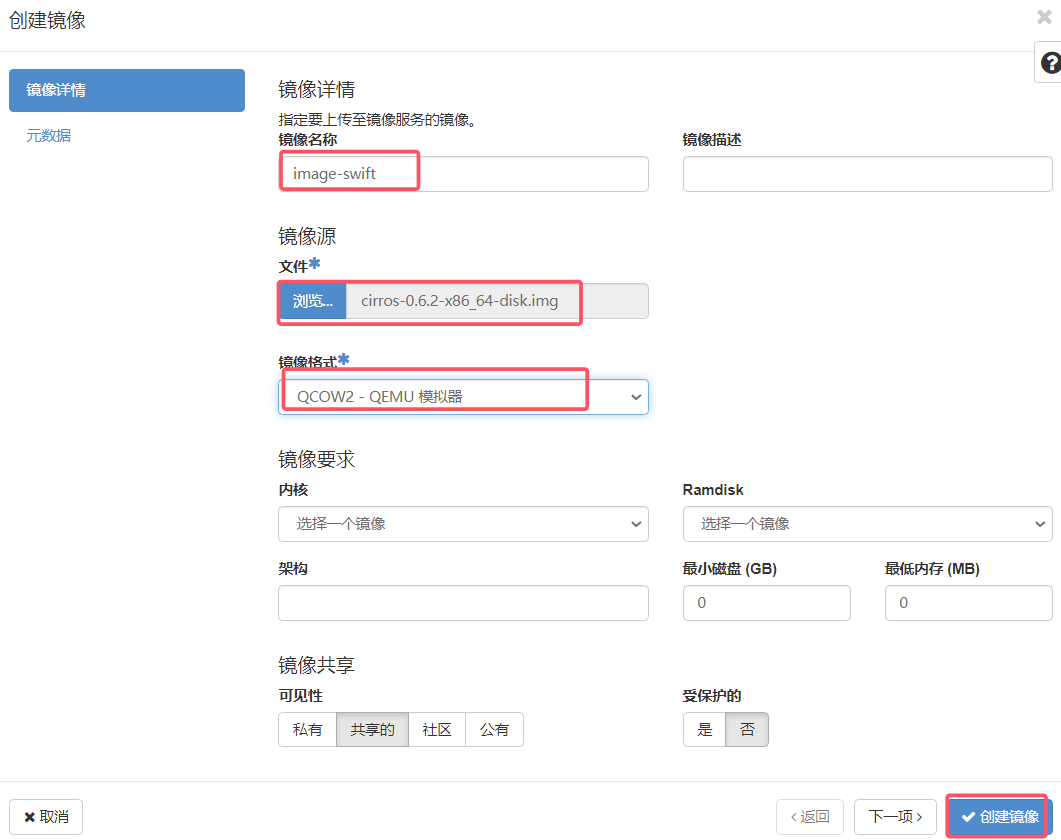
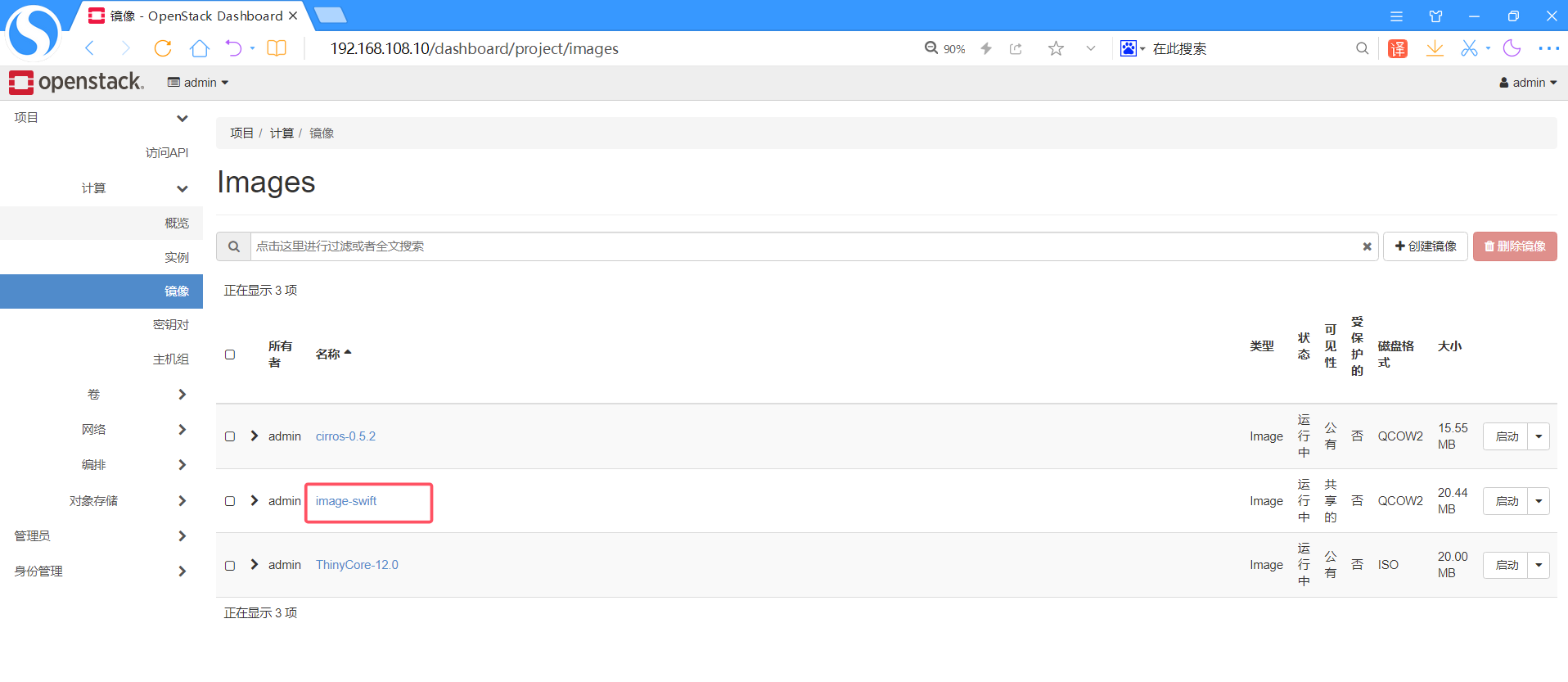
查看具体ID 6a5a50d9-be54-4151-bd2f-4b1c08efdb18
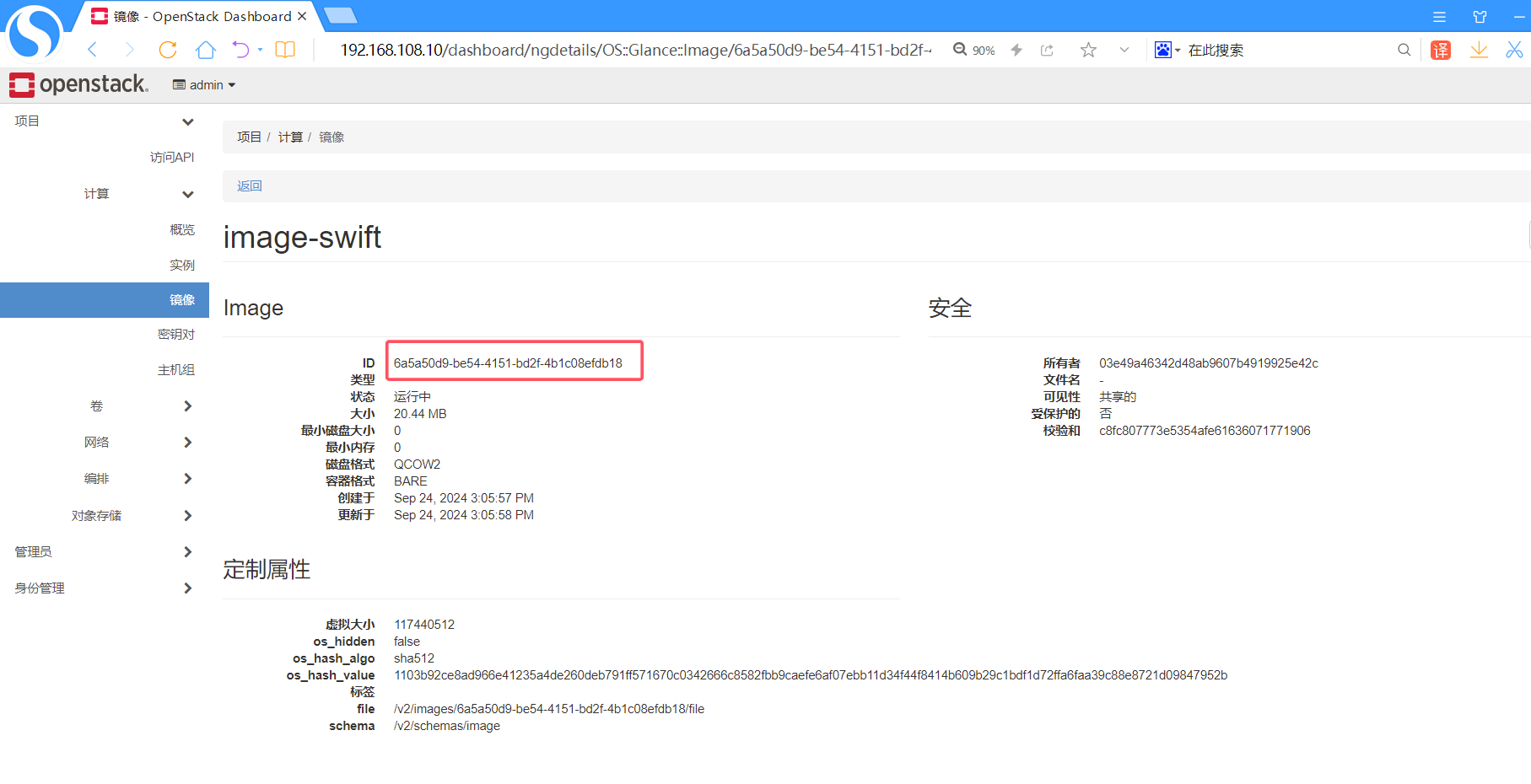
点击对象存储、容器
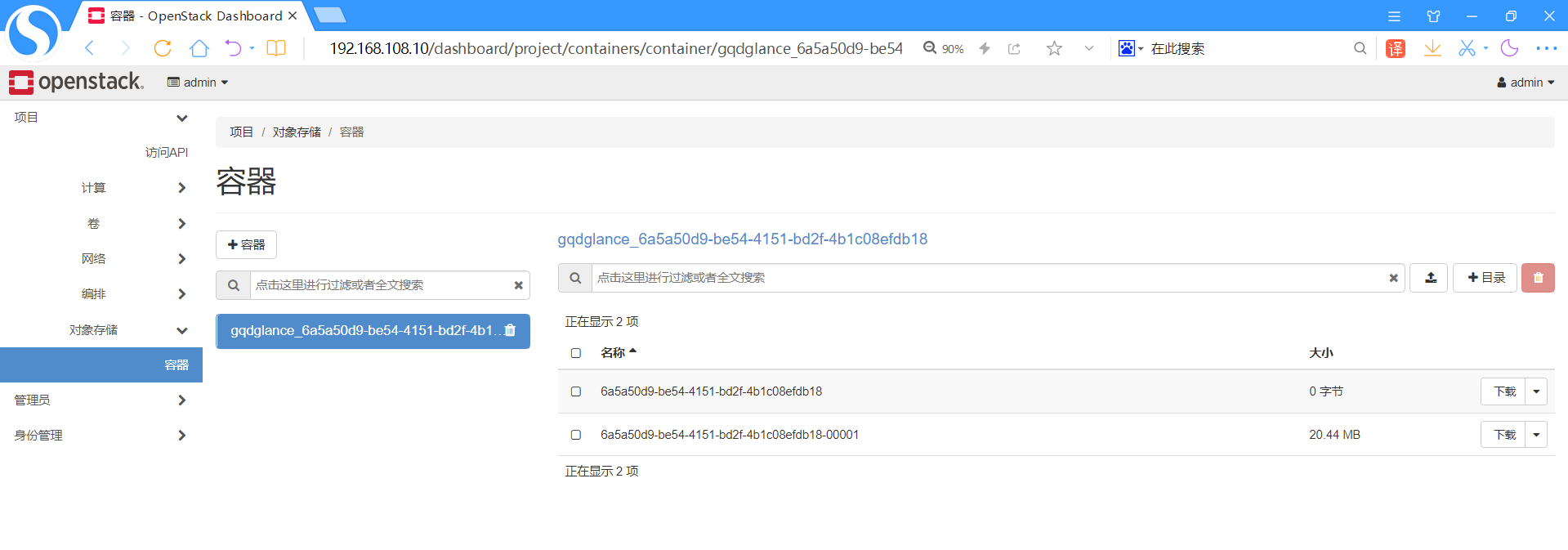
数据库中观察现象:
bash
# 执行命令:mysql
[root@controller ~]# mysql
Welcome to the MariaDB monitor.  Commands end with ; or \g.
Your MariaDB connection id is 23720
Server version: 10.3.28-MariaDB MariaDB Server
Copyright (c) 2000, 2018, Oracle, MariaDB Corporation Ab and others.
Type 'help;' or '\h' for help. Type '\c' to clear the current input statement.
MariaDB [(none)]> show databases;
+--------------------+
| Database           |
+--------------------+
| aodh               |
| cinder             |
| glance             |
| gnocchi            |
| heat               |
| information_schema |
| keystone           |
| mysql              |
| neutron            |
| nova               |
| nova_api           |
| nova_cell0         |
| performance_schema |
| placement          |
| test               |
+--------------------+
15 rows in set (0.000 sec)
MariaDB [(none)]> use glance;
Reading table information for completion of table and column names
You can turn off this feature to get a quicker startup with -A
Database changed
MariaDB [glance]> show tables;
+----------------------------------+
| Tables_in_glance                 |
+----------------------------------+
| alembic_version                  |
| image_locations                  |
| image_members                    |
| image_properties                 |
| image_tags                       |
| images                           |
| metadef_namespace_resource_types |
| metadef_namespaces               |
| metadef_objects                  |
| metadef_properties               |
| metadef_resource_types           |
| metadef_tags                     |
| migrate_version                  |
| task_info                        |
| tasks                            |
+----------------------------------+
15 rows in set (0.000 sec)
MariaDB [glance]> select id,value from image_locations;
+----+---------------------------------------------------------------------------
---------------------------------------------------------------------------------
---+
| id | value
  |
+----+---------------------------------------------------------------------------
---------------------------------------------------------------------------------
---+
|  1 | file:///var/lib/glance/images/e846b42b-5024-479b-9f79-1ae181bfa14e
 |
|  2 | file:///var/lib/glance/images/bb8a4940-3bde-428c-83b4-9c98eb430721
 |
|  3 |
swift+http://192.168.108.10:8080/v1/AUTH_03e49a46342d48ab9607b4919925e42c/gqdglan
ce_6a5a50d9-be54-4151-bd2f-4b1c08efdb18/6a5a50d9-be54-4151-bd2f-4b1c08efdb18 |
+----+---------------------------------------------------------------------------
---------------------------------------------------------------------------------
---+
3 rows in set (0.000 sec)
命令行上传大文件镜像-带进度条 WEB界面上传文件没有进度条,只会转圈
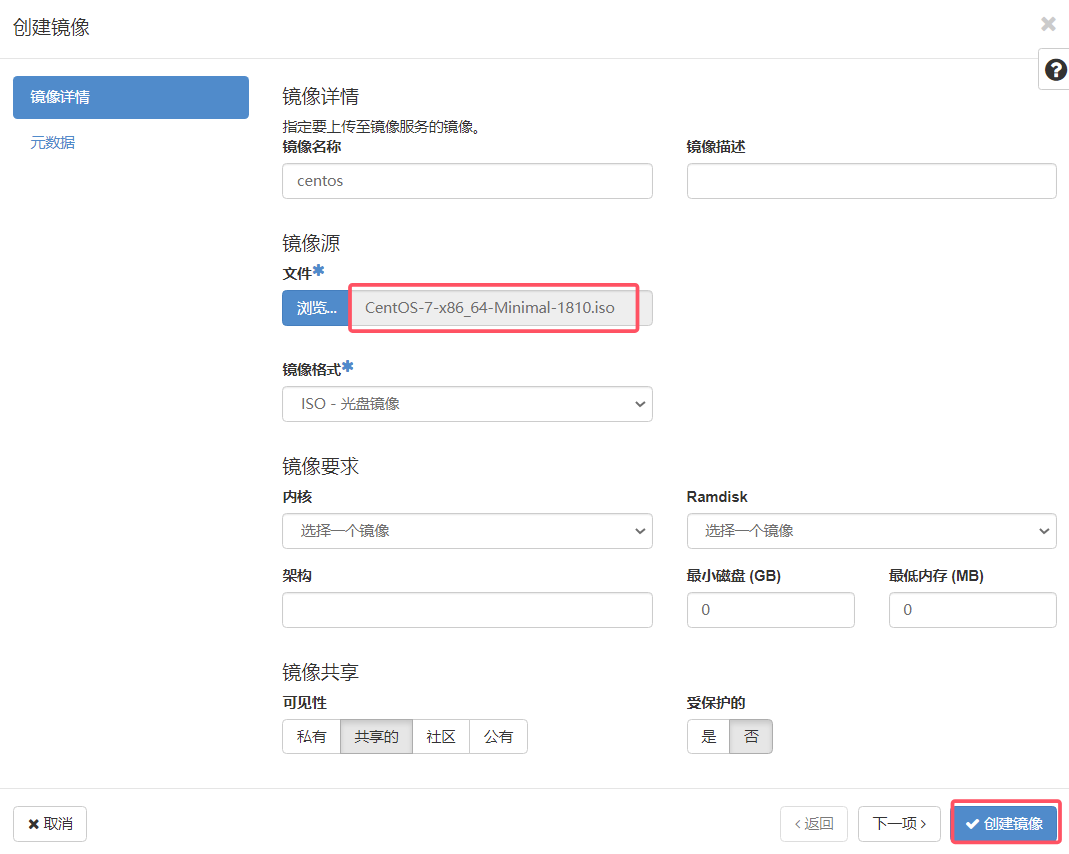
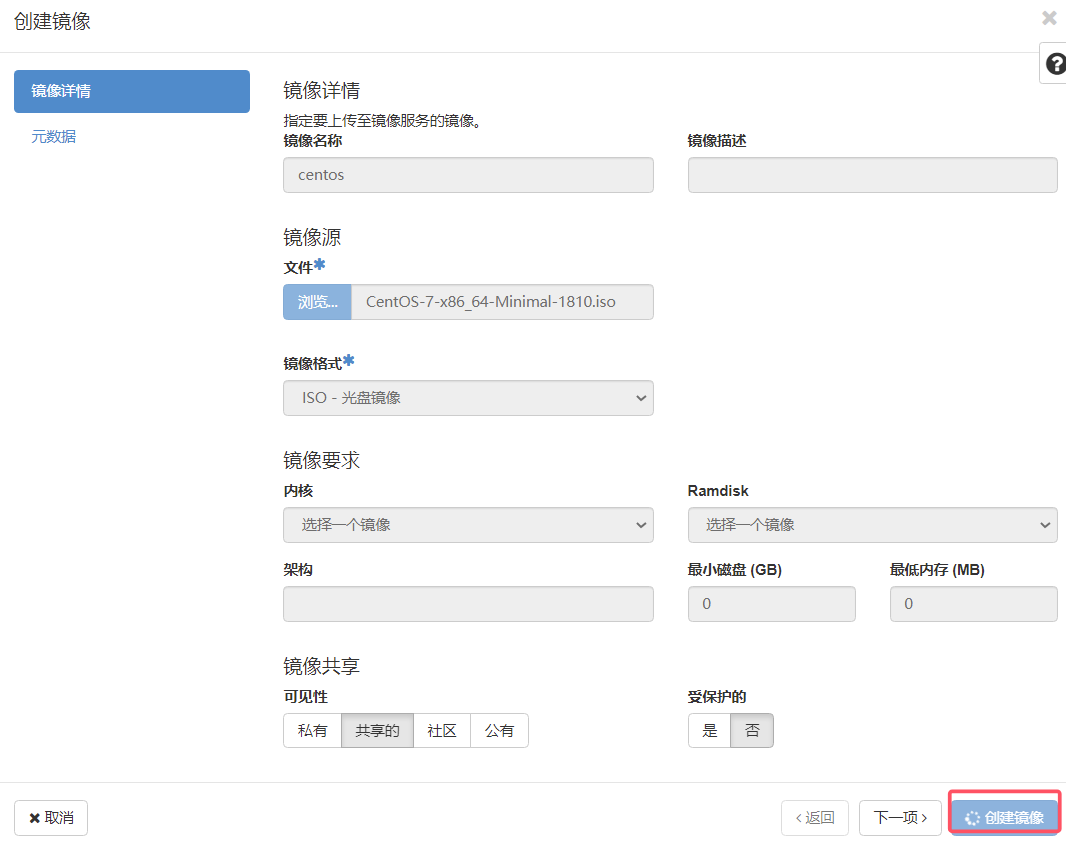
命令行上传大文件:
bash
# 执行命令:glance image-create --name image_centos
[root@controller ~(keystone_admin)]# glance image-create --name image_centos --file CentOS-7-x86_64-Minimal-1810.iso --disk-format raw --container bare --progress
现象如下,有进度条

建议:openstack上传大文件使用命令行,web界面可能上传失败