SpringBoot3+PaddleOCR 发票识别:不接云端大模型,本地飞桨怎么把专票读进进项单
🌐 文档地址 :https://ruoyioffice.com
📦 源码1·GitHub :https://github.com/yuqing2026/ruoyi-office
📦 源码2·GitCode :https://gitcode.com/zhouzhongyan/ruoyi-office
📦 源码3·Gitee :https://gitee.com/yqzy1688/ruoyi-office
💬 微信:17156169080(备注「RuoYi Office」)
财务把一张电子专票丢进对话框,指望大模型「看懂」再抄进 Excel,票号抄错一位,抵扣对不上。RuoYi Office 不走这条路。默认识别器是本地飞桨 PP-OCRv4:影像先上传,Java 把文件打到本机或云主机上的/ocr/invoice,规则解析票号和价税,Vue3 回填进项单。人核过再保存,来源记成 OCR。票进池之后怎么占用,是另一篇文章。
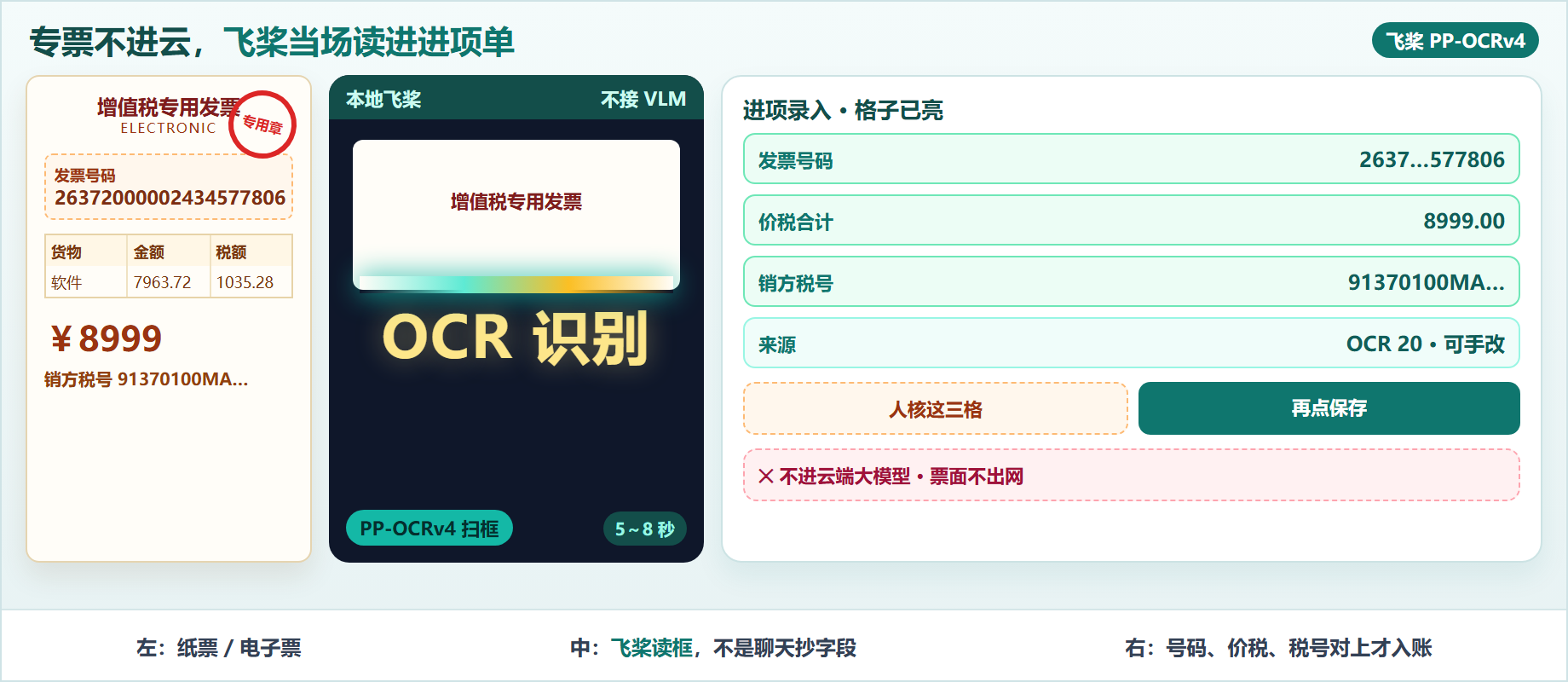
▲ 左:进项录入先上传影像。中:SpringBoot3 默认 provider=model,只打 PaddleOCR。右:PP-OCRv4 出框,parser 锚票号/税号/价税,人核对后 source=20
引言:发票识别难在「读对字段」,不在「看起来智能」
进项录入要的不是一段自然语言摘要,是能入账的格子:发票号码、价税合计、销方税号。格子错了,认证和抵扣一起错。
| 错法 | 看起来省事 | 三个月后 |
|---|---|---|
| 整张票丢给云端多模态大模型 | 不用部署模型 | 票面出公司网,字段偶发幻觉,对账说不清 |
| OCR 成功才允许保存 | 显得智能 | 黄牛票、折叠票全员卡死 |
| 识别结果直接入账 | 少点一次确认 | 票号少一位,重复票和假票一起进池 |
| 把占用、认证、识别写成一列 | 少字段 | 驳回报销时搞不清要不要改税号 |
正确的形状是:影像必传;飞桨能读就回填;读错或读空就手改;保存时 source=20 只表示「这张票曾经走过失识别」,不表示「机器说了算」。
本文只讲本地飞桨怎么把专票读进进项单。票池占用、报销挂票,见已发布的进项发票池一文。
一、产品能力与特点
进项发票是「票面要素 + 影像 + 识别来源」的一张主数据。谁用:财务在 财务 → 发票管理 → 进项发票 点「录入发票」。解决的事:少抄 20 位票号,少抄销方税号,但不取消核对。
| 能力 | 面向角色 | 和「只做一张审批单」差在哪 |
|---|---|---|
| 拖入影像再识别 | 财务 | 没有独立审批流,识别发生在录入弹窗 |
| 本地飞桨 PP-OCRv4 | 实施 / 运维 | 默认不调用云端 VLM,票面不出公司 |
| 回填后可改 | 财务 | 识别失败或半对,仍能保存 |
| 识别留痕 | 审计 | finance_ocr_record 记模型、耗时、原文 |
和「只做一张开票申请」也要分开:开票申请是销项侧审批单;进项 OCR 是收票录入。客户说「发票模块」,先问开出去还是收进来。
模块就三块,点到为止:
| 子模块 | 功能 | 角色 |
|---|---|---|
| 进项录入弹窗 | 上传、识别、回填、保存 | 财务 |
| OCR 服务 | PP-OCRv4 + 发票 parser | 运维 |
| AI 模型配置 | ai_model 指向 GPU 或 CPU 节点 |
实施 |
二、业务流程怎么串
主路径只有四步:打开录入 → 上传影像 → 飞桨回填 → 人核后保存。
2.1 打开进项录入,先看到上传区
菜单进 /finance/invoice/input-invoice,点「录入发票」。弹窗上半是拖拽上传,下半是票面字段。还没上传时,「OCR 识别」不可用。
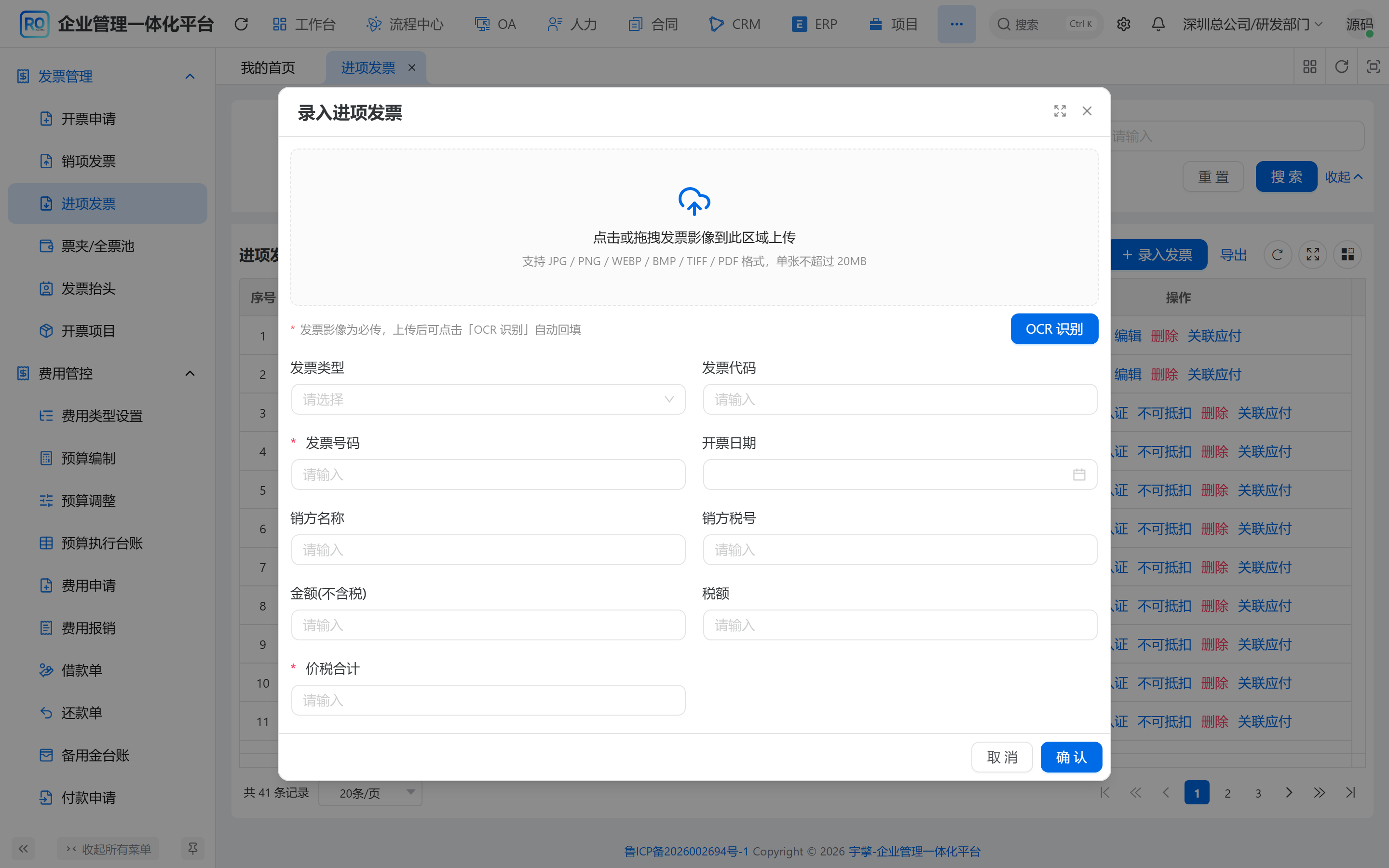
▲ 财务 → 进项发票 → 录入发票。虚线拖拽区支持 JPG / PNG / PDF,单文件不超过 20MB。没有 imageUrl,保存直接警告
状态:弹窗打开,表单空,source 还没写。
2.2 上传完成后点识别,飞桨回填格子
上传走基础设施文件服务,拿到 imageUrl。再点「OCR 识别」,请求 POST /finance/ocr/recognize,带 fileUrl 和 bizType=2(进项)。
回填这些格:发票类型、代码、号码、开票日期、销方名称、销方税号、不含税金额、税额、价税合计。购方名称、购方税号、明细行,解析结果里有,当前进项主表先不回填------避免把本公司抬头写进销方,也避免半截明细当正式分录。
识别成功会提示「已回填可识别字段」;parser 带 warnings 时改用警告,例如价税勾稽对不上。
2.3 人核票号和价税,再保存
飞桨读电子专票时,票号常见 20 位,价税合计在「小写」行。验收过的一张电子票:号码 26372000002434577806,价税合计 8999,销方税号 91370100MAC5ME3C95。CPU 节点大约 5~8 秒,不是秒回。数字对上了才能点确定。
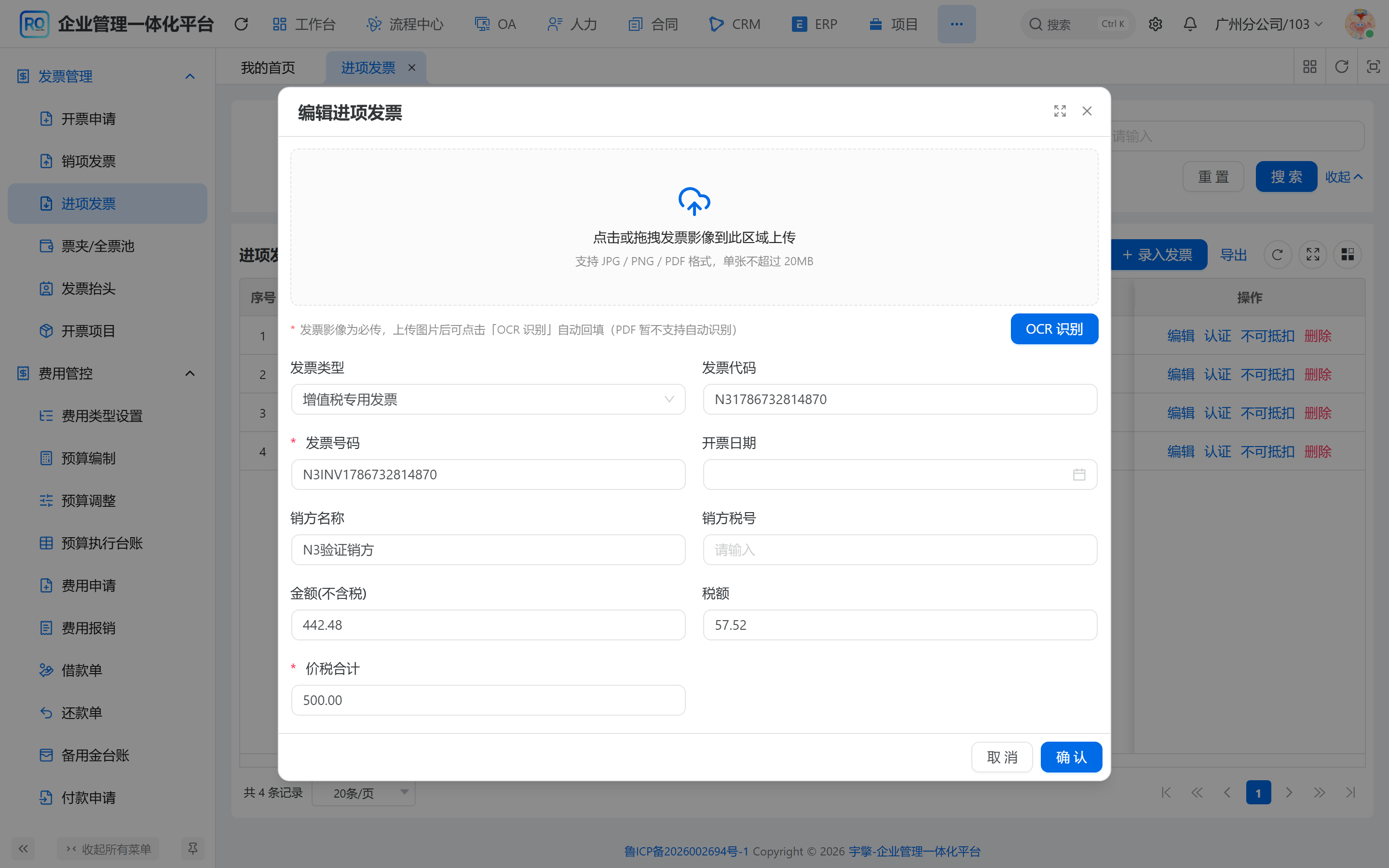
▲ 演示进项编辑弹窗。增值税专用发票,票号、不含税 442.48、税额 57.52、价税合计 500 已回填。人还可以改,保存值才入账
状态:字段从空变成识别值,recognizedBySource=20,单据仍未落库。
2.4 保存进项,影像和来源一起留下
确定时必须带 imageUrl。后端写入 finance_input_invoice。列表能看来源:手工 10 / OCR 20。再点编辑,核对票号价税和影像是不是同一张。私有桶预览走预签名,不要把对象地址当永久公网链。
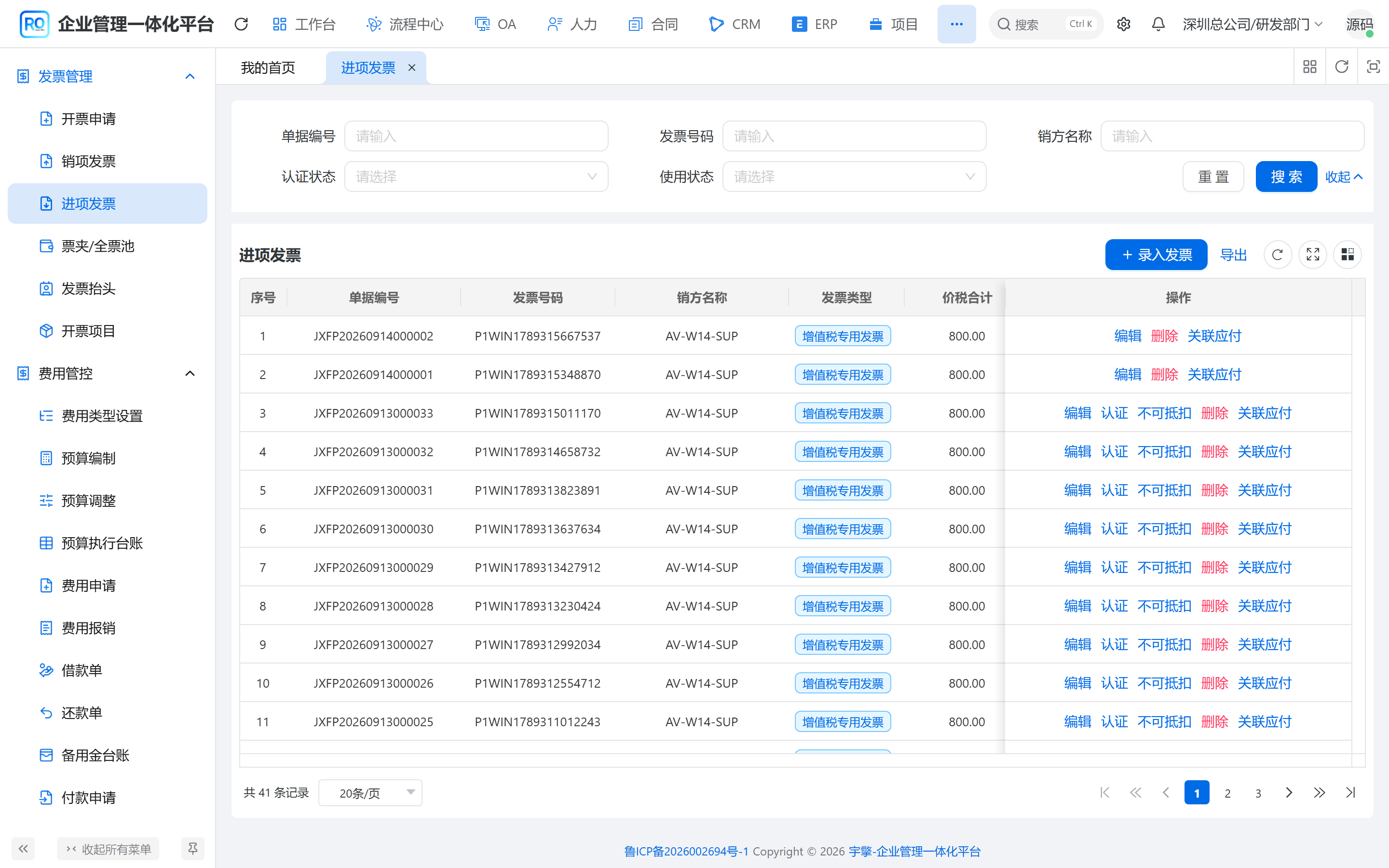
▲ 进项发票列表是入口。点「录入发票」走识别,点「编辑」核对角。来源列能区分手工和 OCR,占用不在这一页完成
状态:进项已保存。占用、票夹,不是这一步的职责。
三、设计怎么落地
3.1 设计思路
| 决策点 | 方案 | 理由 |
|---|---|---|
| 默认识别器 | finance.ocr.provider=model |
票面留在自建节点,不默认出网给 VLM |
| 模型从哪来 | ai_model + ai_api_key |
GPU 127.0.0.1:18081 与 CPU 48082 只换 Key 和 model-id |
| 字段怎么出 | OCR 框 + 规则 parser | 增值税版式稳定,不必让大模型猜「发票号码」四个字 |
| 失败怎么办 | 记录失败,表单仍可手填 | 识别不是保存门禁 |
| 回填哪些格 | 主表票号价税销方;购方和明细暂不写 | 少写错比多写错便宜 |
切到云端大模型要把 provider 改成 vlm,并单独配 VLM 模型。那是另一条客户端,不要和飞桨混在一个 HTTP 里。
3.2 表结构
支撑闭环的只有三张表。票池没有自己的表。
#mermaid-svg-IImliM4b39sNO5fn{font-family:"trebuchet ms",verdana,arial,sans-serif;font-size:16px;fill:#333;}@keyframes edge-animation-frame{from{stroke-dashoffset:0;}}@keyframes dash{to{stroke-dashoffset:0;}}#mermaid-svg-IImliM4b39sNO5fn .edge-animation-slow{stroke-dasharray:9,5!important;stroke-dashoffset:900;animation:dash 50s linear infinite;stroke-linecap:round;}#mermaid-svg-IImliM4b39sNO5fn .edge-animation-fast{stroke-dasharray:9,5!important;stroke-dashoffset:900;animation:dash 20s linear infinite;stroke-linecap:round;}#mermaid-svg-IImliM4b39sNO5fn .error-icon{fill:#552222;}#mermaid-svg-IImliM4b39sNO5fn .error-text{fill:#552222;stroke:#552222;}#mermaid-svg-IImliM4b39sNO5fn .edge-thickness-normal{stroke-width:1px;}#mermaid-svg-IImliM4b39sNO5fn .edge-thickness-thick{stroke-width:3.5px;}#mermaid-svg-IImliM4b39sNO5fn .edge-pattern-solid{stroke-dasharray:0;}#mermaid-svg-IImliM4b39sNO5fn .edge-thickness-invisible{stroke-width:0;fill:none;}#mermaid-svg-IImliM4b39sNO5fn .edge-pattern-dashed{stroke-dasharray:3;}#mermaid-svg-IImliM4b39sNO5fn .edge-pattern-dotted{stroke-dasharray:2;}#mermaid-svg-IImliM4b39sNO5fn .marker{fill:#333333;stroke:#333333;}#mermaid-svg-IImliM4b39sNO5fn .marker.cross{stroke:#333333;}#mermaid-svg-IImliM4b39sNO5fn svg{font-family:"trebuchet ms",verdana,arial,sans-serif;font-size:16px;}#mermaid-svg-IImliM4b39sNO5fn p{margin:0;}#mermaid-svg-IImliM4b39sNO5fn .entityBox{fill:#ECECFF;stroke:#9370DB;}#mermaid-svg-IImliM4b39sNO5fn .relationshipLabelBox{fill:hsl(80, 100%, 96.2745098039%);opacity:0.7;background-color:hsl(80, 100%, 96.2745098039%);}#mermaid-svg-IImliM4b39sNO5fn .relationshipLabelBox rect{opacity:0.5;}#mermaid-svg-IImliM4b39sNO5fn .labelBkg{background-color:rgba(248.6666666666, 255, 235.9999999999, 0.5);}#mermaid-svg-IImliM4b39sNO5fn .edgeLabel .label{fill:#9370DB;font-size:14px;}#mermaid-svg-IImliM4b39sNO5fn .label{font-family:"trebuchet ms",verdana,arial,sans-serif;color:#333;}#mermaid-svg-IImliM4b39sNO5fn .edge-pattern-dashed{stroke-dasharray:8,8;}#mermaid-svg-IImliM4b39sNO5fn .node rect,#mermaid-svg-IImliM4b39sNO5fn .node circle,#mermaid-svg-IImliM4b39sNO5fn .node ellipse,#mermaid-svg-IImliM4b39sNO5fn .node polygon{fill:#ECECFF;stroke:#9370DB;stroke-width:1px;}#mermaid-svg-IImliM4b39sNO5fn .relationshipLine{stroke:#333333;stroke-width:1;fill:none;}#mermaid-svg-IImliM4b39sNO5fn .marker{fill:none!important;stroke:#333333!important;stroke-width:1;}#mermaid-svg-IImliM4b39sNO5fn .edgeLabel{background-color:rgba(232,232,232, 0.8);}#mermaid-svg-IImliM4b39sNO5fn .edgeLabel .label rect{fill:rgba(232,232,232, 0.8);}#mermaid-svg-IImliM4b39sNO5fn .edgeLabel .label text{fill:#333;}#mermaid-svg-IImliM4b39sNO5fn :root{--mermaid-font-family:"trebuchet ms",verdana,arial,sans-serif;} items
traces
finance_input_invoice
string
invoice_no
decimal
price_tax_amount
string
seller_tax_no
int
source
string
image_url
finance_input_invoice_item
finance_ocr_record
string
provider
long
model_id
int
status
int
elapsed_ms
string
parsed_result
| 表 | 关键列 | 作用 |
|---|---|---|
finance_input_invoice |
invoice_no / price_tax_amount / seller_tax_no / source / image_url |
进项主数据;source 10 手工、20 OCR |
finance_input_invoice_item |
货物、金额、税额 | 明细;OCR 有 items 时当前前端不整表灌入 |
finance_ocr_record |
provider / model_id / raw_result |
每次识别留痕,不能拿记录 id 当票 |
3.3 时序图
飞桨 /ocr/invoice AiOcrApiImpl Finance OCR Vue3 进项弹窗 飞桨 /ocr/invoice AiOcrApiImpl Finance OCR Vue3 进项弹窗 #mermaid-svg-vipbs9wCjzF9gdow{font-family:"trebuchet ms",verdana,arial,sans-serif;font-size:16px;fill:#333;}@keyframes edge-animation-frame{from{stroke-dashoffset:0;}}@keyframes dash{to{stroke-dashoffset:0;}}#mermaid-svg-vipbs9wCjzF9gdow .edge-animation-slow{stroke-dasharray:9,5!important;stroke-dashoffset:900;animation:dash 50s linear infinite;stroke-linecap:round;}#mermaid-svg-vipbs9wCjzF9gdow .edge-animation-fast{stroke-dasharray:9,5!important;stroke-dashoffset:900;animation:dash 20s linear infinite;stroke-linecap:round;}#mermaid-svg-vipbs9wCjzF9gdow .error-icon{fill:#552222;}#mermaid-svg-vipbs9wCjzF9gdow .error-text{fill:#552222;stroke:#552222;}#mermaid-svg-vipbs9wCjzF9gdow .edge-thickness-normal{stroke-width:1px;}#mermaid-svg-vipbs9wCjzF9gdow .edge-thickness-thick{stroke-width:3.5px;}#mermaid-svg-vipbs9wCjzF9gdow .edge-pattern-solid{stroke-dasharray:0;}#mermaid-svg-vipbs9wCjzF9gdow .edge-thickness-invisible{stroke-width:0;fill:none;}#mermaid-svg-vipbs9wCjzF9gdow .edge-pattern-dashed{stroke-dasharray:3;}#mermaid-svg-vipbs9wCjzF9gdow .edge-pattern-dotted{stroke-dasharray:2;}#mermaid-svg-vipbs9wCjzF9gdow .marker{fill:#333333;stroke:#333333;}#mermaid-svg-vipbs9wCjzF9gdow .marker.cross{stroke:#333333;}#mermaid-svg-vipbs9wCjzF9gdow svg{font-family:"trebuchet ms",verdana,arial,sans-serif;font-size:16px;}#mermaid-svg-vipbs9wCjzF9gdow p{margin:0;}#mermaid-svg-vipbs9wCjzF9gdow .actor{stroke:hsl(259.6261682243, 59.7765363128%, 87.9019607843%);fill:#ECECFF;}#mermaid-svg-vipbs9wCjzF9gdow text.actor>tspan{fill:black;stroke:none;}#mermaid-svg-vipbs9wCjzF9gdow .actor-line{stroke:hsl(259.6261682243, 59.7765363128%, 87.9019607843%);}#mermaid-svg-vipbs9wCjzF9gdow .innerArc{stroke-width:1.5;stroke-dasharray:none;}#mermaid-svg-vipbs9wCjzF9gdow .messageLine0{stroke-width:1.5;stroke-dasharray:none;stroke:#333;}#mermaid-svg-vipbs9wCjzF9gdow .messageLine1{stroke-width:1.5;stroke-dasharray:2,2;stroke:#333;}#mermaid-svg-vipbs9wCjzF9gdow #arrowhead path{fill:#333;stroke:#333;}#mermaid-svg-vipbs9wCjzF9gdow .sequenceNumber{fill:white;}#mermaid-svg-vipbs9wCjzF9gdow #sequencenumber{fill:#333;}#mermaid-svg-vipbs9wCjzF9gdow #crosshead path{fill:#333;stroke:#333;}#mermaid-svg-vipbs9wCjzF9gdow .messageText{fill:#333;stroke:none;}#mermaid-svg-vipbs9wCjzF9gdow .labelBox{stroke:hsl(259.6261682243, 59.7765363128%, 87.9019607843%);fill:#ECECFF;}#mermaid-svg-vipbs9wCjzF9gdow .labelText,#mermaid-svg-vipbs9wCjzF9gdow .labelText>tspan{fill:black;stroke:none;}#mermaid-svg-vipbs9wCjzF9gdow .loopText,#mermaid-svg-vipbs9wCjzF9gdow .loopText>tspan{fill:black;stroke:none;}#mermaid-svg-vipbs9wCjzF9gdow .loopLine{stroke-width:2px;stroke-dasharray:2,2;stroke:hsl(259.6261682243, 59.7765363128%, 87.9019607843%);fill:hsl(259.6261682243, 59.7765363128%, 87.9019607843%);}#mermaid-svg-vipbs9wCjzF9gdow .note{stroke:#aaaa33;fill:#fff5ad;}#mermaid-svg-vipbs9wCjzF9gdow .noteText,#mermaid-svg-vipbs9wCjzF9gdow .noteText>tspan{fill:black;stroke:none;}#mermaid-svg-vipbs9wCjzF9gdow .activation0{fill:#f4f4f4;stroke:#666;}#mermaid-svg-vipbs9wCjzF9gdow .activation1{fill:#f4f4f4;stroke:#666;}#mermaid-svg-vipbs9wCjzF9gdow .activation2{fill:#f4f4f4;stroke:#666;}#mermaid-svg-vipbs9wCjzF9gdow .actorPopupMenu{position:absolute;}#mermaid-svg-vipbs9wCjzF9gdow .actorPopupMenuPanel{position:absolute;fill:#ECECFF;box-shadow:0px 8px 16px 0px rgba(0,0,0,0.2);filter:drop-shadow(3px 5px 2px rgb(0 0 0 / 0.4));}#mermaid-svg-vipbs9wCjzF9gdow .actor-man line{stroke:hsl(259.6261682243, 59.7765363128%, 87.9019607843%);fill:#ECECFF;}#mermaid-svg-vipbs9wCjzF9gdow .actor-man circle,#mermaid-svg-vipbs9wCjzF9gdow line{stroke:hsl(259.6261682243, 59.7765363128%, 87.9019607843%);fill:#ECECFF;stroke-width:2px;}#mermaid-svg-vipbs9wCjzF9gdow :root{--mermaid-font-family:"trebuchet ms",verdana,arial,sans-serif;} POST /finance/ocr/recognize写入 processing 记录model-id + imageUrlFileApi 取字节并 Base64POST /ocr/invoice + TokenPP-OCRv4 + parse_invoiceinvoice JSONrawResult更新成功记录票号价税等字段setValues + source=20
忙时飞桨进程单锁,会返回 503。财务侧应看到失败提示,而不是空白成功。
3.4 核心代码
上传后才允许识别。 对应 2.2,拦的是空 URL。
typescript
async function handleRecognize() {
  if (!innerUrl.value) {
    message.warning('请先上传发票影像');
    return;
  }
  recognizing.value = true;
  try {
    const result = await recognizeInvoice({
      fileUrl: innerUrl.value,
      bizType: props.bizType,
    });
    emit('recognized', result);
    if (result.warnings && result.warnings.length > 0) {
      message.warning(result.warnings.join(';'));
    } else {
      message.success('识别完成,已回填可识别字段');
    }
  } finally {
    recognizing.value = false;
  }
}
只把飞桨结果写进主表格子。 对应 2.3,不写购方,也不把明细当正式分录。
typescript
function handleRecognized(res: FinanceOcrApi.OcrRecognizeRespVO) {
  recognizedBySource = ocrSource;
  const invoiceDate =
    res.invoiceDate && dayjs(res.invoiceDate).isValid()
      ? dayjs(res.invoiceDate).valueOf()
      : undefined;
  formApi.setValues({
    invoiceType: res.invoiceType,
    invoiceCode: res.invoiceCode,
    invoiceNo: res.invoiceNo,
    invoiceDate,
    sellerName: res.sellerName,
    sellerTaxNo: res.sellerTaxNo,
    amount: res.amount,
    taxAmount: res.taxAmount,
    priceTaxAmount: res.priceTaxAmount,
  });
}
Java 只打 PaddleOCR 节点。 对应 2.2 中间那一跳。平台不是 PaddleOCR 直接拒绝,避免误把对话模型当成读票器。
java
if (!AiPlatformEnum.PADDLE_OCR.getPlatform().equals(model.getPlatform())) {
    throw new IllegalArgumentException("暂不支持的 OCR 平台:" + model.getPlatform());
}
AiApiKeyDO apiKey = apiKeyService.validateApiKey(model.getKeyId());
byte[] fileBytes = fileApi.getFileContentByUrl(reqDTO.getImageUrl()).getCheckedData();
Map<String, Object> request = new LinkedHashMap<>();
request.put("imageBase64", Base64.encode(fileBytes));
request.put("model", model.getModel());
HttpRequest httpRequest = HttpUtil.createPost(buildEndpoint(apiKey.getUrl()))
        .header("Content-Type", "application/json");
if (StrUtil.isNotBlank(apiKey.getApiKey())) {
    httpRequest.header("X-OCR-Token", apiKey.getApiKey());
}
票号和价税来自版式锚点,不是 Prompt。 对应 2.3 的字段验收。
python
result["invoiceNo"] = labeled(r"发票号码:?\s*(\d{20}|\d{8})(?!\d)")
result["invoiceCode"] = labeled(r"发票代码:?\s*(\d{12}|\d{10})(?!\d)")
# ...
if "小写" in joined:
    match = re.search(r"小写[)):]*(?:[¥¥Y])?(-?\d[\d,]*(?:\.\d+)?)", joined)
    if match:
        result["priceTaxAmount"] = number(match.group(1))
if re.search(r"合计", joined) and "价税" not in joined:
    values = [number(t.text) for t in line if number(t.text) is not None]
    if len(values) >= 2:
        result["amount"], result["taxAmount"] = values[-2:]
仓库默认 model-id: 69 指向本机 GPU pp-ocrv4-gpu(127.0.0.1:18081)。演示环境切 model-id: 70,打云主机 CPU pp-ocrv4-cpu(48082,必带 Token)。两套目录禁止混装:ocr-service/gpu-windows 与 ocr-service/cpu-yidong。
四、边界与对照
| 设计要点 | 落地方式 | 对业务的价值 |
|---|---|---|
| 默认不接 VLM | provider=model |
票面不出网,费用可预期 |
| 飞桨只读票 | PP-OCRv4 + parser | 票号价税可回归测试 |
| 识别可失败 | 记录 status=2,表单手改 | 烂票也能入账 |
| 来源 10 / 20 | 保存带 source | 事后知道谁填的 |
| 影像必传 | 无 URL 不保存 | 审核能对图 |
| 购方暂不回填 | 前端 setValues 不写 buyer | 少把本公司抬头写错列 |
| GPU / CPU 双节点 | 换 model-id 和 Key | 笔记本验证、云主机常驻分开 |
| Token 只给 CPU 公网口 | X-OCR-Token |
18081 回环可不鉴权 |
| 占用另算 | 本文不写 occupy | 读票和锁票不要缠成一列 |
传统「把 PDF 丢给聊天模型抄字段」和本方案的差别:前者难回归,后者可以用同一张电子票反复打 /ocr/invoice,票号和价税必须稳定。
五、快速体验
在线演示:https://ruoyioffice.com/web/(账号 admin / admin123)
- 打开 财务 → 发票管理 → 进项发票 (
/finance/invoice/input-invoice)。 - 点「录入发票」,上传一张增值税票面(电子票 JPG 即可)。
- 点「OCR 识别」,看票号、价税合计、销方税号是否回填。
- 对不上的格子手改,不要为了「识别率」硬保存。
- 保存后再次编辑,确认影像还在,来源能区分手工 / OCR。
- 本机有 NVIDIA 时,起
ocr-service/gpu-windows,模型 69 打18081。 - 只有 CPU 的云主机,起
cpu-yidong,模型 70 打48082,Key 不要提交进 Git。
源码仓库:GitHub:https://github.com/yuqing2026/ruoyi-office | GitCode:https://gitcode.com/zhouzhongyan/ruoyi-office | Gitee:https://gitee.com/yqzy1688/ruoyi-office
相关阅读:进项发票池与报销占用(已发);本文是它的前半段------票还没被锁之前,字段从哪来。
常见问题(FAQ)
飞桨发票 OCR 和云端大模型有什么区别?
飞桨 PP-OCRv4 在自建节点做检测和识别,再用规则把「发票号码」「小写」锚成字段。云端多模态是另一条 provider=vlm。RuoYi Office 默认走飞桨,避免专票出网,也避免票号被模型改写成「看起来像」的数字。
识别错了还能保存进项单吗?
能。OCR 只回填,不锁死表单。没有影像不能保存;识别失败可以手填票号和价税。finance_ocr_record 会留下失败原因,进项单仍以保存值为准。
本机 GPU 和云主机 CPU 怎么切?
改 finance.ocr.model-id,以及 ai_model 绑定的 API Key URL。69 + 127.0.0.1:18081 给本机 GPU;70 + 云主机 48082 给 CPU,并配置 X-OCR-Token。模型标识必须是 pp-ocrv4-gpu 或 pp-ocrv4-cpu,和进程加载的设备一致。
为什么购方税号识别出来了,进项单没有?
解析结果里有 buyerTaxNo。进项主表当前只回填销方和价税,减少「本公司抬头写进销方」这类错列。需要购方时再在表单上补,不要为了字段多就整包灌入。
RuoYi Office 的发票 OCR 可以在线体验吗?
可以。后端 Spring Boot 3.5 + 前端 Vue3,演示站按上面路径上传一张票即可。完整能力与私有化部署咨询商业版。
结语
进项录入要的是可核对的格子,不是一段聪明的描述。本地飞桨负责读,规则负责锚,人负责核,SpringBoot3 负责把结果写进进项单。不要把云端大模型默认成读票器,也不要把识别成功当成入账许可。
同一套回填组件,销项录入也能复用,只要 bizType 分开。票读进来之后如何占用、如何报销,走票池那一套,不要塞进识别服务。
你们团队现在是手抄票号,还是已经把飞桨挂在财务网里?欢迎留言对一下耗时和必核字段。
💡 想要体验 RuoYi Office 的强大功能?
🌐 在线演示:https://ruoyioffice.com/web/(账号 admin / admin123)
📦 源码仓库:GitHub:https://github.com/yuqing2026/ruoyi-office | GitCode:https://gitcode.com/zhouzhongyan/ruoyi-office | Gitee:https://gitee.com/yqzy1688/ruoyi-office
💬 技术咨询 :添加微信 17156169080,备注「RuoYi Office」
⭐ 如果觉得不错,请给个 Star 支持一下!