文章目录
- [1. 路由(Routing)](#1. 路由(Routing))
-
- [1.1 是什么?](#1.1 是什么?)
- [1.2 工作原理](#1.2 工作原理)
-
- [1.2.1 决策核心:选择器 Selector](#1.2.1 决策核心:选择器 Selector)
- [1.2.2 分发外壳:路由器 Router](#1.2.2 分发外壳:路由器 Router)
- [2. 案例演示](#2. 案例演示)
-
- [2.1 公共配置(阿里云百炼)](#2.1 公共配置(阿里云百炼))
- [2.2 工具名片:路由的全部判断依据](#2.2 工具名片:路由的全部判断依据)
- [2.3 LLMSingleSelector(单选)](#2.3 LLMSingleSelector(单选))
- [2.4 LLMMultiSelector(多选)](#2.4 LLMMultiSelector(多选))
- [2.5 PydanticSingleSelector(函数调用)](#2.5 PydanticSingleSelector(函数调用))
- [2.6 完整流水线:RouterQueryEngine](#2.6 完整流水线:RouterQueryEngine)
-
- [2.6.1 构建多个查询引擎](#2.6.1 构建多个查询引擎)
- [2.6.2 RouterQueryEngine 初始化](#2.6.2 RouterQueryEngine 初始化)
- [2.6.3 执行查询](#2.6.3 执行查询)
1. 路由(Routing)
1.1 是什么?
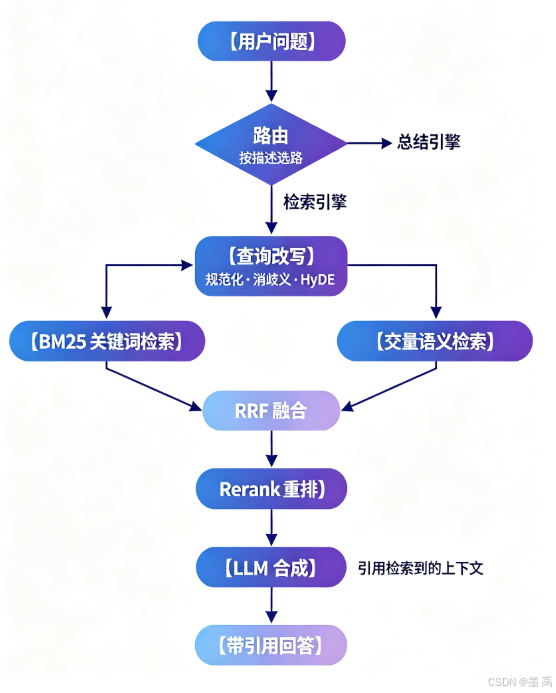
路由 (Routing)是查询进来时的智能分发器 ,先判断这个问题属于哪类,再把它送到最合适的那个数据源/引擎去处理。它回答的问题是去哪问 ,而不是怎么问 (那是查询重写)或拆成几个问(那是子问题)。
它在整个 RAG 链路中的位置:
1.2 工作原理
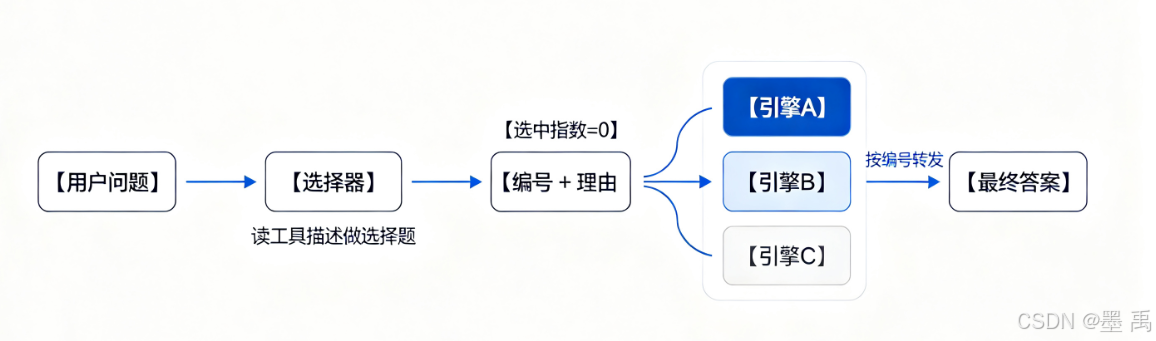
工作原理图:
1.2.1 决策核心:选择器 Selector
选择器是 LlamaIndex 里负责做选择题 的组件,给它一组候选(工具/引擎的名片)和一个问题,它挑出最相关的 1 个或 N 个,并给出理由。
它是路由的决策大脑:路由器只管按选择器的结论转发查询,选谁全由选择器说了算。
输入 / 输出:
python
输入:候选列表 [ToolMetadata(name, description), ...]   ← 只是名片,不含实现
      + 用户问题
输出:SelectorResult
      └─ [SingleSelection(index=0, reason="为什么选它的理由")]
                              ↑ 0-based 下标,指向候选列表的位置
四种实现:
| 实现 | 做题方式 | 特点 |
|---|---|---|
| LLMSingleSelector | 把选项编号列表塞进提示词,让 LLM 输出 JSON | 单选;任何 LLM 可用;依赖文本解析(可能解析失败) |
| LLMMultiSelector | 同上 | 多选;复合问题能拆开意图选多个 |
| PydanticSingleSelector | 走函数调用接口,直接产出结构化对象 | 单选;不依赖文本格式,最稳;要求模型支持函数调用 |
| PydanticMultiSelector | 同上 | 多选 |
| (EmbeddingSingle/MultiSelector) | 问题和描述各自向量化算相似度 | 不调 LLM,零成本,精度弱一档 |
1.2.2 分发外壳:路由器 Router
选择器做完选谁 的判断,路由器是拿着这个判断去执行转发的壳子。它自己没有任何智能。判断在外面的选择器里,它只负责按结论送查询、收答案。
两种:
| 外壳 | 候选是什么 | 转发到哪一步为止 |
|---|---|---|
| RouterQueryEngine | 多个查询引擎 | 完整问答(检索 + 合成),返回答案 |
| RouterRetriever | 多个检索器 | 只到节点召回,返回节点列表(合成由你后续组件做) |
2. 案例演示
本案例演示 LlamaIndex 的路由机制 :查询进来时,由选择器 读一遍各候选工具的名片 (name + description),判断该把问题送去哪个引擎。
2.1 公共配置(阿里云百炼)
先导入所有类和工具:
python
from pathlib import Path
from time import time

from dotenv import load_dotenv
import os

from llama_index.core import (
    Settings,
    SimpleDirectoryReader,
    VectorStoreIndex,
)
from llama_index.core.query_engine import RouterQueryEngine
from llama_index.core.selectors import (
    LLMMultiSelector,
    LLMSingleSelector,
    PydanticSingleSelector,
)
from llama_index.core.tools import QueryEngineTool, ToolMetadata
from llama_index.embeddings.openai_like import OpenAILikeEmbedding
from llama_index.llms.openai_like import OpenAILike
构建模型对象这个我们直接做了很多遍了,不解释:
python
# 路径锚定到脚本位置:无论从项目根还是包目录运行,都能找到 .env 和 data/
PROJECT_ROOT = Path(__file__).resolve().parent.parent
load_dotenv(PROJECT_ROOT / ".env")
api_key = os.environ["DASHSCOPE_API_KEY"]
API_BASE = "https://ws-jfb8j8mx0n7e2k6a.cn-beijing.maas.aliyuncs.com/compatible-mode/v1"

# LLM:路由的"决策者"------选择器全靠它读名片描述做判断。
llm = OpenAILike(
    model="qwen-plus",
    api_key=api_key,
    api_base=API_BASE,
    is_chat_model=True,
    is_function_calling_model=True,  # Pydantic 选择器走函数调用,必须声明
    timeout=180.0,   # 专属端点偶发慢响应,默认 60s 会超时
    max_retries=2,
)
# embedding:第 4 节建向量索引用。
# 注意:LLM 系选择器本身是纯文本提示词,不用 embedding------两个模型各司其职。
embed_model = OpenAILikeEmbedding(
    model_name="text-embedding-v3",
    api_key=api_key,
    api_base=API_BASE,
)
Settings.llm = llm
Settings.embed_model = embed_model
2.2 工具名片:路由的全部判断依据
ToolMetadata 只有 name + description,不含任何实现逻辑,它是给选择器看的名片:
python
tool_choices = [
    ToolMetadata(
        name="pg_essay_retrieval",
        description="检索引擎:回答关于 Paul Graham 随笔细节内容的具体问题",
    ),
    ToolMetadata(
        name="pg_essay_summary",
        description="总结引擎:对整篇 Paul Graham 随笔做主旨概括和全文总结",
    ),
    ToolMetadata(
        name="weather_api",
        description="天气查询接口:查询某个城市今天的天气情况",
    ),
]
【要点】判断依据 100% 来自 description 的措辞:
- 名字起得再好、描述写得含糊 → 照样选错;改名没用,改描述才有用
- 模型相信描述而不是名字:下面
weather_api是无关项,用来验证排除能力
2.3 LLMSingleSelector(单选)
LLMSingleSelector.from_defaults 内部装配两样东西:
- 默认英文提示词模板(变量:
num_choices/context_list/query_str) JSON输出解析器(模型输出的文本 → 解析成结构化对象)
python
single = LLMSingleSelector.from_defaults(llm=llm)select() 内部四步:
- 名片排成编号列表
1. xxx\n2. xxx\n3. xxx - 拼提示词(编号列表 + 问题)→
llm.predict()发给LLM LLM按格式输出JSON:[{"choice": 2, "reason": "..."}]- 解析 → 转成
SelectorResult
python
result = single.select(tool_choices, query="作者是怎么学会编程的?")打印选择结果:
python
print(f"耗时 {time() - t0:.1f}s,选中 {len(result.selections)} 个:")
for s in result.selections:
    print(f"  [{tool_choices[s.index].name}] {s.reason}")
输出示例:
python
耗时 2.9s,选中 1 个:
  [pg_essay_retrieval] 问题'作者是怎么学会编程的?'是关于Paul Graham随笔中某个具体细节内容的询问,需要从原文中检索相关信息,因此属于检索引擎(选项1)的功能范畴。
2.4 LLMMultiSelector(多选)
多选器提示词多了 max_outputs 变量(单次选择数量上限):
python
multi = LLMMultiSelector.from_defaults(llm=llm,max_outputs=2)
result = multi.select(tool_choices, query="这篇文章的整体主旨是什么?作者是谁?")
print(f"选中 {len(result.selections)} 个:")
for s in result.selections:
    print(f"  [{tool_choices[s.index].name}] {s.reason}")
2.5 PydanticSingleSelector(函数调用)
Pydantic 选择器走函数调用,不依赖文本 JSON 解析,与 LLM 系唯一的区别在输出怎么拿:
LLM系:模型输出JSON文本 → 代码解析(模型不守格式就解析失败------老坑)Pydantic系:预定义Selection结构,走函数调用接口让模型直接产出结构化对象,格式由API保证。
python
    pyd_single = PydanticSingleSelector.from_defaults(llm=llm)
    result = pyd_single.select(tool_choices, query="北京今天多少度?")
    for s in result.selections:
        print(f"PydanticSingleSelector 选中 [{tool_choices[s.index].name}] {s.reason}")
输出示例:
python
PydanticSingleSelector 选中 [weather_api] The question '北京今天多少度?' is asking for the current temperature in Beijing, which directly relates to the weather query interface described in choice (3).2.6 完整流水线:RouterQueryEngine
2.6.1 构建多个查询引擎
同一篇语料建两个引擎 :检索问答 vs 全文总结(response_mode 不同)
python
query_engine_tools = [
    # 引擎 0:普通向量检索问答(similarity_top_k=3,召回 3 块拼上下文回答)
    QueryEngineTool.from_defaults(
        query_engine=index.as_query_engine(similarity_top_k=3),
        name="pg_essay_retrieval",
        description="检索引擎:回答关于 Paul Graham 随笔细节内容的具体问题",
    ),
    # 引擎 1:全文总结(tree_summarize:全部块分批摘要再逐层归并,
    #          比检索引擎贵好几次 LLM 调用------路由避开"杀鸡用牛刀"的意义就在这)
    QueryEngineTool.from_defaults(
        query_engine=index.as_query_engine(response_mode="tree_summarize"),
        name="pg_essay_summary",
        description="总结引擎:对整篇 Paul Graham 随笔做主旨概括和全文总结",
    ),
]
2.6.2 RouterQueryEngine 初始化
RouterQueryEngine 初始化时做两件准备:
- 每个工具的 `ToolMetadata` → 将来交给选择器做题
- 引擎按下标注册成查找表 → 将来按选中下标转发
python
router = RouterQueryEngine(
    selector=LLMSingleSelector.from_defaults(llm=llm),
    query_engine_tools=query_engine_tools,
    verbose=True,   # 打印每次实际选中了哪个引擎("Selecting query engine N: 理由")
)
2.6.3 执行查询
问题 1:细节查询 → 应命中引擎 0(检索)。
python
resp = router.query("作者是怎么学会编程的?")
print(f"[问题1 细节查询] 耗时 {time() - t0:.1f}s")
print(f"答案:{str(resp)[:150]}")
输出示例:
python
[问题1 细节查询] 耗时 8.3s
答案:作者最初是在初中九年级(约13或14岁)时,通过使用学校所在学区的IBM 1401计算机学习编程。
问题 2:主旨概括 → 应命中引擎 1(总结)。
python
resp = router.query("整体总结这篇文章讲了什么?")
print(f"[问题2 全文总结] 耗时 {time() - t0:.1f}s")
print(f"答案:{str(resp)[:200]}")
输出示例:
python
[问题2 全文总结] 耗时 9.6s
答案:这篇文章主要讲述了保罗·格雷厄姆(Paul Graham)与杰西卡等人共同创立Y Combinator(YC)的起源、理念与早期实践过程。