适用版本:Spring AI 1.0.x / 2.0
一、为什么要 ChatMemory
LLM 是无状态的,不会保留先前交互的信息:
java
@Test
public void testChatOptions() {
    String content = chatClient.prompt().user("我叫徐庶").call().content();
    System.out.println(content);

    content = chatClient.prompt().user("我叫什么?").call().content();
    System.out.println(content);     // 模型答不上来
}那平时跟大模型聊天为什么能"记住"?------因为每次对话都把之前的对话消息一起发给大模型 ,这就是多轮对话。
Spring AI 提供了 ChatMemory 组件专门存聊天记录:
- 每次对话后,把「用户消息 + 模型响应」存入
ChatMemory; - 下次对话前,把历史记录取出来一起发给模型;
- 可以为不同用户 / 不同会话维护独立上下文。
手动存/取太麻烦 → 用 Advisor 对话拦截自动完成(见第三节)。
二、自动配置:ChatMemoryAutoConfiguration
Spring AI 已经贴心提供了自动配置类:
java
@AutoConfiguration
@ConditionalOnClass({ ChatMemory.class, ChatMemoryRepository.class })
public class ChatMemoryAutoConfiguration {

    @Bean
    @ConditionalOnMissingBean
    ChatMemoryRepository chatMemoryRepository() {
        return new InMemoryChatMemoryRepository();      // 默认:存 JVM 内存
    }

    @Bean
    @ConditionalOnMissingBean
    ChatMemory chatMemory(ChatMemoryRepository chatMemoryRepository) {
        return MessageWindowChatMemory.builder()
                .chatMemoryRepository(chatMemoryRepository)
                .build();
    }
}
引入依赖即生效:
xml
<dependency>
  <groupId>org.springframework.ai</groupId>
  <artifactId>spring-ai-autoconfigure-model-chat-memory</artifactId>
</dependency>
两个 Bean 都是
@ConditionalOnMissingBean:自定义自己的实现就会覆盖默认实现(这是后面换 JDBC / Redis 的关键)。
三、用 Advisor 解放双手
Spring AI 提供了专用于对话记忆的 Advisor:
| 版本 | Advisor | 说明 |
|---|---|---|
| 1.x | PromptChatMemoryAdvisor |
把历史对话作为 system 文本追加 |
| 2.0 | MessageChatMemoryAdvisor(推荐) |
以消息(Message)形式拼进 Prompt,角色更准确 |
java
// 1.x
ChatMemory chatMemory = MessageWindowChatMemory.builder().build();
chatClient = ChatClient.builder(chatModel)
        .defaultAdvisors(PromptChatMemoryAdvisor.builder(chatMemory).build())
        .build();

// 2.0
chatClient = ChatClient.builder(chatModel)
        .defaultAdvisors(MessageChatMemoryAdvisor.builder(chatMemory).build())
        .build();
之后无需手动维护历史:
java
chatClient.prompt().user("我叫徐庶").call().content();
chatClient.prompt().user("我叫什么?").call().content();   // 输出:你叫徐庶
3.1 配置聊天记录最大条数(必须关注 token)
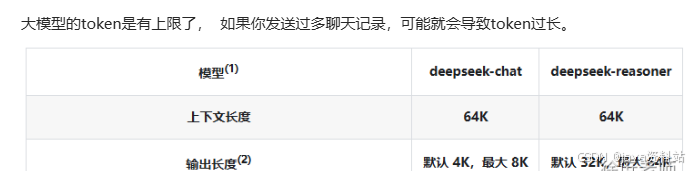
聊天记录是要算 token的:token 有上限、越多越贵、解析越慢,所以窗口不能太长。
MessageWindowChatMemory.DEFAULT_MAX_MESSAGES = 20(即 10 次对话,一问一答算 2 条)- 超出后只保留最后 N 条 (FIFO,先进先出),参考
MessageWindowChatMemory源码
java
ChatMemory chatMemory = MessageWindowChatMemory.builder()
        .chatMemoryRepository(repository)
        .maxMessages(10)        // 自定义窗口大小
        .build();
3.2 多用户隔离记忆
多个用户对话不能混在一起 → 用 CONVERSATION_ID 隔离:
java
chatClient.prompt()
        .user("我叫什么?")
        .advisors(spec -> spec.param(ChatMemory.CONVERSATION_ID, "user-1001"))
        .call()
        .content();
不同的 CONVERSATION_ID 拥有完全独立的记忆。
四、原理拆解
MessageChatMemoryAdvisor(前置存储/拼装)
        ↓
MessageWindowChatMemory(窗口裁剪:只留最近 N 条)
        ↓
ChatMemoryRepository(真正落盘:内存 / JDBC / Redis / ...)
ChatMemoryRepository 接口只需要实现 4 个方法:
| 方法 | 作用 |
|---|---|
List<String> findConversationIds() |
查询所有会话 ID |
List<Message> findByConversationId(String conversationId) |
查某个会话的历史消息 |
void saveAll(String conversationId, List<Message> messages) |
保存(全量覆盖式)该会话消息 |
void deleteByConversationId(String conversationId) |
删除某个会话 |
五、数据库存储(JDBC / MySQL)
默认存在 JVM 内存有两个致命问题:
- 一直存最终会撑爆 JVM → OOM;
- 服务重启就丢 → 无法持久化。
Spring AI 内置提供了几种持久化实现(Cassandra、JDBC、Neo4j),下面演示 JDBC + MySQL。
5.1 依赖
xml
<dependency>
  <groupId>org.springframework.ai</groupId>
  <artifactId>spring-ai-starter-model-chat-memory-repository-jdbc</artifactId>
</dependency>
<dependency>
  <groupId>com.mysql</groupId>
  <artifactId>mysql-connector-j</artifactId>
  <scope>runtime</scope>
</dependency>
5.2 配置
yaml
spring:
  datasource:
    url: jdbc:mysql://localhost:3306/ai_demo?useUnicode=true&characterEncoding=utf8&serverTimezone=Asia/Shanghai
    username: root
    password: root
  ai:
    chat:
      memory:
        repository:
          jdbc:
            initialize-schema: true
            schema: classpath:schema-mysql.sql      # 1.0.0 版本需自己提供脚本
5.3 resources/schema-mysql.sql
1.0.0 版本官方没有提供脚本,需要自己定义:
sql
CREATE TABLE IF NOT EXISTS SPRING_AI_CHAT_MEMORY (
    conversation_id VARCHAR(36) NOT NULL,
    content         TEXT         NOT NULL,
    type            VARCHAR(10)  NOT NULL,
    `timestamp`     TIMESTAMP    NOT NULL DEFAULT CURRENT_TIMESTAMP,
    CONSTRAINT SPRING_AI_CHAT_MEMORY_TYPE_CHECK
        CHECK (type IN ('USER', 'ASSISTANT', 'SYSTEM', 'TOOL'))
);

CREATE INDEX SPRING_AI_CHAT_MEMORY_CONVERSATION_ID_TIMESTAMP_IDX
ON SPRING_AI_CHAT_MEMORY (conversation_id, `timestamp`);conversation_id:会话 ID(多用户隔离的关键列)content:消息内容type:消息角色(USER / ASSISTANT / SYSTEM / TOOL)timestamp:排序用,配合窗口裁剪取最近 N 条
5.4 配置类(自定义窗口大小)
java
@Configuration
public class ChatMemoryConfig {

    @Bean
    public ChatMemory chatMemory(ChatMemoryRepository chatMemoryRepository) {
        return MessageWindowChatMemory.builder()
                .chatMemoryRepository(chatMemoryRepository)   // 注入的是 Jdbc 实现
                .maxMessages(20)
                .build();
    }
}
5.5 测试验证
java
@Test
public void testJdbcMemory() {
    chatClient.prompt()
            .user("我叫徐庶")
            .advisors(spec -> spec.param(ChatMemory.CONVERSATION_ID, "1001"))
            .call().content();

    String answer = chatClient.prompt()
            .user("我叫什么?")
            .advisors(spec -> spec.param(ChatMemory.CONVERSATION_ID, "1001"))
            .call().content();
    System.out.println(answer);   // 输出:你叫徐庶
}
若配置了
.maxMessages(1),数据库中该会话只会保留 1 条记录(窗口裁剪的结果)。
六、Redis 存储
Spring AI 官方暂未提供 Redis 实现,需要自己实现 ChatMemoryRepository 接口 (增、删、查)。
(也可以用阿里现成的实现:spring-ai-alibaba 的 community/memories 模块,还包含 ES 实现 → https://github.com/alibaba/spring-ai-alibaba/tree/main/community/memories)
6.1 自定义 RedisChatMemoryRepository
java
/**
 * 基于 Redis 的对话记忆存储
 * key 结构:
 *   chat:memory:ids             → Set,记录所有 conversationId
 *   chat:memory:{conversationId} → List,按序存放消息 JSON
 */
public class RedisChatMemoryRepository implements ChatMemoryRepository {

    private static final String IDS_KEY = "chat:memory:ids";
    private static final String KEY_PREFIX = "chat:memory:";

    private final StringRedisTemplate redisTemplate;
    private final ObjectMapper objectMapper;
    /** 记忆过期时间(可选,防止无限膨胀) */
    private final Duration ttl;

    public RedisChatMemoryRepository(StringRedisTemplate redisTemplate,
                                     ObjectMapper objectMapper,
                                     Duration ttl) {
        this.redisTemplate = redisTemplate;
        this.objectMapper = objectMapper;
        this.ttl = ttl;
    }

    @Override
    public List<String> findConversationIds() {
        Set<String> ids = redisTemplate.opsForSet().members(IDS_KEY);
        return ids == null ? List.of() : new ArrayList<>(ids);
    }

    @Override
    public List<Message> findByConversationId(String conversationId) {
        List<String> jsonList = redisTemplate.opsForList().range(key(conversationId), 0, -1);
        if (jsonList == null || jsonList.isEmpty()) {
            return List.of();
        }
        return jsonList.stream()
                .map(this::deserialize)
                .filter(Objects::nonNull)
                .toList();
    }

    @Override
    public void saveAll(String conversationId, List<Message> messages) {
        String key = key(conversationId);
        redisTemplate.delete(key);                                   // 全量覆盖
        List<String> jsonList = messages.stream().map(this::serialize).toList();
        redisTemplate.opsForList().rightPushAll(key, jsonList);
        redisTemplate.opsForSet().add(IDS_KEY, conversationId);
        if (ttl != null && !ttl.isZero()) {
            redisTemplate.expire(key, ttl);
        }
    }

    @Override
    public void deleteByConversationId(String conversationId) {
        redisTemplate.delete(key(conversationId));
        redisTemplate.opsForSet().remove(IDS_KEY, conversationId);
    }

    private String key(String conversationId) {
        return KEY_PREFIX + conversationId;
    }

    // Message 是接口(多态),用 {role, content} 手动序列化,避免 Jackson 多态反序列化踩坑
    private String serialize(Message message) {
        String role = switch (message.getMessageType()) {
            case USER -> "USER";
            case ASSISTANT -> "ASSISTANT";
            case SYSTEM -> "SYSTEM";
            case TOOL -> "TOOL";
        };
        return objectMapper.writeValueAsString(Map.of("role", role, "content", message.getText()));
    }

    private Message deserialize(String json) {
        Map<?, ?> map = objectMapper.readValue(json, Map.class);
        String role = String.valueOf(map.get("role"));
        String content = String.valueOf(map.get("content"));
        return switch (role) {
            case "ASSISTANT" -> new AssistantMessage(content);
            case "SYSTEM" -> new SystemMessage(content);
            case "TOOL" -> new ToolResponseMessage(List.of());
            default -> new UserMessage(content);
        };
    }
}
6.2 注册(覆盖默认的内存实现)
java
@Configuration
public class RedisChatMemoryConfig {

    @Bean
    @ConditionalOnMissingBean(ChatMemoryRepository.class)   // 自定义优先,覆盖 InMemory
    public ChatMemoryRepository chatMemoryRepository(StringRedisTemplate redisTemplate,
                                                     ObjectMapper objectMapper) {
        return new RedisChatMemoryRepository(redisTemplate, objectMapper, Duration.ofDays(7));
    }

    @Bean
    public ChatMemory chatMemory(ChatMemoryRepository chatMemoryRepository) {
        return MessageWindowChatMemory.builder()
                .chatMemoryRepository(chatMemoryRepository)
                .maxMessages(20)
                .build();
    }
}
6.3 Redis vs JDBC 对比
| 维度 | JDBC / MySQL | Redis |
|---|---|---|
| 持久化 | ✅ 永久落盘,可审计、可检索 | ⚠️ 依赖持久化配置(AOF/RDB),一般设 TTL |
| 性能 | 中等,有磁盘 IO | ✅ 内存读写,延迟低 |
| 容量 | 大,成本低 | 受内存限制,需设过期时间 |
| 实现成本 | 官方 starter,开箱即用 | 需自己实现 ChatMemoryRepository |
| 适用场景 | 需要长期留存、合规审计的业务对话 | 高频短会话、临时上下文、可容忍丢失 |
七、多层次记忆架构(模仿人类)
痛点 :记忆多 = 更"聪明",但记忆过多会触发 token 上限。
无论用什么存储,只能解决服务端存储性能问题;聊天记录一多,依然会超 token 上限,可我们仍希望存更多记录让对话更像"人"。
解决方案:分层记忆
| 层级 | 内容 | 策略 |
|---|---|---|
| 近期记忆 | 上下文窗口中的最近几轮对话 | 每轮对话完成后立即存储,走 ChatMemory,约 10 条 |
| 中期记忆 | RAG 检索到的相关历史对话 | 每轮对话完成后异步转向量存入向量库,检索回约 5 条 |
| 长期记忆 | 关键信息的固化总结 | 见下方两种方式 |
长期记忆的两种实现方式
方式一:定时批处理
- 通过定时任务(每天 / 每周)对积累的对话做总结提炼
- 提取关键信息、用户偏好、重要事实
- 批处理降低计算成本,适合大规模处理
方式二:关键点实时处理
-
对话中识别出关键信息点时立即提取并存储
-
例:用户明确表达偏好、提供个人信息、设置持久性指令
-
采用"写入触发器"机制,在特定条件下自动更新长期记忆
近期(ChatMemory,窗口 N 条)
↓ 异步向量化
中期(向量库,语义检索 Top-K)
↓ 定时任务 / 写入触发器
长期(结构化摘要:用户画像、偏好、事实)
八、实践要点 / 踩坑
- 一定要设
maxMessages:默认 20 条,token 与费用随窗口线性增长。 - 一定要传
CONVERSATION_ID:不传会使用默认值,导致所有用户共享同一份记忆。 saveAll是全量覆盖语义:自定义 Repository 时先删再写,不要 append,否则窗口裁剪失效。- 消息序列化 :
Message是接口,直接 Jackson 序列化会失败或丢类型,用{role, content}手动映射最稳。 - Redis 要设 TTL :否则 key 无限膨胀;同时用 Set 单独维护
conversationId列表,避免KEYS扫描。 - Advisor 顺序 :记忆 Advisor 一般在 RAG Advisor 之后、日志 Advisor 之前(参考
HIGHEST_PRECEDENCE + 200)。 - 生产别用
InMemoryChatMemoryRepository:会 OOM 且重启丢失。 - 1.0.0 没有官方建表脚本 :JDBC 方式需自备
schema-mysql.sql。
九、项目实战:自实现 ChatMemory(MySQL)+ 会话清单双存储
前面五、六章用的是官方
ChatMemoryRepository(JDBC / Redis)。这一章是完全自己实现 的方案:直接实现
ChatMemory接口 + MyBatis-Plus 落库,并额外用一套ChatHistoryService维护会话清单。
9.0 两套存储的分工
| 模块 | 存储内容 | 用途 |
|---|---|---|
MySqlChatMemory(实现 ChatMemory) |
每一条消息:user / assistant / system 的文本 | 供 Spring AI 的 Advisor 读取对话上下文,拼入 Prompt 传给大模型 |
ChatHistoryService(业务层) |
仅 chatId + 业务 type |
前端会话列表:查询该用户有哪些会话,不存对话内容 |
chat_history(会话清单:chatId + type)  ← 前端左侧会话列表
chat_memory(对话明细:chatId + role + content) ← 大模型上下文
        两者通过 chatId 关联
9.1 MySqlChatMemory:自定义 ChatMemory(存储单条对话消息)
直接实现 ChatMemory 接口,替换默认的 MessageWindowChatMemory,把每一轮问答存入 MySQL,服务重启会话不丢失。
ChatMemory 接口只需实现 5 个方法:
| 方法 | 说明 |
|---|---|
void add(String conversationId, Message message) |
存单条消息 |
void add(String conversationId, List<Message> messages) |
批量存消息 |
List<Message> get(String conversationId) |
取全部消息 |
List<Message> get(String conversationId, int lastN) |
取最后 N 条(控制上下文窗口) |
void clear(String conversationId) |
清空会话 |
① 实现类
java
package com.ruoyi.xingyueai.component;

import com.ruoyi.xingyueai.entity.ChatMemoryEntity;
import com.ruoyi.xingyueai.service.ChatMemoryService;
import org.springframework.ai.chat.memory.ChatMemory;
import org.springframework.ai.chat.messages.AssistantMessage;
import org.springframework.ai.chat.messages.Message;
import org.springframework.ai.chat.messages.SystemMessage;
import org.springframework.ai.chat.messages.UserMessage;
import org.springframework.stereotype.Component;

import java.util.ArrayList;
import java.util.List;
import java.util.stream.Collectors;

/**
 * 基于 MySQL + MyBatis-Plus 的 ChatMemory 持久化实现
 * 供 MessageChatMemoryAdvisor 读取/写入对话消息
 */
@Component
public class MySqlChatMemory implements ChatMemory {

    private final ChatMemoryService chatMemoryService;

    public MySqlChatMemory(ChatMemoryService chatMemoryService) {
        this.chatMemoryService = chatMemoryService;
    }

    /** 保存单条消息 */
    @Override
    public void add(String conversationId, Message message) {
        String role = switch (message.getMessageType()) {
            case USER -> "user";
            case ASSISTANT -> "assistant";
            case SYSTEM -> "system";
            default -> "unknown";
        };
        String content = extractTextContentFromMessage(message);
        if (!content.isBlank()) {
            chatMemoryService.saveChatRecord(conversationId, role, content);
        }
    }

    /** 批量保存消息 */
    @Override
    public void add(String conversationId, List<Message> messages) {
        messages.forEach(message -> this.add(conversationId, message));
    }

    /** 查询会话全部消息 */
    @Override
    public List<Message> get(String conversationId) {
        List<ChatMemoryEntity> chatRecords = chatMemoryService.getChatRecordsByChatId(conversationId);
        if (chatRecords.isEmpty()) {
            return new ArrayList<>();
        }
        return chatRecords.stream()
                .map(record -> switch (record.getRole()) {
                    case "user" -> new UserMessage(record.getContent());
                    case "assistant" -> new AssistantMessage(record.getContent());
                    case "system" -> new SystemMessage(record.getContent());
                    default -> new UserMessage(record.getContent());
                })
                .collect(Collectors.toList());
    }

    /** 查询会话最后 N 条消息(控制上下文窗口) */
    @Override
    public List<Message> get(String conversationId, int lastN) {
        List<Message> allMessages = this.get(conversationId);
        if (allMessages.isEmpty() || lastN <= 0) {
            return new ArrayList<>();
        }
        int startIndex = Math.max(0, allMessages.size() - lastN);
        return allMessages.subList(startIndex, allMessages.size());
    }

    /** 清空会话(逻辑删除) */
    @Override
    public void clear(String conversationId) {
        chatMemoryService.clearChatMemory(conversationId);
    }

    /** 工具方法:提取消息文本 */
    private String extractTextContentFromMessage(Message message) {
        String text = message.getText();
        return text == null ? "" : text.trim();
    }
}
② 实体 ChatMemoryEntity
java
@Data
@TableName("chat_memory")
public class ChatMemoryEntity implements Serializable {
    private static final long serialVersionUID = 1L;

    @TableId(type = IdType.ASSIGN_ID)
    private Long id;
    /** 会话唯一标识 chatId */
    private String chatId;
    /** 角色 user / assistant / system */
    private String role;
    /** 对话文本内容 */
    private String content;
    @TableField(fill = FieldFill.INSERT)
    private LocalDateTime createTime;
    @TableField(fill = FieldFill.INSERT_UPDATE)
    private LocalDateTime updateTime;
    /** 逻辑删除 0未删 1已删 */
    @TableLogic
    private Integer deleted;
}
③ Mapper
java
@Mapper
public interface ChatMemoryMapper extends BaseMapper<ChatMemoryEntity> {
    /** 根据会话ID查询对话记录,按时间正序(@TableLogic 会自动追加 deleted = 0) */
    @Select("SELECT * FROM chat_memory WHERE chat_id = #{chatId} ORDER BY create_time ASC, id ASC")
    List<ChatMemoryEntity> selectByChatId(@Param("chatId") String chatId);
}
也可用 XML 写
<select id="selectByChatId">,二选一即可。
④ Service
java
public interface ChatMemoryService extends IService<ChatMemoryEntity> {
    List<ChatMemoryEntity> getChatRecordsByChatId(String chatId);
    void saveChatRecord(String chatId, String role, String content);
    void clearChatMemory(String chatId);
}

@Service
public class ChatMemoryServiceImpl extends ServiceImpl<ChatMemoryMapper, ChatMemoryEntity>
        implements ChatMemoryService {

    @Override
    public List<ChatMemoryEntity> getChatRecordsByChatId(String chatId) {
        return baseMapper.selectByChatId(chatId);
    }

    @Override
    public void saveChatRecord(String chatId, String role, String content) {
        ChatMemoryEntity entity = new ChatMemoryEntity();
        entity.setChatId(chatId);
        entity.setRole(role);
        entity.setContent(content);
        this.save(entity);
    }

    @Override
    public void clearChatMemory(String chatId) {
        List<ChatMemoryEntity> records = this.getChatRecordsByChatId(chatId);
        if (!records.isEmpty()) {
            records.forEach(record -> record.setDeleted(1));
            this.updateBatchById(records);
        }
    }
}
提示:逻辑删除用
@TableLogic时,更简洁的写法是
this.lambdaUpdate().eq(ChatMemoryEntity::getChatId, chatId).remove(),MyBatis-Plus 会转成UPDATE ... SET deleted = 1。
⑤ ChatClient 配置(绑定自定义 ChatMemory)
java
@Bean
public MySqlChatMemory chatMemory(ChatMemoryService chatMemoryService) {
    return new MySqlChatMemory(chatMemoryService);
}

/**
 * 构建带 MySQL 持久化记忆的 ChatClient
 */
@Bean
public ChatClient chatClient(OpenAiChatModel openAiChatModel, MySqlChatMemory mySqlChatMemory) {
    return ChatClient.builder(openAiChatModel)
            .defaultSystem("你是一个智能助手,名字叫煋玥")
            .defaultAdvisors(
                    new SimpleLoggerAdvisor(),
                    // 绑定自定义持久化 ChatMemory
                    MessageChatMemoryAdvisor.builder(mySqlChatMemory).build()
            )
            .build();
}
⚠️ 自定义
ChatMemory后就没有MessageWindowChatMemory的窗口裁剪了,需要自己控制条数:方案 A:
MessageChatMemoryAdvisor.builder(chatMemory).chatMemoryRetrieveSize(20).build()(1.1.x)方案 B:在
get(conversationId)里直接返回最后 N 条(SQLLIMIT或内存截取)
⑥ 历史消息查询接口
java
/** 查询会话全部历史消息 */
@GetMapping("/getAllHistoryAll")
public Result<List<Message>> getAllHistory(@RequestParam @NotBlank(message = "会话ID不能为空") String chatId) {
    try {
        List<Message> allHistory = mySqlChatMemory.get(chatId, Integer.MAX_VALUE);
        return Result.success(allHistory);
    } catch (Exception e) {
        return Result.error("查询全部历史消息失败:" + e.getMessage());
    }
}

/** 查询会话最后 N 条消息 */
@GetMapping("/getAllHistorylast")
public Result<List<Message>> getLastNHistory(@Validated HistoryQueryDTO historyQueryDTO) {
    try {
        String conversationId = historyQueryDTO.getChatId();
        Integer lastN = historyQueryDTO.getLastN();
        List<Message> lastNHistory = mySqlChatMemory.get(conversationId, lastN == null ? Integer.MAX_VALUE : lastN);
        return Result.success(lastNHistory);
    } catch (Exception e) {
        return Result.error("查询最后N条历史消息失败:" + e.getMessage());
    }
}
建议:直接把
Message对象返回给前端会带上messageType、metadata等字段,通常封装成{role, content, createTime}的 VO 更合适。
⑦ chat_memory 建表 SQL
sql
CREATE TABLE chat_memory (
    id          BIGINT PRIMARY KEY AUTO_INCREMENT,
    chat_id     VARCHAR(255) NOT NULL COMMENT '会话ID',
    role        VARCHAR(50)  NOT NULL COMMENT '消息角色 user/assistant/system',
    content     TEXT         NOT NULL COMMENT '对话内容',
    create_time DATETIME     COMMENT '创建时间',
    update_time DATETIME     COMMENT '更新时间',
    deleted     TINYINT DEFAULT 0 COMMENT '逻辑删除 0未删 1已删',
    KEY idx_chat_id_create_time (chat_id, create_time)
);
9.2 ChatHistoryService:业务会话清单(管理 chatId 列表)
只保存会话 ID ,不存消息内容。按业务
type(chat / pdf / service)归类,用于前端会话列表展示。提供两套实现:内存实现(开发调试)、MySQL 实现(生产)。
① 顶层接口
java
public interface ChatHistoryService {
    /** 保存会话ID:type = chat / service / pdf */
    void save(String type, String chatId);
    /** 删除会话 */
    void delete(String type, String chatId);
    /** 查询该业务类型下全部会话ID */
    List<String> getChatIds(String type);
}
② 内存实现(开发调试,重启丢失)
java
@Repository
public class InMemoryChatHistoryServiceImpl implements ChatHistoryService {

    private final Map<String, List<String>> chatHistory = new ConcurrentHashMap<>();

    @Override
    public void save(String type, String chatId) {
        List<String> chatIds = chatHistory.computeIfAbsent(type, k -> new CopyOnWriteArrayList<>());
        if (chatIds.contains(chatId)) {
            return;
        }
        chatIds.add(chatId);
    }

    @Override
    public void delete(String type, String chatId) {
        List<String> chatIds = chatHistory.get(type);
        if (chatIds != null) {
            chatIds.remove(chatId);
        }
    }

    @Override
    public List<String> getChatIds(String type) {
        return chatHistory.getOrDefault(type, new ArrayList<>());
    }
}
注意:原实现
delete是空方法(删不掉),且HashMap+ArrayList在多线程下不安全,这里换成ConcurrentHashMap+CopyOnWriteArrayList并补全删除逻辑。
③ MySQL 实现(生产持久化)
java
@Repository
public class InSqlChatHistoryServiceImpl implements ChatHistoryService {

    @Autowired
    private ChatHistoryMapper chatHistoryMapper;

    @Override
    public void save(String type, String chatId) {
        if (exists(type, chatId)) {
            return;
        }
        ChatHistory chatHistory = new ChatHistory();
        chatHistory.setType(type);
        chatHistory.setChatId(chatId);
        chatHistoryMapper.insert(chatHistory);
    }

    private boolean exists(String type, String chatId) {
        List<String> chatIds = chatHistoryMapper.selectChatIdsByType(type);
        return chatIds.contains(chatId);
    }

    @Override
    public void delete(String type, String chatId) {
        chatHistoryMapper.delete(type, chatId);
    }

    @Override
    public List<String> getChatIds(String type) {
        return chatHistoryMapper.selectChatIdsByType(type);
    }
}
优化建议:
exists现在会把该 type 下所有 chatId 查回来再判断,数据量大时改成
SELECT COUNT(1) FROM chat_history WHERE type=#{type} AND chat_id=#{chatId};并给
(type, chat_id)加唯一索引 ,用INSERT IGNORE防重复。
④ Mapper
java
@Mapper
public interface ChatHistoryMapper {

    @Insert("INSERT INTO chat_history (type, chat_id) VALUES (#{type}, #{chatId})")
    void insert(ChatHistory chatHistory);

    @Delete("DELETE FROM chat_history WHERE type = #{type} AND chat_id = #{chatId}")
    void delete(@Param("type") String type, @Param("chatId") String chatId);

    @Select("SELECT chat_id FROM chat_history WHERE type = #{type} ORDER BY id DESC")
    List<String> selectChatIdsByType(String type);
}
⑤ 实体
java
@Data
public class ChatHistory {
    private Long id;
    /** 业务类型 chat / pdf / service */
    private String type;
    /** 会话ID */
    private String chatId;
}
⑥ chat_history 建表 SQL
sql
CREATE TABLE chat_history (
    id      BIGINT PRIMARY KEY AUTO_INCREMENT,
    type    VARCHAR(255) NOT NULL COMMENT '业务类型 chat/pdf/service',
    chat_id VARCHAR(255) NOT NULL COMMENT '会话ID',
    UNIQUE KEY uk_type_chat_id (type, chat_id),
    KEY idx_type (type)
);
9.3 流式对话接口(整合两套存储)
每次请求:
- 先把
chatId存入ChatHistoryService(记录会话清单); MessageChatMemoryAdvisor自动用MySqlChatMemory读写历史消息;- Spring AI 1.1.3 使用常量
ChatMemory.CONVERSATION_ID,旧常量CHAT_MEMORY_CONVERSATION_ID_KEY已移除。
java
@GetMapping(value = "/chatStream", produces = MediaType.TEXT_EVENT_STREAM_VALUE)
public Flux<String> chat(@RequestParam("question") String question,
                         @RequestParam("chatId") String chatId) {
    // 1. 保存会话ID到会话清单表 chat_history
    chatHistoryRepository.save(ChatType.CHAT.getValue(), chatId);

    // 2. Advisor 自动读写 chat_memory
    return client.prompt()
            .user(question)
            .advisors(spec -> spec.param(ChatMemory.CONVERSATION_ID, chatId))
            .stream()
            .content();
}
流式场景下,
MessageChatMemoryAdvisor会在流结束后 才把 assistant 的回复写入ChatMemory,因此不用担心半截内容入库。
9.4 两种实现路线对比(官方 vs 自实现)
| 维度 | 官方 ChatMemoryRepository(JDBC / Redis) |
自实现 ChatMemory(MyBatis-Plus) |
|---|---|---|
| 改动点 | 实现 ChatMemoryRepository 4 个方法 |
实现 ChatMemory 5 个方法 |
| 窗口裁剪 | MessageWindowChatMemory 自带 FIFO |
❌ 需自己控制(SQL limit / retrieveSize) |
| 存储粒度 | saveAll 全量覆盖 |
add 单条追加(更符合直觉) |
| 灵活性 | 只能用官方表结构 | 完全自定义表、字段、逻辑删除、多租户 |
| 适合场景 | 快速接入、通用 | 需要定制业务(会话清单、业务类型、审计) |
两套方案可以叠加 :用官方
MessageWindowChatMemory做窗口裁剪,内部套一个自己实现的ChatMemoryRepository;会话清单这类业务需求则单独用
ChatHistoryService维护,与框架解耦------这也是本项目采用的思路。