libavdevice.so.62加载失败:版本不匹配或依赖缺失如何排查?libavdevice.so.62加载失败:版本不匹配或依赖缺失如何排查?_编程语言-CSDN问答
sudo apt update && sudo apt install ffmpeg libavformat-devubuntu,apt 安装的是 libavformat.so.60,不满足 audacity 需要加载 libavdevice.so.62 /.61 /.63。
也许升级 OS可以提高该库的版本号,但嫌麻烦。
ubuntu,upgrade升级有时会导致已安装的有些旧版本的软件运行失败。特别是内核的升级。
之前,22.04 在同一个大版本号中,会出现了内核被升级,造成剪切软件的某个功能失效了。
好像没有问题?下载 libavdevice.so.62 动态库,这个动态库来自其他开源软件 AppImage 的内部 https://download.csdn.net/download/ken2232/93639816
运行 audacity-linux-4.0.1-x86_64.AppImage 错误
06:18:53.680 | ERROR | main_thread | AU3 ReportError | Failed to load shared library 'libavformat.so.63': libavformat.so.63: 无法打开共享目标文件: 没有那个文件或目录
06:18:53.680 | ERROR | main_thread | AU3 ReportError | Failed to load shared library 'libavformat.so.62': libavformat.so.62: 无法打开共享目标文件: 没有那个文件或目录
06:18:53.680 | ERROR | main_thread | AU3 ReportError | Failed to load shared library 'libavformat.so.61': libavformat.so.61: 无法打开共享目标文件: 没有那个文件或目录
find / -name "libavformat.so*" 2>/dev/null/snap/gnome-46-2404/153/usr/lib/x86_64-linux-gnu/libavformat.so
/snap/gnome-46-2404/153/usr/lib/x86_64-linux-gnu/libavformat.so.60
/snap/gnome-46-2404/153/usr/lib/x86_64-linux-gnu/libavformat.so.60.16.100
/snap/gnome-46-2404/164/usr/lib/x86_64-linux-gnu/libavformat.so
/snap/gnome-46-2404/164/usr/lib/x86_64-linux-gnu/libavformat.so.60
/snap/gnome-46-2404/164/usr/lib/x86_64-linux-gnu/libavformat.so.60.16.100
/usr/lib/x86_64-linux-gnu/libavformat.so.60
/usr/lib/x86_64-linux-gnu/libavformat.so.60.16.100
/usr/lib/x86_64-linux-gnu/libavformat.so
/home/mypc/Video2X-x86_64/usr/lib/libavformat.so.60
/home/mypc/audacity-linux-4.0.1-x86_64/lib/libavformat.so.62
/home/mypc/audacity-linux-4.0.1-x86_64/lib/libavformat.so.62.12.101
/home/mypc/kdenlive-26/usr/lib/libavformat.so
/home/mypc/kdenlive-26/usr/lib/libavformat.so.62
/home/mypc/kdenlive-26/usr/lib/libavformat.so.62.12.101
/home/abc/.local/share/flatpak/runtime/org.freedesktop.Platform.codecs-extra/x86_64/25.08-extra/3f422b5306e0c1a1c6855fb36eeff26237d9d9c9a0abcb6d35bd9555ea75efed/files/lib/libavformat.so.61.7.100
/home/abc/.local/share/flatpak/runtime/org.freedesktop.Platform.codecs-extra/x86_64/25.08-extra/3f422b5306e0c1a1c6855fb36eeff26237d9d9c9a0abcb6d35bd9555ea75efed/files/lib/libavformat.so.61
/home/abc/.local/share/flatpak/runtime/org.kde.Platform/x86_64/6.10/d0d8f7888350e93c0e6d009d79c5b143f6f6dde09de28ff93a7dc8a14a848c16/files/lib/x86_64-linux-gnu/libavformat.so.61.7.100
/home/abc/.local/share/flatpak/runtime/org.kde.Platform/x86_64/6.10/d0d8f7888350e93c0e6d009d79c5b143f6f6dde09de28ff93a7dc8a14a848c16/files/lib/x86_64-linux-gnu/libavformat.so.61
实例:某个 AppImage 软件
在 usr/lib/ 目录下有 libavformat.so.62.12.101;还有一个 libavformat.so.62的链接文件,指向 libavformat.so.62.12.101。
这种方法可以使得链接文件指向不同版本的动态库,就是需要创建链接文件。
解决:
1. 解压 AppImage文件
./typora.AppImage --appimage-extract2. 补全动态库
从其他目录中,拷贝到 audacity的 usr/lib/ 目录下,直接改名为 libavformat.so.62。运行 OK。
这种做法是否有隐藏问题?未知。
升级到 audacity 4,会使得 3.4.x 下安装的这些插件,不可用?
- 注意:这不是版本问题。在 3.4.x 下,这个混响插件同样不可用。原因未明?
audacity 4 具有插件兼容性检查的菜单项。还好大部分的 3.4.2 下安装的插件,可用。
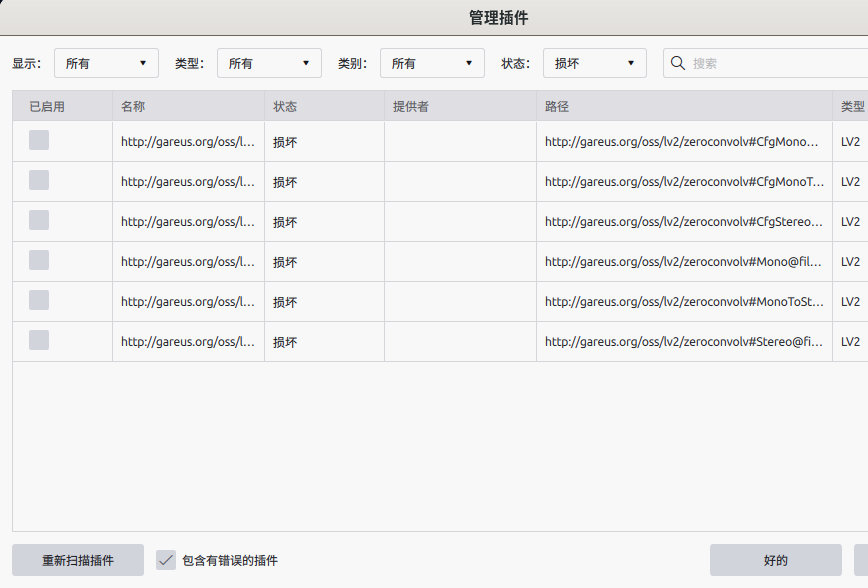
http://gareus.org/oss/lv2/zeroconvolv#CfgMono@file:///usr/lib/lv2/zeroconvo.lv2/
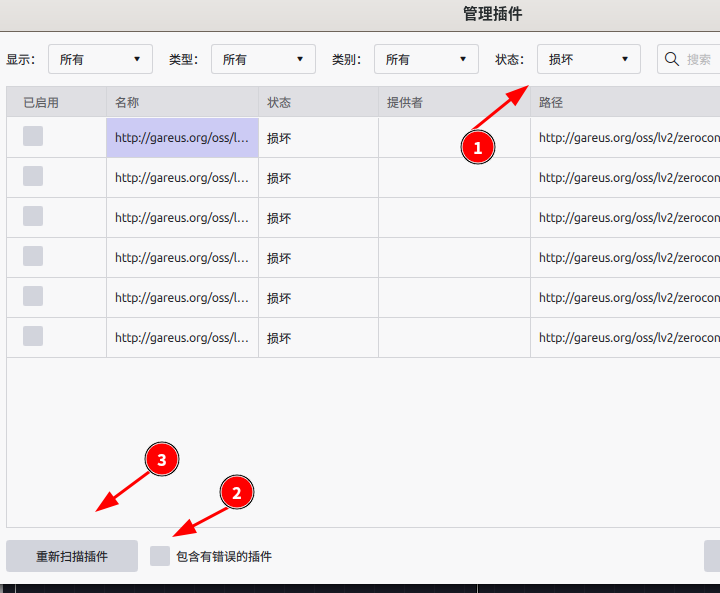
不是 6 个插件坏了,而是 同一个 zeroconvo.lv2 的 6 种通道配置变体。Audacity 把它们标成"不兼容/Incompatible",通常原因是:
-
你装的是旧版 zeroconvo / convoLV2
-
或者是 Snap/Flatpak 版 Audacity(沙箱扫不到系统 LV2)
-
或者 Audacity 对 x42 卷积插件的后台处理/实时线程支持不完整(这插件作者本就是给 Ardour 用的)
升级的必要性?
4.0.1 似乎有严重bug ?被覆盖的片段,会被吞掉?好像是新的操作方法?
- 这是 libavdevice.so.62 的问题吗?删除掉它,问题依旧;应该是软件本身的问题?
或许不是bug ?而是软件本身就有这种不同之前版本的危险操作?
- 一旦发现非预期的覆盖,Ctrl + z 立即恢复?
好像是新操作方法?查看示范:Flexibility that fits
Clips can be dropped anywhere you like. Audacity 4 | The Newest Version of the Renowned Audio Editor
- Ctrl + 上下箭头,将分段移动到其他音轨,确保起始时间参数不变?
- 给每一个片段设置一个标签,将标签全部导出。3.x 也有这个功能:multiple files
- 分段的必要性:有些工具软件,或电脑硬件配置无法满足对长时间音频进行操作的要求,需要分段操作。
- 拼接:好像还是在 3.x中简单方便?不会发生覆盖误操作?
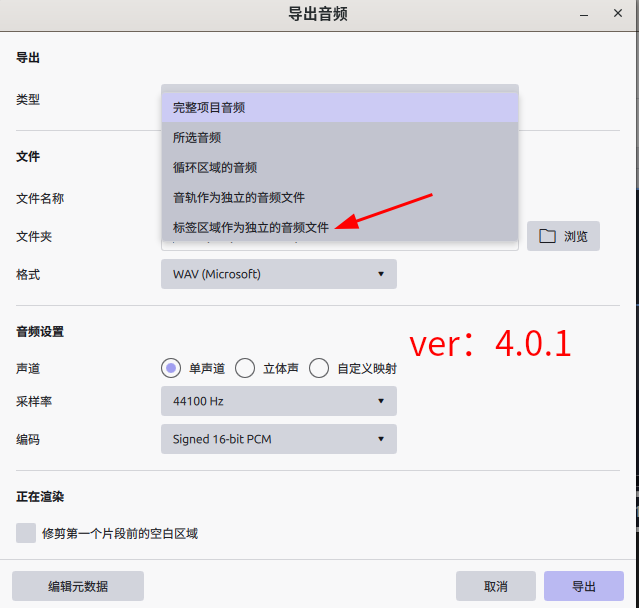
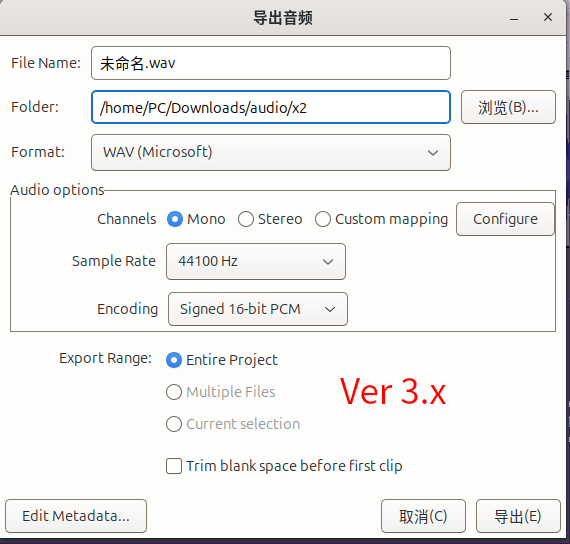
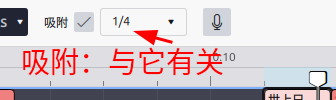
不改变片段参数的拼接方法
- 在分段之前,先设置好这个参数。
- 在拼接时,才容易控制不会产生覆盖?
- 1/4 ~ 1/16 都方便进行拼接?采用"小节"分段,太粗了,在想要分段处,很可能有人声,不是好的分段点。
- 其他时间步长:需要放大后,再进行操作。最大 1/128 即可;不需要回退到 3.x版本。
以下拼接方法:
圈 1 会增加非预期的音轨?
圈 2 会拉伸片段的时间轴???
------
也可以:?保持原始片段的参数?
如果分段之前,没有设置好时间步长。如果需要进行无缝、无覆盖拼接:
- 回退到 3.x 进行片段拼接?
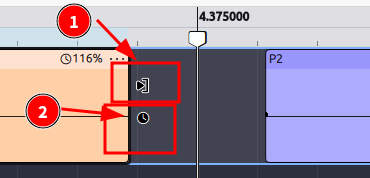
吸附,这个概念的意义,改变了?
3.x 吸附:这个片段吸附到临近的目标片段。
4.x 吸附:片段吸附于步长,如 1/4。
- 因此,在分段之前,首先需要设置好时间步长;在拼接时才能做到无缝连接?????
- 设为 1/16 也还行。一般用途,再精细似乎没必要了?太精细时,拼接操作会麻烦?
新增特性
> Audacity 4 | The Newest Version of the Renowned Audio Editor
New split tool
Press S, then click a clip to split it at that point. Ctrl+I (⌘I on Mac) splits at the playhead.
Flexibility that fits
Clips can be dropped anywhere you like.
All together now
Select multiple clips, then move, trim or stretch them as one.
Group clips
Select your clips and choose "Group clips" from the right-click menu. The group moves, trims, and stretches as one until you ungroup it.
Gain envelopes
Switch on the envelope tool and click to add points along a clip. Drag them to set the clip's gain, and it stays with the clip when you move or copy it.
envelope :信封,塑料封皮,塑料封套
在 3.4.2 下,插件问题
/usr/lib/vst/carla.vst/CarlaPatchbay.so
/usr/lib/vst/carla.vst/CarlaPatchbay16.so
/usr/lib/vst/carla.vst/CarlaPatchbay32.so
/usr/lib/vst/carla.vst/CarlaPatchbay64.so
/usr/lib/vst/carla.vst/CarlaPatchbayFX.so
/usr/lib/vst/carla.vst/CarlaRack.so
/usr/lib/vst/carla.vst/carla-bridge-lv2.so
/usr/lib/vst/carla.vst/libcarla_host-plugin.so
/usr/lib/vst/carla.vst/libcarla_interposer-jack-x11.so
/usr/lib/vst/carla.vst/libcarla_interposer-safe.so
/usr/lib/vst/carla.vst/libcarla_interposer-x11.so
/usr/lib/vst/carla.vst/libcarla_native-plugin.so
/usr/lib/vst/carla.vst/libcarla_utils.so
/usr/lib/vst/carla.vst/styles/carlastyle.so
http://gareus.org/oss/lv2/fil4#stereo
http://gareus.org/oss/lv2/sisco#4chan
http://gareus.org/oss/lv2/zeroconvolv#CfgMono
http://gareus.org/oss/lv2/zeroconvolv#CfgMonoToStereo
http://gareus.org/oss/lv2/zeroconvolv#CfgStereo
http://gareus.org/oss/lv2/zeroconvolv#Mono
http://gareus.org/oss/lv2/zeroconvolv#MonoToStereo
http://gareus.org/oss/lv2/zeroconvolv#Stereo
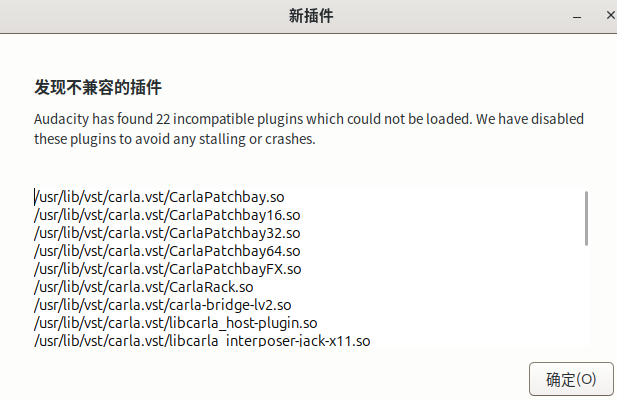
与 3.4.2 共享插件。在 4.0.1 下,插件问题