
Rust+Slint 实现一个一个终端软件源码分享(半成品)
- 一、效果展示
- 二、源码分享
- 三、实现原理
-
- 1、整体架构与数据流
- 2、传输后端抽象(backends.rs)
- 3、终端仿真与颜色解析(mod.rs)
-
- [3.1 线程安全的 vt100 解析](#3.1 线程安全的 vt100 解析)
- [3.2 ANSI 颜色 → RGB 转换](#3.2 ANSI 颜色 → RGB 转换)
- 4、键盘输入编码(key_to_terminal)
- [5、UI 渲染(main.slint)](#5、UI 渲染(main.slint))
- 6、主循环与线程模型(main.rs)
- 7、小结
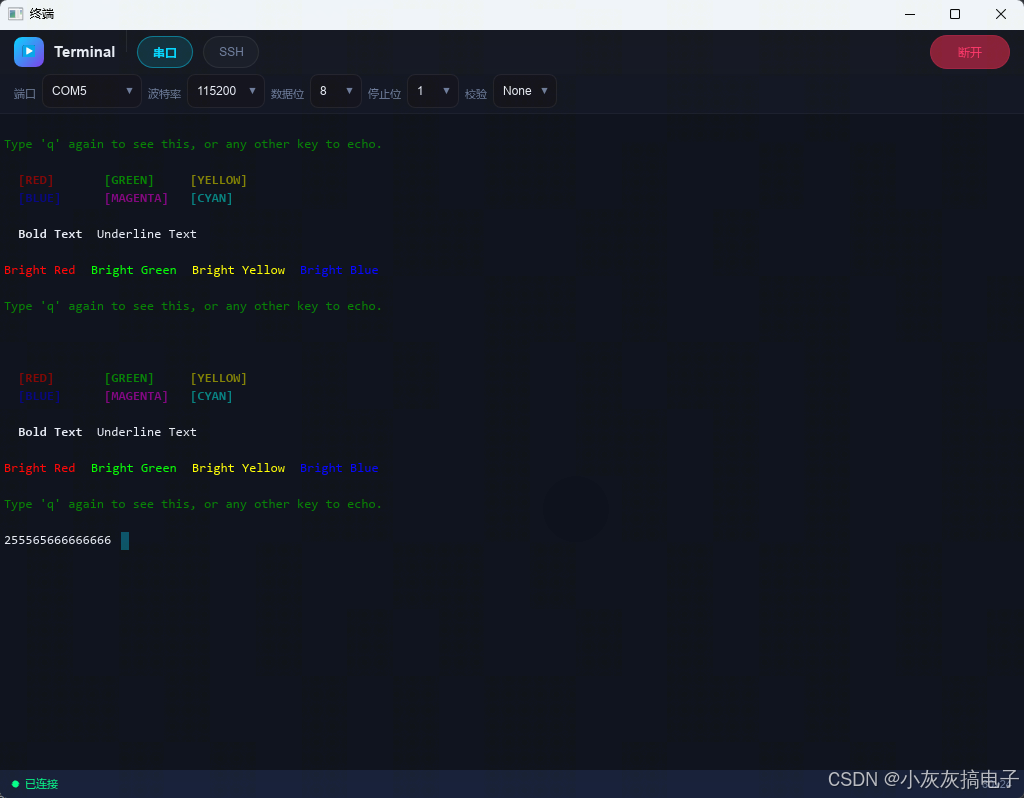
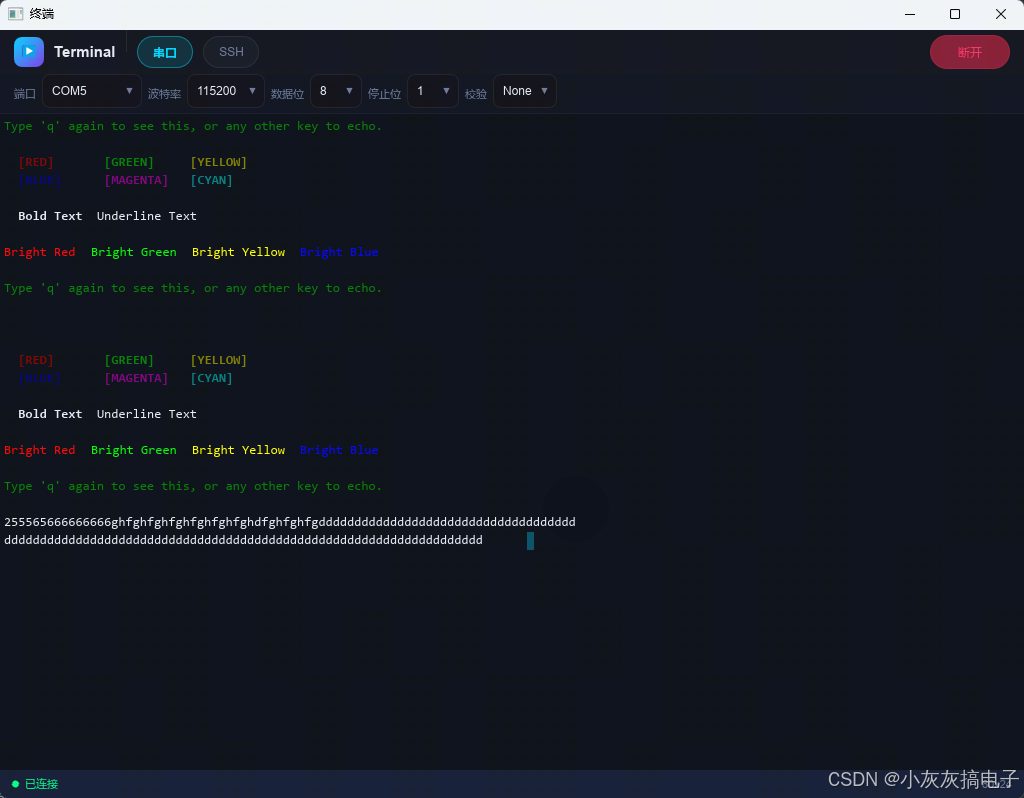
一、效果展示
二、源码分享
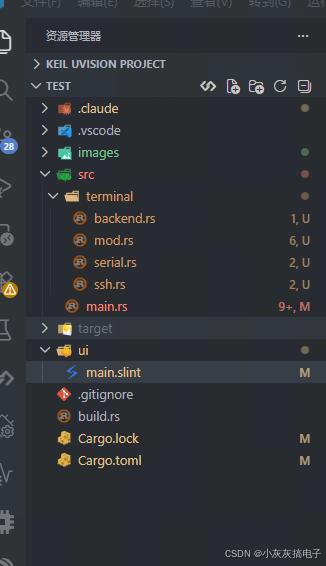
1、工程结构
2、backends.rs
rust
use anyhow::Result;

/// 传输后端 trait ------ 串口和 SSH 都实现此接口
#[allow(dead_code)]
pub trait Backend: Send + 'static {
    /// 从后端读取数据(阻塞)
    fn read(&mut self, buf: &mut [u8]) -> Result<usize>;
    /// 向后端写入数据
    fn write(&mut self, data: &[u8]) -> Result<()>;
    /// 是否已连接
    fn is_connected(&self) -> bool;
    /// 关闭连接
    fn disconnect(&mut self);
}3、mod.rs
rust
pub mod backend;
pub mod serial;
pub mod ssh;

use tokio::sync::Mutex;

/// Send 安全的原始段数据,用于跨线程传递
#[derive(Clone)]
pub struct RawSegment {
    pub text: String,
    pub fg_r: u8,
    pub fg_g: u8,
    pub fg_b: u8,
    pub bg_r: u8,
    pub bg_g: u8,
    pub bg_b: u8,
    pub bold: bool,
    pub italic: bool,
    pub underline: bool,
}

/// Send 安全的行数据
pub type RawLine = Vec<RawSegment>;
pub type RawScreen = Vec<RawLine>;

// ── vt100 Parser 的线程安全包装 ──
pub struct SharedParser {
    inner: Mutex<vt100::Parser>,
}

impl SharedParser {
    pub fn new(rows: u16, cols: u16) -> Self {
        Self {
            inner: Mutex::new(vt100::Parser::new(rows, cols, 10000)),
        }
    }

    pub async fn process(&self, data: &[u8]) {
        self.inner.lock().await.process(data);
    }

    pub async fn with_screen<F, R>(&self, f: F) -> R
    where
        F: FnOnce(&vt100::Screen) -> R,
    {
        let parser = self.inner.lock().await;
        f(parser.screen())
    }
}

// ── ANSI 256 色 → RGB 查找表 ──
pub fn color256_to_rgb(n: u8) -> (u8, u8, u8) {
    match n {
        // 标准 16 色
        0 => (0, 0, 0),
        1 => (128, 0, 0),
        2 => (0, 128, 0),
        3 => (128, 128, 0),
        4 => (0, 0, 128),
        5 => (128, 0, 128),
        6 => (0, 128, 128),
        7 => (192, 192, 192),
        8 => (128, 128, 128),
        9 => (255, 0, 0),
        10 => (0, 255, 0),
        11 => (255, 255, 0),
        12 => (0, 0, 255),
        13 => (255, 0, 255),
        14 => (0, 255, 255),
        15 => (255, 255, 255),
        // 216 色立方体 (16-231)
        16..=231 => {
            let i = n - 16;
            let r_idx = i / 36;
            let g_idx = (i % 36) / 6;
            let b_idx = i % 6;
            let to_val = |x: u8| if x == 0 { 0 } else { 55 + x * 40 };
            (to_val(r_idx), to_val(g_idx), to_val(b_idx))
        }
        // 24 级灰度 (232-255)
        232..=255 => {
            let v = 8 + (n - 232) * 10;
            (v, v, v)
        }
    }
}

/// 提取完整屏幕到 Send 安全的 RawScreen 数据
pub fn extract_screen_raw(screen: &vt100::Screen, rows: u16, cols: u16) -> RawScreen {
    (0..rows)
        .map(|row| extract_row_raw(screen, row, cols))
        .collect()
}

/// 提取光标位置 (row, col)
pub fn extract_cursor_position(screen: &vt100::Screen) -> (u16, u16) {
    screen.cursor_position()
}

/// 从 vt100 屏幕提取一行,合并相邻同属性字符为 segment
fn extract_row_raw(screen: &vt100::Screen, row: u16, cols: u16) -> RawLine {
    let mut segments: Vec<RawSegment> = Vec::new();

    for col in 0..cols {
        let cell = match screen.cell(row, col) {
            Some(c) => c,
            None => continue,
        };

        let ch = cell.contents();
        let display_ch = if ch.is_empty() { " " } else { ch };

        let fg = color_to_rgb(cell.fgcolor(), true);
        let bg = color_to_rgb(cell.bgcolor(), false);

        if let Some(last) = segments.last_mut() {
            if last.fg_r == fg.0
                && last.fg_g == fg.1
                && last.fg_b == fg.2
                && last.bg_r == bg.0
                && last.bg_g == bg.1
                && last.bg_b == bg.2
                && last.bold == cell.bold()
                && last.italic == cell.italic()
                && last.underline == cell.underline()
            {
                last.text.push_str(display_ch);
                continue;
            }
        }

        segments.push(RawSegment {
            text: display_ch.to_string(),
            fg_r: fg.0, fg_g: fg.1, fg_b: fg.2,
            bg_r: bg.0, bg_g: bg.1, bg_b: bg.2,
            bold: cell.bold(),
            italic: cell.italic(),
            underline: cell.underline(),
        });
    }

    segments
}

/// 将 vt100 颜色转为 RGB 元组
fn color_to_rgb(c: vt100::Color, is_fg: bool) -> (u8, u8, u8) {
    match c {
        vt100::Color::Default => {
            if is_fg { (230, 234, 244) } else { (8, 12, 24) }
        }
        vt100::Color::Idx(n) => color256_to_rgb(n),
        vt100::Color::Rgb(r, g, b) => (r, g, b),
    }
}

/// 将 RawScreen 转换为 Slint 模型(在主线程调用)
pub fn raw_screen_to_model(
    raw: &RawScreen,
) -> slint::ModelRc<slint::ModelRc<crate::TerminalSegment>> {
    let lines: Vec<slint::ModelRc<crate::TerminalSegment>> = raw
        .iter()
        .map(|line| {
            let segs: Vec<crate::TerminalSegment> = line
                .iter()
                .map(|s| crate::TerminalSegment {
                    text: slint::SharedString::from(s.text.as_str()),
                    fg: slint::Color::from_rgb_u8(s.fg_r, s.fg_g, s.fg_b),
                    bg: slint::Color::from_rgb_u8(s.bg_r, s.bg_g, s.bg_b),
                    bold: s.bold,
                    italic: s.italic,
                    underline: s.underline,
                })
                .collect();
            slint::ModelRc::new(slint::VecModel::from(segs))
        })
        .collect();
    slint::ModelRc::new(slint::VecModel::from(lines))
}

/// 将键盘输入转换为终端字节序列
pub fn key_to_terminal(text: &str, modifiers: (bool, bool, bool)) -> Option<Vec<u8>> {
    let (_shift, ctrl, alt) = modifiers;

    // Ctrl + 字母 → 控制字符
    if ctrl && !text.is_empty() {
        let ch = text.chars().next()?;
        if ch.is_ascii_alphabetic() {
            let code = (ch.to_ascii_lowercase() as u8) - b'a' + 1;
            return Some(vec![code]);
        }
    }

    // 特殊字符的转义序列
    match text {
        "\r" | "\n" => return Some(vec![b'\r']),
        "\x08" | "\x7f" => return Some(vec![0x7f]),
        "\t" => return Some(vec![b'\t']),
        "\x1b" => return Some(vec![0x1b]),
        // 方向键 (Slint KeyEvent 使用 Unicode 私用区字符)
        "\u{f700}" => return Some(b"\x1b[A".to_vec()),
        "\u{f701}" => return Some(b"\x1b[B".to_vec()),
        "\u{f702}" => return Some(b"\x1b[C".to_vec()),
        "\u{f703}" => return Some(b"\x1b[D".to_vec()),
        "\u{f729}" => return Some(b"\x1b[H".to_vec()),
        "\u{f72b}" => return Some(b"\x1b[F".to_vec()),
        "\u{f72c}" => return Some(b"\x1b[5~".to_vec()),
        "\u{f72d}" => return Some(b"\x1b[6~".to_vec()),
        "\u{f728}" => return Some(b"\x1b[2~".to_vec()),
        "\u{f723}" => return Some(b"\x1b[3~".to_vec()),
        _ => {}
    }

    // Alt + 字符 → ESC + 字符
    if alt && !text.is_empty() {
        let mut data = vec![0x1b];
        data.extend_from_slice(text.as_bytes());
        return Some(data);
    }

    // 普通字符 → UTF-8 编码
    if !text.is_empty() {
        return Some(text.as_bytes().to_vec());
    }

    None
}4、serial.rs
rust
use anyhow::Result;
use std::io::{Read, Write};
use std::sync::Mutex;
use std::time::Duration;

/// 串口配置
pub struct SerialConfig {
    pub port_name: String,
    pub baud_rate: u32,
    pub data_bits: serialport::DataBits,
    pub stop_bits: serialport::StopBits,
    pub parity: serialport::Parity,
    pub flow_control: serialport::FlowControl,
}

/// 串口后端
pub struct SerialBackend {
    port: Mutex<Option<Box<dyn serialport::SerialPort>>>,
}

impl SerialBackend {
    pub fn new() -> Self {
        Self {
            port: Mutex::new(None),
        }
    }

    /// 打开串口连接
    pub fn connect(&self, config: &SerialConfig) -> Result<()> {
        let port = serialport::new(&config.port_name, config.baud_rate)
            .data_bits(config.data_bits)
            .stop_bits(config.stop_bits)
            .parity(config.parity)
            .flow_control(config.flow_control)
            .timeout(Duration::from_millis(100))
            .open()?;

        *self.port.lock().unwrap() = Some(port);
        Ok(())
    }

    /// 读取数据
    pub fn read(&self, buf: &mut [u8]) -> Result<usize> {
        let mut guard = self.port.lock().unwrap();
        let port = guard
            .as_mut()
            .ok_or_else(|| anyhow::anyhow!("串口未打开"))?;

        match port.read(buf) {
            Ok(n) => Ok(n),
            Err(e) if e.kind() == std::io::ErrorKind::TimedOut => Ok(0),
            Err(e) => Err(e.into()),
        }
    }

    /// 写入数据
    pub fn write(&self, data: &[u8]) -> Result<()> {
        let mut guard = self.port.lock().unwrap();
        let port = guard
            .as_mut()
            .ok_or_else(|| anyhow::anyhow!("串口未打开"))?;

        port.write_all(data)?;
        port.flush()?;
        Ok(())
    }

    /// 是否已连接
    #[allow(dead_code)]
    pub fn is_connected(&self) -> bool {
        self.port.lock().unwrap().is_some()
    }

    /// 关闭连接
    pub fn disconnect(&self) {
        *self.port.lock().unwrap() = None;
    }

    /// 枚举可用串口
    pub fn enumerate_ports() -> Vec<String> {
        serialport::available_ports()
            .unwrap_or_default()
            .into_iter()
            .map(|p| p.port_name)
            .collect()
    }
}5、ssh.rs
rust
use anyhow::Result;
use std::sync::Arc;
use tokio::sync::mpsc;
use std::io::Cursor;

use super::backend::Backend;

/// SSH 认证方式
pub enum SshAuth {
    Password(String),
    PublicKey(String), // 密钥文件路径
    KeyboardInteractive,
}

/// SSH 配置
pub struct SshConfig {
    pub host: String,
    pub port: u16,
    pub username: String,
    pub auth: SshAuth,
}

/// russh 客户端事件处理器
pub struct SshClientHandler {
    pub data_tx: mpsc::Sender<Vec<u8>>,
}

impl russh::client::Handler for SshClientHandler {
    type Error = anyhow::Error;

    fn auth_banner(
        &mut self,
        banner: &str,
        _session: &mut russh::client::Session,
    ) -> impl std::future::Future<Output = Result<(), Self::Error>> + Send {
        eprintln!("SSH banner: {}", banner);
        async { Ok(()) }
    }

    fn check_server_key(
        &mut self,
        _server_public_key: &russh_keys::PublicKey,
    ) -> impl std::future::Future<Output = Result<bool, Self::Error>> + Send {
        async { Ok(true) }
    }

    fn data(
        &mut self,
        _channel: russh::ChannelId,
        data: &[u8],
        _session: &mut russh::client::Session,
    ) -> impl std::future::Future<Output = Result<(), Self::Error>> + Send {
        let tx = self.data_tx.clone();
        let data = data.to_vec();
        async move {
            let _ = tx.send(data).await;
            Ok(())
        }
    }

    fn extended_data(
        &mut self,
        _channel: russh::ChannelId,
        _ext: u32,
        data: &[u8],
        _session: &mut russh::client::Session,
    ) -> impl std::future::Future<Output = Result<(), Self::Error>> + Send {
        let tx = self.data_tx.clone();
        let data = data.to_vec();
        async move {
            let _ = tx.send(data).await;
            Ok(())
        }
    }

    fn channel_close(
        &mut self,
        _channel: russh::ChannelId,
        _session: &mut russh::client::Session,
    ) -> impl std::future::Future<Output = Result<(), Self::Error>> + Send {
        async { Ok(()) }
    }

    fn channel_eof(
        &mut self,
        _channel: russh::ChannelId,
        _session: &mut russh::client::Session,
    ) -> impl std::future::Future<Output = Result<(), Self::Error>> + Send {
        async { Ok(()) }
    }
}

/// SSH 后端
pub struct SshBackend {
    data_rx: Option<mpsc::Receiver<Vec<u8>>>,
    channel: Option<russh::Channel<russh::client::Msg>>,
    session: Option<russh::client::Handle<SshClientHandler>>,
    connected: bool,
}

impl SshBackend {
    pub fn new() -> Self {
        Self {
            data_rx: None,
            channel: None,
            session: None,
            connected: false,
        }
    }

    /// 建立 SSH 连接
    pub async fn connect(&mut self, config: &SshConfig) -> Result<()> {
        let (data_tx, data_rx) = mpsc::channel::<Vec<u8>>(256);

        let client_handler = SshClientHandler { data_tx };

        let ssh_config = russh::client::Config::default();
        let ssh_config = Arc::new(ssh_config);

        let addr: (&str, u16) = (&config.host, config.port);
        let mut session =
            russh::client::connect(ssh_config, addr, client_handler).await?;

        // 认证
        match &config.auth {
            SshAuth::Password(password) => {
                let result = session
                    .authenticate_password(&config.username, password)
                    .await?;
                match result {
                    russh::client::AuthResult::Success => {}
                    _ => anyhow::bail!("SSH 认证失败"),
                }
            }
            SshAuth::PublicKey(key_path) => {
                let key_pair = russh_keys::load_secret_key(key_path, None)?;
                let key_with_hash =
                    russh::keys::PrivateKeyWithHashAlg::new(Arc::new(key_pair), None);
                let result = session
                    .authenticate_publickey(&config.username, key_with_hash)
                    .await?;
                match result {
                    russh::client::AuthResult::Success => {}
                    _ => anyhow::bail!("SSH 认证失败"),
                }
            }
            SshAuth::KeyboardInteractive => {
                // 键盘交互认证:简化处理,启动认证流程
                session
                    .authenticate_keyboard_interactive_start(&config.username, None::<String>)
                    .await?;
                // 等待认证完成(简化:直接继续)
            }
        }

        // 打开会话通道
        let channel = session.channel_open_session().await?;

        // 请求 PTY
        channel
            .request_pty(false, "xterm-256color", 80, 24, 0, 0, &[])
            .await?;

        // 请求 shell
        channel.request_shell(false).await?;

        self.data_rx = Some(data_rx);
        self.channel = Some(channel);
        self.session = Some(session);
        self.connected = true;

        Ok(())
    }

    /// 从 data_rx 接收数据(供外部循环调用)
    pub async fn recv_data(&mut self) -> Option<Vec<u8>> {
        if let Some(ref mut rx) = self.data_rx {
            rx.recv().await
        } else {
            None
        }
    }

    /// 异步写入数据到 SSH 通道
    #[allow(dead_code)]
    pub async fn write_async(&self, data: &[u8]) -> Result<()> {
        if let Some(ref channel) = self.channel {
            let cursor = Cursor::new(data);
            channel.data(cursor).await.map_err(|e| anyhow::anyhow!("{}", e))
        } else {
            Err(anyhow::anyhow!("SSH 未连接"))
        }
    }

    /// 取出 channel 和 session(给 writer 使用)
    pub fn take_handles(
        &mut self,
    ) -> Option<(
        russh::Channel<russh::client::Msg>,
        russh::client::Handle<SshClientHandler>,
    )> {
        let channel = self.channel.take()?;
        let session = self.session.take()?;
        Some((channel, session))
    }

    /// 请求终端窗口大小变更
    #[allow(dead_code)]
    pub async fn request_window_change(&self, cols: u32, rows: u32) -> Result<()> {
        if let Some(ref channel) = self.channel {
            channel.window_change(cols, rows, 0, 0).await?;
        }
        Ok(())
    }
}

impl Backend for SshBackend {
    fn read(&mut self, _buf: &mut [u8]) -> Result<usize> {
        // SSH 数据通过 recv_data() 异步接收
        Ok(0)
    }

    fn write(&mut self, _data: &[u8]) -> Result<()> {
        // 使用 write_async() 替代
        Err(anyhow::anyhow!("SSH 使用 write_async()"))
    }

    fn is_connected(&self) -> bool {
        self.connected
    }

    fn disconnect(&mut self) {
        self.connected = false;
        self.data_rx = None;
        self.channel = None;
        self.session = None;
    }
}6、main.rs
rust
use std::sync::Arc;
use std::time::Duration;

use slint::{Model, ModelRc, SharedString, VecModel};
use tokio::sync::{Mutex, mpsc};

mod terminal;

use terminal::serial::{SerialBackend, SerialConfig};
use terminal::ssh::{SshAuth, SshBackend, SshConfig};
use terminal::{SharedParser, extract_cursor_position, extract_screen_raw, key_to_terminal, raw_screen_to_model};

slint::include_modules!();

const DEFAULT_ROWS: u16 = 24;
const DEFAULT_COLS: u16 = 80;

enum WriterCmd {
    Data(Vec<u8>),
    Disconnect,
}

enum ConnectedSession {
    Serial(Arc<SerialBackend>),
    Ssh(SshBackend),
}

enum WriterTarget {
    Serial(Arc<SerialBackend>),
    Ssh {
        channel: russh::Channel<russh::client::Msg>,
        session: russh::client::Handle<terminal::ssh::SshClientHandler>,
    },
}

fn main() -> anyhow::Result<()> {
    // 创建 Tokio 运行时并保持活跃,供 slint::spawn_local 中的异步代码使用
    let rt = tokio::runtime::Runtime::new()?;
    let _enter = rt.enter();

    let ui = TerminalWindow::new()?;
    init_dropdown_options(&ui);

    let ports = SerialBackend::enumerate_ports();
    let port_names: Vec<SharedString> =
        ports.iter().map(|s| SharedString::from(s.as_str())).collect();
    ui.set_serial_ports(ModelRc::new(VecModel::from(port_names)));

    ui.set_connected(false);
    ui.set_connecting(false);
    ui.set_connection_type(0);
    ui.set_cursor_row(0);
    ui.set_cursor_col(0);
    ui.set_status_info(SharedString::from(format!("{}x{}", DEFAULT_COLS, DEFAULT_ROWS)));

    let empty_lines: Vec<ModelRc<TerminalSegment>> = (0..DEFAULT_ROWS)
        .map(|_| {
            ModelRc::new(VecModel::from(vec![TerminalSegment {
                text: SharedString::from(""),
                fg: slint::Color::from_rgb_u8(230, 234, 244),
                bg: slint::Color::from_rgb_u8(8, 12, 24),
                bold: false,
                italic: false,
                underline: false,
            }]))
        })
        .collect();
    ui.set_terminal_lines(ModelRc::new(VecModel::from(empty_lines)));

    let state: Arc<Mutex<Option<ConnState>>> = Arc::new(Mutex::new(None));

    // ── 连接类型切换 ──
    let ui_weak = ui.as_weak();
    ui.on_set_connection_type(move |ct| {
        if let Some(ui) = ui_weak.upgrade() {
            ui.set_connection_type(ct);
        }
    });

    // ── 浏览密钥文件 ──
    let ui_weak = ui.as_weak();
    ui.on_browse_key_file(move || {
        let file = rfd::FileDialog::new()
            .set_title("选择 SSH 密钥文件")
            .add_filter("所有文件", &["*" as &str])
            .pick_file();
        if let Some(path) = file {
            if let Some(ui) = ui_weak.upgrade() {
                ui.set_key_path(SharedString::from(path.to_string_lossy().as_ref()));
            }
        }
    });

    // ── 键盘输入 ──
    let st = state.clone();
    ui.on_terminal_key(move |text, _shift, ctrl, alt| {
        let text_str: String = text.into();
        let st = st.clone();
        let _ = slint::spawn_local(async move {
            let guard = st.lock().await;
            if let Some(ref cs) = *guard {
                if let Some(bytes) = key_to_terminal(&text_str, (_shift, ctrl, alt)) {
                    let _ = cs.writer_tx.send(WriterCmd::Data(bytes)).await;
                }
            }
        });
    });

    // ── 断开连接 ──
    let st = state.clone();
    let ui_weak = ui.as_weak();
    ui.on_disconnect(move || {
        let st = st.clone();
        let ui_weak = ui_weak.clone();
        let _ = slint::spawn_local(async move {
            {
                let guard = st.lock().await;
                if let Some(ref cs) = *guard {
                    let _ = cs.writer_tx.send(WriterCmd::Disconnect).await;
                }
            }
            let mut guard = st.lock().await;
            *guard = None;
            if let Some(ui) = ui_weak.upgrade() {
                ui.set_connected(false);
            }
        });
    });

    // ── 连接 ──
    let st = state.clone();
    let ui_weak = ui.as_weak();
    ui.on_connect(move || {
        let ui_ref = ui_weak.upgrade().unwrap();
        let conn_type = ui_ref.get_connection_type();
        let st = st.clone();
        let ui_weak = ui_weak.clone();
        ui_ref.set_connecting(true);

        let _ = slint::spawn_local(async move {
            let result = if conn_type == 0 {
                connect_serial(&ui_ref).await
            } else {
                connect_ssh(&ui_ref).await
            };

            let ui = ui_weak.upgrade().unwrap();
            match result {
                Ok((parser, session, writer_target)) => {
                    let (writer_tx, writer_rx) = mpsc::channel::<WriterCmd>(64);
                    {
                        let mut guard = st.lock().await;
                        *guard = Some(ConnState {
                            parser: parser.clone(),
                            writer_tx,
                        });
                    }
                    ui.set_connected(true);
                    ui.set_connecting(false);

                    // Writer 任务
                    slint::spawn_local(writer_loop_task(writer_target, writer_rx)).ok();

                    // Reader 任务
                    let st_r = st.clone();
                    let ui_w_r = ui_weak.clone();
                    let parser_r = parser.clone();
                    slint::spawn_local(async move {
                        reader_loop(st_r, ui_w_r, parser_r, session).await;
                    })
                    .ok();

                    {
                        let guard = st.lock().await;
                        if guard.is_some() {
                            update_screen(&ui_weak, &parser).await;
                        }
                    }
                }
                Err(e) => {
                    ui.set_connecting(false);
                    eprintln!("连接失败: {}", e);
                }
            }
        });
    });

    ui.run()?;
    Ok(())
}

#[allow(dead_code)]
struct ConnState {
    parser: Arc<SharedParser>,
    writer_tx: mpsc::Sender<WriterCmd>,
}

// ── Writer 任务 ──

async fn writer_loop_task(target: WriterTarget, mut rx: mpsc::Receiver<WriterCmd>) {
    while let Some(cmd) = rx.recv().await {
        match cmd {
            WriterCmd::Data(data) => {
                let result = match &target {
                    WriterTarget::Serial(backend) => backend.write(&data),
                    WriterTarget::Ssh { ref channel, .. } => {
                        let cursor = std::io::Cursor::new(&data);
                        channel.data(cursor).await.map_err(|e| anyhow::anyhow!("{}", e))
                    }
                };
                if let Err(e) = result {
                    eprintln!("写入失败: {}", e);
                    break;
                }
            }
            WriterCmd::Disconnect => {
                match &target {
                    WriterTarget::Ssh {
                        ref channel,
                        ref session,
                    } => {
                        let _ = channel.close().await;
                        let _ = session
                            .disconnect(russh::Disconnect::ByApplication, "bye", "en")
                            .await;
                    }
                    WriterTarget::Serial(backend) => {
                        backend.disconnect();
                    }
                }
                break;
            }
        }
    }
}

// ── Reader 循环 ──

async fn reader_loop(
    st: Arc<Mutex<Option<ConnState>>>,
    ui_weak: slint::Weak<TerminalWindow>,
    parser: Arc<SharedParser>,
    mut session: ConnectedSession,
) {
    let mut last_update = std::time::Instant::now();

    loop {
        let data: Option<Vec<u8>> = match &mut session {
            ConnectedSession::Serial(ref backend) => {
                // SerialBackend 使用 &self 方法,可直接在 blocking 中调用
                let backend = backend.clone();
                let result = tokio::task::spawn_blocking(move || {
                    let mut buf = vec![0u8; 4096];
                    match backend.read(&mut buf) {
                        Ok(n) if n > 0 => Ok(Some(buf[..n].to_vec())),
                        Ok(_) => Ok(None), // timeout
                        Err(e) => Err(e),
                    }
                })
                .await;

                match result {
                    Ok(Ok(Some(data))) => Some(data),
                    Ok(Ok(None)) => {
                        tokio::time::sleep(Duration::from_millis(5)).await;
                        continue;
                    }
                    Ok(Err(_)) | Err(_) => None, // 连接断开
                }
            }
            ConnectedSession::Ssh(ref mut ssh) => ssh.recv_data().await,
        };

        let data = match data {
            Some(d) => d,
            None => break,
        };

        parser.process(&data).await;

        if last_update.elapsed() >= Duration::from_millis(33) {
            update_screen(&ui_weak, &parser).await;
            last_update = std::time::Instant::now();
        }
    }

    if let Some(ui) = ui_weak.upgrade() {
        ui.set_connected(false);
    }
    let mut guard = st.lock().await;
    *guard = None;
}

// ── 屏幕刷新 ──

async fn update_screen(ui_weak: &slint::Weak<TerminalWindow>, parser: &Arc<SharedParser>) {
    let (raw, cursor_row, cursor_col) = parser
        .with_screen(|screen| {
            let (r, c) = extract_cursor_position(screen);
            (extract_screen_raw(screen, DEFAULT_ROWS, DEFAULT_COLS), r as i32, c as i32)
        })
        .await;

    let ui_weak = ui_weak.clone();
    let _ = slint::invoke_from_event_loop(move || {
        if let Some(ui) = ui_weak.upgrade() {
            let lines = raw_screen_to_model(&raw);
            ui.set_terminal_lines(lines);
            ui.set_cursor_row(cursor_row);
            ui.set_cursor_col(cursor_col);
        }
    });
}

// ── 连接函数 ──

async fn connect_serial(
    ui: &TerminalWindow,
) -> anyhow::Result<(Arc<SharedParser>, ConnectedSession, WriterTarget)> {
    let ports_model = ui.get_serial_ports();
    let port_idx = ui.get_port_index() as usize;
    let port_name = if port_idx < ports_model.row_count() {
        ports_model.row_data(port_idx).unwrap().to_string()
    } else {
        anyhow::bail!("未选择串口");
    };

    let baud_model = ui.get_baud_rates();
    let baud_idx = ui.get_baud_index() as usize;
    let baud_rate: u32 = if baud_idx < baud_model.row_count() {
        baud_model.row_data(baud_idx).unwrap().to_string().parse().unwrap_or(115200)
    } else {
        115200
    };

    let db_model = ui.get_data_bits_list();
    let db_idx = ui.get_data_bits_index() as usize;
    let data_bits = match db_model.row_data(db_idx).unwrap().as_str() {
        "5" => serialport::DataBits::Five,
        "6" => serialport::DataBits::Six,
        "7" => serialport::DataBits::Seven,
        _ => serialport::DataBits::Eight,
    };

    let sb_model = ui.get_stop_bits_list();
    let sb_idx = ui.get_stop_bits_index() as usize;
    let stop_bits = match sb_model.row_data(sb_idx).unwrap().as_str() {
        "2" => serialport::StopBits::Two,
        _ => serialport::StopBits::One,
    };

    let par_model = ui.get_parity_list();
    let par_idx = ui.get_parity_index() as usize;
    let parity = match par_model.row_data(par_idx).unwrap().as_str() {
        "Even" => serialport::Parity::Even,
        "Odd" => serialport::Parity::Odd,
        _ => serialport::Parity::None,
    };

    let config = SerialConfig {
        port_name,
        baud_rate,
        data_bits,
        stop_bits,
        parity,
        flow_control: serialport::FlowControl::None,
    };

    let backend = SerialBackend::new();
    backend.connect(&config)?;

    let shared = Arc::new(backend);
    let parser = Arc::new(SharedParser::new(DEFAULT_ROWS, DEFAULT_COLS));

    Ok((
        parser,
        ConnectedSession::Serial(shared.clone()),
        WriterTarget::Serial(shared),
    ))
}

async fn connect_ssh(
    ui: &TerminalWindow,
) -> anyhow::Result<(Arc<SharedParser>, ConnectedSession, WriterTarget)> {
    let host = ui.get_ssh_host().to_string();
    let port: u16 = ui.get_ssh_port().parse().unwrap_or(22);
    let username = ui.get_ssh_username().to_string();
    let auth_type = ui.get_auth_type();

    let auth = match auth_type {
        0 => SshAuth::Password(ui.get_ssh_password().to_string()),
        1 => SshAuth::PublicKey(ui.get_key_path().to_string()),
        _ => SshAuth::KeyboardInteractive,
    };

    if host.is_empty() || username.is_empty() {
        anyhow::bail!("请填写主机名和用户名");
    }

    let config = SshConfig {
        host,
        port,
        username,
        auth,
    };

    let mut backend = SshBackend::new();
    backend.connect(&config).await?;

    let parser = Arc::new(SharedParser::new(DEFAULT_ROWS, DEFAULT_COLS));

    // 从 backend 提取 channel 和 session(所有权转移给 writer)
    let (channel, session) = backend
        .take_handles()
        .ok_or_else(|| anyhow::anyhow!("SSH 连接句柄不可用"))?;

    let writer_target = WriterTarget::Ssh { channel, session };

    Ok((parser, ConnectedSession::Ssh(backend), writer_target))
}

// ── 初始化下拉选项 ──

fn init_dropdown_options(ui: &TerminalWindow) {
    let baud_rates: Vec<SharedString> = vec![
        "9600", "19200", "38400", "57600", "115200", "230400", "460800", "921600",
    ]
    .into_iter()
    .map(SharedString::from)
    .collect();
    ui.set_baud_rates(ModelRc::new(VecModel::from(baud_rates)));
    ui.set_baud_index(4);

    let data_bits: Vec<SharedString> = vec!["5", "6", "7", "8"]
        .into_iter()
        .map(SharedString::from)
        .collect();
    ui.set_data_bits_list(ModelRc::new(VecModel::from(data_bits)));
    ui.set_data_bits_index(3);

    let stop_bits: Vec<SharedString> = vec!["1", "2"]
        .into_iter()
        .map(SharedString::from)
        .collect();
    ui.set_stop_bits_list(ModelRc::new(VecModel::from(stop_bits)));
    ui.set_stop_bits_index(0);

    let parity: Vec<SharedString> = vec!["None", "Even", "Odd"]
        .into_iter()
        .map(SharedString::from)
        .collect();
    ui.set_parity_list(ModelRc::new(VecModel::from(parity)));
    ui.set_parity_index(0);
}
7、main.slint
rust
// 终端软件 - Slint UI
// 支持串口和 SSH 连接,xterm-256color 终端仿真
import { LineEdit, ComboBox as StdComboBox, ScrollView } from "std-widgets.slint";
// ── 数据类型 ──
export struct TerminalSegment {
text: string,
fg: color,
bg: color,
bold: bool,
italic: bool,
underline: bool,
}
// ── 连接类型 ──
export enum ConnectionType {
serial,
ssh,
}
// ── 认证类型 ──
export enum AuthType {
password,
public-key,
keyboard-interactive,
}
// ── 小组件 ──
// 类型选择 Chip
component TypeChip inherits Rectangle {
in property <string> label;
in property <bool> is-active: false;
callback clicked();
height: 32px;
border-radius: 16px;
background: root.is-active ? #00d4ff22 : #ffffff06;
border-width: 1px;
border-color: root.is-active ? #00d4ff72 : #ffffff12;
animate background { duration: 200ms; }
animate border-color { duration: 200ms; }
touch := TouchArea {
mouse-cursor: pointer;
clicked => { root.clicked(); }
}
Text {
text: root.label;
font-size: 12px;
font-weight: root.is-active ? 600 : 400;
color: root.is-active ? #00d4ff : #6b7a99;
horizontal-alignment: center;
vertical-alignment: center;
}
}
// 操作按钮
component ActionButton inherits Rectangle {
in property <string> label;
in property <color> btn-color: #00d4ff;
in property <bool> is-enabled: true;
callback clicked();
height: 34px;
min-width: 80px;
border-radius: 17px;
background: btn-touch.has-hover && root.is-enabled
? root.btn-color.darker(0.82)
: root.btn-color.darker(0.92);
border-width: 1px;
border-color: root.is-enabled ? root.btn-color.darker(0.65) : #ffffff0d;
animate background { duration: 150ms; }
btn-touch := TouchArea {
mouse-cursor: root.is-enabled ? pointer : default;
clicked => { if root.is-enabled { root.clicked(); } }
}
Text {
text: root.label;
font-size: 12px;
font-weight: 500;
color: root.is-enabled ? root.btn-color : #3e4a66;
horizontal-alignment: center;
vertical-alignment: center;
}
}
// 浏览按钮
component BrowseBtn inherits Rectangle {
in property <color> btn-color: #00d4ff;
callback clicked();
width: 72px;
height: 34px;
border-radius: 17px;
background: bb-touch.has-hover ? btn-color.darker(0.82) : btn-color.darker(0.92);
border-width: 1px;
border-color: btn-color.darker(0.65);
bb-touch := TouchArea {
mouse-cursor: pointer;
clicked => { root.clicked(); }
}
Text {
text: "浏览";
color: root.btn-color;
font-size: 12px;
horizontal-alignment: center;
vertical-alignment: center;
}
}
// 下拉框
component ComboBox inherits Rectangle {
in property <[string]> options;
in-out property <int> selected-index: 0;
callback selected(index: int, text: string);
in-out property <bool> popup-visible: false;
height: 34px;
border-radius: 8px;
background: #0d0d18;
border-width: 1px;
border-color: main-touch.has-hover ? #00d4ff55 : #ffffff12;
main-touch := TouchArea {
mouse-cursor: pointer;
clicked => {
root.popup-visible = !root.popup-visible;
if root.popup-visible { pop.show(); }
}
}
HorizontalLayout {
padding-left: 10px;
padding-right: 8px;
spacing: 6px;
Text {
text: root.options.length > 0 && root.selected-index >= 0 && root.selected-index < root.options.length
? root.options[root.selected-index] : "";
color: #e6eaf4;
font-size: 12px;
vertical-alignment: center;
horizontal-stretch: 1;
overflow: elide;
}
Text {
text: root.popup-visible ? "\u{25B2}" : "\u{25BC}";
color: #6b7a99;
font-size: 9px;
vertical-alignment: center;
horizontal-alignment: center;
}
}
pop := PopupWindow {
y: root.height + 2px;
width: root.width;
height: 200px;
close-policy: PopupClosePolicy.close-on-click-outside;
Rectangle {
background: #161c30ee;
border-radius: 10px;
border-width: 1px;
border-color: #ffffff12;
for item[idx] in root.options : Rectangle {
x: 2px;
y: 2px + idx * 32px;
width: parent.width - 4px;
height: 32px;
border-radius: 6px;
background: item-touch.has-hover ? #ffffff14
: idx == root.selected-index ? #00d4ff18 : transparent;
item-touch := TouchArea {
mouse-cursor: pointer;
clicked => {
root.selected-index = idx;
root.selected(idx, item);
root.popup-visible = false;
pop.close();
}
}
Text {
text: item;
color: idx == root.selected-index ? #00d4ff : #e6eaf4;
font-size: 12px;
font-weight: idx == root.selected-index ? 600 : 400;
vertical-alignment: center;
horizontal-alignment: center;
}
}
}
}
}
// ── 主窗口 ──
export component TerminalWindow inherits Window {
title: "终端";
min-width: 800px;
min-height: 600px;
preferred-width: 1024px;
preferred-height: 768px;
background: @linear-gradient(180deg, #080c18 0%, #0c1630 100%);
// ── UI 属性 ──
// 连接类型
in-out property <int> connection-type: 0; // 0=serial, 1=ssh
// 串口配置
in property <[string]> serial-ports;
in-out property <int> port-index: 0;
in property <[string]> baud-rates;
in-out property <int> baud-index: 4;
in property <[string]> data-bits-list;
in-out property <int> data-bits-index: 3;
in property <[string]> stop-bits-list;
in-out property <int> stop-bits-index: 0;
in property <[string]> parity-list;
in-out property <int> parity-index: 0;
// SSH 配置
in-out property <string> ssh-host: "";
in-out property <string> ssh-port: "22";
in-out property <string> ssh-username: "";
in-out property <int> auth-type: 0; // 0=password, 1=key, 2=keyboard
in-out property <string> ssh-password: "";
in-out property <string> key-path: "";
// 状态
in property <bool> connected: false;
in property <bool> connecting: false;
// 终端数据
in property <[[TerminalSegment]]> terminal-lines;
in property <int> cursor-row: 0;
in property <int> cursor-col: 0;
in property <string> status-info: "";
in property <length> char-width: 7.8px; // Consolas 13px 等宽字符宽度
// ── 回调 ──
callback connect();
callback disconnect();
callback set-connection-type(int);
callback browse-key-file();
callback terminal-key(string, bool, bool, bool); // text, shift, ctrl, alt
callback terminal-resize(int, int); // rows, cols
// ── 主布局 ──
VerticalLayout {
padding: 0px;
spacing: 0px;
// ═══════════════════════════════════════════
// 顶部工具栏 - 第一行: Logo + 连接类型 + 按钮
// ═══════════════════════════════════════════
Rectangle {
height: 44px;
background: #ffffff06;
HorizontalLayout {
padding-left: 14px;
padding-right: 14px;
spacing: 10px;
// Logo
Rectangle {
y:parent.height / 2 - self.height / 2;
width: 30px;
height: 30px;
border-radius: 8px;
background: @linear-gradient(135deg, #00d4ff 0%, #7c3aed 100%);
Text {
text: "\u{25B6}";
color: white;
font-size: 13px;
horizontal-alignment: center;
vertical-alignment: center;
}
}
Text {
y:parent.height / 2 - self.height / 2;
text: "Terminal";
color: #e6eaf4;
font-size: 15px;
font-weight: 600;
vertical-alignment: center;
}
Rectangle { width: 1px; height: 22px; background: #ffffff12; }
TypeChip {
y:parent.height / 2 - self.height / 2;
label: "串口";
is-active: root.connection-type == 0;
width: 56px;
clicked => { root.set-connection-type(0); }
}
TypeChip {
y:parent.height / 2 - self.height / 2;
label: "SSH";
is-active: root.connection-type == 1;
width: 56px;
clicked => { root.set-connection-type(1); }
}
Rectangle { background: transparent; horizontal-stretch: 1; }
ActionButton {
y:parent.height / 2 - self.height / 2;
label: root.connected ? "断开" : (root.connecting ? "连接中..." : "连接");
btn-color: root.connected ? #ff3366 : #00d4ff;
is-enabled: !root.connecting;
clicked => {
if root.connected {
root.disconnect();
} else {
root.connect();
}
}
}
}
}
// ═══════════════════════════════════════════
// 顶部工具栏 - 第二行: 配置区
// ═══════════════════════════════════════════
Rectangle {
height: 40px;
background: #ffffff04;
// 底部分隔线
Rectangle {
y: parent.height - 1px;
height: 1px;
background: #ffffff0a;
}
// ── 串口配置 ──
if root.connection-type == 0 : HorizontalLayout {
padding-left: 14px;
padding-right: 14px;
spacing: 6px;
Text { text: "端口"; color: #6b7a99; font-size: 11px; vertical-alignment: center; }
ComboBox {
width: 100px;
options: root.serial-ports;
selected-index <=> root.port-index;
}
Text { text: "波特率"; color: #6b7a99; font-size: 11px; vertical-alignment: center; }
ComboBox {
width: 78px;
options: root.baud-rates;
selected-index <=> root.baud-index;
}
Text { text: "数据位"; color: #6b7a99; font-size: 11px; vertical-alignment: center; }
ComboBox {
width: 52px;
options: root.data-bits-list;
selected-index <=> root.data-bits-index;
}
Text { text: "停止位"; color: #6b7a99; font-size: 11px; vertical-alignment: center; }
ComboBox {
width: 52px;
options: root.stop-bits-list;
selected-index <=> root.stop-bits-index;
}
Text { text: "校验"; color: #6b7a99; font-size: 11px; vertical-alignment: center; }
ComboBox {
width: 64px;
options: root.parity-list;
selected-index <=> root.parity-index;
}
Rectangle { background: transparent; horizontal-stretch: 1; }
}
// ── SSH 配置 ──
if root.connection-type == 1 : HorizontalLayout {
padding-left: 14px;
padding-right: 14px;
spacing: 6px;
Text { text: "主机"; color: #6b7a99; font-size: 11px; vertical-alignment: center; }
LineEdit {
width: 150px;
height: 28px;
text <=> root.ssh-host;
input-type: InputType.text;
placeholder-text: "hostname / IP";
}
LineEdit {
width: 52px;
height: 28px;
text <=> root.ssh-port;
input-type: InputType.number;
placeholder-text: "port";
}
Text { text: "用户"; color: #6b7a99; font-size: 11px; vertical-alignment: center; }
LineEdit {
width: 90px;
height: 28px;
text <=> root.ssh-username;
input-type: InputType.text;
placeholder-text: "username";
}
ComboBox {
width: 80px;
options: ["密码", "公钥", "键盘交互"];
selected-index <=> root.auth-type;
}
// 密码输入
if root.auth-type == 0 : LineEdit {
width: 130px;
height: 28px;
text <=> root.ssh-password;
input-type: InputType.password;
placeholder-text: "password";
}
// 密钥路径
if root.auth-type == 1 : HorizontalLayout {
spacing: 4px;
LineEdit {
horizontal-stretch: 1;
height: 28px;
text <=> root.key-path;
input-type: InputType.text;
placeholder-text: "private key path";
}
BrowseBtn { btn-color: #7c3aed; clicked => { root.browse-key-file(); } }
}
Rectangle { background: transparent; horizontal-stretch: 1; }
}
}
// ═══════════════════════════════════════════
// 终端视图
// ═══════════════════════════════════════════
Rectangle {
vertical-stretch: 1;
background: #080c18;
border-width: 0;
terminal-scroll := ScrollView {
width: parent.width;
height: parent.height;
viewport-height: root.terminal-lines.length * 18px + 8px;
viewport-y: max(0px, self.viewport-height - self.height) * -1;
term-content := VerticalLayout {
padding: 4px;
spacing: 0px;
for line[idx] in root.terminal-lines : Rectangle {
height: 18px;
HorizontalLayout {
spacing: 0px;
alignment: start;
for seg in line : Rectangle {
background: seg.bg;
seg-text := Text {
text: seg.text;
color: seg.fg;
font-size: 13px;
font-weight: seg.bold ? 700 : 400;
font-family: "Consolas";
vertical-alignment: center;
}
}
}
}
}
}
// 光标
Rectangle {
x: 4px + root.cursor-col * root.char-width;
y: 4px + root.cursor-row * 18px + terminal-scroll.viewport-y;
width: root.char-width;
height: 18px;
background: #00d4ff55;
visible: root.connected;
}
// 键盘输入捕获 (覆盖在终端视图上方)
terminal-input := FocusScope {
width: parent.width;
height: parent.height;
key-pressed(event) => {
if root.connected {
root.terminal-key(event.text, event.modifiers.shift, event.modifiers.control, event.modifiers.alt);
}
return EventResult.accept;
}
}
}
// ═══════════════════════════════════════════
// 底部状态栏
// ═══════════════════════════════════════════
Rectangle {
height: 28px;
background: #ffffff06;
border-width: 0;
HorizontalLayout {
padding-left: 12px;
padding-right: 12px;
spacing: 16px;
// 连接状态
HorizontalLayout {
spacing: 6px;
alignment: start;
Rectangle {
y: parent.height / 2 - 3.5px;
width: 7px;
height: 7px;
border-radius: 4px;
background: root.connected ? #00ff88 : (root.connecting ? #ffaa00 : #ff3366);
}
Text {
text: root.connected ? "已连接" : (root.connecting ? "连接中..." : "未连接");
color: root.connected ? #00ff88 : (root.connecting ? #ffaa00 : #ff3366);
font-size: 11px;
vertical-alignment: center;
}
}
Rectangle { background: transparent; horizontal-stretch: 1; }
// 终端尺寸信息
Text {
text: root.status-info;
color: #6b7a99;
font-size: 11px;
vertical-alignment: center;
}
}
}
}
}8、build.rs
rust
fn main() {
    slint_build::compile("ui/main.slint").unwrap();
}
9、Cargo.toml
rust
[package]
name = "slint-terminal"
version = "0.1.0"
edition = "2021"
build = "build.rs"

[dependencies]
slint = "1.17"
anyhow = "1.0"
rfd = "0.15"
serialport = "4"
tokio = { version = "1", features = ["full"] }
vt100 = "0.16"
russh = "0.50"
russh-keys = "0.50.0-beta.7"
tokio-serial = "5.5"
futures = "0.3"

[build-dependencies]
slint-build = "1.17"
三、实现原理
本终端软件采用 Rust + Slint 技术栈,整体架构围绕「传输后端抽象 → 数据解析 → UI 渲染」三层展开。下面按模块拆解核心实现思路。
1、整体架构与数据流
软件在逻辑上分为三层:
- 传输层 :
backends.rs定义统一的Backendtrait,serial.rs与ssh.rs分别实现串口和 SSH 两种传输后端,屏蔽底层差异。 - 解析层 :
mod.rs中的SharedParser包装vt100::Parser,负责把原始字节流解析为带颜色、加粗等属性的终端屏幕单元。 - 渲染层 :
main.rs把解析后的屏幕数据转换为 Slint 模型,main.slint负责界面布局与终端文本的逐段渲染。
数据流方向如下:
#mermaid-svg-OS5JhZuqSuTujIja{font-family:"trebuchet ms",verdana,arial,sans-serif;font-size:16px;fill:#333;}@keyframes edge-animation-frame{from{stroke-dashoffset:0;}}@keyframes dash{to{stroke-dashoffset:0;}}#mermaid-svg-OS5JhZuqSuTujIja .edge-animation-slow{stroke-dasharray:9,5!important;stroke-dashoffset:900;animation:dash 50s linear infinite;stroke-linecap:round;}#mermaid-svg-OS5JhZuqSuTujIja .edge-animation-fast{stroke-dasharray:9,5!important;stroke-dashoffset:900;animation:dash 20s linear infinite;stroke-linecap:round;}#mermaid-svg-OS5JhZuqSuTujIja .error-icon{fill:#552222;}#mermaid-svg-OS5JhZuqSuTujIja .error-text{fill:#552222;stroke:#552222;}#mermaid-svg-OS5JhZuqSuTujIja .edge-thickness-normal{stroke-width:1px;}#mermaid-svg-OS5JhZuqSuTujIja .edge-thickness-thick{stroke-width:3.5px;}#mermaid-svg-OS5JhZuqSuTujIja .edge-pattern-solid{stroke-dasharray:0;}#mermaid-svg-OS5JhZuqSuTujIja .edge-thickness-invisible{stroke-width:0;fill:none;}#mermaid-svg-OS5JhZuqSuTujIja .edge-pattern-dashed{stroke-dasharray:3;}#mermaid-svg-OS5JhZuqSuTujIja .edge-pattern-dotted{stroke-dasharray:2;}#mermaid-svg-OS5JhZuqSuTujIja .marker{fill:#333333;stroke:#333333;}#mermaid-svg-OS5JhZuqSuTujIja .marker.cross{stroke:#333333;}#mermaid-svg-OS5JhZuqSuTujIja svg{font-family:"trebuchet ms",verdana,arial,sans-serif;font-size:16px;}#mermaid-svg-OS5JhZuqSuTujIja p{margin:0;}#mermaid-svg-OS5JhZuqSuTujIja .label{font-family:"trebuchet ms",verdana,arial,sans-serif;color:#333;}#mermaid-svg-OS5JhZuqSuTujIja .cluster-label text{fill:#333;}#mermaid-svg-OS5JhZuqSuTujIja .cluster-label span{color:#333;}#mermaid-svg-OS5JhZuqSuTujIja .cluster-label span p{background-color:transparent;}#mermaid-svg-OS5JhZuqSuTujIja .label text,#mermaid-svg-OS5JhZuqSuTujIja span{fill:#333;color:#333;}#mermaid-svg-OS5JhZuqSuTujIja .node rect,#mermaid-svg-OS5JhZuqSuTujIja .node circle,#mermaid-svg-OS5JhZuqSuTujIja .node ellipse,#mermaid-svg-OS5JhZuqSuTujIja .node polygon,#mermaid-svg-OS5JhZuqSuTujIja .node path{fill:#ECECFF;stroke:#9370DB;stroke-width:1px;}#mermaid-svg-OS5JhZuqSuTujIja .rough-node .label text,#mermaid-svg-OS5JhZuqSuTujIja .node .label text,#mermaid-svg-OS5JhZuqSuTujIja .image-shape .label,#mermaid-svg-OS5JhZuqSuTujIja .icon-shape .label{text-anchor:middle;}#mermaid-svg-OS5JhZuqSuTujIja .node .katex path{fill:#000;stroke:#000;stroke-width:1px;}#mermaid-svg-OS5JhZuqSuTujIja .rough-node .label,#mermaid-svg-OS5JhZuqSuTujIja .node .label,#mermaid-svg-OS5JhZuqSuTujIja .image-shape .label,#mermaid-svg-OS5JhZuqSuTujIja .icon-shape .label{text-align:center;}#mermaid-svg-OS5JhZuqSuTujIja .node.clickable{cursor:pointer;}#mermaid-svg-OS5JhZuqSuTujIja .root .anchor path{fill:#333333!important;stroke-width:0;stroke:#333333;}#mermaid-svg-OS5JhZuqSuTujIja .arrowheadPath{fill:#333333;}#mermaid-svg-OS5JhZuqSuTujIja .edgePath .path{stroke:#333333;stroke-width:2.0px;}#mermaid-svg-OS5JhZuqSuTujIja .flowchart-link{stroke:#333333;fill:none;}#mermaid-svg-OS5JhZuqSuTujIja .edgeLabel{background-color:rgba(232,232,232, 0.8);text-align:center;}#mermaid-svg-OS5JhZuqSuTujIja .edgeLabel p{background-color:rgba(232,232,232, 0.8);}#mermaid-svg-OS5JhZuqSuTujIja .edgeLabel rect{opacity:0.5;background-color:rgba(232,232,232, 0.8);fill:rgba(232,232,232, 0.8);}#mermaid-svg-OS5JhZuqSuTujIja .labelBkg{background-color:rgba(232, 232, 232, 0.5);}#mermaid-svg-OS5JhZuqSuTujIja .cluster rect{fill:#ffffde;stroke:#aaaa33;stroke-width:1px;}#mermaid-svg-OS5JhZuqSuTujIja .cluster text{fill:#333;}#mermaid-svg-OS5JhZuqSuTujIja .cluster span{color:#333;}#mermaid-svg-OS5JhZuqSuTujIja div.mermaidTooltip{position:absolute;text-align:center;max-width:200px;padding:2px;font-family:"trebuchet ms",verdana,arial,sans-serif;font-size:12px;background:hsl(80, 100%, 96.2745098039%);border:1px solid #aaaa33;border-radius:2px;pointer-events:none;z-index:100;}#mermaid-svg-OS5JhZuqSuTujIja .flowchartTitleText{text-anchor:middle;font-size:18px;fill:#333;}#mermaid-svg-OS5JhZuqSuTujIja rect.text{fill:none;stroke-width:0;}#mermaid-svg-OS5JhZuqSuTujIja .icon-shape,#mermaid-svg-OS5JhZuqSuTujIja .image-shape{background-color:rgba(232,232,232, 0.8);text-align:center;}#mermaid-svg-OS5JhZuqSuTujIja .icon-shape p,#mermaid-svg-OS5JhZuqSuTujIja .image-shape p{background-color:rgba(232,232,232, 0.8);padding:2px;}#mermaid-svg-OS5JhZuqSuTujIja .icon-shape .label rect,#mermaid-svg-OS5JhZuqSuTujIja .image-shape .label rect{opacity:0.5;background-color:rgba(232,232,232, 0.8);fill:rgba(232,232,232, 0.8);}#mermaid-svg-OS5JhZuqSuTujIja .label-icon{display:inline-block;height:1em;overflow:visible;vertical-align:-0.125em;}#mermaid-svg-OS5JhZuqSuTujIja .node .label-icon path{fill:currentColor;stroke:revert;stroke-width:revert;}#mermaid-svg-OS5JhZuqSuTujIja :root{--mermaid-font-family:"trebuchet ms",verdana,arial,sans-serif;} 原始字节流
屏幕单元
Send 安全数据
ModelRc
key_to_terminal
串口 / SSH 后端
vt100 Parser
RawScreen 提取
Slint 模型转换
Slint UI 渲染
键盘输入
2、传输后端抽象(backends.rs)
Backend trait 定义了四个核心方法:read、write、is_connected、disconnect。串口和 SSH 都实现该 trait,使得上层业务逻辑无需关心具体连接方式。
- 串口后端 :基于
serialportcrate,通过Mutex<Option<Box<dyn SerialPort>>>持有端口句柄,读写时加锁保证线程安全。读取时对TimedOut错误做特殊处理,返回Ok(0)表示暂无数据,避免阻塞 UI 线程。 - SSH 后端 :基于
russhcrate,通过mpsc::channel异步接收服务端推送的数据。SshClientHandler实现russh::client::Handler,在data回调中把收到的字节段发送到 channel,供上层循环消费。
3、终端仿真与颜色解析(mod.rs)
这是整个软件的核心难点,主要解决两个问题:
3.1 线程安全的 vt100 解析
vt100::Parser 本身不是 Send,无法直接跨线程传递。因此 mod.rs 用 tokio::sync::Mutex 将其包装为 SharedParser,对外提供 process 和 with_screen 两个异步方法:
process:把后端收到的原始字节喂给解析器;with_screen:在锁内执行闭包,安全地读取当前屏幕快照。
3.2 ANSI 颜色 → RGB 转换
color256_to_rgb 实现了 xterm-256 色到 RGB 的完整映射:
- 标准 16 色:直接查表映射;
- 216 色立方体(16-231) :按
(r, g, b)三维索引计算,每个分量通过55 + x * 40映射到 0-255 范围; - 24 级灰度(232-255) :按
8 + (n - 232) * 10线性插值。
extract_row_raw 遍历屏幕每一行,把相邻且属性相同 的字符合并为一个 RawSegment,大幅减少 UI 渲染的组件数量,提升性能。
4、键盘输入编码(key_to_terminal)
key_to_terminal 负责把 Slint 的键盘事件转换为终端字节序列,核心逻辑:
- Ctrl + 字母 :映射为控制字符(如 Ctrl+C →
0x03); - 特殊键 :方向键、Home/End、PageUp/PageDown、Delete 等映射为对应的 ANSI 转义序列(如方向键上 →
\x1b[A); - Alt + 字符 :前缀
ESC(0x1b)后跟字符本身; - 普通字符:直接按 UTF-8 编码发送。
5、UI 渲染(main.slint)
main.slint 采用深色主题,界面分为三部分:
- 顶部工具栏:第一行是 Logo、连接类型切换(串口/SSH)和连接按钮;第二行根据连接类型动态显示对应的配置项(串口参数或 SSH 主机/认证信息)。
- 终端视图 :用
ScrollView包裹一个VerticalLayout,逐行渲染terminal-lines模型中的TerminalSegment。每个 segment 是一个带背景色和前景色的Text组件,通过font-weight控制加粗。光标是一个半透明矩形,位置由cursor-row、cursor-col和char-width计算得出。 - 底部状态栏:显示连接状态指示灯(绿/黄/红)和终端尺寸信息。
键盘输入通过覆盖在终端视图上的 FocusScope 捕获,按键事件回调到 Rust 侧处理。
6、主循环与线程模型(main.rs)
main.rs 采用 Tokio 异步运行时 + Slint 事件循环 双线程协作:
- 读取线程 :循环调用后端的
read(串口)或recv_data(SSH)获取原始数据,喂给SharedParser; - 渲染线程 :定时(约 30ms)从
SharedParser提取屏幕快照,转换为 Slint 模型后更新 UI; - 写入路径 :UI 键盘事件 →
key_to_terminal编码 → 后端write发送。
两个线程通过 SharedParser 的互斥锁和 Slint 的 invoke_from_event_loop 机制安全通信,避免数据竞争。
7、小结
整个软件的核心价值在于:用 Rust 的系统级能力处理底层传输与终端仿真,用 Slint 的声明式语法快速构建跨平台 UI 。Backend trait 的抽象让串口和 SSH 两种连接方式可以无缝切换,vt100 解析与颜色映射保证了终端内容的正确还原,而 Slint 的模型绑定机制让高频的屏幕刷新也能保持流畅。
