跟着这篇走完,你会在本机把 Meilisearch 跑起来,并按增删改查(CRUD)的顺序把一套文档操作完整走一遍:建索引 → 增(导入文档)→ 查(搜索与过滤)→ 改(更新文档)→ 删(删除文档)。整个过程 6 步,每步都有一条命令能验证自己做对了没有。文中 localhost:7700 是 Meilisearch 的默认监听地址,master key 固定用 aSampleMasterKey(≥16 字节示例值),索引固定用 movies,示例文档用官方 movies.json;如果你换了端口、master key 或索引名,把示例值替换掉即可。

前置条件
| 项 | 要求 | 说明 |
|---|---|---|
| Meilisearch | v1.54.3 或更高 | 2026-10-01 发的当前 stable;项目每周发版,老版本 API 行为有差异,建议用最新 |
| 磁盘 | 1 GB 以上空闲 | movies.json 示例约 16 MB,Meilisearch 二进制本体几十 MB |
| 内存 | 2 GB 以上 | Meilisearch 用内存映射文件,小数据集几百 MB 即可,本文示例足够 |
| curl | 任意版本 | 全文用 curl 调 REST API;jq 可选用于美化输出 |
先跑这条确认 Meilisearch 装好了。
bash
meilisearch --version
text
meilisearch 1.54.3返回 meilisearch 1.54.3(或更新版本)就满足条件。命令报 command not found 说明没装,回到第一步装完再往下走。
第一步:安装并启动 Meilisearch
Meilisearch 提供三种安装方式,挑一个适合你平台的;各平台的完整清单和最新版本以官方安装文档为准。
bash
# macOS(推荐)
brew install meilisearch

# Linux 一键脚本
curl -L https://install.meilisearch.com | sh

# Docker
docker run -d -p 7700:7700 getmeili/meilisearch:v1.54.3
装完后启动服务。dev 模式下 master key 可选,但本文从一开始就设上------所有 API 调用统一带 Authorization 头,也为后续切 production 模式做准备。
bash
meilisearch --master-key="aSampleMasterKey"启动后终端会输出 Server listening on: "localhost:7700"。如果用的是 curl 脚本安装方式,二进制在当前目录,启动命令改成 ./meilisearch --master-key="aSampleMasterKey"。macOS 上 brew services start meilisearch 可以让服务常驻后台。
验证一下。
bash
curl http://localhost:7700/health
json
{"status":"available"}返回 {"status":"available"} 说明服务起来了。返回 curl: (7) Failed to connect to localhost port 7700 是服务没起或端口被占,先看 meilisearch 进程在不在、7700 端口是不是被别的服务占了。production 模式拒绝无 key 启动的情况见 FAQ 第 1 项,key 的权限划分可查官方 master key 文档。
第二步:创建索引
Meilisearch 的索引需要显式创建(也可以靠 POST /documents 隐式创建,但显式创建能提前指定 primaryKey,避免后续推断失败)。创建索引是异步任务,接口不等你建完,直接返回一张任务凭据。
bash
curl -X POST http://localhost:7700/indexes \
  -H "Authorization: Bearer aSampleMasterKey" \
  -H "Content-Type: application/json" \
  -d '{"uid":"movies","primaryKey":"id"}'
返回体里的 taskUid 就是这次任务的任务号,后续靠它查进度。
json
{
  "taskUid": 0,
  "indexUid": "movies",
  "status": "enqueued",
  "type": "indexCreation",
  "enqueuedAt": "2026-10-02T09:00:00.000Z"
}
uid 是索引的唯一标识(仅 a-z A-Z 0-9 - _,不可改),primaryKey 指定文档主键字段名为 id------自动推断失败时必须显式传,这里 movies.json 的文档有 id 字段,显式声明最稳,推断规则见官方索引与文档 API。
拿 taskUid 查一下任务结果。
bash
curl -X GET http://localhost:7700/tasks/0 \
  -H "Authorization: Bearer aSampleMasterKey"
json
{
  "uid": 0,
  "indexUid": "movies",
  "status": "succeeded",
  "type": "indexCreation",
  "details": {
    "primaryKey": "id"
  },
  "duration": "PT0.002S",
  "enqueuedAt": "2026-10-02T09:00:00.000Z",
  "startedAt": "2026-10-02T09:00:00.001Z",
  "finishedAt": "2026-10-02T09:00:00.003Z"
}
返回 "status":"succeeded"、"type":"indexCreation" 说明索引创建完成。如果 status 还是 enqueued,等一两秒再查。返回 401 是 auth 头没带或 master key 写错;未传 primaryKey 且文档无 id 字段会报 index_primary_key_no_candidate_found,见 FAQ 第 3 项。
第三步:增------添加文档(Create)
增就是往索引里写文档。先用官方数据集批量导入,再补一条自定义文档,后面第 4~6 步的查、改、删都拿这条文档当靶子。
先下载官方示例数据集 movies.json(31944 条电影记录,来自官方快速上手),再 POST 到索引。
bash
# 下载示例数据集
curl -L https://www.meilisearch.com/docs/assets/datasets/movies.json -o movies.json

# 添加文档到 movies 索引
curl -X POST http://localhost:7700/indexes/movies/documents \
  -H "Authorization: Bearer aSampleMasterKey" \
  -H "Content-Type: application/json" \
  --data-binary @movies.json
json
{
  "taskUid": 1,
  "indexUid": "movies",
  "status": "enqueued",
  "type": "documentAdditionOrUpdate",
  "enqueuedAt": "2026-10-02T09:00:01.000Z"
}
文档添加同样是异步任务,taskUid 只表示任务入队,文档尚未被索引。Meilisearch 所有写操作------创建索引、添加文档、更新文档、改设置、删除------都排在同一条 FIFO 队列里,任务状态按 enqueued → processing → succeeded(或 failed)流转。所以 POST 完必须轮询 GET /tasks/{uid} 到 succeeded,才能确认数据真的到位(任务字段含义见官方 tasks API)。这里有个高频坑:不等任务跑完就去搜,拿到的必然是空结果,别急着怀疑索引没建成功。
反复查 task 1 的状态,直到 succeeded:
bash
curl http://localhost:7700/tasks/1 -H "Authorization: Bearer aSampleMasterKey"嫌手动查麻烦,用一行 shell 轮询:
bash
while ! curl -s http://localhost:7700/tasks/1 -H "Authorization: Bearer aSampleMasterKey" | grep -q '"status":"succeeded"'; do sleep 0.5; done
json
{
  "uid": 1,
  "indexUid": "movies",
  "status": "succeeded",
  "type": "documentAdditionOrUpdate",
  "details": {
    "receivedDocuments": 31944,
    "indexedDocuments": 31944
  },
  "duration": "PT2.418S",
  "enqueuedAt": "2026-10-02T09:00:01.000Z",
  "startedAt": "2026-10-02T09:00:01.002Z",
  "finishedAt": "2026-10-02T09:00:03.420Z"
}
movies.json 有近 3.2 万条记录,本地机器通常几秒内完成。任务完成后 details.indexedDocuments 从 null 变为实际索引文档数。
确认文档都进去了。
bash
curl -X GET http://localhost:7700/indexes/movies/stats \
  -H "Authorization: Bearer aSampleMasterKey"
json
{
  "numberOfDocuments": 31944,
  "isIndexing": false,
  "fieldDistribution": {
    "id": 31944,
    "title": 31944,
    "genres": 31944,
    "release_date": 31944
  }
}
返回 "isIndexing": false 且 numberOfDocuments 为实际文档数,说明文档全部索引完、索引状态已结束。isIndexing 还是 true 说明还在处理,继续等。status 一直是 enqueued 或 failed 的情况见 FAQ 第 2 项。
批量导入之外,单条或小批写入才是日常。再补一条自定义文档,id 用 1001(官方数据集里没有这个 id,不会冲突):
bash
curl -X POST http://localhost:7700/indexes/movies/documents \
  -H "Authorization: Bearer aSampleMasterKey" \
  -H "Content-Type: application/json" \
  --data-binary '[
    {"id": 1001, "title": "The Matrix", "genres": ["Action", "Science Fiction"], "release_date": 922838400}
  ]'
json
{
  "taskUid": 2,
  "indexUid": "movies",
  "status": "enqueued",
  "type": "documentAdditionOrUpdate",
  "enqueuedAt": "2026-10-02T09:00:05.000Z"
}
等 task 2 也 succeeded 后,这条文档就进索引了,接着进入查询环节。
第四步:查------搜索与过滤(Read)
查分两类:一类是全文搜索(POST /search),一类是按主键或分页把文档取出来(GET /documents)。先看搜索。
搜 botman 会模糊匹配 Batman 系列电影。
bash
curl -X POST http://localhost:7700/indexes/movies/search \
  -H "Authorization: Bearer aSampleMasterKey" \
  -H "Content-Type: application/json" \
  -d '{"q":"botman"}'
json
{
  "hits": [
    {
      "id": 268,
      "title": "Batman",
      "genres": ["Fantasy", "Action"],
      "release_date": 614563200
    },
    {
      "id": 364,
      "title": "Batman Returns",
      "genres": ["Action", "Fantasy"],
      "release_date": 708912000
    }
  ],
  "query": "botman",
  "processingTimeMs": 1,
  "limit": 20,
  "offset": 0,
  "estimatedTotalHits": 62
}
q 是搜索词,会经过默认 ranking rules 排序(words / typo / proximity / attributeRank / sort / wordPosition / exactness,规则见官方 ranking rules)。默认 typo tolerance 开启------oneTypo ≥5 字符、twoTypos ≥9 字符,阈值见官方 typo tolerance------所以 botman 能模糊匹配 Batman(容错 1 个拼写错误)。返回体含 hits(匹配文档数组,默认前 20 条)、estimatedTotalHits(总匹配数)、processingTimeMs(耗时毫秒),字段定义见官方 search API。搜索返回体同时满足三条就算通了:hits 数组非空、estimatedTotalHits 大于 0、processingTimeMs 小于 100ms(小数据集)。搜不到任何结果,多半是任务还没跑完或搜索词差太多 typo,回第三步确认 task succeeded。
默认情况下所有属性都不可过滤(原因见官方 filtering 文档)。要按条件筛,得先用 settings 接口声明 filterableAttributes,等设置任务完成后才能在搜索时用 filter 参数。
bash
# 设置 genres 和 release_date 为可过滤属性
curl -X PATCH http://localhost:7700/indexes/movies/settings \
  -H "Authorization: Bearer aSampleMasterKey" \
  -H "Content-Type: application/json" \
  -d '{"filterableAttributes":["genres","release_date"]}'
json
{
  "taskUid": 3,
  "indexUid": "movies",
  "status": "enqueued",
  "type": "settingsUpdate",
  "enqueuedAt": "2026-10-02T09:00:10.000Z"
}
PATCH /settings 也是异步操作,返回 taskUid。必须等该任务 succeeded 后再发带 filter 的搜索,否则会报 invalid_search_filter。轮询 GET /tasks 确认设置已生效后,搜索带 filter:
bash
curl -X POST http://localhost:7700/indexes/movies/search \
  -H "Authorization: Bearer aSampleMasterKey" \
  -H "Content-Type: application/json" \
  -d '{"q":"","filter":"genres = Action"}'
json
{
  "hits": [
    {
      "id": 6,
      "title": "Judgment Night",
      "genres": ["Action", "Thriller", "Crime"],
      "release_date": 750643200
    },
    {
      "id": 11,
      "title": "Star Wars",
      "genres": ["Adventure", "Action", "Science Fiction"],
      "release_date": 233366400
    }
  ],
  "query": "",
  "filter": "genres = Action",
  "processingTimeMs": 0,
  "limit": 20,
  "offset": 0,
  "estimatedTotalHits": 5403
}
返回 hits 数组里每条电影的 genres 都包含 Action,说明 filter 生效了。如果加上 facets 参数(如 "facets":["genres"]),返回体里的 facetDistribution 字段会显示 genres 各分类的分布计数。filter 报 Attribute "genres" is not filterable 是 settings 任务没完成或属性名写错,见 FAQ 第 4 项。
除了搜索,按主键取数和分页浏览也属于查。按 id 取刚才补的那条:
bash
curl -X GET http://localhost:7700/indexes/movies/documents/1001 \
  -H "Authorization: Bearer aSampleMasterKey"
json
{
  "id": 1001,
  "title": "The Matrix",
  "genres": ["Action", "Science Fiction"],
  "release_date": 922838400
}
列表用 GET /documents,配 limit / offset 分页:
bash
curl -X GET 'http://localhost:7700/indexes/movies/documents?limit=2&offset=0' \
  -H "Authorization: Bearer aSampleMasterKey"
json
{
  "results": [
    {
      "id": 2,
      "title": "Ariel",
      "genres": ["Drama", "Crime", "Comedy"],
      "release_date": 593395200
    },
    {
      "id": 5,
      "title": "Four Rooms",
      "genres": ["Crime", "Comedy"],
      "release_date": 818467200
    }
  ],
  "offset": 0,
  "limit": 2,
  "total": 31945
}
total 是 31944 条数据集文档加上新补的 1001。
第五步:改------更新文档(Update)
Meilisearch 有两条写文档的路由,语义不同:POST /documents 是「添加或替换」,同一个主键已存在就整条覆盖;PUT /documents 是「添加或更新」,只更新传入的字段,没传的字段原样保留。改一条文档通常用后者,两者的差异官方 documents API 有对照说明。
把 1001 的标题改掉,只传 title 一个字段:
bash
curl -X PUT http://localhost:7700/indexes/movies/documents \
  -H "Authorization: Bearer aSampleMasterKey" \
  -H "Content-Type: application/json" \
  --data-binary '[
    {"id": 1001, "title": "The Matrix (Remastered)"}
  ]'
json
{
  "taskUid": 4,
  "indexUid": "movies",
  "status": "enqueued",
  "type": "documentAdditionOrUpdate",
  "enqueuedAt": "2026-10-02T09:02:00.000Z"
}
等 task 4 succeeded 后再查一次,确认只有 title 变了,genres 和 release_date 都还在:
json
{
  "id": 1001,
  "title": "The Matrix (Remastered)",
  "genres": ["Action", "Science Fiction"],
  "release_date": 922838400
}
注意 PUT 的局部更新只作用于顶层字段------传入一个对象字段会整体替换该对象,没写的子字段会丢;想整条覆盖改用 POST /documents。
第六步:删------删除文档(Delete)
删单条按主键来:
bash
curl -X DELETE http://localhost:7700/indexes/movies/documents/1001 \
  -H "Authorization: Bearer aSampleMasterKey"
json
{
  "taskUid": 5,
  "indexUid": "movies",
  "status": "enqueued",
  "type": "documentDeletion",
  "enqueuedAt": "2026-10-02T09:03:00.000Z"
}
按 id 批量删除,body 传 id 数组(官方 delete documents by batch):
bash
curl -X POST http://localhost:7700/indexes/movies/documents/delete-batch \
  -H "Authorization: Bearer aSampleMasterKey" \
  -H "Content-Type: application/json" \
--data-binary '[1001, 25684]'按条件删除,filter 语法与搜索一致,需先声明 filterableAttributes(官方 delete documents by filter):
bash
curl -X POST http://localhost:7700/indexes/movies/documents/delete \
  -H "Authorization: Bearer aSampleMasterKey" \
  -H "Content-Type: application/json" \
  --data-binary '{"filter": "genres = Science Fiction"}'
清空整个索引的文档(索引本身保留):
bash
curl -X DELETE http://localhost:7700/indexes/movies/documents \
  -H "Authorization: Bearer aSampleMasterKey"
删除和添加一样返回 enqueued 凭据,type 是 documentDeletion。等 succeeded 后 GET 对应 task,details.deletedDocuments 会给出实际删掉的条数。
核心概念
这张架构图就是整条调用链路,从左到右走一遍,搜索请求怎么落进索引存储就清楚了。 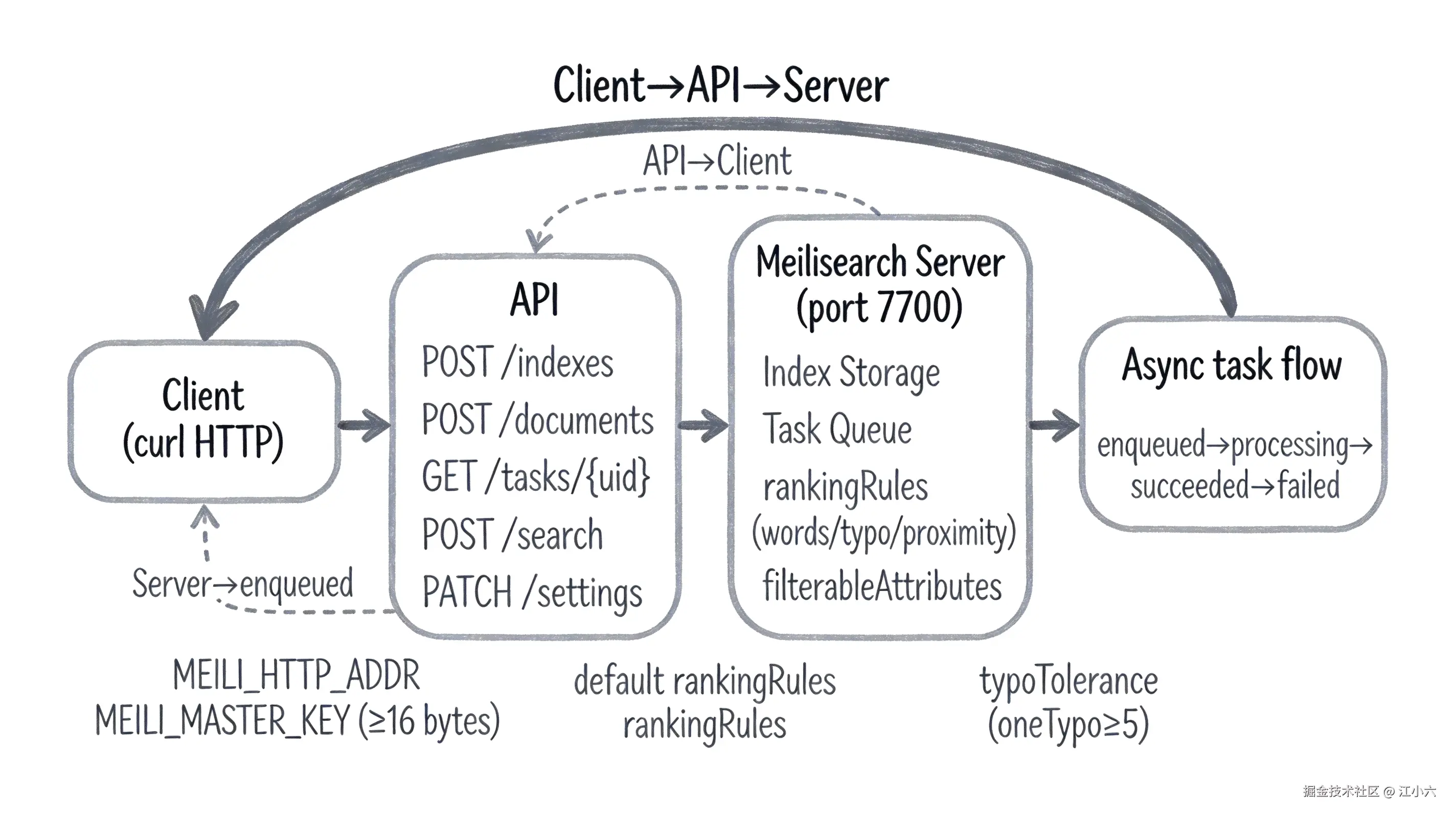
| 概念 | 是什么 | 类比 |
|---|---|---|
| Meilisearch | 开源搜索引擎,Rust 实现,自部署后常驻 7700 端口提供 REST API | 像本地的 Elasticsearch-lite,装好就有一个进程守在端口上 |
| 索引(Index) | 文档的容器,每个索引有独立的 uid、primaryKey 和 settings | 像数据库里的一张表,movies 索引放电影数据 |
| 文档(Document) | 一条 JSON 记录,有唯一主键值,存在索引里 | 像表里的一行数据,一条电影记录就是一个文档 |
| 异步任务(Task) | 写操作(增 / 改 / 删 / 改设置)不立即完成,返回 taskUid 入队处理 | 像消息队列里的任务,POST 完只是入队,要轮询才知道做完没 |
| primaryKey | 索引的主键字段,自动推断以 id 结尾的字段,也可显式指定 |
像数据库主键,唯一标识一条文档,推断失败就加不进去 |
常见问题
missing_master_key
现象 :dev 模式跑通后切 MEILI_ENV=production 启动,进程直接 abort 不运行。
原因:production 模式强制要求 ≥16 字节的 master key 作为安全基线,不设或过短直接拒绝启动。
相关文章 :Meilisearch production 模式不设 master key 拒绝启动
搜索返回 hits: [],estimatedTotalHits: 0
现象:POST /documents 返回了 taskUid,紧接着 POST /search 返回空结果。
原因 :文档添加是异步操作,taskUid 只表示入队,文档尚未被索引;必须轮询 GET /tasks/{uid} 直到 status=succeeded。
相关文章 :Meilisearch 添加文档后立即搜索返回空结果
index_primary_key_no_candidate_found
现象:POST 文档后轮询任务状态是 failed,错误码含 primary_key。
原因 :未显式指定 primaryKey 且文档中找不到唯一以 id 结尾的字段;Meilisearch 自动推断失败。
相关文章 :Meilisearch primary key 自动推断失败报 index_primary_key_no_candidate_found
invalid_search_filter:Attribute "genres" is not filterable
现象:搜索不带 filter 正常返回结果,加 filter 参数后返回 400。
原因:该属性未在 filterableAttributes 设置中声明;Meilisearch 要求先在 settings 里声明可过滤属性才能在搜索时用作 filter。
相关文章 :Meilisearch filter 报 Attribute is not filterable
下一步
启用 production 模式
dev 模式跑通后,下一步是切 production 模式正式上线:设 MEILI_ENV=production + MEILI_MASTER_KEY(≥16 字节),Meilisearch 自动生成 Default Search / Admin API Key,所有路由(除 GET /health)都需要 Authorization 头。
Meilisearch production 模式不设 master key 拒绝启动
调优 ranking rules / typo tolerance
默认 ranking rules 和 typo tolerance 能应付大多数场景,但搜索质量到后期要调------自定义 searchableAttributes 顺序(title 放前面比放后面搜索质量更高)、关掉数字容错、调整 rankingRules 权重。primaryKey 和字段顺序管好了搜索质量才有底。
Meilisearch primary key 自动推断失败报 index_primary_key_no_candidate_found
把搜索接进前端应用
后端服务跑通后,前端用 instant-meilisearch(JS)或官方 React / Vue 组件接搜索框,加 filter 做分面导航。filter 报错多半是 filterableAttributes 没提前声明。