本文记录把 react-native-ratings 适配到 HarmonyOS 的完整过程。
这个库(评分组件,滑动评分 + 点击评分)本身是纯 JS、接入很简单。但它暴露了一个和 React 19 直接相关、而且会让人以为"库坏了"的坑:
同一个库里,两个组件的默认值命运完全不同。
Rating是 class 组件(static defaultProps)⇒ React 19 仍然支持 ⇒ 不传 props 也正常渲染 5 颗星 ✓AirbnbRating是函数组件 (TapRating.defaultProps)⇒ React 19 已移除函数组件的defaultProps支持 ⇒ 不传 props 时一颗星都不渲染(0 颗) ✗
而 RNOH 0.84.3 用的正是 React 19.2.3 。所以如果你照着上游 README 写 <AirbnbRating />,屏幕上会什么都没有。
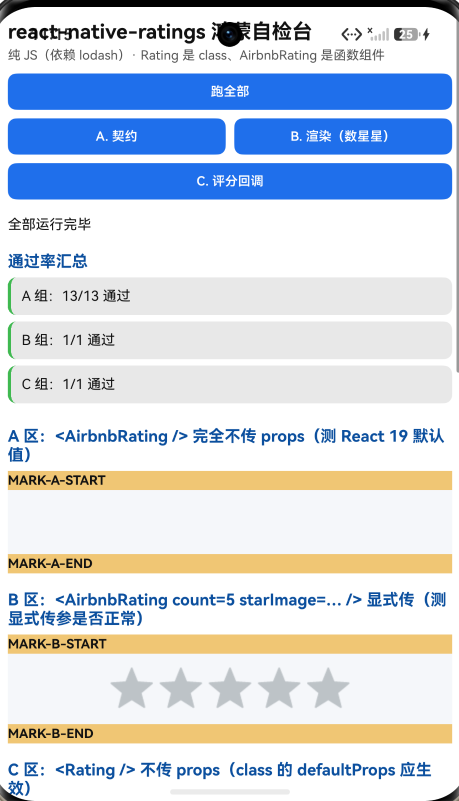
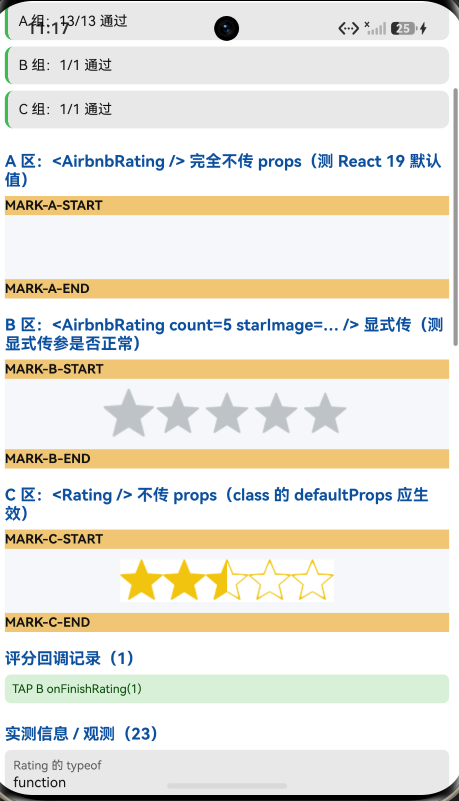
这一条我用"三区对照 + 数星星"实测坐实了,截图里 A 区是一片空白、B 区 5 颗星,对比非常直接。
一、先说结论
| 项 | 结果 |
|---|---|
| 上游最新版 | 8.1.0;license: MIT;npm gitHead 为空 |
| 库类型 | 纯 JS 组件库 (TypeScript 编写):Rating(滑动评分,class)+ AirbnbRating(点击评分,函数组件) |
| 是否需要原生适配 | 不需要 (无 harmony/、无 NativeModules、不用 vector-icons) |
| 运行时依赖 | ⚠️ 有:lodash@^4.17.15 |
prepare |
⚠️ "prepare": "husky install" ⇒ 目录/file: 接入时 npm install 直接失败(见第三节) |
main |
./dist/index.js(tsc 编译产物,已提交) |
| 与 npm 上游的差异 | 38 / 39 个文件逐字节一致 ;唯一差异是 package.json |
| 需要 HAR / 权限 / ohpm | ❌ 都不需要 |
| 设备侧断言 | ✅ 15 / 15 全部通过 |
| ★ 最重要发现 | React 19 下 <AirbnbRating /> 渲染 0 颗星 (函数组件 defaultProps 失效),而 <Rating /> 正常渲染 5 颗星(class 生效) |
| ★ 安装路径差异 | README 写的 .tgz 命令可用 ;但目录/file: 接入会因 prepare 直接失败,且 lodash 不会自动装 ------ README 两者都没提 |
| 三处"看着像缺陷" | 查证后都不是(见第四节) |
二、判定过程
| 步 | 做法 | 结果 |
|---|---|---|
| ① | package.json 里有没有 harmony.autolinking |
没有 |
| ② | 仓库里有没有 harmony/ |
没有 |
| ③ | 代码里有没有 NativeModules / requireNativeComponent |
全无 |
| ④ | 有没有用 react-native-vector-icons |
没有(星星用自带 PNG) |
⇒ 纯 JS 。但 dependencies 不是空的:
json
"dependencies": { "lodash": "^4.17.15" }这个库真的会用 lodash (TapRating.tsx 里 _.times(count, ...)、_.map(...))⇒ 不装 lodash 就直接报模块找不到。
三、安装:同一份包,两条路径结果相反
3.1 prepare 会让"目录安装"直接失败
package.json 里有:
json
"scripts": {
  "prepare": "husky install",
  "build": "tsc -p tsconfig.json",
  "copy-files": "cp -R ./src/images ./dist/images/",
  "postbuild": "yarn run copy-files"
}
prepare 会在安装目录依赖 / git 依赖 时执行,而 husky 只是 devDependency(消费者那里没有)⇒ 实测:
$ npm install            # 目录依赖(file:../lib-copy),不加 --ignore-scripts
npm error code 1
npm error path .../lib-copy
npm error command C:\windows\system32\cmd.exe /d /s /c husky install
npm error 'husky' is not recognized as an internal or external command
⇒ 安装直接失败(exit 1)。
加上 --ignore-scripts 后:
$ npm install --ignore-scripts
added 1 package in 581ms        ← exit 0 ✓
3.2 但 README 里那条 .tgz 命令是好的
交付 README 写的安装方式是:
sh
npm install /path/to/react-native-ratings-8.1.0.tgz实测这条路径完全没问题:
| 检查 | 结果 |
|---|---|
npm install <pkg>.tgz |
exit 0 ✓,added 223 packages |
| 入口可解析 | ✓ node_modules/react-native-ratings/dist/index.js |
lodash 是否自动装上 |
✅ 装上了 |
| 图片资源 | ✅ 6 张齐 |
原因 :prepare 不会因为 tarball 依赖而触发 ,而 tarball 里带着完整的 dependencies,npm 会正常装 lodash。
3.3 所以真正的结论(要精确)
| 路径 | prepare |
lodash |
结果 |
|---|---|---|---|
.tgz(README 写的) |
不触发 | 自动装 | ✅ 可用 |
目录 / file:(开发常用) |
触发 ⇒ 失败 | 不会装 | ❌ exit 1 ;加 --ignore-scripts 后能装,但要手动补 lodash |
而交付 README 全文搜索 ignore-scripts / prepare / husky / lodash ⇒ 零命中。
⇒ README 里那条命令是对的 ,但走目录/git 接入会同时踩两个坑,而文档一个字都没提 。
另外:prepare: "husky install" 与 dependencies: {lodash} 都是上游自带的 (npm 元数据里同样存在)⇒ 是继承来的隐患 ,交付包既没处理、也没说明。
开发路径的规避写法:
bashnpm install ../react-native-ratings --ignore-scripts npm install lodash --ignore-scripts # 必须补,目录依赖不会自动带上它
四、三处"看着像缺陷",查证后都不是
这三条如果只看交付包就下结论,就会把上游的问题记到交付方头上。先查 npm:
| 疑点 | 查证 | 结论 |
|---|---|---|
dist/images/images/ 重复嵌套目录 (airbnb-star*.png 等 6 张图出现两次) |
npm 上游包里同样存在 | 是上游 postbuild 的 cp -R ./src/images ./dist/images/ 跑重了 造成的构建副产物 ⇒ 不是交付方多提交 |
spec.json 缺 upstreamCommit |
查 npm 元数据:gitHead 是空的 |
有客观原因 (上游 npm 里就没这个字段)⇒ 不算应修项 |
spec.json 的 upstream.url 用 git+ssh:// |
与 npm 的 repository 字段完全一致 |
不是缺陷 |
⇒ 交付包实现与产物双重零改动 (src/** 与 dist/** 全部与上游逐字节一致,只差 package.json)。
五、★ 核心:React 19 下 AirbnbRating 的默认值全部失效
5.1 源码里的结构性差异
| 组件 | 导出名 | 组件类型 | 默认值写法 |
|---|---|---|---|
SwipeRating |
Rating |
class | static defaultProps = {...} |
TapRating |
AirbnbRating |
函数组件 (而且是箭头函数 :const TapRating: React.FunctionComponent<...> = props => {...}) |
TapRating.defaultProps = {...} |
Star |
(内部) | 函数组件 | Star.defaultProps = { starImage, selectedColor, unSelectedColor } |
而 React 19 移除了函数组件的 defaultProps 支持 (class 的仍然支持)。宿主 React = 19.2.3。
5.2 实测:三区对照,数星星
测试页放了三个区,每颗星是一个 Image,默认 size = 40vp = 120px:
| 区 | 写法 | 实测 Image 节点数 |
结论 |
|---|---|---|---|
| A | <AirbnbRating />(完全不传 props) |
0 | ❌ 一颗星都没有 |
| B | <AirbnbRating count={5} starImage={require('react-native-ratings/dist/images/airbnb-star.png')} /> |
5 × 120×120 | ✓ 正常 |
| C | <Rating />(完全不传 props,class) |
5 × 120×120 | ✓✓ class 的 defaultProps 生效 |
5.3 根因链
TapRating 是函数组件
  └─ React 19 忽略 TapRating.defaultProps
      └─ count === undefined
          └─ _.times(undefined, fn) === []        (lodash 把 undefined 当 0)
              └─ rating_array 为空
└─ 渲染 0 个 <Star> ← 实测吻合(A 区 0 个 Image)其余默认值(showRating、reviewColor、reviewSize)同样失效。
(defaultRating 被兜住了:useEffect 里发现它是 null/undefined 会 setPosition(3),所以内部位置仍是 3。)
5.4 规避写法:AirbnbRating 必须显式传参
tsx
import {AirbnbRating} from 'react-native-ratings';

<AirbnbRating
  count={5}                    // ★ 必须传!函数组件 defaultProps 在 React 19 失效
  defaultRating={3}            // ★ 建议显式传
  reviews={['很差', '较差', '一般', '不错', '很好']}
  showRating
  reviewColor="rgba(230, 196, 46, 1)"
  reviewSize={25}
  size={40}
  starImage={require('react-native-ratings/dist/images/airbnb-star.png')}
/>Rating(class)不需要额外处理 ------ 实测不传 props 也渲染 5 颗星 ✓
⚠️
starImage那一条我标为"代码级成立、运行时未单独验证" :本轮 B 区是同时 显式传了count和starImage,所以"只传count、不传starImage"这个情形没有单独测 。按源码看,Star.defaultProps.starImage同样会被 React 19 忽略 ⇒const starSource = fill && selectedColor === null ? STAR_SELECTED_IMAGE : starImage;会得到undefined⇒<Animated.Image source={undefined}>。所以建议一并显式传上最稳。
5.5 顺手确认的其他真值
- 导出是
export { Rating, AirbnbRating }⇒ 没有 default 导出,必须具名导入; SwipeRating.defaultProps(class,React 19 生效 ,实测 9 键 ):type: 'star'、ratingImage、ratingColor: '#f1c40f'、ratingBackgroundColor: 'white'、ratingCount: 5、showReadOnlyText: true、imageSize: 40、minValue: 0、jumpValue: 0;TapRating.defaultProps(函数,React 19 失效 ,实测 6 键 ):defaultRating: 3、reviews: ['Terrible','Bad','Okay','Good','Great']、count: 5、showRating: true、reviewColor: 'rgba(230, 196, 46, 1)'、reviewSize: 25;TapRating是箭头函数 ⇒typeof TapRating.prototype === 'undefined'(没有prototype);Star:TouchableOpacity+Animated.Image,尺寸size || STAR_SIZE(40),tintColor由fill ? selectedColor : unSelectedColor决定;点击做一次Animated.spring(useNativeDriver: true)并调starSelectedInPosition(position);SwipeRating用PanResponder做横向拖动评分;- 图片资源 6 张:
airbnb-star、airbnb-star-selected、bell、heart、rocket、star⇒ 打包时资源数 14 → 20(+6,精确对上) ✓。
六、接入方式
bash
# ① 从适配仓库(.tgz 或 git)
npm install "git+https://atomgit.com/oh-react-native/react-native-ratings.git#8.1.0-ohos-1.0.0" --ignore-scripts

# ② 本地目录接入(开发常用)------ 记得补依赖
npm install ../react-native-ratings --ignore-scripts
npm install lodash --ignore-scripts
js
// metro.config.js ------ file: / 软链装法需要把真实目录加进 watchFolders
watchFolders: [ path.resolve(__dirname, '../react-native-ratings') ],
js
import RatingsTestApp from './RatingsTestApp';
AppRegistry.registerComponent('RatingsTestApp', () => RatingsTestApp);
bash
hdc shell aa force-stop com.rnoh084.demo
hdc shell aa start -b com.rnoh084.demo -a EntryAbility --ps rnAppKey RatingsTestApp
不需要 HAR、权限、ohpm、link-harmony。
七、我自己的一个失误(写断言时踩的)
第一版断言里我写了:
✗ [A] AirbnbRating 的 prototype 是空对象|期望 object|实际 undefined错因 :TapRating 是箭头函数 (const TapRating = props => {...}),而箭头函数没有 prototype ⇒ 实测 undefined。
我按"普通函数/class 会有一个空的 prototype 对象"去写了。
纠正 :改成断言 typeof prototype === 'undefined',并把它当作**"这个导出是箭头函数"的证据**。修正后 15 / 15 全部通过。
八、已知限制与本次验证边界
8.1 用这个库要知道的
| 事项 | 说明 |
|---|---|
AirbnbRating 必须显式传 count |
函数组件 defaultProps 在 React 19 失效 ⇒ 不传就一颗星都不渲染 |
starImage 建议一并显式传 |
Star 也是函数组件,它的 starImage 默认值同样失效 |
Rating 不需要额外处理 |
class 组件,static defaultProps 在 React 19 仍生效 |
有运行时依赖 lodash |
目录/file: 接入不会自动装,要手动补 |
目录/file: 接入必须 --ignore-scripts |
否则 prepare: "husky install" 让安装直接失败 |
| 没有 default 导出 | 必须 import { Rating, AirbnbRating } from 'react-native-ratings' |
dist/images/images/ 是上游副产物 |
该库产物里有重复嵌套的图片目录,属上游问题,不影响使用 |
8.2 本次验证的边界
- 只在一台模拟器上验证 (
Pura X View,density 3,1320×2232),没有真机。 - "只传
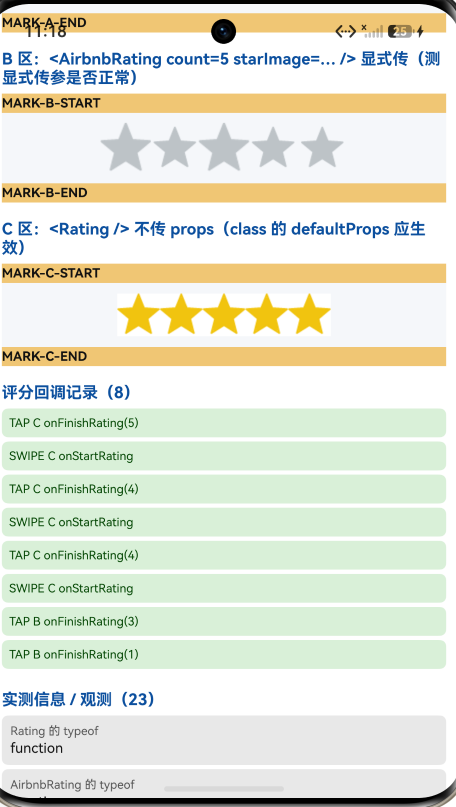
count、不传starImage"未单独测 (见 5.4 的说明)⇒ 该结论属代码级成立、运行时未验证。 - 点击星星的交互路径未完整验证 :测试页装了
onFinishRating,但本轮驱动重点是"数星星",没有点星并回读回调值 ;onFinishRating/onStartRating/onSwipeRating的触发与参数未验证。 Rating的PanResponder拖动评分未测 (jumpValue/minValue/fractions等均未验证)。Rating屏上"4 实心 + 1 空心"的显示状态没有对照源码公式推导(只记录了实测观感)。- 自定义
size/selectedColor/unSelectedColor/starStyle/starContainerStyle/ratingContainerStyle未测。 reviewColor/reviewSize/showRating的显示效果未逐项核对 (A 区因count已失效,更看不到 review 文本)。- 没有跨平台对照(未在 iOS/Android 上跑同一套用例)。
未改动库代码。
九、常见问题
Q1:为什么 <AirbnbRating /> 什么都不显示?
因为它是函数组件 ,默认值写在 TapRating.defaultProps 上,而 React 19 已移除函数组件的 defaultProps 支持 ⇒ count 是 undefined ⇒ _.times(undefined, ...) 得到空数组 ⇒ 渲染 0 颗星。
解法 :显式传 count:
tsx
<AirbnbRating count={5} defaultRating={3} />Q2:为什么 <Rating /> 就正常?
因为 Rating(源码里的 SwipeRating)是 class 组件 ,用的是 static defaultProps ------ React 19 对 class 的 defaultProps 仍然支持 ⇒ 不传 props 也能拿到 ratingCount: 5、imageSize: 40 等默认值。
⇒ 同一个库两个组件表现不同,判断时必须分开看。
Q3:npm install 报 'husky' is not recognized as an internal or external command?
因为包里有 "prepare": "husky install",而 husky 是 devDependency(消费者装不到)。prepare 在目录依赖 / git 依赖时会触发 ⇒ 安装失败。
解法:
bash
npm install <path-or-git> --ignore-scripts(走 .tgz 安装不会触发 prepare,所以按 README 那条命令装是没问题的。)
Q4:Unable to resolve module lodash?
这个库真的依赖 lodash (_.times、_.map)。用目录/file: 接入时,npm 不会 安装目标包自己的 dependencies,所以要手动补:
bash
npm install lodash --ignore-scripts(用 .tgz 安装则会被自动带上。)
Q5:星星的图片能换吗?
可以,AirbnbRating 传 starImage(图片源)即可;Rating 传 ratingImage,并且支持 type: 'star' | 'heart' | 'rocket' | 'bell' | 'custom':
tsx
<Rating type="heart" ratingCount={5} imageSize={40} />Q6:为什么我要显式传 starImage?
因为 Star 也是函数组件,它的 starImage 默认值在 React 19 下同样失效 ⇒ 不传就可能拿到 source={undefined}。显式传最稳(这一条属代码级推断,见 5.4)。
Q7:import Rating from 'react-native-ratings' 为什么拿不到东西?
因为本库没有 default 导出,只有具名导出:
tsx
import {Rating, AirbnbRating} from 'react-native-ratings'; // ✅Q8:dist/images/images/ 这个重复目录是什么?
是上游构建脚本 postbuild: "yarn run copy-files"(cp -R ./src/images ./dist/images/)跑重造成的副产物 ,npm 官方包里同样存在,不影响使用。
Q9:想改默认星星数量/尺寸怎么办?
Rating:ratingCount、imageSize、ratingColor、ratingBackgroundColor、minValue、jumpValue;AirbnbRating:count、size、defaultRating、reviews、showRating、reviewColor、reviewSize、selectedColor。
⚠️ 对 AirbnbRating 而言,所有默认值都不要指望(React 19)------ 想用什么就显式传什么。
Q10:这个库需要鸿蒙侧做什么特殊处理吗?
不需要。 纯 JS、无原生模块、不用 vector-icons、不需要 HAR / 权限 / ohpm。唯一要注意的就是本文说的默认值失效(React 19)与安装路径差异。
小结
react-native-ratings 是纯 JS 组件库,接入不需要任何鸿蒙侧改动,交付包实现与产物双重零改动 (38/39 文件与上游逐字节一致)。设备侧 15 / 15 断言通过。
最值得记下来的是这一条:
-
同一个库里,组件类型不同 ⇒ 默认值在 React 19 下的命运完全不同。
Rating是 class (static defaultProps)⇒ 不传 props 也渲染 5 颗星 ;AirbnbRating是函数组件 ⇒ React 19 已移除函数组件的defaultProps支持 ⇒ 不传 props 渲染 0 颗星 。⇒ 适配前先逐个组件看它是 class 还是函数,不要把这个库当成一个整体下结论。这条对任何"同时含 class 与函数组件"的老库都成立。
-
测安装要把"文档写的路径"和"开发常用路径"都跑一遍。
同一个
prepare: "husky install":走.tgz不触发、安装成功 ;走目录/file:直接 exit 1 失败 。lodash也是:.tgz自动装、file:不装。⇒ 只测一条路径就写"这个包能装/不能装",很容易写错。
-
"看着像缺陷"的一定要先查 npm 再定性。
这次三处疑点------重复的
dist/images/images/、缺upstreamCommit、git+ssh://的仓库地址------查完都不是交付方的问题 (上游副产物 / npmgitHead本就是空 / 与 npmrepository一致)。 -
箭头函数没有
prototype。const C = props => {}⇒typeof C.prototype === 'undefined';而function C(){}有(空对象)。我按后者写断言 ⇒ 假失败一条。⇒ 判断"是不是函数组件"要用typeof,别假设prototype是对象。
本篇用到的库
| 项 | 内容 |
|---|---|
| 三方库 | react-native-ratings(上游 8.1.0 的鸿蒙适配版) |
| 适配仓库 | https://atomgit.com/oh-react-native/react-native-ratings |
| 适配 TAG | 8.1.0-ohos-1.0.0 |
| 需要 HAR / 权限 / ohpm | 都不需要(纯 JS) |
| 库类型 | 纯 JS 组件库 :评分组件(滑动评分 Rating + 点击评分 AirbnbRating) |
| 运行时依赖 | ⚠️ lodash@^4.17.15 ⇒ 目录/file: 接入必须显式补装 |
prepare |
⚠️ 有 "prepare": "husky install" ⇒ 目录/file: 接入必须加 --ignore-scripts |
| 许可证 | MIT |
| 上游仓库 | https://github.com/Monte9/react-native-ratings |
| 宿主工程 | RNOH084Demo(测试页 rnAppKey = RatingsTestApp) |
bash
# 从适配仓库安装
npm install "git+https://atomgit.com/oh-react-native/react-native-ratings.git#8.1.0-ohos-1.0.0" --ignore-scripts

# 本地目录接入(开发常用):必须忽略脚本 + 补 lodash
npm install ../react-native-ratings --ignore-scripts
npm install lodash --ignore-scripts
js
// metro.config.js
watchFolders: [ path.resolve(__dirname, '../react-native-ratings') ],
tsx
// 用法
import {Rating, AirbnbRating} from 'react-native-ratings';   // 注意:没有 default 导出

// ① 点击评分:★ React 19 下必须显式传 count(函数组件 defaultProps 失效)
<AirbnbRating
  count={5}
  defaultRating={3}
  reviews={['很差', '较差', '一般', '不错', '很好']}
  showRating
  size={40}
  starImage={require('react-native-ratings/dist/images/airbnb-star.png')}
  onFinishRating={(v) => console.log('评分', v)}
/>

// ② 滑动评分:class 组件,默认值在 React 19 下仍然生效
<Rating
  type="star"                        // star | heart | rocket | bell | custom
  ratingCount={5}
  imageSize={40}
  startingValue={3}
  onFinishRating={(v) => console.log('评分', v)}
/>
bash
# 换页启动测试页(force-stop 不能省,换页参数只在冷启动生效)
hdc shell aa force-stop com.rnoh084.demo
hdc shell aa start -b com.rnoh084.demo -a EntryAbility --ps rnAppKey RatingsTestApp
验证环境
| 项 | 版本 |
|---|---|
| React Native | 0.84.1 |
| React | 19.2.3 |
| RNOH(npm / ohpm) | @react-native-oh/react-native-harmony / @rnoh/react-native-openharmony 0.84.3 |
| Node.js / npm | v24.14.0 / 11.9.0 |
| DevEco Studio | 26.0.0.621 |
| HarmonyOS SDK | API 26(26.0.0.32) |
| 设备 | HarmonyOS 7.0.0(26.0.0) Beta2 模拟器 Pura X View(ohos-x64),1320×2232,density 3 |
| 宿主 HAP 产物 | entry-default-signed.hap |
| 本次构建 | assembleHap 4 分 01 秒;改断言后重编 3 分 58 秒 |
| 验证规模 | 设备侧 15 / 15 断言;三区星数对照(0 / 5 / 5);安装路径 3 组 实验(目录不加/加 --ignore-scripts、.tgz);上游 39 个文件逐字节比对;打包资源 14→20 |
欢迎加入 CPF-RN 鸿蒙社区:https://atomgit.com/CPF-RN
React Native for OpenHarmony 组织:https://atomgit.com/oh-react-native
RN 三方库鸿蒙适配清单:https://atomgit.com/oh-react-native/rn-ohos-adaptation-overview