大模型本地部署,部署验证不是目的,目的是想用来在本地真实的干活。
我使用大模型的场景,基本上就是用来编程,所以必须把部署好的大模型,接入编程智能体,才能最大程度发挥作用。
选择哪个编程智能体接入呢,平时用 DeepSeek 的大模型比较多,而且 DeepSeek 在国庆节前刚刚发布了 DeepSeek Harness 桌面版,那就选择它了。
部署成功后,在 DeepSeek Harness 桌面版右下角选择模型,可以看到,已经多出了本地部署的三个大模型可供选择:
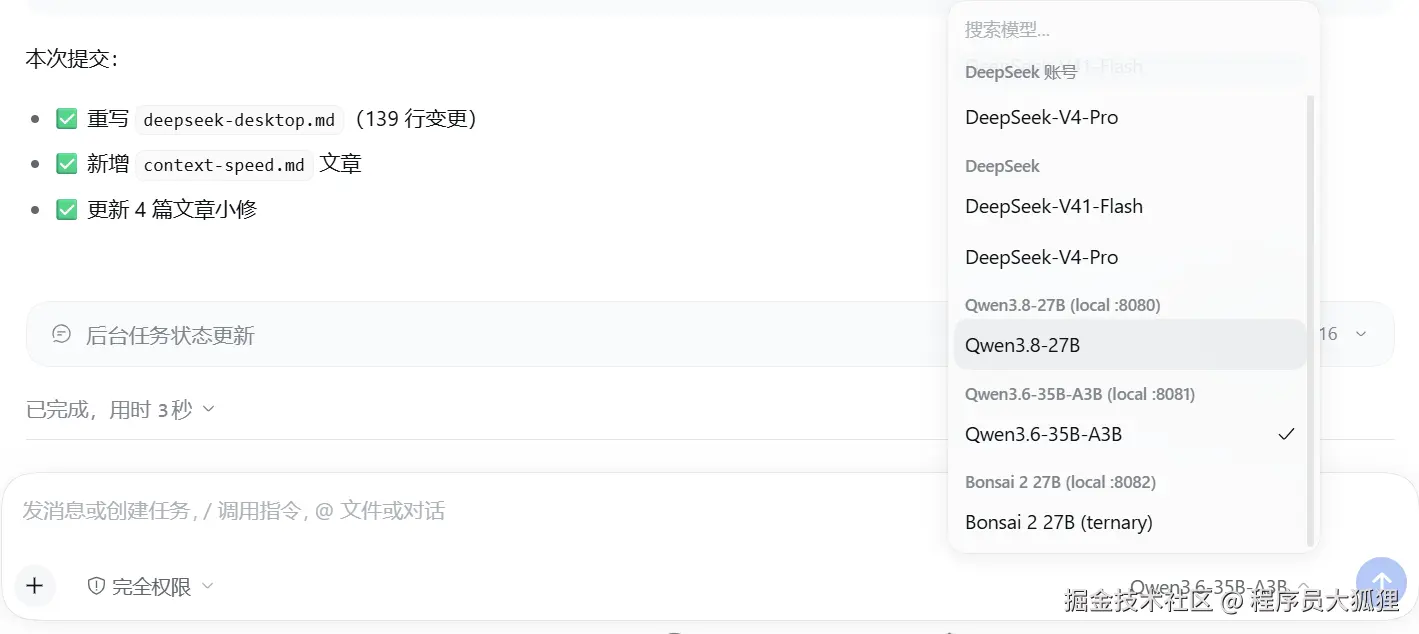
如何接入?不用自己去查文档,直接给 AI 提要求就可以了。
以下是本地模型接入完成后,让 AI 给出的总结报告(使用 Deepseek Harness Desktop + Deepseek V4.1 Flash)。
结论:可行
已接入完成,三条路由全部实测通过。
不需要安装任何插件:DSH 桌面版本就内置了多 provider 适配器
@deepseek-ai/dsh-llm-pi-ai,由
@deepseek-ai/dsh-base以休眠状态 挂载(0 路由),配置里给出 provider 即被激活。本机三个模型都是 llama.cpp 的
llama-server,即 OpenAI 兼容端点,可直接作为自建路由接入。实测:三条路由各跑通一次完整的 DSH headless agent 回合 (非裸 curl),
别名、流式、推理通道、工具调用全部正常。
本文所有结论均来自本机实测,方法见文末。
- DSH 桌面版:
0.2.0-rc.2(profiledesktop) - 平台:Windows x64 / Intel Core Ultra X7 358H / Intel Arc B390 iGPU(SYCL)/ 31.5 GiB 内存
摘要
| 项目 | 结果 |
|---|---|
| 目标 | 把本机部署的三个 llama.cpp 模型接入 DSH 桌面版的模型选择器 |
| 可行性 | ✅ 可行,DSH 自带 dsh-llm-pi-ai 适配器 + Models 页支持"自定义模型 API" |
| 需安装插件 | 不需要。适配器已挂载,只差配置 |
| 接入协议 | openai-completions(llama-server 原生 OpenAI 兼容接口) |
| 路由数 | 3 |
| 端到端实测 | ✅ 3/3 通过 |
| 关键前置改动 | 给 llama-server 加 --alias;三个模型的端口分家 |
| 机器硬约束 | 31.5 GiB 内存,一次只能驻留一个模型(两个 Qwen 各约 15 GiB) |
三个模型最终的端口 / 别名
| 模型 | GGUF 文件 | 权重 | 启动脚本 | 端口 | API 别名 | 上下文 | 最大输出 |
|---|---|---|---|---|---|---|---|
| Qwen3.8-27B | Qwen3.8-27B-UD-Q4_K_M.gguf |
15.33 GiB | chat-27b.cmd |
8080 | qwen38 |
65536 | 16384 |
| Qwen3.6-35B-A3B | Qwen3.6-35B-A3B-UD-Q3_K_M.gguf |
15.46 GiB | chat-q36.cmd |
8081 | qwen36 |
32768 | 8192 |
| Bonsai 2 27B | Ternary-Bonsai-2-27B-PTQ1_0.gguf |
5.54 GiB | chat-bonsai.cmd |
8082 | bonsai |
65536 | 16384 |
Qwen3.6 原为端口 8080(与 Qwen3.8 冲突),本次改为 8081。
可行性依据:DSH 为什么能接本地模型
DSH 内置了多 provider 适配器
@deepseek-ai/dsh-base 的 cordis.patch.yml 中已挂载该条目,且注释明确写了它是休眠的:
yaml
# The pi-ai multi-provider twin, mounted dormant: zero routes (and no extra
# models in the picker) until a `llm-pi-ai:` settings section supplies provider
# profiles --- then those routes register live, keys resolving per request
# through their apiKeyEnv references, and drop again when the section empties.
# Supplying those profiles is exactly what the web Models page does. Which
# adapters exist is composition; which providers run is the user's settings
# document.
- id: llm-pi-ai
  name: '@deepseek-ai/dsh-llm-pi-ai'
它支持的能力正好覆盖 llama.cpp:
| 能力 | 说明 |
|---|---|
api: openai-completions |
面向"自建服务器 / 中继 / 任意 OpenAI 兼容端点" |
| 自建路由 | pi-ai 目录里没有的 provider,可手写 api + baseURL + models 三元组 |
baseURL 可用 localhost |
校验规则明确允许 localhost、IPv4/IPv6 字面量与自定义端口 |
| 端点探测 | GET {baseURL}/models 自动发现模型清单 |
Models 设置页提供图形入口
@deepseek-ai/dsh-client-ui-settings-models(已在 dsh-web-app 中启用)提供:
添加模型提供方 → 自定义模型 API ,其中"Custom model API"模式的原话是 "a relay, a self-hosted server, or any other OpenAI- or Anthropic-compatible endpoint"。 协议选择器提供 OpenAI Chat Completions / OpenAI Responses / Anthropic Messages 三种。
→ 也就是说:图形界面和配置文件两条路都通。本文采用配置文件方式,便于版本化与批量管理。
本机模型恰好是可接的形态
三个模型都由 llama.cpp 的 llama-server.exe 提供,启动参数里都带 --jinja, 因此天然具备 OpenAI 兼容接口 + 工具调用能力,无需任何协议转换层。
实施过程
四个改动步骤,每步记录:问题 → 改动 → 验证。
步骤 1:给 llama-server 加 --alias(统一模型 id)
问题. 不带 --alias 时,/v1/models 返回的 id 是 .gguf 文件全路径,例如:
makefile
D:\AI_Tools\models\Ternary-Bonsai-2-27B\Ternary-Bonsai-2-27B-PTQ1_0.gguf把这个字符串写进 DSH 配置,又长、又要在 YAML 里处理反斜杠、改名量化文件就失效,图形界面里也不好认。
改动. 给两个底层启动器加可选的位置参数 alias,并把 --alias 传给 llama-server:
llama-server.cmd:用法变为[model.gguf] [ctx] [port] [n_parallel] [alias]llama-server-bonsai.cmd:用法变为[model.gguf] [ctx] [port] [mmproj.gguf] [alias]
别名默认值从模型文件名派生,并对已知量化做一次短名映射:
bat
REM --- API model id. Arg 5 wins; otherwise the known quants map to short
REM     stable ids so every launcher reports the SAME id for the same model
REM     no matter which script started it. Anything else falls back to its
REM     bare file name.
set "ALIAS=%~5"
if not "%ALIAS%"=="" goto :alias_ready
for %%F in ("%MODEL%") do set "ALIAS=%%~nF"
if /i "%ALIAS%"=="Qwen3.8-27B-UD-Q4_K_M" set "ALIAS=qwen38"
if /i "%ALIAS%"=="Qwen3.6-35B-A3B-UD-Q3_K_M" set "ALIAS=qwen36"
if /i "%ALIAS%"=="Ternary-Bonsai-2-27B-PTQ1_0" set "ALIAS=bonsai"
:alias_ready
最后在命令行加 --alias "%ALIAS%"。
为什么"从文件名派生"而不是在每个调用脚本里写死 :这样不用改动任何调用方 (chat-27b.cmd / chat-q36.cmd / chat-bonsai.cmd 一行都不用动), 而且同一个模型无论从哪个脚本启动,API 报出的 id 都一致,不会出现"一个模型两个 id"。
验证.
- 两套构建运行时
--help均确认该 flag 存在:-a, --alias STRING set model name aliases, comma-separated (to be used by API) - 两套 README 也都记录了它(
tools/server/README.md第 189 行、第 1251 行)。 - 派生逻辑干跑 5 种输入全部正确(含未知模型回退、显式覆盖)。
- 真实重启服务后
/v1/models实测三个 id:
json
{"id":"bonsai","aliases":["bonsai"],...}
{"id":"qwen36","aliases":["qwen36"],...}
{"id":"qwen38","aliases":["qwen38"],...}
步骤 2:三个模型的端口分家
问题(两层).
- 原来
chat-27b.cmd、chat-q36.cmd都把PORT设为 8080,并且各自跨端口探测复用 (8080 → 8092 → 8081,Bonsai 则是 8082 → 8093),目的是防止在 31.5 GiB 机器上加载第二份 15 GiB 权重。 - 这个探测只确认端口上有没有 HTTP 服务应答
/v1/models,不检查是哪个模型 。 于是chat-q36.cmd完全可能"复用"一个实际跑着 Qwen3.8 的 8080 服务。
叠加 llama.cpp 的一个行为后,后果很隐蔽:单模型模式下请求体里的 model 字段不参与选模 (响应里的模型名取自服务端自身元数据,见 tools/server/server-context.cpp:4340 task.params.oaicompat_model = meta->model_name;;用请求 model 去选模型的是 router 模式, 相关代码在 server-models.cpp)。所以在 DSH 里选了 qwen36 却连到 Qwen3.8, 不会报错,会被当前加载的模型悄悄应答。
改动. 每个脚本只探测自己那一个端口,跨端口探测全部删除:
| 脚本 | 改动前 | 改动后 |
|---|---|---|
chat-27b.cmd |
PORT=8080,探测 8080/8092/8081 |
PORT=8080,探测 8080 |
chat-q36.cmd |
PORT=8080,探测 8080/8092/8081 |
PORT=8081,探测 8081 |
chat-bonsai.cmd |
PORT=8082,探测 8082/8093 |
PORT=8082,探测 8082 |
内存保护没有削弱 :三个脚本仍保留 tasklist 检查------只要有任何 llama-server 进程活着就拒绝启动第二份。被收窄的只是"哪个端口算我的"。
验证. 逐行读回 if defined FOUND (...) 与 tasklist 两处块结构完整; 三个脚本的 PORT 与 call :probe 各只有一个且一致;全工作区已无 8092/8093 引用。
步骤 3:写入 DSH 配置
位置 :C:\Users\liwei\.dsh\profiles\desktop\cordis.patch.yml (DSH 的 profile 补丁层,在所有 bundle 层之后应用,因此优先级最高)
改动 :追加一个 id: llm-pi-ai 的条目,用 providers 声明三条路由。完整内容:
yaml
# --- Local llama.cpp routes (Intel Arc SYCL) --------------------------------
# Targets the llm-pi-ai adapter, which dsh-base mounts dormant: it registers
# zero routes until this `providers` dictionary supplies some. Each route is a
# hand-declared OpenAI-compatible endpoint, so all three need `api`,
# `baseURL`, and a non-empty `models` list. The model `id` values match the
# `--alias` passed by llama-server.cmd / llama-server-bonsai.cmd.
#
# NOTE: each model owns a fixed port - 8080 Qwen3.8-27B, 8081 Qwen3.6-35B-A3B,
# 8082 Bonsai 2 27B - so no two routes point at the same server. Only one of
# them fits in this machine's RAM at a time (31.5 GiB; each Qwen is ~15 GiB),
# so every route stays listed but only the running one connects.
#
# `headers` carries a placeholder bearer token because pi-ai's
# OpenAI-compatible client requires an Authorization header even for a
# keyless local server; llama.cpp ignores it unless started with --api-key.
# `headers` is deliberately not editable from the Models page, so it lives
# here rather than as a key typed into the GUI.
- id: llm-pi-ai
  name: "@deepseek-ai/dsh-llm-pi-ai"
  config:
    providers:
      local-qwen38:
        displayName: Qwen3.8-27B (local :8080)
        api: openai-completions
        baseURL: http://127.0.0.1:8080/v1
        headers:
          Authorization: Bearer local
        models:
          - id: qwen38
            name: Qwen3.8-27B
            contextWindow: 65536
            maxTokens: 16384
      local-qwen36:
        displayName: Qwen3.6-35B-A3B (local :8081)
        api: openai-completions
        baseURL: http://127.0.0.1:8081/v1
        headers:
          Authorization: Bearer local
        models:
          - id: qwen36
            name: Qwen3.6-35B-A3B
            contextWindow: 32768
            maxTokens: 8192
      local-bonsai:
        displayName: Bonsai 2 27B (local :8082)
        api: openai-completions
        baseURL: http://127.0.0.1:8082/v1
        headers:
          Authorization: Bearer local
        models:
          - id: bonsai
            name: Bonsai 2 27B (ternary)
            contextWindow: 65536
maxTokens: 16384四个字段的用意:
| 字段 | 为什么必须有 |
|---|---|
api: openai-completions |
自建路由 pi-ai 目录里没有,必须显式声明协议,否则注册被拒 |
baseURL |
每个模型自己的端口 |
headers.Authorization |
pi-ai 的 OpenAI 兼容客户端即使面对无鉴权本地服务也要求 Authorization 头 。缺了会在请求时报错。llama.cpp 未加 --api-key 时不校验内容 |
models[].id |
必须与步骤 1 的 --alias 完全一致 |
另外约束了 maxTokens < contextWindow,避免 harness 请求比窗口还大的输出。
验证.
- PyYAML 解析 + 断言:根为数组、5 个条目、条目 id 无重复 、三条
baseURL互不相同且正好是 8080/8081/8082、每个模型maxTokens < contextWindow。 - 用 DSH 自己的 JSON schema 校验:
dsh localtest --dump-config-schema(613 KB), 确认displayName/api/baseURL/headers/models/contextWindow/maxTokens都是 schema 认可的字面量。 - 确认没有会覆盖它的东西 :
~/.dsh下不存在任何 settings 文档,storages/里也搜不到llm-pi-ai或providers键。
验证方法与结果
分两层验证。第一层只能证明服务端没问题,第二层才能证明 DSH 侧真的通了,两层都做了。
第一层:服务端(HTTP 直连)
| 检查项 | 方法 | 结果 |
|---|---|---|
| 别名生效 | GET /v1/models |
✅ 三个 id 分别为 qwen38 / qwen36 / bonsai |
| 工具调用 | 带 tools 的 POST /v1/chat/completions |
✅ finish_reason: tool_calls,arguments 为标准 JSON |
| SSE 流式 | curl -N 观察分片 |
✅ data: 分片 + [DONE] 收尾 |
| 推理通道 | 同一响应的 delta.reasoning_content |
✅ 独立通道,pi-ai 可识别 |
| 上下文生效 | GET /props |
✅ n_ctx 与配置一致 |
Bonsai 的一次真实工具调用返回:
json
{"type":"function","function":{"name":"get_weather","arguments":"{\"city\":\"Beijing\"}"},
 "id":"7JoyNSkpNBa72THWijrG5AA56p54CLJa"}
第二层:DSH 端到端
障碍. dsh CLI 拒绝引导 desktop profile: error: profile "desktop" is managed exclusively by the Electron application。
方法. 用官方方式建一个隔离的测试 profile,再喂给它从桌面配置里精确抽出的那份 llm-pi-ai 条目, 确保被测的是真实配置本身,而不是复制件:
powershell
# 1) 从已发布模板创建隔离 profile(模板:acp / headless / sdk / sdk-minimal / web)
dsh localtest --from-default-profile headless --dump-config

# 2) 用 PyYAML 从桌面配置抽出 id == "llm-pi-ai" 的那一条,写成覆盖层
#    -> %TEMP%\dsh-ov-providers.yml

# 3) 用 --patch 叠加"配置 + 目标模型",跑一个真实任务
dsh localtest --patch %TEMP%\dsh-ov-providers.yml `
              --patch %TEMP%\dsh-ov-model-qwen36.yml `
              "Reply with exactly: PONG"
--patch 是"额外补丁层,在 profile 层之后应用",因此效果与写进 profile 一致。
结果.
| 路由 | 端口 | /v1/models 的 id |
退出码 | 输出 | 耗时 |
|---|---|---|---|---|---|
local-bonsai |
8082 | bonsai |
0 | PONG |
未计时 |
local-qwen36 |
8081 | qwen36 |
0 | PONG |
39.4s |
local-qwen38 |
8080 | qwen38 |
0 | PONG |
106.9s |
"通过"的证据不只是输出了 PONG。模型的推理内容复述了 harness 自己的上下文:
python
The user's message says "Reply with exactly: PONG" --- wait, actually there's a contradiction here...
Then the second message is the current runtime context.
...
Wait, but there's a skill system-reminder about available skills. The task "Reply with exactly: PONG"
doesn't match any skill description. So no skill needed.这说明完整的 DSH 系统提示词、runtime context、技能清单都确实送达了本地模型 , 是一次真正的 harness 回合,而不是把 prompt 转手发给了一个 HTTP 端点。 同时 dsh: reasoning: 前缀说明推理通道被 pi-ai 正确识别并分流。
这也一并证明了三件事:协议 openai-completions 正确、headers 占位凭据够用、 三个模型 id 都能在注册阶段解析(配置有误会在注册时带具体原因拒绝,不会静默通过)。
尚未验证的一环
桌面端重新读取 profile。 desktop profile 由 Electron 独占,CLI 无法 dump, 因此无法从外部观察它的合成树。但可以推断无虞:
- 两个 profile 引用的是同一个
@deepseek-ai/dsh-basebundle,而llm-pi-ai由该 bundle 挂载; 在localtest的合成树里已确认id: llm-pi-ai存在。 - 补丁条目正是以该 id 为目标做配置覆盖。
→ 在 GUI 里刷新页面 (dsh-hmr 已挂载,理论上会自动重载;刷新是更稳的路径), 必要时重启桌面端,三条路由即应出现在模型选择器与设置 → 模型中。
已知限制与注意事项
硬约束
- 一次只能驻留一个模型。 31.5 GiB 内存,两个 Qwen 各约 15 GiB。三条路由会始终列在选择器里, 但只有对应服务正在运行的那一条能连上 。切换模型必须先停掉当前服务。 三个启动脚本的
tasklist守卫会在检测到其他llama-server时拒绝启动,这是有意为之。 - 端口必须与服务实际所在端口一致。 若服务意外落在别的端口,DSH 会连不上(这比"被错模型应答"好)。
接入本身的限制
- 裸端点仍需占位凭据。 pi-ai 的 OpenAI 兼容实现要求
Authorization头,见步骤 3。 - 不要在 Models 图形页重新保存这三条路由。
headers按设计在模型页不可编辑 ; 而设置文档优先级高于 cordis 条目,一旦在 GUI 里改动并保存某条路由, 设置层会取代这份配置,占位Authorization有被丢掉的风险。要改字段就改配置文件。 - 默认模型没有变。
agent-default-model仍是deepseek-account/deepseek-flash。 本地模型是可选路由,需要在模型选择器里手动切;会话标题、压缩等辅助调用仍走 DeepSeek。 - pi-ai 适配器的若干约束 (摘自其 README):
- 只有开头的
system消息会成为 pi-ai 的systemPrompt,其余system会折进user消息; GenerateOptions.stop不支持,会以UNSUPPORTED_OPTION拒绝;- 手写路由必须给全
api+baseURL+ 非空models,否则在写入处即被拒绝。
- 只有开头的
模型质量相关
- Bonsai 的工具调用有官方已知缺陷 (见
Bonsai-2-27B-部署报告.md): 偶尔格式错误或死循环;arguments为空会 400/500;系统消息必须只有一条且在开头。 → 建议把 Qwen3.6-35B-A3B 作为 DSH 主力(MoE、约 3B 激活、编码/agentic 定位), Bonsai 用于推理与长上下文试验。 - 上下文结构适应性:实测中 Bonsai 与 Qwen3.8 都在推理里纠结"这里有两条消息" (把 harness 的 runtime-context 块当成了第二个用户回合),Qwen3.6 则干净得多。 不影响功能,但可作选型参考。
- 延迟预期:单轮无工具调用的实测耗时如上表(Qwen3.6 约 39s、Qwen3.8 约 107s)。 这是每回合的成本下限;真实 agent 任务要跑多轮工具调用,会更慢。
操作踩坑
- 不要用
cmd /c "... "arg" ..."这种嵌套引号启动脚本。 本次实施中踩过一次: 外层cmd /c "..."内的双引号会被 cmd 吞掉并截断参数,导致脚本立刻失败。 PowerShell 里直接& 'D:\AI_Tools\llama-server.cmd' '<模型路径>' 32768 8081即可; 或确保路径中没有空格,干脆不加内层引号。 - 两个客户端的默认端口仍是 8080 :
chat.html的"接口"输入框默认http://127.0.0.1:8080/v1(可在页面改,会记入 localStorage);chat_cli.py的--port默认 8080(但三个启动脚本都会显式传--port %PORT%, 从脚本进cli模式不受影响)。
日常操作
启动(三选一,一次只能一个)
makefile
D:\AI_Tools\chat-27b.cmd      ->  qwen38 @ 8080   ctx 65536
D:\AI_Tools\chat-q36.cmd      ->  qwen36 @ 8081   ctx 32768
D:\AI_Tools\chat-bonsai.cmd   ->  bonsai @ 8082   ctx 65536
三者都支持附加 cli 参数走终端客户端;不加则打开 chat.html。
确认服务与别名
powershell
curl.exe -s http://127.0.0.1:8080/v1/models    # 应含 "id":"qwen38"
curl.exe -s http://127.0.0.1:8081/v1/models    # 应含 "id":"qwen36"
curl.exe -s http://127.0.0.1:8082/v1/models    # 应含 "id":"bonsai"
停止并释放内存(换模型前必须做)
powershell
Get-Process llama-server | Stop-Process -Force在 GUI 中使用
刷新 DSH 页面(或重启桌面端)后,在输入框的模型选择器里选:
bash
Qwen3.8-27B (local :8080)
Qwen3.6-35B-A3B (local :8081)
Bonsai 2 27B (local :8082)
附:本次实施用到的关键命令与证据
| 目的 | 命令 / 位置 |
|---|---|
| 查看 DSH 已发布 profile 模板 | dsh tpltest --from-default-profile __nosuch__ --dump-config → 报错里列出 acp/headless/sdk/sdk-minimal/web |
| 查看合成后的 profile 树 | dsh <profile> --dump-config |
| 查看真实配置 JSON Schema | dsh <profile> --dump-config-schema(本次 613 KB) |
确认 --alias 存在 |
`llama-server.exe --help |
| 确认单模型模式忽略请求 model | llama.cpp\tools\server\server-context.cpp:4340;router 相关在 server-models.cpp |
| 确认适配器休眠挂载 | dsh-base/cordis.patch.yml 中 - id: llm-pi-ai 及其上方注释 |
| 确认 Models 页支持自建端点 | dsh-client-ui-settings-models/README.md,"添加与删除 provider"一节 |