背景
我之前写过以下两篇文章,用来展示 ArrayList 扩容的过程
我觉得可以将 GUI 做得更好,于是就借助 trae 对原有的 GUI 进行了改造。
正文
如何运行
为了行文方便,我把完整的代码放到后续的小节里了,请将完整的代码保存为 ArrayListBehaviorDemo.java。使用如下命令可以编译 ArrayListBehaviorDemo.java。
bash
javac ArrayListBehaviorDemo.java编译之后,会得到以下 class 文件
ArrayListBehaviorDemo.classArrayListBehaviorDemo$ArrayGrid.class
使用如下命令,可以运行 ArrayListBehaviorDemo 中的 main 方法。
bash
java --add-opens=java.base/java.util=ALL-UNNAMED ArrayListBehaviorDemo运行效果示例
初始效果
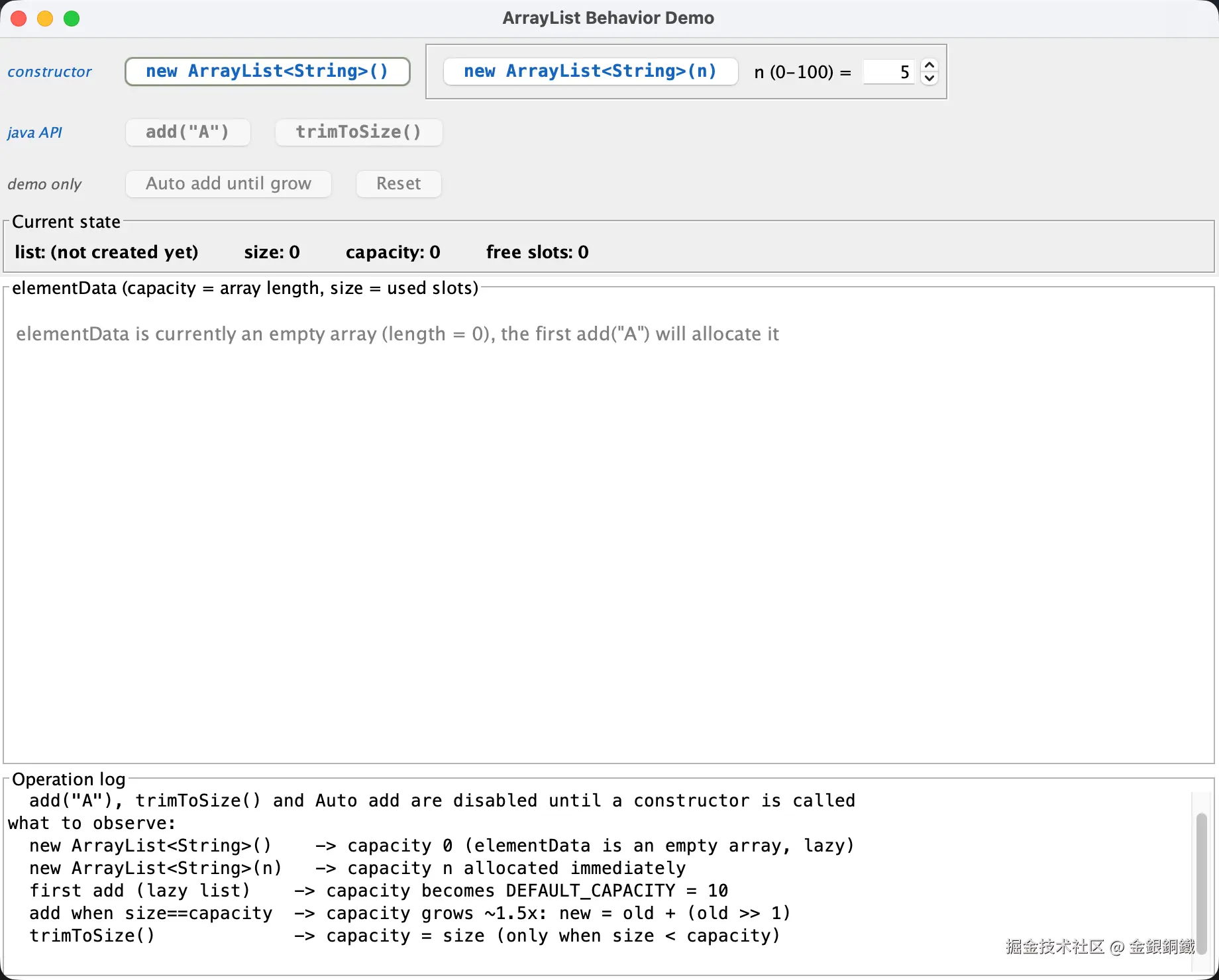
构造函数
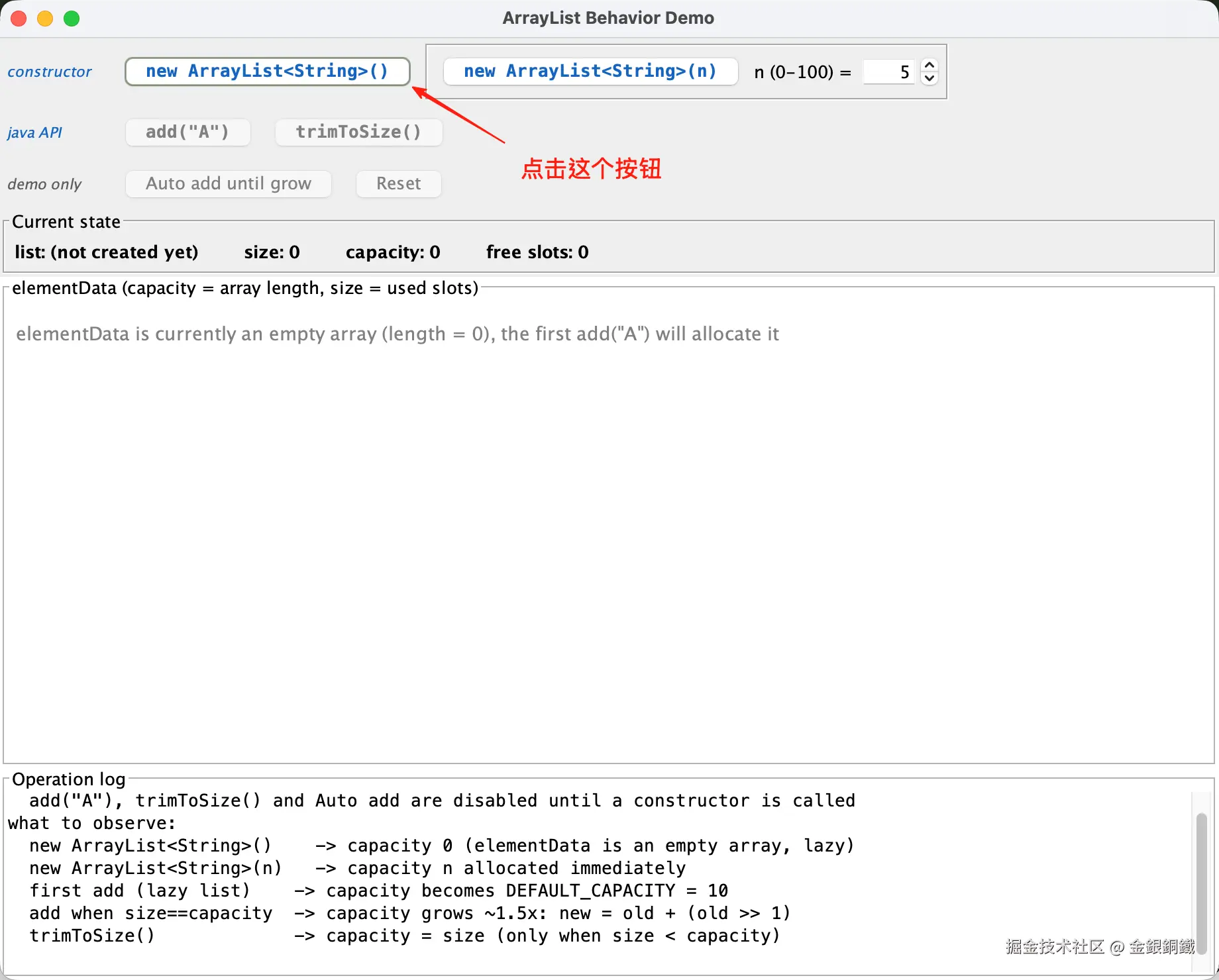
可以使用默认构造函数 ⬇️
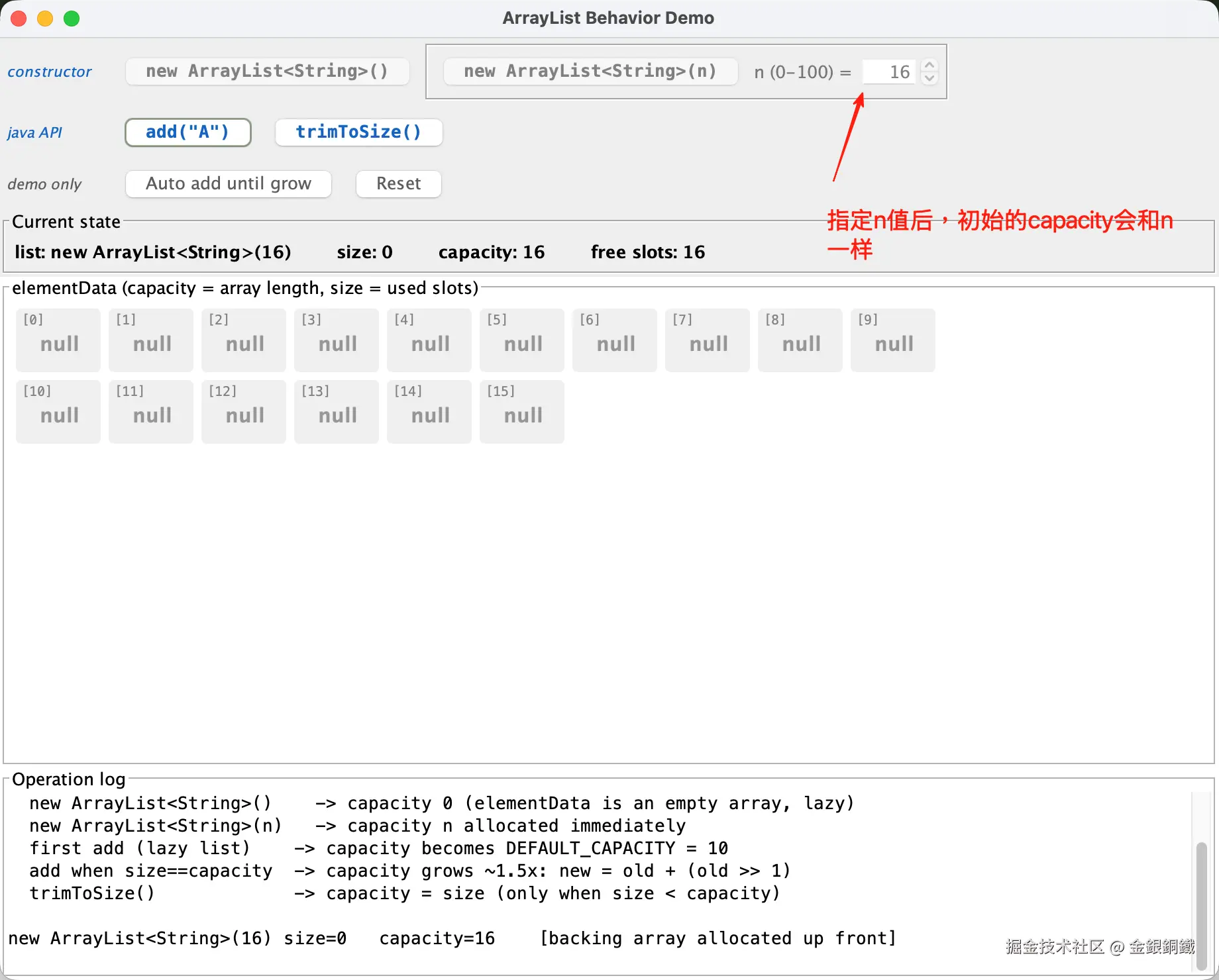
也可以使用带有 int 参数的构造函数(为了便于使用, n 的值必须满足 0≤n≤100)⬇️
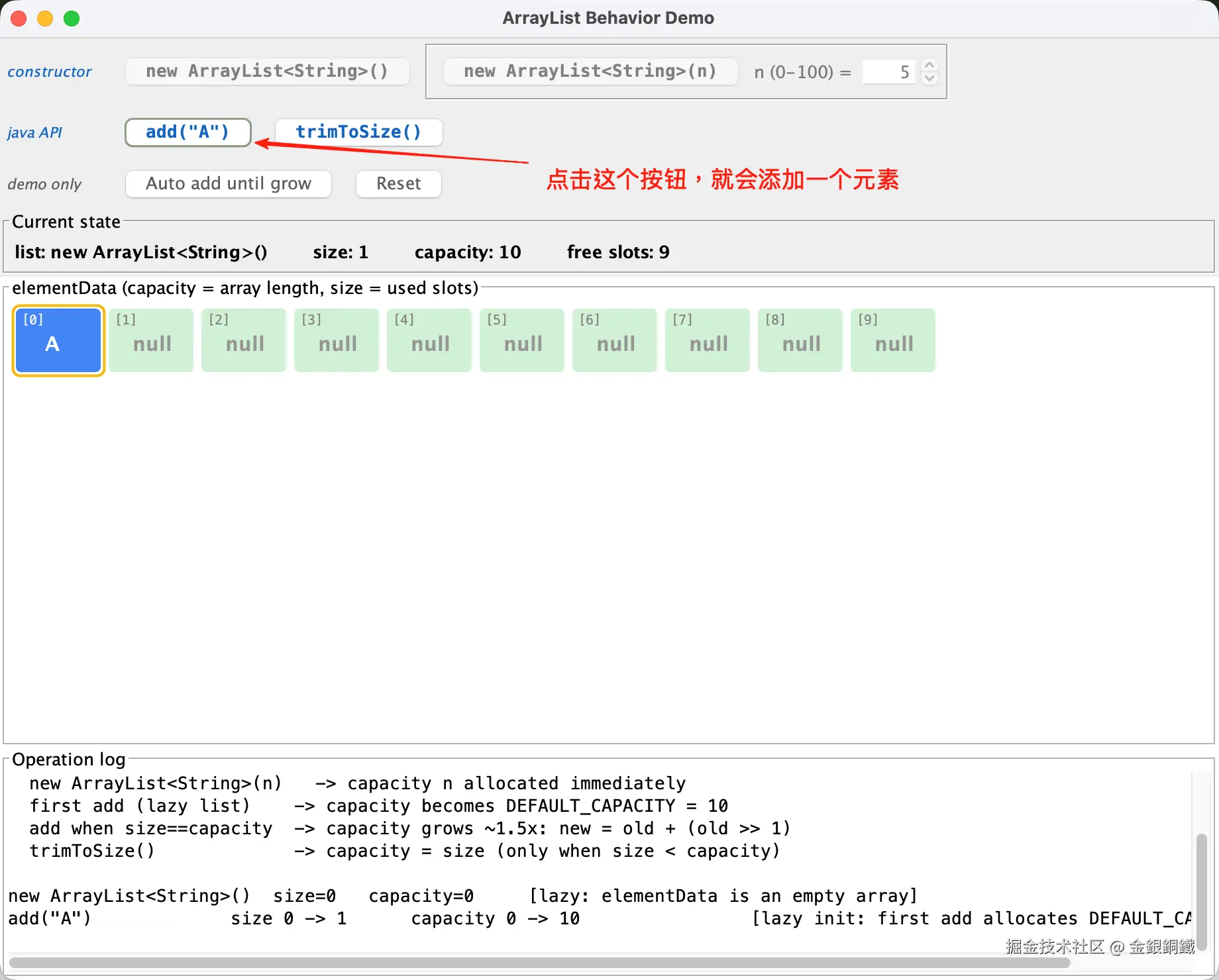
添加元素
通过点击 add("A") 按钮,可以逐个添加元素 ⬇️
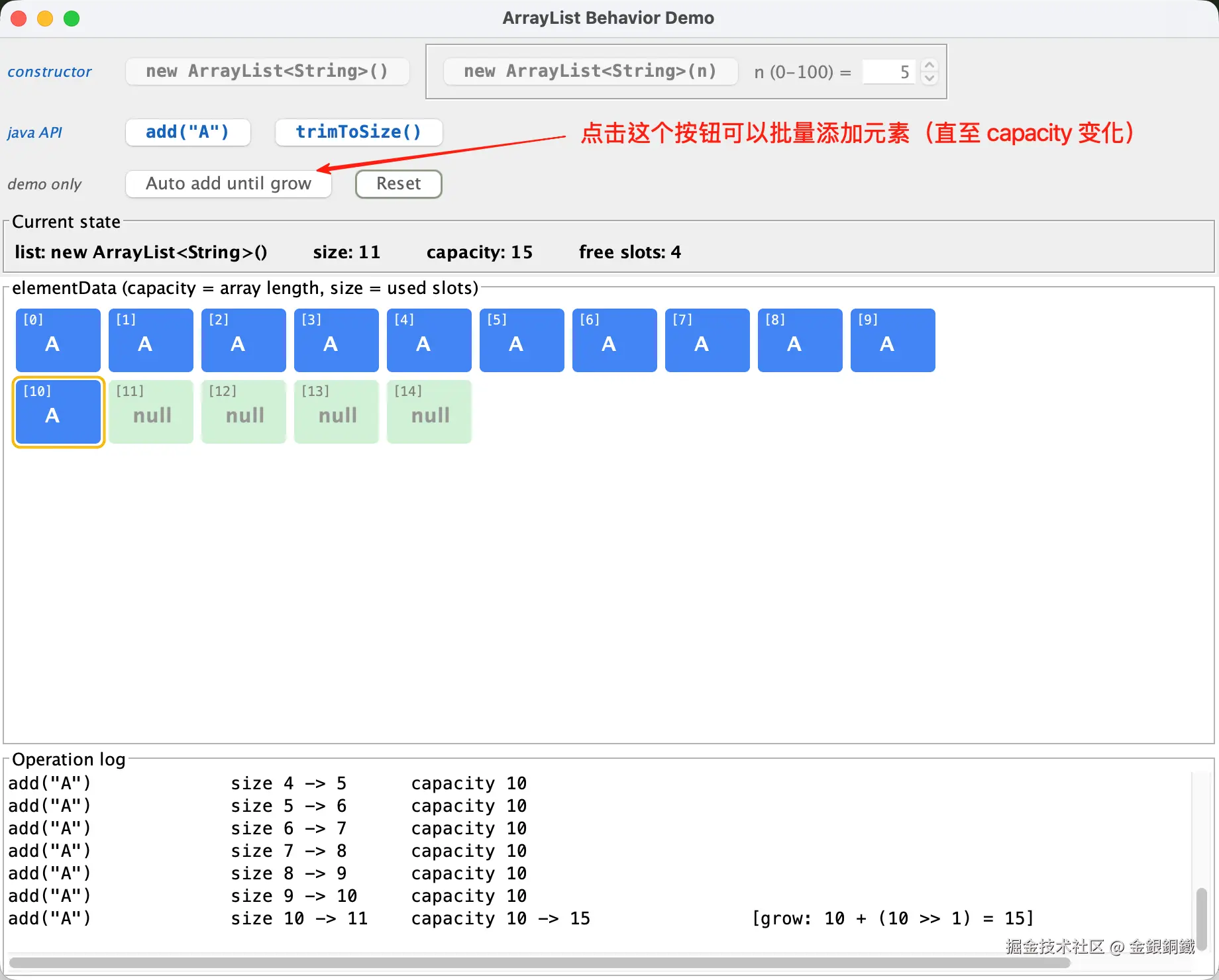
通过点击 Add add until grow 按钮,可以批量添加元素(直至 capacity 变化)⬇️
trimToSize
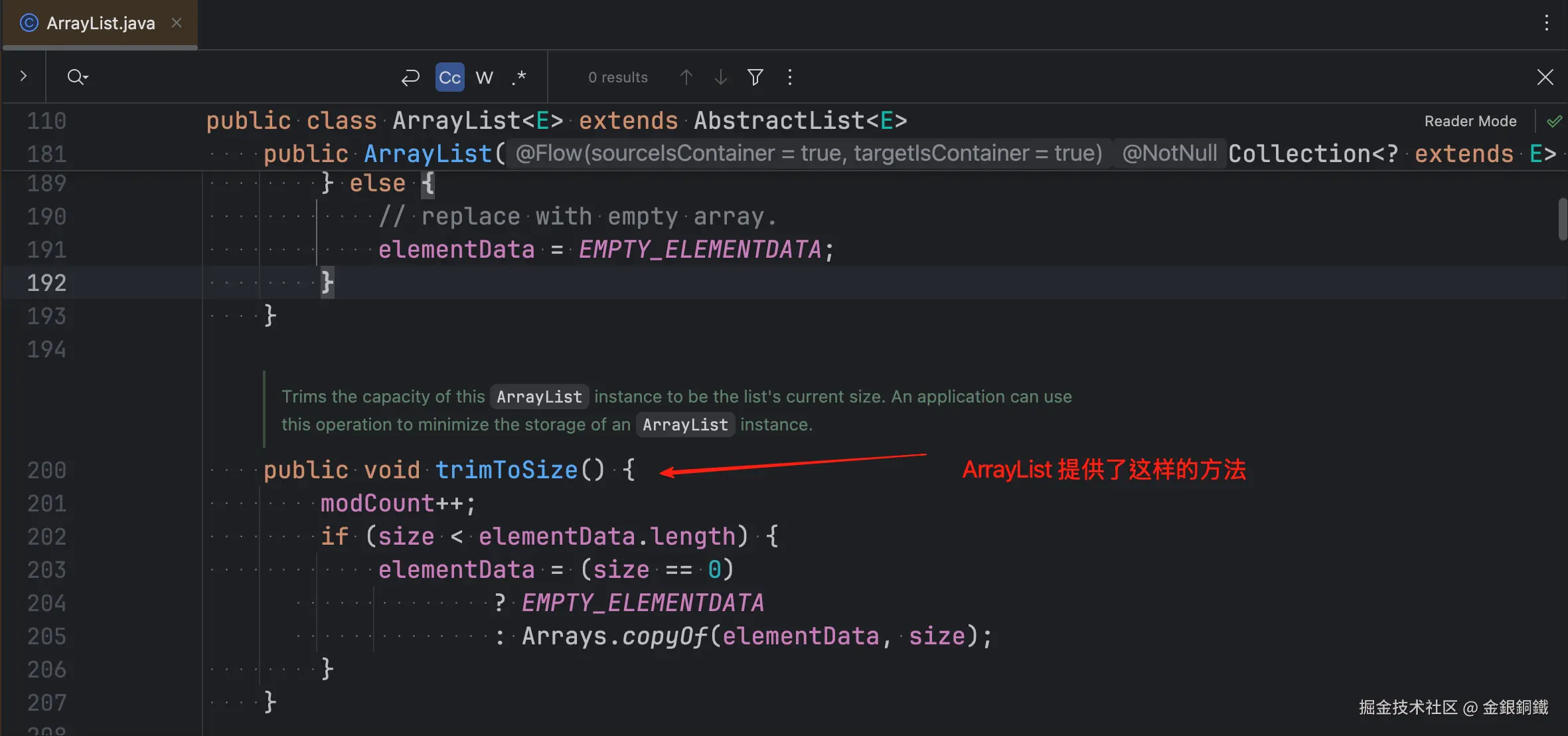
通过点击 trimToSize() 按钮,可以让 capacity 变得和 size 一样(这是 ArrayList 提供的 API)
Reset
通过点击 Reset 按钮,可以从头开始。
Current state 区域
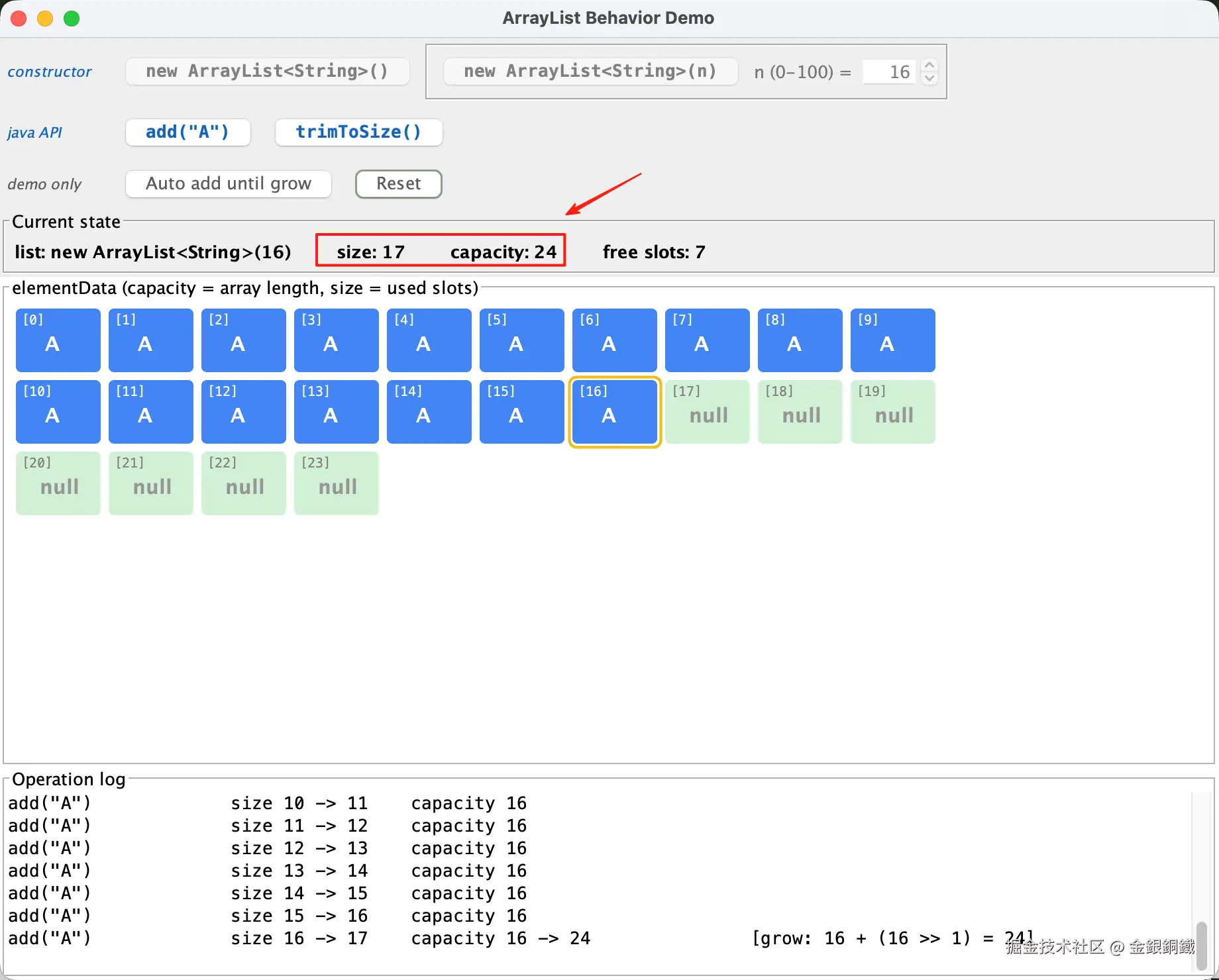
这个区域展示了 ArrayList 实时的 size/capacity 数据 ⬇️
完整的代码
java
import java.awt.BorderLayout;
import java.awt.Color;
import java.awt.Component;
import java.awt.Dimension;
import java.awt.FlowLayout;
import java.awt.Font;
import java.awt.Graphics;
import java.awt.Graphics2D;
import java.awt.RenderingHints;
import java.lang.reflect.Field;
import java.lang.reflect.InaccessibleObjectException;
import java.util.ArrayList;
import javax.swing.BorderFactory;
import javax.swing.Box;
import javax.swing.BoxLayout;
import javax.swing.JButton;
import javax.swing.JFrame;
import javax.swing.JLabel;
import javax.swing.JOptionPane;
import javax.swing.JPanel;
import javax.swing.JScrollPane;
import javax.swing.JSpinner;
import javax.swing.JTextArea;
import javax.swing.SpinnerNumberModel;
import javax.swing.SwingUtilities;
import javax.swing.Timer;
import javax.swing.border.TitledBorder;

/**
 * ArrayList behavior demo: visualizes how size and capacity change when
 * calling the constructors, add(E) and trimToSize().
 * <p>
 * Same principle as the juejin article "用 GUI 展示 ArrayList 扩容的过程":
 * read ArrayList's private elementData (the backing Object[]) and size
 * fields via reflection; capacity = elementData.length.
 * <p>
 * Observable facts:
 * 1) new ArrayList<String>()         -> capacity 0 (lazy: elementData is an empty array);
 * 2) new ArrayList<String>(n), n > 0 -> capacity n allocated right away;
 * 3) first add on a lazy list  -> capacity becomes DEFAULT_CAPACITY (10);
 * 3') first add on an array that is empty for other reasons (e.g. new ArrayList<String>(0)
 *     or after trimToSize)     -> capacity becomes exactly minCapacity (e.g. 1);
 * 4) add when size == capacity -> capacity grows by ~1.5x:
 *     newCapacity = oldCapacity + (oldCapacity >> 1), i.e. 10 -> 15 -> 22 -> 33 -> ...
 * 5) trimToSize()              -> capacity = size (only when size < capacity, otherwise no-op).
 * <p>
 * On JDK 9+ run with:
 * javac ArrayListBehaviorDemo.java
 * java --add-opens=java.base/java.util=ALL-UNNAMED ArrayListBehaviorDemo
 */
public class ArrayListBehaviorDemo {

    /** Fixed argument for add(E) so the demo stays focused on size/capacity. */
    private static final String FIXED_VALUE = "A";

    /** ArrayList.DEFAULT_CAPACITY, the capacity of the first allocation on a lazy list. */
    private static final int DEFAULT_CAPACITY = 10;

    /** Delay between two adds in the "Auto add until grow" run. */
    private static final int AUTO_ADD_DELAY_MS = 200;

    private static final int COLS = 10;
    private static final int CELL_W = 64;
    private static final int CELL_H = 48;
    private static final int GAP = 6;

    private static final Color FILLED_COLOR = new Color(66, 133, 244);
    private static final Color NEW_SLOT_COLOR = new Color(209, 240, 214);
    private static final Color EMPTY_COLOR = new Color(240, 240, 240);
    private static final Color LAST_ADDED_COLOR = new Color(244, 180, 0);

    /** Blue for buttons that map 1:1 to Java code (IDE syntax-highlight blue). */
    private static final Color CODE_COLOR = new Color(21, 101, 192);
    /** Dark gray for demo helper buttons: clearly secondary, not disabled. */
    private static final Color DEMO_COLOR = new Color(93, 93, 93);
    /** Light gray used when a button is disabled. */
    private static final Color DISABLED_COLOR = new Color(175, 175, 175);

    private final JFrame frame = new JFrame("ArrayList Behavior Demo");

    /** The list under observation. */
    private ArrayList<String> list = new ArrayList<>();
    /** How the current list was created, shown in the status area. */
    private String creation = "new ArrayList<String>()";

    // Highlight state for the grid: slots newly opened by the last growth
    private int newSlotStart = -1;
    private int newSlotEnd = -1;
    // Slot that received the last added element
    private int lastAddedIndex = -1;

    private final Field elementDataField;
    private final Field sizeField;

    private JSpinner initialCapacitySpinner;
    private JButton noArgCtorButton;
    private JButton intCtorButton;
    private JButton addButton;
    private JButton trimButton;
    private JButton autoButton;
    private JButton resetButton;
    private JLabel spinnerLabel;
    private JLabel creationLabel;
    private JLabel sizeLabel;
    private JLabel capacityLabel;
    private JLabel freeLabel;
    private JTextArea logArea;
    private ArrayGrid grid;
    private Timer autoTimer;

    public ArrayListBehaviorDemo() throws ReflectiveOperationException {
        // Read ArrayList's internal array and size via reflection
        elementDataField = ArrayList.class.getDeclaredField("elementData");
        sizeField = ArrayList.class.getDeclaredField("size");
        elementDataField.setAccessible(true);
        sizeField.setAccessible(true);
        buildUi();
        resetList();
    }

    private void buildUi() {
        frame.setDefaultCloseOperation(JFrame.EXIT_ON_CLOSE);
        frame.setSize(920, 740);
        frame.setLocationRelativeTo(null);

        // ---------- top: controls ----------
        JPanel control = new JPanel();
        control.setLayout(new BoxLayout(control, BoxLayout.Y_AXIS));

        // ---------- row 1: constructors ----------
        JPanel ctorRow = new JPanel(new FlowLayout(FlowLayout.LEFT));
        ctorRow.setAlignmentX(Component.LEFT_ALIGNMENT);
        noArgCtorButton = new JButton("new ArrayList<String>()");
        intCtorButton = new JButton("new ArrayList<String>(n)");
        spinnerLabel = new JLabel("n (0-100) =");
        initialCapacitySpinner = new JSpinner(new SpinnerNumberModel(5, 0, 100, 1));

        // Constructors are Java code as well: same monospace font, and the
        // tooltip spells out the exact statement being executed.
        Font ctorCodeFont = new Font(Font.MONOSPACED, Font.BOLD, 13);
        noArgCtorButton.setFont(ctorCodeFont);
        intCtorButton.setFont(ctorCodeFont);
        noArgCtorButton.setToolTipText("Runs: new ArrayList<String>()");
        intCtorButton.setToolTipText("Runs: new ArrayList<String>(n) with n from the spinner");

        // Group the int-constructor button with its n input so the two
        // controls read as one unit
        JPanel intCtorGroup = new JPanel();
        intCtorGroup.setBorder(BorderFactory.createEtchedBorder());
        intCtorGroup.add(intCtorButton);
        intCtorGroup.add(spinnerLabel);
        intCtorGroup.add(initialCapacitySpinner);

        ctorRow.add(rowCaption("constructor", CODE_COLOR));
        ctorRow.add(noArgCtorButton);
        ctorRow.add(intCtorGroup);
        control.add(ctorRow);

        // ---------- row 2: Java API calls ----------
        JPanel opRow = new JPanel(new FlowLayout(FlowLayout.LEFT));
        opRow.setAlignmentX(Component.LEFT_ALIGNMENT);
        addButton = new JButton("add(\"" + FIXED_VALUE + "\")");
        trimButton = new JButton("trimToSize()");

        // Buttons that map 1:1 to Java code use a monospace "code" font
        Font codeFont = new Font(Font.MONOSPACED, Font.BOLD, 13);
        addButton.setFont(codeFont);
        trimButton.setFont(codeFont);
        addButton.setToolTipText("Runs: list.add(\"" + FIXED_VALUE + "\")");
        trimButton.setToolTipText("Runs: list.trimToSize()");

        opRow.add(rowCaption("java API", CODE_COLOR));
        opRow.add(addButton);
        opRow.add(trimButton);
        control.add(opRow);

        // ---------- row 3: demo-only helpers ----------
        JPanel demoRow = new JPanel(new FlowLayout(FlowLayout.LEFT));
        demoRow.setAlignmentX(Component.LEFT_ALIGNMENT);
        autoButton = new JButton("Auto add until grow");
        resetButton = new JButton("Reset");
        autoButton.setToolTipText("Demo helper, not a Java API call: repeats "
                + "list.add(\"" + FIXED_VALUE + "\") every " + AUTO_ADD_DELAY_MS
                + " ms until the capacity changes");
        resetButton.setToolTipText("Demo control, not a Java API call: returns to the initial state");

        demoRow.add(rowCaption("demo only", DEMO_COLOR));
        demoRow.add(autoButton);
        demoRow.add(resetButton);
        control.add(demoRow);

        JPanel statusRow = new JPanel(new FlowLayout(FlowLayout.LEFT));
        statusRow.setAlignmentX(Component.LEFT_ALIGNMENT);
        statusRow.setBorder(new TitledBorder("Current state"));
        creationLabel = new JLabel();
        sizeLabel = new JLabel();
        capacityLabel = new JLabel();
        freeLabel = new JLabel();
        Font bold = new Font(Font.SANS_SERIF, Font.BOLD, 13);
        creationLabel.setFont(bold);
        sizeLabel.setFont(bold);
        capacityLabel.setFont(bold);
        freeLabel.setFont(bold);
        statusRow.add(creationLabel);
        statusRow.add(Box.createHorizontalStrut(24));
        statusRow.add(sizeLabel);
        statusRow.add(Box.createHorizontalStrut(24));
        statusRow.add(capacityLabel);
        statusRow.add(Box.createHorizontalStrut(24));
        statusRow.add(freeLabel);
        control.add(statusRow);

        frame.add(control, BorderLayout.NORTH);

        // ---------- center: elementData slot grid ----------
        grid = new ArrayGrid();
        JScrollPane gridScroll = new JScrollPane(grid);
        gridScroll.setBorder(new TitledBorder("elementData (capacity = array length, size = used slots)"));
        gridScroll.getVerticalScrollBar().setUnitIncrement(16);
        frame.add(gridScroll, BorderLayout.CENTER);

        // ---------- bottom: operation log ----------
        logArea = new JTextArea(8, 20);
        logArea.setEditable(false);
        logArea.setFont(new Font(Font.MONOSPACED, Font.PLAIN, 13));
        JScrollPane logScroll = new JScrollPane(logArea);
        logScroll.setBorder(new TitledBorder("Operation log"));
        frame.add(logScroll, BorderLayout.SOUTH);

        noArgCtorButton.addActionListener(e -> doNoArgConstructor());
        intCtorButton.addActionListener(e -> doIntConstructor());
        addButton.addActionListener(e -> doAdd());
        trimButton.addActionListener(e -> doTrimToSize());
        resetButton.addActionListener(e -> resetList());
        autoButton.addActionListener(e -> startAutoAdd());

        autoTimer = new Timer(AUTO_ADD_DELAY_MS, e -> autoAddTick());
        autoTimer.setInitialDelay(0);
    }

    private void doNoArgConstructor() {
        list = new ArrayList<>();
        creation = "new ArrayList<String>()";
        setListCreatedState();
        clearHighlights();
        logLine(String.format("%-24s size=%-3d capacity=%-4d  [lazy: elementData is an empty array]",
                "new ArrayList<String>()", getSize(), getCapacity()));
        refreshView();
    }

    private void doIntConstructor() {
        int n = (Integer) initialCapacitySpinner.getValue();
        list = new ArrayList<>(n);
        creation = "new ArrayList<String>(" + n + ")";
        setListCreatedState();
        clearHighlights();
        String note = (n > 0)
                ? "backing array allocated up front"
                : "capacity 0, first add allocates from scratch";
        logLine(String.format("%-24s size=%-3d capacity=%-4d  [%s]",
                "new ArrayList<String>(" + n + ")", getSize(), getCapacity(), note));
        refreshView();
    }

    /**
     * Runs one automatic add per tick and stops as soon as the capacity
     * has changed, so the freshly grown slots stay highlighted.
     */
    private void autoAddTick() {
        int oldCapacity = getCapacity();
        doAdd();
        if (getCapacity() != oldCapacity) {
            autoTimer.stop();
            setListCreatedState();
        }
    }

    private void startAutoAdd() {
        addButton.setEnabled(false);
        autoButton.setEnabled(false);
        trimButton.setEnabled(false);
        // Reset stays enabled so the auto run can be aborted
        refreshButtonColors();
        autoTimer.start();
    }

    /**
     * Button state before any constructor was called (also right after
     * Reset): only the constructor buttons are meaningful, everything
     * else is disabled.
     */
    private void setNoListState() {
        noArgCtorButton.setEnabled(true);
        intCtorButton.setEnabled(true);
        spinnerLabel.setEnabled(true);
        initialCapacitySpinner.setEnabled(true);
        addButton.setEnabled(false);
        autoButton.setEnabled(false);
        trimButton.setEnabled(false);
        resetButton.setEnabled(false);
        refreshButtonColors();
    }

    /**
     * Button state after a constructor was called: the operations are
     * available, the constructor row is disabled (constructing again is
     * meaningless) until Reset brings back {@link #setNoListState()}.
     */
    private void setListCreatedState() {
        noArgCtorButton.setEnabled(false);
        intCtorButton.setEnabled(false);
        spinnerLabel.setEnabled(false);
        initialCapacitySpinner.setEnabled(false);
        addButton.setEnabled(true);
        autoButton.setEnabled(true);
        trimButton.setEnabled(true);
        resetButton.setEnabled(true);
        refreshButtonColors();
    }

    /**
     * Keeps text colors meaningful: Java-mapped buttons are blue, demo
     * helpers dark gray, and anything disabled turns light gray so a
     * disabled button can never be mistaken for a clickable one.
     */
    private void refreshButtonColors() {
        noArgCtorButton.setForeground(noArgCtorButton.isEnabled() ? CODE_COLOR : DISABLED_COLOR);
        intCtorButton.setForeground(intCtorButton.isEnabled() ? CODE_COLOR : DISABLED_COLOR);
        addButton.setForeground(addButton.isEnabled() ? CODE_COLOR : DISABLED_COLOR);
        trimButton.setForeground(trimButton.isEnabled() ? CODE_COLOR : DISABLED_COLOR);
        autoButton.setForeground(autoButton.isEnabled() ? DEMO_COLOR : DISABLED_COLOR);
        resetButton.setForeground(resetButton.isEnabled() ? DEMO_COLOR : DISABLED_COLOR);
    }

    /**
     * Left-hand caption of a button row. A fixed width keeps the buttons of
     * the three rows aligned with each other.
     */
    private static JLabel rowCaption(String text, Color color) {
        JLabel label = new JLabel(text);
        label.setFont(new Font(Font.SANS_SERIF, Font.ITALIC, 11));
        label.setForeground(color);
        label.setPreferredSize(new Dimension(78, 18));
        return label;
    }

    /**
     * Log text for a value: "a -> b" only when it actually changed,
     * otherwise a plain "a" (no arrow that would imply a change).
     */
    private static String changeText(int oldValue, int newValue) {
        return (newValue == oldValue)
                ? String.valueOf(oldValue)
                : oldValue + " -> " + newValue;
    }

    private void doAdd() {
        int oldSize = getSize();
        int oldCapacity = getCapacity();

        list.add(FIXED_VALUE);

        int newSize = getSize();
        int newCapacity = getCapacity();

        lastAddedIndex = oldSize;
        newSlotStart = -1;
        newSlotEnd = -1;

        String note = null;
        if (newCapacity > oldCapacity) {
            newSlotStart = oldCapacity;
            newSlotEnd = newCapacity - 1;
            if (oldCapacity == 0 && newCapacity == DEFAULT_CAPACITY) {
                note = "lazy init: first add allocates DEFAULT_CAPACITY = " + DEFAULT_CAPACITY;
            } else if (oldCapacity == 0) {
                note = "first add on an empty backing array: capacity = minCapacity = " + newCapacity;
            } else {
                int formula = oldCapacity + (oldCapacity >> 1);
                if (newCapacity == formula) {
                    note = "grow: " + oldCapacity + " + (" + oldCapacity + " >> 1) = " + newCapacity;
                } else {
                    note = "grow: 1.5x was smaller than needed, capacity = minCapacity = " + newCapacity;
                }
            }
        }
        logLine(String.format("%-20s size %-11s capacity %-21s%s",
                "add(\"" + FIXED_VALUE + "\")",
                changeText(oldSize, newSize),
                changeText(oldCapacity, newCapacity),
                note == null ? "" : "  [" + note + "]"));
        refreshView();
    }

    private void doTrimToSize() {
        int oldSize = getSize();
        int oldCapacity = getCapacity();

        list.trimToSize();

        int newSize = getSize();
        int newCapacity = getCapacity();
        clearHighlights();

        String note = (newCapacity < oldCapacity)
                ? "capacity = size (backing array copied to exact length)"
                : "no-op: size == capacity, backing array untouched";
        logLine(String.format("%-20s size %-11s capacity %-21s [%s]",
                "trimToSize()",
                changeText(oldSize, newSize),
                changeText(oldCapacity, newCapacity),
                note));
        refreshView();
    }

    private void resetList() {
        autoTimer.stop();
        list = new ArrayList<>();
        creation = "(not created yet)";
        clearHighlights();
        // Constructor must be the first step: only the constructor
        // buttons stay enabled.
        setNoListState();
        logArea.setText("");
        logLine("--- demo reset: call a constructor first ---");
        logLine("  add(\"A\"), trimToSize() and Auto add are disabled until a constructor is called");
        logLine("what to observe:");
        logLine("  new ArrayList<String>()    -> capacity 0 (elementData is an empty array, lazy)");
        logLine("  new ArrayList<String>(n)   -> capacity n allocated immediately");
        logLine("  first add (lazy list)    -> capacity becomes DEFAULT_CAPACITY = " + DEFAULT_CAPACITY);
        logLine("  add when size==capacity  -> capacity grows ~1.5x: new = old + (old >> 1)");
        logLine("  trimToSize()             -> capacity = size (only when size < capacity)");
        logLine("");
        refreshView();
    }

    private void clearHighlights() {
        newSlotStart = -1;
        newSlotEnd = -1;
        lastAddedIndex = -1;
    }

    private void refreshView() {
        int size = getSize();
        int capacity = getCapacity();
        creationLabel.setText("list: " + creation);
        sizeLabel.setText("size: " + size);
        capacityLabel.setText("capacity: " + capacity);
        freeLabel.setText("free slots: " + (capacity - size));
        grid.setData(list, capacity, size);
    }

    private int getCapacity() {
        try {
            Object[] elementData = (Object[]) elementDataField.get(list);
            return elementData.length;
        } catch (IllegalAccessException e) {
            throw new RuntimeException(e);
        }
    }

    private int getSize() {
        try {
            return (int) sizeField.get(list);
        } catch (IllegalAccessException e) {
            throw new RuntimeException(e);
        }
    }

    private void logLine(String text) {
        logArea.append(text + System.lineSeparator());
        logArea.setCaretPosition(logArea.getDocument().getLength());
    }

    /**
     * Draws one square per slot of elementData.
     */
    private class ArrayGrid extends JPanel {

        private ArrayList<?> data = new ArrayList<>();
        private int capacity;
        private int size;

        ArrayGrid() {
            setBackground(Color.WHITE);
        }

        void setData(ArrayList<?> data, int capacity, int size) {
            this.data = data;
            this.capacity = capacity;
            this.size = size;
            int rows = Math.max(1, (capacity + COLS - 1) / COLS);
            setPreferredSize(new Dimension(
                    COLS * CELL_W + (COLS + 1) * GAP,
                    rows * CELL_H + (rows + 1) * GAP));
            revalidate();
            repaint();
        }

        @Override
        protected void paintComponent(Graphics g) {
            super.paintComponent(g);
            Graphics2D g2 = (Graphics2D) g;
            g2.setRenderingHint(RenderingHints.KEY_ANTIALIASING,
                    RenderingHints.VALUE_ANTIALIAS_ON);
            g2.setRenderingHint(RenderingHints.KEY_TEXT_ANTIALIASING,
                    RenderingHints.VALUE_TEXT_ANTIALIAS_ON);

            if (capacity == 0) {
                g2.setColor(Color.GRAY);
                g2.setFont(new Font(Font.SANS_SERIF, Font.PLAIN, 14));
                g2.drawString("elementData is currently an empty array (length = 0), "
                        + "the first add(\"" + FIXED_VALUE + "\") will allocate it", GAP, 30);
                return;
            }

            Font valueFont = new Font(Font.SANS_SERIF, Font.BOLD, 15);
            Font indexFont = new Font(Font.MONOSPACED, Font.PLAIN, 10);

            for (int i = 0; i < capacity; i++) {
                int col = i % COLS;
                int row = i / COLS;
                int x = GAP + col * (CELL_W + GAP);
                int y = GAP + row * (CELL_H + GAP);

                boolean filled = i < size;
                boolean isNewSlot = i >= newSlotStart && i <= newSlotEnd;

                if (filled) {
                    g2.setColor(FILLED_COLOR);
                } else if (isNewSlot) {
                    g2.setColor(NEW_SLOT_COLOR);
                } else {
                    g2.setColor(EMPTY_COLOR);
                }
                g2.fillRoundRect(x, y, CELL_W, CELL_H, 8, 8);

                // slot index
                g2.setColor(filled ? Color.WHITE : Color.GRAY);
                g2.setFont(indexFont);
                g2.drawString("[" + i + "]", x + 4, y + 12);

                // element value or null
                g2.setFont(valueFont);
                if (filled) {
                    g2.setColor(Color.WHITE);
                    g2.drawString(String.valueOf(data.get(i)), x + 22, y + 32);
                } else {
                    g2.setColor(new Color(150, 150, 150));
                    g2.drawString("null", x + 18, y + 32);
                }

                // outline the slot that received the last element
                if (i == lastAddedIndex) {
                    g2.setColor(LAST_ADDED_COLOR);
                    g2.drawRoundRect(x - 2, y - 2, CELL_W + 4, CELL_H + 4, 10, 10);
                    g2.drawRoundRect(x - 3, y - 3, CELL_W + 6, CELL_H + 6, 12, 12);
                }
            }
        }
    }

    public static void main(String[] args) {
        SwingUtilities.invokeLater(() -> {
            ArrayListBehaviorDemo demo;
            try {
                demo = new ArrayListBehaviorDemo();
            } catch (InaccessibleObjectException e) {
                JOptionPane.showMessageDialog(null,
                        """
                        Reflection access to ArrayList internals was denied.

                        On JDK 9+ start the demo with:
                        java --add-opens=java.base/java.util=ALL-UNNAMED \\
                            ArrayListBehaviorDemo""",
                        "--add-opens required", JOptionPane.ERROR_MESSAGE);
                return;
            } catch (ReflectiveOperationException e) {
                JOptionPane.showMessageDialog(null,
                        "Initialization failed: " + e.getMessage(),
                        "Error", JOptionPane.ERROR_MESSAGE);
                return;
            }
            demo.frame.setVisible(true);
        });
    }
}