1 实现效果 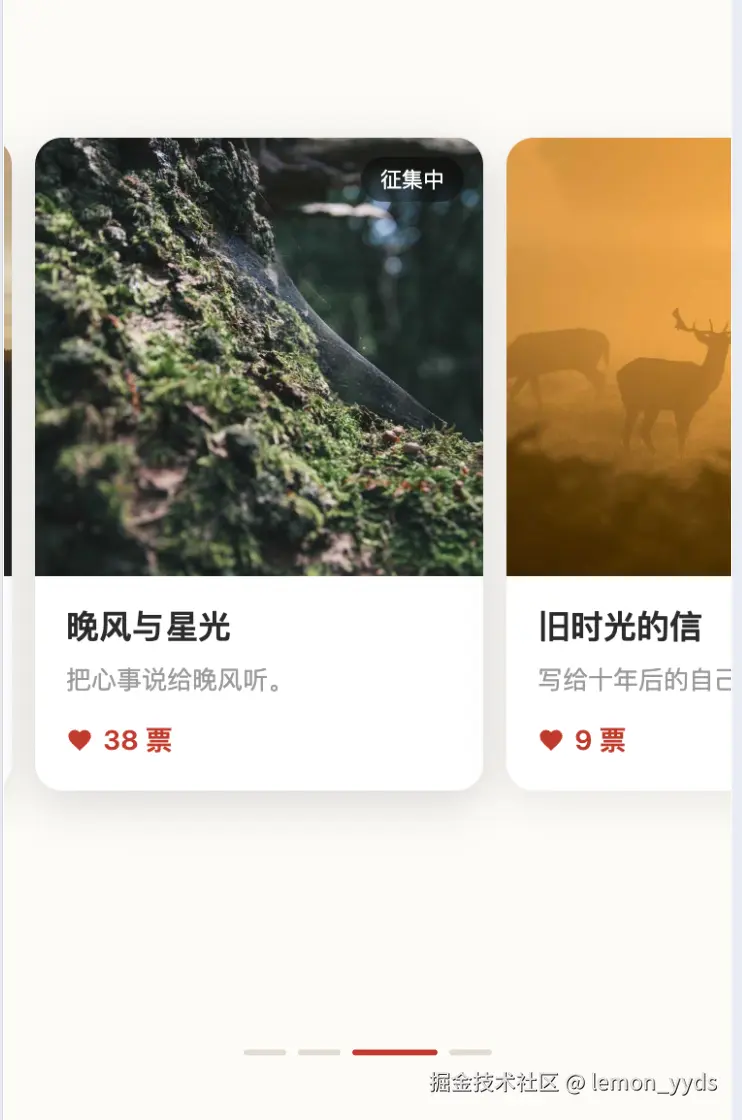 2 实现方案
文档核心内容一览:
- 需求描述 --- 卡片式轮播的功能点清单(左对齐 + 半张露出、拖动吸附、3 秒自动播、指示条)
- 整体结构 --- 视口容器裁切 + 轨道整体
translateX平移的核心思路 - 布局公式 --- 卡宽
W = (屏宽 - 左留白 - 间距) / 1.5,保证任意屏宽下都是"完整一张 + 半张下一张";轨道偏移L - i × (W + G);并记录了 gap 不一致导致末卡被裁的踩坑点 - 手势交互 --- 方向锁定防滚动冲突、拖动跟手/松手吸附两态切换、快速轻扫判定、边界阻尼
- 自动轮播 --- 3 秒定时器、拖动暂停/松手恢复、组件销毁清理
- 状态设计 --- 视图由
activeIndex + dragDelta两个量驱动的极简模型 - 可扩展点 --- 无限循环、圆点指示、3D 层叠、迁移到 SFC 工程的改造方法
H5 卡片式轮播实现方案文档
技术栈:Vue 2.7(CDN 引入,无需构建) · 单文件
index.html· 纯 CSS + 原生 JS 交互
一、需求描述
移动端 H5 活动页常见的卡片式轮播(非单图轮播):
-
卡片承载图文内容:大图 + 状态角标(如"征集中")+ 标题 + 描述 + 票数;
-
布局为左对齐 :当前卡片完整展示、紧贴左侧留白,右侧恰好露出下一张卡片的一半,暗示可滑动;
-
所有卡片大小一致,无缩放差异;
-
支持手指/鼠标拖动跟手滑动,松手自动吸附到最近卡片;
-
底部有分段式指示条,当前页为红色长条;
-
3 秒自动轮播,循环播放,用户拖动时暂停、松手恢复。
二、整体结构
arduino
#app

├── .carousel-wrap // 视口容器,overflow: hidden,负责裁切与事件监听

│ └── .carousel-track // 横向轨道(flex 布局),整体 translateX 平移

│ └── .card × N // 卡片(图片 + 角标 + 标题 + 描述 + 票数)

└── .indicator // 底部分段指示条核心思路:不逐个移动卡片,而是平移整条轨道 translateX,把"当前是第几张"映射为"轨道整体偏移多少"。
三、布局与尺寸计算(关键公式)
3.1 卡片宽度
设:屏宽 vw、左留白 L(16px)、卡片间距 G(12px)、卡片宽 W。
"一张完整卡片 + 半张下一卡" 恰好占满屏宽:
ini
L + W + G + W/2 = vw解得:
ini
W = (vw - L - G) / 1.5该公式保证任意屏宽下都严格呈现"完整一张 + 半张下一张"的视觉效果(响应式)。
3.2 轨道偏移
轨道采用 position: absolute; left: 0,通过 transform 平移。第 i 张为当前卡片时的偏移量:
ini
translateX = L - i × (W + G)即当前卡片左边缘永远落在 x = L 处(左对齐)。
3.3 响应式
监听 window.resize 重新执行 layout(),重算 W 与图片高度;beforeDestroy 时移除监听、清理定时器。
⚠️ 踩坑记录:JS 定位公式里假设卡片间有
G=12px间距,CSS 轨道必须设置gap: 12px与之严格一致,否则每张卡片会逐张累积偏移(这正是"最后一张显示不全"的 bug 根因)。
四、拖动手势交互
4.1 事件与方向锁定
-
移动端
touchstart / touchmove / touchend,PC 端mousedown+ window 级mousemove / mouseup(Vue2 中用原生事件兼容两种环境)。 -
touchmove中做方向锁定 (lockDirection):首次位移超过 8px 时判断主方向,横向(x)则接管事件并preventDefault(),纵向(y)则立即结束拖动、把滚动权还给页面------避免与页面上下滚动冲突。
4.2 跟手与吸附
拖动过程分两态:
| 阶段 | 动画 | 说明 |
|---|---|---|
| 拖动中 | transition: none(no-anim) | dragDelta 直接叠加到轨道偏移上,跟手 |
| 松手后 | transition: cubic-bezier(anim) | 移除 dragDelta,让 activeIndex 变化驱动吸附动画 |
松手后通过 moved = Math.round(-dragDelta / step) 计算翻过几张(step = W + G)。
快速轻扫判定(提升手感):若位移不足半张但满足任一条件,也翻一页:
-
位移超过卡片宽的 18%;
-
拖动速度快(
|delta| / 拖动时长 > 0.5px/ms)且位移超过 30px。
4.3 边界阻尼
首/尾边界处拖动位移乘以 0.35 的阻尼系数,产生"拉不动 + 松手弹回"的原生手感:
js
if ((i === 0 && dx > 0) || (i === last && dx < 0)) return dx * 0.35;4.4 点击卡片切换
点击非当前卡片直接 go(i);通过 Math.abs(dragDelta) > 5 过滤拖动后的误触点击。
五、自动轮播
js
setInterval(() => {

this.activeIndex >= list.length - 1 ? this.go(0) : this.next();

}, 3000);-
暂停/恢复 :
startDrag时pauseAutoplay,endDrag后startAutoplay(同时会重置计时,避免松手瞬间立刻跳页); -
循环:到末尾后回到第 0 张;
-
清理 :
beforeDestroy中clearInterval。
六、指示条
指示条与卡片数量一致,用 v-for 渲染:
html
<span class="bar" :class="{ on: i === activeIndex }"></span>当前项为红色加宽长条(44px),其余为灰色短条(22px),宽度/颜色变化走 CSS transition,无需 JS 动画。
七、状态设计小结
scss
list 轮播数据(img / title / desc / votes / badge)

activeIndex 当前卡片索引(唯一驱动视图的状态)

cardWidth / gap / leftPad / imgHeight 布局尺寸(layout() 计算)

dragging / dragDelta / startX / startY / startT / lockDirection 拖动临时状态

animating 是否启用过渡动画(拖动时关闭)

autoplayTimer 自动播放句柄
视图完全由 activeIndex + dragDelta 两个运行时量驱动:
ini
translateX = L - activeIndex × (W + G) + dragDelta八、可扩展点
| 需求 | 改法 |
|---|---|
| 无限循环轮播 | 数据渲染两份(list.concat(list)),snap 后对索引取模回跳(关闭动画回跳) |
| 底部圆点指示 | .indicator .bar 改为固定宽度圆形样式 |
| 3D 层叠效果 | 给非当前卡片加 transform: scale() + 透明度过渡(本文档初版方案) |
| 自动播放间隔调整 | 修改 setInterval 第二参数(毫秒) |
| 接入真实数据 | 替换 list 数组内容即可,卡片结构在 template 中调整 |
| 打包进工程 | 无构建依赖,可将 <script> 段抽为 SFC 组件,data/methods 原样迁移,事件换 @touchstart 等模板绑定 |
九、文件清单
index.html------ 单文件实现(样式 + 结构 + 逻辑),本地静态服务器即可运行
js
<!DOCTYPE html>
<html lang="zh-CN">
<head>
<meta charset="UTF-8">
<meta name="viewport" content="width=device-width, initial-scale=1.0, maximum-scale=1.0, user-scalable=no">
<title>卡片轮播 - Vue2 H5</title>
<script src="https://cdn.jsdelivr.net/npm/vue@2.7.16/dist/vue.min.js"></script>
<style>
  * { margin: 0; padding: 0; box-sizing: border-box; -webkit-tap-highlight-color: transparent; }
  html, body {
    width: 100%; height: 100%;
    font-family: -apple-system, BlinkMacSystemFont, "PingFang SC", "Helvetica Neue", sans-serif;
    background: #fdfbf7;
    overflow: hidden;
    -webkit-user-select: none; user-select: none;
  }
  #app {
    height: 100%;
    display: flex;
    flex-direction: column;
    justify-content: center;
  }

  /* ===== 轮播区域 ===== */
  .carousel-wrap {
    position: relative;
    width: 100%;
    height: 560px;
    overflow: hidden;
  }
  .carousel-track {
    position: absolute;
    top: 0; left: 0;
    height: 100%;
    display: flex;
    align-items: center;
    will-change: transform;
  }
  .carousel-track.no-anim { transition: none; }
  .carousel-track.anim { transition: transform .45s cubic-bezier(.22,.61,.36,1); }

  .card {
    flex-shrink: 0;
    background: #fff;
    border-radius: 14px;
    overflow: hidden;
    box-shadow: 0 6px 20px rgba(0,0,0,.08);
    transform: scale(.9);
    opacity: .75;
    transition: transform .45s cubic-bezier(.22,.61,.36,1), opacity .45s;
    cursor: pointer;
  }
  .card.active {
    transform: scale(1);
    opacity: 1;
  }

  .card-img {
    position: relative;
    width: 100%;
    background: #eee;
  }
  .card-img img {
    display: block;
    width: 100%;
    height: 100%;
    object-fit: cover;
  }
  .badge {
    position: absolute;
    top: 10px; right: 10px;
    padding: 4px 10px;
    font-size: 11px;
    color: #fff;
    background: rgba(0,0,0,.45);
    border-radius: 20px;
    backdrop-filter: blur(2px);
  }

  .card-body { padding: 14px 16px 16px; }
  .card-title {
    font-size: 17px;
    font-weight: 600;
    color: #2b2b2b;
    margin-bottom: 6px;
  }
  .card-desc {
    font-size: 13px;
    color: #9a9a9a;
    margin-bottom: 12px;
    white-space: nowrap;
    overflow: hidden;
    text-overflow: ellipsis;
  }
  .card-votes {
    display: flex;
    align-items: center;
    font-size: 14px;
    font-weight: 600;
    color: #c0392b;
  }
  .heart {
    width: 14px; height: 14px;
    margin-right: 5px;
    fill: #c0392b;
  }

  /* ===== 底部指示条 ===== */
  .indicator {
    display: flex;
    align-items: center;
    justify-content: center;
    gap: 6px;
    padding: 22px 0 30px;
  }
  .indicator .bar {
    height: 3px;
    width: 22px;
    border-radius: 2px;
    background: #e3ddd3;
    transition: all .35s;
  }
  .indicator .bar.on {
    width: 44px;
    background: #c0392b;
  }
</style>
</head>
<body>
<div id="app">
  <!-- 轮播 -->
  <div class="carousel-wrap"
       @touchstart="onTouchStart"
       @touchmove="onTouchMove"
       @touchend="onTouchEnd"
       @mousedown="onMouseDown">
    <div class="carousel-track" :class="animating ? 'anim' : 'no-anim'" :style="trackStyle">
      <div class="card"
           v-for="(item, i) in list"
           :key="i"
           :class="{ active: i === activeIndex }"
           :style="cardStyle"
           @click="onClickCard(i)">
        <div class="card-img" :style="{ height: imgHeight + 'px' }">
          <img :src="item.img" :alt="item.title" draggable="false">
          <span class="badge">{{ item.badge }}</span>
        </div>
        <div class="card-body">
          <div class="card-title">{{ item.title }}</div>
          <div class="card-desc">{{ item.desc }}</div>
          <div class="card-votes">
            <svg class="heart" viewBox="0 0 24 24">
              <path d="M12 21.35l-1.45-1.32C5.4 15.36 2 12.28 2 8.5 2 5.42 4.42 3 7.5 3c1.74 0 3.41.81 4.5 2.09C13.09 3.81 14.76 3 16.5 3 19.58 3 22 5.42 22 8.5c0 3.78-3.4 6.86-8.55 11.54L12 21.35z"/>
            </svg>
            {{ item.votes }} 票
          </div>
        </div>
      </div>
    </div>
  </div>

  <!-- 指示条 -->
  <div class="indicator">
    <span class="bar" v-for="(item, i) in list" :key="'b' + i" :class="{ on: i === activeIndex }"></span>
  </div>
</div>

<script>
new Vue({
  el: '#app',
  data: function () {
    return {
      list: [
        { title: '给远方的你', desc: '隔着山海,也是挂念。', votes: 15, badge: '征集中', img: 'https://picsum.photos/seed/carousel1/700/720' },
        { title: '谢谢一路同行', desc: '漫长的路,感谢有你。', votes: 22, badge: '征集中', img: 'https://picsum.photos/seed/carousel2/700/720' },
        { title: '晚风与星光', desc: '把心事说给晚风听。', votes: 38, badge: '征集中', img: 'https://picsum.photos/seed/carousel3/700/720' },
        { title: '旧时光的信', desc: '写给十年后的自己。', votes: 9, badge: '征集中', img: 'https://picsum.photos/seed/carousel4/700/720' }
      ],
      activeIndex: 0,
      // 布局尺寸(px,运行时按屏宽计算)
      cardWidth: 0,
      gap: 12,
      imgHeight: 0,
      // 拖动状态
      dragging: false,
      dragDelta: 0,
      startX: 0,
      startY: 0,
      startT: 0,
      lockDirection: '',   // 'x' | 'y',判断滑动方向
      animating: true
    };
  },
  computed: {
    trackStyle: function () {
      var center = window.innerWidth / 2;
      var offset = center - this.cardWidth / 2 - this.activeIndex * (this.cardWidth + this.gap);
      return {
        width: this.list.length * (this.cardWidth + this.gap) + 'px',
        transform: 'translateX(' + (offset + this.dragDelta) + 'px)'
      };
    },
    cardStyle: function () {
      return { width: this.cardWidth + 'px' };
    }
  },
  created: function () {
    this.layout();
    window.addEventListener('resize', this.layout);
  },
  methods: {
    layout: function () {
      var vw = window.innerWidth;
      // 卡片宽 = 屏宽 - 两侧露出 (每侧 34px)
      this.cardWidth = vw - 68;
      this.imgHeight = Math.round(this.cardWidth * 0.98);
    },
    go: function (i) {
      if (i < 0) i = 0;
      if (i > this.list.length - 1) i = this.list.length - 1;
      this.activeIndex = i;
    },
    next: function () { this.go(this.activeIndex + 1); },
    prev: function () { this.go(this.activeIndex - 1); },
    onClickCard: function (i) {
      // 拖动后误触忽略;点非当前卡片则切换过去
      if (Math.abs(this.dragDelta) > 5) return;
      if (i !== this.activeIndex) this.go(i);
    },

    /* ===== Touch ===== */
    onTouchStart: function (e) {
      this.startDrag(e.touches[0].clientX, e.touches[0].clientY);
    },
    onTouchMove: function (e) {
      if (!this.dragging) return;
      var dx = e.touches[0].clientX - this.startX;
      var dy = e.touches[0].clientY - this.startY;
      if (!this.lockDirection) {
        if (Math.abs(dx) > 8 || Math.abs(dy) > 8) {
          this.lockDirection = Math.abs(dx) > Math.abs(dy) ? 'x' : 'y';
        }
      }
      if (this.lockDirection === 'y') { this.endDrag(); return; }
      if (this.lockDirection === 'x') e.preventDefault();
      this.dragDelta = this.calcDelta(dx);
    },
    onTouchEnd: function () {
      this.endDrag();
    },

    /* ===== Mouse ===== */
    onMouseDown: function (e) {
      this.startDrag(e.clientX, e.clientY);
      window.addEventListener('mousemove', this.onMouseMove);
      window.addEventListener('mouseup', this.onMouseUp);
    },
    onMouseMove: function (e) {
      if (!this.dragging) return;
      this.dragDelta = this.calcDelta(e.clientX - this.startX);
    },
    onMouseUp: function () {
      window.removeEventListener('mousemove', this.onMouseMove);
      window.removeEventListener('mouseup', this.onMouseUp);
      this.endDrag();
    },

    startDrag: function (x, y) {
      this.dragging = true;
      this.animating = false;
      this.startX = x;
      this.startY = y;
      this.startT = Date.now();
      this.lockDirection = '';
    },
    calcDelta: function (dx) {
      // 边界阻尼
      var atFirst = this.activeIndex === 0 && dx > 0;
      var atLast = this.activeIndex === this.list.length - 1 && dx < 0;
      if (atFirst || atLast) return dx * 0.35;
      return dx;
    },
    endDrag: function () {
      if (!this.dragging) return;
      this.dragging = false;
      this.animating = true;
      var delta = this.dragDelta;
      this.dragDelta = 0;
      var step = this.cardWidth + this.gap;
      var moved = Math.round(-delta / step);
      // 快速轻扫也可翻页
      var speed = Math.abs(delta) / Math.max(Date.now() - this.startT, 1);
      if (moved === 0 && Math.abs(delta) > this.cardWidth * 0.18) {
        moved = delta < 0 ? 1 : -1;
      } else if (moved === 0 && speed > 0.5 && Math.abs(delta) > 30) {
        moved = delta < 0 ? 1 : -1;
      }
      this.go(this.activeIndex + moved);
    }
  }
});
</script>
</body>
</html>