背景
在之前的几篇文章中,我们借助 GUI 工具观察了 java.util.EnumSet ⬇️
- 当枚举类型中的常量个数不超过
64时,RegularEnumSet用long elements字段存放位图 - 当枚举类型中的常量个数超过
64时,JumboEnumSet用long[] elements保存位图
在那些文章里,ordinal 用来 定位一个 bit 。java.util.EnumMap 的思路与之相同,但用法更直接------ordinal 就是数组下标。
请将以下代码保存为 EnumMapFields.java
java
import java.lang.reflect.Field;
import java.lang.reflect.Modifier;

public class EnumMapFields {
    public static void main(String[] args) {
        Class<?> clazz = java.util.EnumMap.class;
        Field[] fields = clazz.getDeclaredFields();

        System.out.println(clazz.getName() + " declares " + fields.length + " fields:");
        System.out.printf("%-25s %-45s %s%n", "modifiers", "type", "name");
        System.out.println("-".repeat(80));

        for (Field field : fields) {
            String modifiers = Modifier.toString(field.getModifiers());
            String type = field.getGenericType().getTypeName();
            System.out.printf("%-25s %-45s %s%n", modifiers, type, field.getName());
        }
    }
}
执行以下命令可以编译 EnumMapFields.java 并运行其中的 main 方法。(我用的是 JDK 21)
bash
javac EnumMapFields.java
java EnumMapFields
运行结果如下
text
java.util.EnumMap declares 7 fields:
modifiers                 type                                          name
--------------------------------------------------------------------------------
private final             java.lang.Class<K>                            keyType
private transient         K[]                                           keyUniverse
private transient         java.lang.Object[]                            vals
private transient         int                                           size
private static final      java.lang.Object                              NULL
private transient         java.util.Set<java.util.Map$Entry<K, V>>      entrySet
private static final      long                                          serialVersionUID
在本文中,我们只关心前 5 个字段,它们在源码中的位置如下 ⬇️
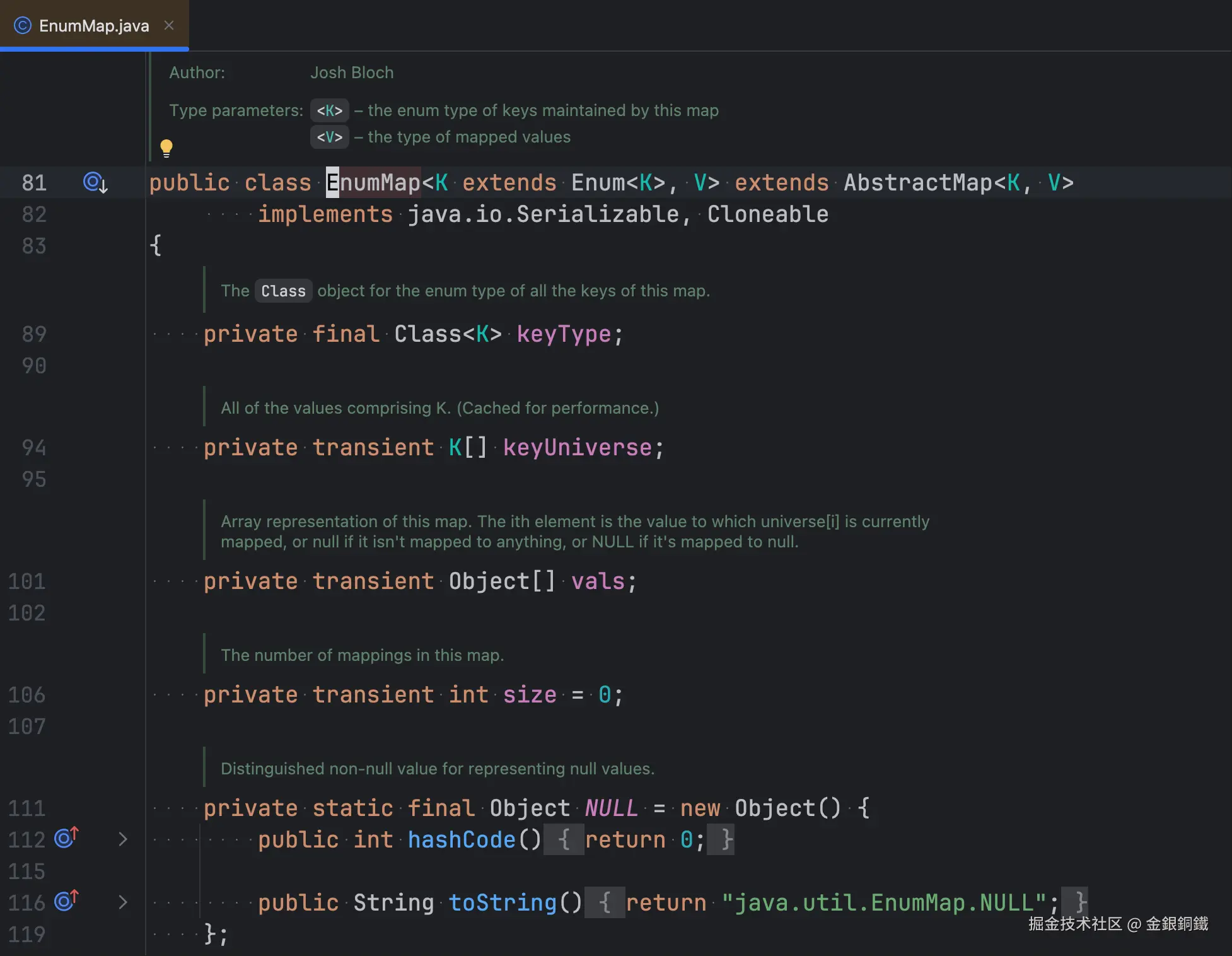
这五个字段对应的可观察事实:
keyType:构造时传入的枚举类,是final的,创建后不再变化keyUniverse:该枚举类的全部常量,下标就是ordinalvals:与keyUniverse对应的值数组,vals[i]就是常量keyUniverse[i]对应的值size:当前键值对个数NULL:一个私有的静态哨兵对象,用来代替null存进vals
构造函数的逻辑比较直观 ⬇️
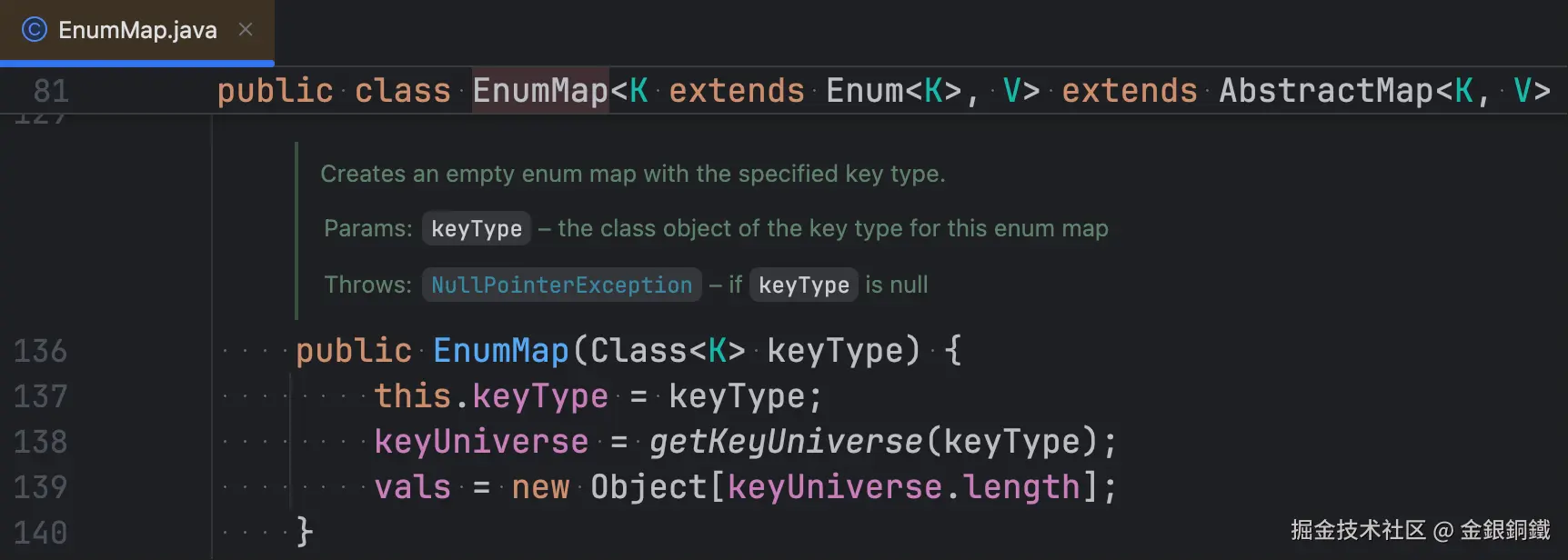
在构造函数里,会为 vals 分配好空间。
与 EnumSet 对照,两者对 ordinal 的用法不同:
| 位图 | 下标 | |
|---|---|---|
EnumSet |
ordinal 定位 long/long[] 中的某个 bit |
--- |
EnumMap |
--- | ordinal 直接作为 vals 数组的下标 |
我们可以通过反射来观察 java.util.EnumMap 增删键值对时,keyUniverse、vals 和 size 的变化。
注意事项
- 完整代码 中用到了
record、instanceof模式匹配和文本块,需要JDK 16+(写作本文时,我使用的是JDK 21) - 通过反射读取
EnumMap的私有字段(keyType、keyUniverse、vals、size、NULL),受JDK 9+模块系统限制,运行时需要使用--add-opens=java.base/java.util=ALL-UNNAMED;JDK 16起默认禁止这类反射访问,缺少参数时demo会捕获异常并弹出提示对话框
正文
我借助 trae 生成了可以观察 java.util.EnumMap 内部状态的代码。为了行文连贯,我把完整的代码放到 完整代码 这一小节里了。
如何运行
请将 完整代码 保存为 EnumMapBehaviorDemo.java。使用如下命令可以编译它。
bash
javac EnumMapBehaviorDemo.java编译之后,会得到以下 class 文件
EnumMapBehaviorDemo.classEnumMapBehaviorDemo$1.class(匿名DocumentListener)EnumMapBehaviorDemo$DemoEnumType.classEnumMapBehaviorDemo$Planet.classEnumMapBehaviorDemo$ValsGrid.classEnumMapBehaviorDemo$地支.classEnumMapBehaviorDemo$方位.classEnumMapBehaviorDemo$天干.classEnumMapBehaviorDemo$五行.class
使用如下命令,可以运行 EnumMapBehaviorDemo 中的 main 方法。
bash
java --add-opens=java.base/java.util=ALL-UNNAMED EnumMapBehaviorDemo运行效果示例
初始效果
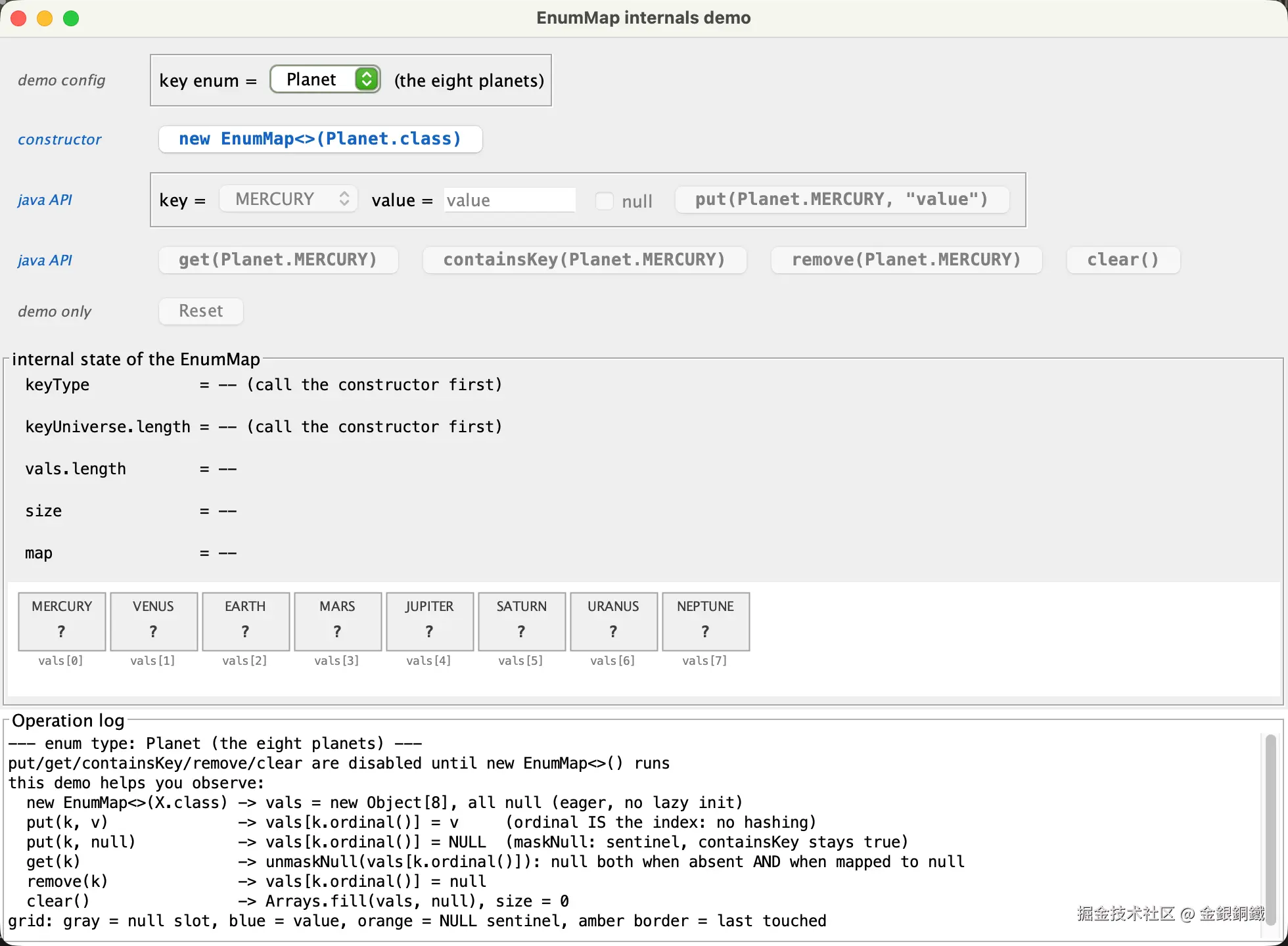
控件一共有五行,每行左侧是小字写的行标题:constructor 和java API 用蓝色,与对应的 Java API 按钮保持一致;demo config 和demo only 用灰色,表示 demo 自身的辅助功能 ⬇️
demo config:key enum下拉框,可以在Planet/五行/天干/地支/方位 之间切换constructor:new EnumMap<>(Planet.class),按钮文字会随所选的枚举类型而变化java API:put(...)以及它需要的key、value和null勾选框java API:get(...)、containsKey(...)、remove(...)、clear()demo only:Reset,仅用于重置演示
蓝色按钮对应真实的 Java API 调用;深灰色表示 demo 自身的辅助控件;浅灰色表示当前不可点击。
和 EnumSet 的 demo 不同,这里第一行不是"选择枚举类型"而是"选择 key 的枚举类型"------因为 EnumMap 还有另一个类型参数 V(值的类型),而 demo 把所有值都固定成 String。
在调用构造函数之前,put / get / containsKey / remove / clear / Reset 都是禁用的。此时 map 还不存在,状态面板显示 --,方格图里的取值也全是 ?。
internal state of the EnumMap 面板
界面中部的 internal state of the EnumMap 面板会展示各个字段的当前值,每次操作后都会刷新。以 new EnumMap<>(天干.class) 按钮为例,点击它之后,该面板会显示 5 行信息 ⬇️
text
keyType            = 天干.class
keyUniverse.length = 10
vals.length        = 10
size               = 0
map = {}keyType是final字段,它决定了keyUniverse的内容和vals的长度,所以放在第一行。keyUniverse.length和vals.length总是相等,因为两个数组是一一对应的map一行调用的是EnumMap的toString()方法,因此看起来就像一个普通的Map
方格图
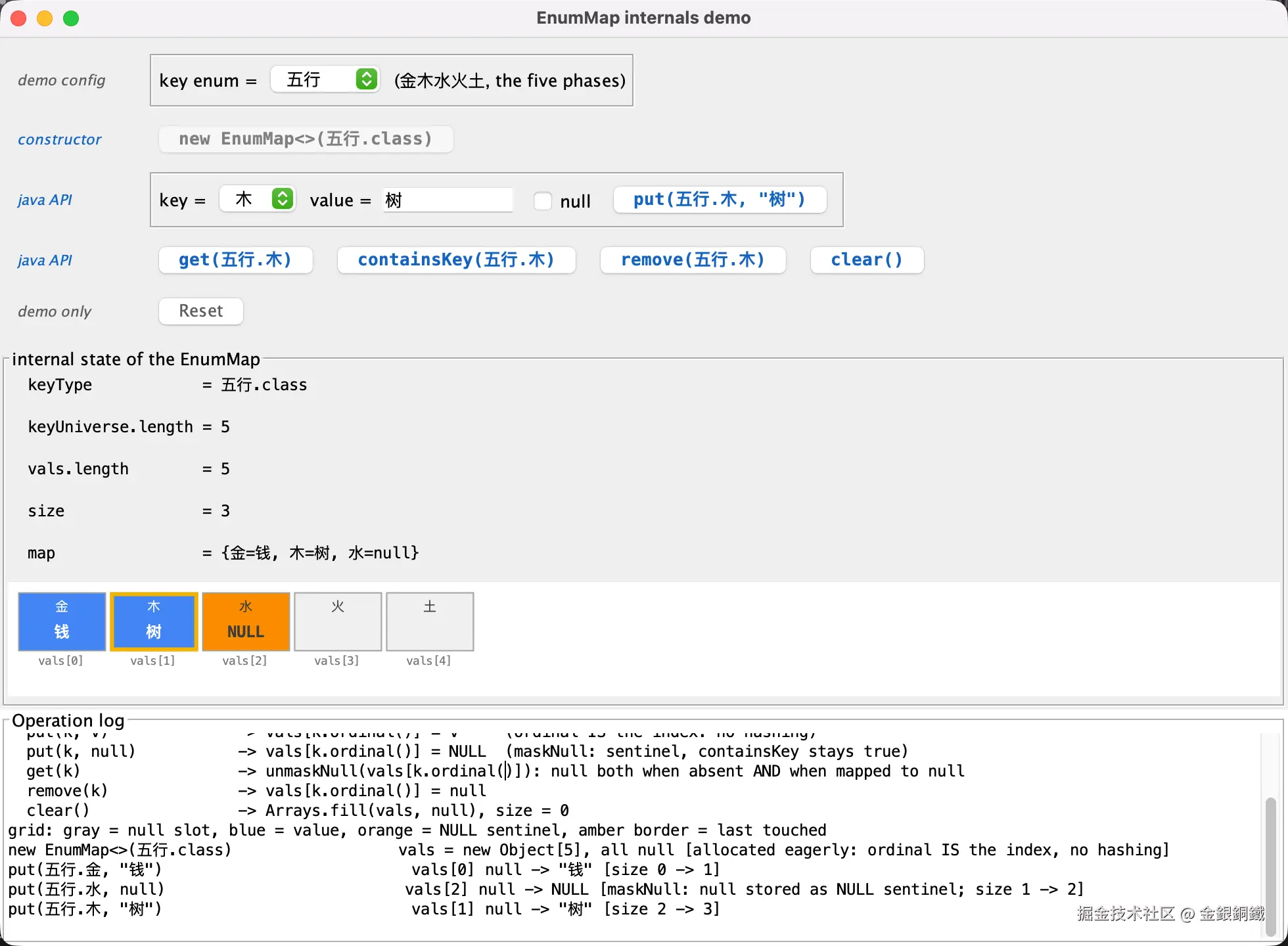
方格图只有一行,每个格子对应 vals 数组中的一个下标,方格里的文字分别:
- 第一行:
keyUniverse[i]的常量名 - 第二行:
vals[i]的内容(如果value为NULL哨兵,则展示为特殊值NULL,如果没有value,则不展示任何内容)
格子下方会展示对应的下标。
格子的颜色区分三种底色 ⬇️ 另有琥珀色边框表示最近一次操作触碰的格子
- 浅灰 :该
key没有对应的值 - 蓝色:存的是真实的值
- 橙色 :存的是
NULL哨兵,也就是该key映射到了 null
调用构造函数
点击 new EnumMap<>(五行.class) 按钮之后,日志会追加一行 ⬇️
text
new EnumMap<>(五行.class) vals = new Object[5], all null [allocated eagerly: ordinal IS the index, no hashing]vals 立刻被分配为长度 5 的数组(五行 中有 5 个常量),所有槽位都是 null,size 为 0。方格图从这一行开始有了实际内容:方格图中原来的? 全部变成空槽(5 个浅灰格子)。
这也体现了 keyType 的作用:EnumMap 必须知道自己要使用哪一种枚举,才能拿到 keyUniverse,进而确定 vals 的长度。
添加键值对:put(key, value)
在 key enum 下拉框里选择 五行 ,在 key 下拉框里选择 金 ,在 value 输入框里填入 钱,然后点击 put(五行.金, "钱") ⬇️
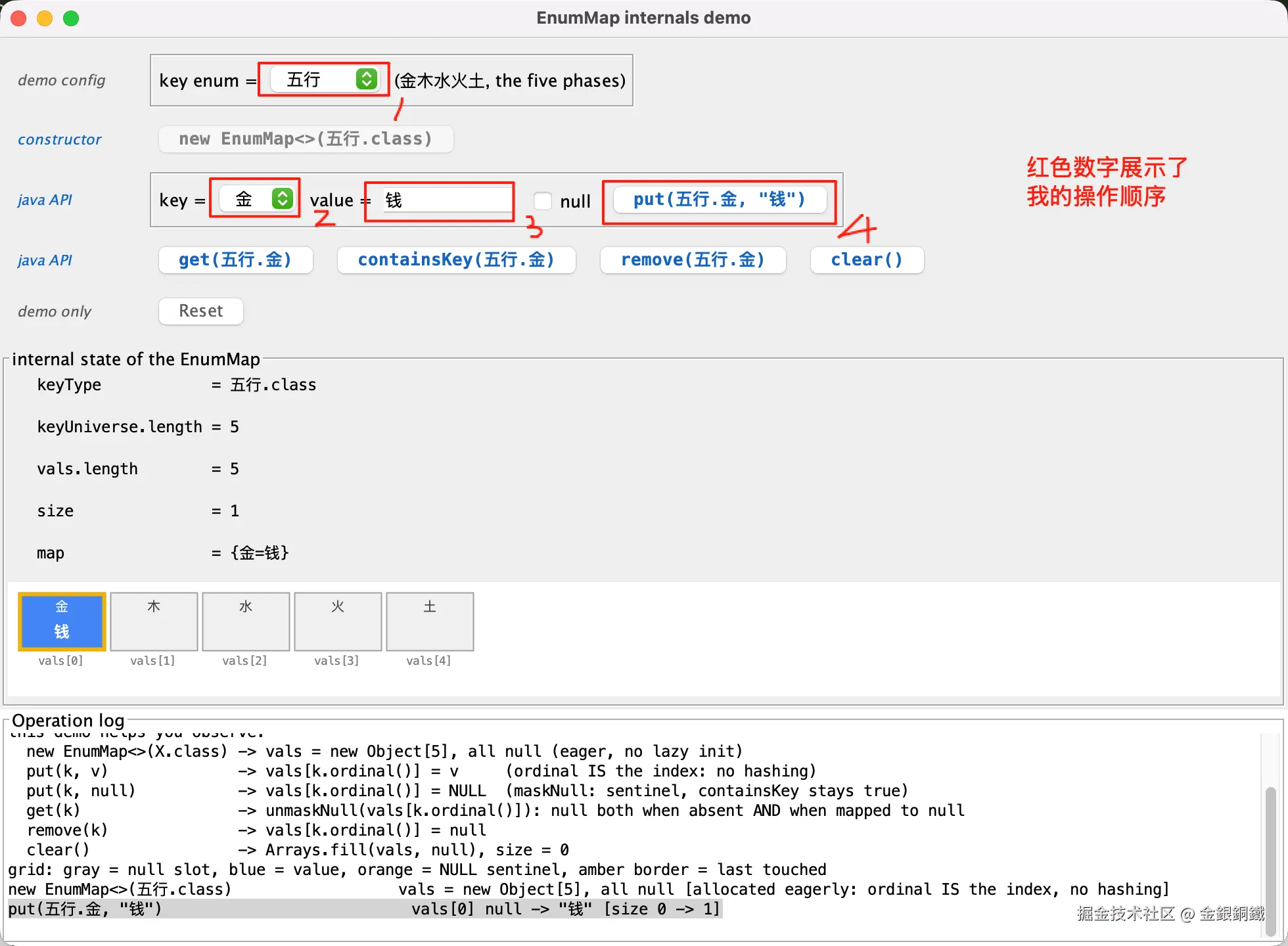
日志会追加一行 ⬇️
text
put(五行.金, "钱") vals[0] null -> "钱" [size 0 -> 1]金 的 ordinal 是 0,所以值被直接写进 vals[0],size 从 0 变成 1。整个过程没有哈希、没有取模、没有冲突处理------对照 HashMap 的"扰动 + 定位 + 链表",这里的定位成本几乎可以忽略。
再对同一个 key 执行一次 put,值会被覆盖,但 size 不变 ⬇️
text
put(五行.金, "镇") vals[0] "钱" -> "镇" [slot was occupied: size unchanged (1)]这一点对应 JDK 源码里的 put 方法 ⬇️
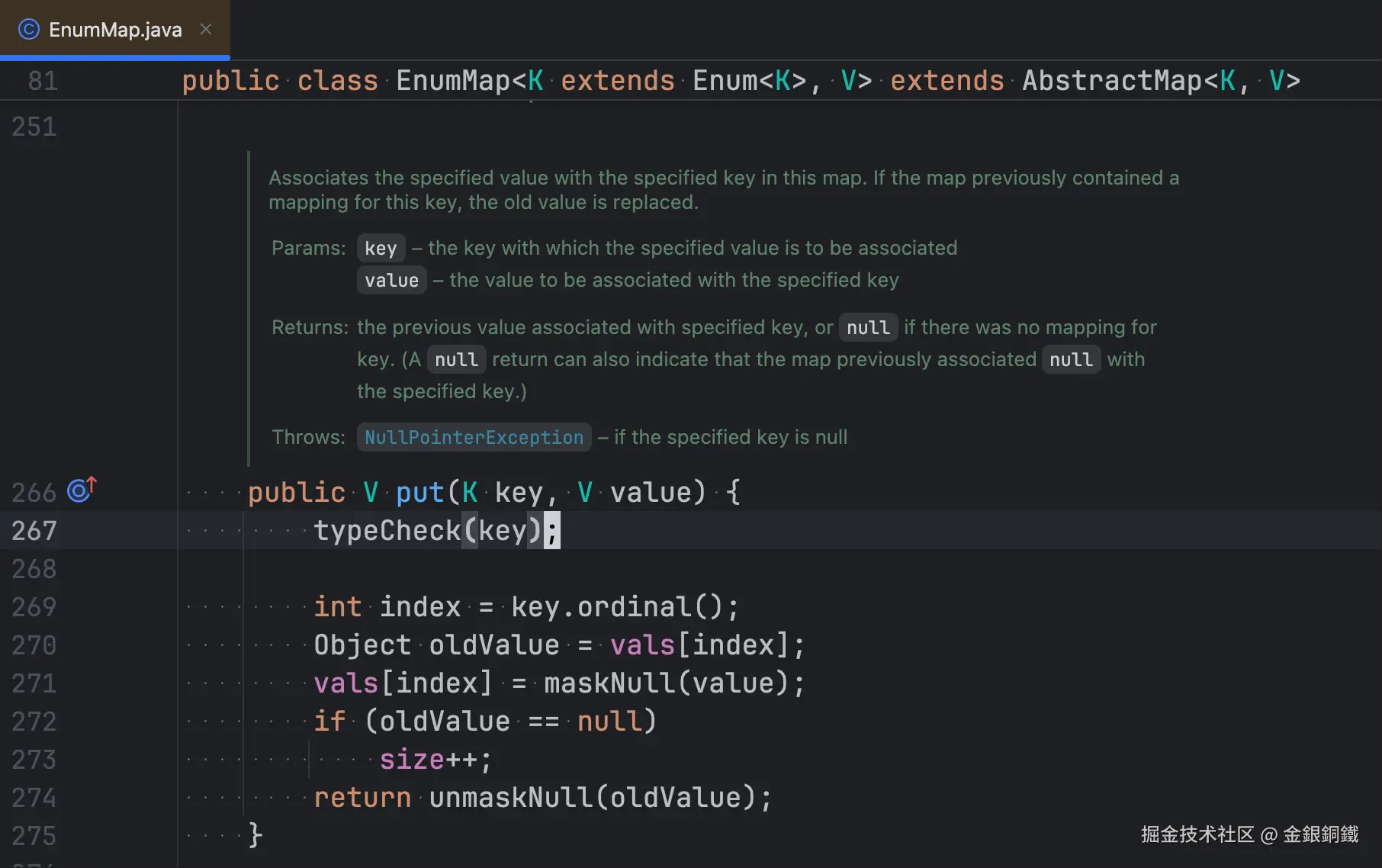
只有原来的槽位是 null 时,size 才会加 1。
添加键值对:put(key, null)
勾选 null 勾选框,再执行 put(五行.水, null) ⬇️
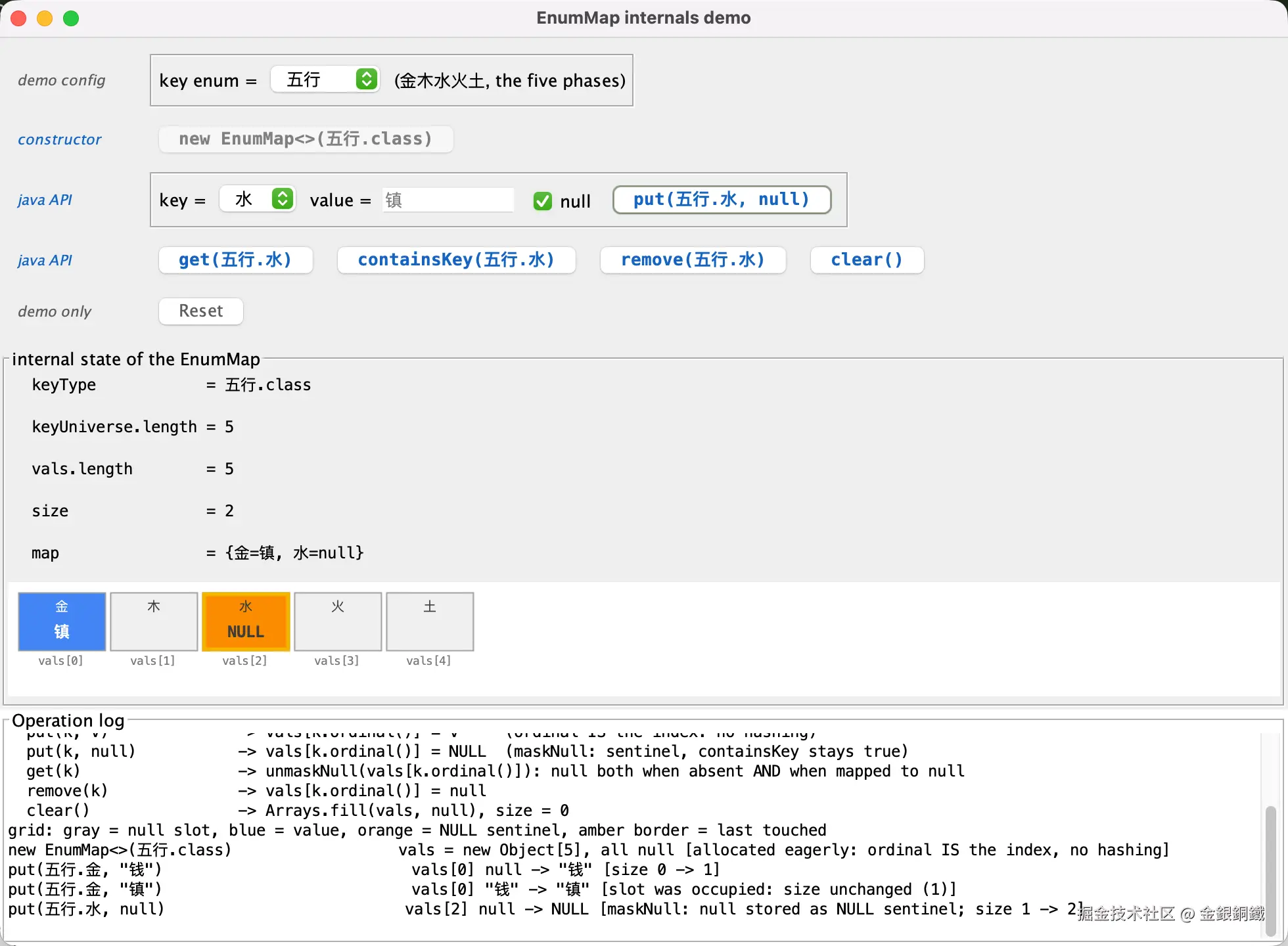
此时格子变成橙色,日志为 ⬇️
text
put(五行.水, null) vals[2] null -> NULL [maskNull: null stored as NULL sentinel; size 1 -> 2]这是 EnumMap 里一个容易迷惑人的细节:put(key, null) 存的不是 null ,而是私有的 NULL 哨兵对象。maskNull / unmaskNull 两个方法负责这层转换 ⬇️
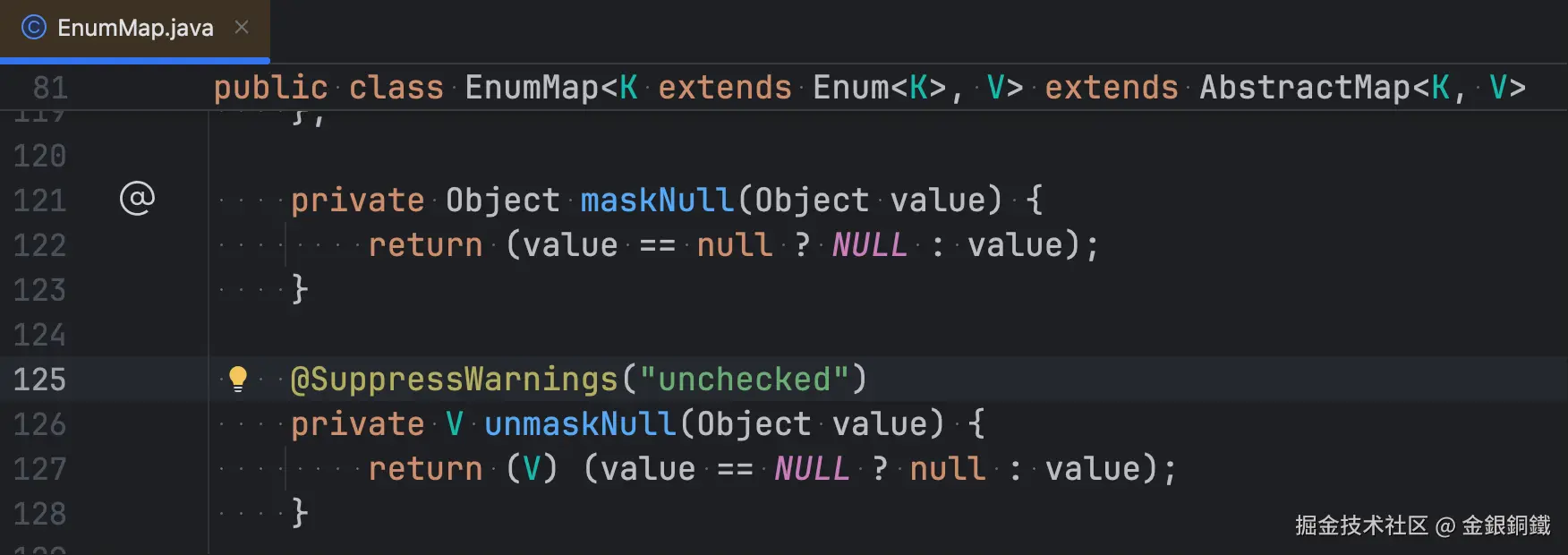
之所以要区分,是因为 vals[i] == null 必须表示"这个 key 没有映射",而"映射到了 null"需要另一个可区分的标记。否则 containsKey 就无法处理。(这有点像"我有一个空的钱包"和"我连钱包也没有"的区别)
get 与 containsKey
对同一个 key(此时它映射到 null)分别执行 get 和 containsKey ⬇️
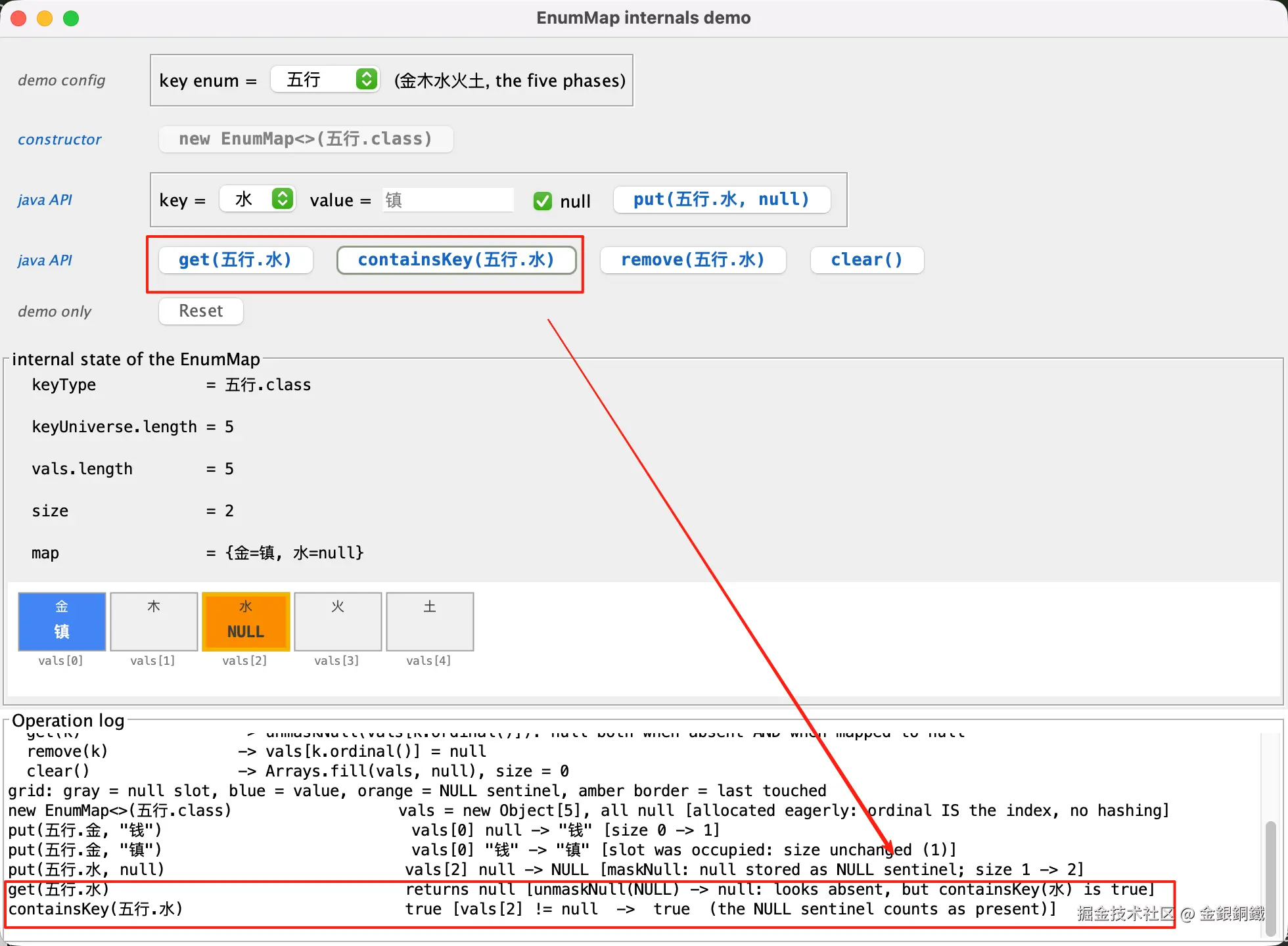
日志如下 ⬇️
text
get(五行.水)                                returns null [unmaskNull(NULL) -> null: looks absent, but containsKey(水) is true]
containsKey(五行.水)                        true [vals[2] != null  ->  true  (the NULL sentinel counts as present)]
两个方法返回的结果看起来矛盾,实际完全一致:
get经过unmaskNull,把哨兵还原成null再返回containsKey只判断vals[2] != null,哨兵不是null,所以返回true
这也解释了为什么 EnumMap 不能直接把 null 存进 vals------那样就没法区分"没有这个 key"和"key 的值是 null"了。
删除键值对:remove
执行 remove(五行.金),格子从蓝色变回浅灰 ⬇️
text
remove(五行.金) vals[0] "镇" -> null [size 2 -> 1]如果对一个本来就没有映射的 key 执行 remove,则什么都不会改变,也不会高亮任何格子 ⬇️
text
remove(五行.土) [no-op: vals[4] was already null, size unchanged]这条约定和前面几篇 demo 保持一致:高亮必须与实际数据变化对齐,没有变化就不给高亮,避免误导。
clear() 按钮
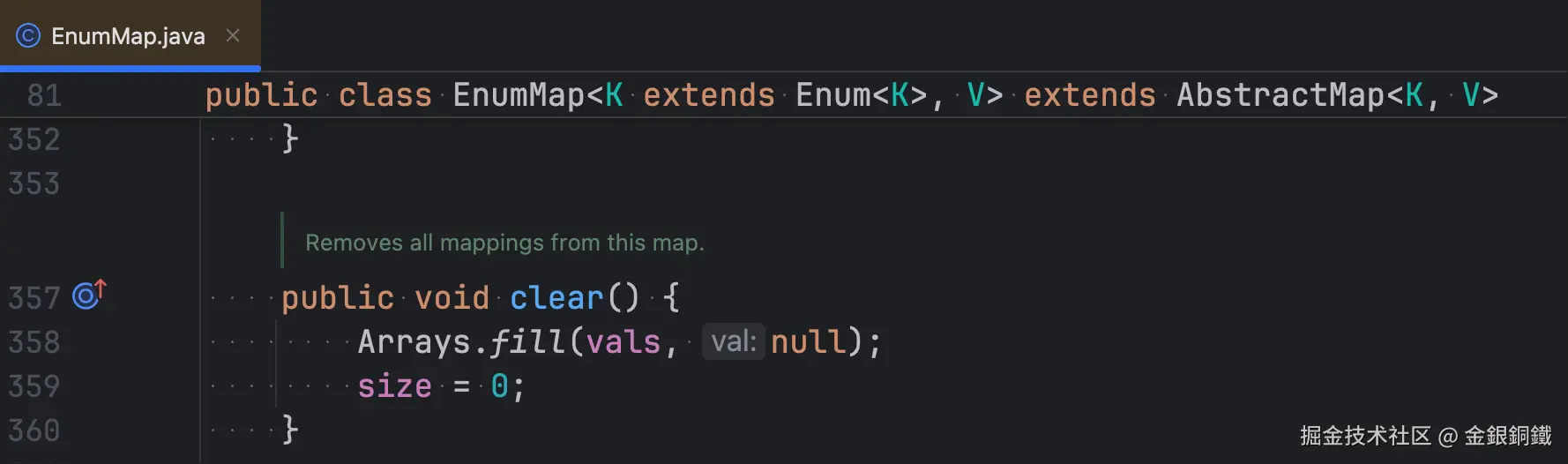
点击 clear() 会清空所有槽位 ⬇️
text
clear() [Arrays.fill(vals, null): all 5 slots cleared, size = 0]源码对应 Arrays.fill(vals, null) 加上 size = 0。注意 vals 的长度不会变 ------clear 只是把槽位填成 null,数组本身保留,下一次 put 不需要重新分配。
Operation log 面板
界面底部的 Operation log 面板会记录每一次操作。启动时的日志如下 ⬇️
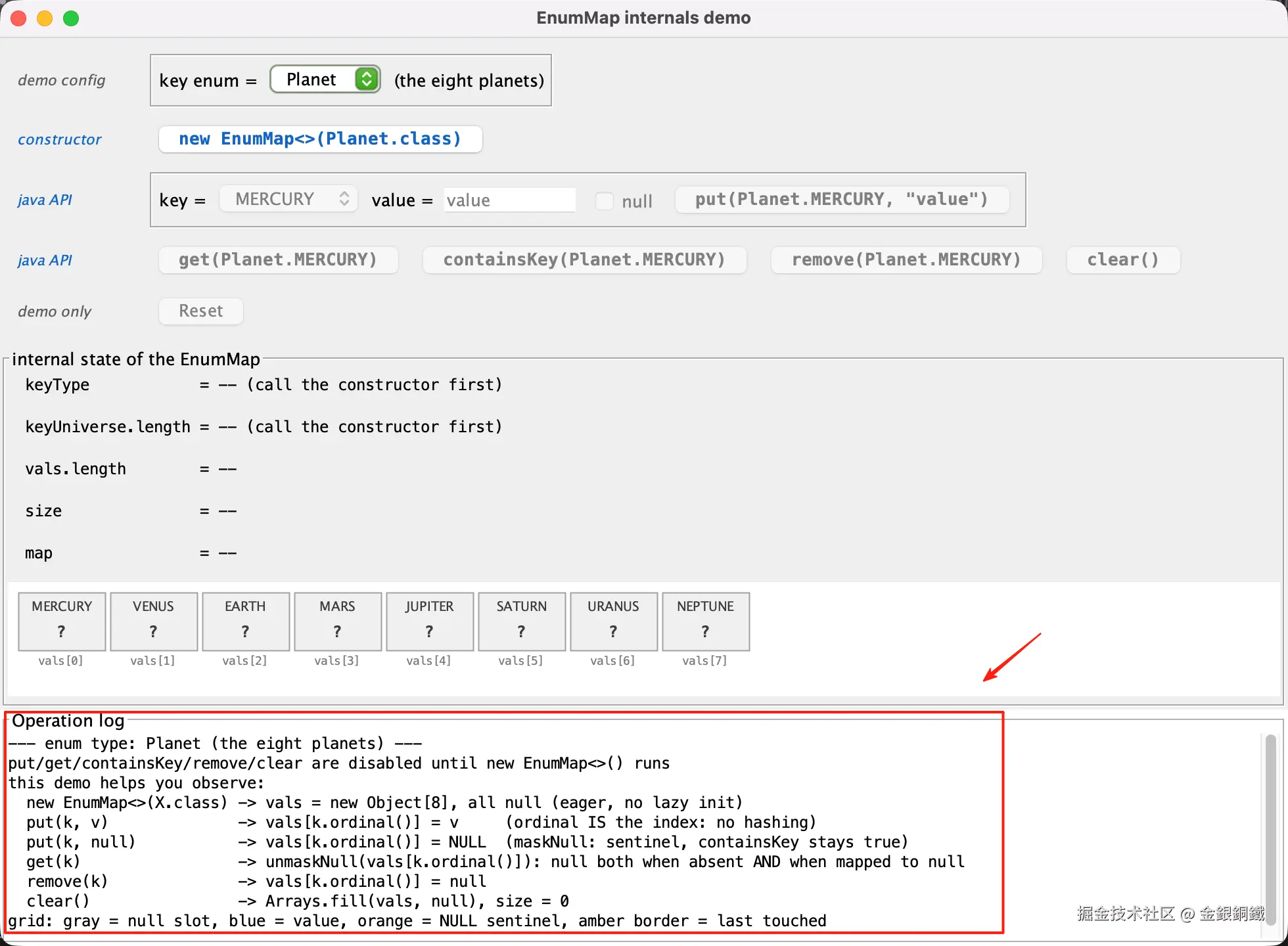
text
--- enum type: Planet (the eight planets) ---
put/get/containsKey/remove/clear are disabled until new EnumMap<>() runs
this demo helps you observe:
  new EnumMap<>(X.class) -> vals = new Object[8], all null (eager, no lazy init)
  put(k, v)              -> vals[k.ordinal()] = v     (ordinal IS the index: no hashing)
  put(k, null)           -> vals[k.ordinal()] = NULL  (maskNull: sentinel, containsKey stays true)
  get(k)                 -> unmaskNull(vals[k.ordinal()]): null both when absent AND when mapped to null
  remove(k)              -> vals[k.ordinal()] = null
  clear()                -> Arrays.fill(vals, null), size = 0
grid: gray = null slot, blue = value, orange = NULL sentinel, amber border = last touched
此后每执行一次操作,日志会追加一行,并自动滚动到最新一行。每一行分为三列:
- 该次调用的表达式,例如
put(五行.金, "钱") - 被触碰的槽位及其变化,写法为"槽位:操作前 -> 操作后";如果这次操作没有改变任何槽位,则只有一句说明、没有
-> - 中括号内的一句补充,解释这次操作对
vals和size做了什么
以本文前面出现的一行为例:
text
put(五行.金, "钱") vals[0] null -> "钱" [size 0 -> 1]- 第 1 列:调用表达式
- 第 2 列:
vals[0]从null变成"钱" - 第 3 列:
size从0变成1
Reset 按钮
Reset 是 demo 自身的辅助按钮,不对应任何 Java API。点击后会丢弃当前 map、清空 Operation log,并重新输出一段以 --- demo reset: call the constructor first --- 开头的启动日志;控件回到初始状态(构造函数可用,其余按钮再次禁用)。
完整代码
java
import java.awt.BasicStroke;
import java.awt.BorderLayout;
import java.awt.Color;
import java.awt.Component;
import java.awt.Dimension;
import java.awt.FlowLayout;
import java.awt.Font;
import java.awt.FontMetrics;
import java.awt.Graphics;
import java.awt.Graphics2D;
import java.awt.RenderingHints;
import java.awt.event.MouseEvent;
import java.lang.reflect.Field;
import java.lang.reflect.InaccessibleObjectException;
import java.util.EnumMap;
import java.util.List;
import javax.swing.BorderFactory;
import javax.swing.BoxLayout;
import javax.swing.JButton;
import javax.swing.JCheckBox;
import javax.swing.JComboBox;
import javax.swing.JFrame;
import javax.swing.JLabel;
import javax.swing.JOptionPane;
import javax.swing.JPanel;
import javax.swing.JScrollPane;
import javax.swing.JTextArea;
import javax.swing.JTextField;
import javax.swing.SwingUtilities;
import javax.swing.ToolTipManager;
import javax.swing.border.TitledBorder;
import javax.swing.event.DocumentEvent;
import javax.swing.event.DocumentListener;
/**
* Swing demo in the style of ArrayListBehaviorDemo and
* RegularEnumSetBehaviorDemo: it visualizes the internal state of
* java.util.EnumMap while operations are executed.
* <p>
* EnumMap keeps two parallel arrays: "keyUniverse" holds every constant of
* the key enum, and "vals" holds the associated values. A key's ordinal is
* used DIRECTLY as the array index - there is no hashing at all. The enum
* class itself is stored in the final field "keyType" at construction and
* never changes afterwards. A private static sentinel object NULL stands in
* for null values, so "no mapping" (slot == null) and "mapped to null"
* (slot == NULL) stay distinguishable. The demo reads all of these private
* fields via reflection and draws one cell per vals slot.
* <p>
* Observable facts:
* 1) new EnumMap<>(X.class) -> keyType = X.class (final), keyUniverse = all
* constants of X, vals = new Object[n], all null, size = 0 (allocated
* eagerly: no lazy init like ArrayList's empty-arg constructor);
* 2) put(k, v) -> vals[k.ordinal()] = v (ordinal IS the index: no hashing);
* 3) put(k, null) -> vals[k.ordinal()] = NULL (maskNull: the sentinel keeps
* containsKey true even though get(k) returns null);
* 4) remove(k) -> vals[k.ordinal()] = null;
* 5) clear() -> Arrays.fill(vals, null), and size = 0;
* 6) size is a maintained field.
* <p>
* The fields are private, so reflection is required. The demo uses records,
* instanceof patterns and text blocks, so JDK 16+ is needed:
* javac EnumMapBehaviorDemo.java
* java --add-opens=java.base/java.util=ALL-UNNAMED EnumMapBehaviorDemo
*/
public class EnumMapBehaviorDemo {
// ---- selectable enum universes (same five as RegularEnumSetBehaviorDemo) ----
/** The eight planets (default demo enum). */
private enum Planet { MERCURY, VENUS, EARTH, MARS, JUPITER, SATURN, URANUS, NEPTUNE }
/** 金木水火土: metal, wood, water, fire, earth. */
private enum 五行 { 金, 木, 水, 火, 土 }
/** 甲乙丙丁戊己庚辛壬癸: the ten heavenly stems. */
private enum 天干 { 甲, 乙, 丙, 丁, 戊, 己, 庚, 辛, 壬, 癸 }
/** 子丑寅卯辰巳午未申酉戌亥: the twelve earthly branches. */
private enum 地支 { 子, 丑, 寅, 卯, 辰, 巳, 午, 未, 申, 酉, 戌, 亥 }
/** 东西南北: east, south, west, north. */
private enum 方位 { 东, 南, 西, 北 }
/** One selectable entry of the "enum type" combo box. */
private record DemoEnumType(String displayName, String gloss, Class<? extends Enum<?>> type) {
@Override
public String toString() {
return displayName;
}
}
private static final List<DemoEnumType> DEMO_ENUMS = List.of(
new DemoEnumType("Planet", "the eight planets", Planet.class),
new DemoEnumType("五行", "金木水火土, the five phases", 五行.class),
new DemoEnumType("天干", "甲乙丙丁戊己庚辛壬癸, the ten heavenly stems", 天干.class),
new DemoEnumType("地支", "子丑寅卯辰巳午未申酉戌亥, the twelve earthly branches", 地支.class),
new DemoEnumType("方位", "东西南北, the four cardinal directions", 方位.class));
// ---- shared design language with the other behavior demos ----
/** Blue for buttons that map 1:1 to Java code (IDE syntax-highlight blue). */
private static final Color CODE_COLOR = new Color(21, 101, 192);
/** Dark gray for demo helper buttons: clearly secondary, not disabled. */
private static final Color DEMO_COLOR = new Color(93, 93, 93);
/** Light gray used when a button is disabled. */
private static final Color DISABLED_COLOR = new Color(175, 175, 175);
/** Slot holds no mapping (vals[i] == null). */
private static final Color SLOT_EMPTY_COLOR = new Color(240, 240, 240);
/** Slot holds a real value. */
private static final Color SLOT_VALUE_COLOR = new Color(66, 133, 244);
/** Slot holds the NULL sentinel: the key is mapped to null. */
private static final Color SLOT_NULL_COLOR = new Color(251, 140, 0);
/** Border of the slot touched by the most recent operation. */
private static final Color LAST_TOUCHED_COLOR = new Color(244, 180, 0);
private static final Font CODE_FONT = new Font(Font.MONOSPACED, Font.BOLD, 13);
// ---- reflection on java.util.EnumMap ----
private final Field keyTypeField;
private final Field keyUniverseField;
private final Field valsField;
private final Field sizeField;
/** EnumMap's private static sentinel: stored in vals[] instead of null. */
private final Object nullSentinel;
// ---- state ----
/** null means "no map yet": operations are disabled until the constructor runs. */
private EnumMap<?, String> map;
private int lastTouchedIndex = -1;
// ---- UI ----
private JFrame frame;
private JButton ctorButton;
private JButton putButton;
private JButton getButton;
private JButton containsKeyButton;
private JButton removeButton;
private JButton clearButton;
private JButton resetButton;
private JComboBox<DemoEnumType> enumTypeCombo;
private JComboBox<Object> keyCombo;
private JTextField valueField;
private JCheckBox nullCheck;
private JLabel glossLabel;
private JLabel keyTypeLabel;
private JLabel keyUniverseLabel;
private JLabel valsLengthLabel;
private JLabel sizeLabel;
private JLabel mapLabel;
private JTextArea logArea;
private ValsGrid valsGrid;
public static void main(String[] args) {
SwingUtilities.invokeLater(() -> {
EnumMapBehaviorDemo demo;
try {
demo = new EnumMapBehaviorDemo();
} catch (InaccessibleObjectException e) {
JOptionPane.showMessageDialog(null,
"""
Reflection access to EnumMap internals was denied.
On JDK 9+ start the demo with:
java --add-opens=java.base/java.util=ALL-UNNAMED \\
EnumMapBehaviorDemo""",
"--add-opens required", JOptionPane.ERROR_MESSAGE);
return;
} catch (ReflectiveOperationException e) {
JOptionPane.showMessageDialog(null,
"Initialization failed: " + e.getMessage(),
"Error", JOptionPane.ERROR_MESSAGE);
return;
}
demo.frame.setVisible(true);
});
}
public EnumMapBehaviorDemo() throws ReflectiveOperationException {
keyTypeField = EnumMap.class.getDeclaredField("keyType");
keyUniverseField = EnumMap.class.getDeclaredField("keyUniverse");
valsField = EnumMap.class.getDeclaredField("vals");
sizeField = EnumMap.class.getDeclaredField("size");
Field nullField = EnumMap.class.getDeclaredField("NULL");
keyTypeField.setAccessible(true);
keyUniverseField.setAccessible(true);
valsField.setAccessible(true);
sizeField.setAccessible(true);
nullField.setAccessible(true);
nullSentinel = nullField.get(null);
createAndShowGui();
}
private void createAndShowGui() {
// Snappier, longer-lived tooltips (same tuning as the other demos).
ToolTipManager.sharedInstance().setInitialDelay(300);
ToolTipManager.sharedInstance().setDismissDelay(12000);
frame = new JFrame("EnumMap internals demo");
frame.setDefaultCloseOperation(JFrame.EXIT_ON_CLOSE);
frame.setLayout(new BorderLayout());
JPanel control = new JPanel();
control.setLayout(new BoxLayout(control, BoxLayout.Y_AXIS));
control.setBorder(BorderFactory.createEmptyBorder(8, 8, 8, 8));
// ---------- row 0: which enum to demo ----------
JPanel typeRow = new JPanel(new FlowLayout(FlowLayout.LEFT));
typeRow.setAlignmentX(Component.LEFT_ALIGNMENT);
enumTypeCombo = new JComboBox<>();
for (DemoEnumType t : DEMO_ENUMS) {
enumTypeCombo.addItem(t);
}
enumTypeCombo.setToolTipText("Chooses which enum class the demo operates on");
glossLabel = new JLabel();
JPanel typeGroup = new JPanel();
typeGroup.setBorder(BorderFactory.createEtchedBorder());
typeGroup.add(new JLabel("key enum ="));
typeGroup.add(enumTypeCombo);
typeGroup.add(glossLabel);
typeRow.add(rowCaption("demo config", DEMO_COLOR));
typeRow.add(typeGroup);
control.add(typeRow);
// ---------- row 1: constructor ----------
JPanel ctorRow = new JPanel(new FlowLayout(FlowLayout.LEFT));
ctorRow.setAlignmentX(Component.LEFT_ALIGNMENT);
ctorButton = new JButton();
ctorButton.setFont(CODE_FONT);
updateCtorButtonText();
ctorRow.add(rowCaption("constructor", CODE_COLOR));
ctorRow.add(ctorButton);
control.add(ctorRow);
// ---------- row 2: put ----------
JPanel putRow = new JPanel(new FlowLayout(FlowLayout.LEFT));
putRow.setAlignmentX(Component.LEFT_ALIGNMENT);
keyCombo = new JComboBox<>();
for (Enum<?> c : currentConstants()) {
keyCombo.addItem(c);
}
valueField = new JTextField("value", 8);
nullCheck = new JCheckBox("null");
nullCheck.setToolTipText("Check to call put(key, null): "
+ "the slot then holds the NULL sentinel instead of null");
putButton = new JButton();
putButton.setFont(CODE_FONT);
putButton.setToolTipText("Runs: map.put(key, value) with the controls on the left");
// The put/get/containsKey/remove buttons show the exact call for the
// current controls (set at the end of createAndShowGui, once all four
// buttons exist - switchEnumType() calls updateOpButtonTexts()).
keyCombo.addActionListener(e -> updateOpButtonTexts());
nullCheck.addActionListener(e -> {
valueField.setEnabled(!nullCheck.isSelected() && map != null);
updateOpButtonTexts();
});
valueField.getDocument().addDocumentListener(new DocumentListener() {
@Override public void insertUpdate(DocumentEvent e) { updateOpButtonTexts(); }
@Override public void removeUpdate(DocumentEvent e) { updateOpButtonTexts(); }
@Override public void changedUpdate(DocumentEvent e) { updateOpButtonTexts(); }
});
// Group the button with its two arguments so the three controls read
// as one unit (same pattern as the range group in the EnumSet demos).
JPanel putGroup = new JPanel();
putGroup.setBorder(BorderFactory.createEtchedBorder());
putGroup.add(new JLabel("key ="));
putGroup.add(keyCombo);
putGroup.add(new JLabel("value ="));
putGroup.add(valueField);
putGroup.add(nullCheck);
putGroup.add(putButton);
putRow.add(rowCaption("java API", CODE_COLOR));
putRow.add(putGroup);
control.add(putRow);
// ---------- row 3: read/remove operations ----------
JPanel opRow = new JPanel(new FlowLayout(FlowLayout.LEFT));
opRow.setAlignmentX(Component.LEFT_ALIGNMENT);
getButton = new JButton();
containsKeyButton = new JButton();
removeButton = new JButton();
clearButton = new JButton("clear()");
getButton.setFont(CODE_FONT);
containsKeyButton.setFont(CODE_FONT);
removeButton.setFont(CODE_FONT);
clearButton.setFont(CODE_FONT);
getButton.setToolTipText("Runs: map.get(key) - the return value is logged");
containsKeyButton.setToolTipText("Runs: map.containsKey(key) - the result is logged");
removeButton.setToolTipText("Runs: map.remove(key)");
clearButton.setToolTipText("Runs: map.clear()");
opRow.add(rowCaption("java API", CODE_COLOR));
opRow.add(getButton);
opRow.add(containsKeyButton);
opRow.add(removeButton);
opRow.add(clearButton);
control.add(opRow);
// ---------- row 4: demo-only helpers ----------
JPanel demoRow = new JPanel(new FlowLayout(FlowLayout.LEFT));
demoRow.setAlignmentX(Component.LEFT_ALIGNMENT);
resetButton = new JButton("Reset");
resetButton.setToolTipText("Demo control, not a Java API call: returns to the initial state");
demoRow.add(rowCaption("demo only", DEMO_COLOR));
demoRow.add(resetButton);
control.add(demoRow);
// ---------- state panel: one labeled line per internal fact ----------
JPanel statePanel = new JPanel();
statePanel.setLayout(new BoxLayout(statePanel, BoxLayout.Y_AXIS));
statePanel.setAlignmentX(Component.LEFT_ALIGNMENT);
statePanel.setBorder(new TitledBorder("internal state of the EnumMap"));
keyTypeLabel = new JLabel();
keyUniverseLabel = new JLabel();
valsLengthLabel = new JLabel();
sizeLabel = new JLabel();
mapLabel = new JLabel();
for (JLabel line : new JLabel[]{keyTypeLabel, keyUniverseLabel,
valsLengthLabel, sizeLabel, mapLabel}) {
line.setFont(new Font(Font.MONOSPACED, Font.PLAIN, 12));
JPanel row = new JPanel(new FlowLayout(FlowLayout.LEFT, 0, 2));
row.setAlignmentX(Component.LEFT_ALIGNMENT);
row.add(line);
statePanel.add(row);
}
valsGrid = new ValsGrid();
statePanel.add(valsGrid);
frame.add(statePanel, BorderLayout.CENTER);
// ---------- operation log ----------
logArea = new JTextArea();
logArea.setEditable(false);
logArea.setFont(new Font(Font.MONOSPACED, Font.PLAIN, 12));
JScrollPane logScroll = new JScrollPane(logArea);
logScroll.setBorder(new TitledBorder("Operation log"));
logScroll.setPreferredSize(new Dimension(0, 180));
frame.add(control, BorderLayout.NORTH);
frame.add(logScroll, BorderLayout.SOUTH);
// ---------- listeners ----------
enumTypeCombo.addActionListener(e -> switchEnumType());
ctorButton.addActionListener(e -> doConstructor());
putButton.addActionListener(e -> doPut());
getButton.addActionListener(e -> doGet());
containsKeyButton.addActionListener(e -> doContainsKey());
removeButton.addActionListener(e -> doRemove());
clearButton.addActionListener(e -> doClear());
resetButton.addActionListener(e -> resetDemo());
switchEnumType();
frame.setSize(980, 720);
frame.setLocationRelativeTo(null);
}
// =====================================================================
// Operations (each logs the before/after of the touched vals slot)
// =====================================================================
private void doConstructor() {
map = newEnumMapRaw(currentType());
lastTouchedIndex = -1;
setMapCreatedState();
int n = currentConstants().length;
logLine(String.format("%-40s %s", "new EnumMap<>(" + currentTypeName() + ".class)",
"vals = new Object[" + n + "], all null"
+ " [allocated eagerly: ordinal IS the index, no hashing]"));
refreshView();
}
private void doPut() {
Enum<?> key = selectedConstant();
boolean putNull = nullCheck.isSelected();
String value = putNull ? null : valueField.getText();
int idx = key.ordinal();
Object old = getVals()[idx];
boolean wasPresent = old != null;
int oldSize = getSize();
putRaw(map, key, value);
Object now = getVals()[idx];
lastTouchedIndex = idx;
String note;
if (wasPresent) {
note = "slot was occupied: size unchanged (" + getSize() + ")";
} else if (putNull) {
note = "maskNull: null stored as NULL sentinel; size " + oldSize + " -> " + getSize();
} else {
note = "size " + oldSize + " -> " + getSize();
}
logLine(String.format("%-40s vals[%d] %s -> %s [%s]", putText(key, value),
idx, slotText(old), slotText(now), note));
refreshView();
}
private void doGet() {
Enum<?> key = selectedConstant();
int idx = key.ordinal();
String result = map.get(key);
Object slot = getVals()[idx];
lastTouchedIndex = idx;
String note;
if (slot == nullSentinel) {
note = "unmaskNull(NULL) -> null: looks absent, but containsKey("
+ key.name() + ") is true";
} else if (slot == null) {
note = "vals[" + idx + "] is null: no mapping";
} else {
note = "unmaskNull(vals[" + idx + "])";
}
logLine(String.format("%-40s returns %s [%s]", callText("get", key),
result == null ? "null" : "\"" + result + "\"", note));
refreshView();
}
private void doContainsKey() {
Enum<?> key = selectedConstant();
int idx = key.ordinal();
boolean result = map.containsKey(key);
lastTouchedIndex = idx;
Object slot = getVals()[idx];
String note = "vals[" + idx + "] != null -> " + result;
if (slot == nullSentinel) {
note += " (the NULL sentinel counts as present)";
}
logLine(String.format("%-40s %s [%s]", callText("containsKey", key), result, note));
refreshView();
}
private void doRemove() {
Enum<?> key = selectedConstant();
int idx = key.ordinal();
Object old = getVals()[idx];
int oldSize = getSize();
map.remove(key);
if (old == null) {
// align the highlight with actual data change: a no-op remove
// touches nothing, so no cell is marked
logLine(String.format("%-40s [no-op: vals[%d] was already null, size unchanged]",
callText("remove", key), idx));
} else {
lastTouchedIndex = idx;
logLine(String.format("%-40s vals[%d] %s -> null [size %d -> %d]",
callText("remove", key), idx, slotText(old), oldSize, getSize()));
}
refreshView();
}
private void doClear() {
map.clear();
lastTouchedIndex = -1;
int n = currentConstants().length;
logLine(String.format("%-40s [Arrays.fill(vals, null): all %d slots cleared, size = 0]",
"clear()", n));
refreshView();
}
// =====================================================================
// UI state
// =====================================================================
/** Demo helper: drops the map and returns every control to the start. */
private void resetDemo() {
map = null;
lastTouchedIndex = -1;
setNoMapState();
logArea.setText("");
printStartupLog(true);
refreshView();
}
private void switchEnumType() {
map = null;
lastTouchedIndex = -1;
DemoEnumType t = currentEnumType();
keyCombo.removeAllItems();
for (Enum<?> c : currentConstants()) {
keyCombo.addItem(c);
}
glossLabel.setText("(" + t.gloss() + ")");
updateCtorButtonText();
updateOpButtonTexts();
setNoMapState();
logArea.setText("");
printStartupLog(false);
refreshView();
}
/** Button state before the constructor runs (also right after Reset). */
private void setNoMapState() {
ctorButton.setEnabled(true);
keyCombo.setEnabled(false);
valueField.setEnabled(false);
nullCheck.setEnabled(false);
putButton.setEnabled(false);
getButton.setEnabled(false);
containsKeyButton.setEnabled(false);
removeButton.setEnabled(false);
clearButton.setEnabled(false);
resetButton.setEnabled(false);
refreshButtonColors();
}
/** Button state once the map exists. */
private void setMapCreatedState() {
ctorButton.setEnabled(false);
keyCombo.setEnabled(true);
valueField.setEnabled(!nullCheck.isSelected());
nullCheck.setEnabled(true);
putButton.setEnabled(true);
getButton.setEnabled(true);
containsKeyButton.setEnabled(true);
removeButton.setEnabled(true);
clearButton.setEnabled(true);
resetButton.setEnabled(true);
refreshButtonColors();
}
/** Enabled Java-API buttons are blue, demo helpers dark gray. */
private void refreshButtonColors() {
JButton[] codeButtons = {ctorButton, putButton, getButton,
containsKeyButton, removeButton, clearButton};
for (JButton b : codeButtons) {
b.setForeground(b.isEnabled() ? CODE_COLOR : DISABLED_COLOR);
}
resetButton.setForeground(resetButton.isEnabled() ? DEMO_COLOR : DISABLED_COLOR);
}
private void updateCtorButtonText() {
String text = "new EnumMap<>(" + currentTypeName() + ".class)";
ctorButton.setText(text);
ctorButton.setToolTipText("Runs: " + text);
}
/** Shows the exact call for the currently selected key and value. */
private void updateOpButtonTexts() {
Enum<?> key = selectedConstant();
if (key == null) {
return;
}
String value = nullCheck.isSelected() ? null : valueField.getText();
putButton.setText(putText(key, value));
getButton.setText(callText("get", key));
containsKeyButton.setText(callText("containsKey", key));
removeButton.setText(callText("remove", key));
}
// =====================================================================
// View
// =====================================================================
private void refreshView() {
if (map == null) {
keyTypeLabel.setText(stateLine("keyType", "-- (call the constructor first)"));
keyUniverseLabel.setText(stateLine("keyUniverse.length", "-- (call the constructor first)"));
valsLengthLabel.setText(stateLine("vals.length", "--"));
sizeLabel.setText(stateLine("size", "--"));
mapLabel.setText(stateLine("map", "--"));
} else {
// keyType is final: it is fixed by the constructor and never
// changes for the lifetime of this map
keyTypeLabel.setText(stateLine("keyType", getKeyType().getSimpleName() + ".class"));
keyUniverseLabel.setText(stateLine("keyUniverse.length",
String.valueOf(getKeyUniverse().length)));
valsLengthLabel.setText(stateLine("vals.length", String.valueOf(getVals().length)));
sizeLabel.setText(stateLine("size", String.valueOf(getSize())));
mapLabel.setText(stateLine("map", map.toString()));
}
valsGrid.revalidate();
valsGrid.repaint();
}
/** "key = value" with the keys aligned into one column. */
private static String stateLine(String key, String value) {
return String.format("%-18s = %s", key, value);
}
// =====================================================================
// Vals grid: one cell per slot of the parallel "vals" array
// =====================================================================
/**
* Draws one cell per slot of "vals". Cell i corresponds to the constant
* keyUniverse[i] (ordinal i); its content is vals[i]: light gray for a
* null slot (no mapping), blue for a real value, orange for the NULL
* sentinel (the key is mapped to null). The most recently touched slot
* gets an amber border.
*/
private class ValsGrid extends JPanel {
private static final int PAD = 8;
private static final int GAP = 4;
private static final int CELL_W = 66;
private static final int CELL_H = 44;
private static final int INDEX_H = 14;
ValsGrid() {
setOpaque(true);
setBackground(Color.WHITE);
}
@Override
public Dimension getPreferredSize() {
int n = currentConstants().length;
return new Dimension(2 * PAD + n * (CELL_W + GAP), CELL_H + INDEX_H + 2 * PAD);
}
@Override
public String getToolTipText(MouseEvent e) {
Enum<?>[] cs = currentConstants();
for (int i = 0; i < cs.length; i++) {
int x = PAD + i * (CELL_W + GAP);
if (e.getX() >= x && e.getX() < x + CELL_W
&& e.getY() >= PAD && e.getY() < PAD + CELL_H) {
String slot = map == null ? "--" : slotVerbose(getVals()[i]);
return "keyUniverse[" + i + "] = " + cs[i].name()
+ " (ordinal " + i + ") -> vals[" + i + "] = " + slot;
}
}
return null;
}
private String slotVerbose(Object slot) {
if (slot == null) {
return "null (no mapping)";
}
if (slot == nullSentinel) {
return "NULL (sentinel: the key is mapped to null)";
}
return "\"" + slot + "\"";
}
@Override
protected void paintComponent(Graphics g) {
super.paintComponent(g);
Graphics2D g2 = (Graphics2D) g.create();
g2.setRenderingHint(RenderingHints.KEY_ANTIALIASING,
RenderingHints.VALUE_ANTIALIAS_ON);
Enum<?>[] cs = currentConstants();
Object[] vals = map == null ? null : getVals();
for (int i = 0; i < cs.length; i++) {
int x = PAD + i * (CELL_W + GAP);
int y = PAD;
Object slot = vals == null ? null : vals[i];
Color fill;
if (vals == null) {
fill = SLOT_EMPTY_COLOR;
} else if (slot == null) {
fill = SLOT_EMPTY_COLOR;
} else if (slot == nullSentinel) {
fill = SLOT_NULL_COLOR;
} else {
fill = SLOT_VALUE_COLOR;
}
g2.setColor(fill);
g2.fillRect(x, y, CELL_W, CELL_H);
g2.setColor(new Color(160, 160, 160));
g2.setStroke(new BasicStroke(1));
g2.drawRect(x, y, CELL_W, CELL_H);
if (i == lastTouchedIndex) {
g2.setColor(LAST_TOUCHED_COLOR);
g2.setStroke(new BasicStroke(3));
g2.drawRect(x + 1, y + 1, CELL_W - 2, CELL_H - 2);
}
boolean darkText = fill != SLOT_VALUE_COLOR;
g2.setColor(darkText ? new Color(60, 60, 60) : Color.WHITE);
g2.setFont(new Font(Font.SANS_SERIF, Font.PLAIN, 10));
drawCentered(g2, cs[i].name(), x, y + 14, CELL_W);
g2.setFont(new Font(Font.MONOSPACED, Font.BOLD, 12));
String content = vals == null ? "?" : slot == null ? ""
: slot == nullSentinel ? "NULL" : String.valueOf(slot);
drawCentered(g2, clipped(g2, content), x, y + 34, CELL_W);
g2.setColor(new Color(120, 120, 120));
g2.setFont(new Font(Font.MONOSPACED, Font.PLAIN, 9));
drawCentered(g2, "vals[" + i + "]", x, y + CELL_H + 11, CELL_W);
}
g2.dispose();
}
private void drawCentered(Graphics2D g2, String text, int x, int baseY, int width) {
FontMetrics fm = g2.getFontMetrics();
g2.drawString(text, x + Math.max(1, (width - fm.stringWidth(text)) / 2), baseY);
}
/** Truncates a value with an ellipsis when it does not fit the cell. */
private String clipped(Graphics2D g2, String text) {
FontMetrics fm = g2.getFontMetrics();
if (fm.stringWidth(text) <= CELL_W - 6) {
return text;
}
StringBuilder sb = new StringBuilder(text);
while (sb.length() > 1 && fm.stringWidth(sb + "...") > CELL_W - 6) {
sb.deleteCharAt(sb.length() - 1);
}
return sb + "...";
}
}
// =====================================================================
// Small helpers
// =====================================================================
/**
* Startup text. Switching the enum type prints the new type as the
* header; Reset prints the reset marker followed by the key enum line.
*/
private void printStartupLog(boolean reset) {
DemoEnumType t = currentEnumType();
int n = currentConstants().length;
logLine(reset ? "--- demo reset: call the constructor first ---"
: "--- enum type: " + t.displayName() + " (" + t.gloss() + ") ---");
if (reset) {
logLine("key enum = " + t.displayName() + " (" + t.gloss() + ")");
}
logLine("put/get/containsKey/remove/clear are disabled until new EnumMap<>() runs");
logLine("this demo helps you observe:");
logLine(" new EnumMap<>(X.class) -> vals = new Object[" + n + "], all null (eager, no lazy init)");
logLine(" put(k, v) -> vals[k.ordinal()] = v (ordinal IS the index: no hashing)");
logLine(" put(k, null) -> vals[k.ordinal()] = NULL (maskNull: sentinel, containsKey stays true)");
logLine(" get(k) -> unmaskNull(vals[k.ordinal()]): null both when absent AND when mapped to null");
logLine(" remove(k) -> vals[k.ordinal()] = null");
logLine(" clear() -> Arrays.fill(vals, null), size = 0");
logLine("grid: gray = null slot, blue = value, orange = NULL sentinel, amber border = last touched");
}
/** Display form of a vals slot in the log: null / NULL / "value". */
private String slotText(Object slot) {
if (slot == null) {
return "null";
}
if (slot == nullSentinel) {
return "NULL";
}
return "\"" + slot + "\"";
}
/** "op(Type.KEY)": the call text shared by the buttons and the log. */
private String callText(String op, Enum<?> key) {
return op + "(" + currentTypeName() + "." + key.name() + ")";
}
/** The put(...) call text, truncated so the button stays a sane width. */
private String putText(Enum<?> key, String value) {
String v = value == null ? "null" : "\"" + abbreviate(value) + "\"";
return "put(" + currentTypeName() + "." + key.name() + ", " + v + ")";
}
private static String abbreviate(String s) {
return s.length() <= 6 ? s : s.substring(0, 5) + "...";
}
// EnumMap's type parameter is K extends Enum<K>, which a
// Class<? extends Enum<?>> token cannot express; controlled raw calls
// inside these helpers keep the rest of the code type-safe.
@SuppressWarnings({"unchecked", "rawtypes"})
private static EnumMap<?, String> newEnumMapRaw(Class<? extends Enum<?>> type) {
return new EnumMap(type);
}
/** put needs the exact K, so it goes through a raw copy of the map. */
@SuppressWarnings({"unchecked", "rawtypes"})
private static void putRaw(EnumMap<?, String> map, Enum<?> key, String value) {
((EnumMap) map).put(key, value);
}
private DemoEnumType currentEnumType() {
return (DemoEnumType) enumTypeCombo.getSelectedItem();
}
private Class<? extends Enum<?>> currentType() {
return currentEnumType().type();
}
private String currentTypeName() {
return currentType().getSimpleName();
}
private Enum<?>[] currentConstants() {
return currentType().getEnumConstants();
}
private Enum<?> selectedConstant() {
return (Enum<?>) keyCombo.getSelectedItem();
}
private Class<?> getKeyType() {
try {
return (Class<?>) keyTypeField.get(map);
} catch (IllegalAccessException e) {
throw new IllegalStateException(e);
}
}
private Object[] getKeyUniverse() {
try {
return (Object[]) keyUniverseField.get(map);
} catch (IllegalAccessException e) {
throw new IllegalStateException(e);
}
}
private Object[] getVals() {
try {
return (Object[]) valsField.get(map);
} catch (IllegalAccessException e) {
throw new IllegalStateException(e);
}
}
private int getSize() {
try {
return sizeField.getInt(map);
} catch (IllegalAccessException e) {
throw new IllegalStateException(e);
}
}
private void logLine(String line) {
logArea.append(line + System.lineSeparator());
logArea.setCaretPosition(logArea.getDocument().getLength());
}
/** Left-hand caption of a button row; fixed width keeps rows aligned. */
private static JLabel rowCaption(String text, Color color) {
JLabel label = new JLabel(text);
label.setFont(new Font(Font.SANS_SERIF, Font.ITALIC, 11));
label.setForeground(color);
label.setPreferredSize(new Dimension(96, 18));
return label;
}
}EnumMap 的简要类图
如果忽略泛型,我们可以为 java.util.EnumMap 画出简要类图 ⬇️
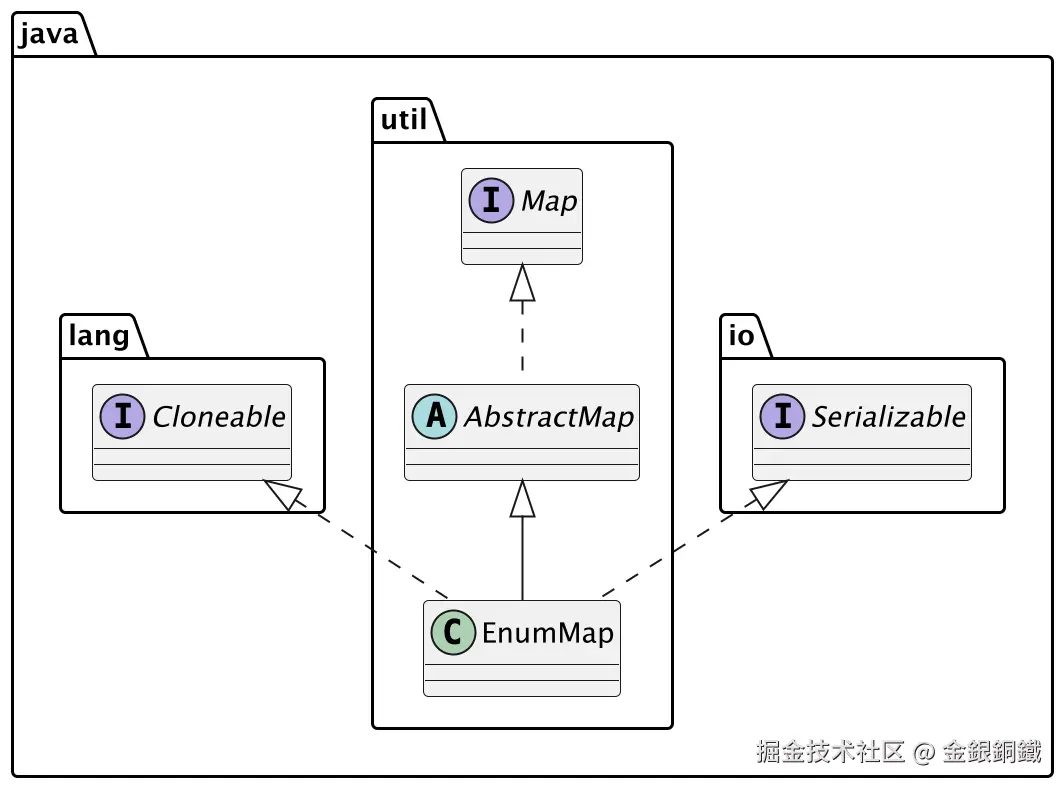
如何为 java.util.EnumMap 绘制类图?
我使用了 Java 如何自动生成简单的 PlantUML 类图 一文中提供的代码。关键的命令如下:
bash
javac ClassDiagramGenerator.java
java ClassDiagramGenerator 'java.util.EnumMap'
运行结果如下
puml
@startuml

interface java.lang.Cloneable
interface java.io.Serializable
interface java.util.Map
abstract java.util.AbstractMap
class java.util.EnumMap
java.util.Map <|.. java.util.AbstractMap
java.util.AbstractMap <|-- java.util.EnumMap
java.io.Serializable <|.. java.util.EnumMap
java.lang.Cloneable <|.. java.util.EnumMap

@enduml
借助 IntelliJ IDEA (Community Edition) 中的 PlantUML 插件,就能将上述 puml 转化为对应的类图。