背景
在之前的文章里,我们分别用 GUI 和 CLI 观察了 java.util.EnumSet
- 当枚举类型中的常量个数不超过
64时,RegularEnumSet用long elements字段存放位图 - 当枚举类型中的常量个数超过
64时,JumboEnumSet用long[] elements保存位图
在 EnumSet 里,ordinal 用来定位一个 bit。java.util.EnumMap 的思路相同,但用法更直接------ordinal 就是数组下标。
在 EnumMap 的源码中可以看到以下字段 ⬇️
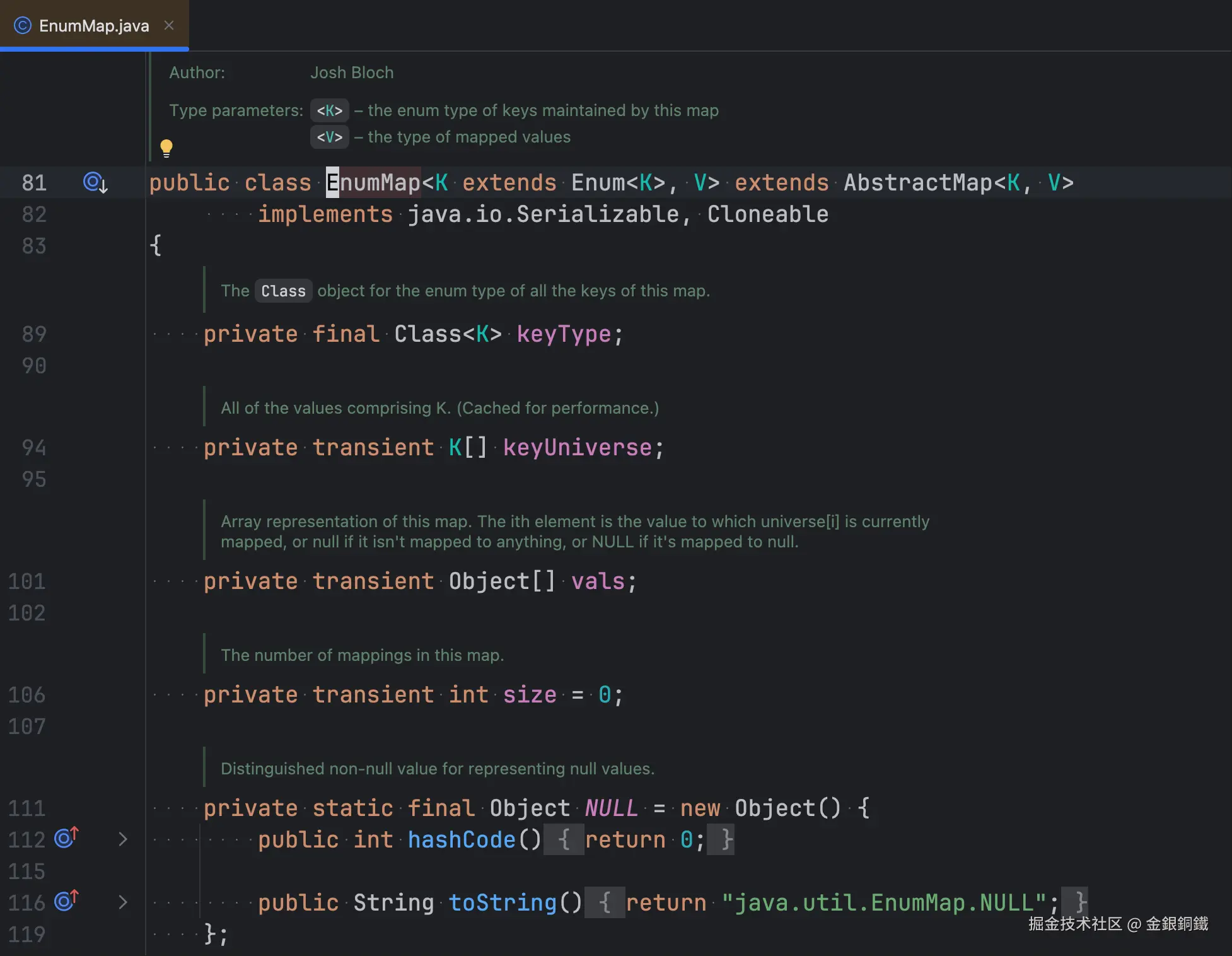
这五个字段对应的可观察事实:
keyType:构造时传入的枚举类,是final的,创建后不再变化keyUniverse:该枚举类的全部常量,下标就是ordinalvals:与keyUniverse对应的值数组,vals[i]就是常量keyUniverse[i]对应的值size:当前键值对个数NULL:一个私有的静态哨兵对象,用来代替null存进vals
构造函数的逻辑比较直观 ⬇️
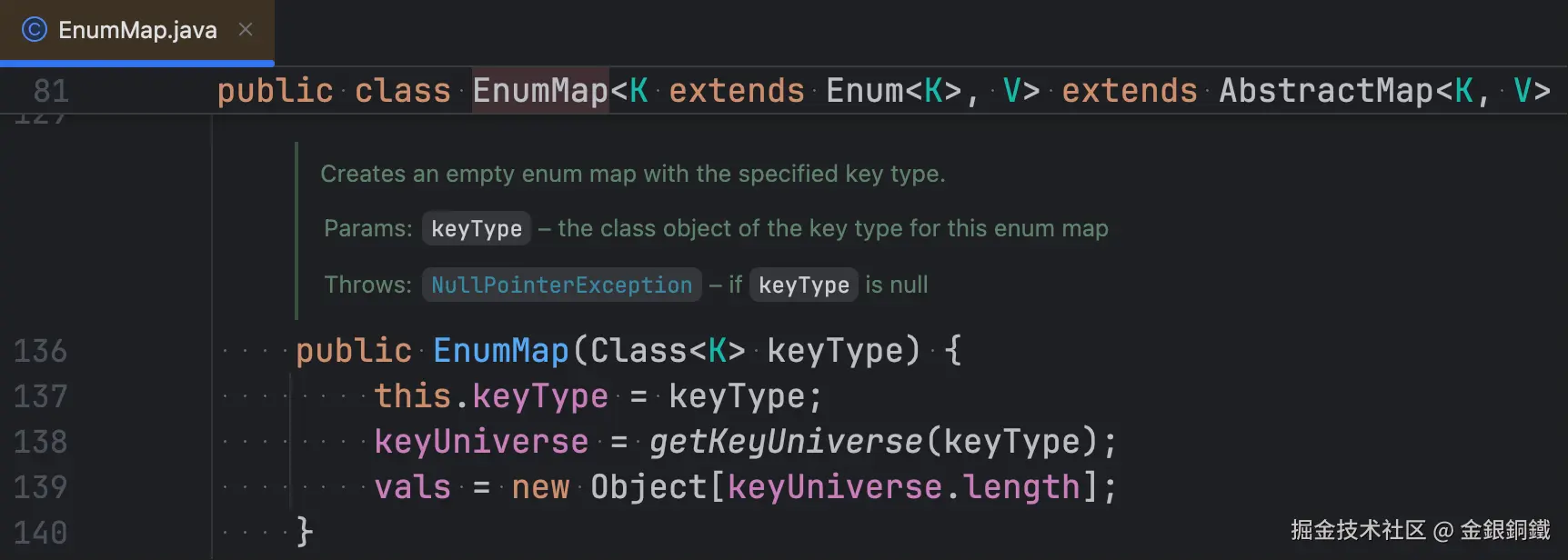
在构造函数里,会为 vals 分配好空间。
与 EnumSet 对照,两者对 ordinal 的用法不同:
| 位图 | 下标 | |
|---|---|---|
EnumSet |
ordinal 定位 long/long[] 中的某个 bit |
--- |
EnumMap |
--- | ordinal 直接作为 vals 数组的下标 |
我们可以通过反射来观察 java.util.EnumMap 增删键值对时,keyUniverse、vals 和 size 的变化。
Java 用 GUI 展示 EnumMap 增删键值对时的内部变化 一文用方格图中的格子与 vals 中的各个元素对应,用不同颜色来区分"空槽位/真实值/NULL 哨兵"。
本篇改用 CLI。对 EnumMap 来说,这个选择很自然:
- 它的内部的
vals数组和与之对应的keyUniverse,没有EnumSet那种"按64位切成若干个long元素"的逻辑,逐行打印就能把结构完整表达出来 NULL哨兵在文本里可以写成明确的字符串,不容易误读- 读者复制命令就能自己复现,适合对照源码阅读
注意事项
- 完整代码用到了
record和文本块,需要JDK 16+及以上(写作本文时,我使用的是JDK 21) - 反射读取
EnumMap的私有字段(keyType、keyUniverse、vals、size、NULL),受JDK 9+模块系统限制,运行时需要使用--add-opens=java.base/java.util=ALL-UNNAMED;JDK 16起默认禁止这类反射访问,缺少参数时demo会在打印提示后退出。
正文
我借助 trae 生成了可以观察 java.util.EnumMap 内部状态的 CLI 代码。为了行文连贯,我把完整的代码放到 完整代码 这一小节里了。
如何运行
请将 完整代码 保存为 EnumMapCliDemo.java。使用如下命令可以编译它。
bash
javac EnumMapCliDemo.java编译之后,会得到以下 class 文件
EnumMapCliDemo.classEnumMapCliDemo$EnumType.classEnumMapCliDemo$Planet.classEnumMapCliDemo$Vowel.classEnumMapCliDemo$Digit.classEnumMapCliDemo$Month.classEnumMapCliDemo$Direction.class
使用如下命令,可以运行 EnumMapCliDemo 中的 main 方法。
bash
java --add-opens=java.base/java.util=ALL-UNNAMED EnumMapCliDemo启动后会出现一个交互式循环,输入命令,按回车即可。也可以把命令通过管道输入,方便复现同一段输出:
bash
printf 'new Vowel\nput A alpha\nexit\n' | java --add-opens=java.base/java.util=ALL-UNNAMED EnumMapCliDemo命令一览
输入 help 可以随时查看全部命令 ⬇️
text
commands:
  new <enum>          create the map; <enum> = Planet|Vowel|Digit|Month|Direction
  put <key> <value>   put a mapping; value `null` maps to null
  get <key>           get(key)
  containsKey <key>   containsKey(key)
  remove <key>        remove(key)
  clear               clear()
  show                print keyType / keyUniverse / vals / size
  reset               drop the map and start over
  help                this text
  exit                quit
note: values are always String; `null` is a literal, not a string.
slot display:
  null                           no mapping (vals[i] == null)
  NULL sentinel (mapped to null) the key is mapped to null (maskNull)
  "value"                        a real value
命令分成三类:
- 对应真实
Java API的:new、put、get、containsKey、remove、clear demo自身的辅助命令:show(只读,重新打印一次当前状态)、reset(丢弃当前的 map)- 元命令:
help、exit
new 的枚举名和 put 的 key 都不区分大小写,new vowel、put u null 也能识别。值可以带空格(put MARS red giant),只有单独的 null 会被当作 null 字面量,而不是字符串 "null"。
在我的终端里,中文和英文混排时,字符会对不齐,所以在本文中,我刻意只使用纯英文的枚举类 ⬇️
Planet(包含8个常量)Vowel(包含5个常量)Digit(包含10个常量)Month(包含12个常量)Direction(包含4个常量)
初始效果
启动时 banner 会说明当前还没有 map,以及槽位的三种显示形式 ⬇️
text
EnumMap CLI demo (java.util.EnumMap internals)
no map yet - run: new <enum>
type help for all commands
slot display: null = no mapping, NULL sentinel (mapped to null) = key mapped to null, "v" = a real value
在 new 之前,put / get / containsKey / remove / clear / show 都会提示先创建 map:
text
> put A alpha
no map yet: run new <enum> first
调用构造函数:new
输入 new Vowel 后,会执行 new EnumMap<>(Vowel.class) 这样的逻辑,输出如下 ⬇️
text
new EnumMap<>(Vowel.class)
  EnumMap<Vowel, String>   keyType = Vowel.class
  keyUniverse.length = 5   vals.length = 5   size = 0
    [0] A -> null
    [1] E -> null
    [2] I -> null
    [3] O -> null
    [4] U -> null
输出可以分成两层:
- 前两行是字段值:
keyType、keyUniverse.length、vals.length、size - 后面的
[i] 常量名 -> 槽位内容是逐下标的明细,i就是常量在枚举声明中的ordinal
几个值得注意的点:
keyType是final字段,它决定了keyUniverse的内容和vals的长度,所以放在第一行keyUniverse.length和vals.length总是相等,两个数组一一对应size此时为0,但vals已经是长度为5的数组------空间在构造时就分配好了 ,后续put不需要扩容- 逐下标的明细里没有
keyUniverse本身,因为它的内容就是左边那一列常量名
这一步也体现了 keyType 的作用:EnumMap 必须知道自己要装哪一种枚举,才能拿到 keyUniverse,进而确定 vals 的长度。
添加键值对:put(key, value)
输入 put A alpha 后,输出如下 ⬇️
text
put(Vowel.A, "alpha")
  vals[0]: null -> "alpha"   size: 0 -> 1
  EnumMap<Vowel, String>   keyType = Vowel.class
  keyUniverse.length = 5   vals.length = 5   size = 1
    [0] A -> "alpha"
    [1] E -> null
    [2] I -> null
    [3] O -> null
    [4] U -> null
结果分三段:
- 第一行是调用表达式
put(Vowel.A, "alpha") - 第二行指明被触碰的槽位及变化:
vals[0]: null -> "alpha",以及size的变化 - 之后是刷新过的完整状态
A 的 ordinal 是 0,所以值被直接写进 vals[0],size 从 0 变成 1。整个过程没有 HashMap 中"扰动 + 定位 + 链表"那样的复杂逻辑。
再对同一个 key 执行一次 put,值会被覆盖,但 size 不变。以输入 put A another 为例,其输出如下 ⬇️
text
put(Vowel.A, "another")
  vals[0]: "alpha" -> "another"   size unchanged (1)
  EnumMap<Vowel, String>   keyType = Vowel.class
  keyUniverse.length = 5   vals.length = 5   size = 1
    [0] A -> "another"
    [1] E -> null
    [2] I -> null
    [3] O -> null
    [4] U -> null
这一点对应 JDK 源码里的 put 方法 ⬇️
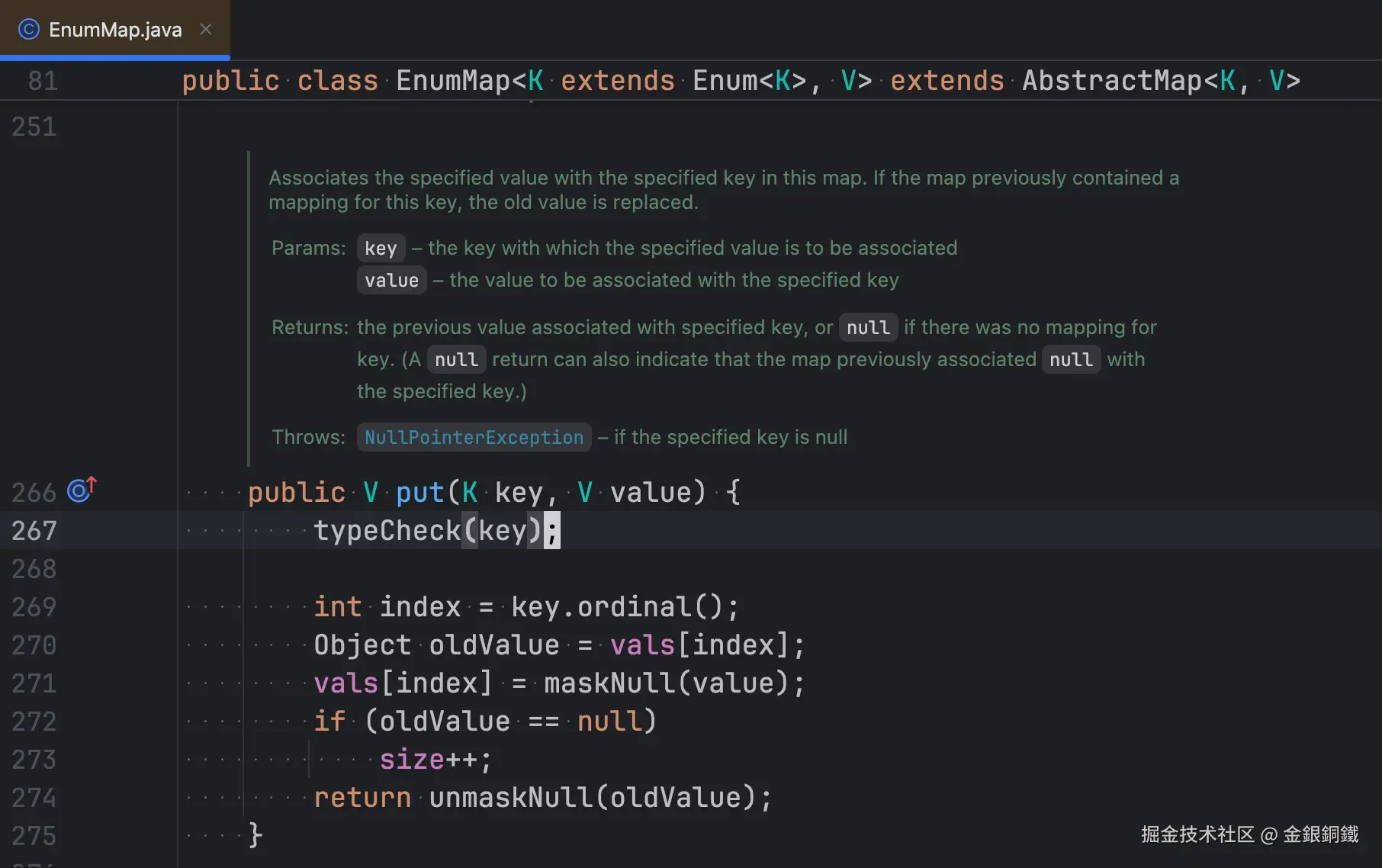
只有原来的槽位是 null 时,size 才会加 1。size: 0 -> 1 和 size unchanged (1) 这两种写法,直接体现了这部分逻辑。
添加键值对:put(key, null)
输入 put U null 后,输出如下 ⬇️
text
put(Vowel.U, null)
  vals[4]: null -> NULL sentinel (mapped to null)   size: 1 -> 2
  note: maskNull stored the NULL sentinel; containsKey stays true
  EnumMap<Vowel, String>   keyType = Vowel.class
  keyUniverse.length = 5   vals.length = 5   size = 2
    [0] A -> "another"
    [1] E -> null
    [2] I -> null
    [3] O -> null
    [4] U -> NULL sentinel (mapped to null)
这是 EnumMap 里一个容易迷惑人的细节:put(key, null) 存的不是 null ,而是私有的 NULL 哨兵对象。maskNull / unmaskNull 两个方法负责这层转换 ⬇️
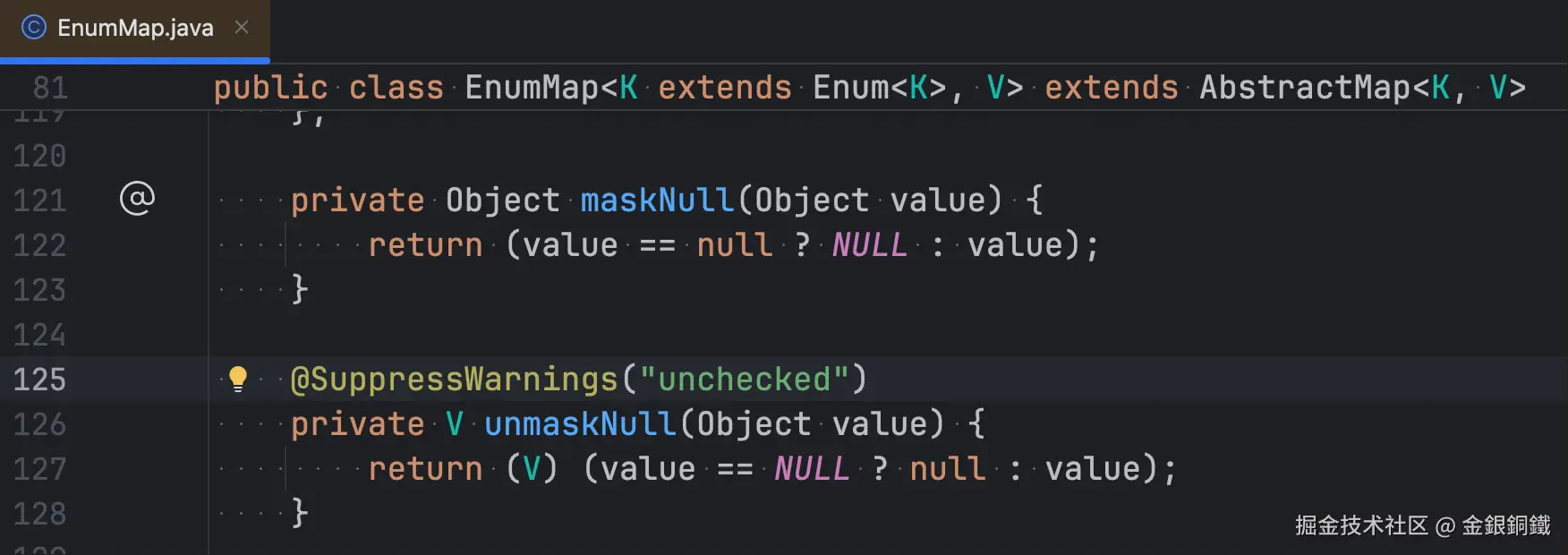
之所以要区分,是因为 vals[i] == null 必须表示"这个 key 没有映射",而"映射到了 null"需要另一个可区分的标记。否则 containsKey 就无法正确处理。这有点像"我有一个空的钱包"和"我连钱包也没有"的区别。
所以 demo 把槽位显示成三种形式:
null:vals[i] == null,没有映射NULL sentinel (mapped to null):vals[i]存的是哨兵,key映射到了null"value":真实值
NULL sentinel (mapped to null) 写得比单独的 NULL 长,是刻意的:读者一眼就知道这不是 null,而是哨兵,而且它代表"有映射、值是 null"。
get 与 containsKey
执行 get U 命令,对应的输出如下
text
get(Vowel.U) -> null (unmaskNull(NULL): looks absent, but containsKey is true)执行 containsKey U 命令,对应的输出如下
text
containsKey(Vowel.U) -> true (vals[4] != null: present, even if it is the NULL sentinel)结果看起来矛盾,实际是一致的:
get经过unmaskNull,把哨兵还原成null再返回containsKey只判断vals[4] != null,哨兵不是null,所以返回true
对一个从未存过的 key (以 E 为例)做同样的操作 ⬇️
text
> get E
get(Vowel.E) -> null   (vals[1] == null: no mapping)
> containsKey E
containsKey(Vowel.E) -> false   (vals[1] == null: no mapping)
现在则是"真的没有这个 key":槽位本身就是 null,两个方法都给出"不存在"的结论。
括号里的说明直接写出了判据,方便把输出和源码对上:U 和 E 的 get 都返回 null,但只有 U 的槽位是哨兵,因此 containsKey 的结果才不同。
删除键值对:remove
输入 remove U,删掉的是那个映射到 null 的键值对 ⬇️
text
> remove U
remove(Vowel.U) -> null
  vals[4]: NULL sentinel (mapped to null) -> null   size: 2 -> 1
  note: the slot held the NULL sentinel, so remove() returned null (unmaskNull)
  EnumMap<Vowel, String>   keyType = Vowel.class
  keyUniverse.length = 5   vals.length = 5   size = 1
    [0] A -> "another"
    [1] E -> null
    [2] I -> null
    [3] O -> null
    [4] U -> null
remove 的返回值同样经过 unmaskNull,所以看起来是 null,和"key 不存在"时的返回值一样。区分的方法只有一个:看 size 有没有变 。这里 size 从 2 变成 1,说明确实删掉了一条映射。
如果对一个本来就没有映射的 key 执行 remove,则什么都不会改变 ⬇️
text
> remove I
remove(Vowel.I) -> null
  vals[2] was already null: no-op, size unchanged (1)
  EnumMap<Vowel, String>   keyType = Vowel.class
  keyUniverse.length = 5   vals.length = 5   size = 1
    [0] A -> "another"
    [1] E -> null
    [2] I -> null
    [3] O -> null
    [4] U -> null
注意这一行里没有 ->,也没有 vals[2]: ... -> ... 的变化行,只有一句 no-op。
clear()
输入 clear 会清空所有槽位 ⬇️
text
> clear
clear()   Arrays.fill(vals, null); size: 1 -> 0
  EnumMap<Vowel, String>   keyType = Vowel.class
  keyUniverse.length = 5   vals.length = 5   size = 0
    [0] A -> null
    [1] E -> null
    [2] I -> null
    [3] O -> null
    [4] U -> null
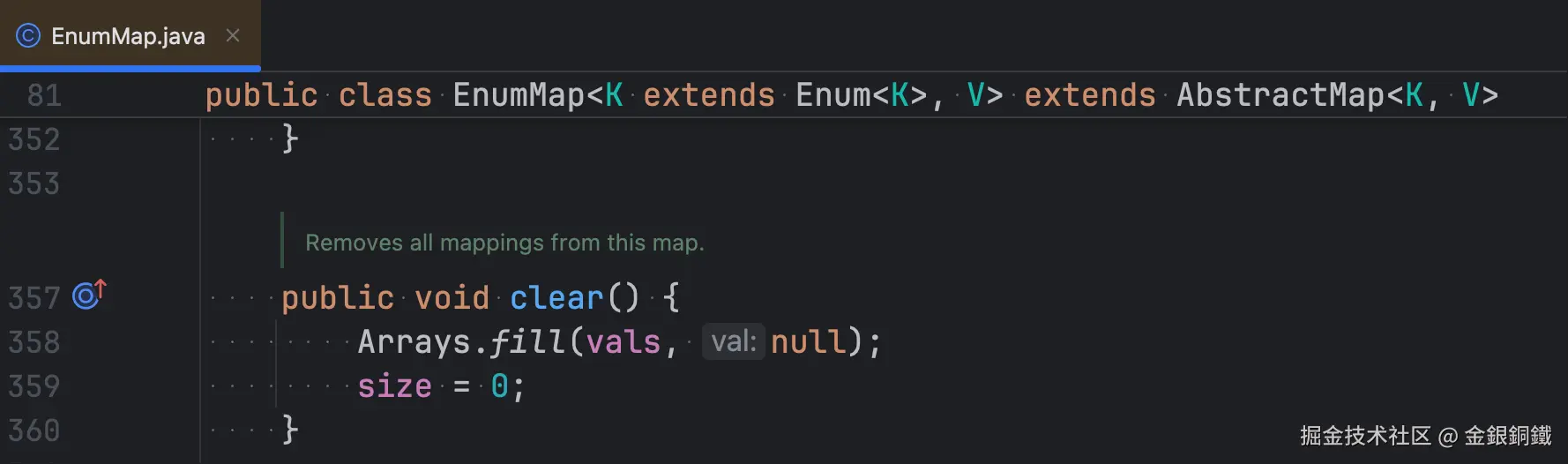
源码对应 Arrays.fill(vals, null) 加上 size = 0。注意 vals 的 长度不会变 ------clear 只是把槽位填成 null,数组本身保留,下一次 put 不需要重新分配。
切换 key 枚举类型
new Month 会换一个枚举重新开始,这次有 12 个常量 ⬇️
text
new EnumMap<>(Month.class)
  EnumMap<Month, String>   keyType = Month.class
  keyUniverse.length = 12   vals.length = 12   size = 0
    [ 0] JANUARY   -> null
    [ 1] FEBRUARY  -> null
    [ 2] MARCH     -> null
    [ 3] APRIL     -> null
    [ 4] MAY       -> null
    [ 5] JUNE      -> null
    [ 6] JULY      -> null
    [ 7] AUGUST    -> null
    [ 8] SEPTEMBER -> null
    [ 9] OCTOBER   -> null
    [10] NOVEMBER  -> null
    [11] DECEMBER  -> null
这里多出两处对齐细节,都是 CLI 特有的:
- 下标右对齐 :
[ 0]到[ 9]前面补了一个空格,[11]不会被挤到左边。补的位数按"最大下标的位数"决定,所以10个常量以内不会出现空格 - 常量名左对齐补齐 :
JANUARY后面会被补齐到SEPTEMBER的宽度,箭头才能在同一个列上开始
补齐用的是 String.repeat,实现如下:
java
private static String pad(String s, int width) {
    return s + " ".repeat(width - s.length());
}
[ 0] 里的空格只是对齐用的填充,不是数据的一部分。
show 与 reset
show 是只读命令,任何时候都可以重新打印一次当前状态,不改变 map:
text
  EnumMap<Month, String>   keyType = Month.class
  keyUniverse.length = 12   vals.length = 12   size = 0
    [ 0] JANUARY   -> null
    [ 1] FEBRUARY  -> null
    [ 2] MARCH     -> null
    [ 3] APRIL     -> null
    [ 4] MAY       -> null
    [ 5] JUNE      -> null
    [ 6] JULY      -> null
    [ 7] AUGUST    -> null
    [ 8] SEPTEMBER -> null
    [ 9] OCTOBER   -> null
    [10] NOVEMBER  -> null
    [11] DECEMBER  -> null
每次 put / remove / clear 也会自动打印同样的内容,所以 show 主要用在「上一条命令的输出被滚屏冲掉」的时候。
reset 对应 GUI 篇的 Reset 按钮,不对应任何 Java API:
text
> reset
map dropped (keyType, keyUniverse, vals, size are gone): run new <enum>
它把 map 置为 null,于是 keyType、keyUniverse、vals、size 一并失去引用,状态回到初始。此时 show 也只会提示还没有 map,而不是报错:
text
> show
no map yet: run new <enum> first
完整代码
java
import java.lang.reflect.Field;
import java.util.EnumMap;
import java.util.List;
import java.util.Scanner;

/**
 * Pure CLI counterpart of EnumMapBehaviorDemo: it observes the internal
 * state of java.util.EnumMap after each operation.
 * <p>
 * EnumMap keeps two parallel arrays: "keyUniverse" holds every constant of
 * the key enum, and "vals" holds the associated values. A key's ordinal is
 * used DIRECTLY as the array index - there is no hashing at all. The enum
 * class itself is stored in the final field "keyType" at construction and
 * never changes afterward. A private static sentinel object NULL stands in
 * for null values, so "no mapping" (slot == null) and "mapped to null"
 * (slot == NULL) stay distinguishable.
 * <p>
 * How the demo prints a slot:
 *   null                          - no mapping (vals[i] == null);
 *   NULL sentinel (mapped to null) - the key is mapped to null (the private
 *                                    NULL object is stored via maskNull);
 *   "value"                       - a real value.
 * <p>
 * Observable facts:
 * 1) new EnumMap<>(X.class) -> keyType = X.class (final), keyUniverse = all
 *    constants of X, vals = new Object[n], all null, size = 0 (allocated
 *    eagerly: no lazy init like ArrayList's empty-arg constructor);
 * 2) put(k, v) -> vals[k.ordinal()] = v (ordinal IS the index: no hashing);
 * 3) put(k, null) -> vals[k.ordinal()] = NULL (maskNull: the sentinel keeps
 *    containsKey true even though get(k) returns null);
 * 4) remove(k) -> vals[k.ordinal()] = null;
 * 5) clear() -> Arrays.fill(vals, null), and size = 0;
 * 6) size is a maintained field, not a recomputation.
 * <p>
 * The fields are private, so reflection is required. On JDK 9+ run with:
 * javac EnumMapCliDemo.java
 * java --add-opens=java.base/java.util=ALL-UNNAMED EnumMapCliDemo
 */
public class EnumMapCliDemo {

    // ---- selectable key enums ----

    /** The eight planets. */
    private enum Planet { MERCURY, VENUS, EARTH, MARS, JUPITER, SATURN, URANUS, NEPTUNE }

    /** The five vowels. */
    private enum Vowel { A, E, I, O, U }

    /** The ten digits. */
    private enum Digit { ZERO, ONE, TWO, THREE, FOUR, FIVE, SIX, SEVEN, EIGHT, NINE }

    /** The twelve months. */
    private enum Month {
        JANUARY, FEBRUARY, MARCH, APRIL, MAY, JUNE,
        JULY, AUGUST, SEPTEMBER, OCTOBER, NOVEMBER, DECEMBER
    }

    /** The four cardinal directions. */
    private enum Direction { EAST, SOUTH, WEST, NORTH }

    private record EnumType(String displayName, Class<? extends Enum<?>> type) { }

    private static final List<EnumType> TYPES = List.of(
            new EnumType("Planet", Planet.class),
            new EnumType("Vowel", Vowel.class),
            new EnumType("Digit", Digit.class),
            new EnumType("Month", Month.class),
            new EnumType("Direction", Direction.class));

    // ---- reflection on java.util.EnumMap ----
    private static Field keyTypeField;
    private static Field keyUniverseField;
    private static Field valsField;
    private static Field sizeField;
    private static Field nullField;

    // ---- state ----
    /** null means "no map yet": operations are rejected until new <enum> runs. */
    private EnumMap<?, String> map;

    public static void main(String[] args) {
        try {
            initReflection();
        } catch (ReflectiveOperationException | RuntimeException e) {
            System.out.println("cannot read java.util.EnumMap private fields: " + e);
            System.out.println("on JDK 9+ run with: "
                    + "java --add-opens=java.base/java.util=ALL-UNNAMED EnumMapCliDemo");
            return;
        }
        new EnumMapCliDemo().run();
    }

    private static void initReflection() throws ReflectiveOperationException {
        keyTypeField = accessible("keyType");
        keyUniverseField = accessible("keyUniverse");
        valsField = accessible("vals");
        sizeField = accessible("size");
        nullField = accessible("NULL");
    }

    private static Field accessible(String name) throws ReflectiveOperationException {
        Field f = EnumMap.class.getDeclaredField(name);
        f.setAccessible(true);
        return f;
    }

    // ---- command loop ----

    private void run() {
        printBanner();
        Scanner in = new Scanner(System.in);
        while (true) {
            System.out.print("> ");
            System.out.flush();
            if (!in.hasNextLine()) {
                break;
            }
            String line = in.nextLine().trim();
            if (line.isEmpty()) {
                continue;
            }
            String[] parts = line.split("\\s+", 2);
            String command = parts[0].toLowerCase();
            String rest = parts.length > 1 ? parts[1].trim() : "";
            switch (command) {
                case "help", "h", "?" -> printHelp();
                case "new" -> doNew(rest);
                case "put" -> doPut(rest);
                case "get" -> doGet(rest);
                case "containskey", "contains" -> doContainsKey(rest);
                case "remove" -> doRemove(rest);
                case "clear" -> doClear();
                case "show", "s" -> show();
                case "reset" -> doReset();
                case "exit", "quit" -> {
                    System.out.println("bye");
                    return;
                }
                default -> System.out.println("unknown command: " + parts[0] + " (type help)");
            }
        }
    }

    private void printBanner() {
        System.out.println("""
                EnumMap CLI demo (java.util.EnumMap internals)
                no map yet - run: new <enum>
                type help for all commands
                slot display: null = no mapping, NULL sentinel (mapped to null) = key mapped to null, "v" = a real value
                """);
    }

    private void printHelp() {
        System.out.println("""
                commands:
                  new <enum>          create the map; <enum> = Planet|Vowel|Digit|Month|Direction
                  put <key> <value>   put a mapping; value `null` maps to null
                  get <key>           get(key)
                  containsKey <key>   containsKey(key)
                  remove <key>        remove(key)
                  clear               clear()
                  show                print keyType / keyUniverse / vals / size
                  reset               drop the map and start over
                  help                this text
                  exit                quit
                note: values are always String; `null` is a literal, not a string.
                slot display:
                  null                           no mapping (vals[i] == null)
                  NULL sentinel (mapped to null) the key is mapped to null (maskNull)
                  "value"                        a real value""");
    }

    // ---- operations ----

    private void doNew(String arg) {
        EnumType t = findType(arg);
        if (t == null) {
            System.out.println("unknown enum type: " + arg + " (valid: Planet, Vowel, Digit, Month, Direction)");
            return;
        }
        map = newMap(t.type());
        System.out.printf("new EnumMap<>(%s.class)%n", t.displayName());
        show();
    }

    @SuppressWarnings({"unchecked", "rawtypes"})
    private EnumMap<?, String> newMap(Class<? extends Enum<?>> type) {
        return new EnumMap(type);
    }

    private void doPut(String rest) {
        if (!requireMap()) {
            return;
        }
        String[] kv = rest.split("\\s+", 2);
        if (kv.length < 2) {
            System.out.println("usage: put <key> <value>   (use `null` for a null value)");
            return;
        }
        Enum<?> key = findKey(kv[0]);
        if (key == null) {
            return;
        }
        String raw = kv[1].trim();
        String value = "null".equalsIgnoreCase(raw) ? null : stripQuotes(raw);

        int index = key.ordinal();
        Object before = vals()[index];
        int sizeBefore = size();
        putRaw(key, value);
        Object after = vals()[index];
        int sizeAfter = size();

        System.out.printf("put(%s, %s)%n", qualified(key), quoted(value));
        String sizeText = before == null
                ? String.format("size: %d -> %d", sizeBefore, sizeAfter)
                : String.format("size unchanged (%d)", sizeAfter);
        System.out.printf("  vals[%d]: %s -> %s   %s%n",
                index, slotText(before), slotText(after), sizeText);
        if (after == nullSentinel()) {
            System.out.println("  note: maskNull stored the NULL sentinel; containsKey stays true");
        }
        show();
    }

    @SuppressWarnings({"unchecked", "rawtypes"})
    private void putRaw(Enum<?> key, String value) {
        ((EnumMap) map).put(key, value);
    }

    private void doGet(String rest) {
        if (!requireMap()) {
            return;
        }
        Enum<?> key = findKey(rest);
        if (key == null) {
            return;
        }
        Object slot = vals()[key.ordinal()];
        String result = map.get(key);
        System.out.printf("get(%s) -> %s", qualified(key), quoted(result));
        if (slot == null) {
            System.out.print("   (vals[" + key.ordinal() + "] == null: no mapping)");
        } else if (slot == nullSentinel()) {
            System.out.print("   (unmaskNull(NULL): looks absent, but containsKey is true)");
        }
        System.out.println();
    }

    private void doContainsKey(String rest) {
        if (!requireMap()) {
            return;
        }
        Enum<?> key = findKey(rest);
        if (key == null) {
            return;
        }
        int index = key.ordinal();
        Object slot = vals()[index];
        boolean present = map.containsKey(key);
        String why = slot == null
                ? "vals[" + index + "] == null: no mapping"
                : "vals[" + index + "] != null: present, even if it is the NULL sentinel";
        System.out.printf("containsKey(%s) -> %s   (%s)%n", qualified(key), present, why);
    }

    private void doRemove(String rest) {
        if (!requireMap()) {
            return;
        }
        Enum<?> key = findKey(rest);
        if (key == null) {
            return;
        }
        int index = key.ordinal();
        Object before = vals()[index];
        int sizeBefore = size();
        String removed = map.remove(key);
        int sizeAfter = size();

        System.out.printf("remove(%s) -> %s%n", qualified(key), quoted(removed));
        if (before == null) {
            System.out.printf("  vals[%d] was already null: no-op, size unchanged (%d)%n", index, sizeAfter);
        } else {
            System.out.printf("  vals[%d]: %s -> null   size: %d -> %d%n",
                    index, slotText(before), sizeBefore, sizeAfter);
            if (before == nullSentinel()) {
                System.out.println("  note: the slot held the NULL sentinel, so remove() returned null (unmaskNull)");
            }
        }
        show();
    }

    private void doClear() {
        if (!requireMap()) {
            return;
        }
        int sizeBefore = size();
        map.clear();
        System.out.printf("clear()   Arrays.fill(vals, null); size: %d -> %d%n", sizeBefore, size());
        show();
    }

    private void doReset() {
        map = null;
        System.out.println("map dropped (keyType, keyUniverse, vals, size are gone): run new <enum>");
    }

    // ---- state output ----

    private void show() {
        if (map == null) {
            System.out.println("no map yet: run new <enum> first");
            return;
        }
        Object[] universe = keyUniverse();
        Object[] values = vals();
        int keyWidth = 0;
        for (Object constant : universe) {
            keyWidth = Math.max(keyWidth, ((Enum<?>) constant).name().length());
        }
        int indexWidth = String.valueOf(values.length - 1).length();
        System.out.printf("  EnumMap<%s, String>   keyType = %s.class%n", typeName(), typeName());
        System.out.printf("  keyUniverse.length = %d   vals.length = %d   size = %d%n",
                universe.length, values.length, size());
        for (int i = 0; i < values.length; i++) {
            System.out.printf("    [%" + indexWidth + "d] %s -> %s%n",
                    i, pad(((Enum<?>) universe[i]).name(), keyWidth), slotText(values[i]));
        }
        System.out.println();
    }

    /** null = no mapping, NULL sentinel = mapped to null, otherwise the quoted value. */
    private String slotText(Object slot) {
        if (slot == null) {
            return "null";
        }
        if (slot == nullSentinel()) {
            return "NULL sentinel (mapped to null)";
        }
        return "\"" + slot + "\"";
    }

    // ---- reflection accessors ----

    private Object[] keyUniverse() {
        return readArray(keyUniverseField);
    }

    private Object[] vals() {
        return readArray(valsField);
    }

    private Object[] readArray(Field field) {
        try {
            return (Object[]) field.get(map);
        } catch (IllegalAccessException e) {
            throw new IllegalStateException(e);
        }
    }

    private Class<?> keyType() {
        try {
            return (Class<?>) keyTypeField.get(map);
        } catch (IllegalAccessException e) {
            throw new IllegalStateException(e);
        }
    }

    private int size() {
        try {
            return sizeField.getInt(map);
        } catch (IllegalAccessException e) {
            throw new IllegalStateException(e);
        }
    }

    private Object nullSentinel() {
        try {
            return nullField.get(null);
        } catch (IllegalAccessException e) {
            throw new IllegalStateException(e);
        }
    }

    private String typeName() {
        return keyType().getSimpleName();
    }

    // ---- helpers ----

    private boolean requireMap() {
        if (map == null) {
            System.out.println("no map yet: run new <enum> first");
            return false;
        }
        return true;
    }

    private EnumType findType(String arg) {
        for (EnumType t : TYPES) {
            if (t.displayName().equalsIgnoreCase(arg) || t.displayName().equals(arg)) {
                return t;
            }
        }
        return null;
    }

    private Enum<?> findKey(String name) {
        if (map == null) {
            return null;
        }
        for (Object constant : keyUniverse()) {
            Enum<?> e = (Enum<?>) constant;
            if (e.name().equals(name) || e.name().equalsIgnoreCase(name)) {
                return e;
            }
        }
        System.out.println("unknown key: " + name + " (valid: " + keyNames() + ")");
        return null;
    }

    private String keyNames() {
        StringBuilder builder = new StringBuilder();
        for (Object constant : keyUniverse()) {
            if (!builder.isEmpty()) {
                builder.append(' ');
            }
            builder.append(((Enum<?>) constant).name());
        }
        return builder.toString();
    }

    private String qualified(Enum<?> key) {
        return typeName() + "." + key.name();
    }

    private static String quoted(String value) {
        return value == null ? "null" : "\"" + value + "\"";
    }

    private static String stripQuotes(String value) {
        if (value.length() >= 2 && value.startsWith("\"") && value.endsWith("\"")) {
            return value.substring(1, value.length() - 1);
        }
        return value;
    }

    /** Right-pads with spaces so that keys line up in the slot listing. */
    private static String pad(String s, int width) {
        return s + " ".repeat(width - s.length());
    }
}