javap -v 的输出里,每个方法都有一行不起眼的数字 ⬇️
text
  public int add(int, int);
    descriptor: (II)I
    flags: (0x0001) ACC_PUBLIC
    Code:
      stack=2, locals=3, args_size=3
         0: iload_1
         1: iload_2
         2: iadd
         3: ireturn
stack 和 locals 对应 JVM 规范 2.6 节「帧」 里的两个大小。本文借 Demo.java 里 add 的四条指令说明它们的来源。
帧:每次调用新建一个
规范 2.6 节 的第一句是 ⬇️
A new frame is created each time a method is invoked.
每次调用方法,JVM 就在当前线程的栈上建一个帧;方法返回(正常或异常)时销毁。帧包含三部分:
本文只看前两部分;第三部分与常量池解析有关,后面再讲。
帧的大小在编译期确定 ⬇️
The sizes of the local variable array and the operand stack are determined at compile-time and are supplied along with the code for the method...
这两个大小写在 Code 属性里(4.7.3 节),javap -v 把它们显示成 locals= 和 stack=。
例子:Demo.java 里的 add
本文的示例代码 ⬇️
java
public class Demo {
    public static void main(String[] args) {
        SimpleAdder adder = new SimpleAdder();
        int sum = adder.add(1, 2);
        System.out.println(sum);
    }
}

class SimpleAdder {
    public int add(int a, int b) {
        return a + b;
    }
}
add 编译出来只有四条指令,javap -v 的完整输出是 ⬇️
text
  public int add(int, int);
    descriptor: (II)I
    flags: (0x0001) ACC_PUBLIC
    Code:
      stack=2, locals=3, args_size=3
         0: iload_1
         1: iload_2
         2: iadd
         3: ireturn
      LineNumberTable:
        line 11: 0
      LocalVariableTable:
        Start  Length  Slot  Name   Signature
            0       4     0  this   LSimpleAdder;
            0       4     1     a   I
0 4 2 b Ilocals=3:0 号槽放 this,1 号放 a,2 号放 b,两个 int 各占一格。 stack=2:整个方法里,操作数栈最多同时放两个值。
它的帧结构 ⬇️
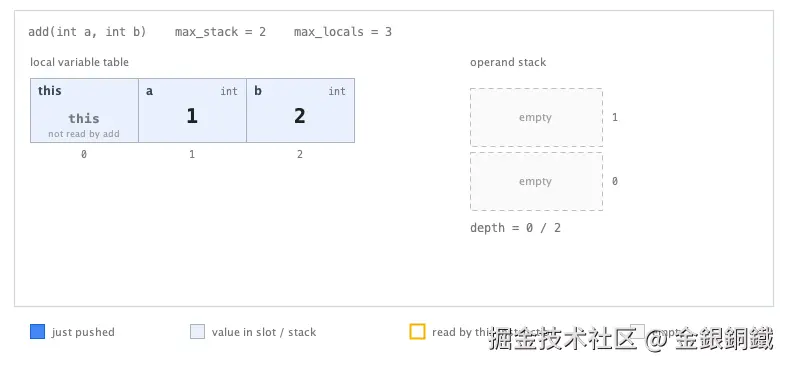
左边是 locals=3 对应的 3 个槽,槽号标在格子下方;右边是 stack=2 对应的两个深度单位,0 是栈底、1 是栈顶。方法刚被调用,参数已放在槽内,操作数栈为空。
以下截图来自配套的 AddFrameDemo.java,可单步执行这四条指令。蓝色表示本步写入的值,琥珀色边框表示本步读取的槽。
局部变量表:从 0 开始的数组
规范 2.6.1 节 先说明一个槽能放什么 ⬇️
A single local variable can hold a value of type int, float, reference, or returnAddress. A pair of local variables can hold a value of type long or double.
要点如下 ⬇️
- 是数组,索引从 0 开始。
- 一格放一个 32 位值:int、float、reference。
- long 和 double 占两格 ,而且只能用较小的那个索引访问。本文的
a、b都是 int,各占一格。
参数如何放置,2.6.1 节 的原文是 ⬇️
On class method invocation, any parameters are passed in consecutive local variables starting from local variable 0. On instance method invocation, local variable 0 is always used to pass a reference to the object on which the instance method is being invoked (
thisin the Java programming language). Any parameters are subsequently passed in consecutive local variables starting from local variable 1.
即:实例方法的 0 号槽是 this,参数从 1 号开始;静态方法没有 this,参数从 0 号开始。
add 是实例方法,所以 this 占 0,a 占 1,b 占 2。取两个参数用的是 iload_1 和 iload_2,编号直接对应槽号。
LocalVariableTable 不是 class 文件的必需项,javac 加 -g 才会生成;没有它 locals= 仍然存在,只是变量名丢失。
操作数栈:LIFO,深度有上限
规范 2.6.2 节 的定义是 ⬇️
Each frame contains a last-in-first-out (LIFO) stack known as its operand stack. The maximum depth of the operand stack of a frame is determined at compile-time...
帧创建时,操作数栈是空的。指令从局部变量、常量池或字段取值压栈,运算时弹出,结果再压回去。例如 iadd 弹出两个 int,加完压回一个。
规范原文 ⬇️
At any point in time, an operand stack has an associated depth, where a value of type long or double contributes two units to the depth and a value of any other type contributes one unit.
int 算一个深度,long 和 double 算两个。 add 里只有 int,把每条指令的栈深算出来 ⬇️
| 指令 | 栈(自底向上) | 深度 |
|---|---|---|
iload_1 |
[a] |
1 |
iload_2 |
[a, b] |
2 |
iadd |
[a + b] |
1 |
ireturn |
[] |
0 |
栈深最大值出现在 iload_2 之后:两个 int 同时在栈上,深度为 2,正好等于 stack=2。
逐条看 add 的四条指令
第一步 iload_1:把槽 1 里的 a 压栈 ⬇️
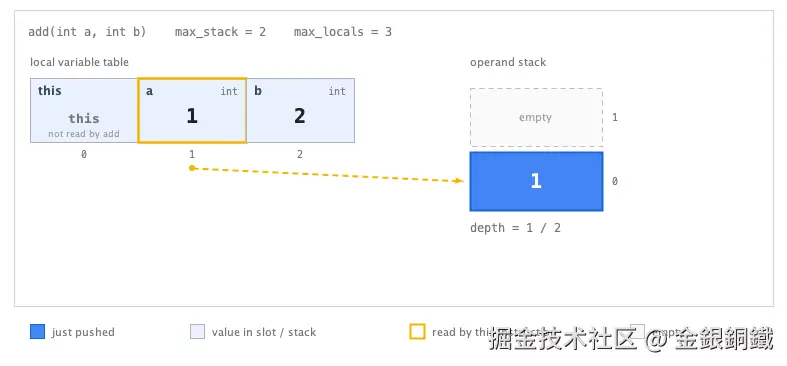
被读取的槽 1 描上琥珀色边框,虚线箭头指向新压入的格子。局部变量表不变,栈深从 0 变成 1。
第二步 iload_2:把槽 2 里的 b 压栈 ⬇️
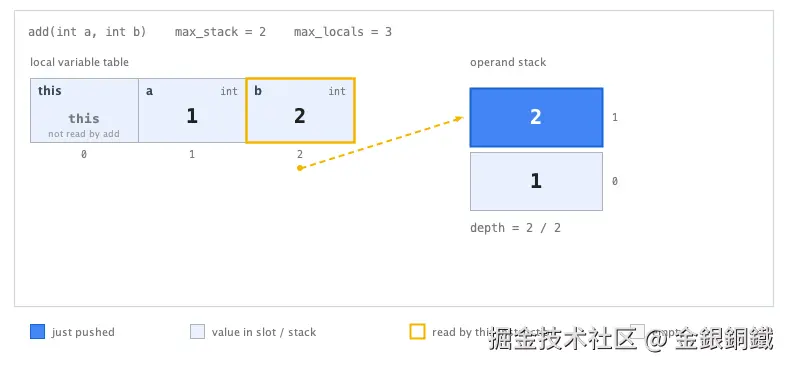
两个值同时在栈上,深度为 2,即 stack=2。
第三步 iadd:弹出两个 int,把和压回去 ⬇️
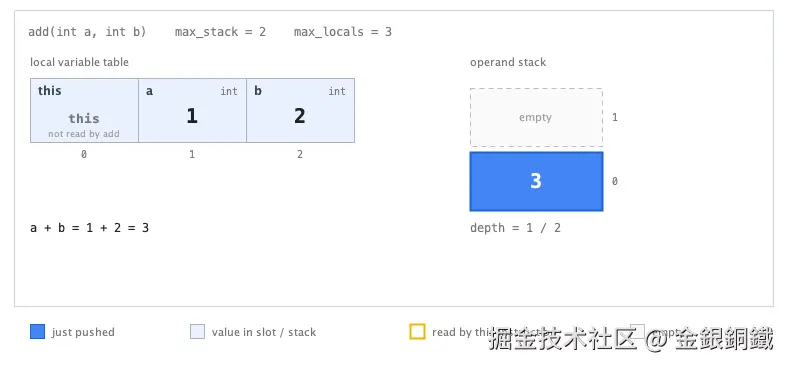
iadd 从栈顶弹出 b 和 a,相加后把 3 压回。栈里只剩一个值,深度回到 1;局部变量表不变。
最后一条 ireturn 把栈顶的 3 返回给调用方,帧随之销毁 ⬇️
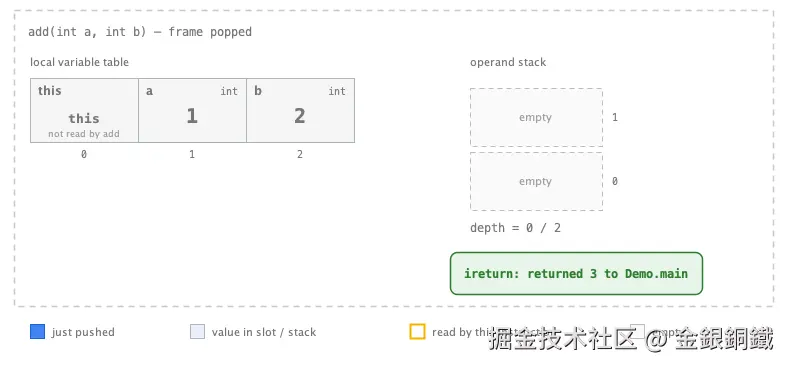
返回指令之后没有下一条指令,因此不单独绘制执行状态。帧销毁后局部变量表和操作数栈都不存在,只把返回值交给调用方。
本地运行配套 demo ⬇️
bash
javac AddFrameDemo.java
java AddFrameDemo
修改 a、b,或点 Run 自动执行完四步。
数字对照
| 数字 | 含义 | 在 add 里 |
|---|---|---|
locals=3 |
局部变量表的槽数 | this 1 + a 1 + b 1 |
stack=2 |
操作数栈的最大深度 | iload_1、iload_2 之后的两个 int |
args_size=3 |
参数个数(不是槽数) | this 也算一个参数 |
args_size 与 locals 含义不同:add 的 args_size=3,因为实例方法把 this 也算一个参数;这里两个 int 各占一格,所以 locals 恰好也是 3。若参数换成 long,locals 会大于 args_size。
小结
- 帧在每次方法调用时创建,里面有局部变量表、操作数栈和常量池引用。
- 局部变量表 是数组,索引从 0;实例方法 0 号是
this,参数从 1 号开始;long/double 占两格,只能用较小的索引访问。 - 操作数栈 是 LIFO,创建时为空,深度上限即
stack=;long/double 算两个深度,其他类型算一个。 locals=是槽数,args_size=是参数个数,两者含义不同。LocalVariableTable要javac -g才有,但它不影响locals=本身。
下一篇看 3.2 节 的 spin 循环:局部变量和操作数栈如何把 i++ 和 i < 100 编译成几条指令。
附:配套 demo 完整代码
截图来自下面的单文件 Swing 程序,无反射、无第三方依赖,逐帧绘制四条指令的栈变化。JDK 21 下编译运行 ⬇️
bash
javac AddFrameDemo.java
java AddFrameDemo
java
import java.awt.BasicStroke;
import java.awt.BorderLayout;
import java.awt.Color;
import java.awt.Component;
import java.awt.Dimension;
import java.awt.FlowLayout;
import java.awt.Font;
import java.awt.FontMetrics;
import java.awt.Graphics;
import java.awt.Graphics2D;
import java.awt.RenderingHints;
import java.awt.geom.Path2D;
import java.util.ArrayList;
import java.util.List;
import javax.swing.BorderFactory;
import javax.swing.BoxLayout;
import javax.swing.JButton;
import javax.swing.JFrame;
import javax.swing.JLabel;
import javax.swing.JPanel;
import javax.swing.JSpinner;
import javax.swing.JSplitPane;
import javax.swing.JTextArea;
import javax.swing.SpinnerNumberModel;
import javax.swing.SwingUtilities;
import javax.swing.Timer;
import javax.swing.border.TitledBorder;
/**
* Step-by-step walkthrough of one JVM frame: SimpleAdder.add(int a, int b)
* from Demo.java. javac 21 emits exactly four instructions:
*
* <pre>
* 0: iload_1 1: iload_2 2: iadd 3: ireturn
* </pre>
*
* max_stack = 2, max_locals = 3 (slot 0 = this, slot 1 = a, slot 2 = b).
* Each step updates the local variable table and the operand stack so the
* stack-machine behaviour can be watched directly.
*
* Run with:
* javac AddFrameDemo.java
* java AddFrameDemo
*/
public class AddFrameDemo {
// ---- shared design language with the other demos in this workspace ----
/** Blue for the language itself: highlighted source line and fresh values. */
private static final Color CODE_COLOR = new Color(21, 101, 192);
/** Dark gray for demo helper buttons. */
private static final Color DEMO_COLOR = new Color(93, 93, 93);
/** A value that already sits in a slot or on the stack. */
private static final Color VALUE_FILL = new Color(232, 240, 254);
/** A value written by the instruction executed in this step. */
private static final Color FRESH_FILL = new Color(66, 133, 244);
/** Amber marks the slot read by the current instruction. */
private static final Color READ_COLOR = new Color(244, 180, 0);
private static final Color EMPTY_FILL = new Color(250, 250, 250);
private static final Color GRID_LINE = new Color(174, 180, 186);
private static final Color HIGHLIGHT_BG = new Color(232, 240, 254);
private static final Color MUTED = new Color(117, 117, 117);
private static final Color RETURN_COLOR = new Color(46, 125, 50);
private static final Font CODE_FONT = new Font(Font.MONOSPACED, Font.BOLD, 13);
private static final Font MONO = new Font(Font.MONOSPACED, Font.PLAIN, 12);
private static final Font MONO_SMALL = new Font(Font.MONOSPACED, Font.PLAIN, 10);
private static final Font SANS_SMALL = new Font(Font.SANS_SERIF, Font.PLAIN, 11);
// ---- bytecode shown by the demo (javap output for add(int, int)) ----
private record Instruction(int offset, String mnemonic, String effect) {
}
private static final List<Instruction> BYTECODE = List.of(
new Instruction(0, "iload_1", "push local 1 (a) depth 0 → 1"),
new Instruction(1, "iload_2", "push local 2 (b) depth 1 → 2"),
new Instruction(2, "iadd", "pop 2, push sum depth 2 → 1"),
new Instruction(3, "ireturn", "return sum depth 1 → 0"));
/** One operand-stack cell; fresh means "pushed by the current instruction". */
private record StackCell(String value, boolean fresh) {
}
/** Everything the view needs about one moment of the execution. */
private record Snapshot(int activeInstruction, String[] locals, List<StackCell> stack,
boolean frameAlive, String returned, String description) {
}
private final List<Snapshot> snapshots = new ArrayList<>();
/** 0 = frame pushed but nothing executed; 4 = ireturn done. */
private int step;
private JSpinner aSpinner;
private JSpinner bSpinner;
private JButton stepButton;
private JButton runButton;
private JButton resetButton;
private JLabel progressLabel;
private JTextArea descriptionArea;
private SourceView sourceView;
private BytecodeView bytecodeView;
private FrameView frameView;
private Timer timer;
public static void main(String[] args) {
SwingUtilities.invokeLater(AddFrameDemo::new);
}
private AddFrameDemo() {
createAndShowGui();
}
private void createAndShowGui() {
JFrame frame = new JFrame("JVM frame demo --- SimpleAdder.add(int a, int b)");
frame.setDefaultCloseOperation(JFrame.EXIT_ON_CLOSE);
frame.setLayout(new BorderLayout());
JPanel control = new JPanel();
control.setLayout(new BoxLayout(control, BoxLayout.Y_AXIS));
control.setBorder(BorderFactory.createEmptyBorder(8, 8, 8, 8));
// ---------- row 0: the two arguments passed by Demo.main ----------
aSpinner = new JSpinner(new SpinnerNumberModel(1, Integer.MIN_VALUE, Integer.MAX_VALUE, 1));
bSpinner = new JSpinner(new SpinnerNumberModel(2, Integer.MIN_VALUE, Integer.MAX_VALUE, 1));
for (JSpinner spinner : new JSpinner[]{aSpinner, bSpinner}) {
// plain digits, no grouping separators; wide enough for a 10-digit int
spinner.setEditor(new JSpinner.NumberEditor(spinner, "0"));
((JSpinner.DefaultEditor) spinner.getEditor()).getTextField().setColumns(12);
}
aSpinner.setToolTipText("Value passed as the first argument (local slot 1, any int)");
bSpinner.setToolTipText("Value passed as the second argument (local slot 2, any int)");
JPanel argGroup = new JPanel();
argGroup.setBorder(BorderFactory.createEtchedBorder());
argGroup.add(new JLabel("a ="));
argGroup.add(aSpinner);
argGroup.add(new JLabel("b ="));
argGroup.add(bSpinner);
control.add(row("arguments", DEMO_COLOR, argGroup));
// ---------- row 1: execution controls ----------
stepButton = new JButton("Step ▶");
stepButton.setFont(CODE_FONT);
stepButton.setToolTipText("Execute the next bytecode instruction");
runButton = new JButton("Run");
runButton.setToolTipText("Execute the remaining instructions automatically");
resetButton = new JButton("Reset");
resetButton.setToolTipText("Demo control, not a bytecode instruction: back to an empty stack");
progressLabel = new JLabel();
progressLabel.setFont(MONO);
progressLabel.setForeground(MUTED);
control.add(row("execution", DEMO_COLOR, stepButton, runButton, resetButton, progressLabel));
// ---------- left column: source and bytecode ----------
sourceView = new SourceView();
bytecodeView = new BytecodeView();
JPanel leftColumn = new JPanel();
leftColumn.setLayout(new BoxLayout(leftColumn, BoxLayout.Y_AXIS));
leftColumn.setBorder(BorderFactory.createEmptyBorder(4, 4, 4, 4));
leftColumn.add(sourceView);
leftColumn.add(bytecodeView);
frameView = new FrameView();
JSplitPane split = new JSplitPane(JSplitPane.HORIZONTAL_SPLIT, leftColumn, frameView);
split.setBorder(null);
split.setContinuousLayout(true);
split.setResizeWeight(0.42);
// ---------- bottom: what the current step does ----------
descriptionArea = new JTextArea(3, 0);
descriptionArea.setEditable(false);
descriptionArea.setLineWrap(true);
descriptionArea.setWrapStyleWord(true);
descriptionArea.setFont(MONO);
descriptionArea.setBackground(Color.WHITE);
descriptionArea.setBorder(BorderFactory.createCompoundBorder(
BorderFactory.createMatteBorder(1, 0, 0, 0, new Color(224, 224, 224)),
BorderFactory.createEmptyBorder(8, 12, 8, 12)));
frame.add(control, BorderLayout.NORTH);
frame.add(split, BorderLayout.CENTER);
frame.add(descriptionArea, BorderLayout.SOUTH);
// ---------- listeners ----------
timer = new Timer(900, e -> doStep());
stepButton.addActionListener(e -> doStep());
runButton.addActionListener(e -> startRun());
resetButton.addActionListener(e -> resetDemo());
aSpinner.addChangeListener(e -> resetDemo());
bSpinner.addChangeListener(e -> resetDemo());
resetDemo();
frame.setSize(1320, 800);
frame.setLocationRelativeTo(null);
frame.setVisible(true);
split.setDividerLocation(0.4);
}
// ---- execution ----
private void doStep() {
if (step >= snapshots.size() - 1) {
return;
}
step++;
refreshView();
if (step == snapshots.size() - 1) {
timer.stop();
stepButton.setEnabled(false);
runButton.setEnabled(false);
}
}
private void startRun() {
if (step >= snapshots.size() - 1) {
return;
}
stepButton.setEnabled(false);
runButton.setEnabled(false);
timer.start();
}
private void resetDemo() {
timer.stop();
int a = ((Number) aSpinner.getValue()).intValue();
int b = ((Number) bSpinner.getValue()).intValue();
snapshots.clear();
snapshots.addAll(buildSnapshots(a, b));
step = 0;
stepButton.setEnabled(true);
runButton.setEnabled(true);
refreshView();
}
private void refreshView() {
Snapshot snapshot = snapshots.get(step);
sourceView.setActiveLine(step == 0 ? 10 : 11);
bytecodeView.setActiveInstruction(snapshot.activeInstruction());
frameView.setSnapshot(snapshot);
progressLabel.setText(" step " + step + " / " + (snapshots.size() - 1));
descriptionArea.setText(snapshot.description());
descriptionArea.setCaretPosition(0);
}
private static List<Snapshot> buildSnapshots(int a, int b) {
String[] locals = {"this", String.valueOf(a), String.valueOf(b)};
int sum = a + b;
String wrapNote = (long) a + b != sum
? " The exact sum does not fit in an int, so it wraps to 32 bits --- iadd behaves exactly like Java's int +."
: "";
List<Snapshot> list = new ArrayList<>();
list.add(new Snapshot(-1, locals, List.of(), true, null,
"Frame pushed for add(" + a + ", " + b + "): local slots 0..2 = [this, a, b], "
+ "operand stack empty. Click Step to run 0: iload_1."));
list.add(new Snapshot(0, locals, List.of(new StackCell(String.valueOf(a), true)), true, null,
"0: iload_1 --- copy local 1 (a = " + a + ") onto the operand stack. "
+ "The local variable table is unchanged; depth 0 → 1."));
list.add(new Snapshot(1, locals, List.of(new StackCell(String.valueOf(a), false),
new StackCell(String.valueOf(b), true)), true, null,
"1: iload_2 --- copy local 2 (b = " + b + ") onto the stack. "
+ "Depth is now 2, which is exactly max_stack."));
list.add(new Snapshot(2, locals, List.of(new StackCell(String.valueOf(sum), true)), true, null,
"2: iadd --- pop b (" + b + ") and a (" + a + "), add them, and push " + sum
+ ". The local slots keep their values; depth 2 → 1." + wrapNote));
list.add(new Snapshot(3, locals, List.of(), false, String.valueOf(sum),
"3: ireturn --- pop " + sum + " and return it to the caller. The frame is destroyed, "
+ "so its locals and operand stack disappear."));
return list;
}
// ---- layout helpers ----
private static JLabel rowCaption(String text, Color color) {
JLabel label = new JLabel(text);
label.setFont(new Font(Font.SANS_SERIF, Font.ITALIC, 11));
label.setForeground(color);
label.setPreferredSize(new Dimension(96, 18));
return label;
}
private static JPanel row(String caption, Color color, Component... items) {
JPanel p = new JPanel(new FlowLayout(FlowLayout.LEFT));
p.setAlignmentX(Component.LEFT_ALIGNMENT);
p.add(rowCaption(caption, color));
for (Component c : items) {
p.add(c);
}
return p;
}
// ---- source panel ----
/** Demo.java excerpt; the executed line is highlighted as the step changes. */
private static final class SourceView extends JPanel {
private static final String[] LINES = {
"class SimpleAdder {",
" public int add(int a, int b) {",
" return a + b;",
" }",
"}"
};
private static final int FIRST_LINE = 9;
private int activeLine = 10;
SourceView() {
setBackground(Color.WHITE);
setPreferredSize(new Dimension(480, 186));
setMinimumSize(new Dimension(420, 186));
setBorder(new TitledBorder("Demo.java --- class SimpleAdder"));
}
void setActiveLine(int line) {
activeLine = line;
repaint();
}
@Override
protected void paintComponent(Graphics g0) {
super.paintComponent(g0);
Graphics2D g = (Graphics2D) g0;
g.setRenderingHint(RenderingHints.KEY_ANTIALIASING, RenderingHints.VALUE_ANTIALIAS_ON);
int lineHeight = 26;
int top = 10;
for (int i = 0; i < LINES.length; i++) {
int lineNo = FIRST_LINE + i;
int y = top + i * lineHeight;
if (lineNo == activeLine) {
g.setColor(HIGHLIGHT_BG);
g.fillRect(8, y - 3, getWidth() - 16, lineHeight);
g.setColor(CODE_COLOR);
g.fillRect(8, y - 3, 3, lineHeight);
}
g.setFont(MONO_SMALL);
g.setColor(MUTED);
String num = String.valueOf(lineNo);
g.drawString(num, 26 - g.getFontMetrics().stringWidth(num), y + 15);
g.setFont(new Font(Font.MONOSPACED, Font.PLAIN, 13));
g.setColor(new Color(33, 33, 33));
g.drawString(LINES[i], 44, y + 15);
}
g.setFont(SANS_SMALL);
g.setColor(MUTED);
g.drawString("executed method: SimpleAdder.add(int a, int b)",
44, top + LINES.length * lineHeight + 6);
}
}
// ---- bytecode panel ----
/** The four instructions, with the current one highlighted. */
private static final class BytecodeView extends JPanel {
private static final int ROW_H = 32;
private int active = -1;
BytecodeView() {
setBackground(Color.WHITE);
setPreferredSize(new Dimension(480, 190));
setMinimumSize(new Dimension(420, 190));
setBorder(new TitledBorder("bytecode --- max_stack = 2, max_locals = 3"));
}
void setActiveInstruction(int index) {
active = index;
repaint();
}
@Override
protected void paintComponent(Graphics g0) {
super.paintComponent(g0);
Graphics2D g = (Graphics2D) g0;
g.setRenderingHint(RenderingHints.KEY_ANTIALIASING, RenderingHints.VALUE_ANTIALIAS_ON);
int top = 8;
for (int i = 0; i < BYTECODE.size(); i++) {
Instruction ins = BYTECODE.get(i);
int y = top + i * ROW_H;
if (i == active) {
g.setColor(HIGHLIGHT_BG);
g.fillRect(8, y, getWidth() - 16, ROW_H - 2);
g.setColor(CODE_COLOR);
g.fillRect(8, y, 3, ROW_H - 2);
}
g.setFont(MONO_SMALL);
g.setColor(MUTED);
g.drawString(String.valueOf(ins.offset()), 26, y + 21);
g.setFont(CODE_FONT);
g.setColor(i == active ? CODE_COLOR : new Color(33, 33, 33));
g.drawString(ins.mnemonic(), 46, y + 21);
g.setFont(SANS_SMALL);
g.setColor(MUTED);
g.drawString(ins.effect(), 152, y + 21);
}
g.setFont(SANS_SMALL);
g.setColor(new Color(150, 150, 150));
g.drawString("all four opcodes are one byte, so offset = instruction index",
46, top + BYTECODE.size() * ROW_H + 14);
}
}
// ---- frame panel: local variable table + operand stack ----
private static final class FrameView extends JPanel {
private static final int CELL_W = 108;
private static final int CELL_H = 64;
private static final int LVT_X = 30;
private static final int CELL_TOP = 78;
private static final int STACK_X = 470;
private static final int STACK_W = 132;
private static final int STACK_H = 58;
private static final int STACK_GAP = 6;
private static final int STACK_BOTTOM = 210;
private static final int FRAME_BOTTOM = 306;
private Snapshot snapshot;
FrameView() {
setBackground(Color.WHITE);
setPreferredSize(new Dimension(760, 390));
setMinimumSize(new Dimension(680, 380));
}
void setSnapshot(Snapshot s) {
snapshot = s;
repaint();
}
private static int stackY(int index) {
return STACK_BOTTOM - STACK_H - index * (STACK_H + STACK_GAP);
}
/** Largest monospaced bold size (maxSize down to 10) whose text fits maxWidth. */
private Font fittedFont(String text, int maxWidth, int maxSize) {
int size = maxSize;
while (size > 10 && getFontMetrics(new Font(Font.MONOSPACED, Font.BOLD, size))
.stringWidth(text) > maxWidth) {
size--;
}
return new Font(Font.MONOSPACED, Font.BOLD, size);
}
@Override
protected void paintComponent(Graphics g0) {
super.paintComponent(g0);
Graphics2D g = (Graphics2D) g0;
g.setRenderingHint(RenderingHints.KEY_ANTIALIASING, RenderingHints.VALUE_ANTIALIAS_ON);
if (snapshot == null) {
return;
}
paintFrameBox(g);
g.setFont(SANS_SMALL);
g.setColor(MUTED);
g.drawString("local variable table", LVT_X, 66);
g.drawString("operand stack", STACK_X, 66);
for (int slot = 0; slot < 3; slot++) {
boolean read = snapshot.frameAlive()
&& (snapshot.activeInstruction() == 0 && slot == 1
|| snapshot.activeInstruction() == 1 && slot == 2);
paintLocalCell(g, slot, snapshot.locals()[slot], read);
}
paintStack(g);
int depth = snapshot.stack().size();
g.setFont(MONO);
g.setColor(MUTED);
g.drawString("depth = " + depth + " / 2", STACK_X, 232);
int active = snapshot.activeInstruction();
if (active == 0) {
paintPushArrow(g, 1, 0);
} else if (active == 1) {
paintPushArrow(g, 2, 1);
} else if (active == 2) {
g.setFont(MONO);
g.setColor(new Color(33, 33, 33));
g.drawString("a + b = " + snapshot.locals()[1] + " + " + snapshot.locals()[2]
+ " = " + snapshot.stack().get(0).value(), LVT_X, 232);
}
if (!snapshot.frameAlive()) {
paintReturnedChip(g);
}
paintLegend(g);
}
private void paintFrameBox(Graphics2D g) {
boolean alive = snapshot.frameAlive();
g.setColor(alive ? new Color(207, 216, 220) : new Color(200, 200, 200));
if (alive) {
g.setStroke(new BasicStroke(1.2f));
} else {
g.setStroke(new BasicStroke(1.5f, BasicStroke.CAP_BUTT, BasicStroke.JOIN_MITER,
10f, new float[]{6f, 5f}, 0f));
}
g.drawRect(14, 10, getWidth() - 28, FRAME_BOTTOM - 10);
g.setFont(MONO);
g.setColor(MUTED);
String header = alive
? "add(int a, int b) max_stack = 2 max_locals = 3"
: "add(int a, int b) --- frame popped";
g.drawString(header, 28, 36);
}
private void paintLocalCell(Graphics2D g, int slot, String value, boolean read) {
int x = LVT_X + slot * CELL_W;
int y = CELL_TOP;
boolean alive = snapshot.frameAlive();
g.setColor(alive ? VALUE_FILL : new Color(245, 245, 245));
g.fillRect(x, y, CELL_W, CELL_H);
g.setColor(read ? READ_COLOR : GRID_LINE);
g.setStroke(new BasicStroke(read ? 2.5f : 1f));
g.drawRect(x, y, CELL_W, CELL_H);
// variable name, top-left
g.setFont(new Font(Font.SANS_SERIF, Font.BOLD, 12));
g.setColor(alive ? new Color(55, 71, 79) : MUTED);
g.drawString(slot == 0 ? "this" : slot == 1 ? "a" : "b", x + 8, y + 17);
// declared type, top-right ("this" has no room and its value says "ref")
if (slot != 0) {
g.setFont(MONO_SMALL);
g.setColor(MUTED);
String type = "int";
g.drawString(type, x + CELL_W - 8 - g.getFontMetrics().stringWidth(type), y + 17);
}
// value, centered; shrink when a full 10-digit int would overflow
Font valueFont = fittedFont(value, CELL_W - 12, slot == 0 ? 13 : 20);
g.setFont(valueFont);
FontMetrics fm = g.getFontMetrics();
g.setColor(alive ? (slot == 0 ? MUTED : new Color(33, 33, 33)) : MUTED);
g.drawString(value, x + (CELL_W - fm.stringWidth(value)) / 2,
y + 45 - (20 - valueFont.getSize()) / 2);
if (slot == 0) {
g.setFont(new Font(Font.SANS_SERIF, Font.PLAIN, 9));
g.setColor(new Color(150, 150, 150));
String note = "not read by add";
g.drawString(note, x + (CELL_W - g.getFontMetrics().stringWidth(note)) / 2, y + 59);
}
// slot number below the cell, like the axis label in the article
g.setFont(MONO_SMALL);
g.setColor(MUTED);
String label = String.valueOf(slot);
g.drawString(label, x + (CELL_W - g.getFontMetrics().stringWidth(label)) / 2,
CELL_TOP + CELL_H + 16);
}
private void paintStack(Graphics2D g) {
List<StackCell> stack = snapshot.stack();
for (int i = 0; i < 2; i++) {
int y = stackY(i);
if (i < stack.size()) {
StackCell cell = stack.get(i);
g.setColor(cell.fresh() ? FRESH_FILL : VALUE_FILL);
g.fillRect(STACK_X, y, STACK_W, STACK_H);
g.setColor(cell.fresh() ? new Color(25, 103, 210) : GRID_LINE);
g.setStroke(new BasicStroke(cell.fresh() ? 2f : 1f));
g.drawRect(STACK_X, y, STACK_W, STACK_H);
Font valueFont = fittedFont(cell.value(), STACK_W - 12, 20);
g.setFont(valueFont);
FontMetrics fm = g.getFontMetrics();
g.setColor(cell.fresh() ? Color.WHITE : new Color(33, 33, 33));
g.drawString(cell.value(), STACK_X + (STACK_W - fm.stringWidth(cell.value())) / 2,
y + STACK_H / 2 + valueFont.getSize() / 3);
} else {
g.setColor(EMPTY_FILL);
g.fillRect(STACK_X, y, STACK_W, STACK_H);
g.setColor(new Color(189, 189, 189));
g.setStroke(new BasicStroke(1f, BasicStroke.CAP_BUTT, BasicStroke.JOIN_MITER,
10f, new float[]{5f, 4f}, 0f));
g.drawRect(STACK_X, y, STACK_W, STACK_H);
g.setFont(SANS_SMALL);
g.setColor(new Color(158, 158, 158));
FontMetrics fm = g.getFontMetrics();
g.drawString("empty", STACK_X + (STACK_W - fm.stringWidth("empty")) / 2,
y + STACK_H / 2 + 4);
}
// stack index to the right of each cell: 0 is the bottom
g.setFont(MONO_SMALL);
g.setColor(MUTED);
g.drawString(String.valueOf(i), STACK_X + STACK_W + 10, y + STACK_H / 2 + 4);
}
}
/** Dashed amber arrow: a local slot is copied to a fresh stack cell. */
private void paintPushArrow(Graphics2D g, int localSlot, int stackIndex) {
// start below the slot numbers so the arrow never crosses another cell
int x1 = LVT_X + localSlot * CELL_W + CELL_W / 2;
int y1 = CELL_TOP + CELL_H + 26;
int x2 = STACK_X - 7;
int y2 = stackY(stackIndex) + STACK_H / 2;
g.setColor(READ_COLOR);
g.setStroke(new BasicStroke(2f, BasicStroke.CAP_BUTT, BasicStroke.JOIN_ROUND,
10f, new float[]{6f, 4f}, 0f));
g.drawLine(x1, y1, x2, y2);
// anchor dot at the read slot
g.setStroke(new BasicStroke(1f));
g.fillOval(x1 - 3, y1 - 3, 6, 6);
// arrowhead, aligned with the line direction
double angle = Math.atan2(y2 - y1, x2 - x1);
double size = 8;
Path2D head = new Path2D.Double();
head.moveTo(x2, y2);
head.lineTo(x2 - size * Math.cos(angle - 0.4), y2 - size * Math.sin(angle - 0.4));
head.lineTo(x2 - size * Math.cos(angle + 0.4), y2 - size * Math.sin(angle + 0.4));
head.closePath();
g.fill(head);
}
private void paintReturnedChip(Graphics2D g) {
String text = "ireturn: returned " + snapshot.returned() + " to Demo.main";
g.setFont(new Font(Font.MONOSPACED, Font.BOLD, 12));
FontMetrics fm = g.getFontMetrics();
int w = fm.stringWidth(text) + 28;
int x = Math.min(STACK_X - 20, getWidth() - 28 - w);
int y = 252;
int h = 42;
g.setColor(new Color(232, 245, 233));
g.fillRoundRect(x, y, w, h, 14, 14);
g.setColor(RETURN_COLOR);
g.setStroke(new BasicStroke(1.5f));
g.drawRoundRect(x, y, w, h, 14, 14);
g.drawString(text, x + 14, y + 26);
}
private void paintLegend(Graphics2D g) {
int y = FRAME_BOTTOM + 30;
legendItem(g, 30, y, FRESH_FILL, null, "just pushed");
legendItem(g, 190, y, VALUE_FILL, GRID_LINE, "value in slot / stack");
legendItem(g, 410, y, Color.WHITE, READ_COLOR, "read by this instruction");
legendItem(g, 630, y, EMPTY_FILL, new Color(189, 189, 189), "empty");
}
private void legendItem(Graphics2D g, int x, int y, Color fill, Color border, String text) {
g.setColor(fill);
g.fillRect(x, y - 12, 14, 14);
if (border != null) {
g.setColor(border);
g.setStroke(new BasicStroke(border.equals(READ_COLOR) ? 2f : 1f));
g.drawRect(x, y - 12, 14, 14);
} else {
g.setColor(new Color(25, 103, 210));
g.setStroke(new BasicStroke(1f));
g.drawRect(x, y - 12, 14, 14);
}
g.setFont(SANS_SMALL);
g.setColor(MUTED);
g.drawString(text, x + 22, y);
}
}
}