原文参考官方文档:
https://pytorch-geometric.readthedocs.io/en/latest/modules/loader.html
torch_geometric.loader 库中, 该库中包含了多种 图数据集的 加载方式,
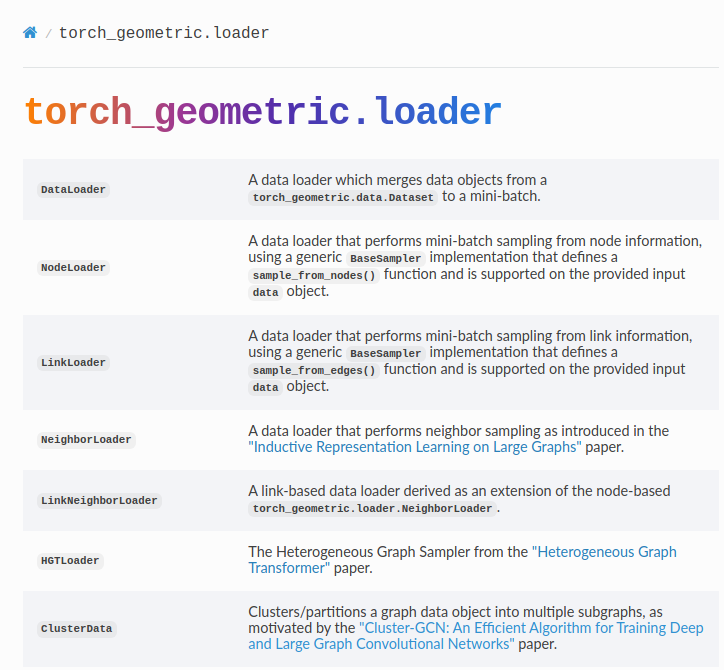
这里主要介绍 DenseDataLoader and DataLoader 这两者之间的区别;
Difference between DenseDataLoader and DataLoader in PyTorch Geometric
1. DenseDataLoader:
-
Purpose: Specifically designed for loading batches of dense graph data where all graph attributes have the same shape.
-
Stacking: Stacks all graph attributes in a new dimension, which means that all graph data needs to be dense (i.e., have the same shape).
-
Use Case: Ideal for situations where the adjacency matrices and feature matrices of graphs in the dataset are of consistent size and can be stacked without any padding or truncation.
-
Implementation : Uses a custom
collate_fnthat stacks all attributes of the graph data objects into a new dimension. This is suitable for dense graph data.pythonclass DenseDataLoader(torch.utils.data.DataLoader): ... def __init__(self, dataset: Union[Dataset, List[Data]], batch_size: int = 1, shuffle: bool = False, **kwargs): kwargs.pop('collate_fn', None) # Ensure no other collate function is used super().__init__(dataset, batch_size=batch_size, shuffle=shuffle, collate_fn=collate_fn, **kwargs)
2. DataLoader:
-
Purpose: General-purpose data loader for PyTorch Geometric datasets. It can handle both homogeneous and heterogeneous graph data.
-
Flexibility: Can handle varying graph sizes and structures by merging data objects into mini-batches. Suitable for heterogeneous data where graph attributes may differ in shape and size.
-
Collate Function : Uses a custom collate function,
Collater, which can handle different types of data elements (e.g.,BaseData,Tensor, etc.). This function is versatile and can manage the complexity of heterogeneous graph data. -
Use Case: Ideal for most graph data scenarios, especially when graphs vary in size and shape, and when working with both homogeneous and heterogeneous data.
pythonclass DataLoader(torch.utils.data.DataLoader): ... def __init__( self, dataset: Union[Dataset, Sequence[BaseData], DatasetAdapter], batch_size: int = 1, shuffle: bool = False, follow_batch: Optional[List[str]] = None, exclude_keys: Optional[List[str]] = None, **kwargs, ): kwargs.pop('collate_fn', None) # Ensure no other collate function is used super().__init__( dataset, batch_size, shuffle, collate_fn=Collater(dataset, follow_batch, exclude_keys), **kwargs, )
Key Differences
-
Data Shape Consistency:
- DenseDataLoader: Requires all graph attributes to have the same shape.
- DataLoader: Can handle variable graph sizes and shapes.
-
Batching Mechanism:
- DenseDataLoader: Stacks all attributes into a new dimension, suitable for dense data.
- DataLoader : Uses the
Collaterclass to handle complex data batching, suitable for heterogeneous and variable-sized graph data.
-
Use Cases:
- DenseDataLoader: Best for datasets with consistent graph sizes and shapes.
- DataLoader: Best for general-purpose graph data loading, especially with varying graph structures.
Practical Example of Each Loader
DenseDataLoader Example:
python
from torch_geometric.datasets import TUDataset
from torch_geometric.loader import DenseDataLoader

# Load a dataset where all graphs have the same number of nodes
dataset = TUDataset(root='/tmp/ENZYMES', name='ENZYMES')

# Create a DenseDataLoader
loader = DenseDataLoader(dataset, batch_size=32, shuffle=True)

for batch in loader:
    print(batch)
    break
DataLoader Example:
python
from torch_geometric.datasets import TUDataset
from torch_geometric.loader import DataLoader

# Load a dataset with graphs of varying sizes
dataset = TUDataset(root='/tmp/ENZYMES', name='ENZYMES')

# Create a DataLoader
loader = DataLoader(dataset, batch_size=32, shuffle=True)

for batch in loader:
    print(batch)
    break
Summary
- Use
DenseDataLoaderwhen working with datasets where all graphs have the same size and shape. - Use
DataLoaderfor more flexible and general-purpose graph data loading, especially when dealing with variable graph structures.