1、数据库备份的分类
(1)数据备份
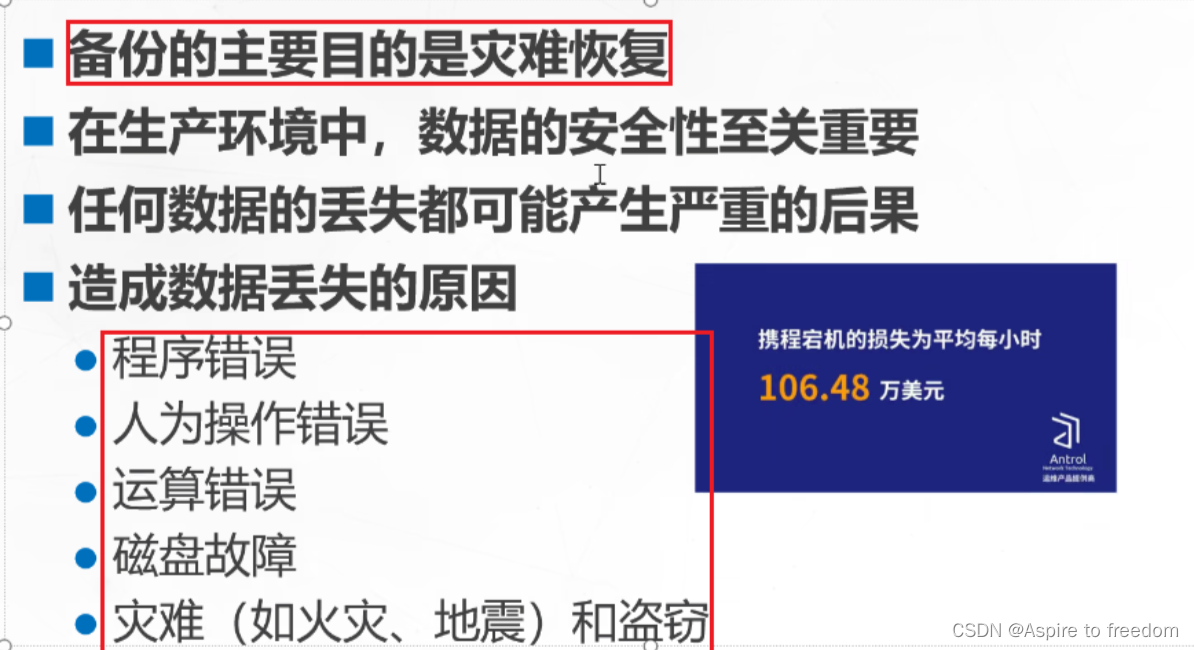
1)数据库备份的分类
- 物理备份:直接对数据库的数据文件或者日志文件进行备份.
- 逻辑备份:对数据库的库或表对象进行备份.
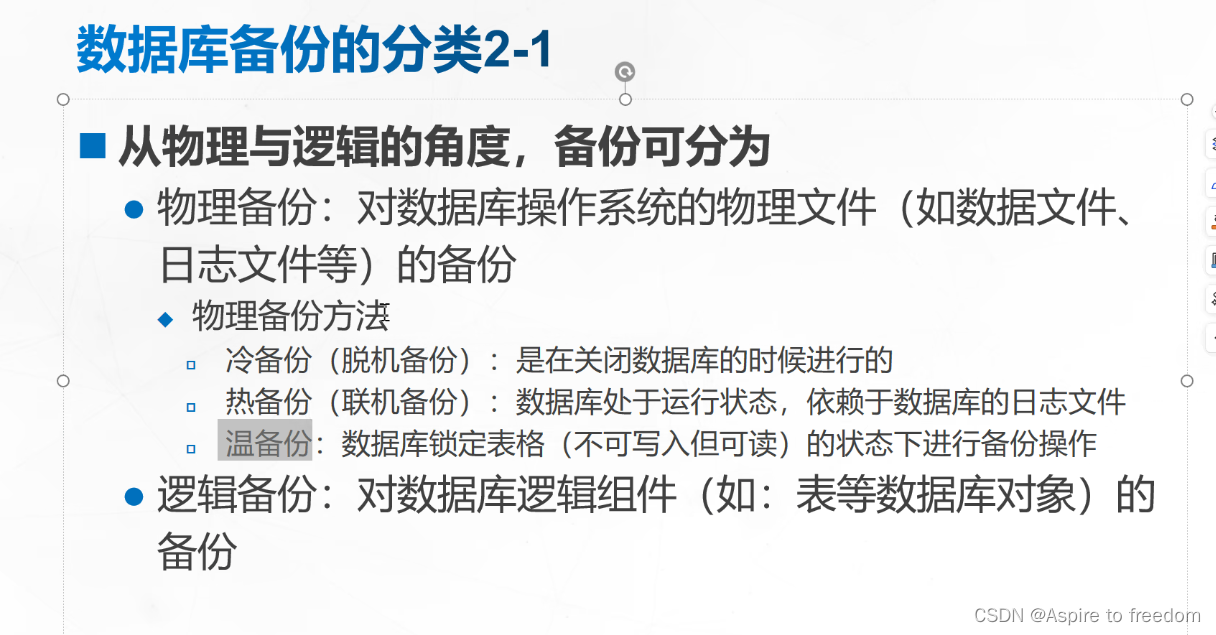
备份策略

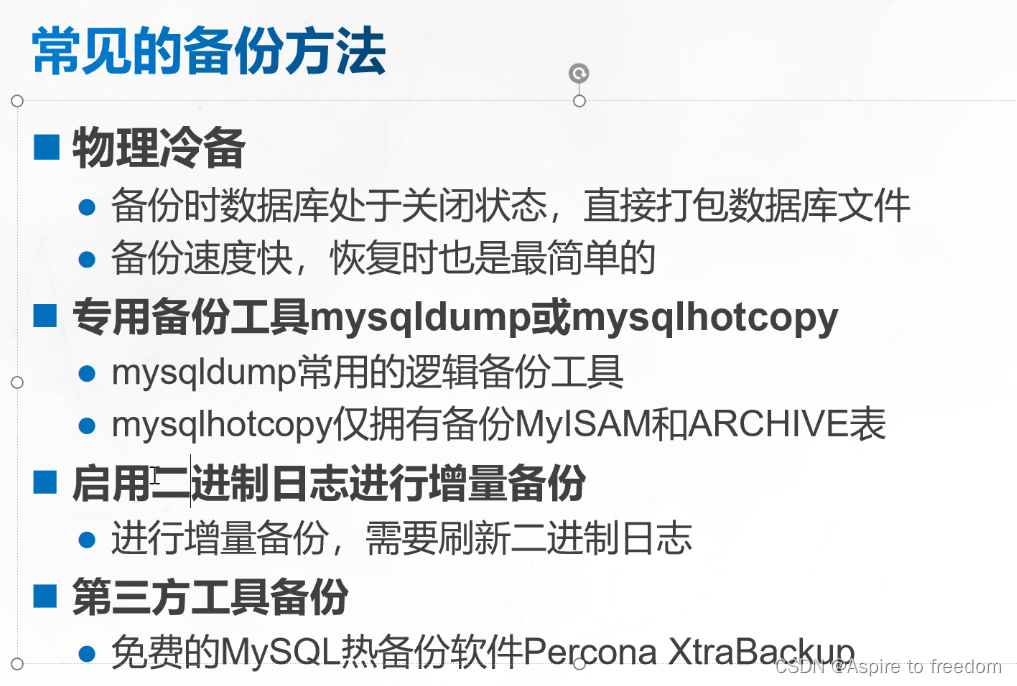
2)常见的备份方法
2、MySQL完全备份与恢复
(1)MySQL完全备份

- 优点:备份与恢复操作简单方便
- 缺点:数据存在大量的重复;占用大量的备份空间;备份与恢复时间长
**(2)**数据库完全备份分类
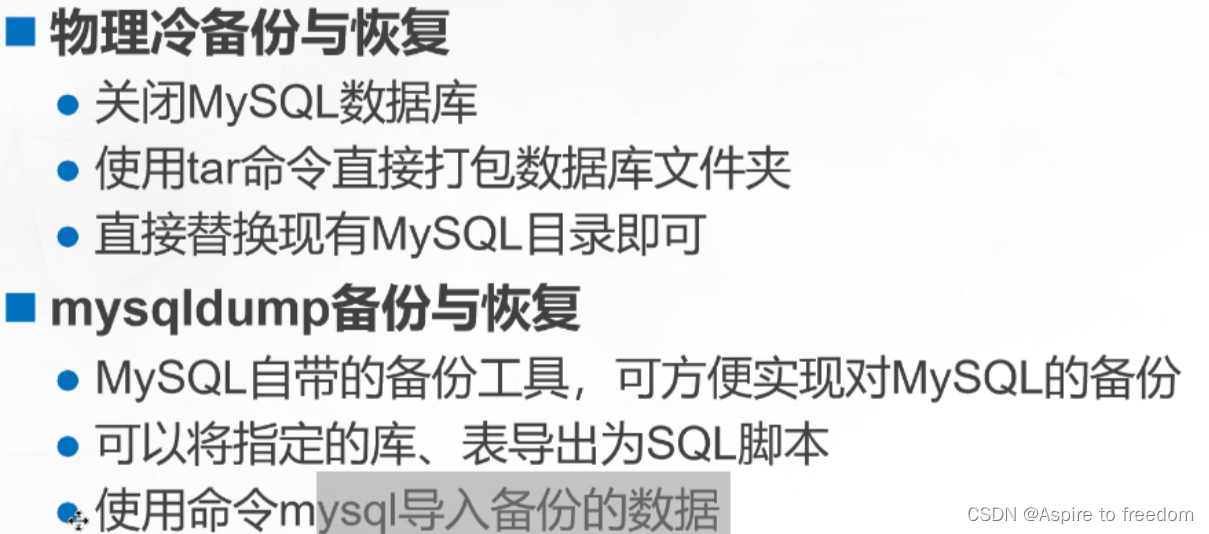
(3)MySQL物理冷备份及恢复
先关闭数据库,然后打包备份相关数据库文件(20.0.0.10)
[root@zx1 system]# systemctl stop mysqld
[root@zx1 system]# cd /usr/local/
[root@zx1 local]# cd mysql/
[root@zx1 mysql]# ls
bin   docs     lib      man         README       share          usr
data  include  LICENSE  mysql-test  README-test  support-files
[root@zx1 mysql]# tar zcf /opt/mysql-backup-$(date +%Y%m%d) data/
[root@zx1 mysql]# cd /opt/
[root@zx1 opt]# ls
mysql-5.7.44  mysql-backup-20240624  mysql-boost-5.7.44.tar.gz  rh
[root@zx1 opt]#
恢复数据库
20.0.0.10主机将备份数据库文件远程复制给20.0.0.20主机
20.0.0.10
[root@zx1 opt]# scp mysql-backup-20240624 20.0.0.20:/opt
The authenticity of host '20.0.0.20 (20.0.0.20)' can't be established.
ECDSA key fingerprint is SHA256:22t/sEC//ZKbNJxo78sJ8GKh58ZnstgFhW+eXMzeU6Q.
ECDSA key fingerprint is MD5:7f:a2:03:67:f4:67:4c:2e:21:e3:9e:8f:9a:e0:7c:ab.
Are you sure you want to continue connecting (yes/no)? yes
Warning: Permanently added '20.0.0.20' (ECDSA) to the list of known hosts.
root@20.0.0.20's password:
mysql-backup-20240624                                 100% 1395KB  46.6MB/s   00:00
[root@zx1 opt]#
20.0.0.20(刚装的mysql系统,里面没有任何数据)
[root@zx2 ~]# cd /opt/
[root@zx2 opt]# ls
mysql-5.7.44  mysql-backup-20240624  mysql-boost-5.7.44.tar.gz  rh
[root@zx2 opt]# tar xf mysql-backup-20240624
[root@zx2 opt]# ls
data  mysql-5.7.44  mysql-backup-20240624  mysql-boost-5.7.44.tar.gz  rh
[root@zx2 opt]# mv /usr/local/mysql/data/ /usr/local/mysql/data_bak
[root@zx2 opt]# mv data/ /usr/local/mysql/
[root@zx2 opt]# ls /usr/local/mysql/
bin       docs     LICENSE     mysql.sock       README       support-files
data      include  man         mysql.sock.lock  README-test  usr
data_bak  lib      mysqld.pid  mysql-test       share
[root@zx2 opt]# systemctl restart mysqld
[root@zx2 opt]# mysql -u root -pabc123
mysql: [Warning] Using a password on the command line interface can be insecure.
Welcome to the MySQL monitor.  Commands end with ; or \g.
Your MySQL connection id is 2
Server version: 5.7.44 Source distribution

Copyright (c) 2000, 2023, Oracle and/or its affiliates.

Oracle is a registered trademark of Oracle Corporation and/or its
affiliates. Other names may be trademarks of their respective
owners.

Type 'help;' or '\h' for help. Type '\c' to clear the current input statement.

mysql> show databases;   ##zx为20.0.0.10主机创建的库
+--------------------+
| Database           |
+--------------------+
| information_schema |
| mysql              |
| performance_schema |
| sys                |
| zx                 |
+--------------------+
5 rows in set (0.00 sec)

mysql> use zx;
Reading table information for completion of table and column names
You can turn off this feature to get a quicker startup with -A

Database changed
mysql> show tables;   ##数据跟着备份过来
+--------------+
| Tables_in_zx |
+--------------+
| zx           |
+--------------+
1 row in set (0.00 sec)

mysql>
(4)mysqldump进行逻辑备份
1)mysqldump备份数据库
备份指定数据库中的文件:
mysqldump -u用户名 -p密码 数据库名 > 指定路径的绝对路径/数据库名.sql
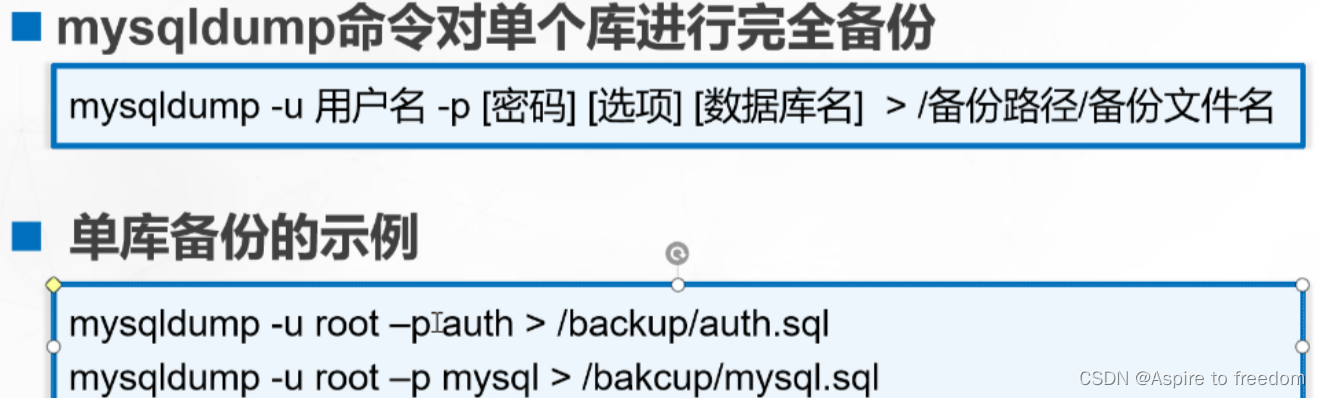
现有一个数据库zx
mysql> show databases;
+--------------------+
| Database           |
+--------------------+
| information_schema |
| mysql              |
| performance_schema |
| sys                |
| zx                 |
+--------------------+
5 rows in set (0.00 sec)

mysql> use zx;
Database changed
mysql> show tables;
+--------------+
| Tables_in_zx |
+--------------+
| zx           |
| zx1          |
| zx2          |
| zx3          |
+--------------+
4 rows in set (0.00 sec)
对库zx进行备份并查看,发现只会保存表的数据
[root@zx1 opt]# mkdir backup
[root@zx1 opt]# mysqldump -u root -pabc123 zx > /opt/backup/zx.sql
mysqldump: [Warning] Using a password on the command line interface can be insecure.
[root@zx1 opt]# cd backup/
[root@zx1 backup]# ls
zx.sql
[root@zx1 backup]# cat zx.sql | grep -v "^--" | grep -v "^/" | grep -v "^$"
DROP TABLE IF EXISTS `zx`;
CREATE TABLE `zx` (
  `id` int(11) NOT NULL,
  `name` varchar(20) DEFAULT NULL,
  `sex` char(2) DEFAULT NULL,
  `age` int(11) DEFAULT NULL,
  PRIMARY KEY (`id`)
) ENGINE=InnoDB DEFAULT CHARSET=utf8;
LOCK TABLES `zx` WRITE;
INSERT INTO `zx` VALUES (1,'scj','男',20),(2,'zx','男',20),(3,'tc','男',20);
UNLOCK TABLES;
DROP TABLE IF EXISTS `zx1`;
CREATE TABLE `zx1` (
  `id` int(11) NOT NULL,
  `name` varchar(20) DEFAULT NULL,
  `sex` char(2) DEFAULT NULL,
  `age` int(11) DEFAULT NULL,
  PRIMARY KEY (`id`)
) ENGINE=InnoDB DEFAULT CHARSET=utf8;
LOCK TABLES `zx1` WRITE;
INSERT INTO `zx1` VALUES (1,'scj','男',20),(2,'zx','男',20),(3,'tc','男',20);
UNLOCK TABLES;
DROP TABLE IF EXISTS `zx2`;
CREATE TABLE `zx2` (
  `id` int(11) NOT NULL,
  `name` varchar(20) DEFAULT NULL,
  `sex` char(2) DEFAULT NULL,
  `age` int(11) DEFAULT NULL,
  PRIMARY KEY (`id`)
) ENGINE=InnoDB DEFAULT CHARSET=utf8;
LOCK TABLES `zx2` WRITE;
INSERT INTO `zx2` VALUES (1,'scj','男',20),(2,'zx','男',20),(3,'tc','男',20);
UNLOCK TABLES;
DROP TABLE IF EXISTS `zx3`;
CREATE TABLE `zx3` (
  `id` int(11) NOT NULL,
  `name` varchar(20) DEFAULT NULL,
  `sex` char(2) DEFAULT NULL,
  `age` int(11) DEFAULT NULL,
  PRIMARY KEY (`id`)
) ENGINE=InnoDB DEFAULT CHARSET=utf8;
LOCK TABLES `zx3` WRITE;
INSERT INTO `zx3` VALUES (1,'scj','男',20),(2,'zx','男',20),(3,'tc','男',20);
UNLOCK TABLES;
[root@zx1 backup]#
备份指定数据库和文件:
mysqldump -u用户名 -p密码 --databases 数据库名 > 指定路径的绝对路径/数据库名.sql
加上 --databases 发现保存的是库和表的数据
[root@zx1 backup]# mysqldump -u root -pabc123 --databases zx > /opt/backup/zx1.sql
mysqldump: [Warning] Using a password on the command line interface can be insecure.
[root@zx1 backup]# cat zx1.sql | grep -v "^--" | grep -v "^/" | grep -v "^$"
CREATE DATABASE /*!32312 IF NOT EXISTS*/ `zx` /*!40100 DEFAULT CHARACTER SET utf8 */;
USE `zx`;
DROP TABLE IF EXISTS `zx`;
CREATE TABLE `zx` (
  `id` int(11) NOT NULL,
  `name` varchar(20) DEFAULT NULL,
  `sex` char(2) DEFAULT NULL,
  `age` int(11) DEFAULT NULL,
  PRIMARY KEY (`id`)
) ENGINE=InnoDB DEFAULT CHARSET=utf8;
LOCK TABLES `zx` WRITE;
INSERT INTO `zx` VALUES (1,'scj','男',20),(2,'zx','男',20),(3,'tc','男',20);
UNLOCK TABLES;
DROP TABLE IF EXISTS `zx1`;
CREATE TABLE `zx1` (
  `id` int(11) NOT NULL,
  `name` varchar(20) DEFAULT NULL,
  `sex` char(2) DEFAULT NULL,
  `age` int(11) DEFAULT NULL,
  PRIMARY KEY (`id`)
) ENGINE=InnoDB DEFAULT CHARSET=utf8;
LOCK TABLES `zx1` WRITE;
INSERT INTO `zx1` VALUES (1,'scj','男',20),(2,'zx','男',20),(3,'tc','男',20);
UNLOCK TABLES;
DROP TABLE IF EXISTS `zx2`;
CREATE TABLE `zx2` (
  `id` int(11) NOT NULL,
  `name` varchar(20) DEFAULT NULL,
  `sex` char(2) DEFAULT NULL,
  `age` int(11) DEFAULT NULL,
  PRIMARY KEY (`id`)
) ENGINE=InnoDB DEFAULT CHARSET=utf8;
LOCK TABLES `zx2` WRITE;
INSERT INTO `zx2` VALUES (1,'scj','男',20),(2,'zx','男',20),(3,'tc','男',20);
UNLOCK TABLES;
DROP TABLE IF EXISTS `zx3`;
CREATE TABLE `zx3` (
  `id` int(11) NOT NULL,
  `name` varchar(20) DEFAULT NULL,
  `sex` char(2) DEFAULT NULL,
  `age` int(11) DEFAULT NULL,
  PRIMARY KEY (`id`)
) ENGINE=InnoDB DEFAULT CHARSET=utf8;
LOCK TABLES `zx3` WRITE;
INSERT INTO `zx3` VALUES (1,'scj','男',20),(2,'zx','男',20),(3,'tc','男',20);
UNLOCK TABLES;
[root@zx1 backup]#
备份多个库及文件
mysqldump -u用户名 -p密码 --databases 数据库1 数据库2 > 指定路径的绝对路径/数据库名.sql
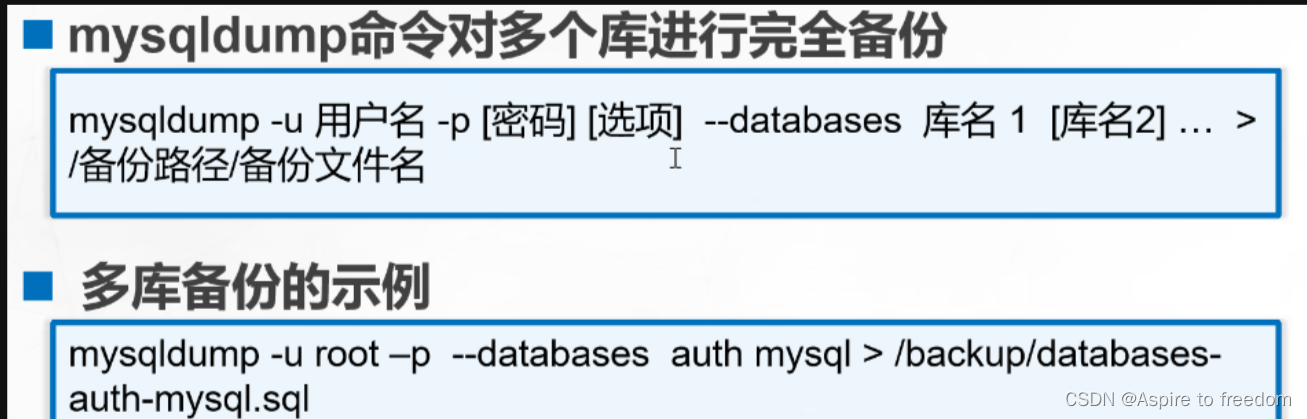
有三个库:zx、zx1、zx2
mysql> show databases;
+--------------------+
| Database           |
+--------------------+
| information_schema |
| mysql              |
| performance_schema |
| sys                |
| zx                 |
| zx1                |
| zx2                |
+--------------------+
7 rows in set (0.00 sec)

mysql>
对这三个库进行备份并查看
[root@zx1 backup]# mysqldump -u root -pabc123 --databases zx zx1 zx2 > /opt/backup/zx2.sql
mysqldump: [Warning] Using a password on the command line interface can be insecure.
[root@zx1 backup]# cat zx2.sql | grep "^USE"
USE `zx`;
USE `zx1`;
USE `zx2`;
[root@zx1 backup]#
备份所有数据库文件:
mysqldump -u用户名 -p密码 --all-databases > 指定路径的绝对路径/数据库名.sql
[root@zx1 backup]# mysqldump -u root -pabc123 --all-databases  > /opt/backup/all-databases.sql
mysqldump: [Warning] Using a password on the command line interface can be insecure.
[root@zx1 backup]# cat all-databases.sql | grep "^USE"                                  USE `mysql`;
USE `zx`;
USE `zx1`;
USE `zx2`;
[root@zx1 backup]#
2)mysqldump备份数据表
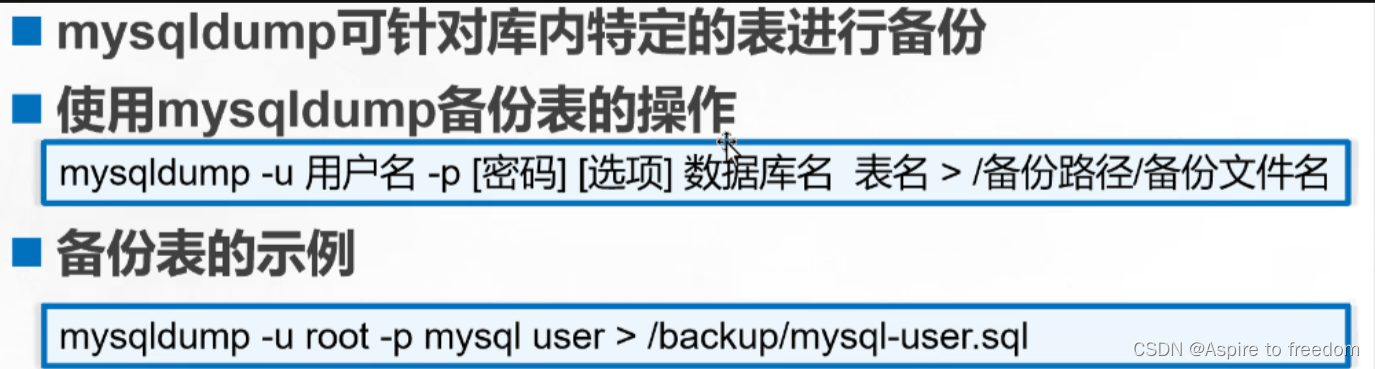
备份指定数据库中的表数据文件:
mysqldump -u用户名 -p密码 数据库名 表名 > 指定路径的绝对路径/数据库名_表名.sql
备份zx库的zx表并查看
[root@zx1 backup]# mysqldump -u root -pabc123  zx zx > /opt/backup/zx_zx.sql            mysqldump: [Warning] Using a password on the command line interface can be insecure.
[root@zx1 backup]# cat zx_zx.sql
-- MySQL dump 10.13  Distrib 5.7.44, for Linux (x86_64)
--
-- Host: localhost    Database: zx
-- ------------------------------------------------------
-- Server version       5.7.44

/*!40101 SET @OLD_CHARACTER_SET_CLIENT=@@CHARACTER_SET_CLIENT */;
/*!40101 SET @OLD_CHARACTER_SET_RESULTS=@@CHARACTER_SET_RESULTS */;
/*!40101 SET @OLD_COLLATION_CONNECTION=@@COLLATION_CONNECTION */;
/*!40101 SET NAMES utf8 */;
/*!40103 SET @OLD_TIME_ZONE=@@TIME_ZONE */;
/*!40103 SET TIME_ZONE='+00:00' */;
/*!40014 SET @OLD_UNIQUE_CHECKS=@@UNIQUE_CHECKS, UNIQUE_CHECKS=0 */;
/*!40014 SET @OLD_FOREIGN_KEY_CHECKS=@@FOREIGN_KEY_CHECKS, FOREIGN_KEY_CHECKS=0 */;
/*!40101 SET @OLD_SQL_MODE=@@SQL_MODE, SQL_MODE='NO_AUTO_VALUE_ON_ZERO' */;
/*!40111 SET @OLD_SQL_NOTES=@@SQL_NOTES, SQL_NOTES=0 */;

--
-- Table structure for table `zx`
--

DROP TABLE IF EXISTS `zx`;
/*!40101 SET @saved_cs_client     = @@character_set_client */;
/*!40101 SET character_set_client = utf8 */;
CREATE TABLE `zx` (
  `id` int(11) NOT NULL,
  `name` varchar(20) DEFAULT NULL,
  `sex` char(2) DEFAULT NULL,
  `age` int(11) DEFAULT NULL,
  PRIMARY KEY (`id`)
) ENGINE=InnoDB DEFAULT CHARSET=utf8;
/*!40101 SET character_set_client = @saved_cs_client */;

--
-- Dumping data for table `zx`
--

LOCK TABLES `zx` WRITE;
/*!40000 ALTER TABLE `zx` DISABLE KEYS */;
INSERT INTO `zx` VALUES (1,'scj','男',20),(2,'zx','男',20),(3,'tc','男',20);
/*!40000 ALTER TABLE `zx` ENABLE KEYS */;
UNLOCK TABLES;
/*!40103 SET TIME_ZONE=@OLD_TIME_ZONE */;

/*!40101 SET SQL_MODE=@OLD_SQL_MODE */;
/*!40014 SET FOREIGN_KEY_CHECKS=@OLD_FOREIGN_KEY_CHECKS */;
/*!40014 SET UNIQUE_CHECKS=@OLD_UNIQUE_CHECKS */;
/*!40101 SET CHARACTER_SET_CLIENT=@OLD_CHARACTER_SET_CLIENT */;
/*!40101 SET CHARACTER_SET_RESULTS=@OLD_CHARACTER_SET_RESULTS */;
/*!40101 SET COLLATION_CONNECTION=@OLD_COLLATION_CONNECTION */;
/*!40111 SET SQL_NOTES=@OLD_SQL_NOTES */;

-- Dump completed on 2024-06-24 15:08:43
[root@zx1 backup]#
3、恢复数据库
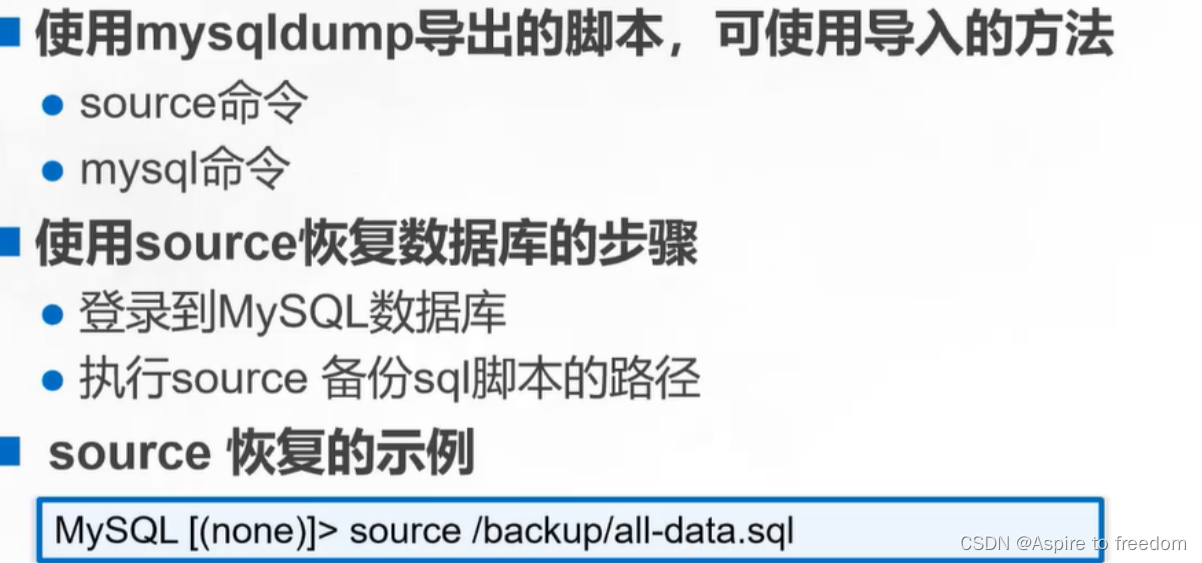
(1)使用source命令恢复数据库
删除zx库
mysql> drop database zx;
Query OK, 4 rows affected (0.01 sec)

mysql> show databases;
+--------------------+
| Database           |
+--------------------+
| information_schema |
| mysql              |
| performance_schema |
| sys                |
| zx1                |
| zx2                |
+--------------------+
6 rows in set (0.00 sec)

mysql>
使用source恢复库
mysql> source /opt/backup/zx1.sql
mysql> show databases;
+--------------------+
| Database           |
+--------------------+
| information_schema |
| mysql              |
| performance_schema |
| sys                |
| zx                 |
| zx1                |
| zx2                |
+--------------------+
7 rows in set (0.00 sec)

mysql>
(2)使用mysql命令恢复数据库
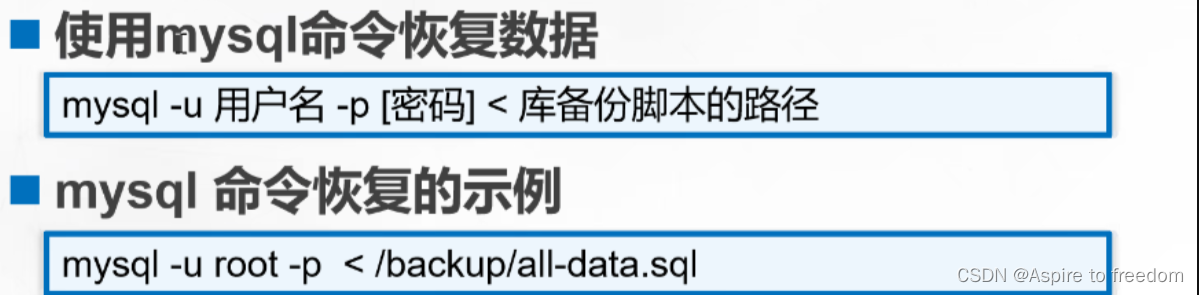
1)重定向方式恢复数据库
删除库zx
mysql> drop database zx;
Query OK, 4 rows affected (0.01 sec)

mysql> show databases;
+--------------------+
| Database           |
+--------------------+
| information_schema |
| mysql              |
| performance_schema |
| sys                |
| zx1                |
| zx2                |
+--------------------+
6 rows in set (0.00 sec)

mysql>
重定向恢复zx库
[root@zx1 backup]#  mysql -u root -pabc123 < /opt/backup/zx1.sql
mysql: [Warning] Using a password on the command line interface can be insecure.
[root@zx1 backup]#  mysql -u root -pabc123 -e 'show databases;'                         mysql: [Warning] Using a password on the command line interface can be insecure.
+--------------------+
| Database           |
+--------------------+
| information_schema |
| mysql              |
| performance_schema |
| sys                |
| zx                 |
| zx1                |
| zx2                |
+--------------------+
[root@zx1 backup]#
2) 管道符方式恢复数据库
删除zx库
mysql> drop database zx;
Query OK, 4 rows affected (0.00 sec)

mysql> show databases;
+--------------------+
| Database           |
+--------------------+
| information_schema |
| mysql              |
| performance_schema |
| sys                |
| zx1                |
| zx2                |
+--------------------+
6 rows in set (0.00 sec)
管道符恢复zx库
[root@zx1 backup]# cat /opt/backup/zx1.sql | mysql -u root -pabc123
mysql: [Warning] Using a password on the command line interface can be insecure.
[root@zx1 backup]#  mysql -u root -pabc123 -e 'show databases;'
mysql: [Warning] Using a password on the command line interface can be insecure.
+--------------------+
| Database           |
+--------------------+
| information_schema |
| mysql              |
| performance_schema |
| sys                |
| zx                 |
| zx1                |
| zx2                |
+--------------------+
[root@zx1 backup]#
(3)恢复表操作
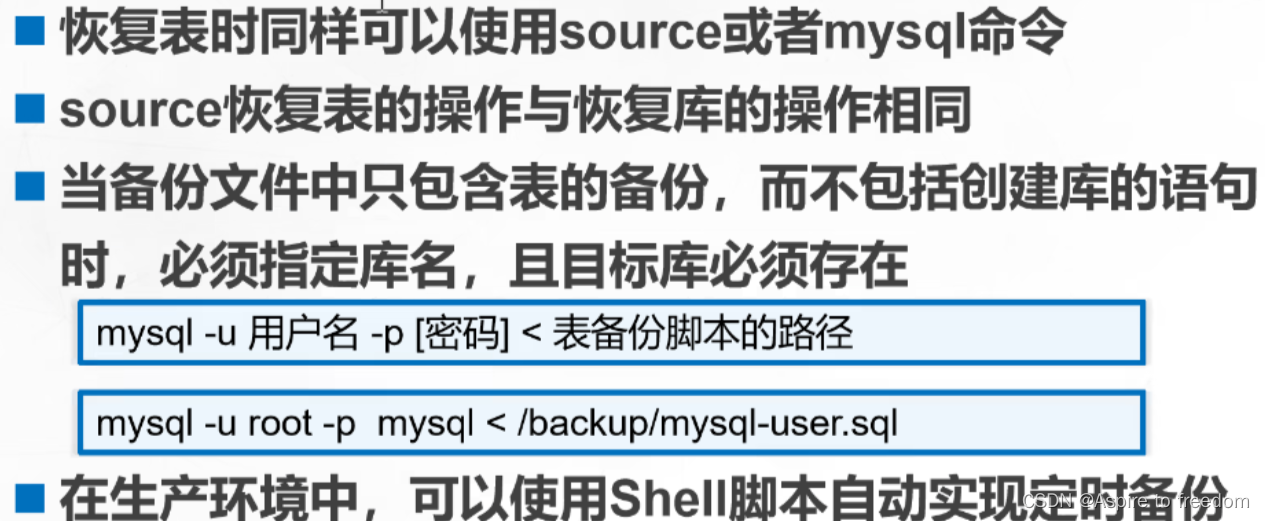
若只想恢复zx库中的zx表,但库中没有zx库,无法恢复表
mysql> drop database zx;
Query OK, 4 rows affected (0.01 sec)

mysql> show databases;
+--------------------+
| Database           |
+--------------------+
| information_schema |
| mysql              |
| performance_schema |
| sys                |
| zx1                |
| zx2                |
+--------------------+
6 rows in set (0.00 sec)

mysql> quit
Bye
[root@zx1 backup]#  mysql -u root -pabc123 < /opt/backup/zx_zx.sql
mysql: [Warning] Using a password on the command line interface can be insecure.
ERROR 1046 (3D000) at line 22: No database selected
[root@zx1 backup]#
需要先创建库再恢复表
[root@zx1 backup]#  mysql -u root -pabc123 -e 'create database zx;'
mysql: [Warning] Using a password on the command line interface can be insecure.
[root@zx1 backup]#  mysql -u root -pabc123 -e 'show databases;'
mysql: [Warning] Using a password on the command line interface can be insecure.
+--------------------+
| Database           |
+--------------------+
| information_schema |
| mysql              |
| performance_schema |
| sys                |
| zx                 |
| zx1                |
| zx2                |
+--------------------+
[root@zx1 backup]#  mysql -u root -pabc123 zx < /opt/backup/zx_zx.sql
mysql: [Warning] Using a password on the command line interface can be insecure.
[root@zx1 backup]#  mysql -u root -pabc123 -e 'show tables from zx;'
mysql: [Warning] Using a password on the command line interface can be insecure.
+--------------+
| Tables_in_zx |
+--------------+
| zx           |
+--------------+
[root@zx1 backup]#
4、MySQL增量备份与恢复
(1)二进制日志文件
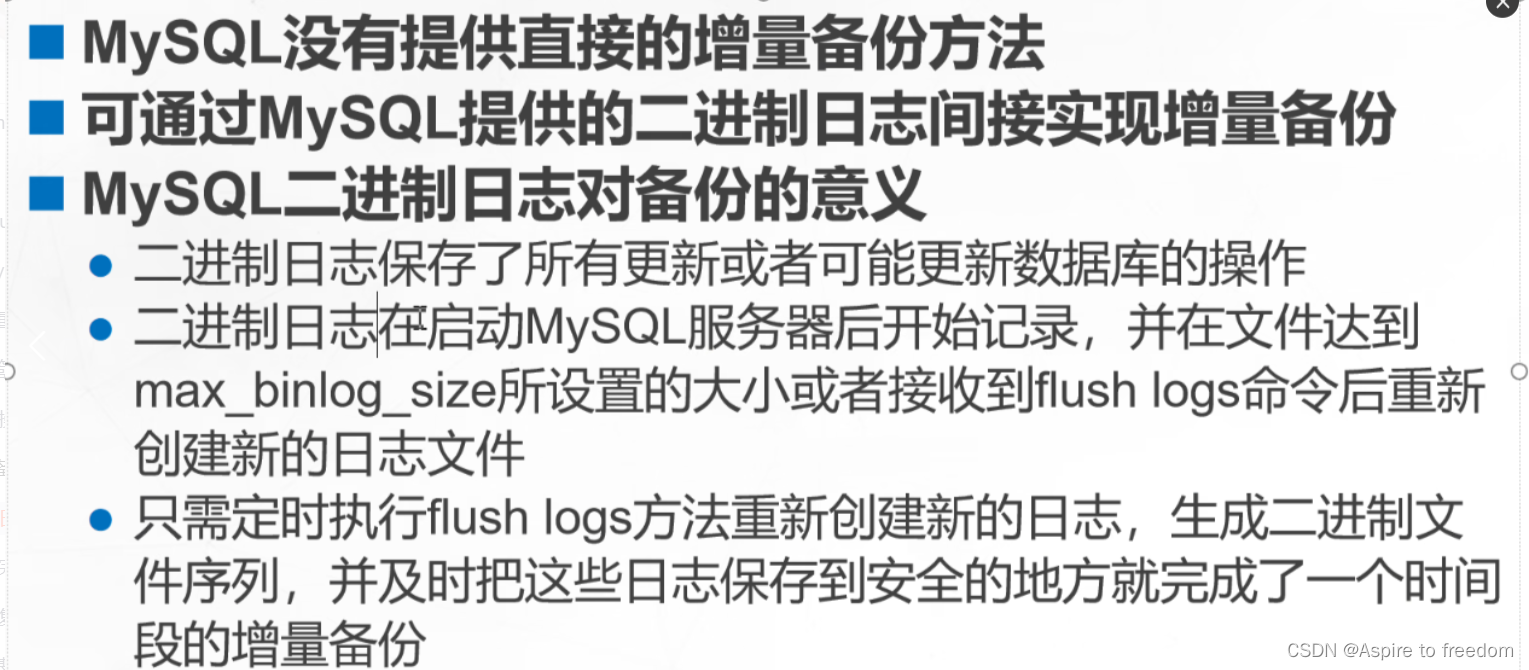
编辑 /etc/my.cnf 文件内容,末行添加以下内容(20.0.0.10)
[root@zx1 backup]# vim /etc/my.cnf


#错误日志
log-error=/usr/local/mysql/data/mysql_error.log
#通用查询日志
general_log=ON
general_log_file=/usr/local/mysql/data/mysql_general.log
#二进制日志
log_bin=mysql_bin
#慢查询日志
slow_query_log=ON
slow_query_log_file=/usr/local/mysql/data/mysql_slow_query.log
long_query_time=2
重启mysql并查看日志
[root@zx1 backup]# systemctl restart mysqld
[root@zx1 backup]# cd /usr/local/mysql/data/
[root@zx1 data]# ls
auto.cnf         ib_logfile0       mysql_general.log     sys
ca-key.pem       ib_logfile1       mysql_slow_query.log  zx
ca.pem           ibtmp1            performance_schema    zx1
client-cert.pem  mysql             private_key.pem       zx2
client-key.pem   mysql_bin.000001  public_key.pem
ib_buffer_pool   mysql_bin.index   server-cert.pem
ibdata1          mysql_error.log   server-key.pem
[root@zx1 data]# vim /etc/my.cnf
[root@zx1 data]#
刷新生成二进制日志文件的两种方式:
(1)重启数据库服务:systemctl restart mysqld;
[root@zx1 data]# ls
auto.cnf         ib_logfile0       mysql_general.log     sys
ca-key.pem       ib_logfile1       mysql_slow_query.log  zx
ca.pem           ibtmp1            performance_schema    zx1
client-cert.pem  mysql             private_key.pem       zx2
client-key.pem   mysql_bin.000001  public_key.pem
ib_buffer_pool   mysql_bin.index   server-cert.pem
ibdata1          mysql_error.log   server-key.pem
[root@zx1 data]# systemctl restart mysqld
[root@zx1 data]# ls
auto.cnf         ibdata1           mysql_bin.000002      private_key.pem  zx1
ca-key.pem       ib_logfile0       mysql_bin.index       public_key.pem   zx2
ca.pem           ib_logfile1       mysql_error.log       server-cert.pem
client-cert.pem  ibtmp1            mysql_general.log     server-key.pem
client-key.pem   mysql             mysql_slow_query.log  sys
ib_buffer_pool   mysql_bin.000001  performance_schema    zx
[root@zx1 data]#
(2)flush-logs命令刷新:mysqladmin -uroot -pabc123 flush-logs;
[root@zx1 data]# ls
auto.cnf         ibdata1           mysql_bin.000002      private_key.pem  zx1
ca-key.pem       ib_logfile0       mysql_bin.index       public_key.pem   zx2
ca.pem           ib_logfile1       mysql_error.log       server-cert.pem
client-cert.pem  ibtmp1            mysql_general.log     server-key.pem
client-key.pem   mysql             mysql_slow_query.log  sys
ib_buffer_pool   mysql_bin.000001  performance_schema    zx
[root@zx1 data]# mysqladmin -uroot -pabc123 flush-logs;
mysqladmin: [Warning] Using a password on the command line interface can be insecure.
[root@zx1 data]# ls
auto.cnf         ibdata1           mysql_bin.000002      performance_schema  zx
ca-key.pem       ib_logfile0       mysql_bin.000003      private_key.pem     zx1
ca.pem           ib_logfile1       mysql_bin.index       public_key.pem      zx2
client-cert.pem  ibtmp1            mysql_error.log       server-cert.pem
client-key.pem   mysql             mysql_general.log     server-key.pem
ib_buffer_pool   mysql_bin.000001  mysql_slow_query.log  sys
[root@zx1 data]#
当前操作命令都会记录在这里
[root@zx1 data]# cat mysql_bin.index
./mysql_bin.000001
./mysql_bin.000002
./mysql_bin.000003
[root@zx1 data]#
二进制日志(binlog)有3种不同的记录格式:
(1)STATEMENT(基于SQL语句):默认格式是STATEMENT。该方式记录语句快,占用内存空间少。但高并发情况下会导致记录日志顺序紊乱,造成恢复数据时发生偏差。
(2)ROW(基于行):基于数据内容行进行记录,不仅记录执行的命令语句,还会记录命令影响的相关数据行。
(3)MIXED(混合模式):高并发情况下ROW方式进行记录,一般情况下采用STATEMENT方式进行记录。
###转换格式,查看指定序列号的二进制数据日志文件
mysqlbinlog --no-defaults --base64-output=decode-rows -v mysql_bin.000003
--no-defaults:不使用默认格式进行查看
--base64-output=decode-rows:使用base64密码格式进行转换,-rows:按行进行输出
-v:显示详细输出过程
测试
设置两台服务器的记录格式为row和statement(20.0.0.10/20.0.0.20)
20.0.0.10(row格式记录了所有修改的内容)
[root@zx1 data]# vim /etc/my.cnf
##末行添加此内容
binlog_format=row

[root@zx1 data]# systemctl restart mysqld.service
[root@zx1 data]# mysql -u root -pabc123
mysql: [Warning] Using a password on the command line interface can be insecure.
Welcome to the MySQL monitor.  Commands end with ; or \g.
Your MySQL connection id is 2
Server version: 5.7.44-log Source distribution

Copyright (c) 2000, 2023, Oracle and/or its affiliates.

Oracle is a registered trademark of Oracle Corporation and/or its
affiliates. Other names may be trademarks of their respective
owners.

Type 'help;' or '\h' for help. Type '\c' to clear the current input statement.


mysql> use zx;
Reading table information for completion of table and column names
You can turn off this feature to get a quicker startup with -A

Database changed
mysql> select * from zx;
+----+------+------+------+
| id | name | sex  | age  |
+----+------+------+------+
|  1 | scj  | 男   |   20 |
|  2 | zx   | 男   |   20 |
|  3 | tc   | 男   |   20 |
+----+------+------+------+
3 rows in set (0.00 sec)

mysql> update zx set age=21 where name='zx';
Query OK, 1 row affected (0.00 sec)
Rows matched: 1  Changed: 1  Warnings: 0

mysql> select * from zx;
+----+------+------+------+
| id | name | sex  | age  |
+----+------+------+------+
|  1 | scj  | 男   |   20 |
|  2 | zx   | 男   |   21 |
|  3 | tc   | 男   |   20 |
+----+------+------+------+
3 rows in set (0.00 sec)

mysql> quit
Bye
[root@zx1 data]# cat mysql_bin.index
./mysql_bin.000001
./mysql_bin.000002
./mysql_bin.000003
./mysql_bin.000004
[root@zx1 data]# mysqlbinlog --no-defaults --base64-output=decode-rows -v mysql_bin.000004
/*!50530 SET @@SESSION.PSEUDO_SLAVE_MODE=1*/;
/*!50003 SET @OLD_COMPLETION_TYPE=@@COMPLETION_TYPE,COMPLETION_TYPE=0*/;
DELIMITER /*!*/;
# at 4
#240624 16:19:38 server id 1  end_log_pos 123 CRC32 0x4c7e11d0  Start: binlog v 4, server v 5.7.44-log created 240624 16:19:38 at startup
# Warning: this binlog is either in use or was not closed properly.
ROLLBACK/*!*/;
# at 123
#240624 16:19:38 server id 1  end_log_pos 154 CRC32 0x73581c51  Previous-GTIDs
# [empty]
# at 154
#240624 16:24:41 server id 1  end_log_pos 219 CRC32 0xd926d6d5  Anonymous_GTID  last_committed=0        sequence_number=1       rbr_only=yes
/*!50718 SET TRANSACTION ISOLATION LEVEL READ COMMITTED*//*!*/;
SET @@SESSION.GTID_NEXT= 'ANONYMOUS'/*!*/;
# at 219
#240624 16:24:41 server id 1  end_log_pos 289 CRC32 0xb64f4f31  Query   thread_id=2    exec_time=0      error_code=0
SET TIMESTAMP=1719217481/*!*/;
SET @@session.pseudo_thread_id=2/*!*/;
SET @@session.foreign_key_checks=1, @@session.sql_auto_is_null=0, @@session.unique_checks=1, @@session.autocommit=1/*!*/;
SET @@session.sql_mode=1437073414/*!*/;
SET @@session.auto_increment_increment=1, @@session.auto_increment_offset=1/*!*/;
/*!\C utf8 *//*!*/;
SET @@session.character_set_client=33,@@session.collation_connection=33,@@session.collation_server=33/*!*/;
SET @@session.lc_time_names=0/*!*/;
SET @@session.collation_database=DEFAULT/*!*/;
BEGIN
/*!*/;
# at 289
#240624 16:24:41 server id 1  end_log_pos 339 CRC32 0x3221872f  Table_map: `zx`.`zx` mapped to number 109
# at 339
#240624 16:24:41 server id 1  end_log_pos 407 CRC32 0x0b5a2f42  Update_rows: table id 109 flags: STMT_END_F
### UPDATE `zx`.`zx`
### WHERE
###   @1=2
###   @2='zx'
###   @3='男'
###   @4=20
### SET
###   @1=2
###   @2='zx'
###   @3='男'
###   @4=21
# at 407
#240624 16:24:41 server id 1  end_log_pos 438 CRC32 0xe973080c  Xid = 13
COMMIT/*!*/;
SET @@SESSION.GTID_NEXT= 'AUTOMATIC' /* added by mysqlbinlog */ /*!*/;
DELIMITER ;
# End of log file
/*!50003 SET COMPLETION_TYPE=@OLD_COMPLETION_TYPE*/;
/*!50530 SET @@SESSION.PSEUDO_SLAVE_MODE=0*/;
[root@zx1 data]#
20.0.0.20(statement格式以SQL语句记录)
[root@zx2 opt]# vim /etc/my.cnf
##在文件末行添加内容
log_bin=mysql_bin
binlog_format=statement

[root@zx2 opt]# systemctl restart mysqld.service
[root@zx2 opt]# mysql -u root -pabc123
mysql: [Warning] Using a password on the command line interface can be insecure.
Welcome to the MySQL monitor.  Commands end with ; or \g.
Your MySQL connection id is 2
Server version: 5.7.44-log Source distribution

Copyright (c) 2000, 2023, Oracle and/or its affiliates.

Oracle is a registered trademark of Oracle Corporation and/or its
affiliates. Other names may be trademarks of their respective
owners.

Type 'help;' or '\h' for help. Type '\c' to clear the current input statement.

mysql> show databases;
+--------------------+
| Database           |
+--------------------+
| information_schema |
| mysql              |
| performance_schema |
| sys                |
| zx                 |
+--------------------+
5 rows in set (0.00 sec)

mysql> use zx;
Reading table information for completion of table and column names
You can turn off this feature to get a quicker startup with -A

Database changed
mysql> show tables;
+--------------+
| Tables_in_zx |
+--------------+
| zx           |
+--------------+
1 row in set (0.00 sec)

mysql> select * from zx;
Empty set (0.00 sec)

mysql> desc zx;
+-------+-------------+------+-----+---------+-------+
| Field | Type        | Null | Key | Default | Extra |
+-------+-------------+------+-----+---------+-------+
| id    | int(11)     | NO   | PRI | NULL    |       |
| name  | varchar(20) | YES  |     | NULL    |       |
| sex   | char(2)     | YES  |     | NULL    |       |
| age   | int(11)     | YES  |     | NULL    |       |
+-------+-------------+------+-----+---------+-------+
4 rows in set (0.00 sec)

mysql> insert into zx(id, name, sex, age) values(1, 'scj', '男', 20);
Query OK, 1 row affected (0.01 sec)

mysql> select * from zx;
+----+------+------+------+
| id | name | sex  | age  |
+----+------+------+------+
|  1 | scj  | 男   |   20 |
+----+------+------+------+
1 row in set (0.00 sec)

mysql> quit
Bye
[root@zx2 opt]# cd /usr/local/mysql/data
[root@zx2 data]# ls
auto.cnf         client-key.pem  ib_logfile1       mysql_bin.index     server-cert.pem
ca-key.pem       ib_buffer_pool  ibtmp1            performance_schema  server-key.pem
ca.pem           ibdata1         mysql             private_key.pem     sys
client-cert.pem  ib_logfile0     mysql_bin.000001  public_key.pem      zx
[root@zx2 data]# cat mysql_bin.index
./mysql_bin.000001
[root@zx2 data]#  mysqlbinlog --no-defaults --base64-output=decode-rows -v mysql_bin.000001
/*!50530 SET @@SESSION.PSEUDO_SLAVE_MODE=1*/;
/*!50003 SET @OLD_COMPLETION_TYPE=@@COMPLETION_TYPE,COMPLETION_TYPE=0*/;
DELIMITER /*!*/;
# at 4
#240624 16:34:05 server id 1  end_log_pos 123 CRC32 0x1c3c5cf3  Start: binlog v 4, server v 5.7.44-log created 240624 16:34:05 at startup
# Warning: this binlog is either in use or was not closed properly.
ROLLBACK/*!*/;
# at 123
#240624 16:34:05 server id 1  end_log_pos 154 CRC32 0x4d904a90  Previous-GTIDs
# [empty]
# at 154
#240624 16:36:13 server id 1  end_log_pos 219 CRC32 0x9a1c66e3  Anonymous_GTID  last_committed=0        sequence_number=1       rbr_only=no
SET @@SESSION.GTID_NEXT= 'ANONYMOUS'/*!*/;
# at 219
#240624 16:36:13 server id 1  end_log_pos 294 CRC32 0x2dd0eb0a  Query   thread_id=2    exec_time=0      error_code=0
SET TIMESTAMP=1719218173/*!*/;
SET @@session.pseudo_thread_id=2/*!*/;
SET @@session.foreign_key_checks=1, @@session.sql_auto_is_null=0, @@session.unique_checks=1, @@session.autocommit=1/*!*/;
SET @@session.sql_mode=1437073414/*!*/;
SET @@session.auto_increment_increment=1, @@session.auto_increment_offset=1/*!*/;
/*!\C utf8 *//*!*/;
SET @@session.character_set_client=33,@@session.collation_connection=33,@@session.collation_server=33/*!*/;
SET @@session.lc_time_names=0/*!*/;
SET @@session.collation_database=DEFAULT/*!*/;
BEGIN
/*!*/;
# at 294
#240624 16:36:13 server id 1  end_log_pos 426 CRC32 0x9cb5cf4f  Query   thread_id=2    exec_time=0      error_code=0
use `zx`/*!*/;
SET TIMESTAMP=1719218173/*!*/;
insert into zx(id, name, sex, age) values(1, 'scj', '男', 20)
/*!*/;
# at 426
#240624 16:36:13 server id 1  end_log_pos 457 CRC32 0x9182829f  Xid = 12
COMMIT/*!*/;
SET @@SESSION.GTID_NEXT= 'AUTOMATIC' /* added by mysqlbinlog */ /*!*/;
DELIMITER ;
# End of log file
/*!50003 SET COMPLETION_TYPE=@OLD_COMPLETION_TYPE*/;
/*!50530 SET @@SESSION.PSEUDO_SLAVE_MODE=0*/;
[root@zx2 data]#
(2)实例:完全备份+增量备份恢复数据库

完全备份+增量备份
准备测试表格
mysql> select * from zx;
+----+------+------+------+
| id | name | sex  | age  |
+----+------+------+------+
|  1 | scj  | 男   |   20 |
|  2 | zx   | 男   |   21 |
|  3 | tc   | 男   |   20 |
+----+------+------+------+
3 rows in set (0.00 sec)

mysql>
创建完全备份和增量备份的保存目录
[root@zx1 data]# cd ~
[root@zx1 ~]# mkdir back-all
[root@zx1 ~]# mkdir back-everyday
[root@zx1 ~]# ls
anaconda-ks.cfg  back-everyday         公共  视频  文档  音乐
back-all         initial-setup-ks.cfg  模板  图片  下载  桌面
[root@zx1 ~]#
备份数据库zx和库中的表zx
[root@zx1 ~]# mysqldump -u root -pabc123 --databases zx > /root/back-all/test_$(date +%Y%m%d).sql
mysqldump: [Warning] Using a password on the command line interface can be insecure.
[root@zx1 ~]# mysqldump -u root -pabc123 zx zx  > /root/back-all/test_zx_$(date +%Y%m%d).sql
mysqldump: [Warning] Using a password on the command line interface can be insecure.
[root@zx1 ~]# ls back-all/
test_20240624.sql  test_zx_20240624.sql
[root@zx1 ~]#
mysql_bin.000004 为现在操作保存位置
[root@zx1 data]# ls
auto.cnf         ibdata1           mysql_bin.000002   mysql_slow_query.log  sys
ca-key.pem       ib_logfile0       mysql_bin.000003   performance_schema    zx
ca.pem           ib_logfile1       mysql_bin.000004   private_key.pem       zx1
client-cert.pem  ibtmp1            mysql_bin.index    public_key.pem        zx2
client-key.pem   mysql             mysql_error.log    server-cert.pem
ib_buffer_pool   mysql_bin.000001  mysql_general.log  server-key.pem
[root@zx1 data]# mysqladmin -u root -pabc123 flush-logs
mysqladmin: [Warning] Using a password on the command line interface can be insecure.
[root@zx1 data]# ls
auto.cnf         ib_logfile1       mysql_bin.index       server-key.pem
ca-key.pem       ibtmp1            mysql_error.log       sys
ca.pem           mysql             mysql_general.log     zx
client-cert.pem  mysql_bin.000001  mysql_slow_query.log  zx1
client-key.pem   mysql_bin.000002  performance_schema    zx2
ib_buffer_pool   mysql_bin.000003  private_key.pem
ibdata1          mysql_bin.000004  public_key.pem
ib_logfile0      mysql_bin.000005  server-cert.pem
备份
[root@zx1 data]# cp mysql_bin.000004 /root/back-everyday/mysql_bin.$(date +%Y%m%d)
[root@zx1 data]# ls /root/back-everyday/
mysql_bin.20240624
[root@zx1 data]#
插入两条数据做增量备份
mysql> select * from zx;
+----+------+------+------+
| id | name | sex  | age  |
+----+------+------+------+
|  1 | scj  | 男   |   20 |
|  2 | zx   | 男   |   21 |
|  3 | tc   | 男   |   20 |
+----+------+------+------+
3 rows in set (0.00 sec)

mysql> insert into zx(id, name, sex, age) values(4, 'ctt', '女', 20);
Query OK, 1 row affected (0.00 sec)

mysql> insert into zx(id, name, sex, age) values(5, 'jlh', '男', 20);
Query OK, 1 row affected (0.00 sec)

mysql>
刷新生成二进制文件复制到指定目录
[root@zx1 data]# mysqladmin -u root -pabc123 flush-logs
mysqladmin: [Warning] Using a password on the command line interface can be insecure.
[root@zx1 data]# ls
auto.cnf         ib_logfile1       mysql_bin.000006      server-cert.pem
ca-key.pem       ibtmp1            mysql_bin.index       server-key.pem
ca.pem           mysql             mysql_error.log       sys
client-cert.pem  mysql_bin.000001  mysql_general.log     zx
client-key.pem   mysql_bin.000002  mysql_slow_query.log  zx1
ib_buffer_pool   mysql_bin.000003  performance_schema    zx2
ibdata1          mysql_bin.000004  private_key.pem
ib_logfile0      mysql_bin.000005  public_key.pem
[root@zx1 data]# cp mysql_bin.000005 /root/back-everyday/mysql_bin.20240625
[root@zx1 data]# ls /root/back-everyday/
mysql_bin.20240624  mysql_bin.20240625
[root@zx1 data]#
插入第三次数据
mysql> insert into zx(id, name, sex, age) values(6, 'zyr', '男', 20);
Query OK, 1 row affected (0.00 sec)

mysql> insert into zx(id, name, sex, age) values(7, 'tj', '男', 20);
Query OK, 1 row affected (0.00 sec)

mysql> select * from zx;
+----+------+------+------+
| id | name | sex  | age  |
+----+------+------+------+
|  1 | scj  | 男   |   20 |
|  2 | zx   | 男   |   21 |
|  3 | tc   | 男   |   20 |
|  4 | ctt  | 女   |   20 |
|  5 | jlh  | 男   |   20 |
|  6 | zyr  | 男   |   20 |
|  7 | tj   | 男   |   20 |
+----+------+------+------+
7 rows in set (0.00 sec)
刷新生成二进制文件复制到指定目录
[root@zx1 data]# mysqladmin -u root -pabc123 flush-logs
mysqladmin: [Warning] Using a password on the command line interface can be insecure.
[root@zx1 data]# cp mysql_bin.000006 /root/back-everyday/mysql_bin.20240626
[root@zx1 data]# ls /root/back-everyday/
mysql_bin.20240624  mysql_bin.20240625  mysql_bin.20240626
[root@zx1 data]#
完全恢复+增量恢复
删除zx库
mysql> show databases;
+--------------------+
| Database           |
+--------------------+
| information_schema |
| mysql              |
| performance_schema |
| sys                |
| zx                 |
| zx1                |
| zx2                |
+--------------------+
7 rows in set (0.00 sec)

mysql> drop database zx;
Query OK, 1 row affected (0.00 sec)

mysql> show databases;
+--------------------+
| Database           |
+--------------------+
| information_schema |
| mysql              |
| performance_schema |
| sys                |
| zx1                |
| zx2                |
+--------------------+
6 rows in set (0.00 sec)

mysql>
将库数据恢复
[root@zx1 data]# mysql -u root -pabc123 < /root/back-all/test_20240624.sql
mysql: [Warning] Using a password on the command line interface can be insecure.
[root@zx1 data]# mysql -u root -pabc123 -e 'show databases;'
mysql: [Warning] Using a password on the command line interface can be insecure.
+--------------------+
| Database           |
+--------------------+
| information_schema |
| mysql              |
| performance_schema |
| sys                |
| zx                 |
| zx1                |
| zx2                |
+--------------------+
[root@zx1 data]# mysql -u root -pabc123 -e 'select * from zx.zx;'
mysql: [Warning] Using a password on the command line interface can be insecure.
+----+------+------+------+
| id | name | sex  | age  |
+----+------+------+------+
|  1 | scj  | 男   |   20 |
|  2 | zx   | 男   |   21 |
|  3 | tc   | 男   |   20 |
+----+------+------+------+
[root@zx1 data]#
增量恢复
[root@zx1 data]# cd /root/back-everyday/
[root@zx1 back-everyday]# ls
mysql_bin.20240624  mysql_bin.20240625  mysql_bin.20240626
[root@zx1 back-everyday]# mysqlbinlog --no-defaults mysql_bin.20240625 | mysql -u root -pabc123
mysql: [Warning] Using a password on the command line interface can be insecure.
[root@zx1 back-everyday]# mysql -u root -pabc123 -e 'select * from zx.zx;'
mysql: [Warning] Using a password on the command line interface can be insecure.
+----+------+------+------+
| id | name | sex  | age  |
+----+------+------+------+
|  1 | scj  | 男   |   20 |
|  2 | zx   | 男   |   21 |
|  3 | tc   | 男   |   20 |
|  4 | ctt  | 女   |   20 |
|  5 | jlh  | 男   |   20 |
+----+------+------+------+
[root@zx1 back-everyday]# mysqlbinlog --no-defaults mysql_bin.20240626 | mysql -u root -pabc123
mysql: [Warning] Using a password on the command line interface can be insecure.
[root@zx1 back-everyday]# mysql -u root -pabc123 -e 'select * from zx.zx;'              mysql: [Warning] Using a password on the command line interface can be insecure.
+----+------+------+------+
| id | name | sex  | age  |
+----+------+------+------+
|  1 | scj  | 男   |   20 |
|  2 | zx   | 男   |   21 |
|  3 | tc   | 男   |   20 |
|  4 | ctt  | 女   |   20 |
|  5 | jlh  | 男   |   20 |
|  6 | zyr  | 男   |   20 |
|  7 | tj   | 男   |   20 |
+----+------+------+------+
(3)断点恢复
删除id>=4(mysql_bin.20240626 为上个实验第三次插入数据id为6、7的增量备份文件)
[root@zx1 ~]# mysql -u root -pabc123 -e 'select * from zx.zx;'
mysql: [Warning] Using a password on the command line interface can be insecure.
+----+------+------+------+
| id | name | sex  | age  |
+----+------+------+------+
|  1 | scj  | 男   |   20 |
|  2 | zx   | 男   |   21 |
|  3 | tc   | 男   |   20 |
|  4 | ctt  | 女   |   20 |
|  5 | jlh  | 男   |   20 |
|  6 | zyr  | 男   |   20 |
|  7 | tj   | 男   |   20 |
+----+------+------+------+
[root@zx1 ~]# mysql -u root -pabc123 -e 'delete from zx.zx where id>=4;'
mysql: [Warning] Using a password on the command line interface can be insecure.
[root@zx1 ~]# mysql -u root -pabc123 -e 'select * from zx.zx;'
mysql: [Warning] Using a password on the command line interface can be insecure.
+----+------+------+------+
| id | name | sex  | age  |
+----+------+------+------+
|  1 | scj  | 男   |   20 |
|  2 | zx   | 男   |   21 |
|  3 | tc   | 男   |   20 |
+----+------+------+------+
[root@zx1 data]# cd /root/back-everyday/
[root@zx1 back-everyday]# mysqlbinlog --no-defaults --base64-output=decode-rows -v mysql_bin.20240626 > binlog-0626  ##将二进制文件重定向输出,以文件方式查看
[root@zx1 back-everyday]# ls
binlog-0626  mysql_bin.20240624  mysql_bin.20240625  mysql_bin.20240626
1)基于位置恢复
只恢复id为7的内容
左边是查看 binlog-0626 文件的内容
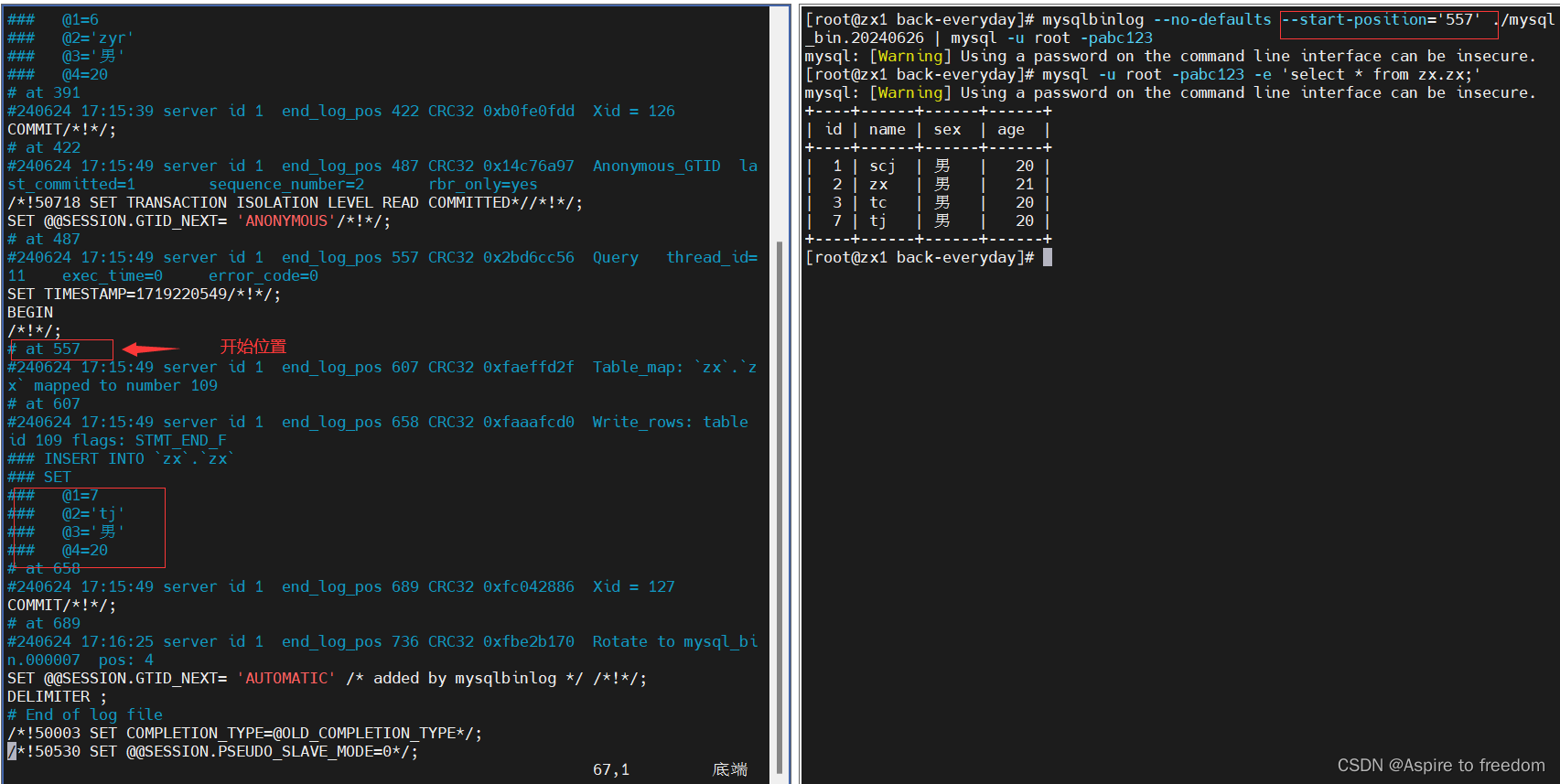
只恢复id为6的内容
删除刚恢复的第七行内容
[root@zx1 back-everyday]# mysql -u root -pabc123 -e 'delete from zx.zx where id=7;'
mysql: [Warning] Using a password on the command line interface can be insecure.
[root@zx1 back-everyday]# mysql -u root -pabc123 -e 'select * from zx.zx;'        mysql: [Warning] Using a password on the command line interface can be insecure.
+----+------+------+------+
| id | name | sex  | age  |
+----+------+------+------+
|  1 | scj  | 男   |   20 |
|  2 | zx   | 男   |   21 |
|  3 | tc   | 男   |   20 |
+----+------+------+------+
[root@zx1 back-everyday]#
恢复第6行内容

增量备份数据多的时候,可以 --start-position='开始位置' --stop-position='结束位置' 来恢复指定的一段数据
2)基于时间恢复
只恢复id为7的内容
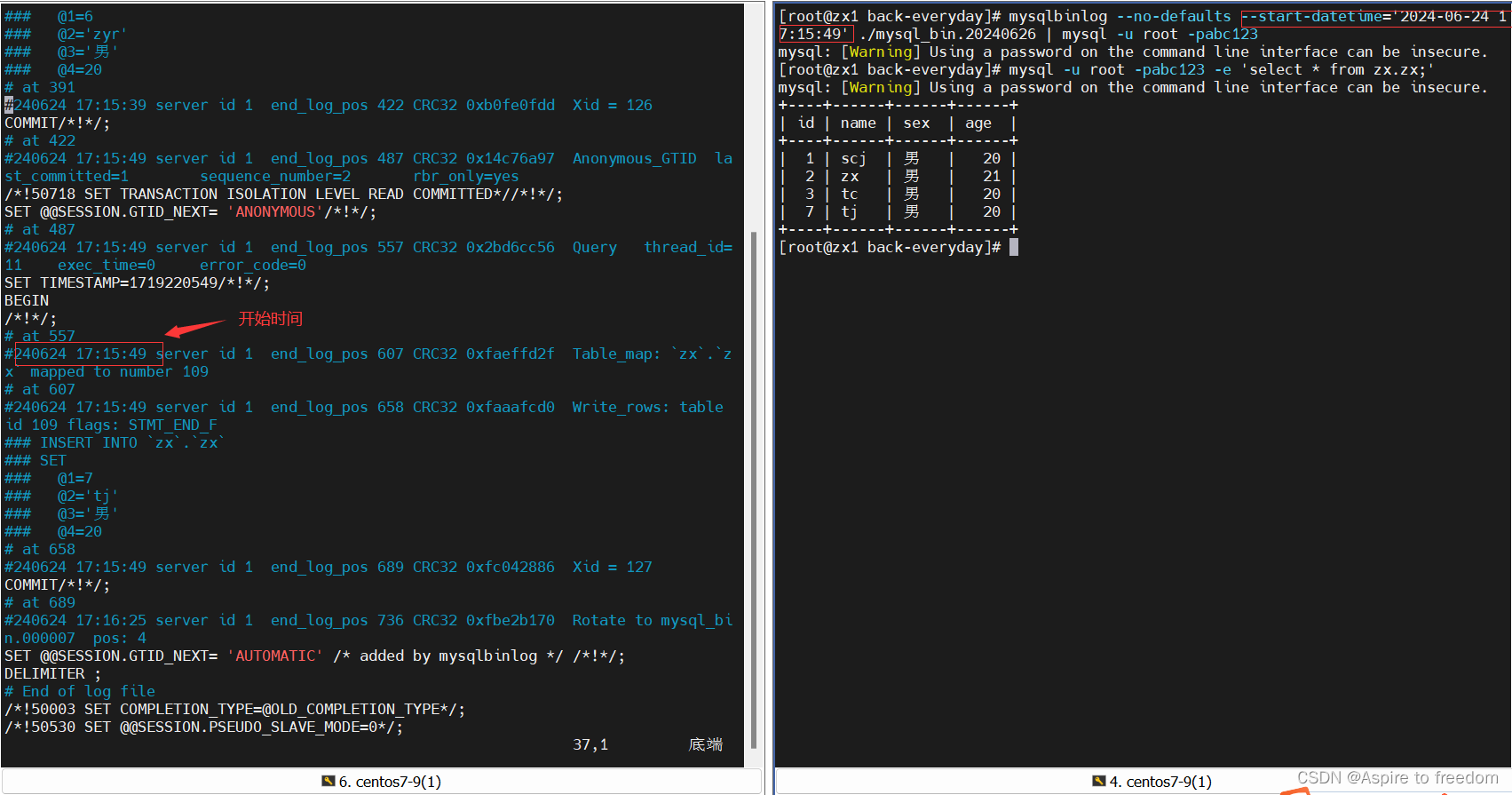
只恢复id为6的内容
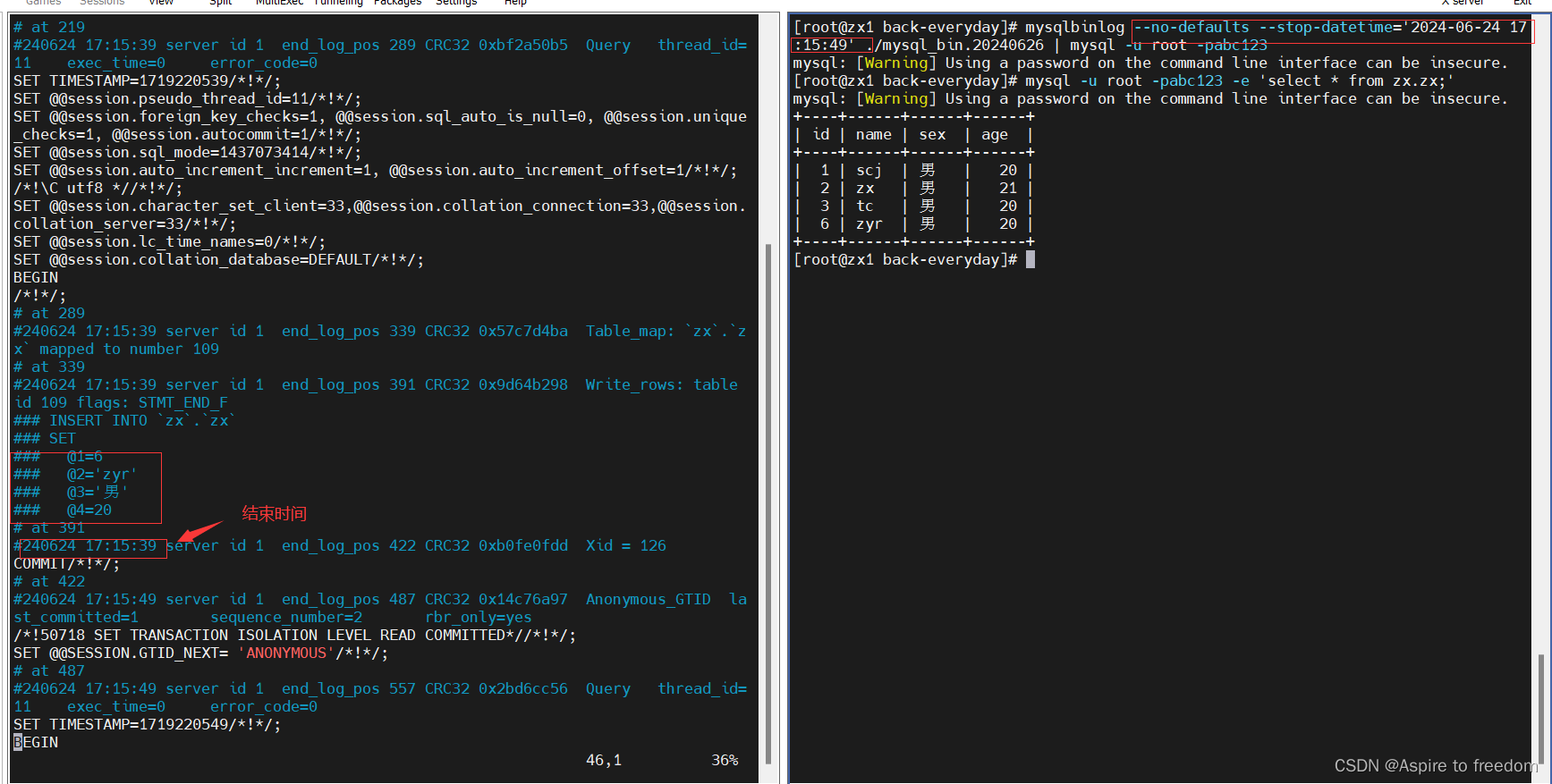
增量备份数据多的时候,可以 --start-datetime='开始时间' --stop-datetime='结束时间' 来恢复指定的一段数据
5、如何备份的数据库
通过xtrabackup对所有数据库做完全备份,使用mysqldump针对某个库或者某个表做完全备份,还可以通过二进制或xtrabackup来做增量备份。