6.6 本章练习
1)设计并实现完整的Restful风格的人员管理模块的Web API,版本号为V1,并配置产生Swagger接口文档。
答案:
-
配置 Swagger 接口文档 创建一个 Swagger 配置类。
package com.example.demo.config;
import io.swagger.v3.oas.models.Components;
import io.swagger.v3.oas.models.OpenAPI;
import io.swagger.v3.oas.models.info.Info;
import io.swagger.v3.oas.models.security.SecurityRequirement;
import io.swagger.v3.oas.models.security.SecurityScheme;
import org.springframework.context.annotation.Bean;
import org.springframework.context.annotation.Configuration;
import org.springframework.web.servlet.config.annotation.WebMvcConfigurer;@Configuration
public class Swagger2Config implements WebMvcConfigurer {@Bean public OpenAPI customOpenAPI() { return new OpenAPI() .info(new Info().title("API Documentation") .description("使用 Spring Boot 构建的 RESTful APIs") .version("V1")) .components(new Components().addSecuritySchemes("bearAuth", new SecurityScheme().name("Authorization") .type(SecurityScheme.Type.HTTP) .scheme("bear") .bearerFormat("JWT") )).addSecurityItem(new SecurityRequirement().addList("bearAuth")); }}
-
创建人员实体类 Person 实体类
package com.example.demo.bean;
import javax.persistence.Entity;
import javax.persistence.GeneratedValue;
import javax.persistence.GenerationType;
import javax.persistence.Id;@Entity
public class Person {@Id @GeneratedValue(strategy = GenerationType.IDENTITY) private Long id; private String name; private Integer age; private String email; public Person() { } public Person(Long id, String name, Integer age, String email) { this.id = id; this.name = name; this.age = age; this.email = email; } public Long getId() { return id; } public void setId(Long id) { this.id = id; } public String getName() { return name; } public void setName(String name) { this.name = name; } public Integer getAge() { return age; } public void setAge(Integer age) { this.age = age; } public String getEmail() { return email; } public void setEmail(String email) { this.email = email; }}
-
创建人员控制器 接下来,创建一个控制器来处理 Web API 请求,遵循 RESTful 风格 PersonOneController
package com.example.demo.controller;
import com.example.demo.bean.Person;
import io.swagger.v3.oas.annotations.Operation;
import io.swagger.v3.oas.annotations.responses.ApiResponse;
import io.swagger.v3.oas.annotations.responses.ApiResponses;
import org.springframework.http.HttpStatus;
import org.springframework.http.ResponseEntity;
import org.springframework.web.bind.annotation.*;
import java.util.ArrayList;
import java.util.List;@RestController
@RequestMapping("/api/v1/persons")
public class PersonOneController {List<Person> personList = new ArrayList<>(); public PersonOneController() { personList.add(new Person(1L, "Alice", 12, "123@163.com")); personList.add(new Person(2L, "Bob", 12, "123@163.com")); } @Operation(summary = "Get all persons", description = "Retrieve all persons from the database.") @GetMapping public List<Person> getAllPersons() { return personList; } @Operation(summary = "Get person by ID", description = "Retrieve a person by their unique ID.") @ApiResponses(value = { @ApiResponse(responseCode = "200", description = "Found the person"), @ApiResponse(responseCode = "404", description = "Person not found") }) @GetMapping("/{id}") public Person getPersonById(@PathVariable Long id) { int personIndex = getPersonIndexUsingPersonId(id); Person person = personList.get(personIndex); return person; } private Integer getPersonIndexUsingPersonId(Long personId) { int personIndex = 0; for (Person personObj : personList) { if (personObj.getId() == personId) { personIndex = personList.indexOf(personObj); } } return personIndex; } @Operation(summary = "Create a new person", description = "Create a new person in the database.") @PostMapping public ResponseEntity<Person> createPerson(@RequestBody Person person) { personList.add(person); return new ResponseEntity<>(person, HttpStatus.CREATED); } @Operation(summary = "Update an existing person", description = "Update an existing person by ID.") @PutMapping("/{id}") public ResponseEntity<Person> updatePerson(@PathVariable Long id, @RequestBody Person person) { int personIndex = getPersonIndexUsingPersonId(id); personList.set(personIndex, person); return new ResponseEntity<>(person, HttpStatus.OK); } @Operation(summary = "Delete a person", description = "Delete a person by their unique ID.") @DeleteMapping("/{id}") public ResponseEntity<Void> deletePerson(@PathVariable Long id) { int personIndex = getPersonIndexUsingPersonId(id); personList.remove(id); return ResponseEntity.noContent().build(); }}
-
启动并测试 启动 Spring Boot 应用并访问 Swagger UI:
Swagger UI 页面会显示所有 API 的文档,您可以在该页面直接测试人员管理的增、删、改、查操作。

2)实现人员管理模块的Web API控制版本,接口新版本为V2,修改V2版本的人员新增接口,并增加人员批量删除接口。
答案:
Sprinng boot对Restful的支持非常全面,因而实现Restful API非常简单,同样对于API版本控制也有相应的实现方案:
1)创建自定义的@ApiVersion注解。
2)自定义URL匹配规则ApiVersionCondition。
3)使用RequestMappingHandlerMapping创建自定义的映射处理程序,根据Request参数匹配符合条件的处理程序。
下面通过示例程序来演示Web API如何增加版本号。
-
创建自定义注解 创建一个自定义版本号标记注解@ApiVersion,实现代码如下:
package com.example.demo.apiversion;
import java.lang.annotation.*;
@Target({ElementType.TYPE})
@Retention(RetentionPolicy.RUNTIME)
@Documented
public @interface ApiVersion {
int value() default 1;
}
在上面的示例中,创建了ApiVersion自定义注解用于API版本控制,并返回了对应的版本号。
-
自定义URL匹配逻辑 接下来定义URL匹配逻辑,创建ApiVersionCondition类并继承RequestCondition接口,将提取请求URL中的版本号与注解上定义的版本号进行对比,以此来判断某个请求应落在哪个控制器上。实现代码如下:
package com.example.demo.apiversion;
import org.springframework.web.servlet.mvc.condition.RequestCondition;
import javax.servlet.http.HttpServletRequest;
import java.util.regex.Matcher;
import java.util.regex.Pattern;public class ApiVersionCondition implements RequestCondition
{ private final static Pattern VERSION_PREFIX_PATTERN = Pattern.compile(".*v(\\d+).*"); private int apiVersion; public ApiVersionCondition(int apiVersion) { this.apiVersion = apiVersion; } public int getApiVersion() { return apiVersion; } public void setApiVersion(int apiVersion) { this.apiVersion = apiVersion; } @Override public ApiVersionCondition combine(ApiVersionCondition other) { return new ApiVersionCondition(other.getApiVersion()); } @Override public ApiVersionCondition getMatchingCondition(HttpServletRequest request) { Matcher m = VERSION_PREFIX_PATTERN.matcher(request.getRequestURI()); if(m.find()){ Integer version = Integer.parseInt(m.group(1)); if(version >= this.apiVersion){ return this; } } return null; } @Override public int compareTo(ApiVersionCondition other, HttpServletRequest request) { return other.getApiVersion() - this.apiVersion; }}
在上面的示例中,通过ApiVersionCondition类重写RequestCondition定义的URL匹配逻辑。
当方法级别和类级别都有ApiVersion注解时,通过ApiVersionRequestCondition.combine方法将两者进行合并。最终将提取请求URL中的版本号,与注解上定义的版本号进行比对,判断URL是否符合版本要求。
-
自定义匹配的处理程序 接下来实现自定义匹配的处理程序。先创建ApiRequestMappingHandlerMapping类,重写部分RequestMappingHandlerMapping的方法,实现自定义的匹配处理程序 示例代码如下:
package com.example.demo.apiversion;
import org.springframework.web.bind.annotation.RequestMapping;
import org.springframework.web.servlet.mvc.condition.RequestCondition;
import org.springframework.web.servlet.mvc.method.annotation.RequestMappingHandlerMapping;import java.lang.reflect.Method;
public class ApiRequestMappingHandlerMapping extends RequestMappingHandlerMapping {
 private static final String VERSION_FLAG = "version";

 private static RequestCondition<ApiVersionCondition> createCondition(Class<?> clazz) {
     RequestMapping classRequestMapping = clazz.getAnnotation(RequestMapping.class);
     if (classRequestMapping == null) {
         return null;
     }
     StringBuilder mappingUrlBuilder = new StringBuilder();
     if(classRequestMapping.value().length > 0){
         mappingUrlBuilder.append(classRequestMapping.value()[0]);
     }
     String mappingUrl = mappingUrlBuilder.toString();
     if(!mappingUrl.contains(VERSION_FLAG)){
         return null;
     }
     ApiVersion apiVersion = clazz.getAnnotation(ApiVersion.class);
     return apiVersion == null? new ApiVersionCondition(1) : new ApiVersionCondition(apiVersion.value());
 }

 @Override
 protected RequestCondition<?> getCustomMethodCondition(Method method) {
     return createCondition(method.getClass());
 }

 @Override
 protected RequestCondition<?> getCustomTypeCondition(Class<?> handlerType) {
     return createCondition(handlerType);
 }
}
-
配置注册自定义的RequestMappingHandlerMapping。 重写WebMvcRegistrationsConfig类,重写getRequestMappingHandlerMapping()的方法,将之前创建的ApiRequestMappingHandlerMapping注册到系统中。
package com.example.demo.apiversion;
import org.springframework.boot.autoconfigure.web.servlet.WebMvcRegistrations;
import org.springframework.context.annotation.Configuration;
import org.springframework.web.servlet.mvc.method.annotation.RequestMappingHandlerMapping;@Configuration
public class WebMvcRegisterationsConfig implements WebMvcRegistrations {@Override public RequestMappingHandlerMapping getRequestMappingHandlerMapping() { return new ApiRequestMappingHandlerMapping(); }}
-
配置实现接口。 配置完成之后,接下来编写测试的控制器(Controller),实现相关接口的测试。在Controller目录下分别创建OrderV1Controller和OrderV2Controller。示例代码如下:
OrderV1Controller;
package com.example.demo.controller;

import com.example.demo.apiversion.ApiVersion;
import com.example.demo.bean.JSONResult;
import org.springframework.web.bind.annotation.GetMapping;
import org.springframework.web.bind.annotation.PathVariable;
import org.springframework.web.bind.annotation.RequestMapping;
import org.springframework.web.bind.annotation.RestController;

@ApiVersion(value = 1)
@RestController
@RequestMapping("api/{version}/order")
public class OrderV1Controller {

    @GetMapping("/delete/{orderId}")
    public JSONResult deleteOrderById(@PathVariable String orderId) {
        System.out.println("V1删除订单成功:"+orderId);
        return JSONResult.ok("V1删除订单成功");
    }

    @GetMapping("/detail/{orderId}")
    public JSONResult queryOrderById(@PathVariable String orderId) {
        System.out.println("V1获取订单详情成功:"+orderId);
        return JSONResult.ok("V1获取订单详情成功");
    }

}
OrderV2Controller:
package com.example.demo.controller;

import com.example.demo.apiversion.ApiVersion;
import com.example.demo.bean.JSONResult;
import com.example.demo.bean.Person;
import org.springframework.web.bind.annotation.*;

import java.util.List;


@ApiVersion(value = 2)
@RestController
@RequestMapping("api/{version}/order")
public class OrderV2Controller {

    @GetMapping("/detail/{orderId}")
    public JSONResult queryOrderById(@PathVariable String orderId) {
        System.out.println("V2获取订单详情成功:"+orderId);
        return JSONResult.ok("V2获取订单详情成功");
    }

    @GetMapping("/list")
    public JSONResult list(){
        System.out.println("V2,新增list订单列表接口");
        return JSONResult.ok("V2,新增list订单列表接口");
    }

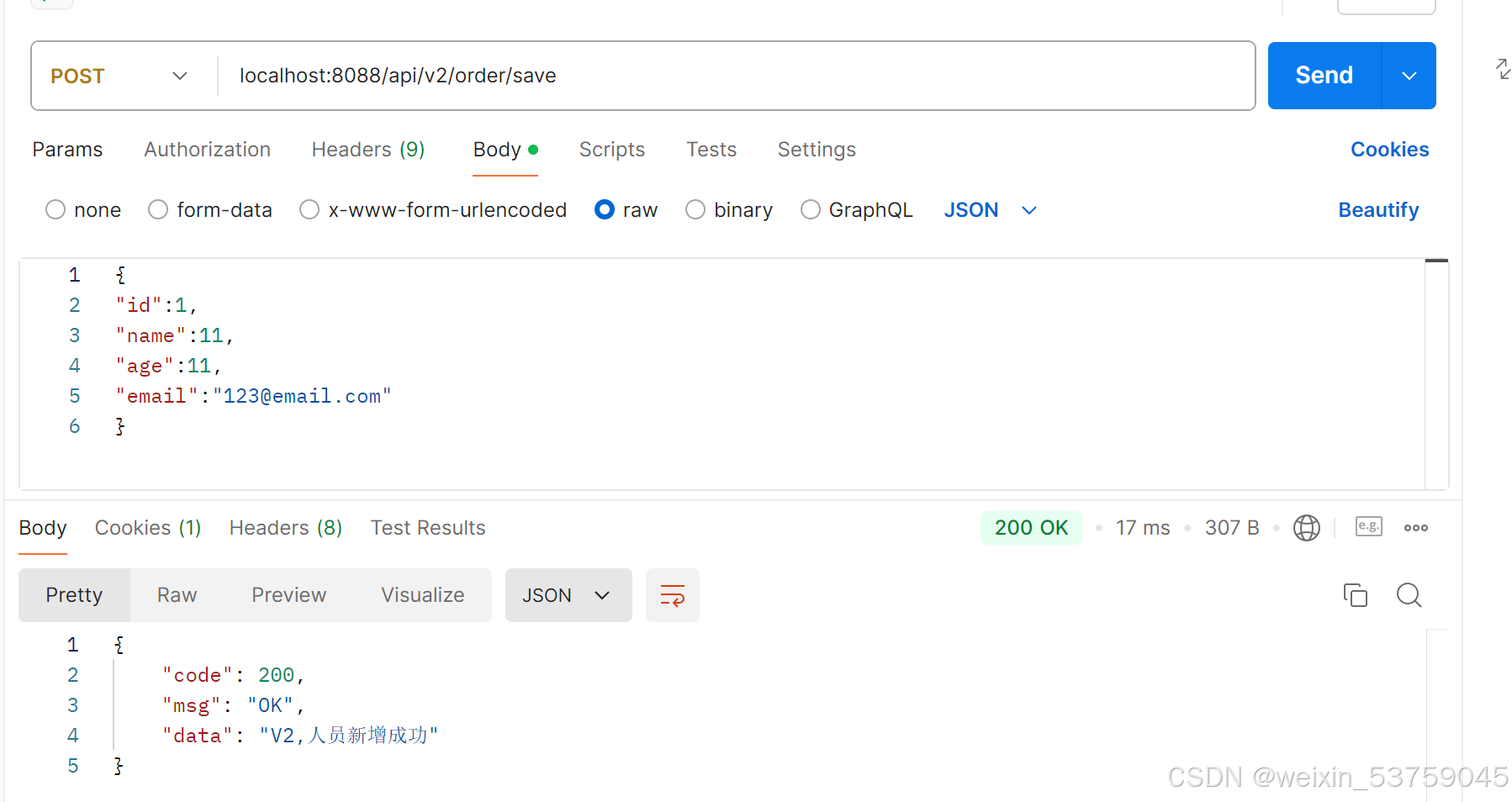
    @PostMapping("/save")
    public JSONResult saveOrder(@RequestBody Person person){
        System.out.println("V2,人员新增成功");
        return JSONResult.ok("V2,人员新增成功");
    }

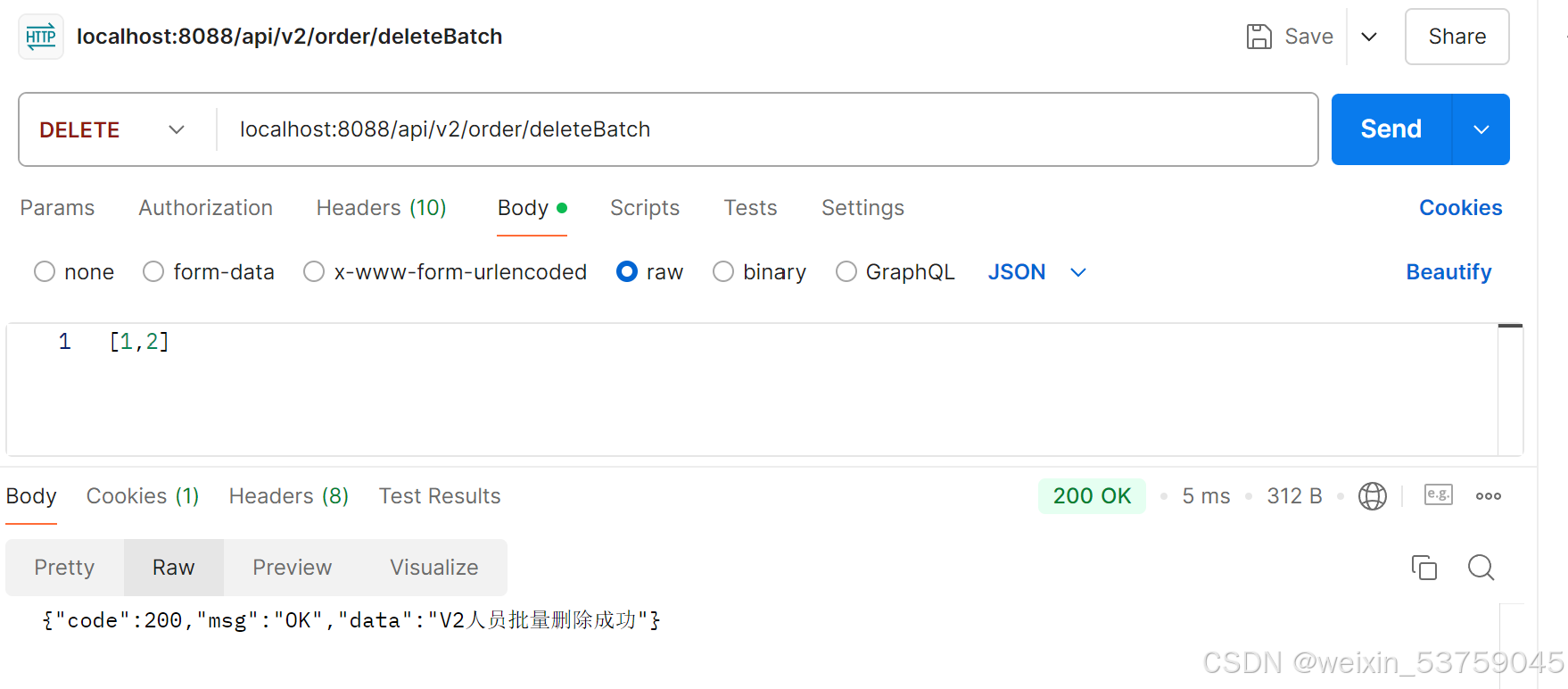
    @DeleteMapping("/deleteBatch")
    public JSONResult deleteBathcOrder(@RequestBody List<Long> ids){
        System.out.println("V2人员批量删除成功");
        return JSONResult.ok("V2人员批量删除成功");
    }

}- 验证测试,使用postman调用接口