更多SpringBoot3内容请关注我的专栏:《SpringBoot3》
期待您的点赞👍收藏⭐评论✍
重学SpringBoot3-如何发送 Email
- [1. 环境准备](#1. 环境准备)
- [2. 项目配置](#2. 项目配置)
-
- [2.1 添加依赖](#2.1 添加依赖)
- [2.2 配置邮件服务器](#2.2 配置邮件服务器)
- [3. 代码实现](#3. 代码实现)
-
- [3.1 创建邮件服务接口](#3.1 创建邮件服务接口)
- [3.2 实现邮件服务](#3.2 实现邮件服务)
- [3.3 创建邮件模板](#3.3 创建邮件模板)
- [3.4 使用模板发送邮件](#3.4 使用模板发送邮件)
- [4. 最佳实践建议](#4. 最佳实践建议)
-
- [4.1 异步发送](#4.1 异步发送)
- [4.2 重试机制](#4.2 重试机制)
- [4.3 邮件发送限流](#4.3 邮件发送限流)
- [4.4 邮件发送记录](#4.4 邮件发送记录)
- [5. 安全性建议](#5. 安全性建议)
- [6. 测试示例](#6. 测试示例)
- [7. 常见问题解决](#7. 常见问题解决)
-
- [7.1 连接超时](#7.1 连接超时)
- [7.2 SSL证书问题](#7.2 SSL证书问题)
- [7.3 中文乱码](#7.3 中文乱码)
- [8. 总结](#8. 总结)
在企业应用开发中,发送邮件是一个非常常见的需求,比如用户注册验证、密码重置、系统通知等场景。SpringBoot 3提供了完善的邮件发送支持,本文将详细介绍如何在SpringBoot 3中实现邮件发送功能,并提供最佳实践建议。
1. 环境准备
- JDK 17+
- SpringBoot 3.0+
- Maven/Gradle
2. 项目配置
2.1 添加依赖
在 pom.xml中添加以下依赖:
xml
        <dependency>
            <groupId>org.springframework.boot</groupId>
            <artifactId>spring-boot-starter-web</artifactId>
        </dependency>

        <dependency>
            <groupId>org.springframework.boot</groupId>
            <artifactId>spring-boot-starter-mail</artifactId>
        </dependency>

        <dependency>
            <groupId>org.springframework.boot</groupId>
            <artifactId>spring-boot-starter-thymeleaf</artifactId>
        </dependency>
2.2 配置邮件服务器
在 application.yml中添加邮件服务器配置:
yaml
spring:
  mail:
    host: smtp.qq.com  # QQ邮件服务器地址
    port: 587            # 端口号
    username: ${username}
    password: ${password}  # 需要去QQ邮箱开通开通POP3/IMAP服务,并设置专用密码
    properties:
      mail:
        smtp:
          auth: true
          starttls:
            enable: true
            required: true
  thymeleaf:
    cache: true
    check-template: true
    check-template-location: true
    content-type: text/html
    enabled: true
    encoding: UTF-8
    excluded-view-names: ''
    mode: HTML
    prefix: classpath:/templates/
    suffix: .html
3. 代码实现
3.1 创建邮件服务接口
java
package com.example.springboot3email.service;

import org.springframework.web.multipart.MultipartFile;

/**
 * @author CoderJia
 * @create 2024/11/21 10:22
 * @Description
 **/
public interface IEmailService {

    void sendSimpleEmail(String to, String subject, String text);

    void sendHtmlEmail(String to, String subject, String htmlContent);

    void sendEmailWithAttachment(String to, String subject, String text, MultipartFile attachment);
}
3.2 实现邮件服务
java
package com.example.springboot3email.service;

import jakarta.annotation.Resource;
import jakarta.mail.internet.MimeMessage;
import lombok.extern.slf4j.Slf4j;
import org.springframework.beans.factory.annotation.Value;
import org.springframework.core.io.FileSystemResource;
import org.springframework.mail.SimpleMailMessage;
import org.springframework.mail.javamail.JavaMailSender;
import org.springframework.mail.javamail.MimeMessageHelper;
import org.springframework.stereotype.Service;
import org.springframework.web.multipart.MultipartFile;

import java.io.File;

/**
 * @author CoderJia
 * @create 2024/11/21 10:23
 * @Description
 **/
@Service
@Slf4j
public class EmailServiceImpl implements IEmailService {

    @Resource
    private JavaMailSender mailSender;

    @Value("${spring.mail.username}")
    private String from;

    /**
     * 发送简单文本邮件
     *
     * @param to
     * @param subject
     * @param text
     */
    @Override
    public void sendSimpleEmail(String to, String subject, String text) {
        try {
            SimpleMailMessage message = new SimpleMailMessage();
            message.setFrom(from);
            message.setTo(to);
            message.setSubject(subject);
            message.setText(text);

            mailSender.send(message);
            log.info("Simple email sent successfully to: {}", to);
        } catch (Exception e) {
            log.error("Failed to send simple email", e);
            throw new RuntimeException("Failed to send email", e);
        }
    }

    /**
     * 发送HTML格式的邮件
     *
     * @param to
     * @param subject
     * @param htmlContent
     */
    @Override
    public void sendHtmlEmail(String to, String subject, String htmlContent) {
        try {
            MimeMessage message = mailSender.createMimeMessage();
            MimeMessageHelper helper = new MimeMessageHelper(message, true, "UTF-8");

            helper.setFrom(from);
            helper.setTo(to);
            helper.setSubject(subject);
            helper.setText(htmlContent, true);

            mailSender.send(message);
            log.info("HTML email sent successfully to: {}", to);
        } catch (Exception e) {
            log.error("Failed to send HTML email", e);
            throw new RuntimeException("Failed to send email", e);
        }
    }

    /**
     * 发送带附件的邮件
     *
     * @param to
     * @param subject
     * @param text
     * @param attachment
     */
    @Override
    public void sendEmailWithAttachment(String to, String subject, String text, MultipartFile attachment) {
        try {
            MimeMessage message = mailSender.createMimeMessage();
            MimeMessageHelper helper = new MimeMessageHelper(message, true, "UTF-8");

            helper.setFrom(from);
            helper.setTo(to);
            helper.setSubject(subject);
            helper.setText(text);

            // 创建临时文件
            File tempFile = File.createTempFile("upload_", attachment.getOriginalFilename());
            attachment.transferTo(tempFile);

            // 使用 FileSystemResource 包装临时文件
            FileSystemResource file = new FileSystemResource(tempFile);
            helper.addAttachment(attachment.getOriginalFilename(), file);

            mailSender.send(message);
            log.info("Email with attachment sent successfully to: {}", to);

            // 删除临时文件
            tempFile.delete();
        } catch (Exception e) {
            log.error("Failed to send email with attachment", e);
            throw new RuntimeException("Failed to send email", e);
        }
    }
}
3.3 创建邮件模板
在 resources/templates目录下创建HTML模板 EmailTemplate.html(使用Thymeleaf):
html
<!DOCTYPE html>
<html xmlns:th="http://www.thymeleaf.org">
<head>
    <title>Email Template</title>
</head>
<body>
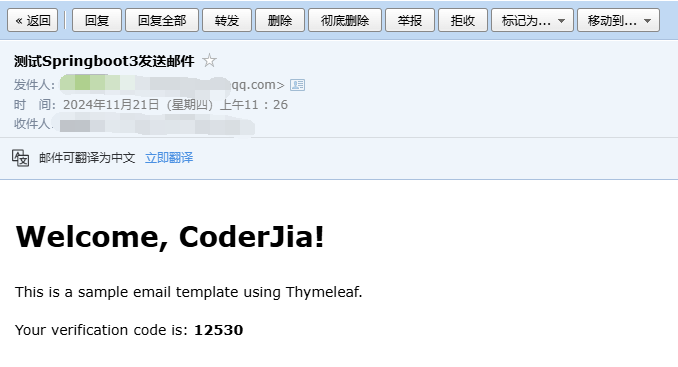
    <h1>Welcome, <span th:text="${name}">User</span>!</h1>
    <p>This is a sample email template using Thymeleaf.</p>
    <p>Your verification code is: <strong th:text="${code}">123456</strong></p>
</body>
</html>
3.4 使用模板发送邮件
java
@Service
public class TemplateEmailService {

    @Autowired
    private EmailService emailService;

    @Autowired
    private TemplateEngine templateEngine;

    public void sendTemplateEmail(String to, String subject, String templateName, Map<String, Object> variables) {
        Context context = new Context();
        variables.forEach(context::setVariable);

        String htmlContent = templateEngine.process(templateName, context);
        emailService.sendHtmlEmail(to, subject, htmlContent);
    }
}
4. 最佳实践建议
4.1 异步发送
为避免邮件发送影响主业务流程,建议使用异步方式发送邮件:
java
@Configuration
@EnableAsync
public class AsyncConfig implements AsyncConfigurer {

    @Override
    public Executor getAsyncExecutor() {
        ThreadPoolTaskExecutor executor = new ThreadPoolTaskExecutor();
        executor.setCorePoolSize(5);
        executor.setMaxPoolSize(10);
        executor.setQueueCapacity(25);
        executor.setThreadNamePrefix("EmailAsync-");
        executor.initialize();
        return executor;
    }
}

@Service
public class AsyncEmailService {

    @Async
    public CompletableFuture<Void> sendEmailAsync(String to, String subject, String content) {
        // 邮件发送逻辑

        return CompletableFuture.completedFuture(null);
    }
}
4.2 重试机制
实现邮件发送重试机制:
java
@Service
public class RetryableEmailService {

    @Retryable(value = {MessagingException.class},
               maxAttempts = 3,
               backoff = @Backoff(delay = 1000))
    public void sendEmailWithRetry(String to, String subject, String content) {
        // 邮件发送逻辑
    }

    @Recover
    public void recover(MessagingException e, String to) {
        // 处理最终失败的情况
        log.error("Failed to send email after retries", e);
    }
}
4.3 邮件发送限流
使用令牌桶算法实现邮件发送限流:
java
@Service
public class RateLimitedEmailService {

    private final RateLimiter rateLimiter = RateLimiter.create(10.0); // 每秒10封邮件

    public void sendEmailWithRateLimit(String to, String subject, String content) {
        if (rateLimiter.tryAcquire()) {
            // 发送邮件
        } else {
            throw new RuntimeException("Rate limit exceeded");
        }
    }
}
4.4 邮件发送记录
记录邮件发送历史:
java
@Entity
@Table(name = "email_log")
public class EmailLog {
    @Id
    @GeneratedValue(strategy = GenerationType.IDENTITY)
    private Long id;

    private String to;
    private String subject;
    private LocalDateTime sendTime;
    private EmailStatus status;
    private String errorMessage;

    // getters and setters
}
5. 安全性建议
- 不要在代码中硬编码邮件服务器凭证
- 使用环境变量或配置中心存储敏感信息
- 实现邮件发送频率限制,防止滥用
- 记录邮件发送日志,便于问题排查
- 使用TLS/SSL加密传输
- 定期轮换邮件服务器密码
6. 测试示例
java
package com.example.springboot3email.controller;

import com.example.springboot3email.service.IEmailService;
import com.example.springboot3email.service.TemplateEmailService;
import jakarta.annotation.Resource;
import lombok.extern.slf4j.Slf4j;
import org.springframework.web.bind.annotation.PostMapping;
import org.springframework.web.bind.annotation.RequestParam;
import org.springframework.web.bind.annotation.RestController;
import org.springframework.web.multipart.MultipartFile;

import java.util.HashMap;
import java.util.Map;

/**
 * @author CoderJia
 * @create 2024/11/21 10:32
 * @Description
 **/
@Slf4j
@RestController
public class EmailController {
    @Resource
    private IEmailService emailService;

    @Resource
    private TemplateEmailService templateEmailService;


    // 发送简单文本邮件接口
    @PostMapping("/sendSimpleEmail")
    public String sendSimpleEmail(@RequestParam("to") String to,
                                  @RequestParam("subject") String subject,
                                  @RequestParam("text") String text) {
        emailService.sendSimpleEmail(to, subject, text);
        return "success";
    }

    // 发送HTML邮件接口
    @PostMapping("/sendHtmlEmail")
    public String sendHtmlEmail(@RequestParam("to") String to,
                                @RequestParam("subject") String subject,
                                @RequestParam("htmlContent") String htmlContent) {
        emailService.sendHtmlEmail(to, subject, htmlContent);
        return "success";
    }

    // 发送带附件的邮件接口
    @PostMapping("/sendEmailWithAttachment")
    public String sendEmailWithAttachment(@RequestParam("to") String to,
                                          @RequestParam("subject") String subject,
                                          @RequestParam("text") String text,
                                          @RequestParam("attachment") MultipartFile attachment) {
        emailService.sendEmailWithAttachment(to, subject, text, attachment);
        return "success";
    }


    // 发送模板邮件接口
    @PostMapping("/sendTemplateEmail")
    public String sendTemplateEmail(@RequestParam("to") String to,
                                    @RequestParam("subject") String subject,
                                    @RequestParam("templateName") String templateName) {
        Map<String, Object> variables = new HashMap<>();
        variables.put("name", "CoderJia");
        variables.put("code", 12530);
        templateEmailService.sendTemplateEmail(to, subject, templateName, variables);
        return "success";
    }
}
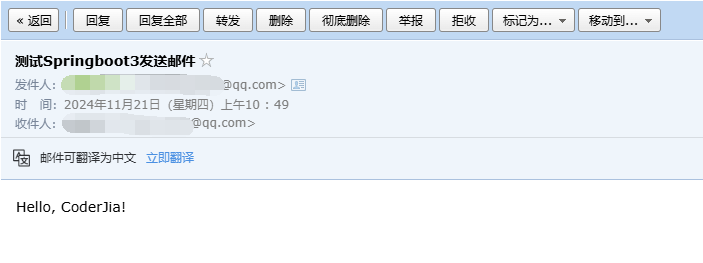
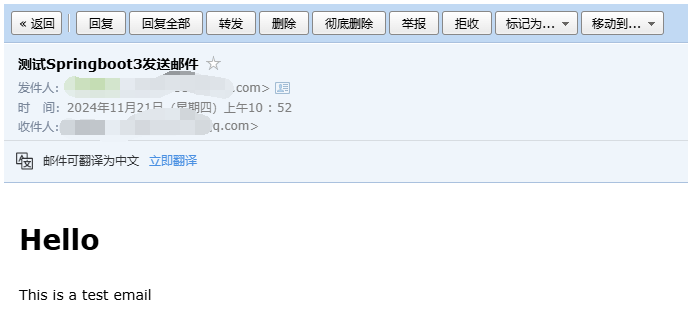
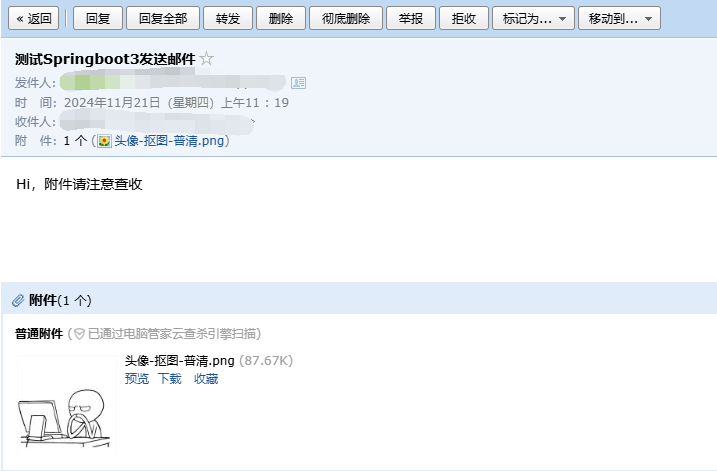
发送效果
普通邮件
HTML邮件
带附件邮件
模板邮件
7. 常见问题解决
7.1 连接超时
yaml
spring:
  mail:
    properties:
      mail:
        smtp:
          connectiontimeout: 5000
          timeout: 5000
          writetimeout: 5000
7.2 SSL证书问题
yaml
spring:
  mail:
    properties:
      mail:
        smtp:
          ssl:
            trust: "*"
7.3 中文乱码
java
helper.setFrom(new InternetAddress(from, "发件人名称", "UTF-8"));8. 总结
本文详细介绍了在SpringBoot 3中实现邮件发送功能的完整解决方案,包括基本配置、代码实现、最佳实践、安全建议等内容。通过采用异步发送、重试机制、限流等最佳实践,可以构建一个健壮的邮件发送系统。在实际应用中,要根据具体需求选择合适的实现方式,同时注意安全性和性能的平衡。