一**.grep****简介**
grep 全程Globally search a Regular Expression and Print,是一种强大的文本搜索工具,它能使用特定模式匹配(包括正则表达式)搜索文本,并默认输出匹配行。Unix的grep家族包括grep和egrep
二**.grep****的工作模式**
2.1.grep****执行语法
grep [option] file...**2.2.**工作方式
-
grep在一个或者多个文件中搜索字符串模板
-
如果模板中包括空格,需要使用引号引起来
-
模板后的所有字符串会被看作是文件名
**2.3.**工作结果
- 如果模板搜索成功,则返回0状态码
- 如果搜索不成功,则返回1状态码
- 如果搜索的文件不存在,则返回2的状态码。
三**.grep****的常用参数详解**
**3.1.**常用参数详解

**3.2.**演示示例
a)建立测试文件
[root@haha shells]# vim testfile
root:x:0:0:root:/root:/bin/bash
bin:x:1:1:bin:/bin:/sbin/nologin
daemon:x:2:2:daemon:/sbin:/sbin/nologin
adm:x:3:4:adm:/var/adm:/sbin/nologin
lp:x:4:7:lp:/var/spool/lpd:/sbin/nologin
sync:x:5:0:sync:/sbin:/bin/sync
shutdown:x:6:0:shutdown:/sbin:/sbin/shutdown
halt:x:7:0:halt:/sbin:/sbin/halt
mail:x:8:12:mail:/var/spool/mail:/sbin/nologin
operator:x:11:0:operator:/root:/sbin/nologin
test:root:test
test:ROOT:test
test:chroot:test
test:test:root
b)过滤文件中所有含有root字符串的行
[root@haha shells]# grep root testfile
root:x:0:0:root:/root:/bin/bash
operator:x:11:0:operator:/root:/sbin/nologin
test:root:test
test:chroot:test
test:test:root
c )过滤包含 root 单词的行
[root@haha shells]# grep root testfile -w
root:x:0:0:root:/root:/bin/bash
operator:x:11:0:operator:/root:/sbin/nologin
test:root:test
test:test:root
d )过滤含有 root 字符的行忽略大小写
[root@haha shells]# grep root testfile -i
root:x:0:0:root:/root:/bin/bash
operator:x:11:0:operator:/root:/sbin/nologin
test:root:test
test:ROOT:test
test:chroot:test
test:test:root
e )过滤含有 root 单词和 bash 单词的行
[root@haha shells]# grep -w -e root -e bash testfile
root:x:0:0:root:/root:/bin/bash
operator:x:11:0:operator:/root:/sbin/nologin
test:root:test
test:test:root
f )只显示匹配内容不不显示其他并标注行号
[root@timinglee shell]# grep -on root testfile
1:root
1:root
1:root
10:root
11:root
13:root
14:root
g )显示包含 root 字符串的行的总数
[root@haha shells]# grep -c root testfile
5
h )显示不含有 root 的行
[root@haha shells]# grep -v root testfile
bin:x:1:1:bin:/bin:/sbin/nologin
daemon:x:2:2:daemon:/sbin:/sbin/nologin
adm:x:3:4:adm:/var/adm:/sbin/nologin
lp:x:4:7:lp:/var/spool/lpd:/sbin/nologin
sync:x:5:0:sync:/sbin:/bin/sync
shutdown:x:6:0:shutdown:/sbin:/sbin/shutdown
halt:x:7:0:halt:/sbin:/sbin/halt
mail:x:8:12:mail:/var/spool/mail:/sbin/nologin
j )显示含有 adm 关键字及其周围的 2 行
[root@haha shells]# grep -2 adm testfile
bin:x:1:1:bin:/bin:/sbin/nologin
daemon:x:2:2:daemon:/sbin:/sbin/nologin
adm:x:3:4:adm:/var/adm:/sbin/nologin
lp:x:4:7:lp:/var/spool/lpd:/sbin/nologin
sync:x:5:0:sync:/sbin:/bin/sync
k)显示含有 adm 关键字及其下面 1 行
[root@haha shells]# grep -A1 adm testfile
adm:x:3:4:adm:/var/adm:/sbin/nologin
lp:x:4:7:lp:/var/spool/lpd:/sbin/nologin
l )显示含有 adm 关键字及其上面 2 行
[root@haha shells]# grep -B2 adm testfile
bin:x:1:1:bin:/bin:/sbin/nologin
daemon:x:2:2:daemon:/sbin:/sbin/nologin
adm:x:3:4:adm:/var/adm:/sbin/nologin四**.**正则表达式的使用
**4.1.**什么是正则表达式
正则表达式就是用在字符串的处理上面的一项表示式
在我们做程序设计时很多需要对一类字符进行处理,正则表达式就完美的解决了这个问题
**4.2.**正则表达式
基本正则表达式( Basic Regular Expression , BRE ),又称为标准正则表达式,是最早制订的正则表达式规范,仅支持最基本的元字符集。基本正则表达式是POSIX 规范制订的两种正则表达式语法标准之一,另外一种语法标准称为扩展正则表达式
扩展正则表达式( Extended Regular Expression , ERE )支持比基本正则表达式更多的元字符

 在grep命令使用基本正则表达式时不需要加任何参数
在grep命令使用扩展正则表达式时必须加-E参数
示例:
a )过滤以 root 开头的行,过滤以 root 开头 bash 结尾的行
[root@haha shells]# grep ^root testfile
root:x:0:0:root:/root:/bin/bash
[root@haha shells]# grep -E "(^root|bash$)" testfile
root:x:0:0:root:/root:/bin/bash
[root@haha shells]#
b )过滤以 root 结尾的行
[root@haha shells]# grep root$ testfile
test:test:root
c )搜索 e 开头 y 结尾的三字符单词,搜索 e 开头 y 结尾的四字符单词
[root@haha shells]# grep e.y testfile1
eay
eby
[root@haha shells]# grep e..y testfile1
eaay
ebby
eaby
d )搜索 e 开头 Y 结尾的所有行
[root@haha shells]# grep e.*y testfile1
eay
eby
eaay
ebby
eaaay
ebbby
eaaaaay
ebbbbby
eababy
eaby
eabababy
e)搜索自定次数出现的字符
[root@haha shells]# grep -E "e.{2}y" testfile1
eaay
ebby
eaby
[root@haha shells]# grep -E "e.{,2}y" testfile1
eay
eby
eaay
ebby
eaby
[root@haha shells]# grep -E "e.{2,}y" testfile1
eaay
ebby
eaaay
ebbby
eaaaaay
ebbbbby
eababy
eaby
eabababy
[root@haha shells]# grep -E "e.+y" testfile1
eay
eby
eaay
ebby
eaaay
ebbby
eaaaaay
ebbbbby
eababy
eaby
eabababy
[root@haha shells]# grep -E "e.?y" testfile1
eay
eby
[root@haha shells]# grep -E "e[ab]y" testfile1
eay
eby
[root@haha shells]# grep -E "e[^ac]y" testfile1
eby
[root@haha shells]# grep -E "e(ab)+y" testfile1
eababy
eaby
eabababy
[root@haha shells]# grep -E "e(ab)?y" testfile1
eaby**4.3.**正则表达式字符集
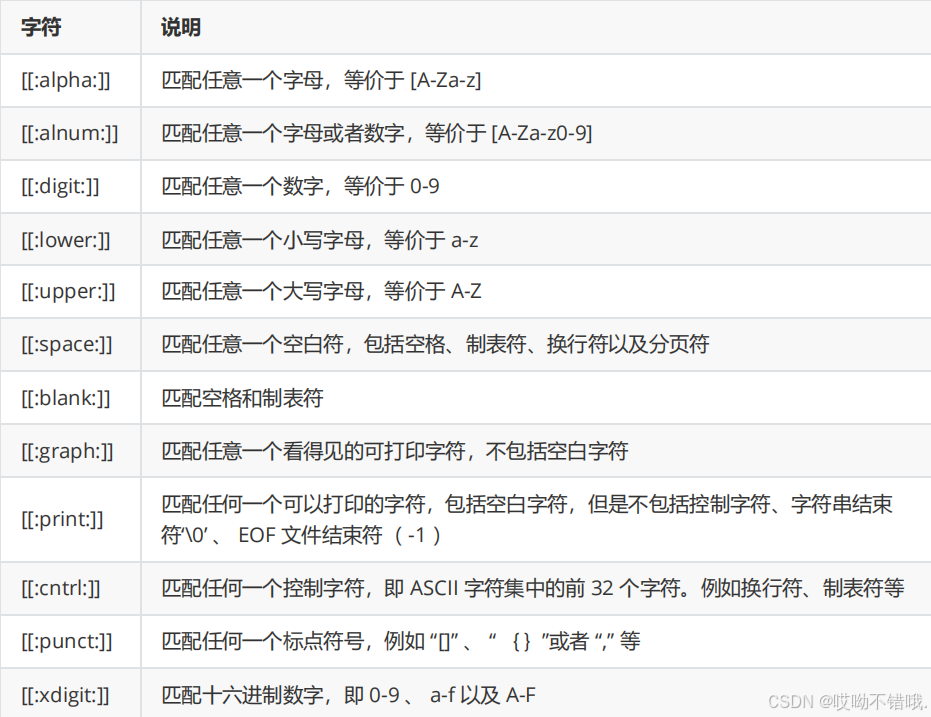
示例:
[root@haha 1]# touch easyalee easyAlee "easy lee" "easy@lee" "easy8lee"
[root@haha 1]# rm -rf easy[[:digit:]]lee
[root@haha 1]# rm -rf easy[[:space:]]lee
[root@haha 1]# rm -rf easy[[:lower:]]lee
[root@haha 1]# rm -rf easy[[:upper:]]lee
[root@haha 1]# rm -rf easy[[:graph:]]lee
[root@haha 1]# rm -rf easy[[:alpha:]]lee