vue版本可以转《【VUE】ArcoDesign之自定义主题样式和命名空间》
今儿整个Next.js+Arco+TailwindCSS的组合
安装
需要同时安装 react >= 16.8 和 react-dom >= 16.8
初始化Next.js:
bash
pnpx create-next-app@15.0.4
# ----------
What is your project named? .
Would you like to use TypeScript? `Yes`
Would you like to use ESLint? `Yes`
Would you like to use Tailwind CSS? `Yes`
Would you like your code inside a `src/` directory? `No`
Would you like to use App Router? (recommended) `Yes`
Would you like to use Turbopack for `next dev`?  `No`
Would you like to customize the import alias (`@/*` by default)? `No`
初始化arco-design及相关依赖
bash
pnpm add @arco-design/web-react

# 按需加载支持(next.js支持webpack,以下选用webpack依赖包实现)
pnpm add -D @arco-plugins/webpack-react

# 后续有自定义主题实现,以下安装相关依赖
pnpm add -D less less-loader postcss-loader style-loader css-loader完整package.json:
json
{
  "name": "next-arco",
  "version": "0.1.0",
  "private": true,
  "scripts": {
    "dev": "next dev",
    "build": "next build",
    "start": "next start",
    "lint": "next lint"
  },
  "dependencies": {
    "@arco-design/web-react": "^2.65.0",
    "next": "15.0.4",
    "react": "^19.0.0",
    "react-dom": "^19.0.0"
  },
  "devDependencies": {
    "@arco-plugins/webpack-react": "^1.4.9",
    "@types/node": "^20",
    "@types/react": "^19",
    "@types/react-dom": "^19",
    "css-loader": "^7.1.2",
    "eslint": "^8",
    "eslint-config-next": "15.0.4",
    "less": "^4.2.1",
    "less-loader": "^12.2.0",
    "postcss": "^8",
    "postcss-loader": "^8.1.1",
    "style-loader": "^4.0.0",
    "tailwindcss": "^3.4.1",
    "typescript": "^5"
  }
}
目录结构:
|- app
	|- fonts
	|- favicon.ico
	|- globals.css
	|- layout.tsx
	|- page.tsx
|- public
|- .eslintrc.json
|- .gitignore
|- next.config.ts
|- next-env.d.ts
|- package.json
|- pnpm-lock.yaml
|- postcss.config.mjs
|- README.md
|- tailwind.config.ts
|- tsconfig.json
接下来,开整~
开整
Arco Design 整合
typescript
// file: ./next.config.ts

import type {NextConfig} from "next";
import type {ArcoDesignPluginOptions} from "@arco-plugins/webpack-react";

import ArcoWebpackPlugin from "@arco-plugins/webpack-react";

// ArcoWebpackPlugin的配置项
// @link https://github.com/arco-design/arco-plugins/blob/main/packages/plugin-webpack-react/README.zh-CN.md
const ArcoOptions: Partial<ArcoDesignPluginOptions> = {
    include: ['app'],
    removeFontFace: true,
    modifyVars: {
        prefix: 'CustomPrefixName'
    },
};

// next.js的配置项
const nextConfig: NextConfig = {
    /* config options here */
    // @link https://nextjs.org/docs/app/api-reference/next-config-js/transpilePackages
    transpilePackages: [
        '@arco-design/web-react'
    ],
    // 由webpack来配置载入@arco-plugins/webpack-react扩展
    // @link https://nextjs.org/docs/app/api-reference/next-config-js/webpack
    webpack: (config) => {
        config.module.rules.push({
            test: /\.css$/,
            use: [{loader: 'css-loader'}]
        });
        config.module.rules.push({
            test: /\.less$/,
            use: [
                {loader: 'style-loader'},
                {loader: 'css-loader'},
                // 下面两个顺序要注意
                {loader: "postcss-loader"},
                {loader: 'less-loader', options: {lessOptions: {modifyVars: {}}}}
            ]
        })
        config.plugins.push(new ArcoWebpackPlugin(ArcoOptions));
        return config;
    }
};

export default nextConfig;
应用
实现目标:arco - 全局设置各组件默认配置
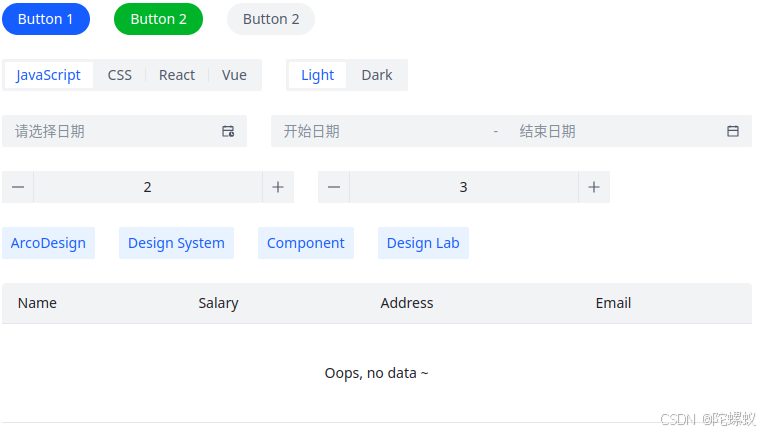
先对项目结构做点小调整
bash
|- app
	# ..
	|- globals.css # => 移动:/layouts/default/styles/globals.less
	# ..
|- layouts
	|- default
		|- styles
			|- globals.less
			|- theme.ts
		|- index.tsx
		|- types.d.ts
现在有了个默认布局组件了,开始填代码
typescript
// file: /layouts/default/types.d.ts
import type {ReactNode} from "react";

export interface DefaultLayoutProps {
    children: ReactNode;
}
typescript
// file: /layouts/default/styles/theme.ts
import type {ConfigProviderProps} from "@arco-design/web-react";

export const prefixCls = 'CustomPrefixName';
export const componentConfig: ConfigProviderProps["componentConfig"] = {
    Button: {
        type: 'primary',
        shape: 'round',
    },
    DatePicker: {
        dayStartOfWeek: 2,
        utcOffset: 0,
    },
    InputNumber: {
        mode: 'button',
    },
    'Radio.Group': {
        type: 'button',
    },
    Space: {
        size: 'large',
    },
    Table: {
        border: false,
        noDataElement: 'Oops, no data ~',
    },
    Tag: {
        color: 'arcoblue',
        size: 'large',
    },
};


export default {
    prefixCls,
    componentConfig
}
typescript
// file: /layouts/default/index.tsx
"use client";

import type {DefaultLayoutProps as Props} from "./types";
import {ConfigProvider} from "@arco-design/web-react";

import theme from "./styles/theme";
import "./styles/globals.less";

const DefaultLayout = function (props: Readonly<Props>) {
    const {children} = props;

    return (
        <ConfigProvider prefixCls={theme.prefixCls}
                        componentConfig={theme.componentConfig}>
            {children}
        </ConfigProvider>
    )
}

export default DefaultLayout;
可选 以下部分是样式文件(主要验证TailwindCSS的整合情况)
typescript
// file: /layouts/default/styles/globals.less
@tailwind base;
@tailwind components;
@tailwind utilities;

:root {
    --font-family: Verdana, Geneva, Tahoma, sans-serif;
}

html {
    font-family: var(--font-family);
}接下来回到app目录,完成最后收尾:
typescript
// file: /app/layout.tsx
import type {ReactNode} from "react";
import type {Metadata} from "next";

// 载入默认布局组件
import DefaultLayout from "@/layouts/default"

export const metadata: Metadata = {
    title: "Create Next App",
    description: "Generated by create next app",
};

export default function RootLayout({
                                       children,
                                   }: Readonly<{
    children: ReactNode;
}>) {
    return (
        <html lang="en">
        <body>
        <DefaultLayout>
            {children}
        </DefaultLayout>
        </body>
        </html>
    );
}
typescript
// file: /app/page.tsx

"use client";

import {
    Button,
    DatePicker,
    Space,
    InputNumber,
    Radio,
    Table,
    Tag,
} from '@arco-design/web-react';

const columns = [
    {
        title: 'Name',
        dataIndex: 'name',
    },
    {
        title: 'Salary',
        dataIndex: 'salary',
    },
    {
        title: 'Address',
        dataIndex: 'address',
    },
    {
        title: 'Email',
        dataIndex: 'email',
    },
];

export default function Home() {

    return (
        <div className={"w-fit mt-20 mx-auto"}>
            <Space direction='vertical'>
                <Space>
                    <Button>Button 1</Button>
                    <Button status={'success'}>Button 2</Button>
                    <Button type={'secondary'}>Button 2</Button>
                </Space>
                <Space>
                    <Radio.Group options={['JavaScript', 'CSS', 'React', 'Vue']} defaultValue='JavaScript'/>
                    <Radio.Group options={['Light', 'Dark']} defaultValue='Light'/>
                </Space>
                <Space>
                    <DatePicker showTime/>
                    <DatePicker.RangePicker/>
                </Space>
                <Space>
                    <InputNumber defaultValue={2}/>
                    <InputNumber defaultValue={3}/>
                </Space>
                <Space>
                    <Tag>ArcoDesign</Tag>
                    <Tag>Design System</Tag>
                    <Tag>Component</Tag>
                    <Tag>Design Lab</Tag>
                </Space>
                <Table columns={columns} data={[]}/>
            </Space>
        </div>
    );
}