import os
import shutil
from kinematic_bicycle_model import Vehicle, VehicleInfo, draw_vehicle
from pure_pursuit_controller import pure_pursuit_steer_control
from Path_generator import Path
import numpy as np
import matplotlib.pyplot as plt
import imageio.v2 as imageio

# 设置最大运行时间

MAX_SIMULATION_TIME = 200.0# 程序最大运行时间200*dt

# 程序入口
def main():
    # 设置车辆参数
    VehicleInfo.L = 3.0  # 车辆长度
    VehicleInfo.W = 1.5  # 车辆宽度
    VehicleInfo.LF = 2.0  # 前轮距离
    VehicleInfo.LB = 2.0  # 后轮距离
    VehicleInfo.MAX_STEER = np.pi / 10  # 最大转向角
    VehicleInfo.TR = 0.5  # 车身半径
    VehicleInfo.TW = 0.3  # 车轮半径
    VehicleInfo.WD = 2.0  # 车身宽度
    VehicleInfo.LENGTH = 4.0  # 车辆长度
    # 设置车辆初始状态
    vehicle1 = Vehicle(x=5.0,
                       y=60.0,
                       yaw=0.0,
                       v=2.0,
                       dt=0.1,
                       l=VehicleInfo.L)
    vehicle2 = Vehicle(x=5.0,
                       y=60.0,
                       yaw=0.0,
                       v=2.0,
                       dt=0.1,
                       l=VehicleInfo.L)  # 车辆2


    # 设置路径参数

    path = Path()
    path.is_reverse = False  # 路径是否为逆时针方向
    path.design_reference_line()  # 设计路径

    # 显示路径
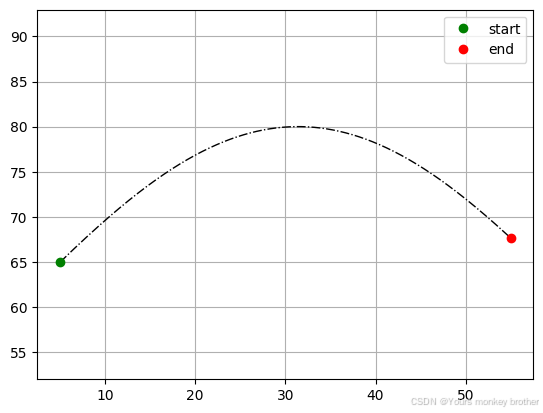
    plt.plot(path.ref_line[:, 0], path.ref_line[:, 1], '-.k', linewidth=1.0)
    plt.plot(path.ref_line[0, 0], path.ref_line[0, 1], 'og', label="start")
    plt.plot(path.ref_line[-1, 0], path.ref_line[-1, 1], 'or', label="end")
    plt.legend()
    plt.axis("equal")
    plt.grid(True)
    plt.show()

    # 设置跟踪轨迹
    rx, ry, rv, ref_yaw, ref_s, ref_kappa = Path().get_ref_line_info()
    # 记录参考路径信息
    ref_path = np.column_stack((rx, ry, rv, ref_yaw, ref_s, ref_kappa))
    # 显示参考路径
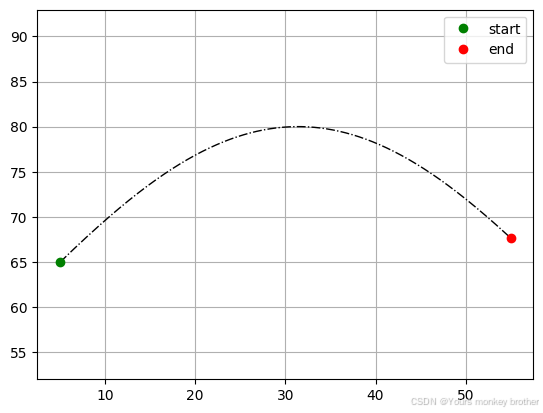
    plt.plot(rx, ry, '-.k', linewidth=1.0)
    plt.plot(rx[0], ry[0], 'og', label="start")
    plt.plot(rx[-1], ry[-1], 'or', label="end")
    plt.legend()
    plt.axis("equal")
    plt.grid(True)
    plt.show()

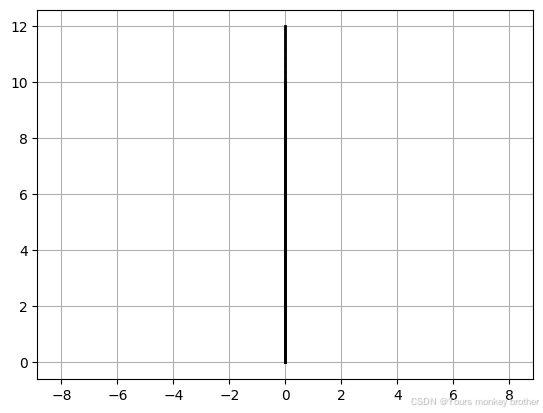
    #绘制车辆道路 三车道 居中显示 带有虚拟车道 车道宽度为2.0 车道间距为1.0
    # 车道1:左侧车道 起点为(0,0) 终点为(0,10)
    # 车道2:右侧车道 起点为(0,0) 终点为(0,10)
    # 车道3:虚拟车道 起点为(0,10) 终点为(0,12)
    # 车道1
    plt.plot([0, 0], [0, 10], 'k', linewidth=2.0)
    plt.plot([0, 0], [0, 10], 'k--', linewidth=1.0)
    # 车道2
    plt.plot([0, 0], [0, 10], 'k', linewidth=2.0)
    plt.plot([0, 0], [0, 10], 'k--', linewidth=1.0)
    #车道3
    plt.plot([0, 0], [10, 12], 'k', linewidth=2.0)
    plt.plot([0, 0], [10, 12], 'k--', linewidth=1.0)
    plt.axis("equal")
    plt.grid(True)
    plt.show()
#控制车辆速度
    # 设置车辆速度
    vehicle1.v = 2.0  # 车辆1速度
    vehicle2.v = 2.0  # 车辆2速度
    # 设置车辆转向角
    vehicle1.steer = 0.0  # 车辆1转向角
    vehicle2.steer = 0.0  # 车辆2转向角

    # 记录车辆轨迹
    trajectory_x1 = []
    trajectory_y1 = []
    trajectory_x2 = []
    trajectory_y2 = []
    lat_err1 = []  # 记录横向误差
    lat_err2 = []  # 记录横向误差

    # 开始仿真
    time = 0.0# 初始时间
    target_ind1 = 0
    target_ind2 = 0
    # 记录车辆轨迹
    trajectory_x1 = []
    trajectory_y1 = []
    trajectory_x2 = []
    trajectory_y2 = []
    lat_err1 = []  # 记录横向误差
    lat_err2 = []  # 记录横向误差

    i = 0
    image_list = []  # 存储图片
    plt.figure(1, dpi=100)  # 创建一个图形窗口
    plt.ion()  # 开启交互模式
    plt.show()  # 显示图形窗口
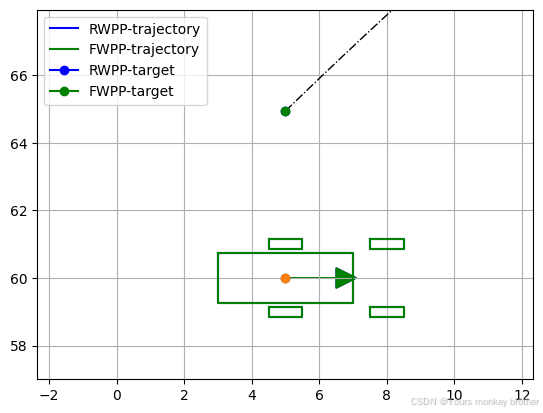
    #显示初始状态
    plt.plot(ref_path[:, 0], ref_path[:, 1], '-.k', linewidth=1.0)
    draw_vehicle(vehicle1.x, vehicle1.y, vehicle1.yaw, vehicle1.steer, plt, color='blue')
    draw_vehicle(vehicle2.x, vehicle2.y, vehicle2.yaw, vehicle2.steer, plt, color='green')
    plt.plot(trajectory_x1, trajectory_y1, "-b", label="RWPP-trajectory")
    plt.plot(trajectory_x2, trajectory_y2, "-g", label="FWPP-trajectory")
    plt.plot(ref_path[target_ind1, 0], ref_path[target_ind1, 1], "b-o", label="RWPP-target")
    plt.plot(ref_path[target_ind2, 0], ref_path[target_ind2, 1], "g-o", label="FWPP-target")
    plt.xlim(min(vehicle1.x, vehicle2.x, ref_path[target_ind1, 0], ref_path[target_ind2, 0]) - 3,
             max(vehicle1.x, vehicle2.x, ref_path[target_ind1, 0], ref_path[target_ind2, 0]) + 3)
    plt.ylim(min(vehicle1.y, vehicle2.y, ref_path[target_ind1, 1], ref_path[target_ind2, 1]) - 3,
             max(vehicle1.y, vehicle2.y, ref_path[target_ind1, 1], ref_path[target_ind2, 1]) + 3)
    plt.legend()
    plt.grid(True)
    plt.pause(0.001)

    #显示时间信息
    plt.subplot(3, 1, 1)
    plt.title("Time: 0.0s")
    plt.subplot(3, 1, 2)
    plt.title("Time: 0.0s")
    plt.subplot(3, 1, 3)
    plt.title("Time: 0.0s")
    plt.pause(0.001)
    plt.savefig("temp.png")
    image_list.append(imageio.imread("temp.png"))


    #显示进度条
    print("Simulation start...")
    print("Progress: 0.0%")
    i = 0

    #将车辆状态信息记录到列表
    trajectory_x1.append(vehicle1.x)
    trajectory_y1.append(vehicle1.y)
    trajectory_x2.append(vehicle2.x)
    trajectory_y2.append(vehicle2.y)
    lat_err1.append(0.0)
    lat_err2.append(0.0)

    #图片转换.mp4格式
   #imageio.mimsave('display.mp4', image_list, fps=10)
    old_index1 = None
    old_index2 = None
    last_idx = ref_path.shape[0] - 1# 跟踪轨迹的最后一个点的索引
    while MAX_SIMULATION_TIME >= time and (last_idx > target_ind1 or last_idx > target_ind2):
        time += vehicle1.dt  # 累加一次时间周期

        if last_idx > target_ind1:
            delta_f1, target_ind1, e_y1 = pure_pursuit_steer_control(vehicle1, ref_path, old_index1, False)
            old_index1 = target_ind1
            # 横向误差
            lat_err1.append(e_y1)
            # 更新车辆状态
            vehicle1.update(0.0, delta_f1, np.pi/10)  # 由于假设纵向匀速运动,所以加速度a=0.0
            trajectory_x1.append(vehicle1.x)
            trajectory_y1.append(vehicle1.y)

        if last_idx > target_ind2:
            delta_f2, target_ind2, e_y2 = pure_pursuit_steer_control(vehicle2, ref_path, old_index2, True)
            old_index2 = target_ind2
            lat_err2.append(e_y2)
            vehicle2.update(0.0, delta_f2, np.pi / 10)  # 由于假设纵向匀速运动,所以加速度a=0.0
            trajectory_x2.append(vehicle2.x)
            trajectory_y2.append(vehicle2.y)

        # 显示动图
        plt.subplots_adjust(hspace=0.5, wspace=0.5)  # 调整垂直和水平间距
        plt.subplot(3, 1, 1)
        plt.cla()
        plt.plot(ref_path[:, 0], ref_path[:, 1], '-.k', linewidth=1.0)
        draw_vehicle(vehicle1.x, vehicle1.y, vehicle1.yaw, vehicle1.steer, plt, color='blue')
        #车辆1带有ego-car字体
        plt.text(vehicle1.x, vehicle1.y, "ego-car", color='blue', fontsize=10)
        #车辆2带有VTU-car字体
        plt.text(vehicle2.x, vehicle2.y, "VTU-car", color='green', fontsize=10)
        draw_vehicle(vehicle2.x, vehicle2.y, vehicle2.yaw, vehicle2.steer, plt, color='green')
        #显示车辆速度
        plt.text(vehicle1.x, vehicle1.y - 1.5, "v: %.2f m/s" % vehicle1.v, color='blue', fontsize=10)
        plt.text(vehicle2.x, vehicle2.y - 1.5, "v: %.2f m/s" % vehicle2.v, color='green', fontsize=10)
        plt.title("Time: %.2fs" % time)
        plt.axis("equal")
        plt.grid(True)


        plt.plot(trajectory_x1, trajectory_y1, "-b", label="RWPP-trajectory")
        plt.plot(trajectory_x2, trajectory_y2, "-g", label="FWPP-trajectory")
        plt.plot(ref_path[target_ind1, 0], ref_path[target_ind1, 1], "b-o", label="RWPP-target")
        plt.plot(ref_path[target_ind2, 0], ref_path[target_ind2, 1], "g-o", label="FWPP-target")
        plt.xlim(min(vehicle1.x, vehicle2.x, ref_path[target_ind1, 0], ref_path[target_ind2, 0]) - 3,
                 max(vehicle1.x, vehicle2.x, ref_path[target_ind1, 0], ref_path[target_ind2, 0]) + 3)
        plt.ylim(min(vehicle1.y, vehicle2.y, ref_path[target_ind1, 1], ref_path[target_ind2, 1]) - 3,
                 max(vehicle1.y, vehicle2.y, ref_path[target_ind1, 1], ref_path[target_ind2, 1]) + 3)
        plt.legend()
        plt.grid(True)

        plt.subplot(3, 1, 2)
        plt.cla()
        plt.plot(ref_path[:, 0], ref_path[:, 1], '-.k', linewidth=1.0)
        plt.plot(trajectory_x1, trajectory_y1, 'b', label="RWPP-trajectory")
        plt.plot(trajectory_x2, trajectory_y2, 'g', label="FWPP-trajectory")
        plt.title("actual tracking effect")
        plt.xlim(min(trajectory_x1[-1], trajectory_x2[-1]) - 1, max(trajectory_x1[-1], trajectory_x2[-1]) + 1)
        plt.ylim(min(trajectory_y1[-1], trajectory_y2[-1]) - 0.5, max(trajectory_y1[-1], trajectory_y2[-1]) + 0.5)
        plt.legend()
        plt.grid(True)

        plt.subplot(3, 1, 3)
        plt.cla()
        plt.plot(lat_err1, 'b', label="RWPP")
        plt.plot(lat_err2, 'g', label="FWPP")
        plt.title("lateral error")
        plt.legend()
        plt.xlim((len(trajectory_x1) + len(trajectory_x2)) / 2 - 35, (len(trajectory_x1) + len(trajectory_x2)) / 2 + 35)
        plt.ylim(min(lat_err1[-1], lat_err2[-1]) - 0.1, max(lat_err1[-1], lat_err2[-1]) + 0.1)

        plt.grid(True)
        plt.pause(0.001)
        plt.savefig("temp.png")
        i += 1
        if (i % 5) == 0:
            image_list.append(imageio.imread("temp.png"))

    imageio.mimsave("display.gif", image_list, duration=0.1)

    plt.figure(2)
    plt.subplots_adjust(hspace=0.5, wspace=0.5)  # 调整垂直和水平间距
    plt.subplot(2, 1, 1)
    plt.plot(ref_path[:, 0], ref_path[:, 1], '-.k', linewidth=1.0)
    plt.plot(trajectory_x1, trajectory_y1, 'b', label="RWPP-trajectory")
    plt.plot(trajectory_x2, trajectory_y2, 'g', label="FWPP-trajectory")
    plt.title("actual tracking effect")
    plt.legend()
    plt.grid(True)

    plt.subplot(2, 1, 2)
    plt.plot(lat_err1, 'b', label="Rear Wheel Pure Pursuit")
    plt.plot(lat_err2, 'g', label="Front Wheel Pure Pursuit")
    plt.title("lateral error")
    plt.legend()
    plt.grid(True)
    plt.show()

#保存图片
    plt.savefig("final_result.png")
    plt.close()
    print("Result saved in final_result.png")
    print("Result saved in display.gif")
    print("Simulation finished!")
    #打包结果图片保存到output文件夹
    shutil.move("final_result.png", "output/final_result.png")
    shutil.move("display.gif", "output/display.gif")
    print("Result saved in output folder")
    print("Done!")
    #将output文件夹中的图片打包成视频
    os.system("ffmpeg -r 10 -i output/display%d.png -vcodec mpeg4 -y output/display.mp4")
    print("Video saved in output folder")
    # 删除临时图片
    for i in range(len(image_list)):
        os.remove("output/display%d.png" % i)
        print("Temp images deleted")
    # 关闭图形窗口
    plt.close()  # 关闭图形窗口


if __name__ == '__main__':
    main()