C#使用WMI获取控制面板中安装的所有程序列表
WMI
全称Windows Management Instrumentation,Windows Management Instrumentation是Windows中用于提供共同的界面和对象模式以便访问有关操作系统、设备、应用程序和服务的管理信息。如果此服务被终止,多数基于 Windows 的软件将无法正常运行。如果此服务被禁用,任何依赖它的服务将无法启动。
WMI提供公用接口及对象模型,以存取有关操作系统、装置、应用程序及服务的管理信息。
新建窗体应用程序WindowsManagementDemo,将默认的Form1重命名为FormWMI,
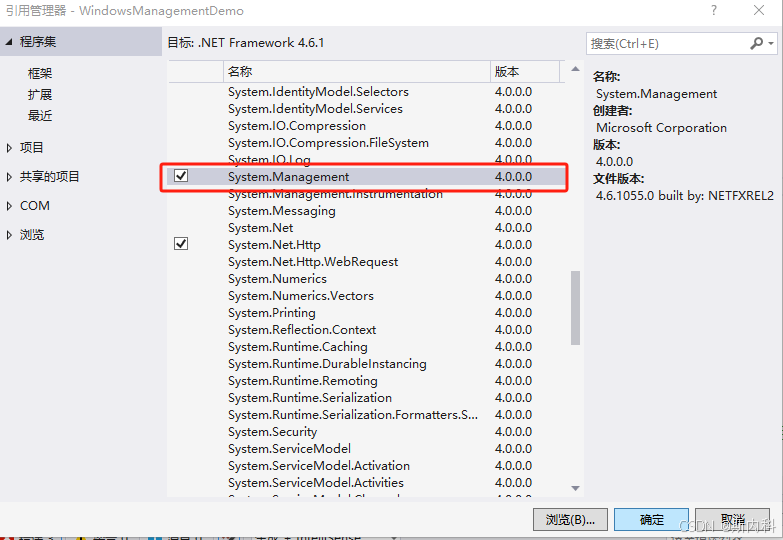
添加引用System.Management,如下图:
窗体FormWMI设计器代码如下:
文件FormWMI.Designer.cs
cs
namespace WindowsManagementDemo
{
    partial class FormWMI
    {
        /// <summary>
        /// 必需的设计器变量。
        /// </summary>
        private System.ComponentModel.IContainer components = null;

        /// <summary>
        /// 清理所有正在使用的资源。
        /// </summary>
        /// <param name="disposing">如果应释放托管资源,为 true;否则为 false。</param>
        protected override void Dispose(bool disposing)
        {
            if (disposing && (components != null))
            {
                components.Dispose();
            }
            base.Dispose(disposing);
        }

        #region Windows 窗体设计器生成的代码

        /// <summary>
        /// 设计器支持所需的方法 - 不要修改
        /// 使用代码编辑器修改此方法的内容。
        /// </summary>
        private void InitializeComponent()
        {
            this.dgvWMI = new System.Windows.Forms.DataGridView();
            this.rtxtMessage = new System.Windows.Forms.RichTextBox();
            this.Column6 = new System.Windows.Forms.DataGridViewTextBoxColumn();
            this.Column1 = new System.Windows.Forms.DataGridViewTextBoxColumn();
            this.Column2 = new System.Windows.Forms.DataGridViewTextBoxColumn();
            this.Column3 = new System.Windows.Forms.DataGridViewTextBoxColumn();
            this.Column4 = new System.Windows.Forms.DataGridViewTextBoxColumn();
            this.Column5 = new System.Windows.Forms.DataGridViewTextBoxColumn();
            ((System.ComponentModel.ISupportInitialize)(this.dgvWMI)).BeginInit();
            this.SuspendLayout();
            //
            // dgvWMI
            //
            this.dgvWMI.AllowUserToAddRows = false;
            this.dgvWMI.AllowUserToDeleteRows = false;
            this.dgvWMI.ColumnHeadersHeightSizeMode = System.Windows.Forms.DataGridViewColumnHeadersHeightSizeMode.AutoSize;
            this.dgvWMI.Columns.AddRange(new System.Windows.Forms.DataGridViewColumn[] {
            this.Column6,
            this.Column1,
            this.Column2,
            this.Column3,
            this.Column4,
            this.Column5});
            this.dgvWMI.Location = new System.Drawing.Point(12, 12);
            this.dgvWMI.MultiSelect = false;
            this.dgvWMI.Name = "dgvWMI";
            this.dgvWMI.ReadOnly = true;
            this.dgvWMI.RowHeadersWidth = 25;
            this.dgvWMI.RowTemplate.Height = 23;
            this.dgvWMI.SelectionMode = System.Windows.Forms.DataGridViewSelectionMode.FullRowSelect;
            this.dgvWMI.Size = new System.Drawing.Size(1084, 363);
            this.dgvWMI.TabIndex = 0;
            //
            // rtxtMessage
            //
            this.rtxtMessage.Location = new System.Drawing.Point(12, 381);
            this.rtxtMessage.Name = "rtxtMessage";
            this.rtxtMessage.ReadOnly = true;
            this.rtxtMessage.Size = new System.Drawing.Size(1084, 395);
            this.rtxtMessage.TabIndex = 1;
            this.rtxtMessage.Text = "";
            //
            // Column6
            //
            this.Column6.HeaderText = "序号";
            this.Column6.Name = "Column6";
            this.Column6.ReadOnly = true;
            this.Column6.Width = 80;
            //
            // Column1
            //
            this.Column1.HeaderText = "名称";
            this.Column1.Name = "Column1";
            this.Column1.ReadOnly = true;
            this.Column1.Width = 370;
            //
            // Column2
            //
            this.Column2.HeaderText = "发布者";
            this.Column2.Name = "Column2";
            this.Column2.ReadOnly = true;
            this.Column2.Width = 200;
            //
            // Column3
            //
            this.Column3.HeaderText = "安装时间";
            this.Column3.Name = "Column3";
            this.Column3.ReadOnly = true;
            //
            // Column4
            //
            this.Column4.HeaderText = "安装路径";
            this.Column4.Name = "Column4";
            this.Column4.ReadOnly = true;
            this.Column4.Width = 180;
            //
            // Column5
            //
            this.Column5.HeaderText = "版本";
            this.Column5.Name = "Column5";
            this.Column5.ReadOnly = true;
            this.Column5.Width = 120;
            //
            // FormWMI
            //
            this.AutoScaleDimensions = new System.Drawing.SizeF(6F, 12F);
            this.AutoScaleMode = System.Windows.Forms.AutoScaleMode.Font;
            this.ClientSize = new System.Drawing.Size(1108, 788);
            this.Controls.Add(this.rtxtMessage);
            this.Controls.Add(this.dgvWMI);
            this.Name = "FormWMI";
            this.Text = "WMI(Windows Management Instrumentation)用于提供共同的界面和对象模式以便访问有关操作系统、设备、应用程序和服务的管理信息";
            this.Load += new System.EventHandler(this.FormWMI_Load);
            ((System.ComponentModel.ISupportInitialize)(this.dgvWMI)).EndInit();
            this.ResumeLayout(false);

        }

        #endregion

        private System.Windows.Forms.DataGridView dgvWMI;
        private System.Windows.Forms.RichTextBox rtxtMessage;
        private System.Windows.Forms.DataGridViewTextBoxColumn Column6;
        private System.Windows.Forms.DataGridViewTextBoxColumn Column1;
        private System.Windows.Forms.DataGridViewTextBoxColumn Column2;
        private System.Windows.Forms.DataGridViewTextBoxColumn Column3;
        private System.Windows.Forms.DataGridViewTextBoxColumn Column4;
        private System.Windows.Forms.DataGridViewTextBoxColumn Column5;
    }
}
窗体FormWMI代码如下
文件FormWMI.cs.
因读取程序遍历数据过多,这里使用等待任务await Task
cs
using System;
using System.Collections.Generic;
using System.ComponentModel;
using System.Data;
using System.Drawing;
using System.Linq;
using System.Text;
using System.Threading.Tasks;
using System.Windows.Forms;
using System.Management;

namespace WindowsManagementDemo
{
    public partial class FormWMI : Form
    {
        public FormWMI()
        {
            InitializeComponent();
            /*
             * 使用WMI,需要添加System.Management的引用
             * 在C#中,可以使用Windows Management Instrumentation (WMI) 来获取控制面板中安装的所有程序列表。
             * 以下是一个简单的示例代码,展示了如何使用WMI查询获取这些信息:
             * Windows Management Instrumentation是Windows中用于提供共同的界面和对象模式以便访问有关操作系统、设备、应用程序和服务的管理信息。
             * 如果此服务被终止,多数基于 Windows 的软件将无法正常运行。如果此服务被禁用,任何依赖它的服务将无法启动。
             * WMI提供公用接口及对象模型,以存取有关操作系统、装置、应用程序及服务的管理信息。
            */
            dgvWMI.Rows.Clear();
        }

        /// <summary>
        /// 异步显示文本内容
        /// </summary>
        /// <param name="message"></param>
        private void DisplayMessage(string message)
        {
            if (!IsHandleCreated)
            {
                return;
            }
            this.BeginInvoke(new Action(() =>
            {
                if (rtxtMessage.TextLength >= 40960)
                {
                    rtxtMessage.Clear();
                }
                rtxtMessage.AppendText($"{DateTime.Now.ToString("yyyy-MM-dd HH:mm:ss.fff")}->{message}\n");
                rtxtMessage.ScrollToCaret();
            }));
        }

        private async void FormWMI_Load(object sender, EventArgs e)
        {
            await Task.Run(() =>
            {
                ManagementObjectSearcher searcher = new ManagementObjectSearcher("SELECT * FROM Win32_Product");
                ManagementObjectCollection managementCollection = searcher.Get();
                DisplayMessage("累计个数:" + managementCollection.Count);
                int sequence = 0;
                int tempIndex = 0;
                foreach (ManagementBaseObject install in managementCollection)
                {
                    sequence++;
                    this.BeginInvoke(new Action(() =>
                    {
                        tempIndex++;
                        dgvWMI.Rows.Add(tempIndex, install["Name"], install["Vendor"], install["InstallDate"], install["InstallLocation"], install["Version"]);
                    }));
                    PropertyDataCollection Properties = install.Properties;
                    DisplayMessage($"【{sequence.ToString("D3")}】{install["Name"]}:属性键值对个数:{install.Properties.Count}");
                    foreach (PropertyData propertyData in Properties)
                    {
                        DisplayMessage($"\x20\x20Name:{propertyData.Name},Value:{propertyData.Value},Type:{propertyData.Type}");
                    }
                }
            });

        }
    }
}
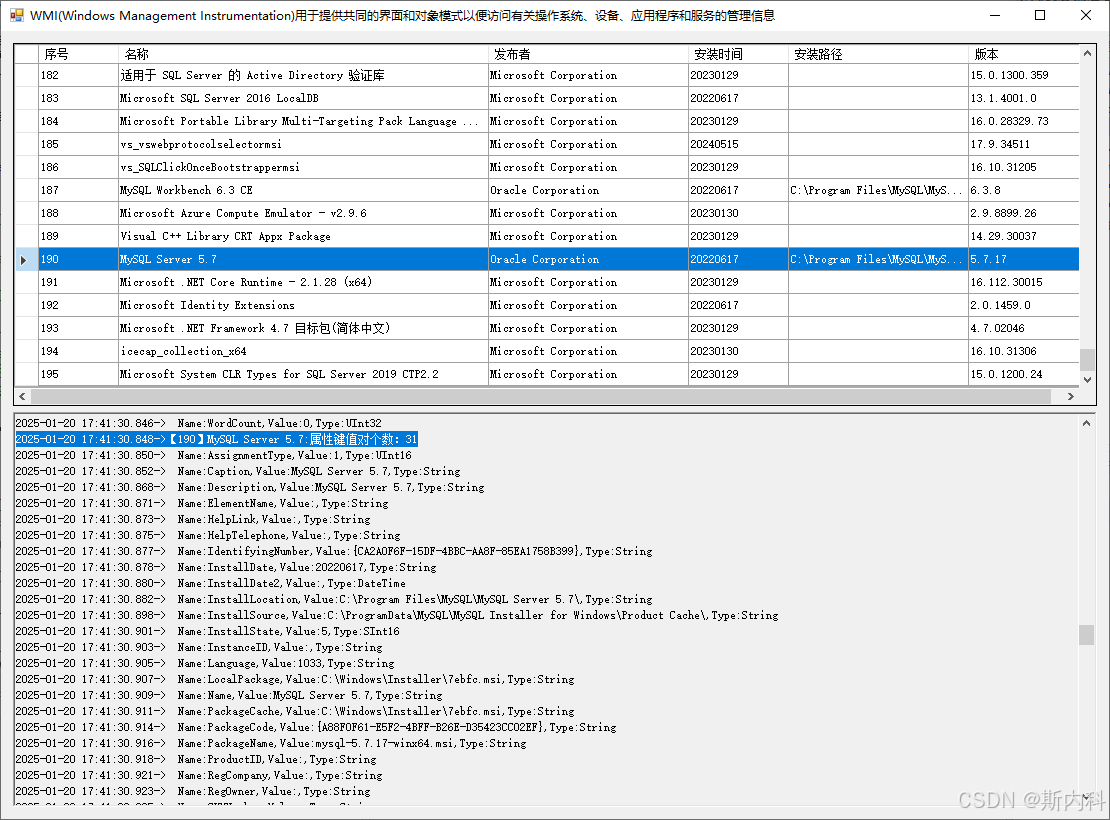
运行如图: