前言:哈喽,大家好,今天给大家分享一篇文章!并提供具体代码帮助大家深入理解,彻底掌握!创作不易,如果能帮助到大家或者给大家一些灵感和启发,欢迎收藏+关注哦 💕



目录
- [DeepSeek 助力 Vue3 开发:打造丝滑的网格布局(Grid Layout)](#DeepSeek 助力 Vue3 开发:打造丝滑的网格布局(Grid Layout))
📚📗📕📘📖🕮💡📝🗂️✍️🛠️💻🚀🎉🏗️🌐🖼️🔗📊👉🔖⚠️🌟🔐⬇️·正文开始⬇️·🎥😊🎓📩😺🌈🤝🤖📜📋🔍✅🧰❓📄📢📈 🙋0️⃣1️⃣2️⃣3️⃣4️⃣5️⃣6️⃣7️⃣8️⃣9️⃣🔟🆗*️⃣#️⃣
DeepSeek 助力 Vue3 开发:打造丝滑的网格布局(Grid Layout)
📚前言
在应用方面,DeepSeek 已广泛渗透到金融、公募基金、电信、汽车等多个行业,为各行业的数字化转型和智能化升级提供了强大的支持。在金融领域,DeepSeek 帮助银行实现智能合同质检、信贷风控和自动化估值对账等功能,有效提升了业务效率和风险防范能力;在公募基金行业,DeepSeek 助力基金公司提升投资研究、产品销售和风控合规等业务的效率和质量,为投资者提供更优质的服务。
📚页面效果

📚指令输入
已经创建好了一个基于Vue3的组合式API的项目(Composition API),并能正常运行起来,请帮我用 Vue3的组合式API(Composition API) 生成一个 网格布局(Grid Layout) 的功能组件,所有代码都保存在components/GridLayout 下的文件夹中。功能组件的script标签中只有setup属性,使用普通 JavaScript 实现,不使用TypeScript。
功能要有,如下属性:
属性定义
1. 布局相关属性
columns- 类型 :
Number | String - 描述 :定义网格的列数。可以是具体的数字,也可以是如
1fr 2fr这样的 CSS 网格列模板定义。
- 类型 :
rows- 类型 :
Number | String - 描述:定义网格的行数。同样可以是具体数字或 CSS 网格行模板定义。
- 类型 :
column-gap- 类型 :
String - 描述 :列与列之间的间距,值为 CSS 长度单位,如
10px、1em等。
- 类型 :
row-gap- 类型 :
String - 描述:行与行之间的间距,值为 CSS 长度单位。
- 类型 :
gap- 类型 :
String - 描述 :统一设置行和列的间距,是
column-gap和row-gap的简写。
- 类型 :
justify-content- 类型 :
String - 描述 :定义网格项在水平方向的对齐方式,可选值有
start、end、center、space-between等。
- 类型 :
align-content- 类型 :
String - 描述 :定义网格项在垂直方向的对齐方式,可选值有
start、end、center、space-between等。
- 类型 :
justify-items- 类型 :
String - 描述 :定义网格内每个项目在水平方向的对齐方式,可选值有
start、end、center等。
- 类型 :
align-items- 类型 :
String - 描述 :定义网格内每个项目在垂直方向的对齐方式,可选值有
start、end、center等。
- 类型 :
2. 响应式属性
breakpoints- 类型 :
Object - 描述 :用于响应式布局,根据不同的屏幕宽度调整网格的列数、间距等属性。例如:
{ sm: 2, md: 3, lg: 4 }表示在小屏幕时显示 2 列,中屏幕显示 3 列,大屏幕显示 4 列。
- 类型 :
3. 样式属性
class- 类型 :
String | Array | Object - 描述:为网格容器添加额外的 CSS 类名,方便自定义样式。
- 类型 :
style- 类型 :
String | Object - 描述:为网格容器添加内联样式。
- 类型 :
事件定义
1. 交互事件
click- 描述:当网格容器被点击时触发。
mouseenter- 描述:鼠标进入网格容器时触发。
mouseleave- 描述:鼠标离开网格容器时触发。
其他
1. 插槽使用
- 提供默认插槽,允许用户在网格内放置任意内容。
- 可以考虑提供具名插槽,用于特殊位置的内容放置,如网格的头部、底部等。
2. 响应式设计
- 结合 Vue 3 的响应式原理,根据
breakpoints属性动态调整网格布局。 - 可以使用
@media查询或第三方库(如vueuse中的响应式工具)来实现响应式效果。
3. 可访问性
- 确保网格布局在不同设备和浏览器上都有良好的可访问性,遵循 WCAG 标准。
- 为网格容器和网格项添加适当的 ARIA 属性,提高屏幕阅读器的支持。
4. 文档和示例
- 提供详细的文档,说明每个属性和事件的使用方法。
- 提供多个示例,展示不同场景下的网格布局效果,方便用户快速上手。
你有更好的建议也可以添加,要注明。组件定义好后给出5个及以上的调用示例,示例中添加完整的数据和事件,确保每个示例是独立的。
下面是现有目录
DeepSeekAndVue/
├── src/ # 源代码目录
│ ├── assets/ # 静态资源
│ │ ├── base.css
│ │ ├── main.css
│ │ └── logo.svg
│ ├── components/ # 组件目录
│ │ ├── HelloWorld.vue
│ │ ├── TheWelcome.vue
│ │ ├── WelcomeItem.vue
│ │ ├── Progress/
│ │ │ └── Progress.vue
│ │ ├── Accordion/
│ │ ├── BackToTop/
│ │ ├── Card/
│ │ ├── InfiniteScroll/
│ │ ├── Notification/
│ │ ├── Timeline/
│ │ ├── Switch/
│ │ ├── Tabs/
│ │ ├── Sidebar/
│ │ ├── Breadcrumbs/
│ │ ├── MasonryLayout/
│ │ ├── Rating/
│ │ ├── ColorPicker/
│ │ ├── RightClickMenu/
│ │ ├── RangePicker/
│ │ ├── Navbar/
│ │ ├── FormValidation/
│ │ ├── CopyToClipboard/
│ │ ├── ClickAnimations/
│ │ ├── ThumbnailList/
│ │ ├── KeyboardShortcuts/
│ │ ├── CommentSystem/
│ │ ├── QRCode/
│ │ ├── RadioButton/
│ │ ├── Slider/
│ │ ├── ScrollAnimations/
│ │ ├── TextInput/
│ │ ├── Divider/
│ │ ├── Checkbox/
│ │ ├── TagInput/
│ │ ├── DropdownSelect/
│ │ ├── List/
│ │ ├── Header/
│ │ ├── Footer/
│ │ ├── Pagination/
│ │ ├── FloatingActionButton/
│ │ ├── GridLayout/
│ │ ├── DatePicker/
│ │ └── icons/
│ ├── router/ # 路由配置
│ │ └── index.js
│ ├── stores/ # Pinia 状态管理
│ │ └── counter.js
│ ├── views/ # 页面组件
│ │ ├── ProgressView.vue
│ │ ├── TabsView.vue
│ │ ├── SwitchView.vue
│ │ ├── TimelineView.vue
│ │ ├── NotificationView.vue
│ │ ├── CardView.vue
│ │ ├── InfiniteScrollView.vue
│ │ ├── BackToTopView.vue
│ │ ├── AccordionView.vue
│ │ ├── SidebarView.vue
│ │ ├── BreadcrumbsView.vue
│ │ ├── MasonryLayoutView.vue
│ │ ├── RatingView.vue
│ │ ├── ColorPickerView.vue
│ │ ├── RightClickMenuView.vue
│ │ ├── RangePickerView.vue
│ │ ├── NavbarView.vue
│ │ ├── FormValidationView.vue
│ │ ├── CopyToClipboardView.vue
│ │ ├── ClickAnimationsView.vue
│ │ ├── ThumbnailListView.vue
│ │ ├── KeyboardShortcutsView.vue
│ │ ├── CommentSystemView.vue
│ │ ├── QRCodeView.vue
│ │ ├── RadioButtonView.vue
│ │ ├── SliderView.vue
│ │ ├── ScrollAnimationsView.vue
│ │ ├── TextInputView.vue
│ │ ├── DividerView.vue
│ │ ├── CheckboxView.vue
│ │ ├── TagInputView.vue
│ │ ├── DropdownSelectView.vue
│ │ ├── ListView.vue
│ │ ├── HeaderView.vue
│ │ ├── FooterView.vue
│ │ ├── PaginationView.vue
│ │ ├── FloatingActionButtonView.vue
│ │ ├── GridLayoutView.vue
│ │ ├── DatePickerView.vue
│ │ └── AboutView.vue
│ ├── App.vue # 根组件
│ └── main.js # 应用入口
├── public/ # 公共资源目录
├── index.html # HTML 模板
├── package.json # 项目配置
├── vite.config.js # Vite 配置
└── node_modules/ # 依赖包目录
📚think
📘组件代码
📚代码测试
报错
ui报错
bash
D:/phpstudy_pro/WWW/vues/DeepSeekAndVue/src/views/GridLayoutView.vue:63:22
61 |    >
62 |      <template v-for="(card, index) in cards">
63 |        <CardComponent :key="index" :data="card" />
   |                        ^
64 |      </template>
65 |      <template #footer>
控制台报错
bash
index.js:208


       GET http://localhost:5173/src/views/GridLayoutView.vue net::ERR_ABORTED 500 (Internal Server Error)
component @ index.js:208
extractComponentsGuards @ vue-router.js?v=c715b44f:1464
(匿名) @ vue-router.js?v=c715b44f:2483
Promise.then(异步)
navigate @ vue-router.js?v=c715b44f:2481
pushWithRedirect @ vue-router.js?v=c715b44f:2384
push @ vue-router.js?v=c715b44f:2320
navigate @ vue-router.js?v=c715b44f:1549
callWithErrorHandling @ chunk-U3LI7FBV.js?v=c715b44f:2263
callWithAsyncErrorHandling @ chunk-U3LI7FBV.js?v=c715b44f:2270
invoker @ chunk-U3LI7FBV.js?v=c715b44f:11202
显示另外 9 个框架
收起
vue-router.js?v=c715b44f:48 [Vue Router warn]: uncaught error during route navigation:
warn @ vue-router.js?v=c715b44f:48
triggerError @ vue-router.js?v=c715b44f:2610
(匿名) @ vue-router.js?v=c715b44f:2393
Promise.catch(异步)
pushWithRedirect @ vue-router.js?v=c715b44f:2384
push @ vue-router.js?v=c715b44f:2320
navigate @ vue-router.js?v=c715b44f:1549
callWithErrorHandling @ chunk-U3LI7FBV.js?v=c715b44f:2263
callWithAsyncErrorHandling @ chunk-U3LI7FBV.js?v=c715b44f:2270
invoker @ chunk-U3LI7FBV.js?v=c715b44f:11202
显示另外 9 个框架
收起
vue-router.js?v=c715b44f:2612 TypeError: Failed to fetch dynamically imported module: http://localhost:5173/src/views/GridLayoutView.vue
原因,需要添数据。没有数据导致。在 上添加 key 属性:确保在 v-for 循环中为每个元素提供唯一的 key,以帮助 Vue 更好地跟踪元素。
📚整理后主要代码
📘调用 \src\views\FloatingActionButtonView.vue
html
<script setup>
import { ref } from 'vue'
import FloatingActionButton from '@/components/FloatingActionButton/FloatingActionButton.vue'


// 示例 5: 使用自定义 SVG 图标
const icon5 = ref(`<svg xmlns="http://www.w3.org/2000/svg" width="20" height="17" fill="currentColor">
    <path
      d="M11 2.253a1 1 0 1 0-2 0h2zm-2 13a1 1 0 1 0 2 0H9zm.447-12.167a1 1 0 1 0 1.107-1.666L9.447 3.086zM1 2.253L.447 1.42A1 1 0 0 0 0 2.253h1zm0 13H0a1 1 0 0 0 1.553.833L1 15.253zm8.447.833a1 1 0 1 0 1.107-1.666l-1.107 1.666zm0-14.666a1 1 0 1 0 1.107 1.666L9.447 1.42zM19 2.253h1a1 1 0 0 0-.447-.833L19 2.253zm0 13l-.553.833A1 1 0 0 0 20 15.253h-1zm-9.553-.833a1 1 0 1 0 1.107 1.666L9.447 14.42zM9 2.253v13h2v-13H9zm1.553-.833C9.203.523 7.42 0 5.5 0v2c1.572 0 2.961.431 3.947 1.086l1.107-1.666zM5.5 0C3.58 0 1.797.523.447 1.42l1.107 1.666C2.539 2.431 3.928 2 5.5 2V0zM0 2.253v13h2v-13H0zm1.553 13.833C2.539 15.431 3.928 15 5.5 15v-2c-1.92 0-3.703.523-5.053 1.42l1.107 1.666zM5.5 15c1.572 0 2.961.431 3.947 1.086l1.107-1.666C9.203 13.523 7.42 13 5.5 13v2zm5.053-11.914C11.539 2.431 12.928 2 14.5 2V0c-1.92 0-3.703.523-5.053 1.42l1.107 1.666zM14.5 2c1.573 0 2.961.431 3.947 1.086l1.107-1.666C18.203.523 16.421 0 14.5 0v2zm3.5.253v13h2v-13h-2zm1.553 12.167C18.203 13.523 16.421 13 14.5 13v2c1.573 0 2.961.431 3.947 1.086l1.107-1.666zM14.5 13c-1.92 0-3.703.523-5.053 1.42l1.107 1.666C11.539 15.431 12.928 15 14.5 15v-2z"
    />
  </svg>`)

</script>

<template>
  <div class="button-container">
    <h2>1. 基本用法</h2>
    <FloatingActionButton
        icon="fas fa-plus"
        position="top-right"
        :offsetX="20"
        :offsetY="120"
        @click="() => console.log('Button 1 clicked!')"
    />
    <!-- 自定义颜色和位置 -->
    <h2>2. 自定义颜色和位置</h2>
    <FloatingActionButton
        icon="fas fa-share"
        color="#4CAF50"
        textColor="#ffffff"
        position="top-right"
        :offsetX="20"
        :offsetY="220"
    />

    <h2>3. 方形大号按钮</h2>
    <FloatingActionButton
        icon="fas fa-download"
        size="large"
        shape="square"
        tooltip="下载文件"
        position="top-right"
        :offsetX="20"
        :offsetY="320"
    />
    <h2>4. 禁用状态</h2>
    <!-- 禁用状态 -->
    <FloatingActionButton
        icon="fas fa-gear"
        :disabled="true"
        animation-type="scale"
        position="top-right"
        :offsetX="20"
        :offsetY="420"
    />
    <h2>5. SVG 图标 </h2>
    <FloatingActionButton
      :icon="icon5"
      color="#17a2b8"
      textColor="#fff"
      text = "5"
      position="top-right"
      :offsetX="20"
      :offsetY="520"
      size="small"
      @click="() => console.log('Button 5 clicked!')"
    />
  </div>
</template>

<style scoped>
.button-container {
  position: relative; /* 使容器成为定位上下文 */
}

h2 {
  margin-top: 0; /* 移除标题顶部的默认间距 */
}

/* 绝对定位按钮 */
.fab {
  position: absolute; /* 绝对定位 */
  bottom: 20px; /* 距离底部20px */
  right: 20px; /* 距离右侧20px */
}
</style>
📚测试代码正常跑通,附其他基本代码
- 添加路由
- 页面展示入口
📘编写路由 src\router\index.js
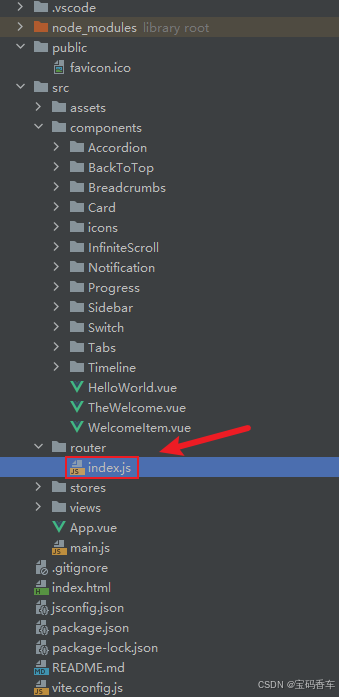
javascript
import { createRouter, createWebHistory } from 'vue-router'
import RightClickMenuView from '../views/RightClickMenuView.vue'
import RangePickerView from '../views/RangePickerView.vue'


const router = createRouter({
  history: createWebHistory(import.meta.env.BASE_URL),
  routes: [
    {
      path: '/',
      name: 'progress',
      component:  () => import('../views/ProgressView.vue'),
    },
    {
      path: '/tabs',
      name: 'tabs',
      // route level code-splitting
      // this generates a separate chunk (About.[hash].js) for this route
      // which is lazy-loaded when the route is visited.
      // 标签页(Tabs)
      component: () => import('../views/TabsView.vue'),
    },
    {
      path: '/accordion',
      name: 'accordion',
      // 折叠面板(Accordion)
      component: () => import('../views/AccordionView.vue'),
    },
    {
      path: '/timeline',
      name: 'timeline',
      // 时间线(Timeline)
      component: () => import('../views/TimelineView.vue'),
    },
    {
      path: '/backToTop',
      name: 'backToTop',
      component: () => import('../views/BackToTopView.vue')
    },
    {
      path: '/notification',
      name: 'notification',
      component: () => import('../views/NotificationView.vue')
    },
    {
      path: '/card',
      name: 'card',
      component: () => import('../views/CardView.vue')
    },
    {
      path: '/infiniteScroll',
      name: 'infiniteScroll',
      component: () => import('../views/InfiniteScrollView.vue')
    },
    {
      path: '/switch',
      name: 'switch',
      component: () => import('../views/SwitchView.vue')
    },
    {
      path: '/sidebar',
      name: 'sidebar',
      component: () => import('../views/SidebarView.vue')
    },
    {
      path: '/breadcrumbs',
      name: 'breadcrumbs',
      component: () => import('../views/BreadcrumbsView.vue')
    },
    {
      path: '/masonryLayout',
      name: 'masonryLayout',
      component: () => import('../views/MasonryLayoutView.vue')
    },
    {
      path: '/rating',
      name: 'rating',
      component: () => import('../views/RatingView.vue')
    },
    {
      path: '/datePicker',
      name: 'datePicker',
      component: () => import('../views/DatePickerView.vue')
    },
    {
      path: '/colorPicker',
      name: 'colorPicker',
      component: () => import('../views/ColorPickerView.vue')
    },
    {
      path: '/rightClickMenu',
      name: 'rightClickMenu',
      component: RightClickMenuView
    },
    {
      path: '/rangePicker',
      name: 'rangePicker',
      component: () => import('../views/RangePickerView.vue')
    },
    {
      path: '/navbar',
      name: 'navbar',
      component: () => import('../views/NavbarView.vue')
    },
    {
      path: '/formValidation',
      name: 'formValidation',
      component: () => import('../views/FormValidationView.vue')
    },
    {
      path: '/copyToClipboard',
      name: 'copyToClipboard',
      component: () => import('../views/CopyToClipboardView.vue')
    },
    {
      path: '/clickAnimations',
      name: 'clickAnimations',
      component: () => import('../views/ClickAnimationsView.vue')
    },
    {
      path: '/thumbnailList',
      name: 'thumbnailList',
      component: () => import('../views/ThumbnailListView.vue')
    },
    {
      path: '/keyboardShortcuts',
      name: 'keyboardShortcuts',
      component: () => import('../views/KeyboardShortcutsView.vue')
    },
    {
      path: '/commentSystem',
      name: 'commentSystem',
      component: () => import('../views/CommentSystemView.vue')
    },
    {
      path: '/qRCode',
      name: 'qRCode',
      component: () => import('../views/QRCodeView.vue')
    },
    {
      path: '/radioButton',
      name: 'radioButton',
      component: () => import('../views/RadioButtonView.vue')
    },
    {
      path: '/slider',
      name: 'slider',
      component: () => import('../views/SliderView.vue')
    },
    {
      path: '/scrollAnimations',
      name: 'scrollAnimations',
      component: () => import('../views/ScrollAnimationsView.vue')
    },
    {
      path: '/textInputView',
      name: 'textInputView',
      component: () => import('../views/TextInputView.vue')
    },
    {
      path: '/divider',
      name: 'divider',
      component: () => import('../views/DividerView.vue')
    },
    {
      path: '/checkbox',
      name: 'checkbox',
      component: () => import('../views/CheckboxView.vue')
    },
    {
      path: '/tagInput',
      name: 'tagInput',
      component: () => import('../views/TagInputView.vue')
    },
    {
      path: '/dropdownSelect',
      name: 'dropdownSelect',
      component: () => import('../views/DropdownSelectView.vue')
    },
    {
      path: '/list',
      name: 'list',
      component: () => import('../views/ListView.vue')
    },
    {
      path: '/header',
      name: 'header',
      component: () => import('../views/HeaderView.vue')
    },
    {
      path: '/footer',
      name: 'footer',
      component: () => import('../views/FooterView.vue')
    },
    {
      path: '/pagination',
      name: 'pagination',
      component: () => import('../views/PaginationView.vue')
    },
    {
      path: '/floatingActionButton',
      name: 'floatingActionButton',
      component: () => import('../views/FloatingActionButtonView.vue')
    },
    {
      path: '/gridLayout',
      name: 'gridLayout',
      component: () => import('../views/GridLayoutView.vue')
    }
  ],
})

export default router
📘编写展示入口 src\App.vue
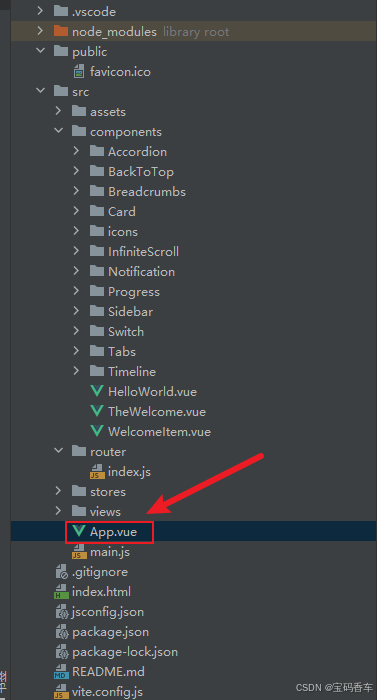
html
<script setup>
import { RouterLink, RouterView } from 'vue-router'
import HelloWorld from './components/HelloWorld.vue'
</script>

<template>
  <header>
    <img alt="Vue logo" class="logo" src="@/assets/logo.svg" width="125" height="125" />

    <div class="wrapper">
      <HelloWorld msg="You did it!" />
      <nav>
        <RouterLink to="/">Progress</RouterLink>
        <RouterLink to="/tabs">Tabs</RouterLink>
        <RouterLink to="/accordion">Accordion</RouterLink>
        <RouterLink to="/timeline">Timeline</RouterLink>
        <RouterLink to="/backToTop">BackToTop</RouterLink>
        <RouterLink to="/notification">Notification</RouterLink>
        <RouterLink to="/card">Card</RouterLink>
        <RouterLink to="/infiniteScroll">InfiniteScroll</RouterLink>
        <RouterLink to="/switch">Switch</RouterLink>
        <RouterLink to="/sidebar">Sidebar</RouterLink>
        <RouterLink to="/breadcrumbs">Breadcrumbs</RouterLink>
        <RouterLink to="/masonryLayout">MasonryLayout</RouterLink>
        <RouterLink to="/rating">Rating</RouterLink>
        <RouterLink to="/datePicker">DatePicker</RouterLink>
        <RouterLink to="/colorPicker">ColorPicker</RouterLink>
        <RouterLink to="/rightClickMenu">RightClickMenu</RouterLink>
        <RouterLink to="/rangePicker">RangePicker</RouterLink>
        <RouterLink to="/navbar">Navbar</RouterLink>
        <RouterLink to="/formValidation">FormValidation</RouterLink>
        <RouterLink to="/copyToClipboard">CopyToClipboard</RouterLink>
        <RouterLink to="/clickAnimations">ClickAnimations</RouterLink>
        <RouterLink to="/thumbnailList">ThumbnailList</RouterLink>
        <RouterLink to="/keyboardShortcuts">KeyboardShortcuts</RouterLink>
        <RouterLink to="/commentSystem">CommentSystem</RouterLink>
        <RouterLink to="/qRCode">QRCode</RouterLink>
        <RouterLink to="/radioButton">RadioButton</RouterLink>
        <RouterLink to="/slider">Slider</RouterLink>
        <RouterLink to="/scrollAnimations">ScrollAnimations</RouterLink>
        <RouterLink to="/textInputView">TextInput</RouterLink>
        <RouterLink to="/divider">Divider</RouterLink>
        <RouterLink to="/checkbox">Checkbox</RouterLink>
        <RouterLink to="/tagInput">TagInput</RouterLink>
        <RouterLink to="/dropdownSelect">DropdownSelect</RouterLink>
        <RouterLink to="/list">List</RouterLink>
        <RouterLink to="/header">Header</RouterLink>
        <RouterLink to="/footer">Footer</RouterLink>
        <RouterLink to="/pagination">Pagination</RouterLink>
        <RouterLink to="/floatingActionButton">FloatingActionButton</RouterLink>
        <RouterLink to="/gridLayout">GridLayout</RouterLink>
      </nav>
    </div>
  </header>
  <RouterView />
</template>

<style scoped>
header {
  line-height: 1.5;
  max-height: 100vh;
}

.logo {
  display: block;
  margin: 0 auto 2rem;
}

nav {
  width: 100%;
  font-size: 12px;
  text-align: center;
  margin-top: 2rem;
}

nav a.router-link-exact-active {
  color: var(--color-text);
}

nav a.router-link-exact-active:hover {
  background-color: transparent;
}

nav a {
  display: inline-block;
  padding: 0 1rem;
  border-left: 1px solid var(--color-border);
}

nav a:first-of-type {
  border: 0;
}

@media (min-width: 1024px) {
  header {
    display: flex;
    place-items: center;
    padding-right: calc(var(--section-gap) / 2);
  }

  .logo {
    margin: 0 2rem 0 0;
  }

  header .wrapper {
    display: flex;
    place-items: flex-start;
    flex-wrap: wrap;
  }

  nav {
    text-align: left;
    margin-left: -1rem;
    font-size: 1rem;

    padding: 1rem 0;
    margin-top: 1rem;
  }
}
</style>
📚页面效果
📚相关文章
------------ 相 关 文 章 ------------
-
DeepSeek 助力 Vue 开发:打造丝滑的导航栏(Navbar)https://blog.csdn.net/qq_33650655/article/details/145732421
-
DeepSeek 助力 Vue 开发:打造丝滑的二维码生成(QR Code)https://blog.csdn.net/qq_33650655/article/details/145797928
-
DeepSeek 助力 Vue 开发:打造丝滑的滑块(Slider)https://blog.csdn.net/qq_33650655/article/details/145817161
-
DeepSeek 助力 Vue 开发:打造丝滑的文本输入框(Text Input)https://blog.csdn.net/qq_33650655/article/details/145837003
-
DeepSeek 助力 Vue 开发:打造丝滑的分割线(Divider)https://blog.csdn.net/qq_33650655/article/details/145849100
-
DeepSeek 助力 Vue 开发:打造丝滑的 复选框(Checkbox)https://blog.csdn.net/qq_33650655/article/details/145855695
-
DeepSeek 助力 Vue3 开发:打造丝滑的标签输入(Tag Input)https://blog.csdn.net/qq_33650655/article/details/145858574
-
DeepSeek 助力 Vue3 开发:打造丝滑的列表(List)https://blog.csdn.net/qq_33650655/article/details/145866384
-
DeepSeek 助力 Vue3 开发:打造丝滑的页眉(Header)https://blog.csdn.net/qq_33650655/article/details/145885122
-
DeepSeek 助力 Vue3 开发:打造丝滑的页脚(Footer)https://blog.csdn.net/qq_33650655/article/details/145886306
-
DeepSeek 助力 Vue3 开发:打造丝滑的分页(Pagination)https://blog.csdn.net/qq_33650655/article/details/145886824
到此这篇文章就介绍到这了,更多精彩内容请关注本人以前的文章或继续浏览下面的文章,创作不易,如果能帮助到大家,希望大家多多支持宝码香车~💕,若转载本文,一定注明本文链接。
更多专栏订阅推荐:
💕 vue
✈️ Electron
⭐️ js
📝 字符串