1 对于项目中一些比较长的日志,比如前后端交互协议具体数据等,这些日志内容可能会比较长,在unity控制面板上查看不是十分方便,我们可以对双击事件进行扩展,将日志保存到一个文本中,然后用系统默认的文本查看工具查看这个日志
2 项目中如果用到了lua,当我们在控制台输出lua文件的时候,能不能双击日志用我们的代码编辑器软件打开日志输出位置
console日志双击然后用记事本打开显示
我们先用 OnOpenAsset 特性,重写双击回调方法,这个方法返回false,会继续执行系统默认日志双击打开方法,返回true则会中断。
我们想要的效果是用记事本打开这个特殊日志,但是不需要跳转到对应的代码输出位置
首先我们先在lua里面把日志输出方法重写一下,在日志输出的时候,添加一个标签 "",当我们检测到双击的日志信息包含这个标签,则用记事本打开这一段日志(我们也可以把一些特殊的日志先在代码中缓存,在这个时候调用缓存读取那些特殊的日志进行输出显示)
lua
function printLongLog(fmt, ...)
    local logText = string.format(fmt, ...)
    local debugInfo = debug.getinfo(2)
    local str = string.format("%s\n<open in file>", logText,
                    debugInfo.short_src, debugInfo.currentline)

    local logMessage = concatStrs(str, debug.traceback("", 2))
    UnityEngine.Debug.Log(logMessage)
end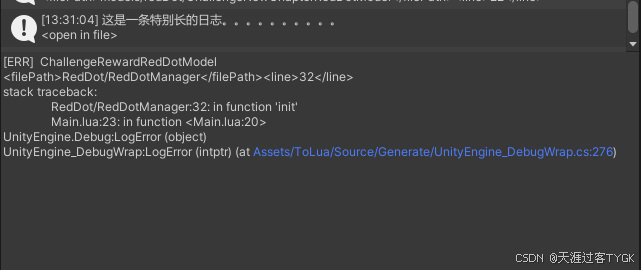
然后再C#代码中监听这一段日志
csharp
 [OnOpenAsset(0)]
    public static bool OnAsset(int instanceID, int line)
    {
        string assetPath = AssetDatabase.GetAssetPath(instanceID);
        string fileExtension = Path.GetExtension(assetPath);
         string stackTrace = GetStackTrace();
        if (string.IsNullOrEmpty(stackTrace))
        {
            return false;
        }

        if (stackTrace.Contains("<open in file>")) //对于一些比较长的日志,添加标签<open in file>,双击的时候再文本中打开
        {
            openLog(stackTrace);
            return true;
        }
         return false;
     }
获取console里面的日志
csharp
private static string GetStackTrace()
    {
        var consoleWindowType = typeof(EditorWindow).Assembly.GetType("UnityEditor.ConsoleWindow");
        var fieldInfo = consoleWindowType.GetField("ms_ConsoleWindow", BindingFlags.Static | BindingFlags.NonPublic);
        var consoleWindowInstance = fieldInfo.GetValue(null);
        if (null != consoleWindowInstance && (object)EditorWindow.focusedWindow == consoleWindowInstance)
        {
            fieldInfo = consoleWindowType.GetField("m_ActiveText", BindingFlags.Instance | BindingFlags.NonPublic);
            string activeText = fieldInfo.GetValue(consoleWindowInstance).ToString();
            return activeText;
        }
        return "";
    }
用记事本打开日志文件,我们先把日志信息保存在本地,然后调用系统方法打开这个文件
这里用到了一个方法 System.Diagnostics.Process.Start(fileName),参数是文件的完整路径,调用系统默认方式打开改文件
csharp
private static void openLog(string stackTrace)
    {
        string fileName = GetFileSaveName();
        string saveDirPath = Application.dataPath + "/../Debug";

        if (!Directory.Exists(saveDirPath))
        {
            Directory.CreateDirectory(saveDirPath);
        }
        string savePath = saveDirPath + "/" + fileName;
        File.WriteAllText(savePath, stackTrace);
        System.Diagnostics.Process.Start(savePath);
    }

    private static string GetFileSaveName()
    {
        DateTime currentTime = DateTime.Now;
        string customFormat = currentTime.ToString("yyyy_MM_dd_HH_mm_ss");
        string fileName = $"debug_{customFormat}.txt";
        return fileName;
    }
双击打开lua日志然后用lua编辑器定位到日志输出位置
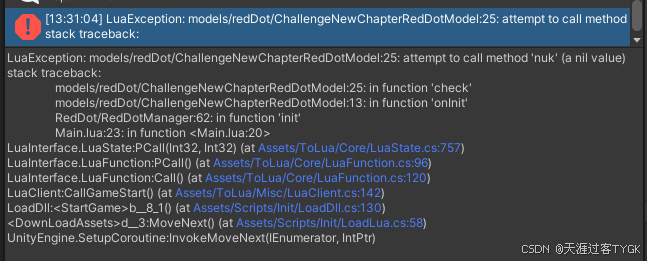
对于lua输出的日志,我们为了便于打开可以用类似上面的方法重新封装一个lua日志输出方法,然后通关特殊标签的进行确定lua文件的名称和对应的行号。也可以进行拆分lua堆栈数据取到lua代码名称和对应堆栈。
添加标签方式的lua日志输出
lua
function print(fmt, ...)
    local logText = string.format(fmt, ...)
    local debugInfo = debug.getinfo(2)
    local str = string.format("%s\n<filePath>%s</filePath><line>%s</line>", logText,
                    debugInfo.short_src, debugInfo.currentline)

    local logMessage = concatStrs(str, debug.traceback("", 2))
    UnityEngine.Debug.Log(logMessage)
end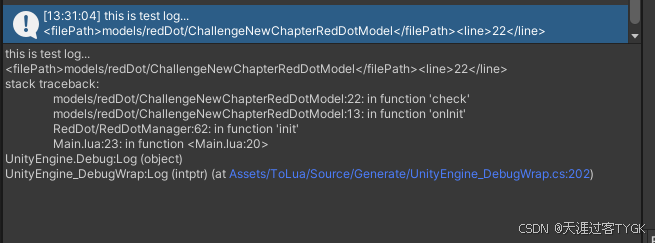
获取文件名称和行号
csharp
static bool OpenLua(string logText)
    {
        //获取lua文件路径
        Regex regex = new Regex(@"<filePath>.*<\/filePath>");
        Match match = regex.Match(logText);
        if (!match.Success)
        {
            return false;
        }
        string filePath = match.Groups[0].Value.Trim();
        int length = filePath.Length - 10 - 11; //去掉开头和结尾的字符串 <filePath>  </filePath>
        filePath = filePath.Substring(10, length);
        filePath = filePath.Replace(".", "/");
        if (!filePath.EndsWith(".lua"))
        {
            filePath = filePath + ".lua";
        }

        //获取日志行号
        Regex lineRegex = new Regex(@"<line>.*<\/line>");
        match = lineRegex.Match(logText);
        if (!match.Success)
        {
            return false;
        }
        string luaLineString = match.Groups[0].Value;
        luaLineString.Trim();
        length = luaLineString.Length - 6 - 7;
        luaLineString = luaLineString.Substring(6, length);
        int luaLine = int.Parse(luaLineString.Trim());

        return OpenFileAtLineExternal(filePath, luaLine);
    }
对于系统默认输出日志,我们通关拆分字符串方式获取
csharp
 static bool OpenLuaDefault(string logText)
    {
        int index = logText.IndexOf("stack traceback:");
        string temp = logText.Substring(index, logText.Length - index);
        string[] arr = temp.Split(':');
        if (arr.Length < 3)
        {
            return false;
        }

        string filePath = arr[1].Trim();
        int luaLine = int.Parse(arr[2]);
        filePath = filePath + ".lua";
        return OpenFileAtLineExternal(filePath, luaLine);
    }
有了文件名和行号,我们就可以通关调用VScode或者Idea编辑器软件,打开对应的文件并定位到指定的行
csharp
static void OpenFileWith(string fileName, int line)
    {
        string editorPath = EditorUserSettings.GetConfigValue(EXTERNAL_EDITOR_PATH_KEY);
        System.Diagnostics.Process proc = new System.Diagnostics.Process();
        proc.StartInfo.FileName = editorPath;
        string projectRootPath = EditorUserSettings.GetConfigValue(LUA_PROJECT_ROOT_FOLDER_PATH_KEY);
        if (string.IsNullOrEmpty(projectRootPath))
        {
            SetLuaProjectRoot();
            return;
        }
        string procArgument = "";
        if (editorPath.IndexOf("idea") != -1) //idea
        {
            procArgument = string.Format("{0} --line {1} {2}", projectRootPath, line, fileName);
        }
        else if (editorPath.IndexOf("Code.exe") != -1) // VSCode
        {
            string filePath = Path.Combine(projectRootPath, fileName);
            procArgument = string.Format("-g {0}:{1}:0", filePath, line);
        }
        else
        {
            procArgument = string.Format("{0}:{1}:0", fileName, line);
        }
        proc.StartInfo.Arguments = procArgument;
        proc.Start();
    }
完整代码
lua 日志方法
lua
function print(fmt, ...)
    local logText = string.format(fmt, ...)
    local debugInfo = debug.getinfo(2)
    local str = string.format("%s\n<filePath>%s</filePath><line>%s</line>", logText,
                    debugInfo.short_src, debugInfo.currentline)

    local logMessage = concatStrs(str, debug.traceback("", 2))
    UnityEngine.Debug.Log(logMessage)
end

function printLongLog(fmt, ...)
    local logText = string.format(fmt, ...)
    local debugInfo = debug.getinfo(2)
    local str = string.format("%s\n<open in file>", logText,
                    debugInfo.short_src, debugInfo.currentline)

    local logMessage = concatStrs(str, debug.traceback("", 2))
    UnityEngine.Debug.Log(logMessage)
end
C#方法
csharp
using System;
using System.Collections;
using System.Collections.Generic;
using System.IO;
using System.Reflection;
using System.Text.RegularExpressions;
using UnityEditor;
using UnityEditor.Callbacks;
using UnityEngine;

public class ConsoleTools : MonoBehaviour
{
    public const string EXTERNAL_EDITOR_PATH_KEY = "mTv8";
    public const string LUA_PROJECT_ROOT_FOLDER_PATH_KEY = "obUd";

    [OnOpenAsset(0)]
    public static bool OnAsset(int instanceID, int line)
    {
        string assetPath = AssetDatabase.GetAssetPath(instanceID);
        string fileExtension = Path.GetExtension(assetPath);
        // string fileName = Path.GetFileNameWithoutExtension(assetPath);
        if(fileExtension != ".cs" && fileExtension != ".lua")
        {
            return false;
        }

        string stackTrace = GetStackTrace();
        if (string.IsNullOrEmpty(stackTrace))
        {
            return false;
        }

        if (stackTrace.Contains("<open in file>")) //对于一些比较长的日志,添加标签<open in file>,双击的时候再文本中打开
        {
            openLog(stackTrace);
            return true;
        }


        if (stackTrace.Contains("stack traceback:")) //lua输出堆栈信息,会自带 ""stack traceback:" 这描述,这里用来筛选lua日志
        {
            bool isOpenSuccess = false;
            if (stackTrace.Contains("<filePath>"))
            {
                isOpenSuccess = OpenLua(stackTrace);
            }
            else
            {
                isOpenSuccess = OpenLuaDefault(stackTrace);
            }
            return isOpenSuccess;
        }

        return false;
    }

    /// <summary>
    /// 通关日志堆栈获取日志信息
    /// </summary>
    /// <returns></returns>
    private static string GetStackTrace()
    {
        var consoleWindowType = typeof(EditorWindow).Assembly.GetType("UnityEditor.ConsoleWindow");
        var fieldInfo = consoleWindowType.GetField("ms_ConsoleWindow", BindingFlags.Static | BindingFlags.NonPublic);
        var consoleWindowInstance = fieldInfo.GetValue(null);
        if (null != consoleWindowInstance && (object)EditorWindow.focusedWindow == consoleWindowInstance)
        {
            fieldInfo = consoleWindowType.GetField("m_ActiveText", BindingFlags.Instance | BindingFlags.NonPublic);
            string activeText = fieldInfo.GetValue(consoleWindowInstance).ToString();
            return activeText;
        }
        return "";
    }

    /// <summary>
    /// 以文件个格式打开日志
    /// </summary>
    /// <param name="stackTrace"></param>
    private static void openLog(string stackTrace)
    {
        string fileName = GetFileSaveName();
        string saveDirPath = Application.dataPath + "/../Debug";

        if (!Directory.Exists(saveDirPath))
        {
            Directory.CreateDirectory(saveDirPath);
        }
        string savePath = saveDirPath + "/" + fileName;
        File.WriteAllText(savePath, stackTrace);
        System.Diagnostics.Process.Start(savePath);
    }

    private static string GetFileSaveName()
    {
        DateTime currentTime = DateTime.Now;
        string customFormat = currentTime.ToString("yyyy_MM_dd_HH_mm_ss");
        string fileName = $"debug_{customFormat}.txt";
        return fileName;
    }

    static void SetExternalEditorPath()
    {
        string path = EditorUserSettings.GetConfigValue(EXTERNAL_EDITOR_PATH_KEY);
        path = EditorUtility.OpenFilePanel(
            "设置lua文件默认打开的编辑器软件路径(选择exe文件)",
            path,
            "exe");

        if (path != "")
        {
            EditorUserSettings.SetConfigValue(EXTERNAL_EDITOR_PATH_KEY, path);
            Debug.Log("Set Editor Path: " + path);
        }
    }

    static void SetLuaProjectRoot()
    {
        string path = EditorUserSettings.GetConfigValue(LUA_PROJECT_ROOT_FOLDER_PATH_KEY);
        path = EditorUtility.OpenFolderPanel(
            "设置lua项目根目录位置",
            path,
            "");

        if (path != "")
        {
            EditorUserSettings.SetConfigValue(LUA_PROJECT_ROOT_FOLDER_PATH_KEY, path);
            Debug.Log("Set Editor Path: " + path);
        }
    }

    static bool OpenLua(string logText)
    {
        //获取lua文件路径
        Regex regex = new Regex(@"<filePath>.*<\/filePath>");
        Match match = regex.Match(logText);
        if (!match.Success)
        {
            return false;
        }
        string filePath = match.Groups[0].Value.Trim();
        int length = filePath.Length - 10 - 11; //去掉开头和结尾的字符串 <filePath>  </filePath>
        filePath = filePath.Substring(10, length);
        filePath = filePath.Replace(".", "/");
        if (!filePath.EndsWith(".lua"))
        {
            filePath = filePath + ".lua";
        }

        //获取日志行号
        Regex lineRegex = new Regex(@"<line>.*<\/line>");
        match = lineRegex.Match(logText);
        if (!match.Success)
        {
            return false;
        }
        string luaLineString = match.Groups[0].Value;
        luaLineString.Trim();
        length = luaLineString.Length - 6 - 7;
        luaLineString = luaLineString.Substring(6, length);
        int luaLine = int.Parse(luaLineString.Trim());

        return OpenFileAtLineExternal(filePath, luaLine);
    }
    /// <summary>
    /// 打开没有标签的日志对应的脚本
    /// </summary>
    /// <param name="logText"></param>
    /// <returns></returns>
    static bool OpenLuaDefault(string logText)
    {
        int index = logText.IndexOf("stack traceback:");
        string temp = logText.Substring(index, logText.Length - index);
        string[] arr = temp.Split(':');
        if (arr.Length < 3)
        {
            return false;
        }

        string filePath = arr[1].Trim();
        int luaLine = int.Parse(arr[2]);
        filePath = filePath + ".lua";
        return OpenFileAtLineExternal(filePath, luaLine);
    }

    /// <summary>
    /// 打开指定的文件
    /// </summary>
    /// <param name="fileName">文件名</param>
    /// <param name="line">行号</param>
    /// <returns></returns>
    static bool OpenFileAtLineExternal(string fileName, int line)
    {
        string editorPath = EditorUserSettings.GetConfigValue(EXTERNAL_EDITOR_PATH_KEY);
        if (string.IsNullOrEmpty(editorPath) || !File.Exists(editorPath))
        {   // 没有path就弹出面板设置
            SetExternalEditorPath();
        }
        OpenFileWith(fileName, line);
        return true;
    }

    static void OpenFileWith(string fileName, int line)
    {
        string editorPath = EditorUserSettings.GetConfigValue(EXTERNAL_EDITOR_PATH_KEY);
        System.Diagnostics.Process proc = new System.Diagnostics.Process();
        proc.StartInfo.FileName = editorPath;
        string projectRootPath = EditorUserSettings.GetConfigValue(LUA_PROJECT_ROOT_FOLDER_PATH_KEY);
        if (string.IsNullOrEmpty(projectRootPath))
        {
            SetLuaProjectRoot();
            return;
        }
        string procArgument = "";
        if (editorPath.IndexOf("idea") != -1) //idea
        {
            procArgument = string.Format("{0} --line {1} {2}", projectRootPath, line, fileName);
        }
        else if (editorPath.IndexOf("Code.exe") != -1) // VSCode
        {
            string filePath = Path.Combine(projectRootPath, fileName);
            procArgument = string.Format("-g {0}:{1}:0", filePath, line);
        }
        else
        {
            procArgument = string.Format("{0}:{1}:0", fileName, line);
        }
        proc.StartInfo.Arguments = procArgument;
        proc.Start();
    }


}