Qt实现点击按钮弹出侧边框
- 1、创建界面
- 2、封面按钮实现
-
- [2.1 连接信号与槽](#2.1 连接信号与槽)
- 2.2固定封面按钮、侧边框及各个标签位置和顶层显示封面按钮
- 2.3创建侧边框状态并在初始化列表中初始化
- [2.4 侧边框动画效果实现](#2.4 侧边框动画效果实现)
- 3、视频演示效果
- 4、总结
1、创建界面
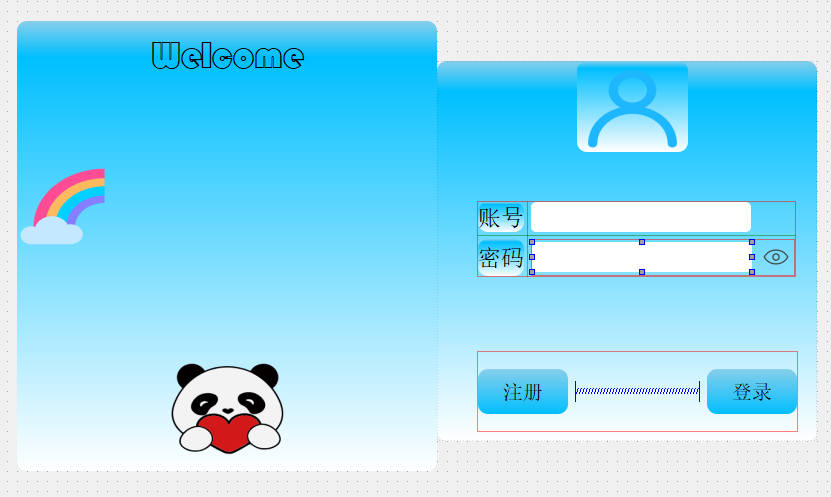
|---------|
| 封面按钮样式表 |
css
QPushButton
{
border-radius:10px;

background-color: qLineargradient(x1:0,y1:0,x2:0,y2:1, stop:0 rgb(135,206,235),stop: 0.08 rgb(0, 191, 255),
stop:1 rgb(255,255,255));
}
|--------|
| 输入框样式表 |
css
QLineEdit {
    border-radius: 5px;
}

QLineEdit:focus {
	 border: 2px solid rgba(44,170,255);
	 border-radius: 5px;
}
2、封面按钮实现
2.1 连接信号与槽

2.2固定封面按钮、侧边框及各个标签位置和顶层显示封面按钮
cpp
QRect coverButtonRect = ui->coverPushbutton->geometry();         //获取封面按钮x,y,宽和高
int coverButtonRect_x = coverButtonRect.x();                         //获取x坐标
int coverButtonRect_y = coverButtonRect.y();                         //获取y坐标
int coverButtonRect_w = coverButtonRect.width();                     //封面按钮宽
int coverButtonRect_h = coverButtonRect.height();                   //封面按钮高

int hidloginFram_x = coverButtonRect.x() + coverButtonRect.width()-ui->loginFrame->width();   //侧边框隐藏时的x坐标
//设置侧边框初始位置
ui->loginFrame->setGeometry(hidloginFram_x,coverButtonRect.y()+40,ui->loginFrame->width(),ui->loginFrame->height());

//固定封面按钮坐标
ui->coverPushbutton->setGeometry(120,120,ui->coverPushbutton->width(),ui->coverPushbutton->height());

//固定welcome标签位置
ui->welcomeLabel->setGeometry((coverButtonRect_x + coverButtonRect_w)/2-10,coverButtonRect_y,ui->welcomeLabel->width(),ui->welcomeLabel->height());

//固定熊猫标签位置
ui->pandaLabel->setGeometry((coverButtonRect_x + coverButtonRect_w)/2,coverButtonRect_y+coverButtonRect_h-115,ui->pandaLabel->width(),ui->pandaLabel->height());


ui->coverPushbutton->raise();               //确保封面按钮在顶层
ui->welcomeLabel->raise();                  //确保welcome标签在顶层
ui->pandaLabel->raise();                    //确保熊猫标签在顶层

ui->loginFrame->hide();
2.3创建侧边框状态并在初始化列表中初始化
cpp
bool loginFrameState; //侧边框状态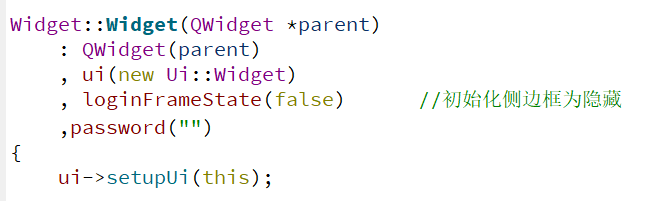
2.4 侧边框动画效果实现
cpp
//封面按钮
void Widget::on_coverPushbutton_clicked()
{
    QRect coverButtonRect = ui->coverPushbutton->geometry();           //获取封面按钮x,y宽和高
    QRect loginFrameRect = ui->loginFrame->geometry();                 //获取登录界面按钮x,y宽和高

    int targetX;        //目标位置参数
    //侧边框展开
    if(loginFrameState)
    {

        targetX = coverButtonRect.x()+coverButtonRect.width()-loginFrameRect.width();          //侧边框展开时目标位置
    }
    else
    {
        targetX = coverButtonRect.x()+coverButtonRect.width()-20;           //侧边框隐藏时位置
    }

    QPropertyAnimation *animation = new QPropertyAnimation(ui->loginFrame,"geometry");         //为侧边框创建动画对象

    animation->setDuration(500);            //动画持续时间
    animation->setEasingCurve(QEasingCurve::OutQuad);       //设置动画缓动曲线。开始变慢,让然后加快

    //设置动画范围
    ui->loginFrame->hide();
    animation->setStartValue(loginFrameRect);               //动画开始位置
    animation->setEndValue(QRect(targetX-5, coverButtonRect.y()+40,loginFrameRect.width(),loginFrameRect.height()));   //动画结束位置
    ui->loginFrame->show();

    //状态切换
    connect(animation,&QPropertyAnimation::finished,[this](){
        loginFrameState = !loginFrameState;         //侧边框状态翻转
    });

    animation->start(QAbstractAnimation::DeleteWhenStopped);        //开始,结束自动删除动画
}
3、视频演示效果
弹出侧边框
4、总结
|-------------------------------------------------------------------------------------------------------------|
| 以上就是Qt实现点击按钮弹出侧边框的整个过程了,浏览过程中,如若发现错误,欢迎 大家指正,有问题的可以评论区留言或者私信。最后,如果大家觉得有所帮助的话,可 以点个赞,谢谢大家!梦虽遥,追则能达;愿虽艰,持则可圆! |