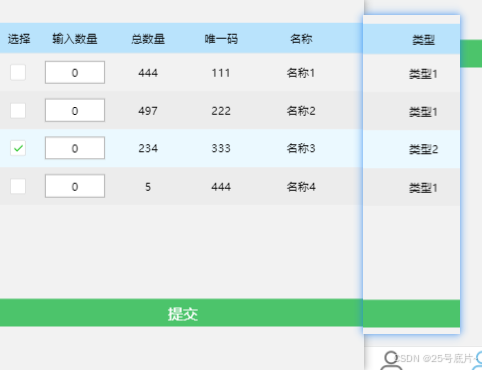
一、样式效果
二、代码
1、wxml
html
<view class="line flex flex-center">
  <view class="none" wx:if="{{info.length == 0}}">暂无料号</view>
  <view wx:else class="table-container">
    <!-- 动态生成表头 -->
    <view class="table-header-wrapper">
      <view class="table-header flex">
        <view wx:for="{{tableColumns}}" wx:key="key" class="th" style="flex: 0 0 {{item.width}}; min-width: {{item.width}};">
          {{item.title}}
        </view>
      </view>
    </view>
    <!-- 表格数据行 -->
    <view class="table-body-wrapper">
      <view class="table-body">
        <view class="table-row flex {{rowData.checked ? 'row-selected' : ''}}" wx:for="{{info}}" wx:key="index" wx:for-item="rowData" data-id="{{rowData.id}}">
          <view wx:for="{{tableColumns}}" wx:key="key" wx:for-item="colConfig" class="td" style="flex: 0 0 {{colConfig.width}}; min-width: {{colConfig.width}};">
            <block wx:if="{{colConfig.key === 'checked'}}">
              <checkbox value="{{rowData.id}}" checked="{{rowData.checked}}" bindtap="handleSelectItem" data-id="{{rowData.id}}" />
            </block>
            <block wx:elif="{{colConfig.editable}}">
              <!-- 新增判断条件 -->
              <input type="number" value="{{rowData[colConfig.key]}}" placeholder="请输入" bindinput="handleInputChange" data-id="{{rowData.id}}" data-index="{{index}}" data-key="{{colConfig.key}}" />
            </block>
            <block wx:else>
              {{rowData[colConfig.key] || '--'}}
            </block>
          </view>
        </view>
      </view>
    </view>
  </view>
</view>
<view class="btn" bindtap="submitCheckedItems">
  提交
</view>
2、wxss
css
/* 行关系 */
.line {
  width: 100%;
  margin-top: 50px;
}

.none {
  color: rgb(153, 153, 153);
}

/* 表格容器 */
.table-container {
  width: 100%;
  font-size: 12px;
  overflow-x: auto;
}

/* 表头包装器 */
.table-header-wrapper {
  width: max-content;
  min-width: 100%;
}

/* 表头样式 */
.table-header {
  border-bottom: 1px solid #eaeaea;
  background-color: #b9e3fc;
}

/* 表格内容包装器 */
.table-body-wrapper {
  width: fit-content;
}

/* 表头和表格行通用样式 */
.table-header,
.table-row {
  display: flex;
  align-items: center;
}

/* 表头单元格和表格单元格 */
.th,
.td {
  padding: 8px 0;
  text-align: center;
  word-break: break-word;
  display: flex;
  justify-content: center;
  align-items: center;
}

/* 表格行样式 */
.table-row {
  min-width: 100%;
}

/* 隔行变色效果(可选) */
.table-row:nth-child(even) {
  background-color: #ececec;
}

/* 复选框样式调整 */
.td checkbox {
  transform: scale(0.7);
}

/* 选中行样式 */
.row-selected {
  background-color: #ebf9ff !important;
  position: relative;
}

.td input {
  width: 80%;
  text-align: center;
  background-color: rgb(255, 255, 255);
  border: 1px solid rgb(165, 165, 165);
}

/* 按钮 */
.btn {
  width: 100%;
  background-color: #4cc46b;
  position: absolute;
  margin-top: 100px;
  display: flex;
  justify-content: center;
  align-items: center;
  height: 30px;
  color: #fff;
}
3、js
javascript
// pages/test3/index.js
Page({
  data: {
    // 动态表头配置
    tableColumns: [{
        key: 'checked',
        title: '选择',
        width: '80rpx',
        maxWidth: '100rpx'
      },
      {
        key: 'Qty2',
        title: '输入数量',
        width: '150rpx',
        maxWidth: '150rpx',
        editable: true
      },
      {
        key: 'Qty1',
        title: '总数量',
        width: '150rpx',
        maxWidth: '150rpx'
      },
      {
        key: 'code',
        title: '唯一码',
        width: '150rpx',
        maxWidth: '200rpx'
      },
      {
        key: 'name',
        title: '名称',
        width: '180rpx',
        maxWidth: '250rpx'
      },
      {
        key: 'type',
        title: '类型',
        width: '150rpx',
        maxWidth: '300rpx'
      },
    ],
    // 表格数据
    info: [{
        id: 1,
        checked: false,
        code: "111",
        name: "名称1",
        type: "类型1",
        Qty1: 444,
        Qty2: 0,
      },
      {
        id: 2,
        checked: false,
        code: "222",
        name: "名称2",
        type: "类型1",
        Qty1: 497,
        Qty2: 0,
      },
      {
        id: 3,
        checked: false,
        code: "333",
        name: "名称3",
        type: "类型2",
        Qty1: 234,
        Qty2: 0,
      },
      {
        id: 4,
        checked: false,
        code: "444",
        name: "名称4",
        type: "类型1",
        Qty1: 5,
        Qty2: 0,
      }
    ]
  },
  // 复选框选择事件
  handleSelectItem: function (e) {
    const id = e.currentTarget.dataset.id;
    const info = this.data.info.map(item => {
      if (item.id == id) {
        return {
          ...item,
          checked: !item.checked
        };
      }
      return item;
    });
    this.setData({
      info
    });
  },
  // 处理输入框变化
  handleInputChange: function (e) {
    const {
      id,
      key
    } = e.currentTarget.dataset;
    const value = e.detail.value;
    const info = this.data.info.map(item => {
      if (item.id == id) {
        return {
          ...item,
          [key]: value
        };
      }
      return item;
    });
    this.setData({
      info
    });
  },
  // 提交方法 - 获取勾选的数据
  submitCheckedItems: function () {
    const checkedItems = this.data.info.filter(item => item.checked);
    if (checkedItems.length === 0) {
      wx.showToast({
        title: '请至少选择一项',
        icon: 'none'
      });
      return;
    }
    // 这里可以发送到服务器或处理数据
    console.log('提交的数据:', checkedItems);
  }
})