用户有自己的文章格式,要求复制或者粘贴进来的文章能够一键排版,不需要手动调试
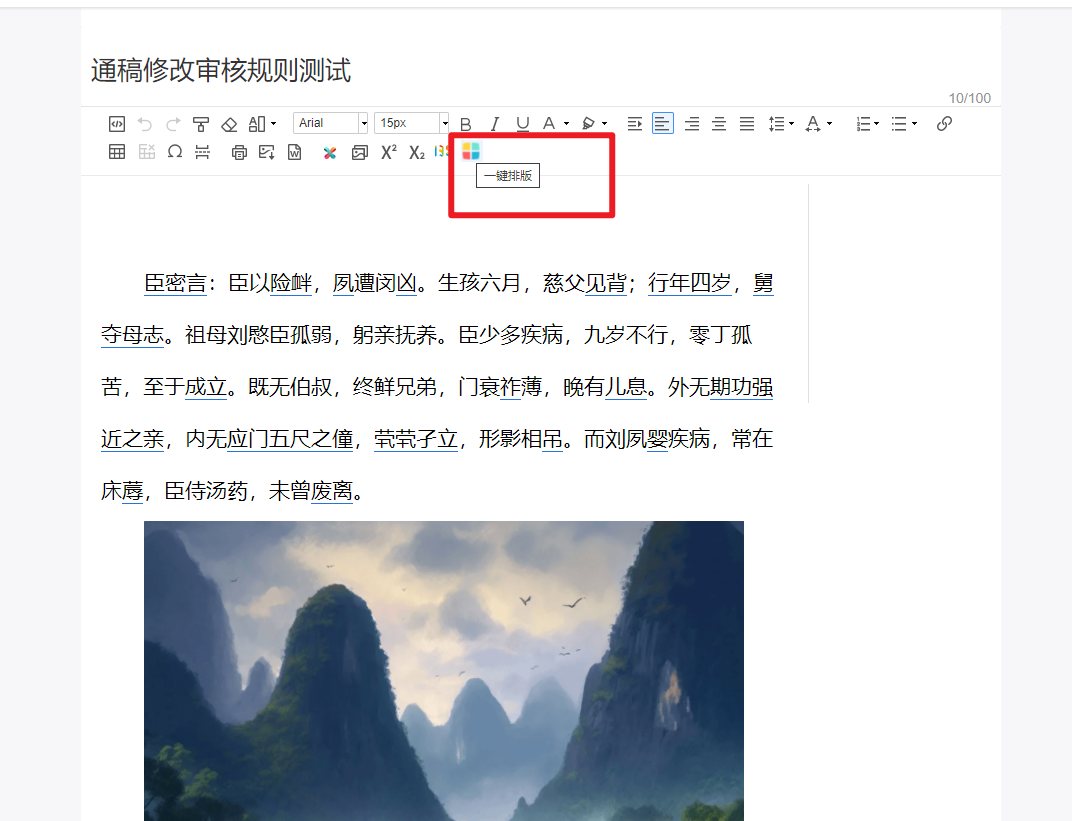
这个需求的话咱们就需要自己去注册一个事件啦,这里我没有修改源码,而是在编辑器初始化之后给他注册了一个事件
我的工具列表变量
vue组件中data中定义的变量
data(){
    return {
      aiList: [
        {name:'AIwrite',className:'edui-for-ai_writing',title:'一键排版',httpType:'AI_WRITING_ADDRESS'},
        // {name:'AIvoice',className:'edui-for-ai_voice',title:'AI语音',httpType:'AI_VOICE_ADDRESS'},
        // {name:'AIdraw',className:'edui-for-ai_AIdraw',title:'AI绘图',httpType:'AI_DRAWING_ADDRESS'},
        // {name:'AIvideo',className:'edui-for-AIvideo',title:'AI视频',httpType:'AI_VIDEO_ADDRESS'},
        // {name:'AIzhineng',className:'edui-for-AIzhineng',title:'AI智能',httpType:'AI_BRAINPOWER_ADDRESS'},
        // {name:'AIroom',className:'edui-for-AIroom',title:'AI实验室',httpType:'AI_LABORATORY_ADDRESS'},
        // {name:'AImore',className:'edui-for-AImore',title:'更多',httpType:'AI_MORE_ADDRESS'},
      ]
    }
}

    registerUIYiJian(){  //当window对象已经挂在的ueditor的实例时调用此方法,在iframe.css中去调整自定义按钮的样式
      let _this = this
      window.UE.registerUI( _this.aiList[0].name ,function(editor,uiName){
        var btn = new UE.ui.Button({
            name:'btn-dialog-' + uiName,
            className:_this.aiList[0].className,
            title:_this.aiList[0].title,
            onclick:function () {
                // AIwrite = window.open('https://www.baidu.com')
                _this.httpRequest(_this.aiList[0].httpType)
            }
        });
        return btn;
      },undefined);
    },
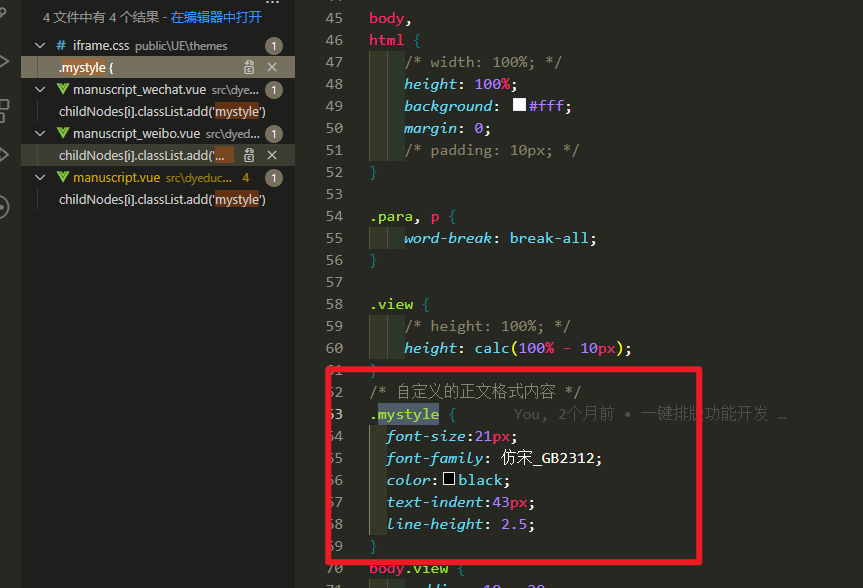
httpRequest中的逻辑主要是对稿件样式进行处理,添加自己的自定义类名之后,然后去iframe.css加上自己的样式即可
   // 一键排版功能
    oneClickLayout(){
      console.log(this.editor,'当前的编辑器内容')
      if(this.editor.body.childNodes.length > 0){
        // 说明当前文章有内容
        for (let i = 0; i < this.editor.body.childNodes.length; i++) {
          console.log(this.editor.body.childNodes[i],'当前的p标签有哪些元素')
          // 获取标签内容重新组装html结构填充到编辑器中
          this.editor.body.childNodes[i].classList.remove()
          this.editor.body.childNodes[i].removeAttribute('style')
          // 给最外层的标签加上我的目标样式
          this.editor.body.childNodes[i].classList.add('mystyle')
          this.clearCssStyle(this.editor.body.childNodes[i])
        }
      }
    },
    // 递归去除所有标签的行内样式和类名
    clearCssStyle(node){
      if(node.childNodes.length == 0) return
      for (let i = 0; i < node.childNodes.length; i++) {
        if('classList' in node.childNodes[i]){
          node.childNodes[i].classList.remove()
        }
        if('style' in node.childNodes[i]){
          node.childNodes[i].removeAttribute('style')
        }
      }
    },
我移除了编辑器所有的类名和行内样式,增加了mystyle类名
一键排版就完成了 。
此外我还注册过其他功能,业务代码的话其实没啥好说的,主要是注册的方法的使用,比如之前还注册过一些ai的功能以及和135编辑器的一些交互
/*
* @description : write something
* @Author : snoop-dog
* @Date : 2021-12-06 11:39:53
* @LastEditors : snoop-dog
* @LastEditTime : 2021-12-06 14:15:39
* @FilePath : 135editor.js
*/
UE.registerUI('135editor',function(editor,uiName){
// var dialog = new UE.ui.Dialog({
// iframeUrl: editor.options.UEDITOR_HOME_URL+'dialogs/135editor/135EditorDialogPage.html',
// cssRules:"width:"+ parseInt(document.body.clientWidth*0.9) +"px;height:"+(window.innerHeight -50)+"px;",
// editor:editor,
// name:uiName,
// title:"135缂栬緫鍣�"
// });
// dialog.fullscreen = false;
// dialog.draggable = false;
var editor135;
function onContentFrom135(event) {
if (typeof event.data !== 'string') {
if(event.data.ready) {
editor135.postMessage(editor.getContent(),'*');
}
return;
};
if(event.data.indexOf('<') !== 0) return;
editor.setContent(event.data);
editor.fireEvent("catchRemoteImage");
window.removeEventListener('message', onContentFrom135);
}
var btn = new UE.ui.Button({
name:'btn-dialog-' + uiName,
className:'edui-for-135editor',
title:'135编辑器',
onclick:function () {
// dialog.render();
// dialog.open();
// 鐢变簬鐧诲綍瀛樺湪璺ㄥ煙闂锛岃浣跨敤濡備笅鏂瑰紡璋冪敤135缂栬緫鍣�
editor135 = window.open('https://www.135editor.com/simple_editor.html?callback=true&appkey=')
window.removeEventListener('message', onContentFrom135);
window.addEventListener('message', onContentFrom135, false);
}
});
return btn;
},undefined);
// ai写作
var aiList = [
{name:'AIwrite',className:'edui-for-ai_writing',title:'AI写作',httpType:'AI_WRITING_ADDRESS'},
{name:'AIvoice',className:'edui-for-ai_voice',title:'AI语音',httpType:'AI_VOICE_ADDRESS'},
{name:'AIdraw',className:'edui-for-ai_AIdraw',title:'AI绘图',httpType:'AI_DRAWING_ADDRESS'},
{name:'AIvideo',className:'edui-for-AIvideo',title:'AI视频',httpType:'AI_VIDEO_ADDRESS'},
{name:'AIzhineng',className:'edui-for-AIzhineng',title:'AI智能',httpType:'AI_BRAINPOWER_ADDRESS'},
{name:'AIroom',className:'edui-for-AIroom',title:'AI实验室',httpType:'AI_LABORATORY_ADDRESS'},
{name:'AImore',className:'edui-for-AImore',title:'更多',httpType:'AI_MORE_ADDRESS'},
]
for (let i = 0; i < aiList.length; i++) {
UE.registerUI( aiList[i].name ,function(editor,uiName){
var btn = new UE.ui.Button({
name:'btn-dialog-' + uiName,
className:aiList[i].className,
title:aiList[i].title,
onclick:function () {
// AIwrite = window.open('https://www.baidu.com')
httpRequest(aiList[i].httpType)
}
});
return btn;
},undefined);
}
// 原生js发送请求
function httpRequest(code){
var currentUser = JSON.parse(localStorage.getItem("login_casData"))
var url = window.location.origin +'/' +window.location.pathname.split('/')[1]+'/dyportalserver/ParameterController/getParameter'
var formdata = new FormData()
formdata.append('parameterCode',code)
$.ajax({
type: 'POST',
url: url,
data: formdata,
contentType: false,
processData: false,
headers:{
'tenantId': currentUser.tenantId,
'token': currentUser.token,
'userId': encodeURIComponent(currentUser.userId),
'userName': encodeURIComponent(currentUser.userName),
'X-Requested-With': 'XMLHttpRequest',
'newseditingsuite-header': true
},
success: function(data) {
console.log(data,'当前接口是否成功')
if(data.status){
var targetUrl = data.data[0].parameterValue
// 通知vue打开弹框,利用广播进行通信
localStorage.setItem('openVueDialog',targetUrl)
console.log('asdfasf',window.vm)
const channel = new BroadcastChannel('updataCatalogTask')
let obj = {
url:targetUrl,
}
if(code === 'AI_WRITING_ADDRESS'){
obj.type = true
} else {
obj.type = false
}
channel.postMessage(obj)
} else {
alert('当前参数未配置,请联系管理员配置!')
}
},
error: function(jqXHR, textStatus, errorThrown) {
alert('当前参数未配置,请联系管理员配置!')
}
});
}