
专栏:MySQL数据库成长记
个人主页:手握风云
目录
[1.1. 为什么要使用联合查询](#1.1. 为什么要使用联合查询)
[1.2. 多表联合查询时的计算](#1.2. 多表联合查询时的计算)
[1.3. 示例](#1.3. 示例)
[2.1. 语法](#2.1. 语法)
[2.2. 示例](#2.2. 示例)
[4.1. 语法](#4.1. 语法)
[4.2. 示例](#4.2. 示例)
一、简介
1.1. 为什么要使用联合查询
一次查询需要从多张表中获取到数据,成为联合查询,或者叫表联合查询。
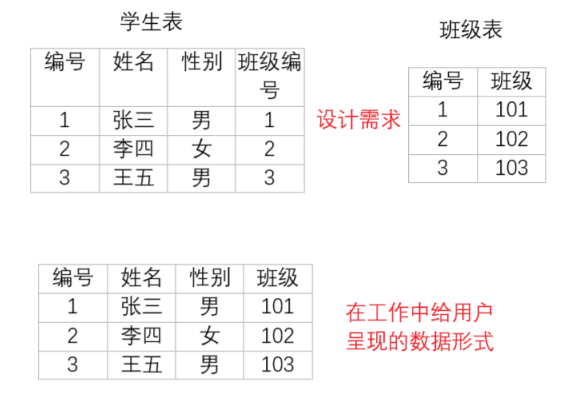
在数据设计时由于范式的要求,数据被拆分到多个表中,那么要查询⼀个条数据的完整信息,就要从多个表中获取数据,如下图所示:要获取学生的基本信息和班级信息就要从学生表和班级表中获取,这时就需要使用联合查询。
1.2. 多表联合查询时的计算
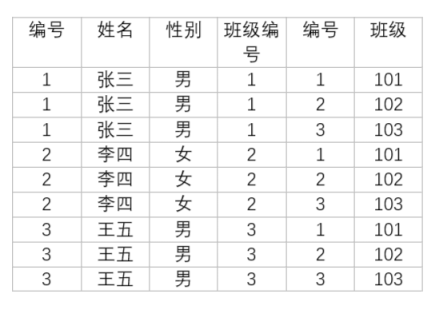
- 参与查询的所有表取笛卡尔积,结果集在临时表中
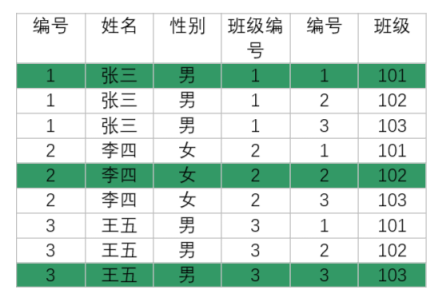
- 观察哪些记录是有效数据,根据两个表的关联关系过滤掉⽆效数据
如果联合查询表的个数越多,表中的数据量越大,临时表就会越大,所以根据实际情况确定联合查询表的个数。
1.3. 示例
sql
-- 课程表
create table if not exists course(
  id bigint auto_increment primary key,
  `name` varchar(30) not null
);
insert into course (`name`) values ('Java'),('C++'),('操作系统'),('计算机网络'),('数据结构');
insert into course (`name`) values ('MySQL');
select* from course;

-- 班级表
create table if not exists class(
  id bigint auto_increment primary key,
  `name` varchar(30) not null
);
insert into class (`name`) values ('101班'),('102班'),('103班');
select * from class;

-- 学生表
create table if not exists student(
  id bigint auto_increment primary key,
  `name` varchar(30) not null,
  sno varchar(30) not null,
  age bigint,
  gender tinyint,
  enroll_date date,
  class_id bigint,
  foreign key (class_id) references class(id)
);
insert into student (`name`,sno,age,gender,enroll_date,class_id) values
('Paul','10001',18,1,'2025-09-01',1),
('Amy','10002',19,0,'2025-09-01',1),
('Jack','10003',19,1,'2025-09-01',1),
('Mary','10004',18,0,'2025-09-01',1);
insert into student (`name`,sno,age,gender,enroll_date,class_id) values
('Bob','20001',19,1,'2025-09-01',2),
('Alice','20002',19,0,'2025-09-01',2),
('Nick','20003',18,1,'2025-09-01',2),
('Kelen','20004',18,0,'2025-09-01',2);
update student set id = id - 4 where id >= 9;
select * from student;

-- 成绩表
create table if not exists score(
  id bigint auto_increment primary key,
  score float not null,
  student_id bigint,
  course_id bigint,
  foreign key (student_id) references student(id),
  foreign key (course_id) references course(id)
);
insert into score (score,student_id,course_id) values
(70.5, 1, 1),
(98.5, 1, 3),
(33, 1, 5),
(98, 1, 6),
(60, 2, 1),
(59.5, 2, 5),
(33, 3, 1),
(68, 3, 3),
(99, 3, 5),
(67, 4, 1),
(23, 4, 3),
(56, 4, 5),
(72, 4, 6),
(81, 5, 1),
(37, 5, 5),
(56, 6, 2),
(43, 6, 4),
(79, 6, 6);
我们接下来要查询Paul的详细信息,包括个人信息和班级信息。
- 确定参与查询的表
sql
select * from student,class;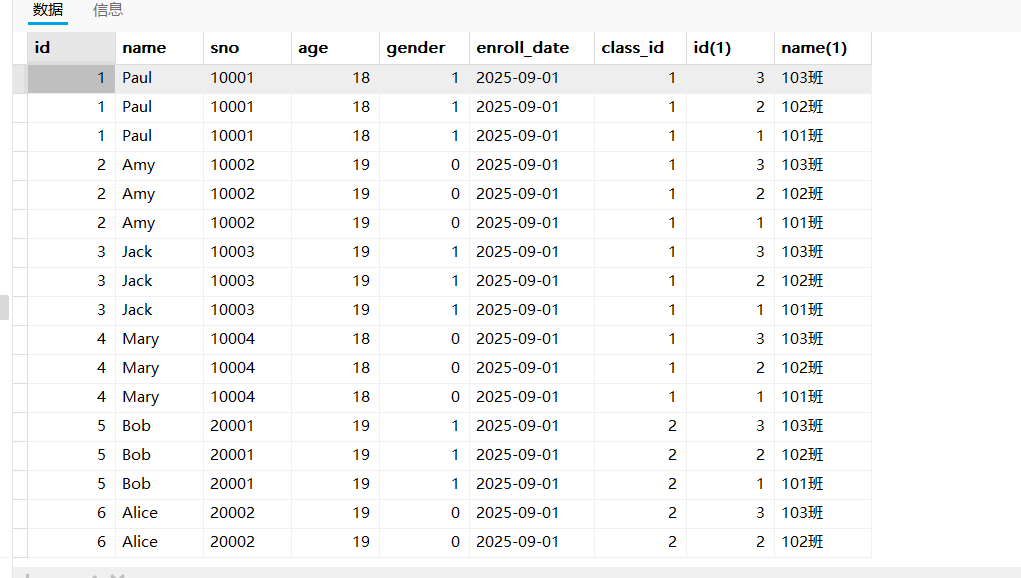
- 确定连接条件
sql
select * from student,class where class_id = id;但此时一执行,就会报错:olumn 'id' in where clause is ambiguous.这是因为student表与class表里面都有id列,我们没有指定,程序也不知道比较哪个。
sql
select * from student,class where student.class_id = class.id;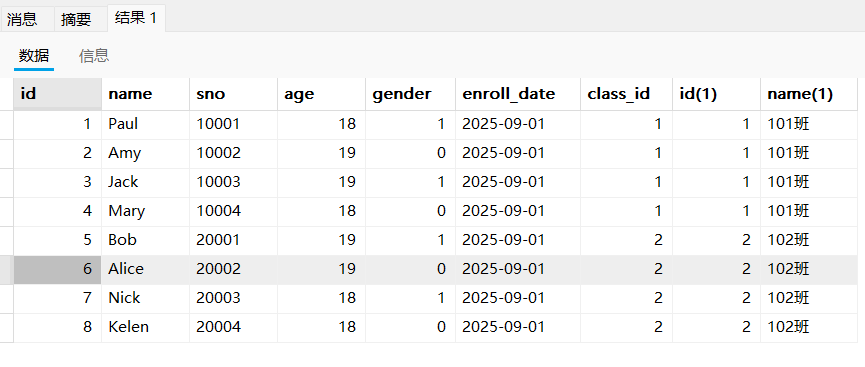
- 加⼊查询条件
sql
select * from student,class where student.class_id = class.id and student.`name` = 'Paul';
- 精减查询结果字段
sql
select student.id,student.`name`,student.age,student.gender,student.enroll_date,class.`name` from student,class where student.class_id = class.id and student.`name` = 'Paul';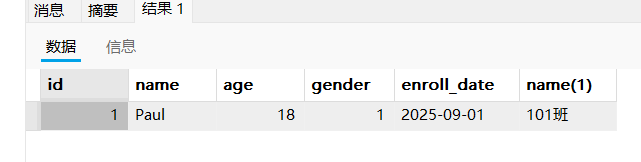
- 指定别名简化查询
sql
select * from student s,class c where s.class_id = c.id and s.`name` = 'Paul'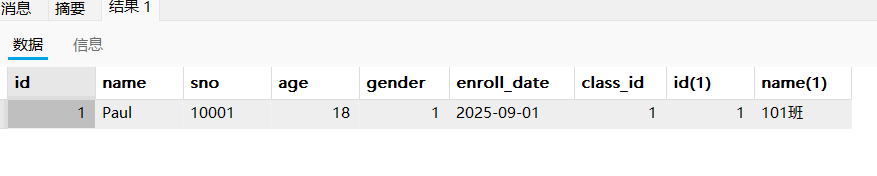
二、内连接
2.1. 语法
sql
select 字段 from 表1 别名1, 表2 别名2 where 连接条件 and 其他条件;
select 字段 from 表1 别名1 [inner] join 表2 别名2 on 连接条件 where 其他条件;
join两侧连接的是表名,on后面是连接条件。示例如下:
sql
select s.id,s.`name`,s.age,s.gender,s.enroll_date,c.`name` from student s inner join class c on s.class_id = c.id;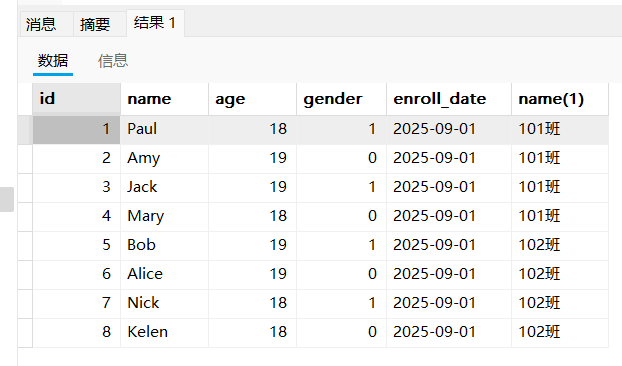
2.2. 示例
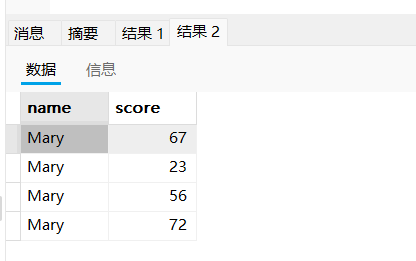
- 查询Mary的所有成绩
sql
select * from student stu,score sco where stu.id  = sco.student_id and stu.`name` = 'Mary';
select stu.`name`,sco.score from student stu,score sco where stu.id  = sco.student_id and stu.`name` = 'Mary';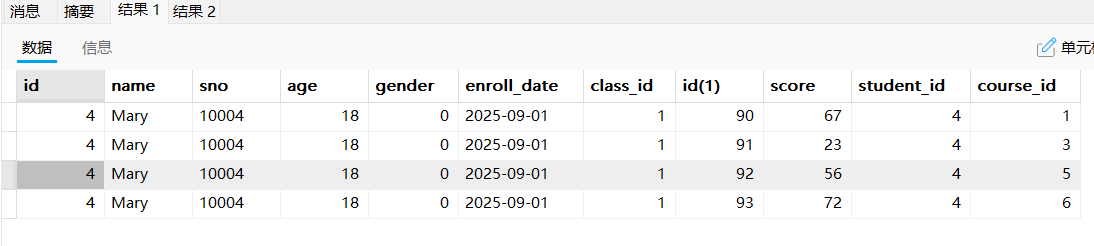
- 查询所有同学的总成绩,及同学的个人信息
sql
select stu.id,stu.`name`,sco.student_id,sum(sco.score) from student stu,score sco where stu.id = sco.student_id group by sco.student_id;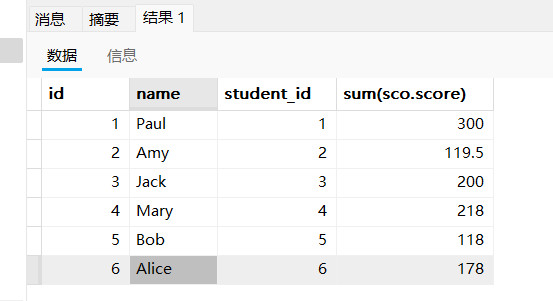
sql
select stu.id,stu.`name` as 姓名,sum(sco.score) 总分 from student stu,score sco where stu.id = sco.student_id group by sco.student_id;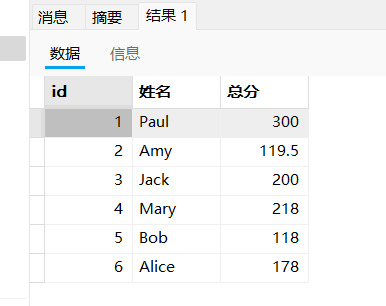
- 查询所有同学每⻔课的成绩,及同学的个⼈信息
我们先看下三个表的字段,找出关联关系。
sql
desc student;
desc score;
desc course;
sql
select * from student stu,score sco,course c where stu.id = sco.student_id and c.id = sco.course_id;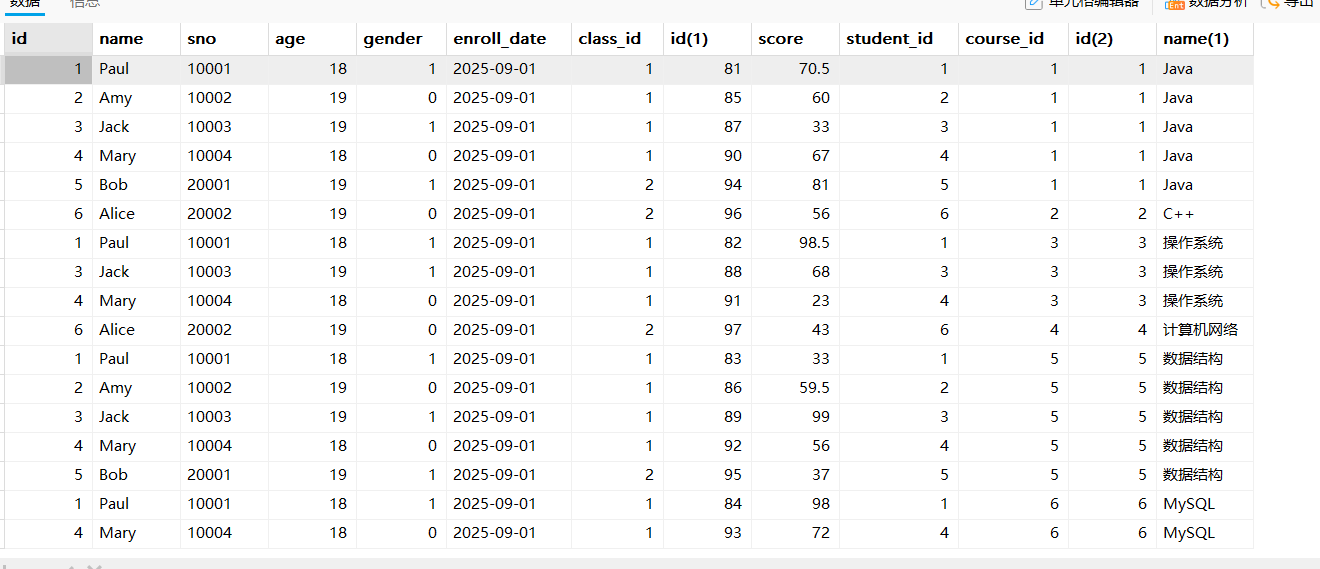
也可以使用join进行多表连接
sql
select * from student stu join score sco on stu.id = sco.student_id join course c on c.id = sco.course_id;在工作中尽量少对大表进行表关联查询,一般表关联的个数不超过3个。
三、外连接
- 外连接分为左外连接、右外连接和全外连接三种类型,MySQL不支持全外连接,并且执行过程中,右外连接又会被优化成左外连接。
- 左外连接:返回左表的所有记录和右表中匹配的记录。如果右表中没有匹配的记录,则结果集中对应字段会显示为NULL。
- 右外连接:与左外连接相反,返回右表的所有记录和左表中匹配的记录。如果左表中没有匹配的记 录,则结果集中对应字段会显示为NULL。
无论是哪种外连接,必须先找到基准表。左外连接是以左表为基准,右外连接是以右表为基准。基准表中的记录都会显示出来。
4.1. 语法
sql
-- 左外连接,表1完全显示
select 字段名 from 表名1 left join 表名2 on 连接条件;
-- 右外连接,表2完全显示
select 字段名 from 表名1 right join 表名2 on 连接条件;
4.2. 示例
- 查询没有参加考试的同学信息(左外连接)
sql
select * from student;
select * from score;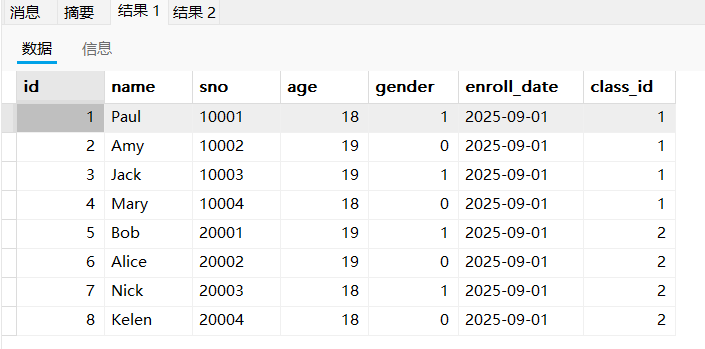
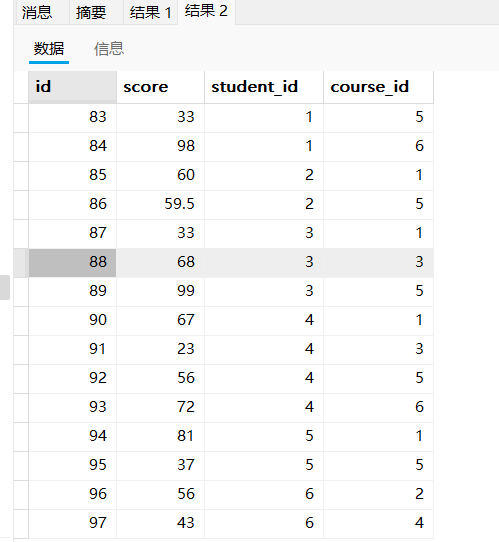
由于成绩表里面没有学号为7和8的同学,所以我们无法通过内连接查询。
sql
select * from student stu left join score sco on stu.id = sco.student_id;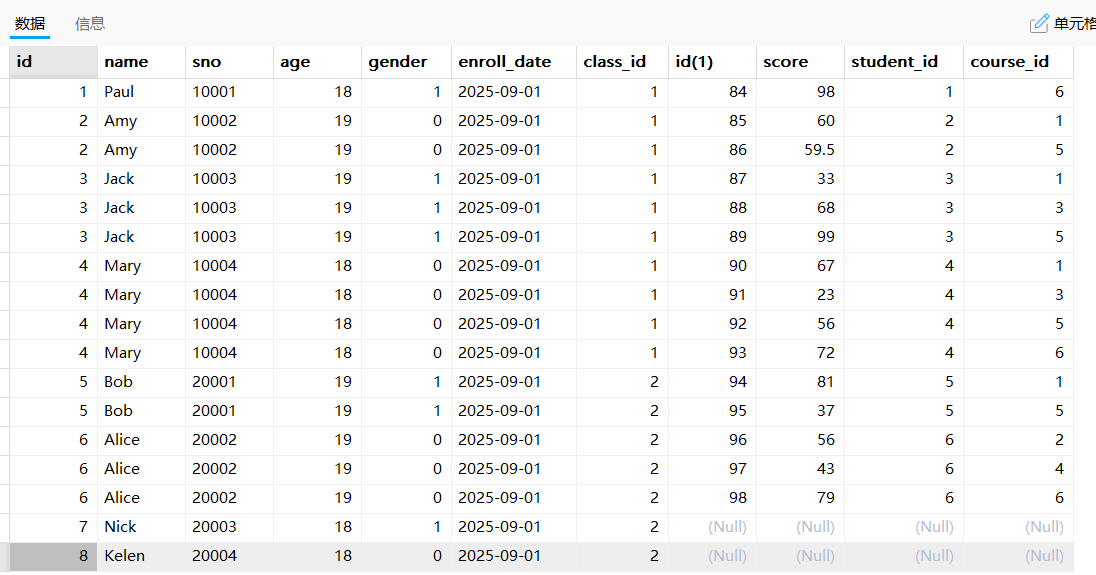
接着就可以继续使用where条件进行过滤,将成绩表为空的找出来。
sql
select * from student stu left join score sco on stu.id = sco.student_id where sco.score is null;
- 查询没有学生的班级(右外连接)
sql
select * from student s right join class c on s.class_id = c.id;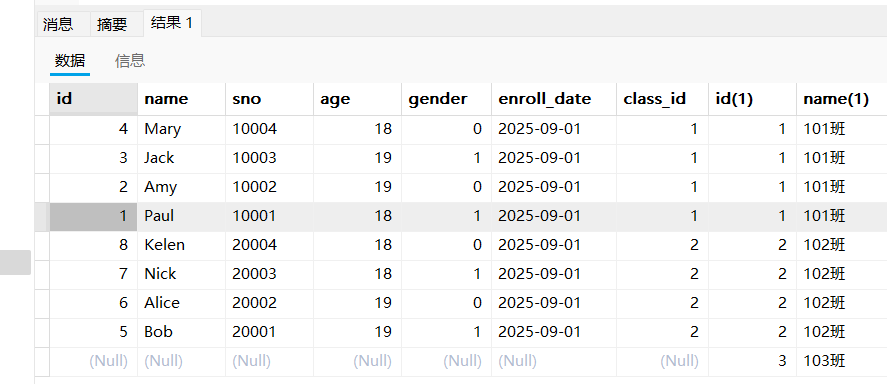
sql
select * from student s right join class c on s.class_id = c.id where s.id is null;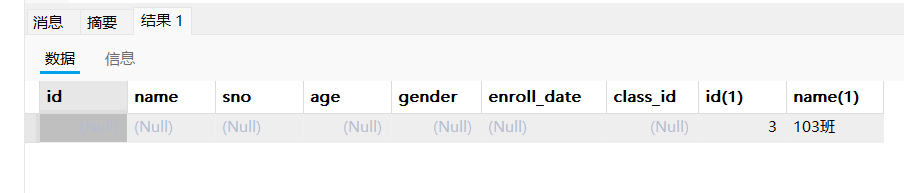
sql
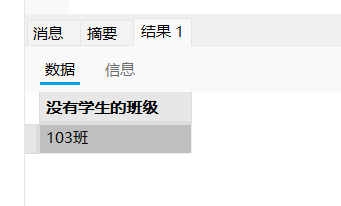
select c.`name` as '没有学生的班级' from student s right join class c on s.class_id = c.id where s.id is null;