安装与配置
root@server \~# systemctl status ntp # 查看ntp状态
安装
默认已安装,若需要安装则可执行:
root@server \~# yum install chrony -y
root@server \~# systemctl start chronyd
root@server \~# systemctl enable chronyd
Chrony****配置文件分析
主配置文件: /etc/chrony.conf
root@server \~# vim /etc/chrony.conf
使用 pool.ntp.org 项目中的公共服务器。
或者使用server开头的服务器,理论上想添加多少时间服务器都可以
iburst表示的是首次同步的时候快速同步
pool pool.ntp.org iburst
根据实际时间计算出服务器增减时间的比率,然后记录到一个文件中,在系统重启后为系统做出最佳时间
补偿调整。
driftfile /var/lib/chrony/drift
如果系统时钟的偏移量大于1秒,则允许系统时钟在前三次更新中步进。
Allow the system clock to be stepped in the first three updates if its offset
is larger than 1 second.
makestep 1.0 3
启用实时时钟(RTC)的内核同步。
Enable kernel synchronization of the real-time clock (RTC).
rtcsync
通过使用 hwtimestamp 指令启用硬件时间戳
Enable hardware timestamping on all interfaces that support it.
#hwtimestamp *
Increase the minimum number of selectable sources required to adjust the system
clock.
#minsources 2
指定 NTP 客户端地址,以允许或拒绝连接到扮演时钟服务器的机器
Allow NTP client access from local network.
#allow 192.168.48.0/24
Serve time even if not synchronized to a time source.
local stratum 10
指定包含 NTP 身份验证密钥的文件。
Specify file containing keys for NTP authentication.
keyfile /etc/chrony.keys
指定日志文件的目录。
Specify directory for log files.
logdir /var/log/chrony
选择日志文件要记录的信息。
Select which information is logged.
log measurements statistics tracking
同步时间服务器
授时中心
210.72.145.44 国家授时中心
ntp.aliyun.com 阿里云
s1a.time.edu.cn 北京邮电大学
s1b.time.edu.cn 清华大学
s1c.time.edu.cn 北京大学
s1d.time.edu.cn 东南大学
s1e.time.edu.cn 清华大学
s2a.time.edu.cn 清华大学
s2b.time.edu.cn 清华大学
s2c.time.edu.cn 北京邮电大学
s2d.time.edu.cn 西南地区网络中心
s2e.time.edu.cn 西北地区网络中心
s2f.time.edu.cn 东北地区网络中心
s2g.time.edu.cn 华东南地区网络中心
s2h.time.edu.cn 四川大学网络管理中心
s2j.time.edu.cn 大连理工大学网络中心
s2k.time.edu.cn CERNET桂林主节点
s2m.time.edu.cn 北京大学
ntp.sjtu.edu.cn 202.120.2.101 上海交通大学
实验****1
同步时间
第一步:先修改成错误时间
root@server \~ # date -s 10:30
2023 年 05 月 30 日 星期二 10 :30:00 CST
第二步:编制 chrony 的配置文件
root@server \~# vim /etc/chrony.conf定位第3行,删除后添加阿里的时间同步服务地址
server ntp.aliyun.com iburst
注意:也可以先清空chrony.conf内容,将阿里开源提供的时间服务器推荐配置复制粘贴到该文件中
server ntp.aliyun.com iburst
stratumweight 0
driftfile /var/lib/chrony/drift
rtcsync
makestep 10 3
bindcmdaddress 127.0.0.1
bindcmdaddress ::1
keyfile /etc/chrony.keys
commandkey 1
generatecommandkey
logchange 0.5
logdir /var/log/chrony
第三步:重启服务
root@server \~# systemctl restart chronyd
第四步:时间同步
root@server \~# chronyc sources -v
.-- Source mode '^' = server, '=' = peer, '#' = local clock.
/ .- Source state '*' = current best, '+' = combined, '-' = not combined,
| / 'x' = may be in error, '~' = too variable, '?' = unusable.
|| . - xxxx yyyy +/- zzzz
|| Reachability register (octal) -. | xxxx = adjusted offset,
|| Log2(Polling interval) --. | | yyyy = measured offset,
|| \ | | zzzz = estimated error.
|| | | \
MS Name/IP address Stratum Poll Reach LastRx Last sample
==========================================================================
^* 203.107.6.88 2 6 17 56 +493us -335us +/- 34ms
第五步:查看时间是否同步
root@server \~# timedatectl status
Local time: 二 2024-05-30 10:24:39 CST
Universal time: 二 2024-05-30 02:24:39 UTC
RTC time: 二 2024-05-30 02:24:40
Time zone: Asia/Shanghai (CST, +0800)
System clock synchronized: yes # yes 表名已同步
NTP service: active
RTC in local TZ: no
root@server \~# date
2024年 05月 30日 星期二 10:26:14 CST
chronyc****命令
查看时间服务器:
root@server \~# chronyc sources -v
.-- Source mode '^' = server, '=' = peer, '#' = local clock.
/ .- Source state '*' = current best, '+' = combined, '-' = not combined,
| / 'x' = may be in error, '~' = too variable, '?' = unusable.
|| . - xxxx yyyy +/- zzzz
|| Reachability register (octal) -. | xxxx = adjusted offset,
|| Log2(Polling interval) --. | | yyyy = measured offset,
|| \ | | zzzz = estimated error.
|| | | \
MS Name/IP address Stratum Poll Reach LastRx Last sample
==========================================================================
^* 203.107.6.88 2 6 17 56 +493us -335us +/- 34ms
chronyc sources输出分析
M:这表示信号源的模式。*^表示服务器,=*表示对等方,#表示本地连接的参考时钟。
S:此列指示源的状态
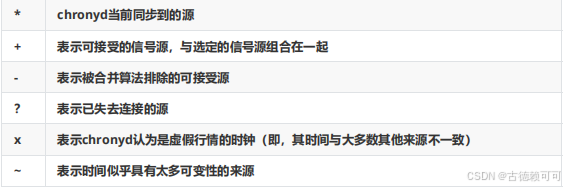
Name/IP address:显示服务器源的名称或IP地址
Stratum:表示源的层级,层级1表示本地连接的参考时钟,第2层表示通过第1层级计算机的时钟
实现同步,依此类推
Poll:表示源轮询频率,以秒为单位,值是基数2的对数,例如值6表示每64秒进行一次测量,
chronyd会根据当时的情况自动改变轮询频率
Reach:表示源的可达性的锁存值(八进制数值),该锁存值有8位,并在当接收或丢失一次时进
行一次更新,值377表示最后八次传输都收到了有效的回复
LastRx:表示从源收到最近的一次的时间,通常是几秒钟,字母m,h,d或y分别表示分钟,小
时,天或年
Last sample:表示本地时钟与上次测量时源的偏移量,方括号左侧的数字表示原始测量值,方括
号右侧表示偏差值,*+/-*指示器后面的数字表示测量中的误差范围。正偏移表示本地时钟位于源时钟之前
其它命令
查看时间服务器的状态
root@server \~# chronyc sourcestats -v查看时间服务器是否在线
root@server \~# chronyc activity -v同步系统时钟
root@server \~# chronyc -a makestep
常见时区
UTC 整个地球分为二十四时区,每个时区都有自己的本地时间。在国际无线电通信场合,为了统一
起见,使用一个统一的时间,称为通用协调时(UTC, Universal Time Coordinated)。
GMT 格林威治标准时间 (Greenwich Mean Time)指位于英国伦敦郊区的格林尼治天文台的标准
时间,因为本初子午线被定义在通过那里的经线。(UTC与GMT时间基本相同,本文中不做区分)
CST 中国标准时间 (China Standard Time)GMT + 8 = UTC + 8 = CST
DST夏令时(Daylight Saving Time) 指在夏天太阳升起的比较早时,将时间拨快一小时,以提早日
光的使用。(中国不使用)