1. 命名管道
概念
是一种进程间通信(IPC)机制,能允许没有关联的两个进程进行数据交换。
由于匿名管道只能在有亲缘关系的父子进程间通信所以具有局限性,所以就要通过命名管道来对两个没有关系的进程进行通信。
命名管道是通过路径和文件名来使两个进程找到同一份文件资源。
管道的五种特性
- 只能用来进行具有血缘关系的进程间通信(常用于父与子)
- 管道文件自带同步机制 快的等待慢的。同一时间只允许一个进程进行写入或读取操作,并且保证同一个公共资源同一时刻只能被一个进程使用,两个进程不能同时操作(互斥)
- 管道是面向字节流的 其大小最大为64kb,65536字节
- 管道是单向通信的(特殊的半双工通信)
- 管道文件的生命周期是随进程的(所有拥有其读写端fd的都close关闭)进程终止时,所有未关闭的fd都会被内核自动关闭。
四种通信情况
- 写慢,读快---读端就要阻塞(等待写端写入)。
- 写快,读慢---满了的时候,写就要阻塞等待
- 写关闭,读继续---read就会读到返回值为0,表示文件结尾
- 读关闭,写继续---写端再写入也没有任何意义了
操作系统OS不做无意义的事情,OS会(发送异常信号)杀掉写端进程
命名管道创建与删除
可以通过
bash
mkfifo 管道名称来创建一个命名管道,如下图所示
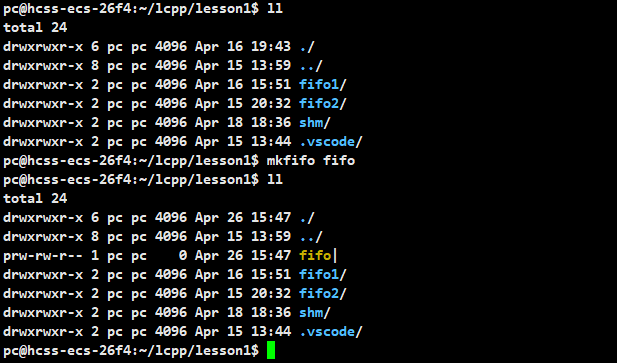
通过下面两种方法来删除
bash
rm -rf 命名管道名称
unlink 命名管道名称
在C/C++程序中也可以创建命名管道
所需头文件 与函数原型
cpp#include <sys/types.h> #include <sys/stat.h> int mkfifo(const char *pathname, mode_t mode);pathname:指定要创建管道的名称(以路径的方式给出的话将命名管道创建在pathname路径下,以文件名方式给出的话,将命名管道文件默认创建在当前路径下)
mode:设置管道的权限(会被默认掩码umask影响)
返回值:成功返回0,失败返回-1 并设置errno指示错误原因
删除命名管道
所需头文件 与原型
cpp#include<unistd.h> int unlink(const char *pathname);参数:pathname 要删除文件的路径
返回值: 函数执行成功,它会返回0;如果失败,则返回-1,并设置errno以指示错误原因
2. 命名管道对文件进行备份
写进程
很简单,负责写入管道文件的进程 mkfifo创建一个管道后,open只读打开我们要进行备份的文件,open只写打开管道文件。
将要备份文件里的内容read读取到字符数组中,再将这个字符数组里的内容write写到管道文件。
最后close关闭打开的文件描述符,unlink删除管道文件(读进程没开始,写进程尝试open打开管道就会被阻塞,直到读进程打开读端)
cpp
#include<iostream>
#include<string>
#include<sys/types.h>
#include<sys/stat.h>
#include<unistd.h>
#include<fcntl.h>

int main()
{
    umask(0);
    //将源文件内容写入管道
    mkfifo("tp",0666);

    int fdout=open("abc",O_RDONLY);
    if(fdout<0) std::cerr<<"open error"<<std::endl;

    int fdtp=open("tp",O_WRONLY);
    if(fdtp<0) std::cerr<<"open error"<<std::endl;

    char buffer[2024];
    int n=read(fdout,buffer,sizeof buffer-1);
    if(n>0)
    {
        buffer[n]=0;
        write(fdtp,buffer,n);
    }

    close(fdout);
    close(fdtp);
    unlink("tp");
    return 0;
}
读进程
负责备份的进程,打开要备份到的文件,与管道文件,通过一个字符数组read读取管道文件里的内容,并且将其write写到要备份的文件里
最后close关闭打开的文件描述符,unlink
cpp
#include<iostream>
#include<string>
#include<sys/types.h>
#include<sys/stat.h>
#include<unistd.h>
#include<fcntl.h>

int main()
{
    //负责备份管道内数据
    int fdin=open("abc.bak",O_CREAT|O_RDWR|O_TRUNC,0666);
    if(fdin<0)
    {
        std::cerr<<"open error"<<std::endl;
    }
    int fdtp=open("tp",O_RDONLY);
    if(fdtp<0)
    {
        std::cerr<<"open error"<<std::endl;
    }

    char buffer[2024];

    int n=read(fdtp,buffer,2024);
    // std::cout<<buffer<<std::endl;
    if(n>0)
    {
        buffer[n]=0;

        write(fdin,buffer,n);
    }
    close(fdin);
    close(fdtp);
    unlink("tp");

    return 0;
}
3. 两个进程通信
分别称两个进程为客户端client和服务端server。
server
mkfifo一个管道以只读方式打开这个管道,创建一个char数组通过while循环一直读取客户端写入了什么并输出。最后关闭文件描述符并删除文件
cpp
#include<iostream>
#include<string>
#include<sys/types.h>
#include<sys/stat.h>
#include<unistd.h>
#include<fcntl.h>
// using namespace std;
#define FIFO_FILE "fifo"
int  main()
{
    umask(0);//将umask设置为0
    int n=mkfifo(FIFO_FILE,0666);

    if(n!=0)
    {
        std::cerr<<"mkfifo error"<<std::endl;
        return 1;
    }
    int fd=open(FIFO_FILE,O_RDONLY);
    if(fd<0)
    {
        std::cerr<<"open error"<<std::endl;
        return 2;
    }
    char buffer[2024];
    while(true)
    {

        int number=read(fd,buffer,sizeof(buffer)-1);
        if(number >0)
        {
            buffer[number]=0;
            std::cout<<"client: "<<buffer<<std::endl;
        }
        else if(number==0)//读取完毕
        {
            std::cout<<"client quit! "<<std::endl;
            break;
        }
        else//读取失败
        {
            std::cerr<<"read error"<<std::endl;
        }
    }
    close(fd);
    unlink(FIFO_FILE);
    if(n==0)
    {
        std::cout<<"remove fifo success"<<std::endl;//成功
    }
    else
    {
        std::cout<<"remove fifo failed"<<std::endl;//失败
    }

    return 0;
}
client
以写的方式打开管道文件,通过while循环写入数据到管道文件。最后关闭文件描述符
cpp
#include<iostream>
#include<string>
#include<sys/types.h>
#include<sys/stat.h>
#include<unistd.h>
#include<fcntl.h>
// using namespace std;
#define FIFO_FILE "fifo"
int  main()
{
    int fd=open(FIFO_FILE,O_WRONLY);
    if(fd<0)
    {
        std::cerr<<"open fifo error"<<std::endl;
        return 2;
    }
    std::string message;//消息
    int cnt=1;
    pid_t id=getpid();
    while(true)
    {
        std::cout<<"请输入:";

        std::getline(std::cin,message);
        message+=" message num: "+std::to_string(cnt++)+" ["+std::to_string(id)+"]";
        // std::cout<<message<<std::endl;
        int n=write(fd,message.c_str(),message.size());

    }
    close(fd);
    return 0;
}
演示结果如下

变为面向对象的形式
使用一个类创建命名管道
cpp
#pragma once
#include<iostream>
#include<string>
#include<sys/types.h>
#include<sys/stat.h>
#include<unistd.h>
#include<fcntl.h>
#define FIFO_FILE "fifo"
class NameFifo
{
public:
     NameFifo(const std::string& path,const std::string& name)
     :_path(path),_name(name)
     {
        _fifoname=_path+"/"+_name;
        umask(0);
        int n=mkfifo(_fifoname.c_str(),0666);//将管道按照指定路径构建出来
        if(n<0)
        {
            std::cerr<<"mkfifo error"<<std::endl;//失败
        }
        else
        {
            std::cout<<"mkfifo success"<<std::endl;//成功
        }

     }
     ~NameFifo()
     {
        int n=unlink(_fifoname.c_str());//删除管道文件
        if(n==0)
        {
            std::cout<<"remove fifo success"<<std::endl;
        }
        else
        {
            std::cout<<"remove fifo failed"<<std::endl;
        }
     }
private:
     std::string _path;
     std::string _name;
     std::string _fifoname;
};
成员
_path:路径
_name 命名管道名称
_fifoname _path+_name 更方便记录
使用一个类来实现 1. 打开读端 2. 打开写端 3. 写 4. 读 5. 关闭文件描述符 等操作
cpp
class FileOper
{
public:
    FileOper(const std::string& path,const std::string& name)
    :_path(path),_name(name)
    {
        _fifoname=_path+"/"+_name;
    }
    void OpenForRead()
    {
        _fd=open(_fifoname.c_str(),O_RDONLY);
        if(_fd<0)
        {
            std::cerr<<"open fifo error"<<std::endl;
            return ;
        }
    }
    void OpenForWrite()
    {
        _fd=open(_fifoname.c_str(),O_WRONLY);
        if(_fd<0)
        {
            std::cerr<<"open fido success"<<std::endl;
            return ;
        }
    }
    void Write()
    {
        int cnt=1;
        int id=getpid();
        while(true)
        {
            std::string message;
            std::getline(std::cin,message);
            message+=" message num: "+std::to_string(cnt++)+" ["+std::to_string(id)+"]";

            write(_fd,message.c_str(),message.size());
        }
    }
    void Read()
    {
        char buffter[2024];
        while(true)
        {
            int n=read(_fd,buffter,sizeof buffter-1);
            if(n>0)
            std::cout<<"client: "<<buffter<<std::endl;
            else if(n==0)
            {
                std::cout<<"client quit!"<<std::endl;
                break;
            }
            else
            {
                std::cerr<<"error"<<std::endl;
                break;
            }
        }
    }
    void Close()
    {
        if(_fd>0)
        close(_fd);
    }
    ~FileOper()
    {}
private:
    std::string _path;
    std::string _name;
    std::string _fifoname;
    int _fd;
};
此时server代码变为了
cpp
#include<iostream>
#include<string>
#include<sys/types.h>
#include<sys/stat.h>
#include<unistd.h>
#include"comm.hpp"
#include<fcntl.h>
// using namespace std;
// #define FIFO_FILE "fifo"
int  main()
{
    NameFifo fifo(".","fifo");

    FileOper readerfile(".","fifo");

    readerfile.OpenForRead();
    readerfile.Read();

    readerfile.Close();

    return 0;
}
client变为了
cpp
#include<iostream>
#include<string>
#include<sys/types.h>
#include<sys/stat.h>
#include<unistd.h>
#include"comm.hpp"
#include<fcntl.h>
// using namespace std;

int  main()
{
    FileOper writefile(".","fifo");

    writefile.OpenForWrite();
    writefile.Write();
    writefile.Close();
    return 0;
}
这篇就到这里啦(๑′ᴗ‵๑)I Lᵒᵛᵉᵧₒᵤ❤